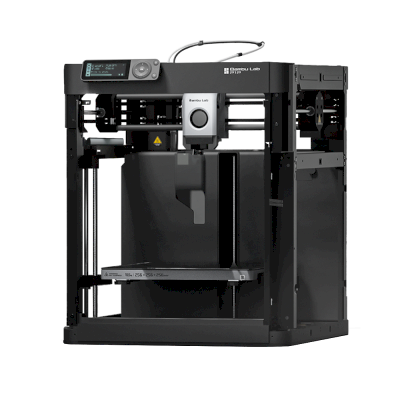
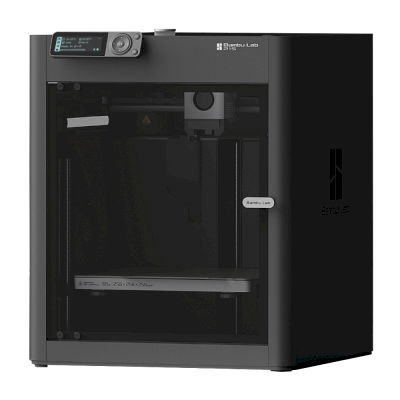
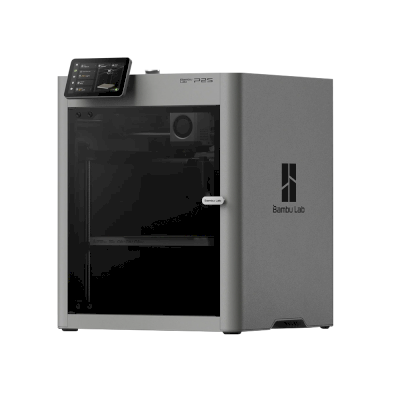
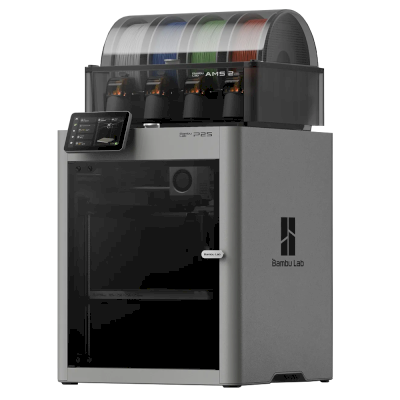
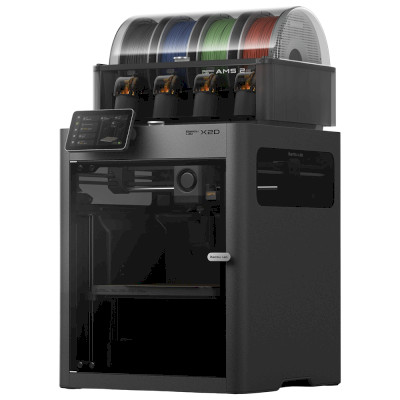
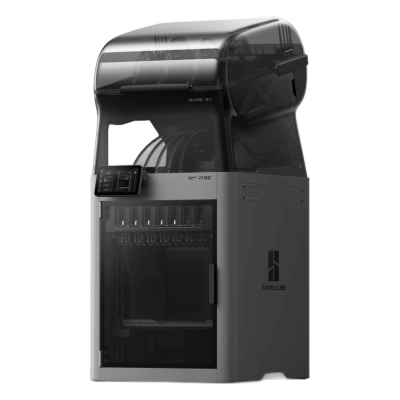
Bambu Lab's second tool changer: a smaller, cheaper H3C with a 256 × 256 × 260 mm bed, seven tool slots with five 0.4 mm PrintTools fitted, and the AMS 3P on top holding seven spools. It is built for multicolor and mixed-material printing, including very soft TPU with the optional 2.85 mm tool.
Does the Bambu Lab P3C 3D printer work with SimplyPrint, OctoPrint, Mainsail and Fluidd?
Each way of connecting it, what it needs, and how to set it up.
SimplyPrint Client
Expected to work
A smaller version of the Bambu Lab H3C, built on the same tool-changing platform. The H3C works with SimplyPrint through the SimplyPrint Client, so the P3C is expected to connect the same way. Not confirmed on the P3C yet.
Connected through SimplyPrint Client in LAN-only mode, SimplyPrint is expected to support everything the Bambu Lab P3C lets other software do: the camera and AI failure detection, remote printing, skipping objects, temperature and movement control, filament mapping for its multi-material unit and AutoPrint. The only exceptions are what the Bambu Lab P3C doesn't let other software do: baby stepping, bed leveling and Z-Offset Calibration. The table below compares the two ways of connecting it to SimplyPrint.
Every SimplyPrint feature, for each way of connecting it to SimplyPrint
Connected to SimplyPrint through
SimplyPrint feature
SimplyPrint Client (LAN-only mode, recommended)
Expected to work
SimplyPrint Client (Cloud mode)
Expected to work
Monitoring
Live status and progress
Yes
Yes
Webcam
Yes
Yes
AI failure detection
Yes
Yes
Time left
Yes
Yes
Layer progress
Yes
Yes
Temperatures
Yes
Yes
Printing
Starting a print
Yes
Depends1
Pause, resume and cancel
Yes
Depends1
Skip objects
Yes
Depends1
Print start options
Yes
Depends1
Files
Print sliced 3MF files
Yes
Yes
Printer control
Change temperatures
Yes
Depends1
Moving with the controls
Yes
Depends1
Homing
Yes
Depends1
Extrude and retract
Yes
Depends1
Change print speed
Yes
Depends1
Fan speed
Yes
Depends1
Baby stepping
Not offered by the printer2
Not offered by the printer2
Send G-code
Yes
Depends1
Calibration
Change filament
Yes
Depends1
Bed leveling
Not offered by the printer2
Not offered by the printer2
Z-Offset Calibration
Not offered by the printer2
Not offered by the printer2
Multi-material
Map filament to multi-material slots
Yes3
Yes3
Sync loaded filament from the multi-material unit
Yes3
Yes3
Automation
AutoPrint
Pro
Yes
Depends1
Download the file before the print starts
Yes
Not offered by the printer2
Connected to SimplyPrint through SimplyPrint Client (LAN-only mode, recommended)
Expected to work
Monitoring
Live status and progressYes
WebcamYes
AI failure detectionYes
Time leftYes
Layer progressYes
TemperaturesYes
Printing
Starting a printYes
Pause, resume and cancelYes
Skip objectsYes
Print start optionsYes
Files
Print sliced 3MF filesYes
Printer control
Change temperaturesYes
Moving with the controlsYes
HomingYes
Extrude and retractYes
Change print speedYes
Fan speedYes
Baby steppingNot offered by the printer2
Send G-codeYes
Calibration
Change filamentYes
Bed levelingNot offered by the printer2
Z-Offset CalibrationNot offered by the printer2
Multi-material
Map filament to multi-material slotsYes3
Sync loaded filament from the multi-material unitYes3
Automation
AutoPrint ProYes
Download the file before the print startsYes
Connected to SimplyPrint through SimplyPrint Client (Cloud mode)
Expected to work
Monitoring
Live status and progressYes
WebcamYes
AI failure detectionYes
Time leftYes
Layer progressYes
TemperaturesYes
Printing
Starting a printDepends1
Pause, resume and cancelDepends1
Skip objectsDepends1
Print start optionsDepends1
Files
Print sliced 3MF filesYes
Printer control
Change temperaturesDepends1
Moving with the controlsDepends1
HomingDepends1
Extrude and retractDepends1
Change print speedDepends1
Fan speedDepends1
Baby steppingNot offered by the printer2
Send G-codeDepends1
Calibration
Change filamentDepends1
Bed levelingNot offered by the printer2
Z-Offset CalibrationNot offered by the printer2
Multi-material
Map filament to multi-material slotsYes3
Sync loaded filament from the multi-material unitYes3
Automation
AutoPrint ProDepends1
Download the file before the print startsNot offered by the printer2
Works
Depends
Not supported
Not offered by the printer
Bambu Lab firmware from 2025 on only allows monitoring in cloud mode: use LAN-only mode to start prints and control the printer. Older firmware still allows both.
The printer doesn't offer this to other software.
Needs a multi-material unit
What slicer to use for the Bambu Lab P3C
Bambu Lab printers use BambuStudio, Bambu Lab's own slicer. There's no ready-made profile for the Bambu Lab P3C in our cloud yet.
We only list slicers you can use in the SimplyPrint cloud, so there may be others for the Bambu Lab P3C.
Cloud-Based Slicer for Bambu Lab P3C: Use BambuStudio Online
Use BambuStudio and other slicers - directly in your browser with SimplyPrint's online cloud slicer. No installation required. Slice your Bambu Lab P3C models from any device, anywhere in the world!
Automatic Profile Updates: Profiles are automatically checked and fetched from the slicer GitHub repositories every day, as well as from our own open-source community-driven slicer profile database. This ensures you always have access to the latest profiles.
Note: Other slicers, such as Simplify3D, ideaMaker, SuperSlicer and KISSlicer, aren't in our cloud, so we don't track their profiles. They may still work well with your Bambu Lab P3C: check the slicer's own documentation or forums for a profile. You can also contribute profiles to our open-source slicer profile database on GitHub.
The app for the Bambu Lab P3C
SimplyPrint works as the Bambu Lab P3C's app: on your phone and in any browser, with a slicer in the cloud.
There's no plate swapper or auto-ejection kit for the Bambu Lab P3C in SimplyPrint yet, but AutoPrint can still keep it printing: once the plate is clear, it starts the next job from your queue.
Enclosed printers push their prints out
The Bambu Lab P3C's bed only moves up and down inside its enclosure, so instead of swapping plates, kits like these let the toolhead push the cooled print off the plate and out through its front door, which they open for you when a print is done.
Push prints off with the toolheadOn a CoreXY printer, a G-code routine can push the cooled print off the front of the plate before the next job starts.
Your own ejection G-codeWrite the routine that clears your plate, and AutoPrint runs it after every print.
Yes
Available options: Use AMS, Bed Leveling, Flow Calibration, Timelapse
The printer
Printer manufacturer / brand
Bambu Lab
Printer model name
P3C
Made by a company from
China
Launched
November 24, 2026
Still made
Yes
Disclaimer:
We strive to keep this information as current and accurate as possible, but cannot guarantee its completeness or reliability. Our data is based on user submissions and manufacturer references.
What filament can the Bambu Lab P3C print?
Filament compatibility for the Bambu Lab P3C: the materials Bambu Lab lists for it.
Filament
Suitability
Notes
PLA
Great
On the maker's list of materials for this printer.
PETG
Great
On the maker's list of materials for this printer.
TPU & flexibles
Great
On the maker's list of materials for this printer.
ABS & ASA
Great
On the maker's list of materials for this printer.
Nylon (PA)
Great
On the maker's list of materials for this printer.
Polycarbonate (PC)
Great
On the maker's list of materials for this printer.
Carbon-fiber & glass-filled
Great
On the maker's list of materials for this printer.
Tip: this is a general guide from the printer's specs - always check your filament's recommended settings. With SimplyPrint you can save a profile for each spool and track exactly what filament you have in stock.
Best filament for the Bambu Lab P3C
Filaments the Bambu Lab P3C prints well, Bambu Lab's own first, then the best known.
The same tools and excellent TPU printing as the H3C at about half the price, with quick color changes, mixed nozzle sizes and materials in one print, and hardened steel nozzles. It drops the heated chamber, filament dryer and automatic filament loading; loading filament is tedious, swapping tools is fiddly, and it is tall enough to need a step stool for the back slots.
“The Bambu Lab P3C is best for anyone who wants poop-free multicolor, multi-material printing without paying H3C money.”
CNC Kitchen · November 24, 2026
Sponsored by VoxelPLA (disclosed). Tool changes of 6-7 seconds and multicolor and multi-material quality matched only by the H3C, plus very soft TPU through the 2.85 mm tool. The biggest downside is manual filament loading: changing all seven spools takes about five minutes. ABS, ASA, nylon and PC print well, but with no heated chamber PPA and PPS are out.
Tested · November 24, 2026
After a week and a half: thousands of tool swaps without a failed pickup and very good full-color prints, at a price below the X1C's launch price. Filament is loaded and unloaded by hand, the filament dryer is an optional extra, and it needs about 45 inches of height with the AMS lid open. He sees it as a printer for multicolor and aesthetic prints rather than engineering parts.
When to choose the Bambu Lab P3C
Choose it when you print five or more colors or mix materials often and the H3C costs too much: tool changes take about 6-7 seconds and print quality is close to the H3C's. It starts at $1,149 with five tools; the two empty slots take extra tools at about $100 each. Filament is loaded and unloaded by hand, so it suits people who keep the same spools loaded. If you mostly print one or two colors, a dual-nozzle printer or a cheaper four-tool printer does the job for less; for PPA, PPS or other high-temperature materials, the H3C's heated chamber and 350 °C nozzles are the better fit.
Pros
Tool changes in about 6-7 seconds, so multicolor prints are much faster than on a single-nozzle printer.
Very good print quality, close to the H3C's, at less than half its price.
An optional 2.85 mm tool prints very soft TPU, and soft and rigid materials can be combined in one print.
Different nozzle sizes and materials can be mixed in one print, and all nozzles are hardened steel.
Enclosed, with a particle and activated-carbon filter that recirculates the air when printing ABS or ASA.
Expected to work with SimplyPrint through the SimplyPrint Client, like the H3C.
Cons
Filament is loaded and unloaded by hand: there are no feed motors, and changing all seven spools takes about five minutes.
Ships with five tools; filling the other two slots costs about $100 per tool, and the filament dryer is an optional extra.
No heated chamber and a 300 °C nozzle limit, so high-temperature materials such as PPA and PPS are out.
Tall: about 94 cm with the AMS closed and 1.2 m of height needed to open its lid.
Wi-Fi only: there is no Ethernet port.
Each tool change still primes a little filament onto a prime tower.
Who it suits
SchoolsCan work
Enclosed and filtered, but manual filament loading and fiddly tool swaps add work for a classroom.
HobbyistsGreat fit
The most affordable way into Bambu Lab's fast tool changing for multicolor prints and soft TPU.
BusinessesGood fit
Multi-material parts and breakaway supports work well, but no heated chamber for high-temperature materials.
Print farmsCan work
Wi-Fi only and manual filament loading; for single-color jobs, simpler printers do the same work.
Printers from the same maker, of a similar size, printing the same engineering materials or multi-material like it, that you can buy today. Compare up to four side by side, with their specs and how each connects.
Who makes the Bambu Lab P3C, and how open Bambu Lab leaves you: whether its printers run without its cloud, take any filament and slicer, and can be repaired. Each area is rated from public sources.
Openness: Mostly closed (2.3 of 5)
Mostly closed
Walled gardenOpen
Bambu Lab is a Shenzhen company founded in 2020 by former DJI engineers. It makes FDM printers in four families (A, P, X and H), the AMS multi-material units, the Bambu Studio slicer, the Bambu Handy app and the MakerWorld model site, and designs them to be used together. Its printers are used by beginners, hobbyists, schools and print farms.
Founded:
2020 ·
Headquarters:
Shenzhen, China ·
Ownership:
Privately held; founded by CEO Ye Tao and other former DJI staff, with venture investors (BGR, 2026) ·
Website:bambulab.com
Bambu Lab works like Apple: printer, slicer, app, cloud and multi-material system come from one company and are made to work together. Filament and slicer choice stay open, but the firmware is closed and signed, and since 2025 third-party control needs Bambu Connect or the unsupported Developer Mode.
Firmware and custom firmware ●●●●●
The printer firmware is Bambu's own and closed; in 2022 Bambu said it would keep it in-house. Its security white paper describes secure boot that only runs verified firmware on X1, H2, P1 and A1 printers. Bambu publishes the GPL parts it uses (Linux kernel, U-Boot, BusyBox) but not the printer software. Rooting the X1 only became possible through a security flaw the X1Plus project used in 2024; Bambu then published a one-off rootable X1 firmware for owners who give up their warranty, and blocks rooting in later firmware.
[1][2][3][4][22]
Local control and integrations ●●●●●
LAN Only mode prints and monitors from Bambu Studio or Bambu Connect without internet or an account; the Handy app, printing from outside the network and print history need Bambu's cloud. Since the 2025 authorization firmware, other software can only read status in normal mode. Full control needs Developer Mode, which cuts the cloud link and which Bambu says it cannot support because the protocols are not official. Bambu documents no local protocol; it offers a file hand-off to Bambu Connect and a Local Server SDK on application.
[23][24][6][7][5]
Third-party filament, slicers and parts ●●●●●
Third-party filament works, and Bambu publicly denied in 2025 that it would restrict it. OrcaSlicer and other slicers can be used, but since the 2025 firmware they send and control prints through Bambu Connect or Developer Mode. Hotends are Bambu's own designs, and Bambu says it cannot promise long-term support for accessories that control the printer unless it approved them first.
[7][6][4]
Repairs and spare parts ●●●●●
Bambu's store sells individual spare parts down to motors, belts, encoders and boards, and its wiki has step-by-step replacement guides for each model (for example the P2S hotend and the H2D/H2C AP board). Many parts, hotends included, are Bambu-specific, so spares come from Bambu.
[8][9][10]
Data and privacy ●●●●●
Cloud features need a Bambu account, while LAN Only mode keeps jobs on the local network. Bambu publishes a Trust Center and a 38-page security white paper, says it holds ISO/IEC 27001, ISO/IEC 27701 and TRUSTe certifications, and runs a paid bug bounty. In August 2023 a cloud outage made some printers start earlier jobs on their own; Bambu apologised.
[2][11][5][12]
Community and documentation ●●●●●
Very large user community, the MakerWorld model site, a detailed wiki and a blog where Bambu explains its policy changes. Bambu Studio is developed in public on GitHub with an open issue tracker. The printer protocol is not documented, and Developer Mode is unsupported.
[13][5][7]
Pros
Printer, slicer, app and AMS come from one company and are designed to work together, which makes a first setup simple.
Step-by-step repair guides for each model and individual spare parts sold in Bambu's store.
LAN Only mode works without internet or an account.
Bambu Studio is open source, and third-party filament works.
Publishes security certifications and runs a public bug bounty.
Cons
Firmware is closed and signed; current models have no supported way to run custom firmware.
Since the 2025 firmware, third-party software and accessories need Bambu Connect or the unsupported Developer Mode to control the printer.
Remote printing, the Handy app and print history depend on Bambu's cloud.
Hotends and many parts are Bambu-specific, so spares come from Bambu.
In 2026 a US jury found the X1, P1 and A1 infringe Stratasys patents; Bambu is appealing.
Track record
September 2026: A US federal jury in Texas found that Bambu Lab's X1, P1 and A1 printers infringe Stratasys patents on prime towers and bed levelling, and awarded Stratasys $27.6 million. No injunction was placed on the printers. Bambu told Tom's Hardware it disagrees with the verdict and intends to seek post-trial review and appeal. Stratasys had filed two suits in 2024; more patents are still to be decided.
[14]
May 2026: Bambu Lab pressed the developer of 'OrcaSlicer-bambulab', a fork that restored direct cloud printing from OrcaSlicer, to remove it, according to Manufactur3D. On 7 May Bambu said the fork impersonated the official Bambu Studio client to its cloud, which its user agreement does not allow, and that modifying and sharing its AGPL code remains fine. The developer disputed the claims.
[15][16][17]
October 2025: Bambu Lab opened a Trust Center with a security white paper and listed ISO/IEC 27001, ISO/IEC 27701 and TRUSTe privacy certifications. A year later it said its bug bounty had worked with over 100 researchers and that it had added a public security update log.
[2][11]
January 20, 2025: After criticism from users and print farms, Bambu Lab announced an optional Developer Mode for X1, P1, A1 and A1 mini that leaves MQTT, FTP and the live stream open for third-party software in LAN mode, without official support. It also said LAN mode via Bambu Connect needs neither internet nor an account, and that third-party filament would not be restricted.
[7]
January 16, 2025: Bambu Lab announced firmware with 'authorization control', first for the X1: starting prints, moving axes, changing temperatures and binding the printer now require Bambu-approved software, also in LAN mode. On updated printers, third-party slicers and accessories such as the Panda Touch could no longer control the printer except through Bambu Connect; reading status still worked. Bambu cited security and up to 30 million unauthorised cloud requests a day; older firmware stayed optional.
[6]
March 2024: After the X1Plus jailbreak, Bambu Lab published a one-off rootable firmware for the X1 series for owners who give up their warranty support. It said it does not support X1Plus, and that firmware after it would block rooting again.
[4]
February 2024: Bambu Lab extended its A1 heatbed-cable callback to a recall of all A1 printers and asked owners to stop using them. It reported electrical faults in under 0.1% of units and offered a full refund plus an $80 voucher, or a redesigned heatbed plus a $120 voucher and six extra months of warranty. The A1 mini was not affected.
[18][19]
January 2024: Community developers rooted the X1 series through a security flaw in its firmware (up to version 1.07) and released the X1Plus custom firmware. Bambu Lab closed the flaw in later firmware.
[22]
August 2023: During a Bambu cloud outage on 15 August 2023, some printers started print jobs without user action, because jobs stuck in the cloud were resent when service returned. Bambu apologised, took responsibility and said it would add checks before a print starts.
[12]
May 2022: Before its first printers shipped, Bambu Lab said its firmware would stay closed and in-house to remain competitive, and promised to open-source everything if the company ever could not survive.
[1]
Researched from 24 sources, last checked October 20, 2026. Show sources
Most likely. We expect the Bambu Lab P3C to connect to SimplyPrint via SimplyPrint Client, but nobody has confirmed it yet. If you have one, the setup guide shows within minutes whether it works, and your answer confirms it for everyone.
How do I connect the Bambu Lab P3C to SimplyPrint?
Follow our step-by-step setup guide for the Bambu Lab P3C. It shows how to connect it via SimplyPrint Client, what you need for each, and which to pick.
What slicer should I use for the Bambu Lab P3C?
Use BambuStudio, Bambu Lab's own slicer, made for its printers. You can run it in SimplyPrint's online slicer; there's no ready-made profile for the Bambu Lab P3C in it yet.
Can I use OrcaSlicer with the Bambu Lab P3C?
Yes, but OrcaSlicer has no built-in profile for the Bambu Lab P3C that we know of: start from a similar printer's profile and set the bed size, height and nozzle to match.
What filament can the Bambu Lab P3C print?
Bambu Lab lists PLA, PETG, TPU & flexibles, ABS & ASA, Nylon (PA), Polycarbonate (PC) and Carbon-fiber & glass-filled for the P3C.
Does the Bambu Lab P3C work with OctoPrint or Klipper?
Not that we know of, but you don't need either: SimplyPrint connects to the Bambu Lab P3C via SimplyPrint Client.
What is the Bambu Lab P3C's bed size and build volume?
The Bambu Lab P3C has a 256 x 256 mm print bed and prints up to 260 mm tall, a build volume of about 256 x 256 x 260 mm. See the full specifications table above for bed type, temperatures and more.
When did the Bambu Lab P3C come out?
Bambu Lab launched the P3C on November 24, 2026.
Can the Bambu Lab P3C eject prints automatically?
There's no kit for it that we support yet, but SimplyPrint's AutoPrint can push prints off with the toolhead, or run your own ejection G-code, and then start the next job from your queue.
Affiliate disclosure: Some links on this page are affiliate links. We may earn a commission if you make a purchase, at no extra cost to you. As an Amazon Associate, we earn from qualifying purchases.
 China
 SimplyPrint Client



 PrusaSlicer
 OrcaSlicer
 ElegooSlicer
 CrealityPrint
 Cura
 Kiri:Moto