Release notes for the web platform, the mobile app and the SimplyPrint Client.
380+
New features
276
User suggestions completed
As of November 10, 2026
1,160+
Improvements and fixes
November 2026
· SimplyPrint Client 1.0.0-rc.25
The Bambu Lab H3C hotend rack in the Client
New features
Bambu Lab H3C hotend rack: The Client now reads the H3C's AMS-3H and reports all nine hotends, each with its own slot, external spool, temperature and nozzle, plus which hotend is on the extruder. With today's web update, filaments map per hotend.
Improvements:
Clearer connection problems · Cloud status · Add manually
Show all 3 improvements
Clearer connection problems: When a printer can't connect because of a fault in the Client itself, its card now says so, and that restarting the Client may help, instead of blaming your printer. The Bambu Lab "Turn on Developer mode" hint shows only when that's really the cause.
Cloud status: The Client's status page shows again when it's disconnected from SimplyPrint, and why.
Add manually: The brand grid uses the full page width, and long names like "Klipper (Moonraker)" no longer get cut off.
5 bug fixes
Fixed Home XY homing only X on Anycubic and Elegoo printers (and moving only X on Ultimaker), which left a Kobra 4 refusing every jog.
Fixed Anycubic Z jogs moving the wrong way.
Fixed MQTT printers (like Bambu Lab) going quiet on Windows after a network error, or past about 500 printers on one computer.
Fixed Windows 11 24H2 and Windows Server 2025 computers not reporting their CPU model.
Fixed logs and settings files on Windows being read with the wrong text encoding, and the network check not recognising a refused connection.
Print custom fields in the app: Starting a print by hand now asks for your account's required print custom fields, just like the panel.
2 bug fixes
Fixed files uploaded from your phone printing without the AMS slot and start options you picked, so printers like the Bambu Lab X2D paused with "failed to get AMS mapping".
Fixed the "Printer(s) started!" sheet opening again on every printer update.
Full Bambu Lab H3C support, merged spools and one User column
New features
Full Bambu Lab H3C support: The H3C's nine-hotend rack now shows as nine hotends, each with its own AMS-3H slot and external spool, and the active hotend is marked. Files sliced per hotend map each filament to its own hotend, automatically or by hand, and 2.85 mm filament only ever maps to a TPU 2.85 mm hotend. The cloud slicer now writes hotend-rack files the printer can run. Needs SimplyPrint Client 1.0.0-rc.25.
Merge duplicate spools: A Bambu Lab spool you added by hand gets a second record the first time the AMS reads its tag. You can now merge the two: tags, history, print usage and the printer slot move to the spool you keep, and the other goes to Trash. SimplyPrint suggests it on the printer-made spool, and it's also in the spool menu and the bulk bar.
One User column, with classes and workgroups: The queue, print history and approvals share one User column with the member's picture, classes, base role and workgroups. Filter the queue and history by class, and add or remove workgroups straight from the Users table. Pick what the column shows under Organization → General.
Improvements:
Idle nozzles fold away · Printer stage on the job bar · One Mac download · Clearer carbon totals
Show all 4 improvements
Idle nozzles fold away: On printers with many nozzles, idle ones show as small temperature chips, with Show all to expand them.
Printer stage on the job bar: The job bar shows what the printer says it's doing, like bed leveling or changing a hotend, and shows heating only while a print prepares.
One Mac download: The setup guide now offers a single Mac installer for both Apple silicon and Intel.
Clearer carbon totals: A print with nothing to count reads as not counted instead of zero, and the job page says what to add.
7 bug fixes
Fixed prints started from the slicer's G-code view, or with a new sliced 3MF, starting without a file analysis or material mapping, which Bambu Lab P2S and H2S firmware refuse.
Fixed spool weights of 1 kg and more showing as 1 g.
Fixed apostrophes and ampersands in spool color names (like "Gentleman's Grey") being saved as code.
Fixed the filament diameter not reaching the printer when setting a slot's material.
Fixed dropping files on the file picker selecting them instead of uploading them to the folder.
Fixed the material list staying open over the material browser after clicking Import.
Fixed /en/ referral, article and setup guide links landing on a broken address.
Carbon footprint per print, view as a member, and QIDI printers
New features
Carbon footprint per print: Turn it on under Settings → Energy and carbon and every print gets a CO2e estimate from its filament and the electricity it used. It shows on the print, in print history, in CSV exports and on the statistics page. Set the electricity source (your country's grid, a mix, or your supplier's figure), and give a material profile its own figure.
View the panel as a group or a member: On multi-user plans, admins can see the panel exactly as a role, workgroup or single member sees it, to check a setup before others use it. It only changes what you see, never what you can do.
QIDI printers: QIDI printers such as the Q2 and Plus5 now connect through the SimplyPrint Client, with QIDI Box material mapping.
New G-code preview color modes: Color the preview by temperature, flow, line width or layer time. The line type legend shows time, share and filament per type.
Slicer in the command palette: Ctrl/Cmd+K on the slicer page finds slicer commands, plates, views, settings, shapes and common models.
3D Printing Basics in the Academy: 17 new courses in every panel language, from first print to materials, ready for classrooms.
Slicer for screen readers: The slicer now describes how each object sits on the plate, and you can lay an object on a face from the keyboard (F).
Improvements:
FarmLoop · OrcaSlicer 2.5.0 · Rename machine profile variants · Bigger print history exports · Sign-in security emails · Printer ready to add, and 1 more
Show all 7 improvements
FarmLoop: Templates now come straight from FarmLoop, with kits for the H2C, H2D (incl. Laser), H2S, X2D, Centauri Carbon 2, CORE One, U1 and Prusa XL. You can also save an AutoPrint setup without turning AutoPrint on. FarmLoop
OrcaSlicer 2.5.0: Now the default in the cloud slicer, and PrusaSlicer errors show the full message.
Rename machine profile variants: A variant's name is now its own field.
Bigger print history exports: Up to 50,000 rows (was 5,000), retrying failed pages and saying when an export stops short. From suggestion #908
Sign-in security emails: You get an email when two-factor is turned off, a passkey is removed or your password changes.
Printer ready to add: The panel tells you when a printer is waiting to be added.
Calendars: Clicking an event on the queue timeline or the reservations calendar opens its details beside it, and the Print queue lists its tabs in the sidebar.
14 bug fixes
Fixed slicer Basic mode not saving its settings.
Fixed 1-Click Print, Clear bed, display screens, reprints and project plates starting a different print file than the queue chose.
Fixed G-code, UFP and sliced 3MF uploads being stored as models, and UFP files not being offered to Ultimaker printers.
Fixed material mapping picking a similar color in the wrong material over the right material in another color.
Fixed Bambu/Orca high-flow nozzle variants slicing as Standard.
Fixed Mark as done not working while an item was still printing.
Fixed G-code peripherals being hidden on most printers.
Fixed file searches failing on large libraries.
Fixed closing a slicer scene of loose models without asking, and losing its auto-save.
Fixed statistics, AI savings and the Total cost card using the billing currency instead of your print cost currency.
Fixed base roles needing matching quota reset schedules.
Fixed a deleted maintenance template dropping printer statistics.
Fixed the slicer page not filling the screen, Apple Pencil taps on the plate, and custom printers crashing the machine profile wizard.
Fixed label variables in the label generator after adding spools.
QIDI Box, the Bambu Lab H3C and a lighter, faster Client
New features
QIDI Box: QIDI printers such as the Q2 and Plus5 now get their own setup in the Client, with QIDI Box material mapping and QIDI's own error messages.
Bambu Lab H3C: Connect the H3C and its nozzle rack, with chamber temperature, AMS switching and AMS drying from day one.
Anycubic Kobra 4 (experimental): The Kobra 4 now connects. We built it without the printer, so tell us how it runs on yours.
Bambu Lab internal storage: Bambu Lab printers with built-in storage can print from it, so no SD card is needed. You can still choose the SD card in the printer's settings.
Keep the computer awake while printing: The Client stops the computer from going to sleep while a print runs, and lets it sleep again afterwards. You can turn it off in the settings.
Universal macOS installer: One installer for both Apple silicon and Intel Macs.
Improvements:
A lighter, faster Client · Clearer setup help · Temporary computer notice · Finds more printers · Instant fan and light controls · Uploads sized to your computer, and 3 more
Show all 9 improvements
A lighter, faster Client: Every printer brand now runs on one shared, rebuilt core. The Client uses less CPU per printer, which matters most on big farms and small computers.
Clearer setup help: An offline printer's card says why in its brand's terms, with one action to fix it. Bambu Lab LAN setup checks Developer mode first and shows what LAN-only mode gives and changes, side by side. A failed step shows its help right under the error.
Temporary computer notice: If the Client runs on a laptop that sleeps or switches off, it tells you why printers go offline and how to move the Client to an always-on computer.
Finds more printers: Discovery now searches every network adapter, so printers turn up on computers with several networks or a VPN.
Instant fan and light controls: A fan or light change shows right away instead of waiting for the printer's next report.
Uploads sized to your computer: The number of uploads at once now follows the computer's memory, and you can set it yourself in the settings.
Easier troubleshooting: Turn on debug logging from the settings, and a failed update now says why (no DNS, a timeout, an untrusted connection).
Safer sign-in settings: Changing the local sign-in password asks for it twice, so a typo can't lock you out.
Creality SPARKX i7: Now in the list of supported models.
11 bug fixes
Fixed Creality K1, K1C, K1 Max, K1 SE and Ender-3 V3 KE refusing to start prints.
Fixed Creality printers refusing sliced 3MF files (error 2121), and connections dropping on firmware that ignores pings.
Fixed H2D-series prints pausing with "Failed to get AMS mapping table" when a filament was mapped to the external spool of a nozzle without an AMS.
Fixed Bambu Lab A-series printers showing a placeholder chamber temperature, and Developer mode not being detected.
Fixed Anycubic Kobra X finishes and ACE slot numbering, and a cancelled print blocking the next one.
Fixed Dremel printers not starting prints sent from SimplyPrint.
Fixed Flashforge AD5X uploads failing, reprints not starting, and unclear error states.
Fixed Duet print results being lost after a reconnect or reboot.
Fixed the Windows installer not allowing the Client through the firewall on domain-joined PCs. macOS now asks for Local Network access and says why.
Fixed the installer picking the wrong build on ARM computers with a 32-bit system.
Fixed an older update replacing a newer Client installed by hand on macOS.
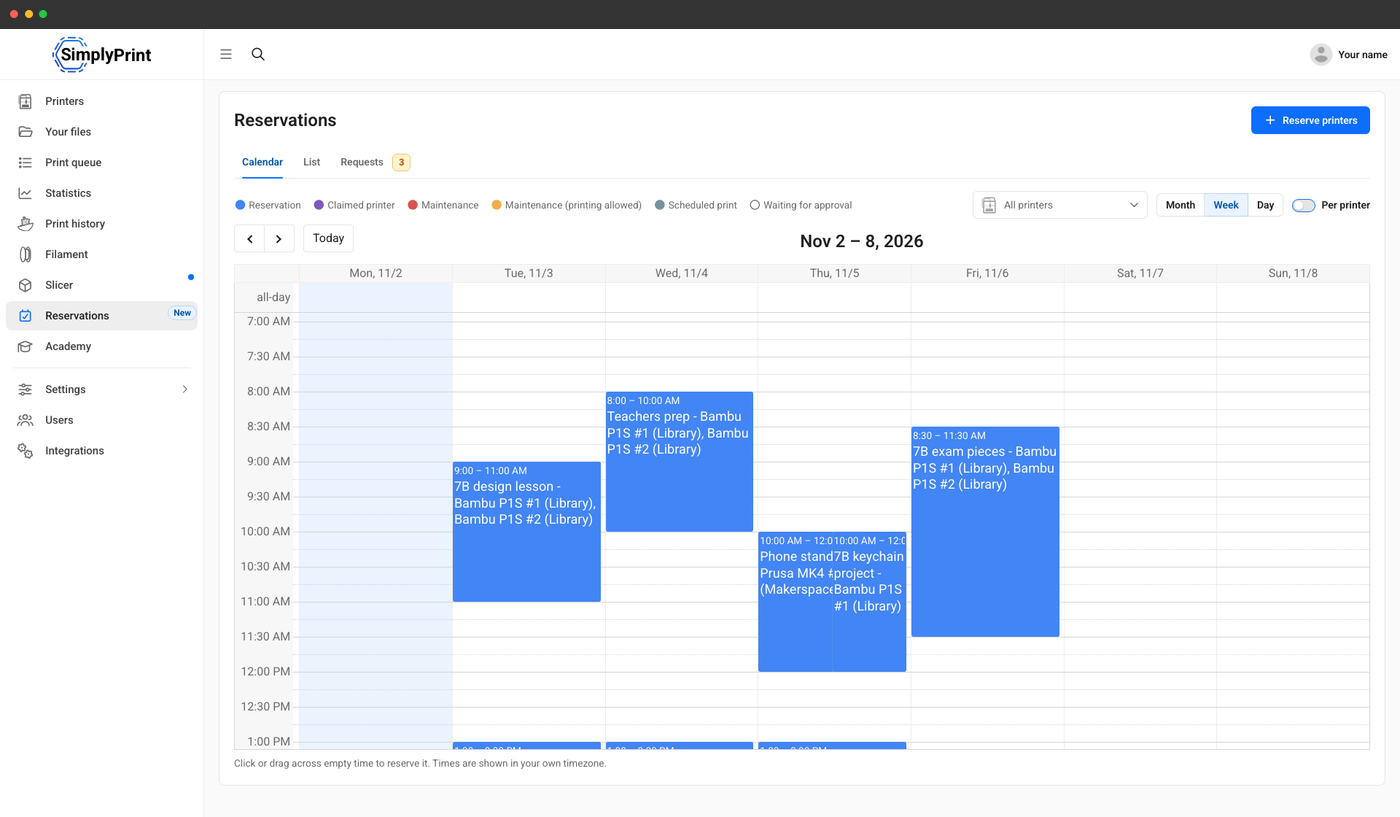
Printer reservations: School and Enterprise accounts can now reserve printers ahead of time. Reserve one printer, several, a printer group or every printer, for a person, a class, a role or workgroup, or (on Enterprise) a Project. While a reservation runs, only the prints it covers can start on those printers, and the queue, AutoPrint, scheduled prints and maintenance all respect it. You see any conflicts before you save. Existing accounts switch reservations on from the new Reservations page, which walks you through who can reserve.
Reservations calendar: The new Reservations page has a month, week and day calendar for all printers, one printer or one group, plus a full list where you can cancel several at once. A cancel reason is kept and emailed to the person it affects.
Rules that fit your space: Optionally require approval for reservations, set limits per role or workgroup, and release a reservation nobody used after 30 minutes. Requests show in the calendar, the Approvals dashboard card and the alerts menu. Reservations also check the open hours of the people they are for.
Start times on maintenance jobs: Maintenance jobs can have a time of day, so maintenance and reservations stay out of each other's way. Planning maintenance over a reservation asks you to confirm, and the holders are told.
Improvements
Help when a new printer goes offline: If a new account's printer has been offline for a day in its first two weeks, we send one email with what to check for how it connects.
3 bug fixes
Fixed signing in to the SimplyPrint MCP again after revoking access giving a token that did not work.
Fixed cloud slicing for Bambu Lab printers with a nozzle rack, like the H3C, adding extra filaments to the job.
Start checks and native push notifications in the app
New features
Start checks, like the web: Before a print starts, the app lists what differs from the file by how much it matters, with quick fixes. Nothing blocks you: from medium issues up it says "Print anyway", and a critical issue asks first.
Native push notifications: Notifications now come straight through Apple and Google push, for faster and more reliable delivery.
iPhone Duo support: The app follows the window as the Duo folds and unfolds, and uses the full width of both displays.
Improvements:
Plan features match your account · Clearer print errors · Live chat knows who you are · NFC writes · Embedded slicer · VoiceOver
Show all 6 improvements
Plan features match your account: The app now asks the server which features you have, so Pro accounts are no longer told AutoPrint needs an upgrade, and gifted features count.
Clearer print errors: When a printer fails to download or start a print, you see the printer's error and every printer that failed, not a bare "Network Error".
Live chat knows who you are: Support sees which account you are writing from, so you don't have to explain.
NFC writes: Writing NTAG and ICODE tags recovers from glitches, and a refused write says whether the tag is locked, protected or too small.
Embedded slicer: Pick any printer model to slice for, save into your personal subfolders, and upgrade prompts open in the browser.
VoiceOver: Unnamed buttons and controls are now labelled for screen readers.
7 bug fixes
Fixed changing a queue item's amount or deadline clearing its printer assignments.
Fixed queue items starting on printers they were not assigned to, or outside their queue group's limits.
Fixed file thumbnails not loading.
Fixed the queue showing every group's items under the first group on first load.
Fixed false "does not fit" errors on printers with a centered origin, like the Flashforge Adventurer 5M.
Fixed a rank with no permissions seeing every action in the app.
Fixed cleared beds staying in the Clear bed sheet.
Sign in with Google, Apple and others, and passkeys
New features
Sign in with Google, Apple, Microsoft, GitHub or Discord: Sign up or sign in with one click. A verified email links to your existing account, two-factor still applies, and you manage providers under Account settings > Connections.
Passkeys and security keys: Sign in with a passkey alone, in the panel and on the Hub, or add a security key such as a YubiKey as a second step next to your authenticator app. Security settings and recovery codes are redone too.
SimplyPrint in Japanese: The panel is now available in Japanese.
School setup wizard: Answer a few questions (how students print, who presses Print, approval, slicer access) and the wizard sets your lab up, listing every change before it applies. Find it under Settings > School setup.
IT setup link: Send IT a link: they set up single sign-on, domain verification and the IP allowlist from one page without an account, and you hear when they are done. SSO can now be tested before it is switched on.
Print room posters: School and Enterprise accounts can make posters for their print room next to the Academy: premade designs, a live editor, sizes up to A0, a QR code to your account's sign-in page and print-ready PDFs. Anyone can download the premade ones at simplyprint.io/3d-printing-posters.
Choose which printers 1-Click Print uses: Leave printers out of 1-Click Print per printer model, group or printer.
Limit a user group to specific filaments: Beside material types, a group can now be held to named filaments.
3MF import choice: The slicer asks whether to bring in a whole 3MF project or only its models, and can remember your answer.
Improvements:
A faster panel · Live chat · New permissions · Queue · Files · Teams webhooks, and 3 more
Show all 9 improvements
A faster panel: Pages in the panel now load about five times faster.
Live chat: Our assistant can now navigate the panel for you, and show you your printers, spools and files.
New permissions: Change a printer's nozzle, bed and multi-material setup, or refresh filament from the printer, without full edit rights.
Queue: Picking a model plus some of its printers now says it matches the whole model. Color matching judges Close and Similar colors the way the eye does.
Files: Big folders load in pages, and search ranks the closest name first.
Teams webhooks: Microsoft Teams' new Workflows webhook URLs are now supported.
Camera cards show the printer name, and the Projects beta got better matching and history.
Various accessibility and screen reader improvements across the panel, slicer and login.
Billing: Add an invoice reference to every invoice, get an email confirming a cancellation, a reminder 14 days before a yearly renewal, and pay a failed yearly renewal monthly instead. Print Farm now includes two users, and prices are available in Polish złoty.
13 bug fixes
Fixed saved axis invert and speed settings sometimes not taking effect.
Fixed working hours set in the afternoon saving as morning in 12-hour time.
Fixed typing a deadline year, and deadlines can now be cleared.
Fixed the printer pick and tags in the queue item window not saving.
Fixed multi-tagging replacing the colors of multicolor files, and auto-tagging skipping some files.
Fixed prints sent straight from the slicer showing no thumbnail.
Fixed an object printing in its 3MF's filament instead of the one assigned in the panel.
Fixed cloning multi-part objects, and phone downloads saving as.gcode.txt.
Fixed account owners not being able to preview jobs started from a member's personal folder.
Fixed AutoPrint waiting 30 minutes on a print the printer never started.
Fixed Bambu Lab High Flow nozzles slicing as Standard, and Cura temperature formulas.
Fixed a deleted printer staying connected, and loading a spool from a to-do task.
Fixed virtual machines showing as offline, and the trial days in the top bar.