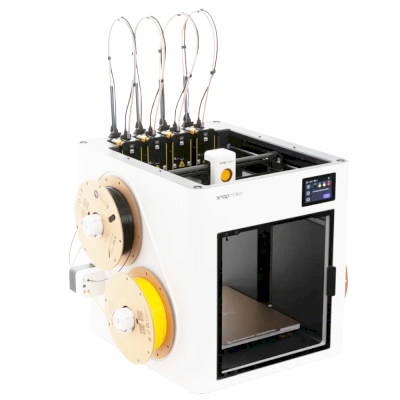
Does the Snapmaker U1 3D printer work with SimplyPrint, OctoPrint, Mainsail and Fluidd?
Each way of connecting it, what it needs, and how to set it up.
SimplyPrint Client
Compatible
What you need: A computer or Raspberry Pi on the same network that stays on, running the SimplyPrint Client
Connected through SimplyPrint Client, SimplyPrint supports most of what it offers on the Snapmaker U1: the camera and AI failure detection, remote printing, skipping objects, temperature and movement control, filament mapping for its multi-material unit and AutoPrint. Not available through SimplyPrint Client: bed leveling, Z-Offset Calibration and download the file before the print starts. The table below compares the two ways of connecting it to SimplyPrint.
Every SimplyPrint feature, for each way of connecting it to SimplyPrint
Connected to SimplyPrint through
SimplyPrint feature
SimplyPrint Client
Compatible
Klipper (Moonraker)
Compatible
Monitoring
Live status and progress
Yes
Yes
Webcam
Yes
Yes
AI failure detection
Yes
Yes
Time left
Yes
Yes
Layer progress
Yes
Yes
Temperatures
Yes
Yes
Printing
Starting a print
Yes
Yes
Pause, resume and cancel
Yes
Yes
Skip objects
Yes
Yes
Print start options
Yes
No
Printer control
Change temperatures
Yes
Yes
Moving with the controls
Yes
Yes
Homing
Yes
Yes
Extrude and retract
Yes
Yes
Change print speed
Yes
Yes
Fan speed
Yes
Yes
Baby stepping
Yes
Yes
Send G-code
Yes
Yes
Calibration
Change filament
Yes
Yes
Bed leveling
No
Yes
Z-Offset Calibration
No
Yes
Multi-material
Map filament to multi-material slots
Yes
No
Sync loaded filament from the multi-material unit
Yes
No
Automation
AutoPrint
Pro
Yes
Yes
Download the file before the print starts
No
No1
Connected to SimplyPrint through SimplyPrint Client
Compatible
Monitoring
Live status and progressYes
WebcamYes
AI failure detectionYes
Time leftYes
Layer progressYes
TemperaturesYes
Printing
Starting a printYes
Pause, resume and cancelYes
Skip objectsYes
Print start optionsYes
Printer control
Change temperaturesYes
Moving with the controlsYes
HomingYes
Extrude and retractYes
Change print speedYes
Fan speedYes
Baby steppingYes
Send G-codeYes
Calibration
Change filamentYes
Bed levelingNo
Z-Offset CalibrationNo
Multi-material
Map filament to multi-material slotsYes
Sync loaded filament from the multi-material unitYes
Automation
AutoPrint ProYes
Download the file before the print startsNo
Connected to SimplyPrint through Klipper (Moonraker)
Compatible
Monitoring
Live status and progressYes
WebcamYes
AI failure detectionYes
Time leftYes
Layer progressYes
TemperaturesYes
Printing
Starting a printYes
Pause, resume and cancelYes
Skip objectsYes
Print start optionsNo
Printer control
Change temperaturesYes
Moving with the controlsYes
HomingYes
Extrude and retractYes
Change print speedYes
Fan speedYes
Baby steppingYes
Send G-codeYes
Calibration
Change filamentYes
Bed levelingYes
Z-Offset CalibrationYes
Multi-material
Map filament to multi-material slotsNo
Sync loaded filament from the multi-material unitNo
Automation
AutoPrint ProYes
Download the file before the print startsNo1
Works
Depends
Not supported
SimplyPrint doesn't support this through this connection yet.
Snapmaker U1 owners on SimplyPrint
500+ printers use SimplyPrint
SimplyPrint Client
4.9 out of 5
7 verified owners
Ratings come from owners whose printer has finished at least 10 prints with SimplyPrint.
What slicer to use for the Snapmaker U1
Use OrcaSlicer, ElegooSlicer, or Kiri:Moto: each has a ready-made profile for the Snapmaker U1.
We only list slicers you can use in the SimplyPrint cloud, so there may be others for the Snapmaker U1.
Cloud-Based Slicer for Snapmaker U1: Use OrcaSlicer Online
Use OrcaSlicer and other slicers - directly in your browser with SimplyPrint's online cloud slicer. No installation required. Slice your Snapmaker U1 models from any device, anywhere in the world!
Automatic Profile Updates: Profiles are automatically checked and fetched from the slicer GitHub repositories every day, as well as from our own open-source community-driven slicer profile database. This ensures you always have access to the latest profiles.
Note: Other slicers, such as Simplify3D, ideaMaker, SuperSlicer and KISSlicer, aren't in our cloud, so we don't track their profiles. They may still work well with your Snapmaker U1: check the slicer's own documentation or forums for a profile. You can also contribute profiles to our open-source slicer profile database on GitHub.
The app for the Snapmaker U1
Use SimplyPrint as the app for your Snapmaker U1: watch and run it from your phone or any browser, slice in the cloud, and keep it next to your other printers. It's free to start. Snapmaker's own app is Snapmaker App.
There's no plate swapper or auto-ejection kit for the Snapmaker U1 in SimplyPrint yet, but AutoPrint can still keep it printing: once the plate is clear, it starts the next job from your queue.
CoreXY printers push their prints off
The Snapmaker U1's bed only moves up and down, so the usual way to automate it is a G-code routine that lets the toolhead push the cooled print off the front of the plate before the next job starts.
Ways to automate it
Push prints off with the toolheadOn a CoreXY printer, a G-code routine can push the cooled print off the front of the plate before the next job starts.
Your own ejection G-codeWrite the routine that clears your plate, and AutoPrint runs it after every print.
Snapmaker U1 specifications: bed size, print height and more
Its size, temperatures, multi-material and how it connects, from the maker and our own research.
Read more by the manufacturer
Size
Build volume
270 x 270 x 270 mm
Bed type
Square
Bed size
270 x 270 mm
Max print height
270 mm
Printing
Enclosure
Partly enclosed
Motion system
CoreXY
Max print speed
500 mm/s
Max extruder temperature
300 °C
Has heated bed
Yes
Max bed temperature
100 °C
Number of nozzles
4
Toolheads
4
Direct drive
Yes
Probing tool / Auto Bed Leveling
Yes
Filament width
1.75 mm
Multi-material
Ships with multi-material
Snapmaker U1
Multi-material units it works with
Snapmaker U1
Toolchanger or hotend changer
Yes
IDEX (independent dual extruders)
No
Connecting
Connectivity
Wi-Fi, USB
Built-in camera
Yes
Supports serial printing
No
Shipped firmware
Klipper
Files and slicing
Supported file formats
G-code (.gcode, .gco, .g)
Has start options
Yes
Available options: Bed Leveling, Flow Calibration, Timelapse
The printer
Printer manufacturer / brand
Snapmaker
Printer model name
U1
Made by a company from
China
Launched
2025
Still made
Yes
Disclaimer:
We strive to keep this information as current and accurate as possible, but cannot guarantee its completeness or reliability. Our data is based on user submissions and manufacturer references.
What filament can the Snapmaker U1 print?
Filament compatibility for the Snapmaker U1: the materials it can handle, judged from its hotend, bed, chamber and enclosure.
Filament
Suitability
Notes
PLA
Great
The easiest filament to print. Works on almost any printer; a heated bed helps adhesion but is not required.
PETG
Great
Comfortably in range (PETG likes a ~230-250C hotend and a ~70-85C bed).
TPU & flexibles
Great
The direct-drive extruder feeds flexible filament well. Print slowly for clean results.
ABS & ASA
With care
The bed is hot enough, but ABS and ASA warp without an enclosure, which is strongly recommended for clean prints.
Nylon (PA)
With care
Possible with care - an enclosure and very dry filament are essential.
Polycarbonate (PC)
With care
On the edge - PC really wants an enclosed, hot chamber to avoid warping.
Carbon-fiber & glass-filled
With care
Possible if you fit a hardened or wear-resistant nozzle - the abrasive fibers quickly wear a stock brass nozzle.
Tip: this is a general guide from the printer's specs - always check your filament's recommended settings. With SimplyPrint you can save a profile for each spool and track exactly what filament you have in stock.
Best filament for the Snapmaker U1
Filaments the Snapmaker U1 prints well, Snapmaker's own first, then the best known.
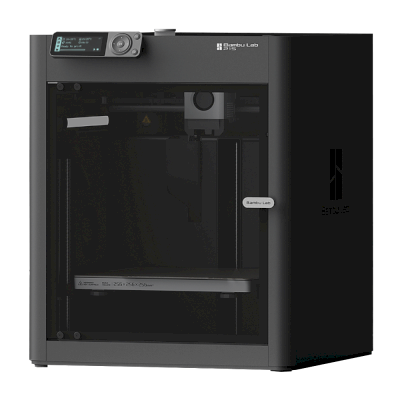
Tested a beta unit and found the U1 fast, precise and frugal with filament, producing clean multicolor prints faster than the reviewer's Bambu Lab P1P because tool swaps take seconds. Caveats are early-adopter rough edges, since it was Kickstarter-only at the time, and no fully enclosed lid at the base price.
“The Snapmaker U1 is the affordable tool changer we’ve all been waiting for, one with both speed, precision, and respect for your filament budget.”
Enjoyed how the U1 speeds up multifilament printing and rated its print quality, design and small desktop footprint highly. Notes it is still an open printer with the enclosure an added cost, only 0.4 mm nozzles at the time, and would have liked a built-in filament drying option.
“I've really enjoyed using the Snapmaker U1 as it opens up a world of possibilities for multifilament printing.”
Aurora Tech · July 18, 2026
Long-term review after more than 1,000 hours: it consistently printed faster with better quality in his single-color and multicolor tests, and he moves it to second place on his recommendation list with 87.5 out of 100. A dual-nozzle Bambu printer is the closer rival for two-material work and engineering filaments.
Maker's Muse · November 2, 2025
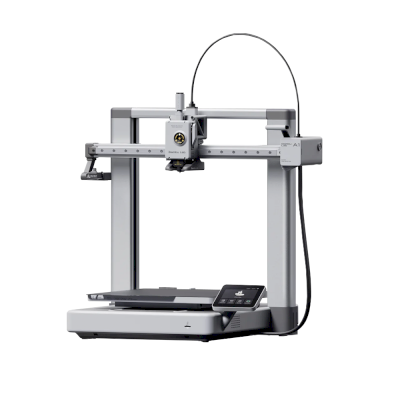
Review of a production unit by a skeptic who ends up impressed. For single-material printing the Bambu A1 or A1 Mini are still the best budget picks, but for multicolor or multi-material without purge waste the U1 makes much more sense. Cautions that other reviewers saw less reliable units.
Teaching Tech · October 17, 2025
First impressions of the production model: sees it as a slightly larger, more open-source tool changer take on the Bambu X1 Carbon, at a price that will attract many buyers. Notes the LAN mode and USB printing, and wants Snapmaker to publish its Klipper changes.
Compare the Snapmaker U1 with similar printers
Printers from the same maker, of a similar size, printing the same engineering materials or multi-material like it, that you can buy today. Compare up to four side by side, with their specs and how each connects.
Who makes the Snapmaker U1, and how open Snapmaker leaves you: whether its printers run without its cloud, take any filament and slicer, and can be repaired. Each area is rated from public sources.
Openness: Mostly open (4.1 of 5)
Mostly open
Walled gardenOpen
Snapmaker is a Shenzhen company founded in 2016, built around machines that swap tool heads; its Original, 2.0 and U1 machines were launched on Kickstarter. It sells the U1, a CoreXY printer with four tool heads that change in about five seconds for multi-colour printing, and the Artisan, which combines 3D printing, laser engraving and CNC carving. Its buyers are makers, hobbyists and small workshops.
Founded:
2016 ·
Headquarters:
Shenzhen, China ·
Ownership:
Shenzhen Snapmaker Technologies Co., Ltd.; its main products were crowdfunded on Kickstarter ·
Website:www.snapmaker.com
Snapmaker is mostly open: the U1 runs Klipper with a local Fluidd interface and published source, and nearly every part is sold separately. Its proprietary hotends and RFID system are the closed parts.
Firmware and custom firmware ●●●●●
The U1 runs modified Klipper, Moonraker and Fluidd. Snapmaker published its changes on GitHub under GPL-3.0 on 30 March 2026, about three months after Kickstarter deliveries finished. Firmware for the Snapmaker 2.0 and, since August 2026, the Artisan controller is also on GitHub under GPL.
[1][2][3][4]
Local control and integrations ●●●●●
The U1 runs Klipper, Moonraker and Fluidd on the printer and prints from Snapmaker Orca over Wi-Fi or from a USB drive, so other software can use Moonraker's documented API; Snapmaker publishes its Moonraker changes on GitHub. For the Artisan, Snapmaker documents its G-code commands and has Luban pass jobs from OrcaSlicer over the OctoPrint protocol. The Snapmaker app is for remote monitoring.
[1][5][13][14][15]
Third-party filament, slicers and parts ●●●●●
Third-party 1.75 mm filament works and the U1 is supported in OrcaSlicer, but its RFID filament recognition is proprietary and only reads Snapmaker spools, and its hotends are proprietary one-piece units. Snapmaker documents using Cura, OrcaSlicer and PrusaSlicer with its older machines.
[1][6][7]
Repairs and spare parts ●●●●●
Snapmaker's shop sells most U1 parts on their own, including the main board, heated bed, extruder motor, toolhead board, belts, fans and touchscreen, and its wiki has replacement guides such as the U1 XY motor. Hotends can only be replaced as a whole unit.
[8][9][1]
Data and privacy ●●●●●
Cloud features need a Snapmaker account. The privacy policy says personal data is stored on servers in the United States, may be shared with affiliates and third parties in China for some functions, and some data is kept for three years.
[10]
Community and documentation ●●●●●
Active forum and a wiki with detailed FAQs and guides, firmware and slicer sources on GitHub, and frequent public updates and livestreams during the U1 campaign.
[1][2][11]
Pros
The U1's four-head tool changer wastes little filament on colour changes.
Klipper-based U1 with a local Fluidd interface and published firmware source.
Nearly every U1 part is sold separately, with replacement guides.
Has delivered all of its Kickstarter campaigns, the U1 ahead of schedule by its own account.
Cons
U1 hotends are proprietary one-piece units.
RFID filament recognition is proprietary and only works with Snapmaker spools.
U1 firmware source came after deliveries, at the end of a self-set deadline.
Personal data is stored in the US and may be shared with affiliates in China.
The U1 does not work with Luban, so owners of older machines need a different slicer.
Track record
August 2026: Snapmaker published the Artisan's Marlin-based controller firmware on GitHub under GPL-3.0.
[4]
March 30, 2026: Snapmaker published its modified Klipper, Moonraker and Fluidd for the U1 on GitHub under GPL-3.0, on the last day of the deadline it had set itself.
[1][2]
December 2025: Snapmaker says all U1 Kickstarter orders shipped by 23 December 2025, ahead of its schedule. It says it delivered all three of its Kickstarter campaigns.
[12]
September 2025: The U1 Kickstarter raised $20.2 million from more than 20,000 backers by 30 September 2025, the most for any 3D printer on the platform. Snapmaker gives the final total as $20.6 million from 20,680 backers.
[11][12]
Researched from 15 sources, last checked October 18, 2026. Show sources
Yes. You can connect the Snapmaker U1 to SimplyPrint via SimplyPrint Client or Klipper (Moonraker), then slice, queue, start and monitor prints from your browser or the mobile app.
How do I connect the Snapmaker U1 to SimplyPrint?
Follow our step-by-step setup guide for the Snapmaker U1. It shows how to connect it via SimplyPrint Client or Klipper (Moonraker), what you need for each, and which to pick.
What slicer should I use for the Snapmaker U1?
We recommend OrcaSlicer for the Snapmaker U1. You can run it, and 6 other slicers, directly in SimplyPrint's online slicer - no install, on any device, with profiles for the Snapmaker U1 kept up to date automatically.
Can I use OrcaSlicer with the Snapmaker U1?
Yes. OrcaSlicer comes with a profile for the Snapmaker U1, and you can run it in SimplyPrint's online slicer, so there's nothing to install.
What filament can the Snapmaker U1 print?
Based on its specs (hotend up to 300C, heated bed up to 100C), the Snapmaker U1 handles PLA, PETG, or TPU & flexibles well. See the full filament guide above for ABS, nylon, PC and composites.
Does the Snapmaker U1 work with OctoPrint or Klipper?
The Snapmaker U1 works with Klipper (Mainsail and Fluidd), and SimplyPrint connects to it through them - so you get cloud access, a queue and camera monitoring on top.
What is the Snapmaker U1's bed size and build volume?
The Snapmaker U1 has a 270 x 270 mm print bed and prints up to 270 mm tall, a build volume of about 270 x 270 x 270 mm. See the full specifications table above for bed type, temperatures and more.
When did the Snapmaker U1 come out?
Snapmaker launched the U1 in 2025.
Can the Snapmaker U1 eject prints automatically?
There's no kit for it that we support yet, but SimplyPrint's AutoPrint can push prints off with the toolhead, or run your own ejection G-code, and then start the next job from your queue.
Where can I buy the Snapmaker U1?
From Snapmaker's own store, which has shops for the US and everywhere else. The links on this page go to those stores; some are affiliate links, so we may earn a commission at no extra cost to you.
Affiliate disclosure: Some links on this page are affiliate links. We may earn a commission if you make a purchase, at no extra cost to you. As an Amazon Associate, we earn from qualifying purchases.
 China
China
 SimplyPrint Client
  Klipper (Moonraker)



 PrusaSlicer
 BambuStudio
 CrealityPrint
 Cura
Cura



 Best for USA: Snapmaker's store for the US