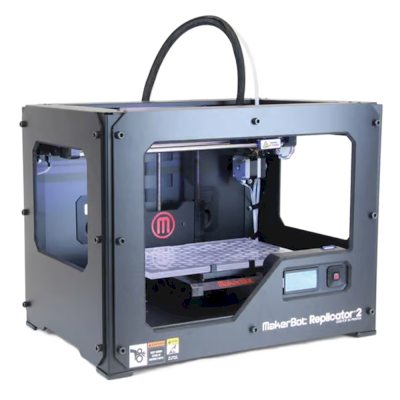
Does the MakerBot Replicator 2 3D printer work with SimplyPrint, OctoPrint, Mainsail and Fluidd?
Each way of connecting it, what it needs, and how to set it up.
Doesn't ship with Klipper: it runs Klipper after you install it in place of its own firmware, a modification
What works with SimplyPrint
Connected through OctoPrint, SimplyPrint supports everything the MakerBot Replicator 2 lets other software do: the camera and AI failure detection, remote printing, temperature and movement control and AutoPrint. 3 features depend on how it's set up: the table says what each needs.
Every SimplyPrint feature, for each way of connecting it to SimplyPrint
Connected to SimplyPrint through
SimplyPrint feature
OctoPrint
Compatible
Monitoring
Live status and progress
Yes
Webcam
Yes1
AI failure detection
Yes1
Time left
Yes
Layer progress
Yes
Temperatures
Yes
Printing
Starting a print
Yes
Pause, resume and cancel
Yes
Skip objects
Depends2
Files
Print binary G-code (.bgcode)
Depends3
Printer control
Change temperatures
Yes
Moving with the controls
Yes
Homing
Yes
Extrude and retract
Yes
Change print speed
Yes
Fan speed
Yes
Baby stepping
Yes
Send G-code
Yes
Calibration
Change filament
Yes
Bed leveling
Yes
Z-Offset Calibration
Yes
Automation
AutoPrint
Pro
Yes
Download the file before the print starts
Depends4
Connected to SimplyPrint through OctoPrint
Compatible
Monitoring
Live status and progressYes
WebcamYes1
AI failure detectionYes1
Time leftYes
Layer progressYes
TemperaturesYes
Printing
Starting a printYes
Pause, resume and cancelYes
Skip objectsDepends2
Files
Print binary G-code (.bgcode)Depends3
Printer control
Change temperaturesYes
Moving with the controlsYes
HomingYes
Extrude and retractYes
Change print speedYes
Fan speedYes
Baby steppingYes
Send G-codeYes
Calibration
Change filamentYes
Bed levelingYes
Z-Offset CalibrationYes
Automation
AutoPrint ProYes
Download the file before the print startsDepends4
Works
Depends
Not supported
Needs a camera
Requires the OctoPrint plugin Cancel Objects
Requires the OctoPrint plugin BGCode
Requires version 4.2.0 or newer of the SimplyPrint plugin
MakerBot Replicator 2 owners on SimplyPrint
10+ printers use SimplyPrint
What slicer to use for the MakerBot Replicator 2
Use Kiri:Moto: it has a ready-made profile for the MakerBot Replicator 2.
We only list slicers you can use in the SimplyPrint cloud, so there may be others for the MakerBot Replicator 2.
Cloud-Based Slicer for MakerBot Replicator 2: Use Kiri:Moto Online
Use Kiri:Moto and other slicers - directly in your browser with SimplyPrint's online cloud slicer. No installation required. Slice your MakerBot Replicator 2 models from any device, anywhere in the world!
Automatic Profile Updates: Profiles are automatically checked and fetched from the slicer GitHub repositories every day, as well as from our own open-source community-driven slicer profile database. This ensures you always have access to the latest profiles.
Note: Other slicers, such as Simplify3D, ideaMaker, SuperSlicer and KISSlicer, aren't in our cloud, so we don't track their profiles. They may still work well with your MakerBot Replicator 2: check the slicer's own documentation or forums for a profile. You can also contribute profiles to our open-source slicer profile database on GitHub.
The app for the MakerBot Replicator 2
SimplyPrint works as the MakerBot Replicator 2's app: on your phone and in any browser, with a slicer in the cloud.
There's no plate swapper or auto-ejection kit for the MakerBot Replicator 2 in SimplyPrint yet, but AutoPrint can still keep it printing: once the plate is clear, it starts the next job from your queue.
Ways to automate it
Your own ejection G-codeWrite the routine that clears your plate, and AutoPrint runs it after every print.
MakerBot Replicator 2 specifications: bed size, print height and more
Its size, temperatures, multi-material and how it connects, from the maker and our own research.
Read more by the manufacturer
Size
Build volume
285 x 153 x 155 mm
Bed type
Rectangle
Bed size
285 x 153 mm
Max print height
155 mm
Printing
Enclosure
Partly enclosed
Motion system
Other kinematics
Max extruder temperature
280 °C
Has heated bed
No
Number of nozzles
1
Toolheads
1
Direct drive
No
Probing tool / Auto Bed Leveling
No
Filament width
1.75 mm
Multi-material
Toolchanger or hotend changer
No
IDEX (independent dual extruders)
No
Connecting
Connectivity
USB, SD card
Supports serial printing
Yes
Shipped firmware
The maker's own
Files and slicing
Supported file formats
G-code (.gcode, .gco, .g)
The printer
Printer manufacturer / brand
MakerBot
Printer model name
Replicator 2
Made by a company from
USA
Launched
September 2012
Disclaimer:
We strive to keep this information as current and accurate as possible, but cannot guarantee its completeness or reliability. Our data is based on user submissions and manufacturer references.
What filament can the MakerBot Replicator 2 print?
Filament compatibility for the MakerBot Replicator 2: the materials it can handle, judged from its hotend, bed, chamber and enclosure.
Filament
Suitability
Notes
PLA
Great
The easiest filament to print. Works on almost any printer; a heated bed helps adhesion but is not required.
PETG
With care
Marginal - PETG prefers a hotter bed (~70-80C) than this printer reaches.
TPU & flexibles
With care
Possible, but a Bowden extruder makes flexibles harder - print slowly and prefer firmer (higher-shore) TPU.
ABS & ASA
Not ideal
Not recommended - the bed cannot reach the ~90-110C ABS and ASA need.
Nylon (PA)
Not ideal
Not recommended - nylon needs a hotter hotend (~250-270C) and ideally an enclosure.
Polycarbonate (PC)
Not ideal
Not recommended - PC needs very high hotend temps and an enclosed chamber.
Carbon-fiber & glass-filled
With care
Possible if you fit a hardened or wear-resistant nozzle - the abrasive fibers quickly wear a stock brass nozzle.
Tip: this is a general guide from the printer's specs - always check your filament's recommended settings. With SimplyPrint you can save a profile for each spool and track exactly what filament you have in stock.
Best filament for the MakerBot Replicator 2
Filaments the MakerBot Replicator 2 prints well, MakerBot's own first, then the best known.
Compare the MakerBot Replicator 2 with similar printers
Printers from the same maker, of a similar size, printing the same engineering materials or multi-material like it, that you can buy today. Compare up to four side by side, with their specs and how each connects.
Who makes the MakerBot Replicator 2, and how open MakerBot leaves you: whether its printers run without its cloud, take any filament and slicer, and can be repaired. Each area is rated from public sources.
Openness: Mostly closed (2.3 of 5)
Mostly closed
Walled gardenOpen
MakerBot is an American 3D printer brand founded in New York in 2009 out of the open-source RepRap scene. Stratasys bought it in 2013 and merged it with Ultimaker in 2022; MakerBot is now UltiMaker's education brand, selling Sketch classroom printers with lesson plans, teacher tools and management in UltiMaker's Digital Factory cloud. The Replicator printers in our catalogue are discontinued.
Founded:
2009-01 ·
Headquarters:
Brooklyn, New York, US ·
Ownership:
Brand of UltiMaker, formed in August 2022 when Stratasys merged MakerBot with Ultimaker (NPM Capital 53.5%, Stratasys 46.5% at closing) ·
Website:www.makerbot.com
Proprietary firmware, MakerBot-only extruders and materials, and classroom management in UltiMaker's cloud. In return schools get one managed system with curriculum and support.
Firmware and custom firmware ●●●●●
MakerBot stopped sharing its hardware designs with the Replicator 2 in 2012, and its fifth-generation printers moved to proprietary controllers, extruders and firmware. We found no firmware source for the current Sketch line.
[15][14]
Local control and integrations ●●●●●
The Sketch Sprint prints over Wi-Fi or Ethernet from UltiMaker Cura or Digital Factory, or from a USB stick. Classroom management, remote monitoring and browser slicing (Cura Cloud) run in UltiMaker's Digital Factory cloud, which replaced MakerBot CloudPrint in 2025. We found no documented local interface that other software could use.
[16][2][3]
Third-party filament, slicers and parts ●●●●●
MakerBot lists only its own PLA and Tough PLA, and only its own Sketch extruder, for the Sketch Sprint. Slicing is in UltiMaker Cura (open source) or Cura Cloud.
[2]
Repairs and spare parts ●●●●●
UltiMaker's shop sells Sketch extruders, a Sketch Sprint nozzle assembly, build plates and cables, and still sells Smart Extruder+ units for the Replicator+; spare parts are mostly whole assemblies.
[6]
Data and privacy ●●●●●
Some MakerBot services need an account, and MakerBot's privacy policy lists what it collects (including device identifiers such as MAC addresses and usage data) and its use of Google Analytics and retargeting. Students can submit files through Link Share without an account.
[5][2]
Community and documentation ●●●●●
MakerBot offers hundreds of free lesson plans, educator certification, Thingiverse Education and a support site; there is no public source code or bug tracker.
[1]
Pros
Built for schools: curriculum, lesson plans, teacher tools and certification are part of the package.
Enclosed Sketch printers with HEPA filtration, aimed at classrooms.
Students can submit files without creating accounts (Link Share).
Spare extruders and parts are still sold, even for the Replicator+.
Cons
Closed firmware and MakerBot-only extruders; only MakerBot PLA and Tough PLA are listed for the Sketch Sprint.
Fleet management depends on UltiMaker's Digital Factory cloud.
CloudPrint's 2025 shutdown left the Replicator 5th Gen, Mini, Mini+ and Z18 without cloud support.
Many ownership changes and layoffs over the years (Stratasys 2013, layoffs 2015 and 2017, Ultimaker merger 2022).
Track record
December 2025: UltiMaker shut down MakerBot CloudPrint in early December 2025, after announcing 1 October 2025. Printers had to be reconnected to Digital Factory by hand, and the Replicator Z18, 5th Gen, Mini and Mini+ are not supported there; MakerBot points their owners to MakerBot Print.
[3][4]
August 31, 2022: Stratasys closed the merger of MakerBot with Ultimaker into a company named Ultimaker (now UltiMaker), owned 53.5% by NPM Capital and 46.5% by Stratasys.
[7]
February 2017: MakerBot announced a restructuring with another round of layoffs, Fortune reported.
[9]
July 2016: A court dismissed the investor class action over the fifth-generation printers and Smart Extruder, finding the statements at issue were not actionable.
[10]
April 2016: MakerBot moved printer manufacturing from Brooklyn to the contract manufacturer Jabil and parted ways with an undisclosed number of Brooklyn staff, The Verge reported.
[13]
July 2015: A class action was filed against MakerBot and Stratasys alleging investors were misled about problems with the fifth-generation printers' Smart Extruder.
[11]
April 2015: MakerBot laid off about 20% of its staff, roughly 100 people, under a new CEO, Motherboard reported.
[12]
June 2013: Stratasys bought MakerBot in a stock deal worth $403 million at the time.
[8]
September 2012: With the Replicator 2, MakerBot stopped publishing its machine designs, a break with open-source hardware that co-founder Zach Smith criticised publicly.
[14][15]
Researched from 16 sources, last checked October 18, 2026. Show sources
Is the MakerBot Replicator 2 compatible with SimplyPrint?
Yes. You can connect the MakerBot Replicator 2 to SimplyPrint via OctoPrint, then slice, queue, start and monitor prints from your browser or the mobile app.
How do I connect the MakerBot Replicator 2 to SimplyPrint?
Follow our step-by-step setup guide for the MakerBot Replicator 2. It shows how to connect it via OctoPrint, what you need for each, and which to pick.
What slicer should I use for the MakerBot Replicator 2?
We recommend Kiri:Moto for the MakerBot Replicator 2. You can run it, and 6 other slicers, directly in SimplyPrint's online slicer - no install, on any device, with profiles for the MakerBot Replicator 2 kept up to date automatically.
Can I use OrcaSlicer with the MakerBot Replicator 2?
Yes, but OrcaSlicer has no built-in profile for the MakerBot Replicator 2 that we know of: start from a similar printer's profile and set the bed size, height and nozzle to match.
What filament can the MakerBot Replicator 2 print?
Based on its specs (hotend up to 280C, no heated bed), the MakerBot Replicator 2 handles PLA well. See the full filament guide above for ABS, nylon, PC and composites.
Does the MakerBot Replicator 2 work with OctoPrint or Klipper?
The MakerBot Replicator 2 works with OctoPrint, and SimplyPrint connects to it through them - so you get cloud access, a queue and camera monitoring on top.
What is the MakerBot Replicator 2's bed size and build volume?
The MakerBot Replicator 2 has a 285 x 153 mm print bed and prints up to 155 mm tall, a build volume of about 285 x 153 x 155 mm. See the full specifications table above for bed type, temperatures and more.
When did the MakerBot Replicator 2 come out?
MakerBot launched the Replicator 2 in September 2012.
Can the MakerBot Replicator 2 eject prints automatically?
There's no kit for it that we support yet, but SimplyPrint's AutoPrint can run your own ejection G-code, work with a robot arm through the API, or wait for you to clear the plate, and then start the next job from your queue.
Affiliate disclosure: Some links on this page are affiliate links. We may earn a commission if you make a purchase, at no extra cost to you. As an Amazon Associate, we earn from qualifying purchases.
 USA
USA
 OctoPrint



 PrusaSlicer
 OrcaSlicer
 BambuStudio
 ElegooSlicer
 CrealityPrint
 Cura
Cura


/product_photo_md.png?cacheid=67b61612c5617)