What we shipped in 2023

Release notes for the web platform, the mobile app and the SimplyPrint Client.

December 2023

· Web

Auto-tagging and a fuller G-code analysis
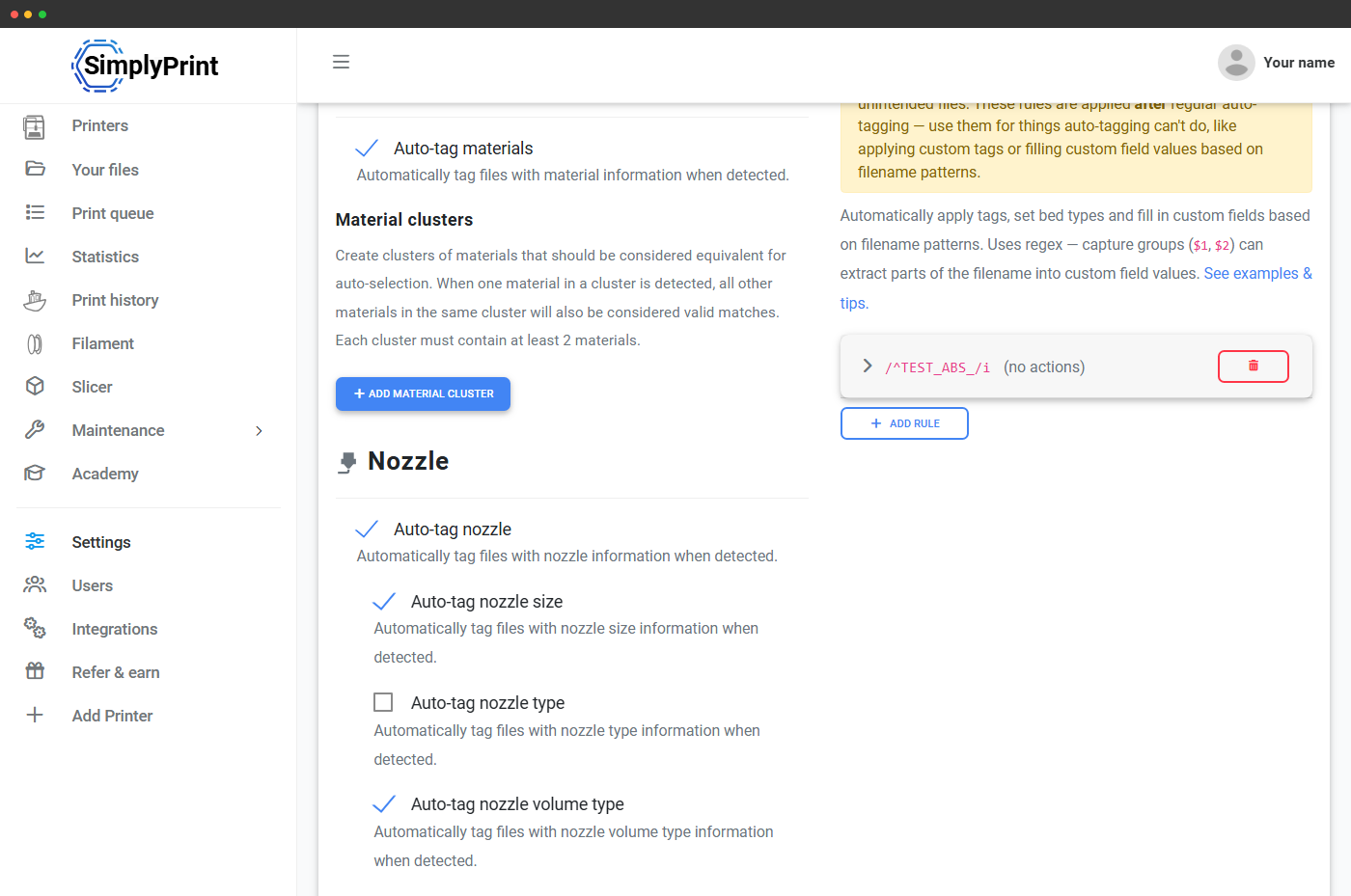
Auto-tagging settings for materials and nozzle size

New features

  • Auto-tagging: Newly uploaded files get material and nozzle size tags automatically, and colours for multi-colour prints. It works for files sliced in most slicers.

Improvements: G-code analysis: more details · Queue match criteria · Temperature margins · Why 1-click print matched · When the queue has run out · Why nothing matched, and 13 more

Show all 19 improvements
  • G-code analysis: more details: The analysis now finds a file's total layers and layer height, among other new details.
  • Queue match criteria: Three new settings: match nozzle size, match material colour and match material type.
  • Temperature margins: Matching a material to a printer used to allow a fixed 10°C difference. Two account-wide settings now set the margin, one for nozzle and one for bed, and each material type can have its own in your filament settings.
  • Why 1-click print matched: 1-click print makes it easier to see why an item, or none, was matched with a printer.
  • When the queue has run out: A blue box tells you when nothing is matched with a printer simply because the queue is empty.
  • Why nothing matched: When nothing matches, click to see exactly which matching criteria were not met.
  • AutoPrint troubleshooting: With AutoPrint on, the bottom of a printer's AutoPrint widget has a "Troubleshooting & debugging" section: AutoPrint's state, the print it wants to start next, and any reason it has for not starting one.
  • Faster panel: The panel loads and runs faster.
  • Fixes this update made possible: Fixed sorting of printers, the print queue and more; sliced files being named "SimplySliced.gcode"; saving from the slicer failing; parts of the interface staying dark after switching to light mode; not reconnecting to the printer server after a short loss of internet; and a file's selected printers not showing after saving. A file's printers are now selected when you click "Print file".
  • Print queue on its own page: The print queue is now at simplyprint.io/panel/queue, with its own item in the sidebar, and the queue buttons on the Printers page are gone. It gives the queue room to grow, and works for users who may see the queue but not the printers.
  • 1-click print, easier to find: The 1-click print button moved to the left of the Printers page, where newer users are less likely to miss it.
  • File actions moved up: In the panel that opens when you click a file in Your files, Start print, Add to queue, delete, download, move and rename now sit above the preview, so you do not have to scroll to them.
  • Klipper START_PRINT temperatures: The analysis reads tool and bed temperatures from the Klipper macro START_PRINT in G-code files.
  • Print information from the first layer: Print information is gathered only once the first layer starts, so start lines and purging do not set off alerts.
  • PrusaSlicer filament estimates: For PrusaSlicer files, the filament usage is the estimate PrusaSlicer wrote into the file, which is more precise than our own analysis.
  • Prusa .bgcode files: SimplyPrint accepts Prusa's new binary G-code format, decodes it and analyses it like any G-code file. It only prints on printers that support the format, for now the Prusa MK4 and XL.
  • Printable 3MF files: 3MF files can be printed in certain cases.
  • 3MF splitting: Each plate in a 3MF file can be extracted as its own file.
  • Panel loads without the printer server: The panel now loads even when it cannot reach the printer API server, showing the last known state of your printers. Only printer actions, such as starting prints, need the connection. This matters when a firewall blocks it or the server is being updated.
1 bug fix
  • Fixed the filament usage analysis for multi-extruder prints.

Read the blog post

October 2023

· Web

AutoPrint

Choosing an AutoPrint bed-clearing method

New features

  • AutoPrint: Automated, continuous printing: once a bed is cleared, the next job from the queue starts by itself, with support for bed-clearing hardware and printers. Requires the Print Farm plan.
4 bug fixes
  • Fixed the print cost showing a material cost of 0 when the printer had an active spool.
  • Fixed the printer image on the print job page for newer printers that have no silhouette picture.
  • Fixed sorting by "Color" and "Type name" on the Filament page.
  • Fixed queue items not always matching a printer's tags when a spool was assigned.

Read the blog post

August 2023

· Web · From your suggestion

A Cura plugin and browser extensions

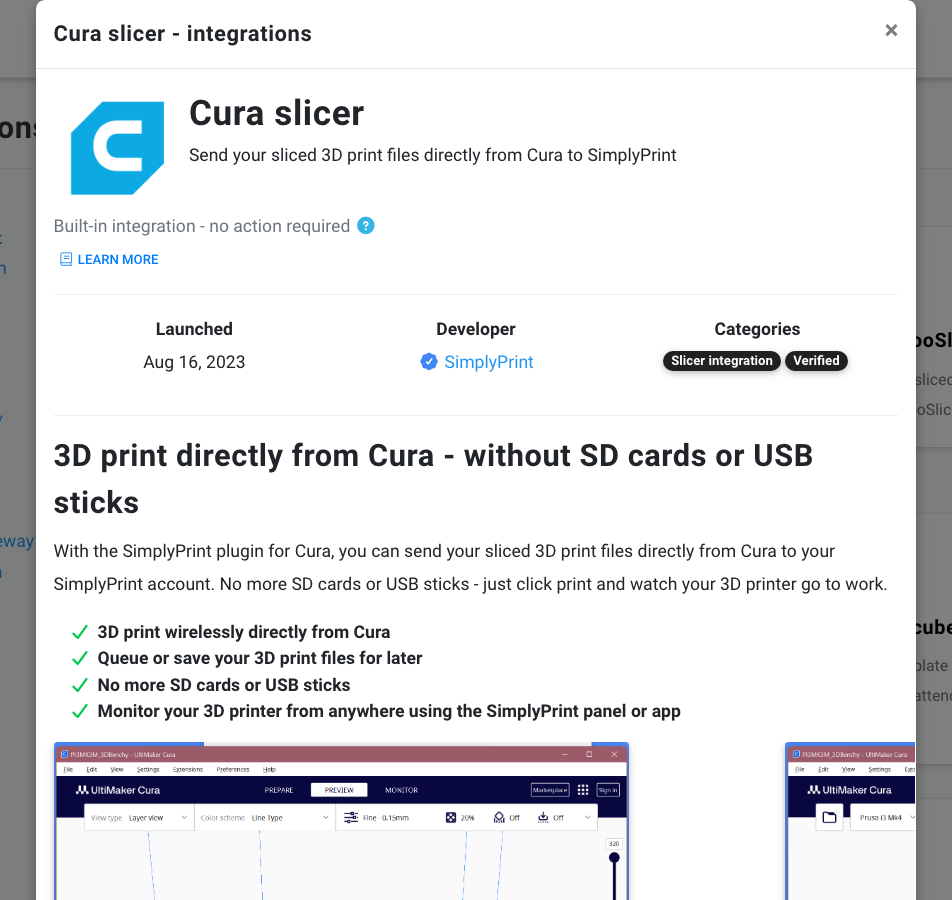
Cura slicer integration details in the panel

New features

  • Cura plugin: Print directly from Cura by Ultimaker, the second most used slicer among SimplyPrint users after our own.
  • Browser extensions: Send 3D models from Thingiverse and Printables to SimplyPrint with an extension for most browsers.

Improvements: Filament pages · App banners · See default slicer profiles

Show all 3 improvements
  • Filament pages: Scan the QR code SimplyPrint generates for a spool to see the filament's details, assign it to a printer or do something else with it. The account setting "Public filament pages" can require login after a scan; without login, only the spool's colour, brand and percentage left show. Live since 29 July. From suggestion #31
  • App banners: Phones show a link to download our mobile app, and you get a download link when a print starts if you chose app notifications without having the app. Live since 8 August.
  • See default slicer profiles: A new user group permission hides SimplyPrint's default slicer profiles from chosen groups, leaving them custom and account profiles. Live since 8 August.
3 bug fixes
  • Fixed missing Danish translations in the "Cancel print" popup.
  • Fixed creating a slicer profile from a default profile with "Copy from currently selected".
  • Fixed the flickering time under "Next finished print" in the Farm overview.

Read the blog post

July 2023

· Web

The Farm overview and reworked G-code macros

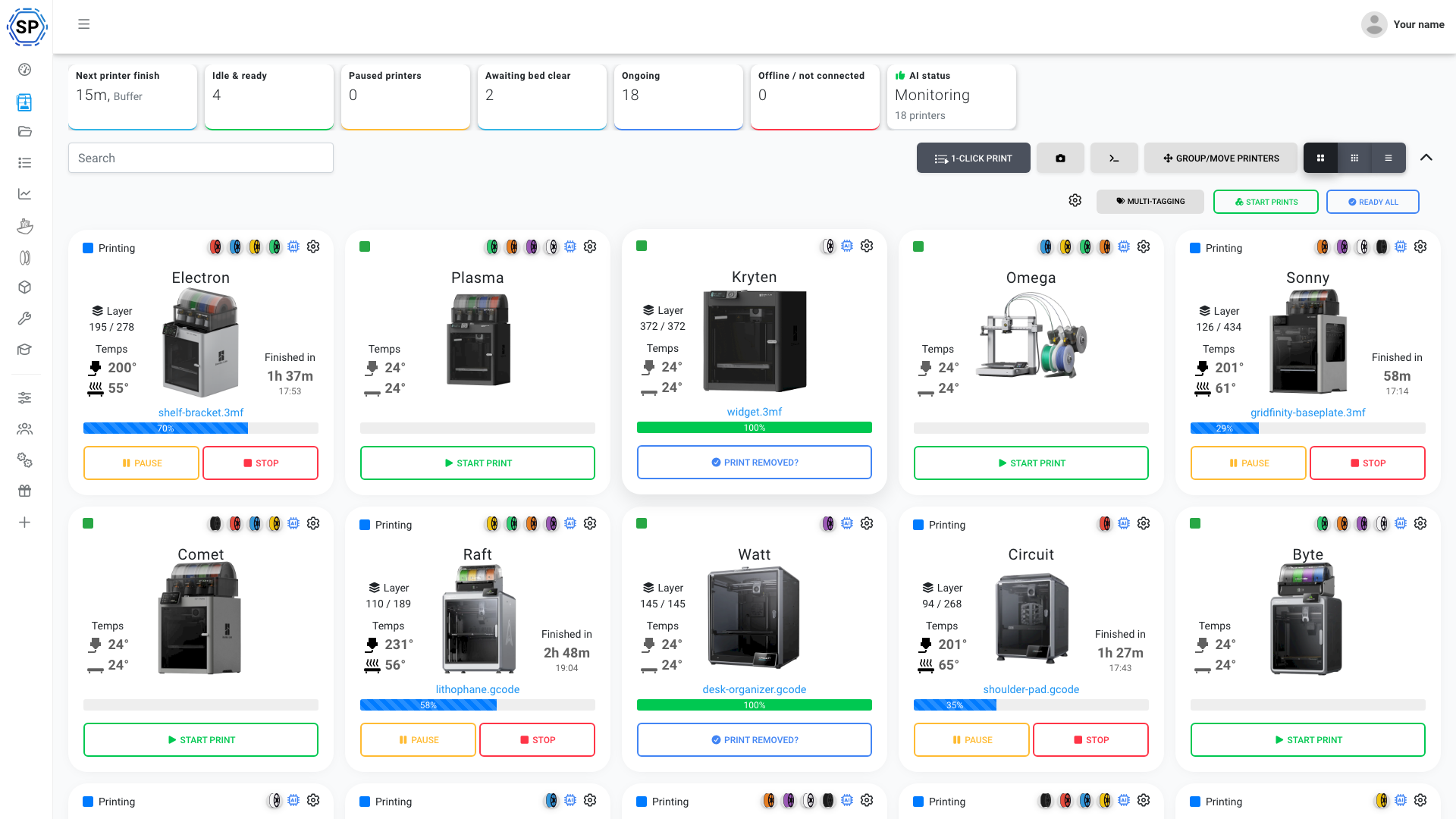
Farm overview of printers with status and progress

New features

  • Farm overview: A clear overview of your whole farm at a glance, always there, for those of you with many printers.
  • G-code without snippets: Each macro has a field you can type any G-code commands into. Before, a macro had to be built from one or more snippets.
  • G-code auto-complete and tooltips: G-code commands complete as you type, which makes scripts, snippets and macros easier to write.

Improvements: G-code macros, reworked · Tidier button bar · Filament brand field · Log in with SimplyPrint · Tags, out of beta · Setup guides, and 4 more

Show all 10 improvements
  • G-code macros, reworked: A rework of the G-code Macros page: one of the least visited pages in SimplyPrint, and an important one.
  • Tidier button bar: The top bar of buttons, where the print queue is, was tidied on the overview and on the control panel. 1-click print and Quick queue have their own icon, to tell the queue's start actions from the queue itself.
  • Filament brand field: When you create a spool, the brand field makes clearer that you can type any brand name, on our list or not.
  • Log in with SimplyPrint: OAuth2 login with a SimplyPrint account is finished, for integrations such as the coming Cura plugin. Message us if you want to integrate SimplyPrint with your application.
  • Tags, out of beta: The Beta badge is off Tags: the feature is stable.
  • Setup guides: Room for more setup guides, with Direct Prusa and Bambu Lab marked as coming soon, and SSH settings information in the OctoPrint guide.
  • Printer compatibility pages: Printers in the compatibility list open a page with the platforms each one works with, its specifications, and setup guides for SimplyPrint and OctoPrint. Printers known not to work are listed too, and say so.
  • Unused Hub settings removed: "Allow preheat", "Allow feedrate change" and "Allow Gcode preview" are gone from the Hub settings. Permissions decide these now.
  • Hub temporary login: With temporary login on, the printer overview and control panel refresh on login and logout, so the buttons match what the user may do.
  • Hub: More bug fixes across the Hub.
5 bug fixes
  • Fixed the "Print done" timer sometimes racing ahead on screen.
  • Fixed print progress showing 0 when the page first loads, before updating to the right value.
  • Fixed "Load more" in the panel's news fetching the same first five articles again.
  • Fixed the Hub's dark mode setting.
  • Fixed a missing translation in the Hub settings.

Read the blog post

June 2023

· Web

Tinkercad integration

Sending a Tinkercad design to SimplyPrint

New features

  • Tinkercad integration: Choose Export > 3D Print > SimplyPrint in Tinkercad, and the design is in SimplyPrint, ready to be sliced, saved, queued or printed.

Read the blog post

· Web

Print cost and data export

Print cost breakdown shown before starting a print

New features

  • Print cost: Work out what each print costs you or your business, from a simple figure based on the material to advanced estimates that take a range of factors into account.
  • Export: On the Print Farm plan, export your print job data as CSV: statistics, print job history and print queue data.

Improvements: Quick material change · Ghost spool · More compact print queue · Auto select printers on Start print · Files uploaded card · Number formatting, and 1 more

Show all 7 improvements
  • Quick material change: A spool icon in the Start print file selector lets you change the printer's filament or material details before a print, and checks that the material makes sense.
  • Ghost spool: A printer with no material data shows a "ghost" spool on its control panel, so you can quickly edit the material data or assign a spool.
  • More compact print queue: The action buttons are smaller and the printer selector is a square, to make room for the newer columns.
  • Auto select printers on Start print: A new print queue setting, under Settings > General.
  • Files uploaded card: The card sits on the left of the screen and closes 10 seconds after the last upload, so it no longer covers buttons such as "Add to queue" and "Start print".
  • Number formatting: Numbers always show thousand separators, with better rules for when decimals appear.
  • One Print Queue button: The extra button under the printer image on the control panel is gone. The queue button is at the top right.
8 bug fixes
  • Fixed bugs importing OBJ and 3MF files into the slicer.
  • Fixed the filament "Create" and "Delete" buttons showing for users without permission.
  • Fixed users without the "Set temperatures" permission not being able to see the temperatures at all.
  • Fixed "Set print speed" being hidden when the "Control printer" permission was turned off.
  • Fixed some small material-related bugs in matching tags to printers.
  • Fixed small errors in the API documentation, and documented the cost feature.
  • Fixed sorting bugs, in the print queue and elsewhere, where a newly added item went to the top and not the bottom.
  • Fixed a possibly wrong percentage in the tooltip of the print status chart on the Statistics page.

Read the blog post

· Web

Permissions for tags

Improvements

  • Tag permissions: Six new permissions decide who may set nozzle tags, material tags and custom tags, on files and on queue items.

Compiled afterwards from our development history.

May 2023

· Web

1-click print and a bigger print queue

New features

  • 1-click print: A new button in the print queue starts all your printers with one click.
  • Print queue update: A major makeover: queue groups, a list of done items, quick stats, notes, a download button, virtual items and more permissions.
  • Tags: Tag printers, files and queue items with nozzle size, material and your own custom tags, and the print queue only pairs a file with printers that match. Released quietly in the weeks before this post, as a beta.
  • Public API: The API is open to use, with documentation at apidocs.simplyprint.io.
  • Suggestion box: Post your ideas at suggestions.simplyprint.io, and vote and comment on other people's.

Improvements: Slicer update · Many more permissions · Bigger Start print window · Printer list view · File badges

Show all 5 improvements
  • Slicer update: A big update to the SimplyPrint slicer. It is less visible than the rest, but slicing works a lot better.
  • Many more permissions: From basics such as who can start a print, slice, cancel or clear a bed, to specifics such as showing the "Go to OctoPrint" button.
  • Bigger Start print window: The file selector is much larger, with the file's details on the right.
  • Printer list view: The list view of your printers was reworked.
  • File badges: A badge on each file shows whether it is a 3D model or a printable file.
3 bug fixes
  • Fixed the slicer's "Snaking" support type not working.
  • Fixed the slicer deselecting your assigned filament and briefly going back to the standard start G-code.
  • Fixed the slicer jumping back to a previously selected printer when you have several.

Read the blog post

· Web

Blog news in the panel

Improvements

  • News in the panel: The news list in the panel was rebuilt and now shows the latest posts from our blog.
  • CraftWare files recognised: The G-code analysis recognises files sliced in CraftWare.
2 bug fixes
  • Fixed SMS notifications not being delivered.
  • Fixed the date a spool was added showing in the wrong time zone.

Compiled afterwards from our development history.

April 2023

· Web

Duplicate a spool, and drop files anywhere

New features

  • Duplicate a spool: Make a copy of a filament spool from its actions menu, handy when you buy the same filament again.

Improvements: Drop files anywhere · Finding your printer model · OrcaSlicer files recognised

Show all 3 improvements
  • Drop files anywhere: Drag a file onto any page of the panel and an overlay offers to upload it.
  • Finding your printer model: The model search when adding a printer is more forgiving and suggests names as you type.
  • OrcaSlicer files recognised: The G-code analysis recognises files sliced in OrcaSlicer.
1 bug fix
  • Fixed the wrong file name being used when sending a file from the print queue to the slicer.

Compiled afterwards from our development history.

March 2023

· Web

A permission to manage users of your own group

Improvements

  • Manage users of your own group: A new permission lets members of a user group manage other users in the same group, not only those below them.
3 bug fixes
  • Fixed the emergency stop button being disabled while a printer was printing.
  • Fixed deleting several filament spools at once not working.
  • Fixed file uploads from iPhones and iPads.

Compiled afterwards from our development history.

February 2023

· Web

Drag to reorder filament types, snippets and slicer profiles

Improvements

  • Drag to reorder: Put filament types, G-code snippets and slicer profiles in the order you want by dragging them. The order is saved for the account.
  • Prints cancelled outside SimplyPrint: A print cancelled outside SimplyPrint, on the printer's own screen for example, is labelled that way in the print history.
  • Printer model picker: When you add a printer, the most popular models come first and retired ones are no longer offered.

Compiled afterwards from our development history.

January 2023

· Web

More slicers recognised by the G-code analysis

Improvements

  • MatterControl files recognised: The G-code analysis reads files from MatterControl and the SoftFever build of Bambu Studio.
3 bug fixes
  • Fixed files from Simplify3D 5 not being analysed correctly.
  • Fixed two-factor authentication setup not working in user settings.
  • Fixed printers not being pre-selected when starting a print from the print queue.

Compiled afterwards from our development history.