What we shipped in 2024

Release notes for the web platform, the mobile app and the SimplyPrint Client.

December 2024

· Web · From your suggestions

1-Click Print v2, PayPal and invoiced subscriptions
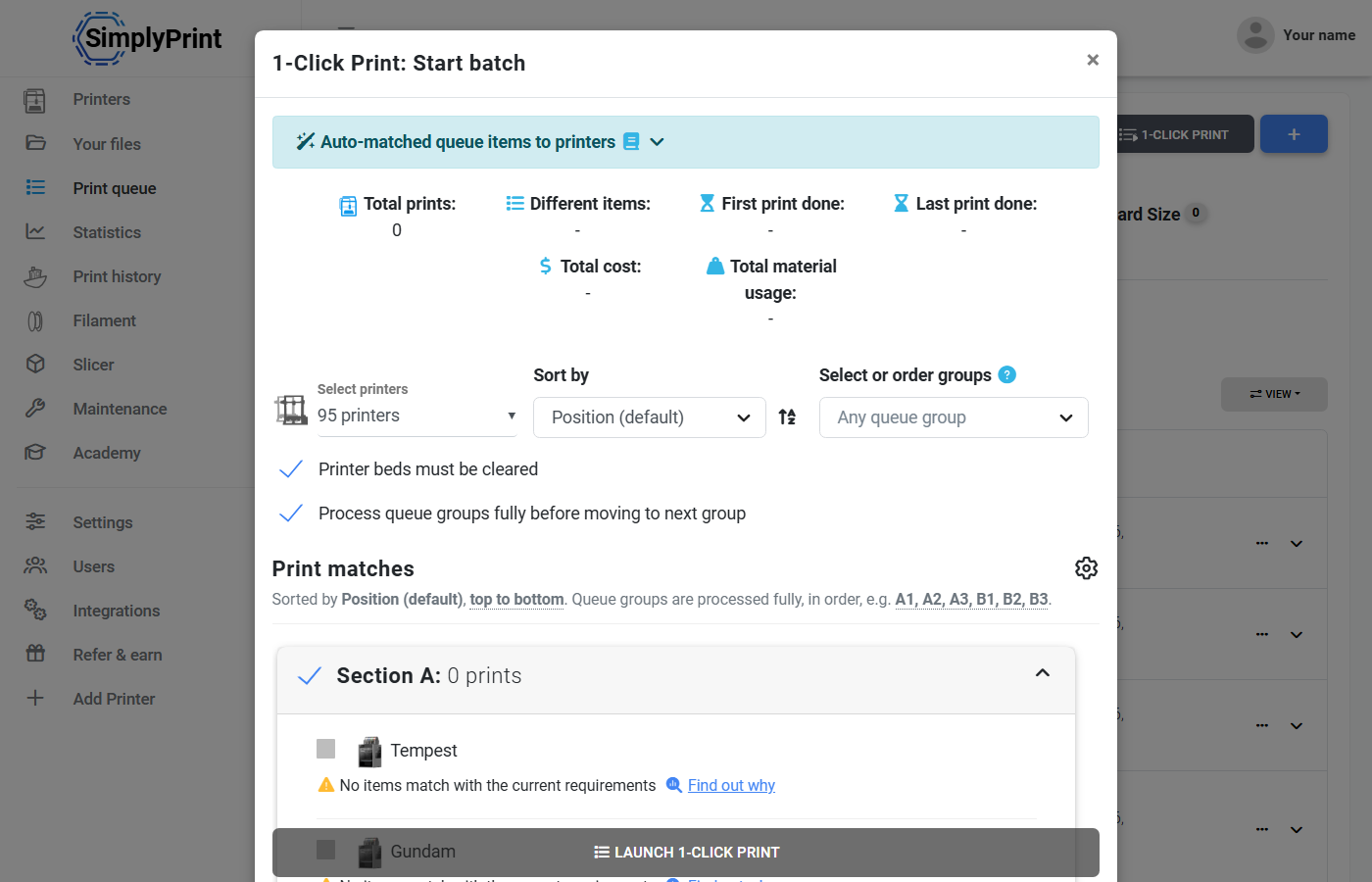
1-Click Print batch matching queue items to printers

New features

  • 1-Click Print v2: A reworked 1-Click Print: a bigger popup, proper sorting by printer and group, group selection and deselection, "Sort by" for queue items, choosing which queue groups to match, and its own settings in the print queue settings.
  • PayPal: Pay for your SimplyPrint subscription with PayPal, from 1 December. Our earlier payment options did not work for everyone.
  • Invoiced subscriptions: Enterprise customers whose subscription is more than you would put on a credit card can get a monthly invoice, to pay by bank transfer or a payment link.
  • Custom colours: Add your own colours for filament and tags, as a hex value or as your own name for a predefined colour.
  • Printer access per user group: Choose which user groups can see and use which printers, printer models and printer groups.
  • API: send G-code: A new API endpoint sends raw G-code to a printer.

Improvements: Printer selector · API: filament types, and 2 more

Show all 4 improvements
  • Printer selector: The printer selector keeps a fixed height, shows a loader while the list renders, and selects the printer for you when the multi-material mapping you pick matches the file. Two bugs are fixed: the Select button being clickable with nothing selected, and the colour selector opening behind the popup.
  • Auto-tag colour for single-extrusion files: A new setting tags the material colour of single-extrusion files automatically. From suggestion #248
  • Duet3D and RepRapFirmware in mesh bed leveling: Duet3D and RepRapFirmware are in the mesh bed leveling list. From suggestion #257
  • API: filament types: The API can read filament types.
18 bug fixes
  • Fixed the colour namer not running at all.
  • Matches on a colour name alone are allowed.
  • Added colour name variants, so that "Gray" matches "Grey".
  • Added 18 colours to the list of known colours, taken from the most used tags.
  • Fixed the first extruder not always being chosen when it was as good a match as any other.
  • Fixed materials not always being returned sorted by extruder, low to high, which caused poor matches.
  • Made the colour namer return the same names more consistently, for more and better matches.
  • Fixed AutoPrint still waiting for a set time or bed temperature when the bed was already cleared.
  • Fixed editing filament in the mobile app sometimes ending on a "No connection" screen.
  • Fixed 1-Click Print not showing every print queue group.
  • Fixed table column order being wrong with conditional columns.
  • Fixed "Done jobs" no longer showing in the print queue after the Custom Fields update.
  • Fixed a file's material usage not updating when you selected one file and quickly another.
  • Fixed the "File upload" button not accepting several files.
  • Replaced dead links in the Creality K1 setup guide.
  • Fixed the 3MF splitter going by a file's index and not its plate number, which generated the wrong files.
  • Fixed problems with the TempUpload and ChunkReceive endpoints for OAuth2 API users.
  • The custom_fields/SubmitValues API endpoint no longer needs the "manage webhook" permission.
Read the blog post

September 2024

· Web · From your suggestion

Custom Fields and API file uploads

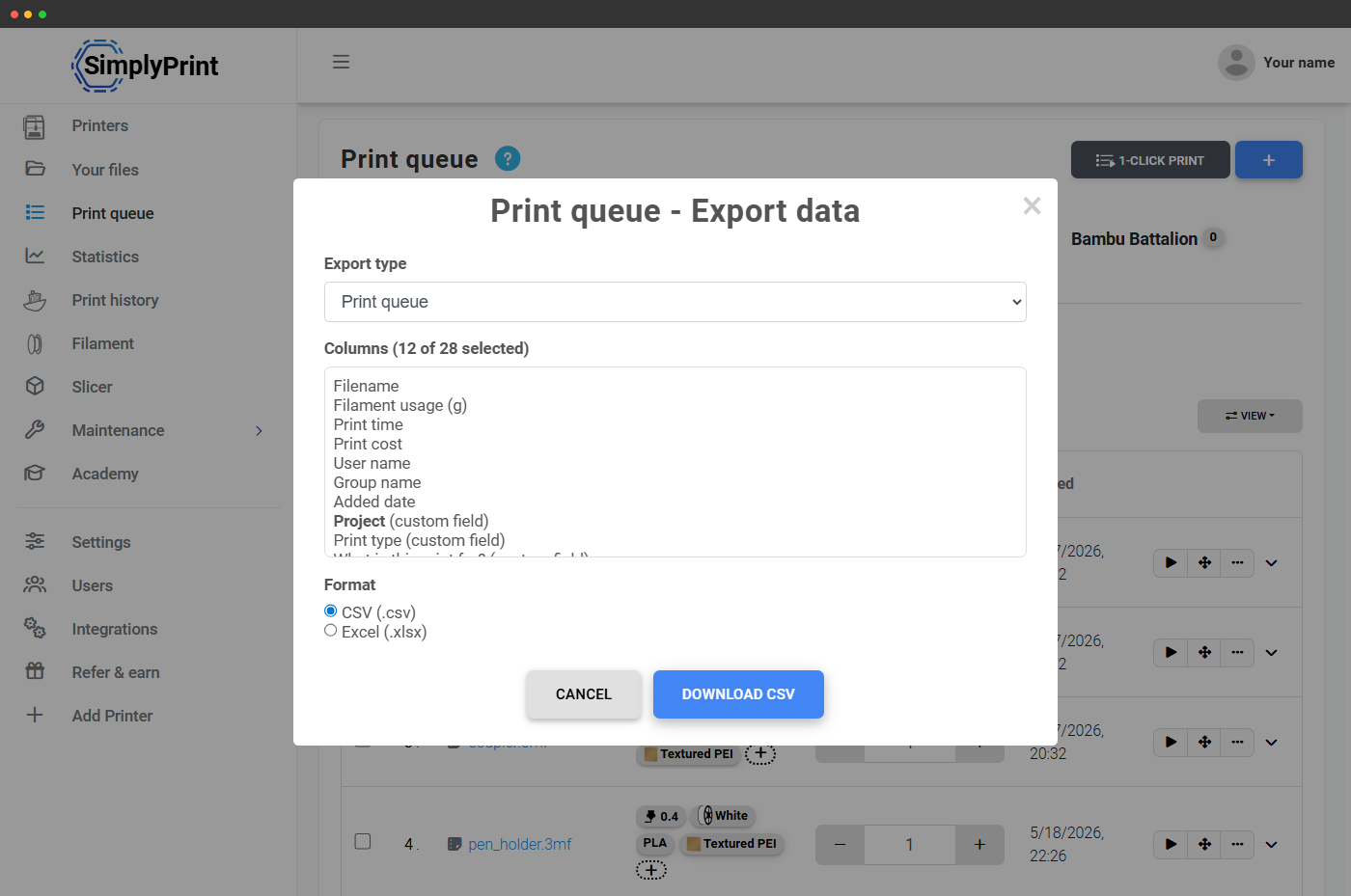
Exporting the print queue with custom field columns

New features

  • Custom Fields: On the Print Farm plan, create your own data fields and show them in the print queue, on files and on print jobs. A value set on a queue item follows the print into the print history.
  • API file uploads: Files can now be uploaded through the API, which was not possible before: upload the file to an endpoint, get a token back, and use it in the existing endpoints to queue the file, print it or save it to your files. See the API documentation.
  • Set table column order: In every table in the panel, such as the print queue and the print history, drag the columns into the order you want under "View", where you can also hide the ones you do not need. The order is saved per user.
  • Multi-tagging for printers: Tag several printers at once. Before, only files and queue items could be multi-tagged.

Improvements: Print history CSV export · Fewer clicks to clear a bed · A faster G-code analysis · Close button on narrow popups · Spool limit on the Filament page · 3MF splitter height, and 1 more

Show all 7 improvements
  • Print history CSV export: The print history export has many new fields and a whole new format.
  • Fewer clicks to clear a bed: When AutoPrint is paused for the whole farm, clearing a bed by hand no longer asks you to tick the "I understand" box. A user's suggestion, built the day after it was made. On the web for now; the mobile app follows. From suggestion #253
  • A faster G-code analysis: API uploads needed the G-code analysis rewritten to run fast on our servers. Before, a file of about 30 MB could take 40 seconds to analyse there.
  • Close button on narrow popups: Every narrow popup has a close button at its top right. Some had none, which could leave a phone stuck in the popup, or scrolling a long way to close it.
  • Spool limit on the Filament page: The Filament page and the Add filament popup tell you when you have reached, or are close to, the maximum number of spools.
  • 3MF splitter height: The 3MF splitter popup has a maximum height, so files with many plates no longer mean endless scrolling.
  • Links for queue groups: Each print queue group has its own address, for bookmarks, moving between groups and the browser's back and forward buttons.
9 bug fixes
  • Fixed the slicer's "Replace 3D model queue item with sliced version" button, which had been failing in about 70% of cases.
  • Fixed the slicer's auto-rotate not working properly for some files uploaded through Your files.
  • Fixed a login error caused by Unilogin user group mapping.
  • Fixed new spools sometimes not loading on the Filament page right after another spool was deleted.
  • Fixed print jobs from before the print cost feature (13 June 2023) not loading in the print history.
  • Fixed the table column order being wrong for accounts with a single printer.
  • Fixed 3MF files over 100 MB not uploading because they were treated as 3D models, though they may be printable files for Bambu Lab printers.
  • Fixed the "Done jobs" section missing from the print queue after the last update.
  • Fixed a queue item vanishing from view when its "Amount" field was emptied, until the page was reloaded.

Read the blog post

August 2024

· Web · From your suggestions

Teacher roles and classes for schools

Class editor with graduation date and Google Classroom link

New features

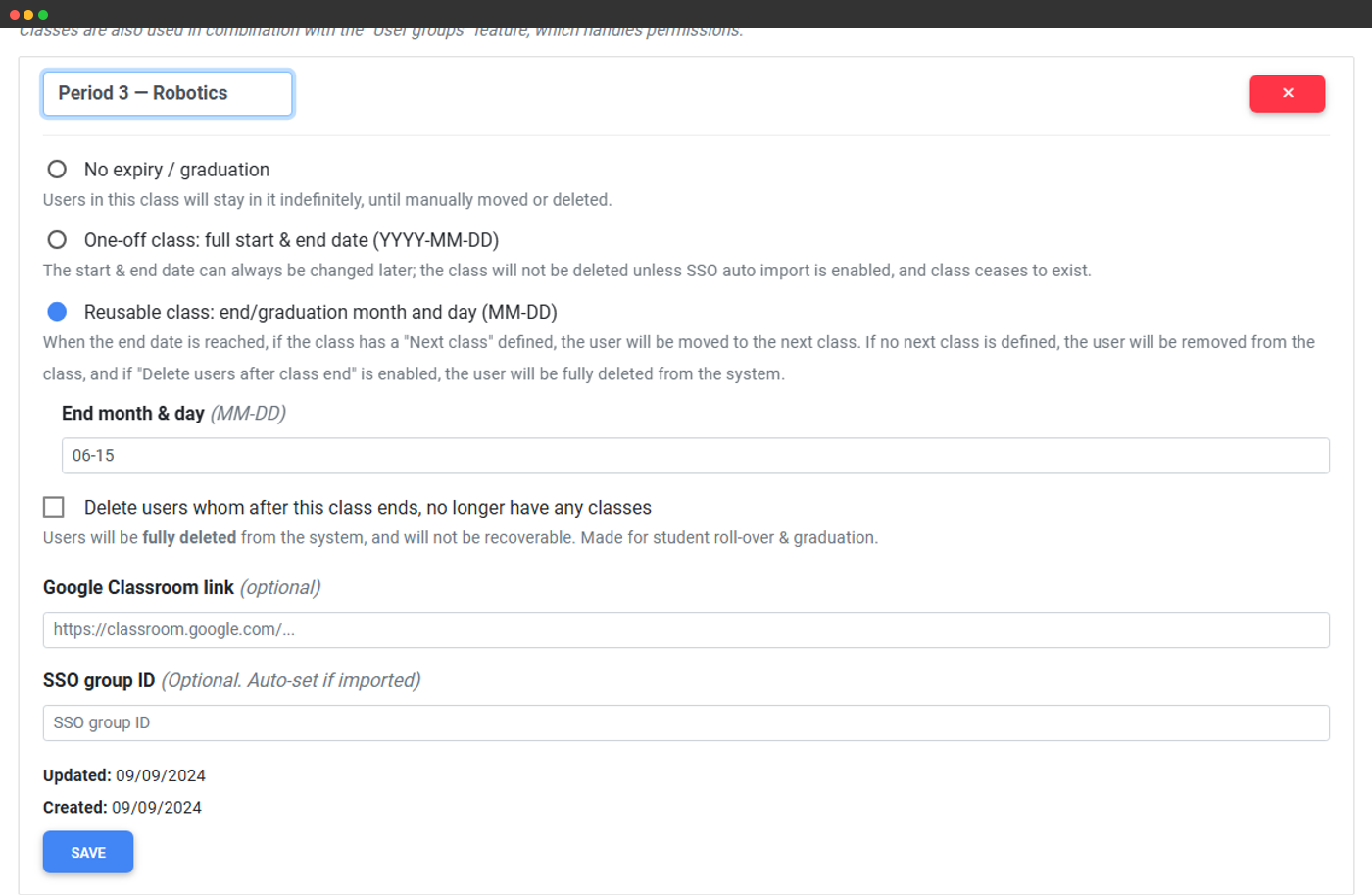
  • Teacher role and classes: Schools can mark a user as a teacher, and assign classes or grades to users.
  • Profile pictures: Choose your own profile picture. Released on 26 August.
  • New table design: A new table design on the Print queue, G-code snippets, Users, Print jobs, Printer logs, User sessions, Active organizations and Webhooks pages, and on every table in the partner portal.
  • LutraCAD integration: A new LutraCAD integration.

Improvements: User group mapping for single sign-on · Search the print queue · Print jobs table · More bulk actions · Export selected rows · OrcaSlicer integration, and 12 more

Show all 18 improvements
  • User group mapping for single sign-on: SAML single sign-on can place users in groups: tell us a user's groups at login, and a group that matches one of your SimplyPrint user groups puts the user in it. Set the mapping per group in your organization settings, and make sure your SSO provider exposes the groups.
  • Search the print queue: The print queue table can be searched, filtered and sorted.
  • Print jobs table: The print jobs table shows the printer's image, can be searched by file name, filtered by printer model and printer group, and sorted by status, file name, start time and print cost.
  • More bulk actions: Approve or remove several users at once, delete several G-code snippets at once, and tag several print queue items at once.
  • Export selected rows: Every table with an Export option can export just the rows you select.
  • OrcaSlicer integration: Live with OrcaSlicer 2.1.1 since 26 June: uploads over 100 MB, the whole 3MF with all its plates for Bambu Lab printers, an option to open SimplyPrint in the Device tab after uploading, and a printer setting to keep Bambu Lab's own device monitor there. A login error in the Device tab is fixed. See the pull request.
  • Active spool marker: On multi-tool printers, a small blue dot in the control panel's material section marks the active spool. Live since late April.
  • Cool plate setting: A printer setting that lets the G-code analysis accept temperatures up to 35 degrees below the material's own. Made for the Bambu Lab Cool Plate, where PLA prints much cooler than usual, and on by default for Bambu Lab printers. Live since late April.
  • Print cost calculation v2: The print cost calculation handles multi-material prints and MMS mapping, can default to tool 0 for Bambu Lab printers, and works in the Start print file selector for files you have not uploaded yet.
  • Tags in Quick queue: The Quick queue, the queue button on a printer, shows each item's tags and material information.
  • Purge temperatures in the analysis: The G-code analysis treats temperatures set before the print starts only as a maximum your nozzle must handle. The temperature shown is the one the print itself uses, so a hot purge no longer stops a file from matching.
  • Printer material syncing: A new printer setting for Bambu Lab and Prusa MMU3.
  • Item count on queue groups: A badge shows how many items a print queue group holds. From suggestion #179
  • Drag and drop for queue groups: Print queue groups support drag and drop. From suggestion #213
  • Faster print queue: "Done items" load only when needed, so the print queue opens faster.
  • File name in Start print via queue: The "Start print via queue" popup shows the file name. Live since 16 July.
  • Delete all done items: The button is back in the print queue's "Done items" section, to clean up the queue history quickly.
  • SKU printer settings: SKU printer settings are available to all print farms.
17 bug fixes
  • Fixed users without two-factor authentication often being logged out every 24 hours. Live since 22 July.
  • Fixed tags with a colour name but no colour value not showing in the tag line.
  • Fixed the Users page showing "Last online: Right now" for users without the app.
  • Fixed the printer actions menu running off the screen.
  • Fixed holiday gimmicks, such as April Fools', following UTC and not your local time.
  • Fixed dropdowns and collapsible sections not opening in the tag editor.
  • Fixed not being able to add a port to a printer's local IP address in the printer settings.
  • Fixed sidebar links with a full address, such as the one to the Hub, redirecting wrongly.
  • Fixed a "Validation failed" error that left some folders uneditable.
  • Fixed the Unilogin redirect not working on an account's registration page.
  • Fixed the last user group not being preselected for "Group to place new signups in", and the default user groups on the Schools plan being in the wrong order.
  • Fixed the filament "bought at" date being wrong for users outside UTC.
  • Fixed an extruder with a spool assigned showing static material data, on multi-extruder printers with several spools.
  • Fixed queue groups that only allow certain file types accepting, and uploading, other files.
  • Fixed the browser tab's title still updating after you left a print job opened from the print history.
  • Fixed 1-click print and clear bed not starting the next queue items with more than one MMS mapping.
  • Many performance improvements to the printer API server, for more stable printer connections.

Read the blog post

June 2024

· Web

Select all in the 3MF plate splitter

Plate splitter dialog for naming the plates to save

Improvements

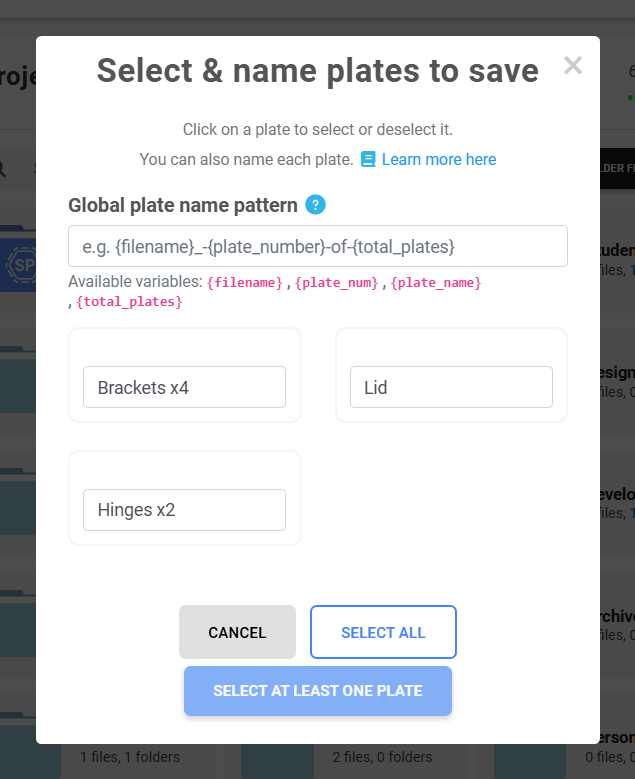
  • 3MF plate splitter: "Select all" and "Close" buttons in the plate splitter.
1 bug fix
  • Fixed exporting the print history for a date range.

Compiled afterwards from our development history.

May 2024

· Web

Better names for split 3MF plates

Improvements

  • 3MF plate splitting: Plates split from a 3MF file get more sensible names, and the wrong file is no longer uploaded after a split.
2 bug fixes
  • Fixed filament being created with a colour value that was too short or invalid.
  • Fixed renaming files and folders from the right-click menu.

Compiled afterwards from our development history.

April 2024

· Web

Printer models picked automatically for queued files

New features

  • Automatic printer model for queued files: When you add a file to the queue, SimplyPrint picks the printer models it was sliced for. A new setting under Settings > General turns this, and auto-tagging, on or off.
4 bug fixes
  • Fixed the print job page not loading for jobs without filament data.
  • Fixed deleting the first queue group, and a queue group's allowed file types not being resettable.
  • Fixed the "Can't save macro because you don't own snippet" error.
  • Fixed signing up failing when an organisation email address was typed with capital letters.

Compiled afterwards from our development history.

March 2024

· Web · From your suggestions

OrcaSlicer integration and a file system update

Cloud slicer using OrcaSlicer with models on a Creality bed

New features

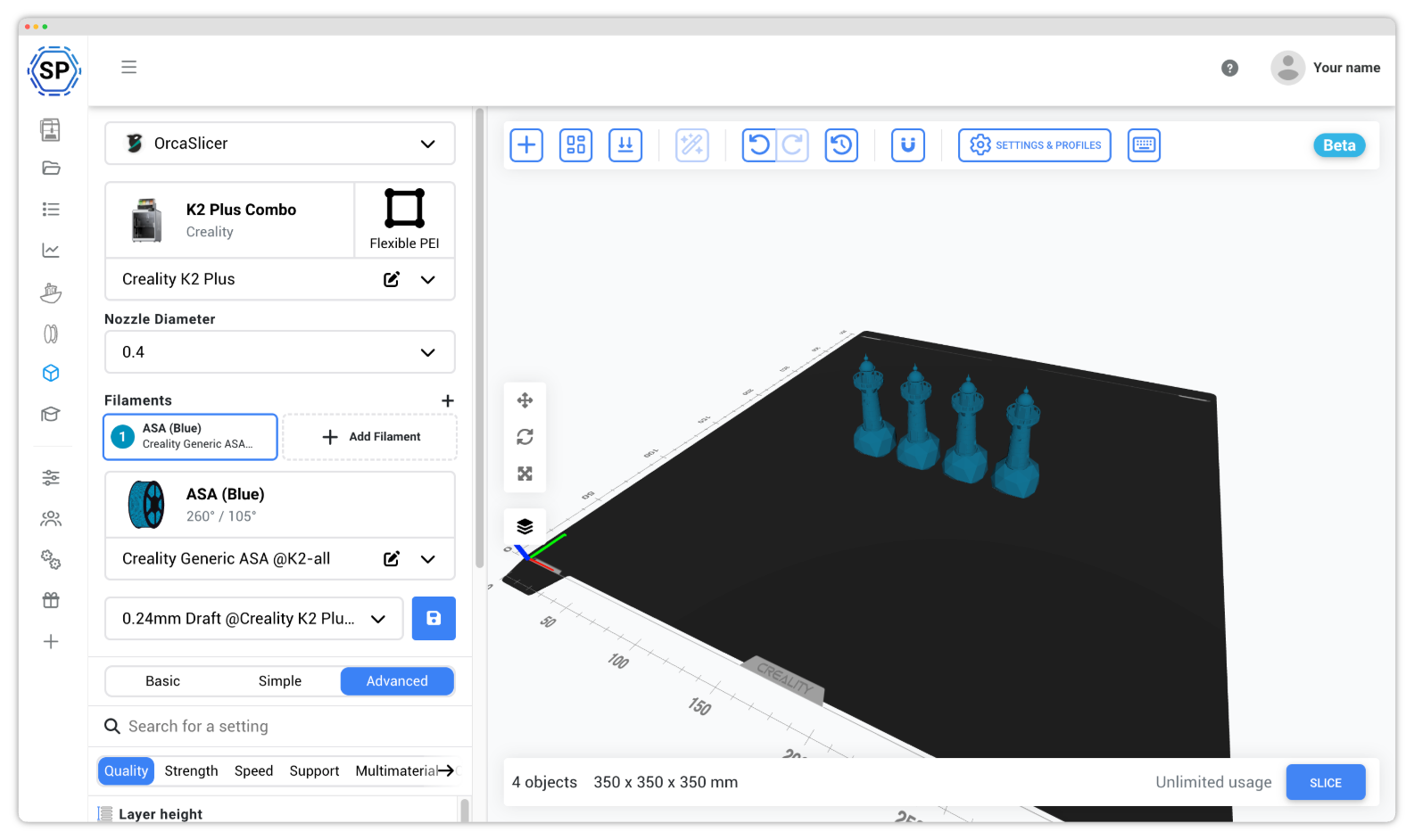
  • OrcaSlicer integration: Send sliced files straight from OrcaSlicer to SimplyPrint. Requested, shaped and tested by community members. From suggestion #103
  • File system and print queue update: A file system update, released about two weeks before this post, makes it more stable underneath and better to use.
  • Queue groups and printer models: Choose specific printers, printer groups or printer models for a whole print queue group, and printer models for single queue items. From suggestions #175, #174
  • Clear all AutoPrint cycles: Clear the AutoPrint cycles of all your printers at once with the new "Clear cycles" button.
  • Queue several files at once: Add several files to the queue in one go, by selecting them in Your files or from the Print queue page. From suggestion #97
  • Bulk-tagging files, as a preview: Tag several files at once in Your files. A public preview for now; printers and queue items come next.

Improvements: A new Add to queue popup · The popup on every queue add · Cmd-select on Mac · Steadier grid view · Selected items · Creation date in list view, and 8 more

Show all 14 improvements
  • A new Add to queue popup: The reworked popup lets you set how many of each item to queue, and assign tags.
  • The popup on every queue add: The same popup shows when you add files by drag and drop or from the Print queue page. If you would sooner not see it, turn it off under Settings > General > Print queue > "Show dialogue on print queue add".
  • Cmd-select on Mac: Hold Command on a Mac to select several files, as Ctrl always has.
  • Steadier grid view: Files and folders in the grid view no longer shift around when you select them.
  • Selected items: Selected items look clearer, and the file system works better on mobile.
  • Creation date in list view: The list view shows each file's creation date and can sort by it.
  • Tags in the file selector: Set tags for files in the file selector for Start print, Add to queue and Import file to slicer. Changing the tags or the printer's material updates the G-code analysis and the cost estimate as you go.
  • Unselectable files fade: Files you cannot pick in the current context, such as G-code files when importing to the slicer, are slightly faded.
  • Drag and drop: Dropping new files from your device, and moving files and folders by dragging, is clearer, less buggy and faster.
  • Drop several files anywhere: Drop several files from your computer anywhere in SimplyPrint.
  • Printer images in Compact and List views: The Printers page shows printer images in the Compact and List views. Since the printer selector uses the Compact view, picking the right printer there is easier too. From suggestion #176
  • Setup guides for Creality K1 and Klipper printers: New guides in the setup guide for the Creality K1 and K1 Max, and for printers that ship with Klipper such as the Neptune 4 series. The Raspberry Pi steps match the new Raspberry Pi Imager, and you can search for your printer to get the instructions for it.
  • Creality Slicer files: The G-code analysis supports files from Creality Slicer.
  • More from OrcaSlicer files: The G-code analysis reads more from OrcaSlicer files, such as layer height, material data and version number, as it already did for PrusaSlicer and Bambu Studio.
5 bug fixes
  • Fixed sorting in the list view not always being remembered.
  • Fixed links to folders with spaces in their name not working.
  • Fixed "Fetch cost" for print queue items not updating when the material tag changed, until a reload.
  • Fixed automatic tags overwriting the tags you set yourself, and added the G-code analysis to Add to queue to show what is tagged automatically.
  • Fixed the settings cog being misplaced at the top right of the list view.

Read the blog post

· Web

Webhooks and SAML single sign-on

Creating a webhook with Discord, Slack and Teams formats

New features

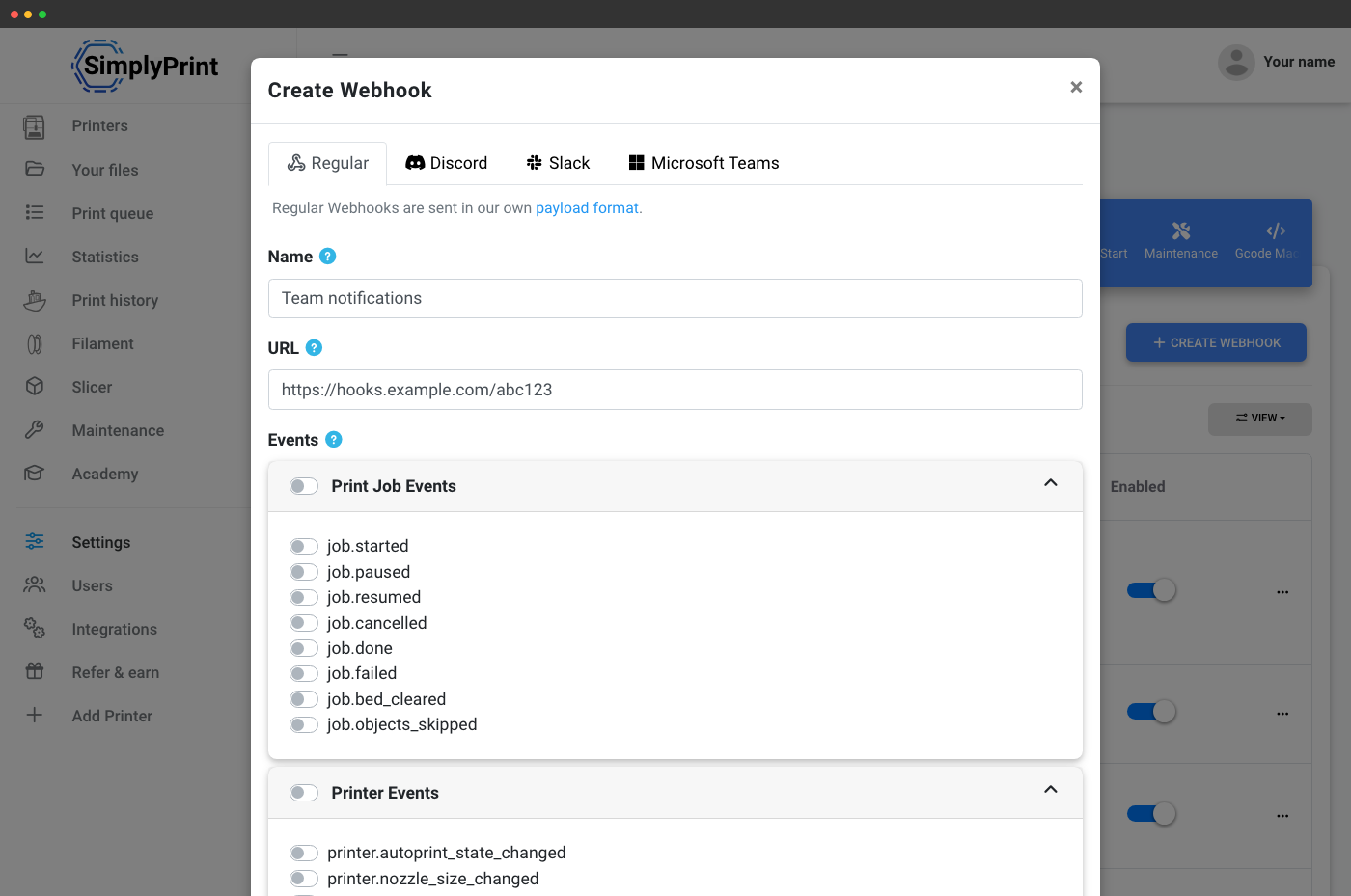
  • Webhooks: Connect SimplyPrint to third-party platforms with the new webhooks feature, a step towards making SimplyPrint easier to integrate with.
  • Single sign-on (SAML): Accounts on the Print Farm or Schools plan can turn on SAML single sign-on in their organization settings.

Improvements

  • New login and signup: The login and signup pages were reworked. Pick your school or institution right on the login page to sign in through it.
  • Unilogin: Full support for Unilogin, the login service of Danish schools.
10 bug fixes
  • Fixed printer sorting, which had been half broken for some accounts.
  • Fixed a printer's number of extruders not being synced to its OctoPrint printer profile.
  • Fixed the filament type name sometimes missing from the filament list.
  • Fixed the slicer not loading in Chromium-based browsers because of a cookie problem.
  • Fixed queue matching by colour not reacting to assigned spools.
  • Fixed having to reload the page after deleting the last queue group.
  • Fixed the file name showing twice in the Quick queue popup.
  • Fixed matching, G-code analysis and tag issues not showing when you hover a printer in the printer selector.
  • Fixed a selected printer showing as deselected in the printer selector when it no longer had the right material or tags.
  • Fixed the extruder icon and number showing on filament usage when only one extruder was used.

Read the blog post

· Web

Link your account to single sign-on

Improvements

  • Link your account to single sign-on: In your security settings, link your account to your organisation's single sign-on, or unlink it again.
3 bug fixes
  • Fixed the G-code analysis missing the filament and time estimate in small files.
  • Fixed 1-click print not loading when the print queue was empty.
  • Fixed spools staying assigned to a printer that had been removed, which left them unusable.

Compiled afterwards from our development history.

January 2024

· Web

Choose the account an app may access

Improvements

  • Log in with SimplyPrint: When you authorise an app with your SimplyPrint login, such as the Cura plugin, you now choose which of your accounts it may access.
3 bug fixes
  • Fixed renaming a folder from the right-click menu in Your files.
  • Fixed search and sorting not being applied in the file selector for Start print and Add to queue.
  • Fixed AutoPrint trying to clear a print that had already been cleared.

Compiled afterwards from our development history.