Meet an alternative to Spoolman

How does SimplyPrint compare with Spoolman? What's the best 3D printing cloud platform? Discover why SimplyPrint might be what you and your printer never knew you were missing!

Get started - free forever Jump to the comparison table

Looking for Spoolman alternatives?

Spoolman is a free, open-source, self-hosted filament inventory: a tidy database of your spools that you run on your own server. It's genuinely good software, and if you live in Klipper and Moonraker and want to own your data, it's a sensible pick.

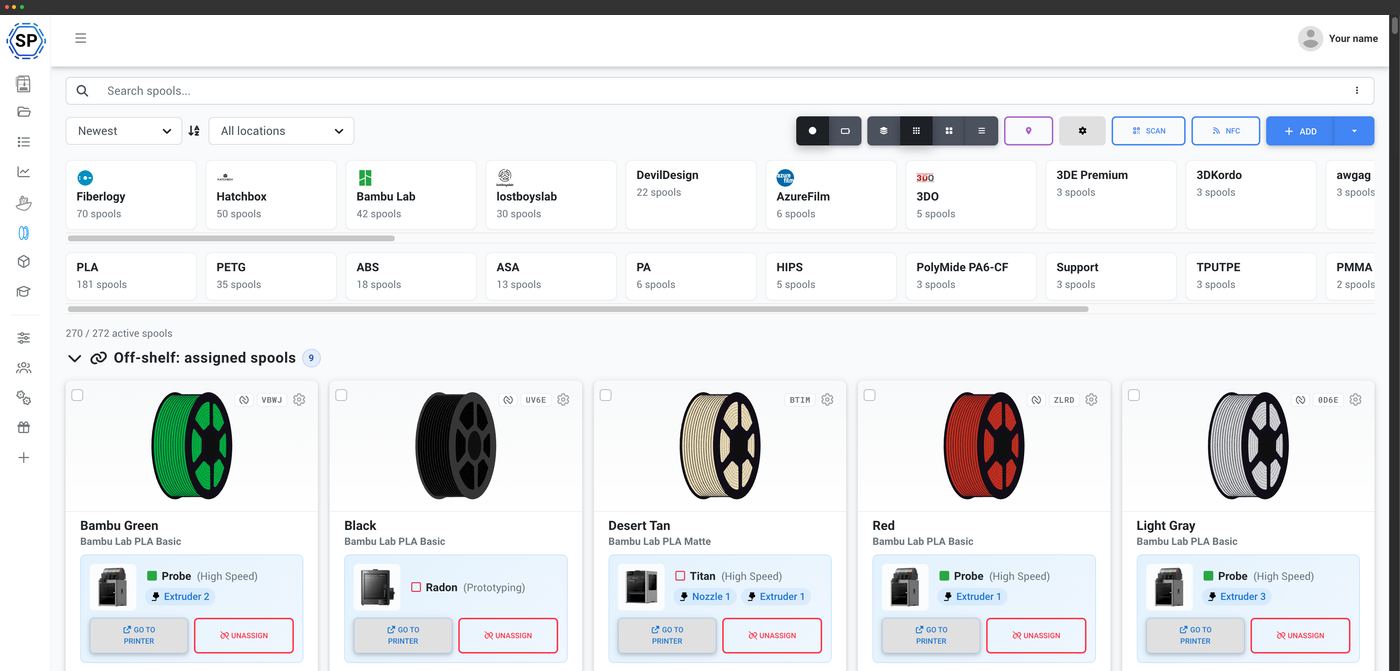
But Spoolman is a database, not a tracker. It doesn't connect to your printers; it waits for other software to tell it what you used. SimplyPrint's filament manager works the other way around: it's connected to your printers, reads the G-code of every print, and keeps each spool accurate on its own, with no plugins, no scale, and no server for you to run. Here's a fair, side-by-side look, first purely as a filament manager, then as the whole platform.

SimplyPrint filament manager

There's a lot more to the SimplyPrint filament manager

Automatic usage tracking, NFC across every standard, Bambu & Creality AMS auto-import, direct Dymo & Zebra label printing, drying, storage locations, a mobile app and the Open Filament Database. See it all, with screenshots, on one page.

Explore the filament manager
The SimplyPrint filament manager

Compare Spoolman vs SimplyPrint for:

The bottom line

Spoolman is a free, MIT-licensed, self-hosted spool database, a great fit if you run Klipper/Moonraker, want to own your data, and don't mind wiring up a plugin to feed it usage. It doesn't connect to printers itself.

SimplyPrint is a connected filament manager: it reads the G-code of every print on your printer and deducts filament automatically, with no plugins, no scale and no server to run, plus native NFC, Bambu and Creality AMS auto-import, direct Dymo and Zebra label printing, and the open, MIT-licensed Open Filament Database (143 brands and growing). And the filament manager is free on every plan. If you want tracking that just happens across any printer brand, that's SimplyPrint; if self-hosting a database you control is the point, that's Spoolman.

Comparing purely as a filament manager, the deep, head-to-head view.

A filament manager that's actually connected to your printer

This is the heart of it. Spoolman is a database that other software has to feed; it doesn't talk to your printers. SimplyPrint is connected to them, so your inventory stays right on its own.

Automatic usage tracking
SimplyPrint
We read the G-code of every print on a connected printer, convert it to grams and deduct it from the assigned spool when the print ends, automatically. No plugin, no scale, no spreadsheet.
Spoolman
Spoolman has no printer connection of its own. Automatic tracking works only if you separately run the Moonraker [spoolman] component or the OctoPrint-Spoolman plugin and set the active spool yourself, and only for Klipper or OctoPrint-hosted printers.
AMS & multi-material
SimplyPrint
Drop a tagged spool into a Bambu Lab AMS (or a Creality CFS or Anycubic ACE) and we auto-create the spool, assign it to the right slot and sync the AMS-measured weight.
Spoolman
No first-party AMS support. Bambu AMS workflows exist only through third-party Home Assistant or Docker community bridges; the native Bambu request has been open since 2023.
NFC, labels & hardware
SimplyPrint
Native NFC read and write across Bambu Lab, Creality CFS, Prusa OpenPrintTag, OpenSpool and OpenTag, from your phone, your browser or a USB reader, plus direct label printing to Dymo and Zebra thermal printers. No extra hardware to build.
Spoolman
No first-party NFC and no hardware of its own (NFC/RFID are long-standing open feature requests, served only by third-party community gadgets). It generates QR labels in the browser, but prints them through the OS dialog, with no built-in Dymo or Zebra driver.
The core difference is simple: SimplyPrint is connected to the printer, so tracking happens by itself; Spoolman is a database that other tools have to keep fed.

Open filament data, two different ways

Credit where it's due: Spoolman's filament data is genuinely open. So is ours. The difference is reach, how you contribute, and whether the data is wired into tracking.

The database
SimplyPrint
The Open Filament Database, MIT-licensed and stewarded by SimplyPrint, with 143 brands and growing, and editable in a no-code web editor by anyone, in minutes.
Spoolman
SpoolmanDB, also MIT-licensed and a real strength, but a separate single-maintainer repository with far fewer brands, contributed to only by opening a JSON pull request on GitHub.
Where the data goes
SimplyPrint
The same open data backs your slicing profiles and the automatic deduction, so adding a spool and tracking it are one connected flow.
Spoolman
The database fills in spool details, but consumption still has to be pushed in from a separate plugin you set up.
Spoolman's data is honestly open, and that counts. SimplyPrint uses an open database too, a larger one that anyone can edit straight from the browser, wired directly into automatic tracking.

Where Spoolman is the better pick

Spoolman is a well-made tool, and for some setups it's the right call. Credit where it's due:

Self-hosting & data ownership
SimplyPrint
Hosted for you (on-prem is an enterprise option), so there's no server to run, but it is our cloud.
Spoolman
Genuinely MIT-licensed and runs entirely on your own Pi, NAS or VPS with no cloud at all, ideal if data ownership or an air-gapped setup is a hard requirement.
A home in the Klipper / Moonraker world
SimplyPrint
We connect Klipper, Moonraker and OctoPrint printers natively, alongside every other brand.
Spoolman
Purpose-built to slot into a self-hosted Klipper stack, with a clean REST API and WebSocket updates and a rich community of plugins and bridges built on top.
If self-hosting and data ownership are non-negotiable, or you've built your setup around Klipper and Moonraker and enjoy running your own services, Spoolman is a fine choice, and it's free. If you'd rather the tracking just happen, across any printer brand, with no server to run, that's SimplyPrint.
The bottom line

Spoolman does one job, filament inventory, and self-hosts it well. SimplyPrint includes that same filament manager and surrounds it with the rest of a print operation: a print queue, a full cloud slicer, AI failure and bed detection, a maintenance system, teams and permissions, mobile apps and more, in one hosted platform that's free to start. In the table below, Spoolman's column is filament; ours is the whole platform.

The same filament comparison, plus everything else SimplyPrint does that a spool database doesn't.

A filament manager that's actually connected to your printer

This is the heart of it. Spoolman is a database that other software has to feed; it doesn't talk to your printers. SimplyPrint is connected to them, so your inventory stays right on its own.

Automatic usage tracking
SimplyPrint
We read the G-code of every print on a connected printer, convert it to grams and deduct it from the assigned spool when the print ends, automatically. No plugin, no scale, no spreadsheet.
Spoolman
Spoolman has no printer connection of its own. Automatic tracking works only if you separately run the Moonraker [spoolman] component or the OctoPrint-Spoolman plugin and set the active spool yourself, and only for Klipper or OctoPrint-hosted printers.
AMS & multi-material
SimplyPrint
Drop a tagged spool into a Bambu Lab AMS (or a Creality CFS or Anycubic ACE) and we auto-create the spool, assign it to the right slot and sync the AMS-measured weight.
Spoolman
No first-party AMS support. Bambu AMS workflows exist only through third-party Home Assistant or Docker community bridges; the native Bambu request has been open since 2023.
NFC, labels & hardware
SimplyPrint
Native NFC read and write across Bambu Lab, Creality CFS, Prusa OpenPrintTag, OpenSpool and OpenTag, from your phone, your browser or a USB reader, plus direct label printing to Dymo and Zebra thermal printers. No extra hardware to build.
Spoolman
No first-party NFC and no hardware of its own (NFC/RFID are long-standing open feature requests, served only by third-party community gadgets). It generates QR labels in the browser, but prints them through the OS dialog, with no built-in Dymo or Zebra driver.
The core difference is simple: SimplyPrint is connected to the printer, so tracking happens by itself; Spoolman is a database that other tools have to keep fed.

Open filament data, two different ways

Credit where it's due: Spoolman's filament data is genuinely open. So is ours. The difference is reach, how you contribute, and whether the data is wired into tracking.

The database
SimplyPrint
The Open Filament Database, MIT-licensed and stewarded by SimplyPrint, with 143 brands and growing, and editable in a no-code web editor by anyone, in minutes.
Spoolman
SpoolmanDB, also MIT-licensed and a real strength, but a separate single-maintainer repository with far fewer brands, contributed to only by opening a JSON pull request on GitHub.
Where the data goes
SimplyPrint
The same open data backs your slicing profiles and the automatic deduction, so adding a spool and tracking it are one connected flow.
Spoolman
The database fills in spool details, but consumption still has to be pushed in from a separate plugin you set up.
Spoolman's data is honestly open, and that counts. SimplyPrint uses an open database too, a larger one that anyone can edit straight from the browser, wired directly into automatic tracking.

Where Spoolman is the better pick

Spoolman is a well-made tool, and for some setups it's the right call. Credit where it's due:

Self-hosting & data ownership
SimplyPrint
Hosted for you (on-prem is an enterprise option), so there's no server to run, but it is our cloud.
Spoolman
Genuinely MIT-licensed and runs entirely on your own Pi, NAS or VPS with no cloud at all, ideal if data ownership or an air-gapped setup is a hard requirement.
A home in the Klipper / Moonraker world
SimplyPrint
We connect Klipper, Moonraker and OctoPrint printers natively, alongside every other brand.
Spoolman
Purpose-built to slot into a self-hosted Klipper stack, with a clean REST API and WebSocket updates and a rich community of plugins and bridges built on top.
If self-hosting and data ownership are non-negotiable, or you've built your setup around Klipper and Moonraker and enjoy running your own services, Spoolman is a fine choice, and it's free. If you'd rather the tracking just happen, across any printer brand, with no server to run, that's SimplyPrint.
Join 90.000+ print farms & hobbyists
who use SimplyPrint
Get started

Free forever. No credit card.

Our users love us. Rated Excellent on Trustpilot.

4.7 Trustpilot score

Spoolman and SimplyPrint comparison

Nothing is black-and-white, and there are always pros and cons to consider when choosing a 3D printing cloud solution!
And we're not here to simply tell you, that SimplyPrint is the best - we want you to make an informed decision, and of course there are pros of using Spoolman as well!

Pros of using Spoolman

Spoolman has real strengths, and they're worth being honest about:

  • Genuinely free and open-source: both the app and its SpoolmanDB filament database are MIT-licensed, so you can fork, audit and contribute to them.
  • Self-hosted, your data: it runs entirely on your own Pi, NAS or VPS with no cloud dependency, a real plus if you want full data ownership or an air-gapped setup.
  • A deep, well-modelled inventory: per-spool cost, locations and archiving, batch/lot numbers, lifecycle status and custom fields.
  • Built for the Klipper crowd: a clean documented REST API and WebSocket updates make it a first-class fit for Klipper/Moonraker/Fluidd/Mainsail and OctoPrint, with a healthy plugin ecosystem.
  • Active and well-supported: a popular, actively maintained project (2,500+ GitHub stars), not abandonware.

Cons of using Spoolman

Where Spoolman falls short if you want tracking that just happens:

  • It isn't connected to your printers: Spoolman never measures usage itself. Automatic deduction works only if you separately install and configure the Moonraker [spoolman] component or the OctoPrint-Spoolman plugin, and only for Klipper or OctoPrint-hosted printers.
  • No first-party NFC, AMS or hardware: native NFC read/write, Bambu and Creality AMS auto-import and direct thermal label printing aren't built in. NFC/RFID and a Bambu AMS link are open feature requests, met only by third-party community tools.
  • No mobile app and no native drying tracker: it's a responsive web app only, and there's no built-in mark-as-dried / days-since-dried tracking.
  • You run the server: hosting, TLS, backups, remote access and updates are all on you, which is exactly what some people want, and a chore for others.

Spoolman vs. SimplyPrint

Side-by-side list comparison of details and features in Spoolman and SimplyPrint

Spoolman logo SimplyPrint logo
Filament management
Free to use
Open-source / self-hostable ?
Filament database ? SpoolmanDB (separate) Open Filament Database
Open, community-built database ?
Add filament without code or GitHub ?
Connects directly to your printer ?
Automatic usage tracking (no manual subtracting) ? Via Moonraker / OctoPrint plugin
AMS auto-import (Bambu / Creality / Anycubic) ? Bambu, Creality, Anycubic + more
Read filament NFC tags
Write filament NFC tags
Label printing (direct to Dymo / Zebra) QR labels; no thermal driver Dymo & Zebra
Barcode / QR scanning
Drying tracking
Storage locations Text field, no nesting
Cost & spend tracking
Custom fields
Mobile app (iOS & Android)
Multi-user / team access
Import your existing spools ?
Developer API for filament data ?
Compare Learn more Learn more
Spoolman logo SimplyPrint logo
Filament management
Free to use
Open-source / self-hostable ?
Filament database ? SpoolmanDB (separate) Open Filament Database
Open, community-built database ?
Add filament without code or GitHub ?
Connects directly to your printer ?
Automatic usage tracking (no manual subtracting) ? Via Moonraker / OctoPrint plugin
AMS auto-import (Bambu / Creality / Anycubic) ? Bambu, Creality, Anycubic + more
Read filament NFC tags
Write filament NFC tags
Label printing (direct to Dymo / Zebra) QR labels; no thermal driver Dymo & Zebra
Barcode / QR scanning
Drying tracking
Storage locations Text field, no nesting
Cost & spend tracking
Custom fields
Mobile app (iOS & Android)
Multi-user / team access
Import your existing spools ?
Developer API for filament data ?
General
Has free plan
Free printers 2
Max cost Free, self-hosted Free, or from $4/printer/mo
Free cloud storage 1GB
Usage based cost
Unlimited printing
Supports all printers
Features
Remote access
Knows your printer
Cloud files
Print queue
Livestream
Gcode analysis
A.I failure detection
AI Bed Check (is the bed clear?)
AutoPrint / continuous printing
Maintenance & servicing system
Custom fields
Staggered Start (for power draw)
Print job history
Print remotely
Built-in slicer
Multi-printer friendly
Multi-print
Multi-stream
Statistics
API
Slicer smart-rotation
Smart filament change
Bed level helper
Organization
Multiple users
User groups / ranks
User permissions
School plan
Shared files & folders
Shared slicer profiles
Hub
Custom domains
SSO (single sign-on)
Notifications
Email notifications
Push (mobile / app) notifications
SMS / text message notifications
Apps
Android app
iOS app
"PWA" (installable web-application)
Security & privacy
Account 2-factor authentication
Privacy-minded analytics & data-gathering ?
Support
Live-chat support
Phone support
Email support
Firmware & gateway support
OctoPrint install
Native Moonraker support
Mainsail install
Fluidd install
Klipper support
Duet3D integration
Direct Prusa support (MK4, XL and up / new main boards)
Direct Bambu Lab printer integration
Support for custom integrations
Enterprise & partners
OEM
Partner program (reseller / distributor)
Affiliate program
On-prem / self-hosting ? Contact us
Compare Learn more Learn more

Contact us if you think we made a mistake in our comparison!

Spoolman vs. SimplyPrint: frequently asked questions

Is SimplyPrint or Spoolman better for filament tracking?

It depends on what you want. Spoolman is the better fit if you specifically want to self-host an open-source database on your own server and you live in the Klipper/Moonraker world. SimplyPrint is the better fit if you want filament tracking that happens automatically: it connects to your printers, reads the G-code of each print and deducts filament on its own, across any printer brand, with native NFC, Bambu and Creality AMS auto-import, direct Dymo/Zebra labels and the Open Filament Database, free on every plan.

Does Spoolman track filament usage automatically?

Not on its own. Spoolman is a database that doesn't connect to printers; its own wiki notes it doesn't need to know about your printers at all. Automatic deduction works only if you separately install and configure the Moonraker [spoolman] component or the OctoPrint-Spoolman plugin and set the active spool, and only for Klipper or OctoPrint-hosted printers. SimplyPrint reads the G-code of every print on a connected printer and deducts usage automatically, with nothing to install.

Is Spoolman free?

Yes, completely. Spoolman is free and MIT-licensed, and so is its SpoolmanDB filament database. You do provide and run the server it lives on. SimplyPrint's filament manager is also free, included on every plan down to Free, with automatic tracking and the Open Filament Database, and there's no server for you to run.

Can I import my Spoolman spools into SimplyPrint?

Yes. SimplyPrint lists Spoolman as a supported import source, and Spoolman can export your spools, filaments and vendors as CSV or JSON through its API, so moving your inventory over is straightforward, with brands matched against the Open Filament Database as they import.

Does Spoolman work with the Bambu Lab AMS or NFC tags?

Not with first-party support. Spoolman has no built-in AMS integration or NFC reading/writing; both are long-standing open feature requests, and the workflows that exist rely on third-party community bridges and gadgets. SimplyPrint reads Bambu AMS tags to auto-create and auto-assign spools and sync their weight, reads and writes NFC across Bambu, Creality CFS, Prusa OpenPrintTag, OpenSpool and OpenTag, and works from your phone, browser or a USB reader.

Is the Open Filament Database the same as SpoolmanDB?

No, they're separate projects. SpoolmanDB is Spoolman's own MIT-licensed filament list, contributed to via GitHub pull requests. The Open Filament Database is a separate MIT-licensed, community-maintained database stewarded by SimplyPrint, with more brands and a no-code web editor anyone can use, and it's wired directly into SimplyPrint's presets and automatic tracking.

Do I have to run a server to use SimplyPrint?

No. Spoolman is self-hosted, so you run, secure and back up the server yourself, which some people specifically want. SimplyPrint is hosted for you, so you just sign in and start; an on-premises option is available for enterprise customers who need it.

Conclusion
Why SimplyPrint is the Top Spoolman Alternative

We made SimplyPrint due to the fact, that nothing else on the market quite fit our needs. We wanted a platform that was easy to use, but still had all the features we needed. We wanted a feature-rich platform, intuitive and easy to use, with a great user experience and actual innovation within the 3D print management software space.

In summary, we - humble and unbiased as we are 😉 - believe that the SimplyPrint platform is a great Spoolman alternative!

Get started - free forever

On this page