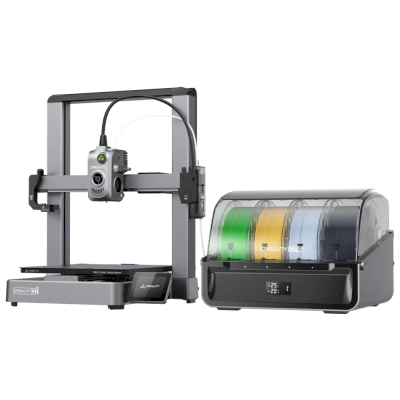
The Kobra 4 is Anycubic's quiet, fast open-frame bedslinger: a 260 mm build cube, a 300 degrees C hotend, a built-in 720p camera and a 600 mm/s top speed. It is for hobbyists who want a simple PLA and PETG printer, and the Combo adds the ACE 2 Pro for four colours.
Does the Anycubic Kobra 4 3D printer work with SimplyPrint, OctoPrint, Mainsail and Fluidd?
Each way of connecting it, what it needs, and how to set it up.
SimplyPrint Client
Not confirmed yet - help us find out
Anycubic's Kobra OS; the Client supports the Kobra 3 and S1 families, but nothing yet says the Kobra 4 firmware is the same.
Source
Kobra OS is Klipper-based but has no Moonraker; Rinkhals does not list the Kobra 4.
Source
What slicer to use for the Anycubic Kobra 4
Use Anycubic's own slicer, Anycubic Slicer Next: none of the slicers in SimplyPrint's cloud has a profile for the Anycubic Kobra 4, and it doesn't take standard G-code that we know of.
Anycubic Kobra 4 specifications: bed size, print height and more
Its size, temperatures, multi-material and how it connects, from the maker and our own research.
Read more by the manufacturer
Size
Build volume
260 x 260 x 260 mm
Bed type
Square
Bed size
260 x 260 mm
Max print height
260 mm
Printing
Enclosure
Open frame
Motion system
Bed slinger
Max print speed
600 mm/s
Max extruder temperature
300 °C
Has heated bed
Yes
Max bed temperature
100 °C
Number of nozzles
1
Toolheads
1
Direct drive
Yes
Probing tool / Auto Bed Leveling
Yes
Filament width
1.75 mm
Multi-material
Multi-material units it works with
Anycubic ACE Pro, Anycubic ACE 2 Pro
Toolchanger or hotend changer
No
IDEX (independent dual extruders)
No
Connecting
Connectivity
Wi-Fi, USB
Built-in camera
Yes
Prints from
USB stick
Supports serial printing
No
Shipped firmware
The maker's own
Files and slicing
Supported file formats
G-code (.gcode, .gco, .g)
The printer
Printer manufacturer / brand
Anycubic
Printer model name
Kobra 4
Made by a company from
China
Launched
May 2026
Still made
Yes
Disclaimer:
We strive to keep this information as current and accurate as possible, but cannot guarantee its completeness or reliability. Our data is based on user submissions and manufacturer references.
What filament can the Anycubic Kobra 4 print?
Filament compatibility for the Anycubic Kobra 4: the materials Anycubic lists for it.
Filament
Suitability
Notes
PLA
Great
On the maker's list of materials for this printer.
PETG
Great
On the maker's list of materials for this printer.
TPU & flexibles
Great
On the maker's list of materials for this printer.
ABS & ASA
With care
The bed is hot enough, but ABS and ASA warp without an enclosure, which is strongly recommended for clean prints.
Nylon (PA)
With care
Possible with care - an enclosure and very dry filament are essential.
Polycarbonate (PC)
With care
On the edge - PC really wants an enclosed, hot chamber to avoid warping.
Carbon-fiber & glass-filled
With care
Possible if you fit a hardened or wear-resistant nozzle - the abrasive fibers quickly wear a stock brass nozzle.
Tip: this is a general guide from the printer's specs - always check your filament's recommended settings. With SimplyPrint you can save a profile for each spool and track exactly what filament you have in stock.
What reviewers say about the Anycubic Kobra 4
Reviews from people who test printers for a living. We link to them; the opinions are theirs.
Tested an early-production Kobra 4 Combo with the ACE 2 Pro and calls it an updated Kobra 3 with A1-style looks. Likes the quick-swap high-flow hardened nozzle, quick assembly, quiet running and better colour handling. Dislikes slow filament swaps, wasteful purging, the large footprint and awkward TPU. Subtitle: did the Kobra X do it better? Probably.
“It doesn’t do much to move the needle when compared to its brethren, but it's a solid machine and a good value.”
When to choose the Anycubic Kobra 4
Choose the Kobra 4 when you want an easy, quiet printer at a low price and mostly print PLA and PETG: Tom's Hardware, testing the Combo, called it a solid machine and good value, though an evolution of the Kobra 3 more than a leap. Choose the Combo for colour, but note Tom's Hardware found filament swaps slow and purging wasteful. If you need ABS or ASA or a closed chamber, pick an enclosed printer such as the Bambu Lab P2S or Creality K2; if you want a larger plate, the Kobra 3 Max V2 Combo is bigger.
Pros
Quiet: Anycubic gives 48 dB in standard mode and 45 dB in silent mode, and Tom's Hardware also found it quiet.
Quick assembly, about 15 minutes by Anycubic's claim, and a quick-swap high-flow hardened nozzle (Tom's Hardware).
A built-in 720p camera with spaghetti and foreign-object detection, plus time-lapse and an app (Anycubic).
The Combo adds the ACE 2 Pro for four colours (up to eight with two units) and better colour handling (Tom's Hardware, Anycubic).
Tom's Hardware rated the Combo 4/5 and a good value.
Cons
Open frame with no enclosure, so it is best kept to PLA, PETG and TPU.
Filament swaps with the ACE 2 Pro are slow and purging is wasteful, and TPU is awkward (Tom's Hardware).
A large footprint for a 260 mm printer (Tom's Hardware).
We have not confirmed how it connects to SimplyPrint; Klipper is ruled out and OctoPrint unlikely, so check before buying for a fleet.
Who it suits
SchoolsCan work
Quiet and easy to set up, with a camera, but open and without confirmed SimplyPrint support, so queueing student prints for approval is not assured.
HobbyistsGood fit
Quiet, quick to set up and good value, with an optional four-colour Combo; it is more evolution than revolution (Tom's Hardware).
BusinessesCan work
Good for PLA and PETG prototypes, but open, with slow colour changes and no confirmed SimplyPrint route.
Print farmsNot a good fit
SimplyPrint compatibility is unconfirmed and it has no enclosure or plate-clearing kit in our sources.
Printers like the Anycubic Kobra 4 that work with SimplyPrint
Printers from the same maker, of a similar size, printing the same engineering materials or multi-material like it, that you can buy today and that we know work with SimplyPrint.
Who makes the Anycubic Kobra 4, and how open Anycubic leaves you: whether its printers run without its cloud, take any filament and slicer, and can be repaired. Each area is rated from public sources.
Openness: Mixed (3.0 of 5)
Mixed
Walled gardenOpen
Anycubic is a Chinese 3D printer maker founded in 2015. It sells the Kobra line of FDM printers, including the enclosed Kobra S1 and S1 Max, the large Kobra 3 Max and the low-cost Kobra X, the ACE Pro multi-material unit and Photon resin printers. Its printers are aimed at hobbyists and home users at budget to mid-range prices.
Founded:
2015 ·
Headquarters:
China (its global store is run by Hongkong Anycubic Technology Co., Limited) ·
Website:www.anycubic.com
Anycubic is mixed: its printers work locally in LAN mode, take third-party filament and slicers, and have spare parts and guides, but its published firmware source leaves proprietary parts closed, custom firmware is unsupported, and its cloud had a security incident in 2024.
Firmware and custom firmware ●●●●●
The Kobra 3, 3 Max and S1 run Klipper-go, Anycubic's Go port of Klipper. Anycubic published its source with the kernel and U-Boot under GPL, for the Kobra 3 in October 2024 and for the wider family in October 2025, but says some proprietary features are kept closed, and that modifying the firmware voids the warranty. The community project Rinkhals adds Fluidd, Mainsail and SSH, and reports that the newer Kobra X only accepts signed updates.
[1][2][3]
Local control and integrations ●●●●●
LAN mode lets Anycubic Slicer Next send prints, show progress and stream video on the local network without an account, and the S1's firmware 2.5.9.9 added sending from OrcaSlicer. With LAN mode on, the cloud, the app and AI failure detection are off, and the S1 must leave LAN mode and be bound to an account to update its firmware. Anycubic documents no local API for other software; Moonraker, Fluidd and Mainsail come only with the community firmware Rinkhals.
[4][5][3]
Third-party filament, slicers and parts ●●●●●
Third-party filament works. Anycubic Slicer Next is an open-source OrcaSlicer fork, and recent firmware accepts files sent from OrcaSlicer. Hotends, extruders and many other parts are model-specific Anycubic parts.
[6][5][7]
Repairs and spare parts ●●●●●
Anycubic's store sells hotends, extruders, motherboards, heated beds, motors and screens, and its wiki has replacement guides for current models, for example the Kobra S1 Max XY motors and the Kobra X Y-axis motor.
[7][8][9]
Data and privacy ●●●●●
LAN mode keeps data on the local network, but the app and cloud need an account. Anycubic's privacy policy allows broad collection, including product usage, device signals and nearby Wi-Fi access points, and storage in the United States. In February 2024 a flaw in its cloud MQTT server let a third party push a file to Kobra 2 printers; Anycubic apologised and patched it.
[10][11][4]
Community and documentation ●●●●●
Active user community and a wiki with guides and error codes for each model. Source releases leave proprietary parts closed, and custom firmware is a community effort.
[4][2][3]
Pros
Budget to mid-range prices, with multi-colour Combo bundles.
LAN mode works without an account.
Spare parts and replacement guides for current models.
Open-source slicer, and third-party filament works.
Cons
Published firmware source leaves some features closed; modifying firmware voids the warranty.
LAN mode turns off the app, cloud and AI failure detection, and firmware updates need the cloud.
The privacy policy allows broad data collection.
Its cloud was used to push files to printers in 2024 (fixed).
Track record
October 2025: Anycubic published Klipper-go, its Go port of Klipper, as a standalone project for the Kobra 3, Kobra 3 V2, Kobra 3 Max and Kobra S1, with the MCU firmware, Linux kernel and U-Boot sources, on GitHub under GPL-3.0. It says some proprietary features remain closed.
[2][12]
October 2024: Anycubic published the Kobra 3 firmware sources (Klipper-go, MCU firmware, Linux kernel and U-Boot) on GitHub under GPL-3.0.
[1]
February 2024: A third party used a vulnerability in Anycubic's cloud MQTT server to make Kobra 2 Pro/Plus/Max printers download a file named 'hacked_machine_readme.gcode'. Anycubic counted 237 affected printers and over 2,000 that received the file, apologised for its late response, tightened cloud authorisation and released a firmware fix.
[11]
Researched from 14 sources, last checked October 18, 2026. Show sources
Is the Anycubic Kobra 4 compatible with SimplyPrint?
We don't know yet. SimplyPrint works with 130+ brands and 600+ models via OctoPrint, Klipper and built-in integrations; if you have a Anycubic Kobra 4, our compatibility check tells you in a few questions how it could connect.
What slicer should I use for the Anycubic Kobra 4?
Use Anycubic's own slicer, Anycubic Slicer Next: none of the slicers in SimplyPrint's cloud has a profile for the Anycubic Kobra 4, and it doesn't take standard G-code that we know of.
What filament can the Anycubic Kobra 4 print?
Anycubic lists PLA, PETG and TPU & flexibles for the Kobra 4.
What is the Anycubic Kobra 4's bed size and build volume?
The Anycubic Kobra 4 has a 260 x 260 mm print bed and prints up to 260 mm tall, a build volume of about 260 x 260 x 260 mm. See the full specifications table above for bed type, temperatures and more.
When did the Anycubic Kobra 4 come out?
Anycubic launched the Kobra 4 in May 2026.
Where can I buy the Anycubic Kobra 4?
From Anycubic's own store, which has shops for the US and everywhere else. The links on this page go to those stores; some are affiliate links, so we may earn a commission at no extra cost to you.
Affiliate disclosure: Some links on this page are affiliate links. We may earn a commission if you make a purchase, at no extra cost to you. As an Amazon Associate, we earn from qualifying purchases.
 China
China


 PrusaSlicer
 OrcaSlicer
 BambuStudio
 ElegooSlicer
 CrealityPrint
 Cura
Cura Kiri:Moto

 Best for USA: Anycubic's store for the US