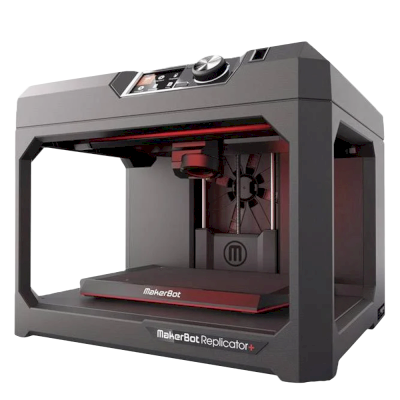
Does the MakerBot Replicator+ 3D printer work with SimplyPrint, OctoPrint, Mainsail and Fluidd?
Each way of connecting it, what it needs, and how to set it up.
SimplyPrint
Not compatible
Klipper (Moonraker)
Not compatible
OctoPrint
Directly, over USB
Not compatible
No known way to connect it to SimplyPrint
Unfortunately, the MakerBot Replicator+ is currently not, to our knowledge, compatible with OctoPrint, Mainsail, Fluidd, or SimplyPrint. For the best 3D printing experience, consider other 3D printers that are compatible with these softwares.
How we determine compatibility
We consider a printer compatible if it works with one or more of the following:
SimplyPrint custom integration for this specific model
OctoPrint support (requires the printer to support serial printing)
Klipper support (printer can run Klipper, either by flashing compatible firmware or using an external controller/pad)
OctoPrint compatibility is primarily based on whether the printer supports serial communication. If serial printing is not supported, we mark OctoPrint as not compatible.
Note: Some printers have third-party OctoPrint plugins that enable unofficial/custom connections. We don’t maintain a list of these plugins, so they are not reflected in our compatibility data.
Use MakerBot's own slicer, MakerBot Print: none of the slicers in SimplyPrint's cloud has a profile for the MakerBot Replicator+, and it doesn't take standard G-code that we know of.
MakerBot Replicator+ specifications: bed size, print height and more
Its size, temperatures, multi-material and how it connects, from the maker and our own research.
Read more by the manufacturer
Size
Build volume
295 x 195 x 165 mm
Bed type
Rectangle
Bed size
295 x 195 mm
Max print height
165 mm
Printing
Max extruder temperature
280 °C
Has heated bed
No
Number of nozzles
1
Direct drive
No
Probing tool / Auto Bed Leveling
No
Filament width
1.75 mm
Connecting
Connectivity
USB, Ethernet, Wi-Fi
Built-in camera
Yes
Supports serial printing
No
Shipped firmware
The maker's own
Files and slicing
Supported file formats
G-code (.gcode, .gco, .g)
The printer
Printer manufacturer / brand
MakerBot
Printer model name
Replicator+
Made by a company from
USA
Launched
2016
Disclaimer:
We strive to keep this information as current and accurate as possible, but cannot guarantee its completeness or reliability. Our data is based on user submissions and manufacturer references.
What filament can the MakerBot Replicator+ print?
Filament compatibility for the MakerBot Replicator+: the materials it can handle, judged from its hotend, bed, chamber and enclosure.
Filament
Suitability
Notes
PLA
Great
The easiest filament to print. Works on almost any printer; a heated bed helps adhesion but is not required.
PETG
With care
Marginal - PETG prefers a hotter bed (~70-80C) than this printer reaches.
TPU & flexibles
With care
Possible, but a Bowden extruder makes flexibles harder - print slowly and prefer firmer (higher-shore) TPU.
ABS & ASA
Not ideal
Not recommended - the bed cannot reach the ~90-110C ABS and ASA need.
Nylon (PA)
Not ideal
Not recommended - nylon needs a hotter hotend (~250-270C) and ideally an enclosure.
Polycarbonate (PC)
Not ideal
Not recommended - PC needs very high hotend temps and an enclosed chamber.
Carbon-fiber & glass-filled
With care
Possible if you fit a hardened or wear-resistant nozzle - the abrasive fibers quickly wear a stock brass nozzle.
Tip: this is a general guide from the printer's specs - always check your filament's recommended settings. With SimplyPrint you can save a profile for each spool and track exactly what filament you have in stock.
Printers like the MakerBot Replicator+ that work with SimplyPrint
Printers from the same maker, of a similar size, printing the same engineering materials or multi-material like it, that you can buy today and that we know work with SimplyPrint.
Who makes the MakerBot Replicator+, and how open MakerBot leaves you: whether its printers run without its cloud, take any filament and slicer, and can be repaired. Each area is rated from public sources.
Openness: Mostly closed (2.3 of 5)
Mostly closed
Walled gardenOpen
MakerBot is an American 3D printer brand founded in New York in 2009 out of the open-source RepRap scene. Stratasys bought it in 2013 and merged it with Ultimaker in 2022; MakerBot is now UltiMaker's education brand, selling Sketch classroom printers with lesson plans, teacher tools and management in UltiMaker's Digital Factory cloud. The Replicator printers in our catalogue are discontinued.
Founded:
2009-01 ·
Headquarters:
Brooklyn, New York, US ·
Ownership:
Brand of UltiMaker, formed in August 2022 when Stratasys merged MakerBot with Ultimaker (NPM Capital 53.5%, Stratasys 46.5% at closing) ·
Website:www.makerbot.com
Proprietary firmware, MakerBot-only extruders and materials, and classroom management in UltiMaker's cloud. In return schools get one managed system with curriculum and support.
Firmware and custom firmware ●●●●●
MakerBot stopped sharing its hardware designs with the Replicator 2 in 2012, and its fifth-generation printers moved to proprietary controllers, extruders and firmware. We found no firmware source for the current Sketch line.
[15][14]
Local control and integrations ●●●●●
The Sketch Sprint prints over Wi-Fi or Ethernet from UltiMaker Cura or Digital Factory, or from a USB stick. Classroom management, remote monitoring and browser slicing (Cura Cloud) run in UltiMaker's Digital Factory cloud, which replaced MakerBot CloudPrint in 2025. We found no documented local interface that other software could use.
[16][2][3]
Third-party filament, slicers and parts ●●●●●
MakerBot lists only its own PLA and Tough PLA, and only its own Sketch extruder, for the Sketch Sprint. Slicing is in UltiMaker Cura (open source) or Cura Cloud.
[2]
Repairs and spare parts ●●●●●
UltiMaker's shop sells Sketch extruders, a Sketch Sprint nozzle assembly, build plates and cables, and still sells Smart Extruder+ units for the Replicator+; spare parts are mostly whole assemblies.
[6]
Data and privacy ●●●●●
Some MakerBot services need an account, and MakerBot's privacy policy lists what it collects (including device identifiers such as MAC addresses and usage data) and its use of Google Analytics and retargeting. Students can submit files through Link Share without an account.
[5][2]
Community and documentation ●●●●●
MakerBot offers hundreds of free lesson plans, educator certification, Thingiverse Education and a support site; there is no public source code or bug tracker.
[1]
Pros
Built for schools: curriculum, lesson plans, teacher tools and certification are part of the package.
Enclosed Sketch printers with HEPA filtration, aimed at classrooms.
Students can submit files without creating accounts (Link Share).
Spare extruders and parts are still sold, even for the Replicator+.
Cons
Closed firmware and MakerBot-only extruders; only MakerBot PLA and Tough PLA are listed for the Sketch Sprint.
Fleet management depends on UltiMaker's Digital Factory cloud.
CloudPrint's 2025 shutdown left the Replicator 5th Gen, Mini, Mini+ and Z18 without cloud support.
Many ownership changes and layoffs over the years (Stratasys 2013, layoffs 2015 and 2017, Ultimaker merger 2022).
Track record
December 2025: UltiMaker shut down MakerBot CloudPrint in early December 2025, after announcing 1 October 2025. Printers had to be reconnected to Digital Factory by hand, and the Replicator Z18, 5th Gen, Mini and Mini+ are not supported there; MakerBot points their owners to MakerBot Print.
[3][4]
August 31, 2022: Stratasys closed the merger of MakerBot with Ultimaker into a company named Ultimaker (now UltiMaker), owned 53.5% by NPM Capital and 46.5% by Stratasys.
[7]
February 2017: MakerBot announced a restructuring with another round of layoffs, Fortune reported.
[9]
July 2016: A court dismissed the investor class action over the fifth-generation printers and Smart Extruder, finding the statements at issue were not actionable.
[10]
April 2016: MakerBot moved printer manufacturing from Brooklyn to the contract manufacturer Jabil and parted ways with an undisclosed number of Brooklyn staff, The Verge reported.
[13]
July 2015: A class action was filed against MakerBot and Stratasys alleging investors were misled about problems with the fifth-generation printers' Smart Extruder.
[11]
April 2015: MakerBot laid off about 20% of its staff, roughly 100 people, under a new CEO, Motherboard reported.
[12]
June 2013: Stratasys bought MakerBot in a stock deal worth $403 million at the time.
[8]
September 2012: With the Replicator 2, MakerBot stopped publishing its machine designs, a break with open-source hardware that co-founder Zach Smith criticised publicly.
[14][15]
Researched from 16 sources, last checked October 18, 2026. Show sources
Is the MakerBot Replicator+ compatible with SimplyPrint?
To our knowledge the MakerBot Replicator+ is not yet supported. SimplyPrint works with 130+ brands and 600+ models via OctoPrint, Klipper and built-in integrations - check the compatibility list for a supported printer.
What slicer should I use for the MakerBot Replicator+?
Use MakerBot's own slicer, MakerBot Print: none of the slicers in SimplyPrint's cloud has a profile for the MakerBot Replicator+, and it doesn't take standard G-code that we know of.
What filament can the MakerBot Replicator+ print?
Based on its specs (hotend up to 280C, no heated bed), the MakerBot Replicator+ handles PLA well. See the full filament guide above for ABS, nylon, PC and composites.
What is the MakerBot Replicator+'s bed size and build volume?
The MakerBot Replicator+ has a 295 x 195 mm print bed and prints up to 165 mm tall, a build volume of about 295 x 195 x 165 mm. See the full specifications table above for bed type, temperatures and more.
 USA
USA


 PrusaSlicer
 OrcaSlicer
 BambuStudio
 ElegooSlicer
 CrealityPrint
 Cura
Cura Kiri:Moto