Set up SimplyPrint on the Co Print ChromaPad
In this quick guide you'll find the ChromaPad's IP address and then proceed directly to Mainsail to finish the SimplyPrint setup.
In this guide we will go through:
- Find your ChromaPad's IP address
- Open the Mainsail web interface
1. Find your ChromaPad's IP address
- On the ChromaPad touchscreen, go to "Settings" → "Network".
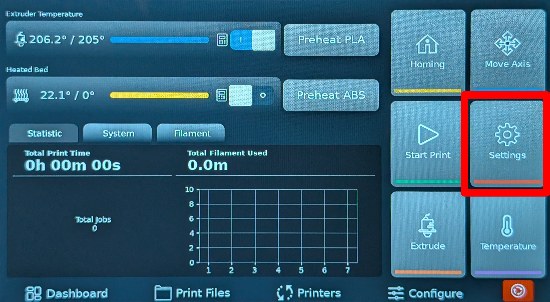
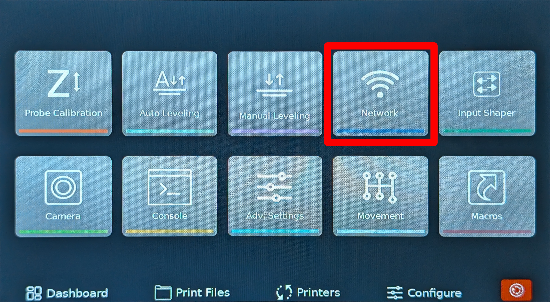
- Note the IP address shown on the Network page (top‑left). For example
192.168.1.42.
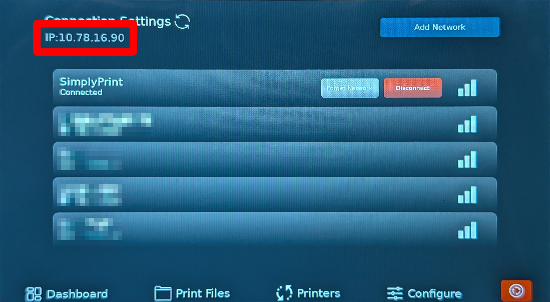
Tip
Make sure the device you use to open Mainsail is on the same local network as the ChromaPad; otherwise the page will not load.
2. Open the Mainsail web interface
In your browser on your computer or phone, visit http://[IP_ADDRESS] (replace with the IP you just noted).
This opens the Mainsail web interface hosted by your Co Print ChromaPad.
Now, proceed to the next step, which will guide you through enabling SimplyPrint in Mainsail by adding the required [simplyprint] section to your moonraker.conf file.