Setting up SimplyPrint on DIGGRO Alpha-3: Co Print ChromaPad method
Co Print ChromaPad setup for this printer. Follow the steps to connect your DIGGRO Alpha-3 3D printer to SimplyPrint.

In this quick guide you'll find the ChromaPad's IP address and then proceed directly to Mainsail to finish the SimplyPrint setup.
In this guide we will go through:
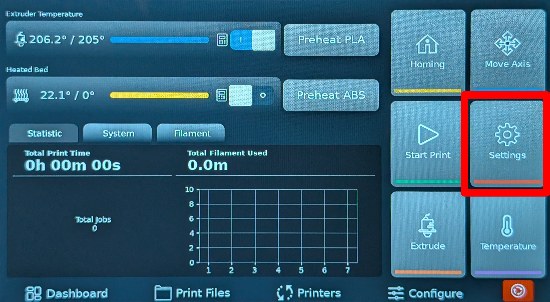
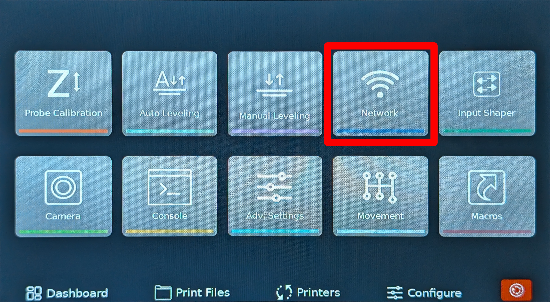
192.168.1.42.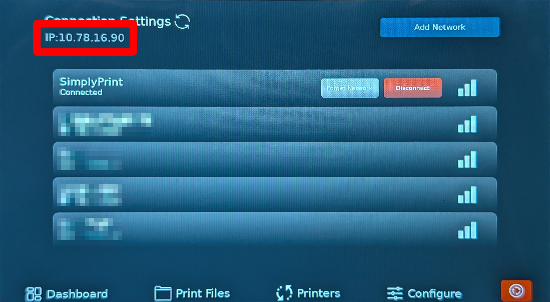
Make sure the device you use to open Mainsail is on the same local network as the ChromaPad; otherwise the page will not load.
In your browser on your computer or phone, visit http://[IP_ADDRESS] (replace with the IP you just noted).
This opens the Mainsail web interface hosted by your Co Print ChromaPad.
Now, proceed to the next step, which will guide you through enabling SimplyPrint in Mainsail by adding the required [simplyprint] section to your moonraker.conf file.
Thousands complete this setup every week. Follow each step carefully - most issues come from skipping ahead.
You're now ready to connect your printer and start using SimplyPrint.
Create your free account