
Onshape
Send your CAD parts and assemblies directly from Onshape to SimplyPrint for slicing and printing
Install from Onshape Store Read the full guide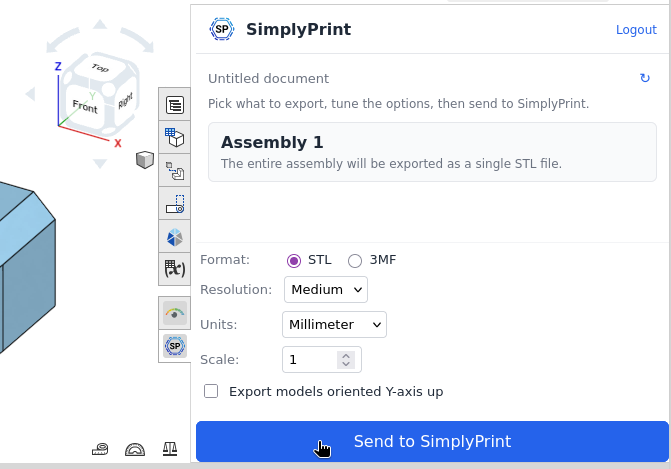
Send your CAD parts and assemblies directly from Onshape to SimplyPrint for slicing and printing
Install from Onshape Store Read the full guide
SimplyPrint is not endorsed by or affiliated with Onshape. We use trademarks and images only to indicate compatibility with our platform. Use of Onshape hardware with SimplyPrint may not be as intended by Onshape. All rights belong to respective owners.
The SimplyPrint app for Onshape bridges the gap between cloud CAD and 3D printing. Design your part or assembly in Onshape, then send it straight to SimplyPrint in one click - no downloading STLs, no juggling browser tabs, no extra software on your machine.
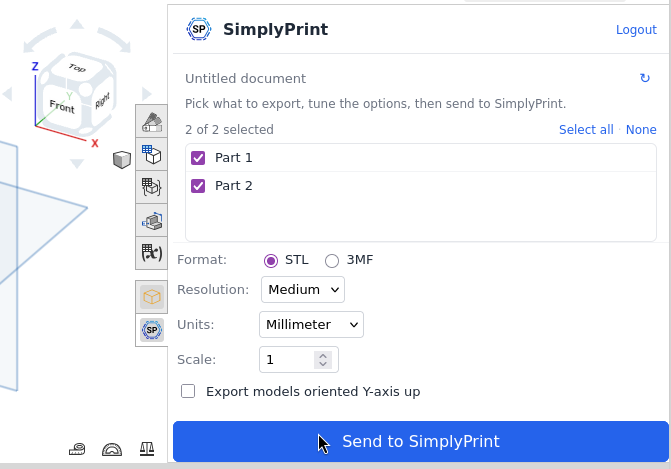
Onshape runs entirely in your browser, and so does SimplyPrint's cloud platform. Once subscribed from the Onshape App Store, the SimplyPrint panel docks into Onshape's right-hand sidebar on every Part Studio and Assembly. Pick your parts, choose STL or 3MF, dial in resolution and units, hit Send, and the model lands in SimplyPrint ready to slice, queue, or print on one or more printers.
Pick individual parts inside a Part Studio, or export an entire Assembly as a single combined model. The panel adapts to whichever workspace you have open.
Resolution (coarse, medium, fine), units (mm, cm, m, inch, foot), uniform scale, and STL Y-axis-up - all the knobs you need, none of the ones you don't.
Add a new part to the Part Studio and it shows up in the picker within seconds - no panel refresh, no re-opening Onshape.
Multi-hundred-megabyte exports upload reliably thanks to automatic chunking - no timeouts, no manual splitting, no fiddling.
Onshape runs in the browser; so does SimplyPrint. The whole pipeline from CAD to printed part works on Mac, Windows, Linux, or a Chromebook.
The app uses Onshape's OAuth 2.0 - it only sees documents you explicitly open it in, and you can revoke access at any time from your Onshape account settings.
Design in Onshape's free hobbyist tier, send the part to your home printer, and kick off the print from SimplyPrint - all without leaving your browser.
Students design in Onshape EDU, teachers route prints through a shared SimplyPrint queue, and the lab printers stay busy without anyone shuffling SD cards.
Iterate on assemblies as a team in Onshape, push prototypes to a SimplyPrint print farm with one click, and skip the export-email-import dance.
Open the Onshape App Store and find the SimplyPrint listing:
Open Onshape App StoreClick Subscribe on the listing and approve the OAuth permissions Onshape asks for.
Open any Onshape document - a SimplyPrint tab now appears on the right-hand panel of every Part Studio and Assembly.
Open the SimplyPrint panel inside an Onshape document and click Connect SimplyPrint the first time. A browser tab opens, you approve the request, and you're set for future sessions. Then pick the parts (Part Studios) or accept the full assembly (Assemblies), tweak the export options, and click Send. SimplyPrint opens in your browser with the export loaded - ready to slice, queue, or print on one or more printers.
No - the SimplyPrint app works on every Onshape tier, including the free hobbyist and EDU plans. You only need a paid Onshape plan if Onshape itself requires it for your use case (private documents, larger storage, etc.).
Read-only access to documents you explicitly open it in. The app can read part geometry to build STL and 3MF exports, but it can't modify your documents, share them, or access documents you haven't opened it in. You can revoke access at any time from Onshape's account settings.
The app handles multi-hundred-megabyte exports through automatic chunked uploads - in practice there's no realistic limit for printable parts. If a huge assembly feels slow, dropping the resolution to Medium produces a much smaller mesh.
The app exports whichever configuration is currently active in the document - the same one you see in the viewport. Switch configurations in Onshape, hit Send again, and you get a fresh export of the new variant.
Yes. Each team member subscribes to the app in their own Onshape account and signs in to a shared SimplyPrint workspace - prints, queue and printer status are visible to everyone with workspace access.
Integration for SimplyPrint allows for applications to interact with your 3D printers, and your 3D printers to interact with other applications. This allows for endless possibilities, and we strongly believe that your 3D printer should be able to function as an IOT device, working together with any and all applications you can imagine!
This is why the team behind SimplyPrint work to provide official integrations for the most popular platforms, slicer and applications, while also allowing our users to create custom integrations using our API, or for approved third party vendors to create integrations to be used by all SimplyPrint users, using a "Log in with SimplyPrint" method (using the "OAuth2" method).
If you're a developer interested in creating an integration for SimplyPrint, please read our documentation on the subject.
If you're not a developer yourself, but would like to see an integration for a specific application, go check if it's already on our roadmap or suggestion list, and if not, feel free to suggest it!