The end of "Student (robotics + laser)"
Every shared-printer account eventually hits the same wall. Someone needs one extra thing, and a single role per person can't say it. So you clone a role, then clone it again for the next combination, and a year later you're maintaining fourteen near-identical groups that nobody dares touch. Workgroups are the second axis that problem was always missing: four roles plus two workgroups express what would otherwise take sixteen roles, and every one of them stays readable.
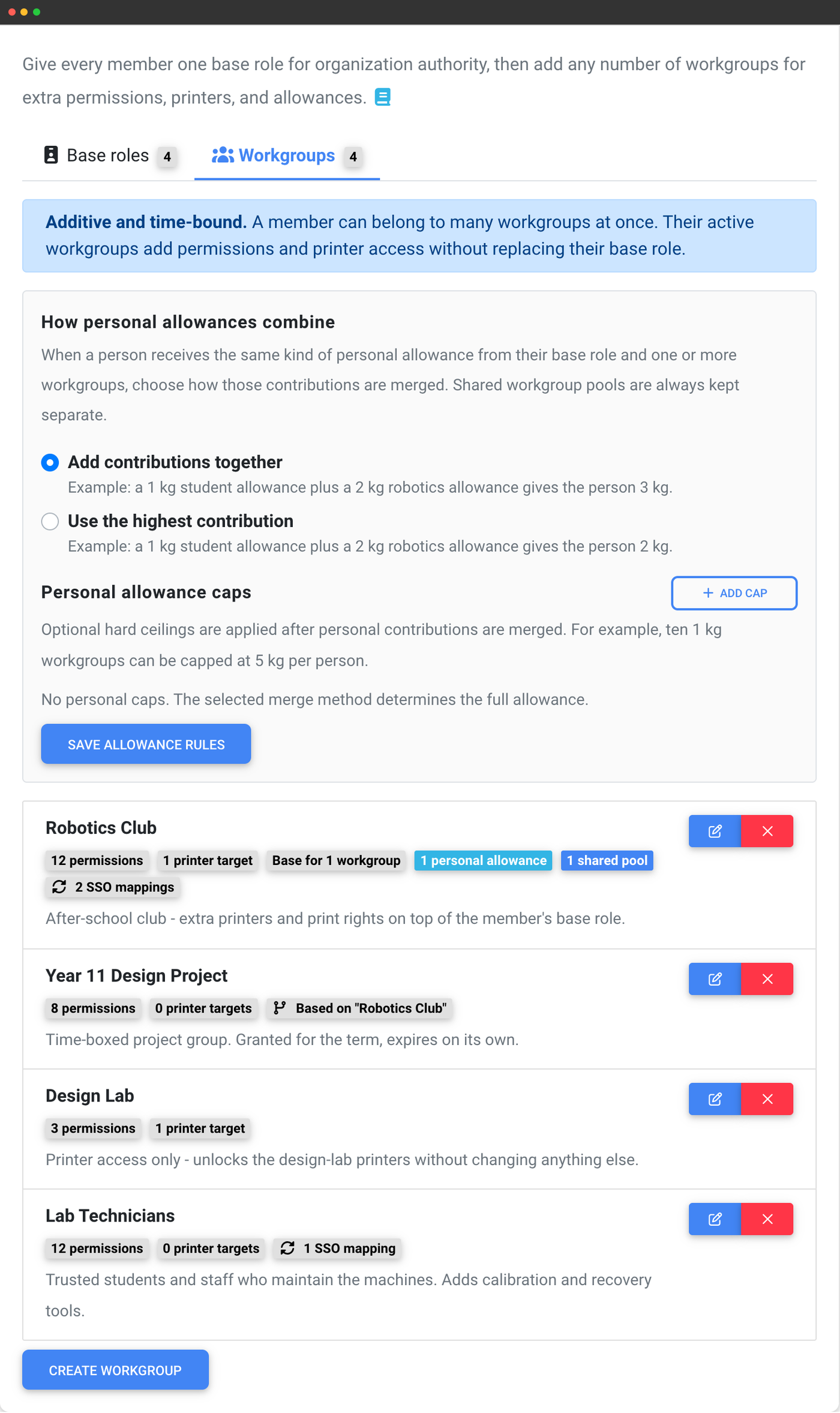
One role, many workgroups
A user group answers "who is this person in the organisation?" - and everybody has exactly one. It carries organisation authority: managing users, billing, settings, API keys.
A workgroup answers "what else are they part of right now?" - and there is no limit on how many somebody holds. It carries workflow permissions, printer access and print allowances, and nothing else.
The short version: your user group is your job title, your workgroups are the rooms you have keys to. Changing someone's job title is a decision about authority. Handing them a key for the term is not, and it should not require rebuilding your group structure to express it.
User groups vs workgroups
SimplyPrint is a cloud 3D printer management platform that lets you slice, queue, monitor and manage any brand of printer from a browser. Its access model has two axes:
| User group (base role) | Workgroup | |
|---|---|---|
| How many per member | Exactly one | Any number |
| Assignable permissions | The full permission list | A fixed allow-list of workflow permissions |
| Users, billing, API keys, settings | ✓ | × |
| Access all printers | ✓ | Only the printers it names |
| Can expire on a date | × | ✓ |
| Granted per SSO sign-in | One | Every one that matches |
| Effect on the member | Replaces the previous group | Adds to what they have |
How permission layering works
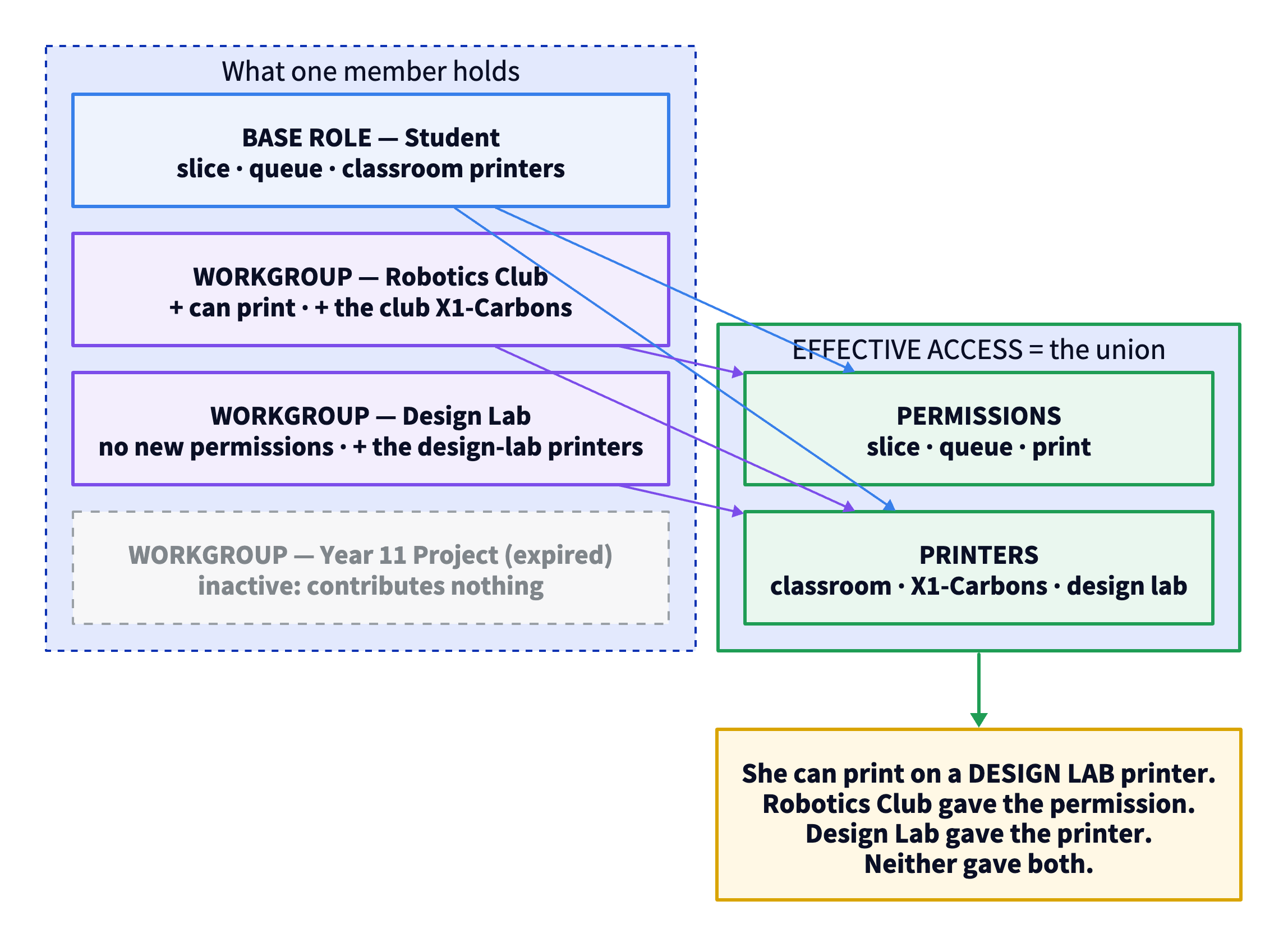
When SimplyPrint decides whether you may do something, it builds your effective access from your user group plus every workgroup that is active for you at that moment:
- Permissions are unioned. You have a permission if your user group grants it or any active workgroup grants it. No ordering, no priority, no overrides - one yes anywhere is a yes.
- Printer access is unioned separately. Individual printers, printer groups and printer models all merge together from every source.
- The two lists combine independently. A permission that came from one workgroup applies on a printer that came from a different one.
Workgroups only ever add - so they can't break anything
There is no deny in a workgroup. It cannot remove a permission, hide a printer, or narrow anything a member already had. Turning a permission off inside a workgroup simply means that workgroup does not contribute it.
This is deliberate, and it is what makes workgroups safe to hand out freely. Adding somebody to a workgroup can never break their existing access, so you never have to reason about the order they were added in, or work out which one wins. Nothing wins - everything adds.
The practical consequence, and the one rule worth remembering: if somebody needs to have less, that belongs in their user group.
Organisation authority stays on the role, permanently
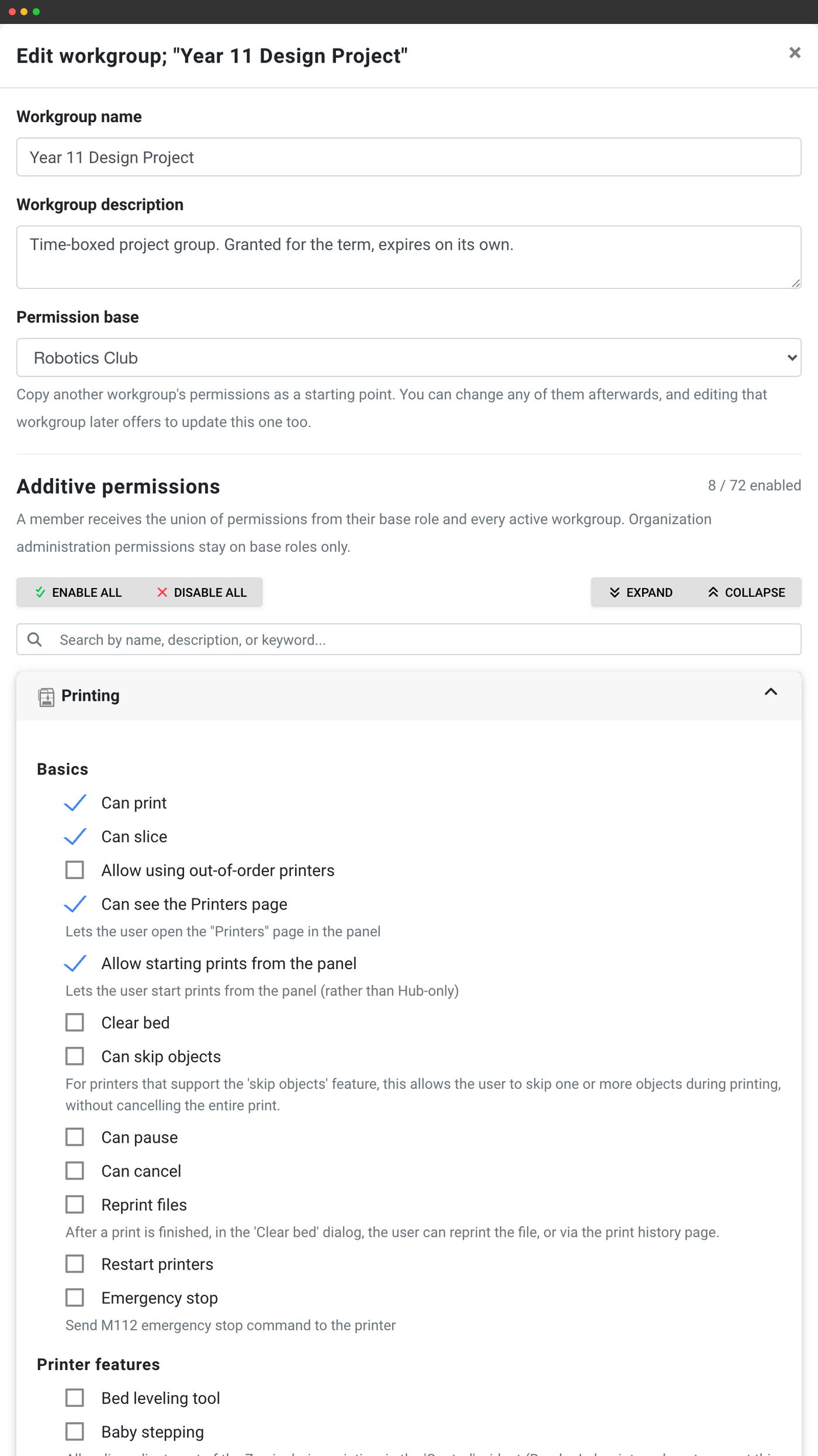
A workgroup can only grant from an explicit allow-list of workflow and resource permissions - printing, pausing, cancelling, the queue, the slicer tools, filament, cameras, print history, printer calibration. The editor shows the exact count for your account.
It can never grant:
- Managing users - inviting, deleting, changing somebody's group
- Managing the user groups and workgroups themselves
- The subscription, billing or invoices
- API keys, webhooks or custom fields
- Organisation and registration settings, or the audit log
- Access all printers - a workgroup only ever adds the specific printers it names
- Exemption from IP restrictions or device approval
Permanent, scheduled, or expiring on its own
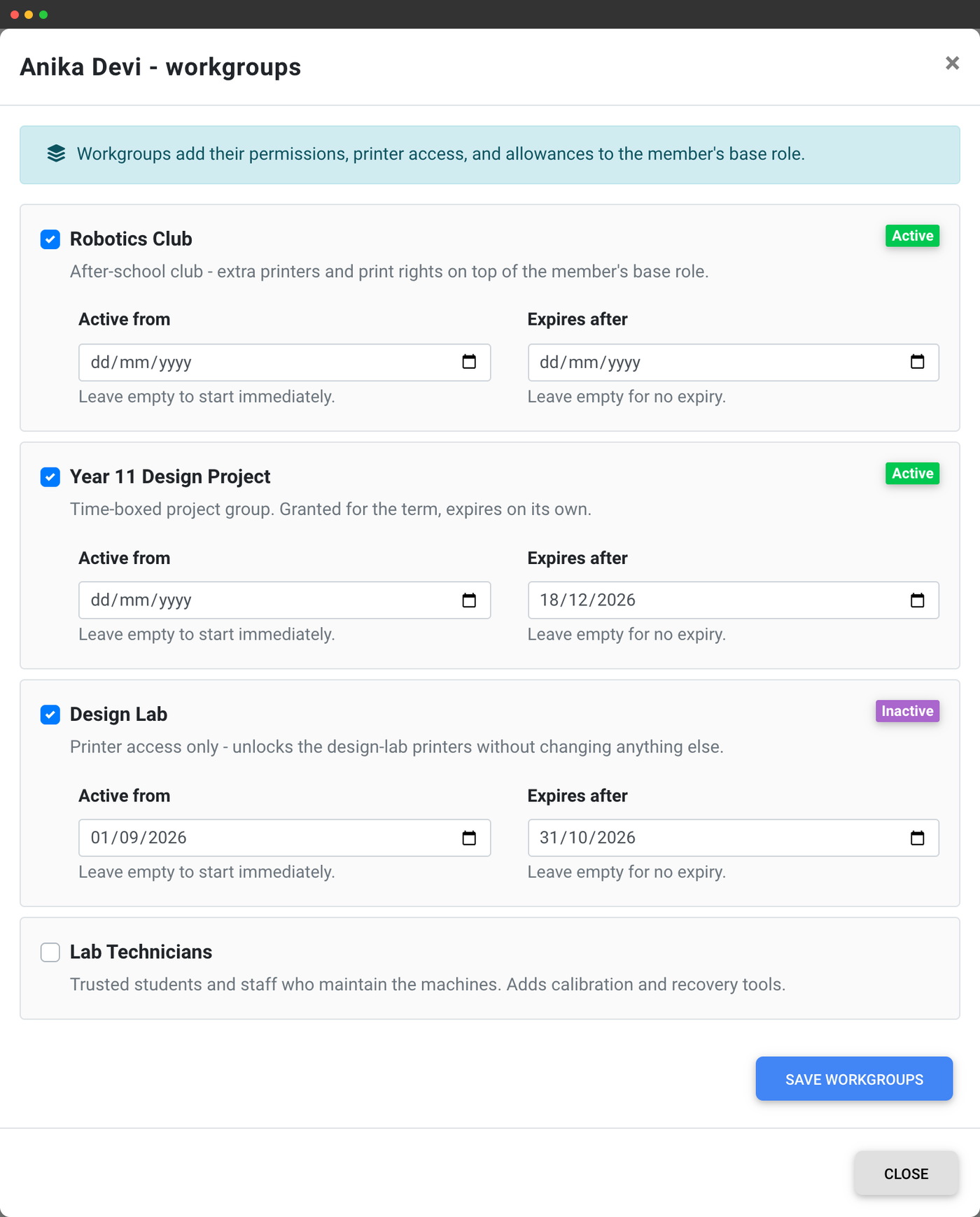
Every grant carries its own optional dates. Leave them empty for permanent access, set an "active from" to schedule access that starts next term, set an "expires after" and it revokes itself.
Outside its window a workgroup contributes exactly nothing - no permissions, no printers, no allowance - and starts contributing again the moment the window opens, with no action from anybody. A student who joins the robotics club for one term stays a student when the term ends; the club's printers simply drop away.
You can set workgroups on an invite or a shareable join link so people arrive already in the right ones, and re-date up to 500 members in a single bulk action at the end of a term.
Full SSO and SCIM sync - as many as match
Map identity-provider groups onto a workgroup, and SimplyPrint reconciles them on every single sign-on. Somebody added to a group in your IdP holds the workgroup at their next sign-in; somebody removed loses it. Your directory stays the source of truth, with no scheduled job and nothing to clean up.
The difference from roles is the whole point: SSO assigns exactly one user group, but as many workgroups as match. Your IdP can finally say "this person is a Teacher" and "this person is in the robotics group, the laser-trained group and the department admins" in one assertion - which no single-role model can express.
Each authority holds its own independent claim, so an SSO sync never disturbs what a teacher granted by hand, what a class grants, or what a course enrolment grants. And a workgroup can never be used as an SSO role mapping, so being added to a directory group can grant access without silently changing anybody's role.
Shared budgets, not just shared permissions
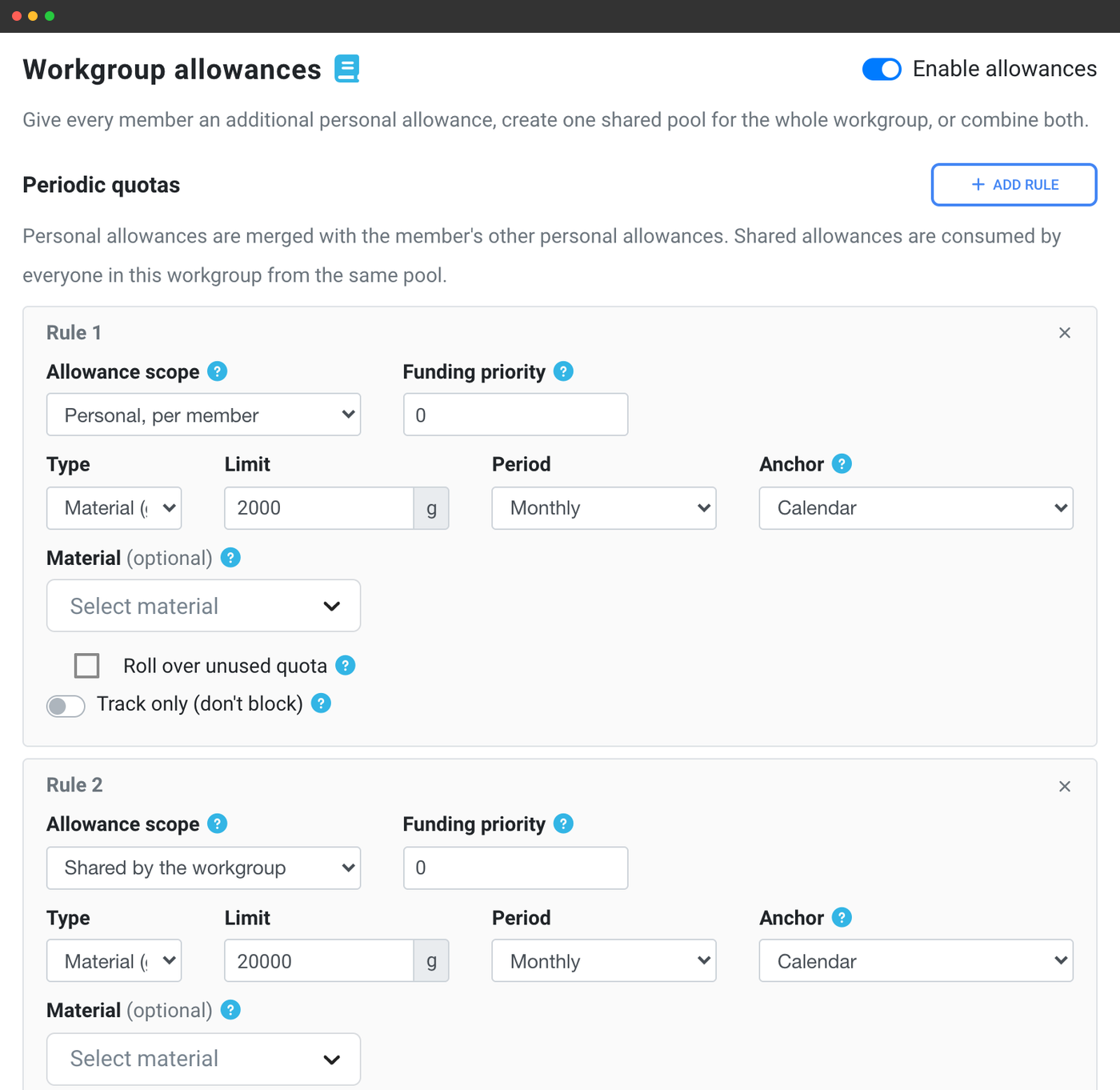
A workgroup can carry print allowances too, in two distinct shapes:
- Personal - every member gets this much each. "Everyone in Robotics Club gets an extra 2 kg a term."
- Shared - the whole workgroup draws from one pool. "Robotics Club has 20 kg between them." It runs out for everybody at once.
Workgroups deliberately carry additive allowances only. Fixed per-job limits, balance exemptions and the other safety policy stay on the user group, so a workgroup can top somebody up but can never quietly disable a guard rail. See quotas & limits
Where a membership comes from - and why it came back
A workgroup membership can be asserted by an admin by hand, by an invitation or join link, by your identity provider over SSO or SCIM, by a school class, or by a course enrolment. Each authority holds its own independent claim, and the panel shows every claim on a membership and which source it came from.
That independence is the useful part. If a student is in the robotics workgroup both because your directory says so and because a teacher added them by hand, dropping them from the directory group leaves the teacher's grant standing and they keep the access. It is also the answer to the usual "why did this come back?" - removing by hand something a class or your IdP asserts will be re-asserted at the next sync. To remove it for good, remove it at the source.
School classes are computed rather than copied: put workgroups on a class once, and the roster decides who holds them. Adding a student to the class grants them immediately, removing them takes it away immediately, and there is no sync step that can drift.
Part of the multi-user system
Workgroups sit alongside user groups and the permission matrix. If you want the bigger picture - how permissions themselves work, how people get invited, how quotas and queue approval fit together - start from the multi-user overview.
Back to the multi-user overview