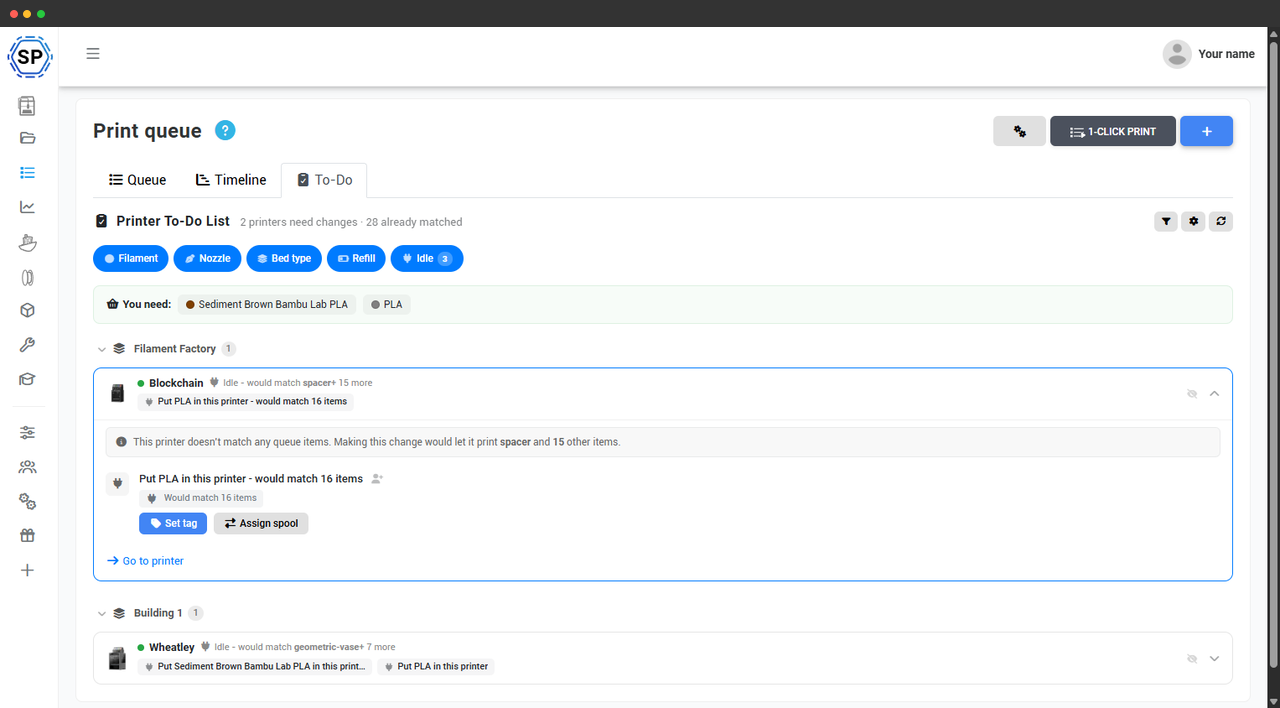
Turn "why is nothing printing?" into a checklist
On a busy farm the queue stalls for boring, physical reasons: a printer is loaded with the wrong material, a spool ran out, a nozzle or plate doesn't match the next job. The hard part isn't fixing them - it's finding which of your printers is the one holding up an order.
The to-do list does that finding for you. It compares your live queue against every printer's current setup and lists exactly what to change, ordered by how many prints each change would unlock. It's built for print-farm operators who'd rather work a short list than walk the floor guessing.
The one change that unlocks the most prints, per printer
An idle printer that matches nothing in the queue is wasted capacity. For each one, the to-do list finds the single change that would let it run the most queued jobs and shows it plainly: "This printer doesn't match any queue items. Put PLA in it and it would match 16 items."
You're never handed a wall of options - just the highest-impact move for that machine, with the job count it would free up, so you can work top-down and clear the biggest bottlenecks first.
Every kind of change, in one place
The list covers the physical work that actually blocks a queue, grouped into filter pills you can toggle:
- Filament - load the material or colour the next jobs need.
- Nozzle - swap to the nozzle size a job requires.
- Bed type - fit the build plate the queue is asking for.
- Refill - spools running low or already empty.
- Idle - printers matching no queue items, with the change that would match the most.
Fix it from the list, then advance to the next
You don't have to leave the to-do list to act on it. Each task offers the quick actions that make sense for it - set the tag so the printer advertises the new material, nozzle or plate; assign a specific spool from your filament inventory; or jump to the printer for anything hands-on.
Complete a task and the list strikes it through and advances you to the next card, so clearing the queue's blockers becomes a steady top-to-bottom sweep instead of a hunt.
A pick list of what to grab before you start
Before you walk to the printers, the to-do list shows a "You need:" bar that adds up every material the pending changes call for - 3x PLA, a roll of Sediment Brown Bambu Lab PLA - with the colour swatch for each. If you've recorded where your spools live, it even shows the storage location, so it doubles as a pick list and you make one trip instead of five.
Stop walking the floor to find the blocker
Queue your jobs, open the to-do list, and work one short checklist to keep every printer busy.
Start your free trialHand the right task to the right person
On a team, not everyone changes every printer. Assign any task to a specific team member and it shows up under their name, ready to filter to "assigned to me" so each person sees only their work.
For the repetitive routing, set up auto-assign rules: send every refill to one person, every nozzle change to another, optionally scoped to a printer group - so tasks land with whoever owns that bench without anyone triaging the list by hand.
A daily digest, so the shift starts informed
Have the day's to-do list delivered before anyone's on the floor. Schedule a digest to a chat webhook - Discord, Slack, Teams or a custom endpoint - and to email recipients, at a time you pick, optionally anchored to your working hours.
The morning crew walks in already knowing which spools to load and which printers need attention, instead of opening the panel to find out.
Filter it down to exactly your patch
Big farm, focused view. Narrow the list to a printer group, include or hide offline and busy machines, restrict it to a set of eligible printers, or show only the groups you own. There's even a one printer per queue item mode that suggests a single printer per job - fewer spool swaps when you'd rather burn a queue down slowly.
Dial in the filters once and save them as your account default, so the to-do list always opens on the view that matters to you.
Part of the print queue
The to-do list is one view of the print queue. These features feed it and build on top of it.
Plan availability
The queue to-do list is part of the Print Farm plan and is included on the School and Enterprise plans too. It's built for operations running many printers, where finding the one blocker fastest pays off most. The print queue itself is part of the core platform.
| Feature / Limit | Free | Basic | Pro | Print Farm | Enterprise | School | Cloud Slicer | Filament Manager |
|---|---|---|---|---|---|---|---|---|
|
Queue to-do list
Prioritised change list, idle-printer matching, quick actions, shopping list, assignment and a scheduled digest. Print Farm plan and up.
|
||||||||
|
Queue timeline
The Gantt companion to the to-do list - see when every job finishes. Print Farm plan and up.
|
Want to learn more about our plans?
View full pricing & feature comparison