Yes, you can. To slice 3D model without installing software, you use a browser-based cloud slicer that runs the real slicing engine on a remote server. With a tool like the SimplyPrint slicer, you upload an STL or 3MF file, choose a printer profile, slice in the browser, and download ready-to-print G-code, all without putting a single program on your computer. It works the same on Windows, macOS, Linux, a Chromebook, or a tablet, because the heavy lifting happens in the cloud and only the interface lives in your browser tab.
This guide answers the question directly, walks through the four steps end to end, and tackles the trust question most people have next: is online slicing actually as good as a desktop slicer? The short version is that it depends entirely on whether the online slicer runs the genuine engine or a simplified one, and that distinction is where this article spends its time.
Can you slice 3D model without installing software at all?
Yes. Slicing is the step that turns a 3D model (an STL or 3MF) into G-code, the line-by-line motion instructions your printer follows. Traditionally you did that in a desktop program like PrusaSlicer or OrcaSlicer. A browser-based slicer moves that same process to a server: you send it your model and your chosen settings, the server runs the slicing engine, and it sends back the sliced result and a downloadable G-code file.
Nothing installs on your machine. There is no setup wizard, no Linux container, no Raspberry Pi, and no admin rights needed, which matters on locked-down school or work computers. The only requirements are a browser and an internet connection. Because the compute runs server-side, a five-year-old laptop slices a dense model just as quickly as a new workstation would.
This is a real shift in how slicing works. For most of the last decade, slicing meant downloading a few hundred megabytes of desktop software, keeping it updated, and tying your print files to one computer. Moving the engine to the cloud removes that entire maintenance burden: there is no version to update, no install to repair, and your work is reachable from whatever device you happen to have in front of you. The result you get is the same; the friction around getting it is gone.
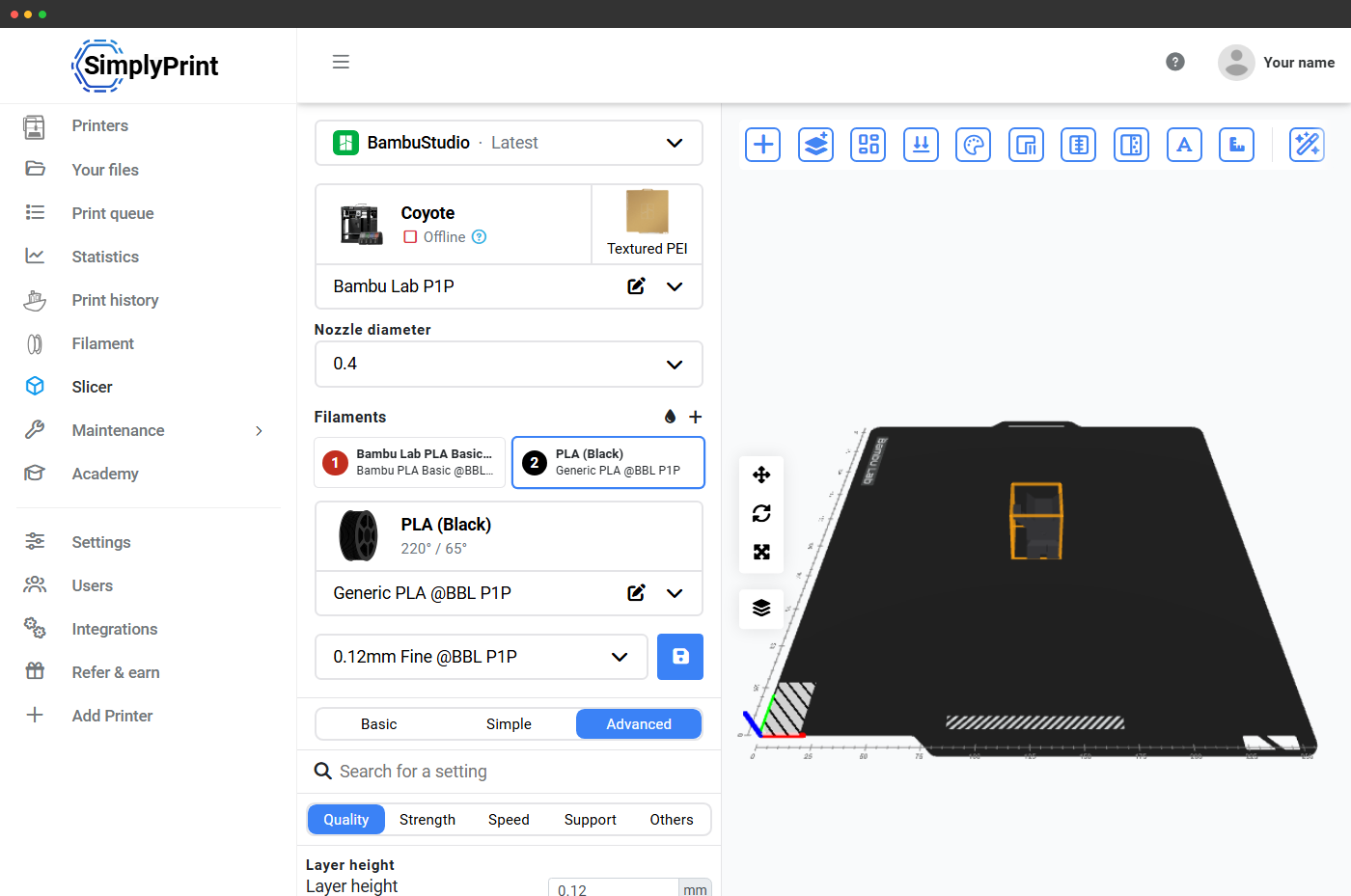
How to slice in the browser, step by step
Here is the full no-install workflow. The whole thing takes a couple of minutes the first time and seconds after that.
- Open the cloud slicer. Go to the SimplyPrint slicer in any browser and sign in to the free tier. No download, no plugin.
- Upload your model. Drag an STL or 3MF file into the slicer, or import it from a connected design tool. A 3MF is the better choice when you have one, because it can carry settings and supports along with the geometry.
- Pick a printer and profile. Select your printer and a matching profile (layer height, infill, supports, filament). If you already use OrcaSlicer or PrusaSlicer on desktop, the same profiles and presets are available because the engine underneath is identical.
- Slice and download G-code. Click slice, review the layer preview and the time and filament estimate, then download the G-code or send it straight to a connected printer.
That is the complete path from model to print file: upload, profile, slice, download. No installation touched your device at any point. If your goal is simply to slice STL to gcode in browser, those four steps are all you need.
What file formats can you slice online?
The format you upload determines how much survives the round trip. Most browser slicers accept the same set a desktop slicer does, but they are not equal in what they preserve.
| Format | What it stores | Best for |
|---|---|---|
| STL | Geometry only (a mesh of triangles) | Quick one-off slices, models from Thingiverse or Printables |
| 3MF | Geometry plus print settings, supports, colors, and multiple plates | Reproducible slices, sharing a tuned project across machines |
| OBJ | Geometry plus color and texture data | Multi-color or textured models |
| STEP | Precise CAD geometry (solid bodies, not a mesh) | Engineering parts exported from CAD |
The takeaway: prefer 3MF whenever you can. Because a 3MF bundles the model and the slicer settings together, you can hand it to a colleague, a classroom, or another printer and re-slice it to the exact same result. The 3MF format is maintained by the open 3MF Consortium, whose members include Microsoft, HP, and Ultimaker, so it is a safe long-term choice rather than a single-vendor format.
Online slicers vs running the real engine in the cloud
Not all online slicers are built the same, and this is the single most important thing to understand before you trust one with a print. There are two broad categories.
Generic-engine web slicers run a simplified or in-house slicing engine written to be lightweight enough for a browser. They are convenient, and an online slicer no download tool will happily hand you a G-code file, but the output often differs from what your printer's recommended slicer would generate. Supports, seam placement, and pressure-advance handling are common weak spots, and your carefully tuned desktop profile usually cannot be imported at all.
Real-engine cloud slicers run the actual desktop slicing software on a server. SimplyPrint runs the unmodified OrcaSlicer, PrusaSlicer, BambuStudio, ElegooSlicer, CrealityPrint, and Cura engines through their official command-line interface. That means the G-code is byte-for-byte what the desktop app would produce from the same profile, because it is literally the same engine doing the work.
- Generic web engine: lightweight, but different output and no profile portability.
- Real engine in the cloud: identical output to desktop, your existing profiles work, no install required.
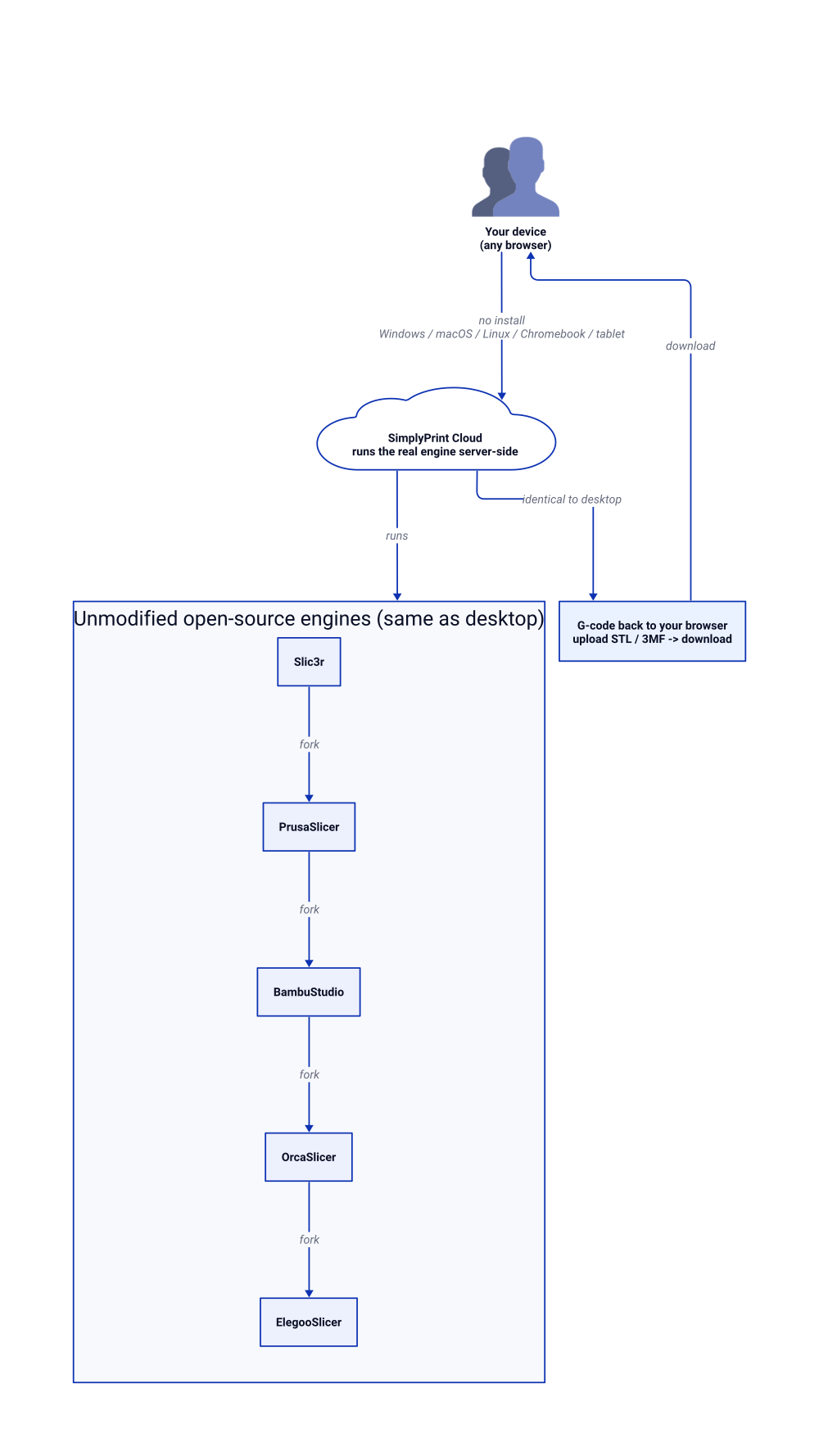
If you want the convenience of the browser without giving up the quality of a desktop slicer, the engine is the deciding factor, not the interface.
Is online slicing as good as desktop PrusaSlicer or OrcaSlicer?
This is the top trust barrier, so it deserves a direct answer: online slicing is as good as desktop slicing when the online slicer runs the same engine. Quality differences come from the engine, not from where it runs.
SimplyPrint uses the open-source OrcaSlicer, PrusaSlicer, BambuStudio, ElegooSlicer, CrealityPrint, and Cura engines exactly as their maintainers ship them, with no proprietary fork in between. OrcaSlicer itself is a community fork of Bambu Studio, which is a fork of PrusaSlicer, which descends from Slic3r, so the Orca-family engines share a deep, well-tested lineage. Running them server-side does not change the slicing math; it only changes the device you trigger it from.
What you gain over desktop is access from anywhere and not maintaining four separate installs. What you do not lose is fidelity: same profiles, same settings, same G-code. The one practical difference is that a very large model takes a moment to upload, but slicing itself is typically faster because it runs on server hardware rather than your laptop. For a deeper feature-by-feature look, see our guide to browser-based 3D slicers.
Does it work on a Chromebook, tablet, or locked-down PC?
Yes, and this is where a no-install slicer shines hardest. Desktop slicers cannot run on Chrome OS without enabling the Linux container, which school IT departments routinely disable. They cannot run on an iPad or an Android tablet at all, because there is no mobile build. And on a managed work PC you often lack the admin rights to install anything.
A browser 3d slicer no install setup sidesteps all three problems. Because it is just a web page, it opens on:
- Chromebooks with no Linux container and no developer mode, which is why classrooms rely on it. See our walkthrough on slicing on a Chromebook.
- iPads and Android tablets with no App Store or Play Store download and no sideloaded APK. Our guide to printing from an iPad or Chromebook covers the full mobile flow.
- Managed or locked-down PCs where installing software is blocked, because nothing installs.
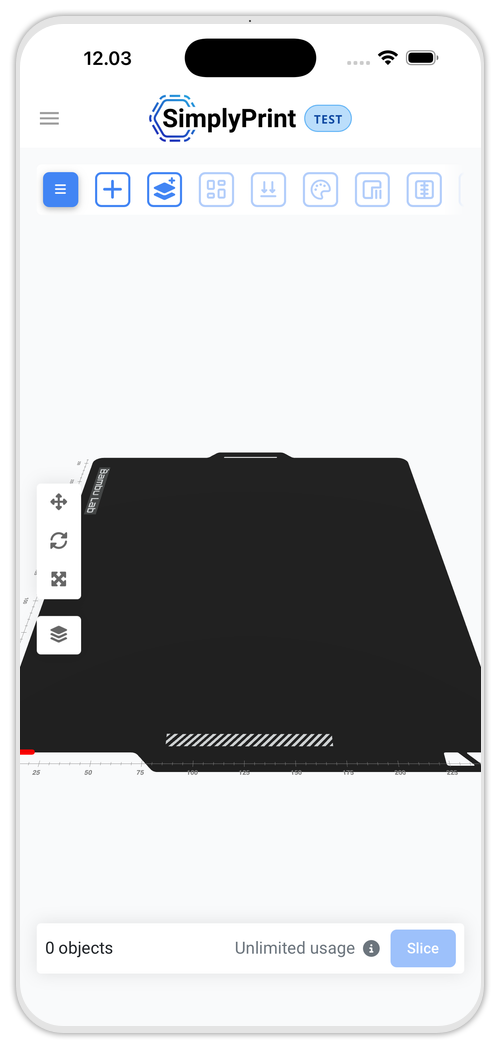
Chromebooks dominate US K-12 classrooms, where tens of millions are in daily use, and almost none of those devices can run a desktop slicer. A cloud slicer turns every one of them into a fully capable slicing workstation.
How to share one profile across every machine
Once your slicing lives in the cloud, your settings can too, and this is the payoff that desktop slicers cannot match. On desktop, a tuned profile lives on one computer. If you run three printers or a classroom of twenty, you copy config files around by hand or paste settings into a forum thread.
With a cloud slicer, you tune a profile once and it is available to everyone on the account from any device. Update the layer height or a filament preset in one place and the next slice on every machine uses it. For a print farm or a school lab this removes an entire category of "which version of the profile is this?" mistakes, and it means a new team member is productive the moment they log in, with no install and no config hunting.
- Tune a profile once, use it on every printer.
- New users slice correctly from their first login.
- No config files emailed around, no version drift across the fleet.
That centralization is the difference between slicing being a per-machine chore and being a shared, reproducible workflow. You can start free and have your first model sliced in the browser within a couple of minutes.