Looking for Creality Print alternatives?
Creality Print is Creality's free, official slicer, and it's a good one: since v5 it's built on an OrcaSlicer fork, so you get the full Orca settings tree tuned for Creality's Ender, CR and K-series machines. If you're on Windows or macOS and print only on Creality printers, it does the job.
The catch is where it runs, and what it slices for. Creality Print is a desktop app: there's no version for a Chromebook, an iPad, an Android tablet or a phone, and it's built around Creality's own printers. So people search "Creality Print alternative" for one of two reasons: they can't install it on the device they have, or they've added a printer from another brand.
The honest answer to both is OrcaSlicer (Creality Print is an Orca fork, so it's the natural switch), and the better answer is that you don't have to choose. SimplyPrint runs the unmodified CrealityPrint engine in your browser, on any device, right next to PrusaSlicer, OrcaSlicer, BambuStudio, ElegooSlicer, Cura & Kiri:Moto. Keep Creality's profiles, add every other engine, and slice from a Chromebook, tablet or phone. Here's a fair, side-by-side look.
The actual slicer alternatives to Creality Print
Looking for a different slicer, not just a different device? Fair enough. These are the real alternatives - and every one of them runs online, in your browser, through SimplyPrint.

OrcaSlicer
The natural alternative: Creality Print is itself an OrcaSlicer fork, so Orca feels instantly familiar - the same settings tree, without the Creality tuning. Open-source, community-driven, with profiles for hundreds of printers of every brand.
Use OrcaSlicer online
PrusaSlicer
Prusa Research's open-source slicer and the granddaddy of the family - Bambu Studio (and through it Orca and Creality Print) descends from it. Rock-solid, superb supports, and a huge community of shared profiles.
Use PrusaSlicer online
BambuStudio
Bambu Lab's official open-source slicer, and the base OrcaSlicer forked from. The go-to if you also run Bambu printers, with first-class AMS multi-color support.
Use BambuStudio online
ElegooSlicer
Elegoo's official slicer and Creality Print's closest sibling - also an OrcaSlicer fork, tuned for Elegoo machines. Same familiar Orca controls, different brand focus.
Use ElegooSlicer onlineOne slicer, every engine, on any device
The SimplyPrint cloud slicer runs the real PrusaSlicer, OrcaSlicer, BambuStudio, ElegooSlicer, CrealityPrint, Cura & Kiri:Moto engines - 100% of the profiles and settings, in your browser, on a Chromebook, tablet or phone. Import your profiles, slice, then send straight to your printers. See it all, with screenshots, on one page.
Explore the cloud slicer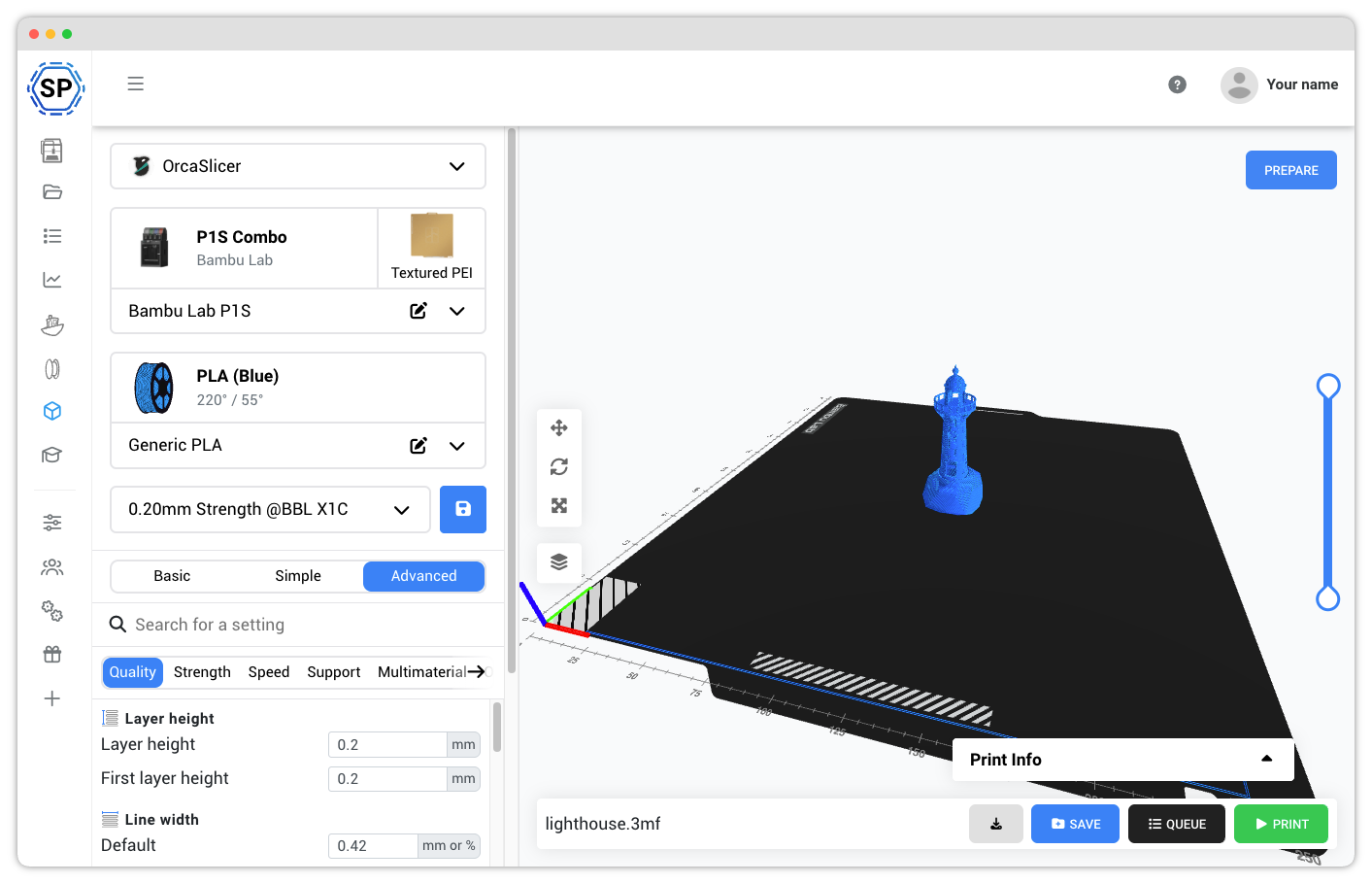
Creality Print is a fine, free, official slicer, and if you print only on Creality machines from a Windows or Mac desktop, there's no reason to stop using it. It's an OrcaSlicer fork, so the settings are all there.
But if you're looking for a Creality Print alternative because you can't run it on your Chromebook, tablet or old laptop, or because you now own printers from more than one brand, that's SimplyPrint. We run the same unmodified CrealityPrint engine in the cloud, so you get 100% of the profiles and settings with G-code identical to the desktop app, on any device with a browser, alongside PrusaSlicer, OrcaSlicer, BambuStudio, ElegooSlicer, Cura & Kiri:Moto. You don't have to pick one engine or one device, you get all of them.
Run the CrealityPrint engine on the devices it can't run on
Creality Print is a desktop app for Windows and macOS (there's a community Linux build too). It doesn't run on ChromeOS, an iPad, an Android tablet or a phone. SimplyPrint runs the same engine in a browser, so "which device" stops being a question.
Keep the CrealityPrint engine, and get 6 more
The natural alternative to Creality Print is OrcaSlicer, because Creality Print is an Orca fork. The point of SimplyPrint is that you don't pick one: we run the unmodified CrealityPrint engine and PrusaSlicer, OrcaSlicer, BambuStudio, ElegooSlicer, Cura & Kiri:Moto, switchable per print.
Where Creality Print is the better pick
Creality Print is a genuinely good, free slicer, and for some setups it's the right tool. Credit where it's due:
Creality Print and SimplyPrint comparison
Nothing is black-and-white, and there are always pros and cons to consider when choosing a 3D printing cloud solution!
And we're not here to simply tell you, that SimplyPrint is the best - we want you to make an informed decision, and of course there are pros of using Creality Print as well!
Pros of using Creality Print
Creality Print has real strengths, and they're worth being honest about:- Free and official: Creality's own slicer, maintained by Creality, at no cost.
- A full OrcaSlicer feature set: since v5 it's an OrcaSlicer fork, so the settings tree, previews and controls are the ones Orca users already know.
- Tuned for Creality printers: factory-calibrated profiles for the Ender, CR and K-series, and the newest Creality models are supported first.
- Fully offline and local: runs on your own machine with no account and no internet; your files stay on your computer.
- Multi-color ready: supports Creality's CFS multi-material system for multi-color prints.
Cons of using Creality Print
Where Creality Print falls short if you want to slice from anywhere, on any printer:- Desktop-only: Windows and macOS (plus a community Linux build). There's no native version for a Chromebook, iPad, Android tablet or phone, so on those devices there's no native way to run it.
- Heavy models need a real machine: slicing runs locally, so a big or detailed model is slow on an older or low-RAM computer.
- Built around Creality's printers: it's an Orca fork, so it can slice for other brands, but it's tuned for Creality and its profiles don't transfer cleanly to non-Creality machines.
- Profiles live on one machine: your tuned profiles sit on the computer you set them up on; there's no built-in cloud sync across devices or users.
- Slicing and printing are separate: it's a slicer, not a print platform, so there's no built-in remote queue, monitoring, AI detection or team management beyond Creality's own tools.
Creality Print vs. SimplyPrint
Side-by-side list comparison of details and features in Creality Print and SimplyPrint

|

|
|
|---|---|---|
| Slicing & devices | ||
| Runs the real, unmodified engine ? | ||
| Every desktop setting (not a stripped preset) ? | ||
| Slicing engines available | 1 (Orca-based) | 7 engines |
| Import your existing profiles | ||
| Multi-color / AMS support | ||
| Slices for all major FDM brands ? | Creality-focused | |
| No install (opens in a browser) | ||
| Windows & macOS | ||
| Linux | Community AppImage | |
| Chromebook / ChromeOS ? | Linux/Crostini only | |
| iPad & Android tablets | ||
| Phone (iPhone & Android) | ||
| Old / low-power machines ? | ||
| Send to your printer + monitor remotely | Creality printers | |
| Profiles synced across your devices | ||
| Compare | Learn more | Learn more |
SimplyPrint prices are shown in USD; see our pricing page for your local currency. Competitor prices are shown as they publish them.
Contact us if you think we made a mistake in our comparison!
Creality Print vs. SimplyPrint: frequently asked questions
What is the best alternative to Creality Print?
Can I run Creality Print on a Chromebook, iPad or phone?
Is Creality Print based on OrcaSlicer?
Does SimplyPrint use the real Creality Print engine?
Is there a Creality Print online or web version?
Can I slice for non-Creality printers too?
Do I have to stop using Creality Print?
Conclusion
Why SimplyPrint is the Top Creality Print Alternative
We made SimplyPrint due to the fact, that nothing else on the market quite fit our needs. We wanted a platform that was easy to use, but still had all the features we needed. We wanted a feature-rich platform, intuitive and easy to use, with a great user experience and actual innovation within the 3D print management software space.
In summary, we - humble and unbiased as we are 😉 - believe that the SimplyPrint platform is a great Creality Print alternative!
Get started - free forever