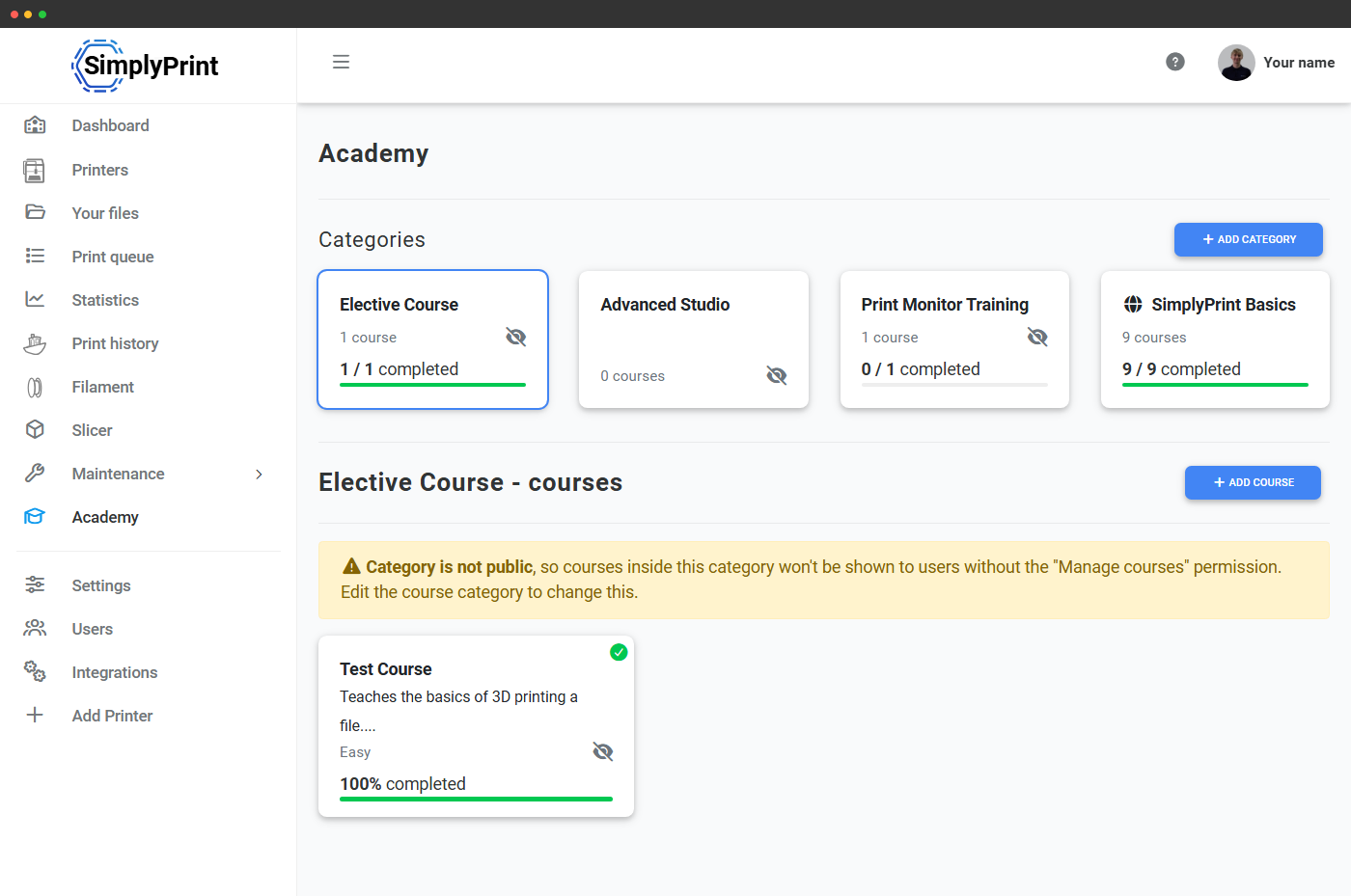
Samme Academy, med klasseværelsesregler
På School-planen holder Academy op med at være en bunke valgfri læsning og bliver et struktureret læringsrum: tildel et kursus, kræv det før en elev kan bruge sliceren eller starte et print, se hvem der er færdig og hvem der ikke er, og lad elever rykke op i næste klasse, når de består.
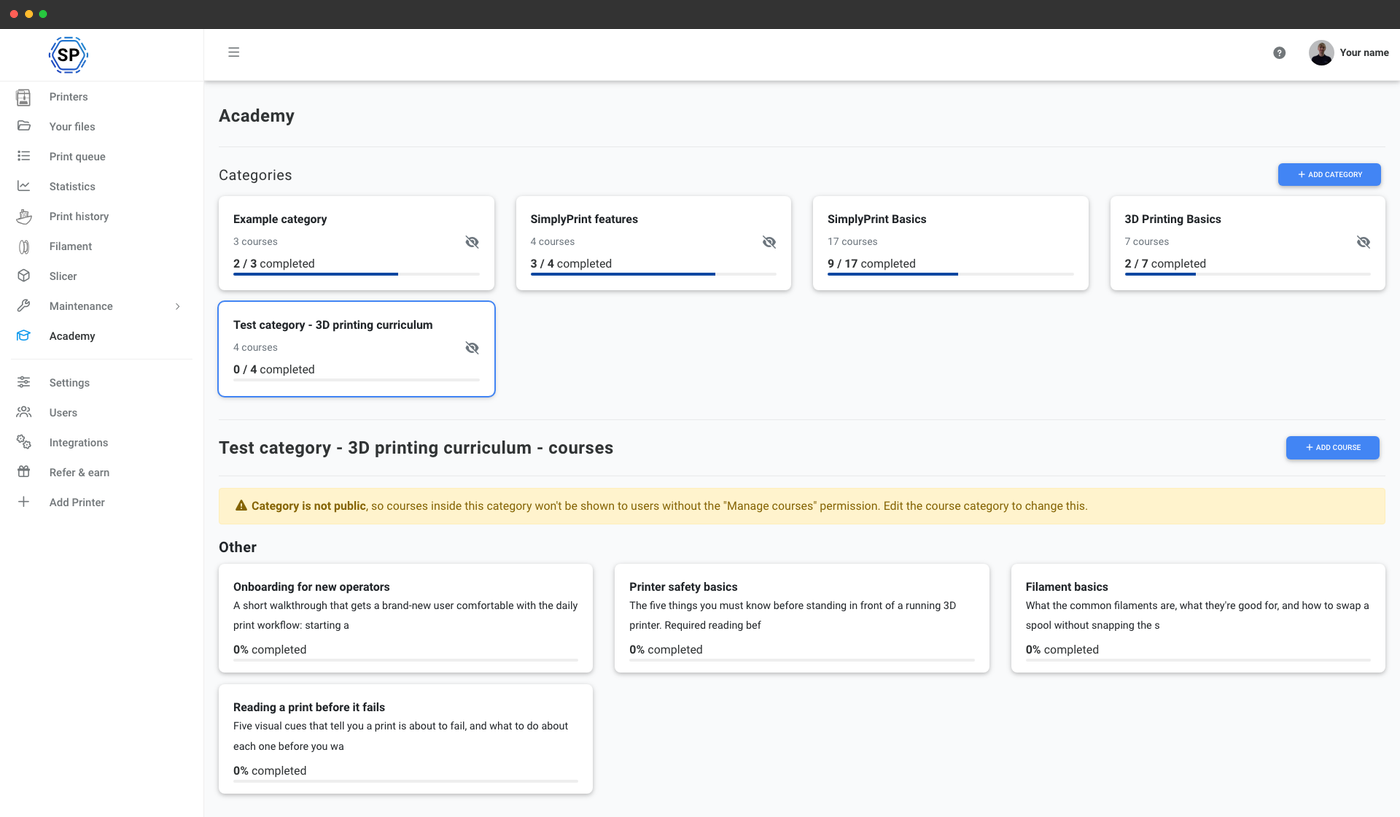
Kræv sikkerhedskursus før første print
Opsæt en organisationsfunktion, der knytter "Start et print" til et kursus, en sikkerhedsgennemgang, grundlæggende viden om ikke at røre dysen eller skolens egne laboratorieregler. Indtil eleven har gennemført kurset og bestået quizzen, forbliver knappen til at starte print låst. Samme mønster virker for sliceren, kræv et kursus om, hvordan en slicer fungerer, før elever kan slice, for rydning af printpladen, kræv et kursus om, hvordan et godt print ser ud, og for filamentskift. Alle printfunktioner kan låses bag kursusgennemførelse.
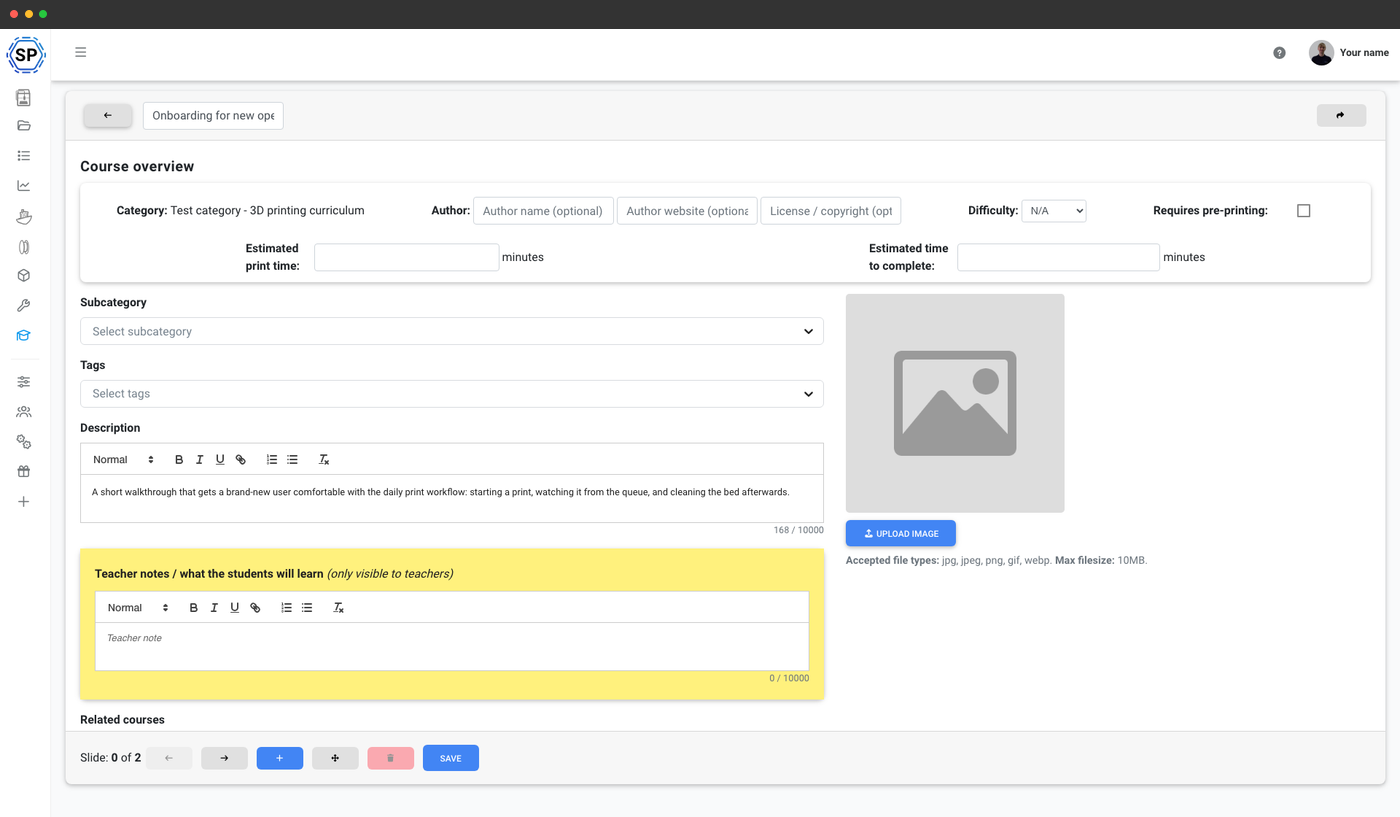
Skriv dine egne kurser, der passer til din klasse
Byg slides, indlejr YouTube-videoer, tilføj billeder, skriv quizzer med multiple choice- eller fritekstspørgsmål, og send dem til én klasse eller hele skolen. "Design din første del i Tinkercad," "Sådan tænker en slicer om laghøjde," "Aflæs printerskærmen efter en strømafbrydelse" - dit pensum, dine ord, din skoles regler. Kursuseditoren er den samme, som Enterprise-kunder bruger, så du sidder ikke fast i en beskåret klasseværelsesversion.
Eksempelkurser som udgangspunkt for dit pensum
Er du usikker på, hvor du skal starte? Her er fem kurser, de fleste skolekonti ender med at bruge i en eller anden form. Brug dem som udgangspunkt: omdøb, omarrangér og redigér slides, så de passer til dit udstyr og skolens regler:
- Grundlæggende 3D-printersikkerhed (~15 min), passende personlige værnemidler, varme overflader og hvad du aldrig må røre.
- Slicer-grundlag: fra STL til G-code (~25 min) - slicingindstillinger, printretning, supports
- Forstå et mislykket print (~20 min) - almindelige fejl, hvad de betyder, og hvad du skal gøre
- Ilægning og skift af filament (~15 min) - manuel skifteproces, tilstopninger, skifteprocedurer
- Vedligeholdelse af din printer mellem print (~10 min) - rengøring af printplade, aftørring af dyse, regelmæssige tjek
Ryk elever op til næste klasse, når de består
Når en elev afslutter et kursus, kan SimplyPrint automatisk opgradere elevens brugerrolle ("Begynder" til "Øvet"), føje eleven til en skoleklasse eller låse op for flere funktioner for brugeren. Gennemførelse er ikke blot en fejring på skærmen, det er sådan en elev på første år kommer på tredje år, sådan en elev, der kun bruger Tinkercad, får adgang til avancerede slicerindstillinger, og sådan en elev, der har gennemført sikkerhedskurset, kommer ind i laboratoriet.
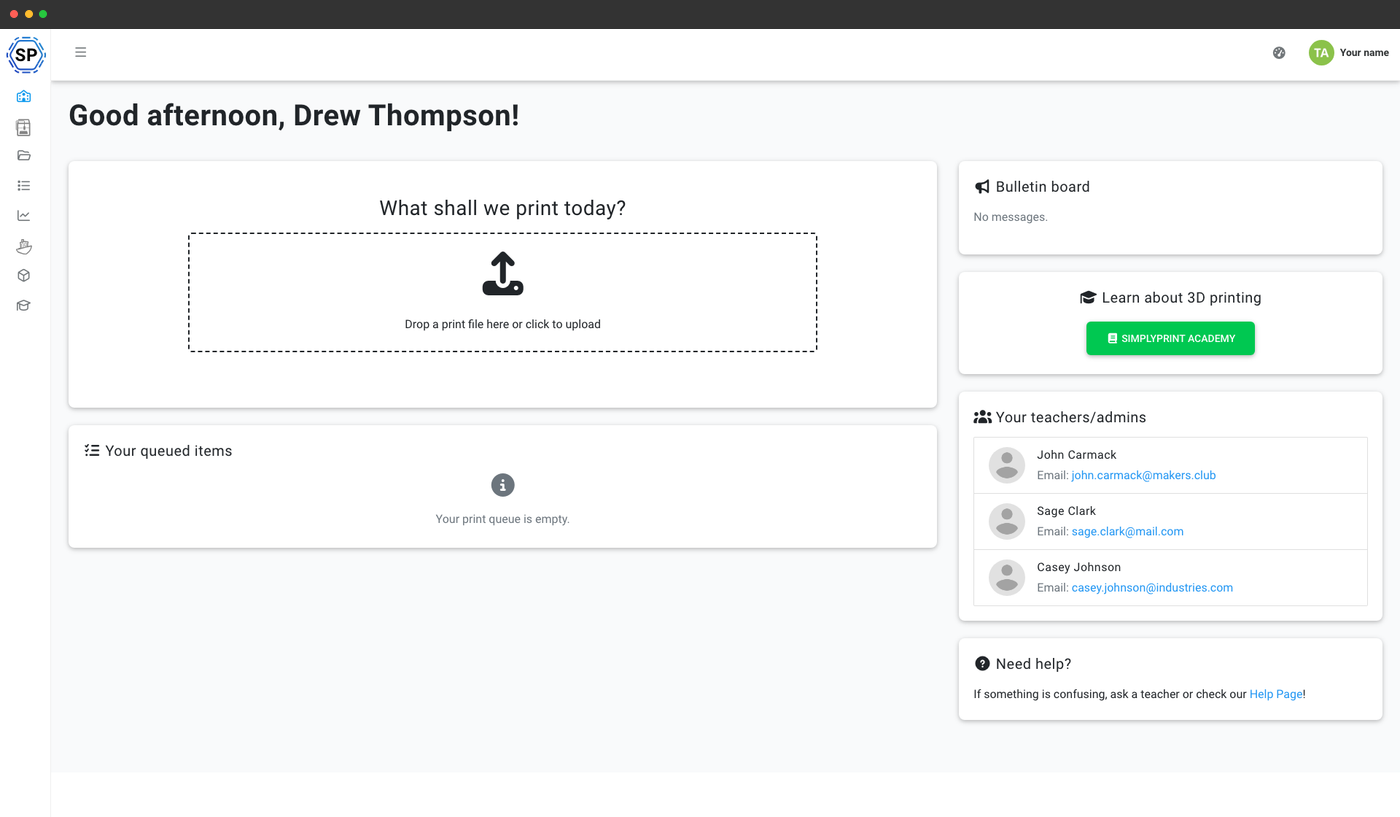
Lærere ser én visning, elever ser en anden
På School-planen kan hver kursusslide have lærernoter, som kun lærere ser, svar på quizzen, talepunkter til gennemgangen, påpegninger af typiske elevfejl. Elever får det polerede kursus, lærere får det samme kursus med undervisningsplanen bagt ind. Elevdashboardet viser en "Lær om 3D-print"-knap lige ved siden af filuploadfeltet, så eleverne finder Academy uden at nogen skal pege dem derhen.
Et overblik over, hvem der har afsluttet hvad
Hver kursusgennemførelse registreres på elevens konto, inklusive hvilken version af kurset eleven bestod (så en revision af pensum ikke sletter sidste semesters registreringer). Kombiner det med eksport af printhistorikken, så har du ét sted at besvare spørgsmålet "havde denne elev gennemført sikkerhedskurset, før eleven printede?" Det er nyttigt til forældremøder, semesterrapportering og det uundgåelige forsikringsspørgsmål.
Gennemførelsesregistreringer fungerer også som dokumentation for skolers forsikring og STEAM-udstyrs ansvarskrav, bevis for at hver elev bestod obligatorisk sikkerhedstræning, før de rørte printeren.
Hvad er inkluderet i School-abonnementet
Alt på denne side er inkluderet i skoleplanen. Kursusudarbejdelse er også tilgængelig på Enterprise (uden det strukturerede e-læringsforløb); det er gratis at læse det offentlige kursuskatalog på alle planer.
| Funktion/grænse | Gratis | Basic | Pro | Printfarm | Enterprise | Skole | Cloud Slicer | Filament Manager |
|---|---|---|---|---|---|---|---|---|
|
Academy-e-læringsrum
Progression, oplåsning ved gennemførelse, lærervisning med lærernoter og CTA på elevdashboardet. Kun på School-abonnementet.
|
||||||||
|
Opret egne kurser
Byg dine egne kurser med slides, quizzer og indlejrede medier. Enterprise og School.
|
||||||||
|
Dashboards for elever og lærere
Dashboardene, der viser Academy-knappen for elever. Kun med School-planen.
|
Vil du vide mere om vores abonnementer?
Se fuld pris- og funktionssammenligningOfte stillede spørgsmål
Kan jeg virkelig forhindre en elev i at printe, før eleven har bestået et kursus?
Kan jeg tildele et kursus til én klasse frem for hele skolen?
Hvilke kurser kan jeg oprette?
Ser lærere andet indhold end elever?
Udsteder Academy et certifikat?
Kan jeg se, hvem der har gennemført et kursus, og hvem der ikke har?
Hvordan adskiller dette sig fra den almindelige Academy-side?
Læs mere om SimplyPrint Academy
Academy til skoler er en del af SimplyPrints bredere Academy-produkt. Udforsk hovedsiden for det offentlige kursuskatalog, oprettelse af tilpassede kurser på Enterprise og de generelle Academy-funktioner.