Hent når du vil. Send når det gælder.
SimplyPrint API'et er godt, når dit system stiller spørgsmålene. Webhooks er måden, SimplyPrint fortæller dig, når noget ændrer sig, uden polling, uden planlagte job og uden mistede hændelser.
Send events i stedet for at polle
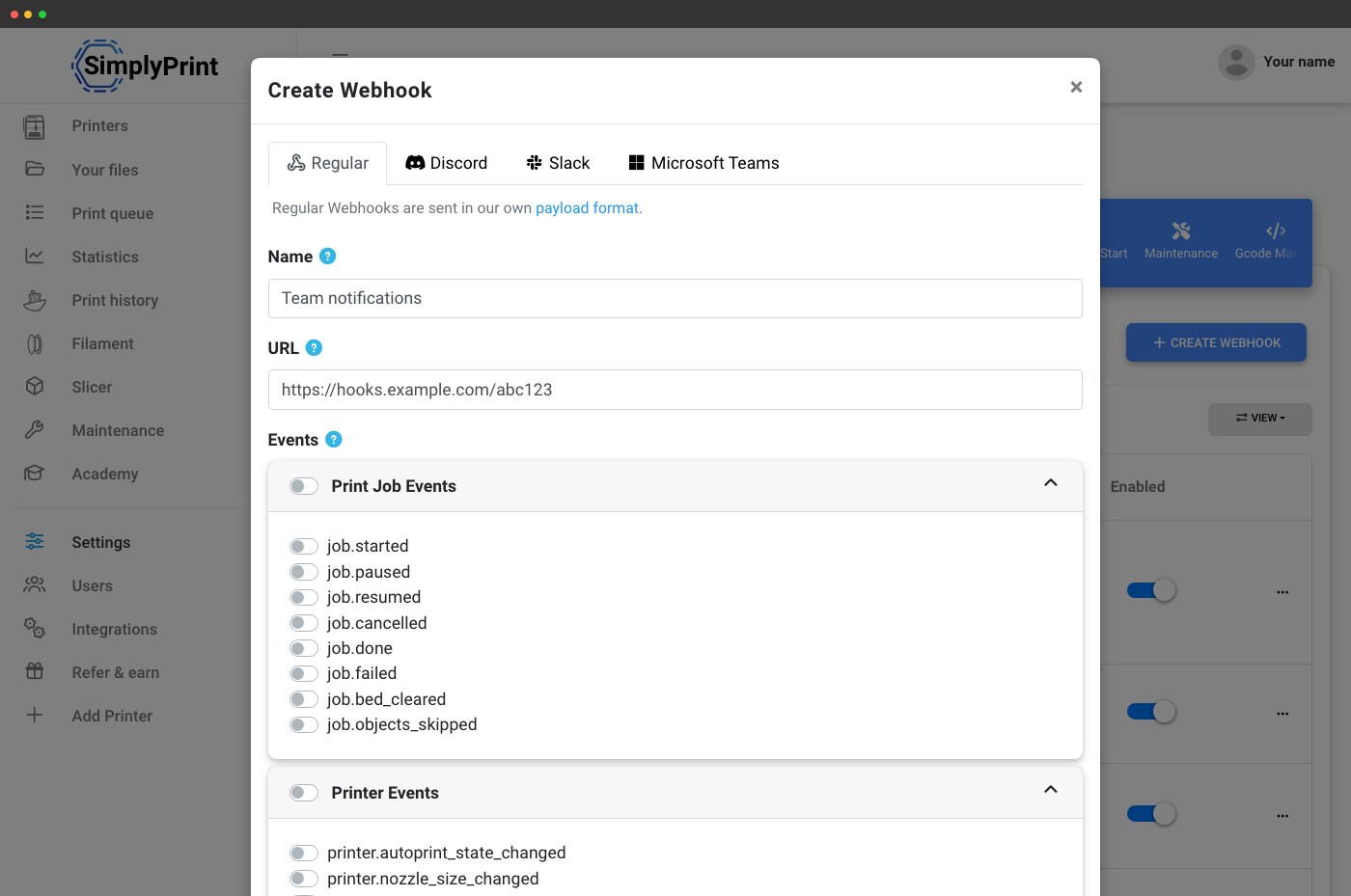
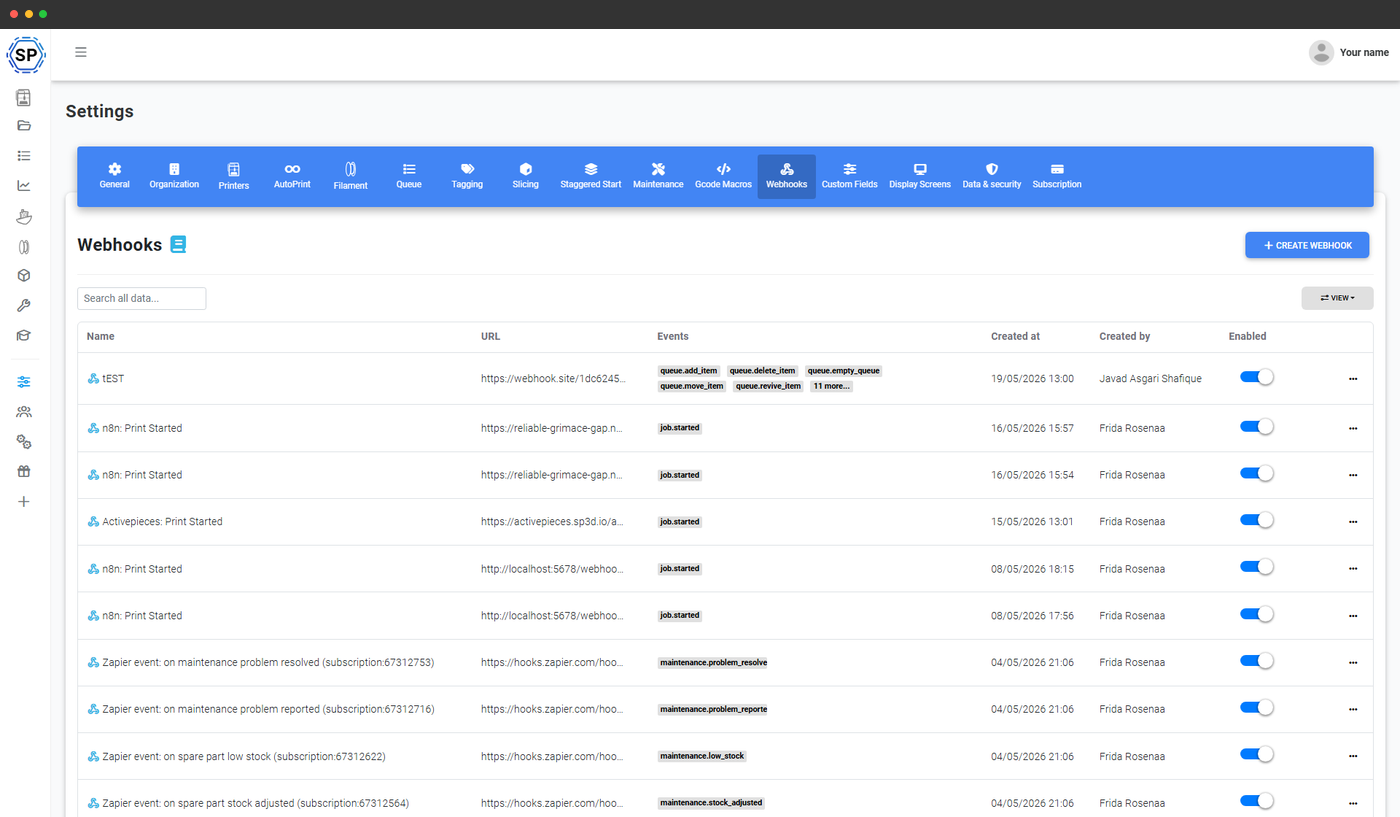
En webhook er en URL, du giver til SimplyPrint. Når der sker noget på din konto, som du abonnerer på, for eksempel at et print starter, et job fejler, et køelement godkendes, eller lagerbeholdningen af en reservedel bliver lav, sender SimplyPrint en HTTP POST til den URL med hændelsesdataene. Ingen polling-løkker, ingen jonglering med rate limits og intet "gik vi glip af den?", kun en hændelsesstrøm, du kan koble til alt, der taler HTTP.
Opret så mange webhooks, som du har brug for. Vælg præcist, hvilke hændelser hver af dem skal reagere på. Deaktiver en uden at slette den. Se alle leveringer i historikvisningen. Det er samme grundelement, som resten af nettet kører på, nu forbundet til din 3D-printerflåde.
Fire leveringsformater, ét webhook-system
SimplyPrint registrerer automatisk destinationen ud fra URL'en og formaterer payloaden, så den passer. Sender du en webhook til Discord, får du et rigtigt embed med farve, felter og tidsstempel. Sender du den til Slack, får du en Slack Block Kit-meddelelse. Sender du den til Microsoft Teams, får du et adaptivt kort. Sender du den til noget andet, får du ren rå JSON, som du kan bruge, som du vil.
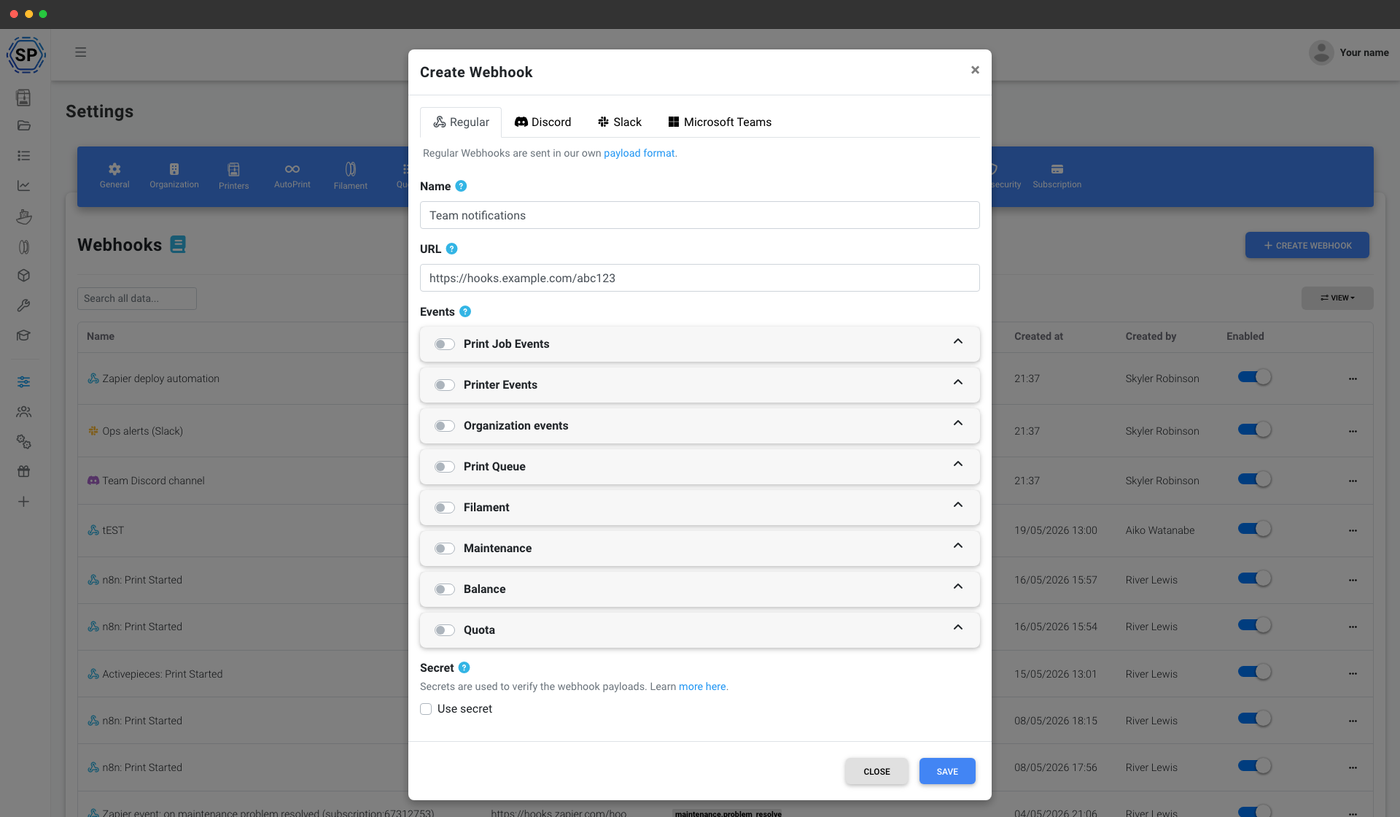
Ren POST-body til Zapier, n8n, Make eller din egen backend.
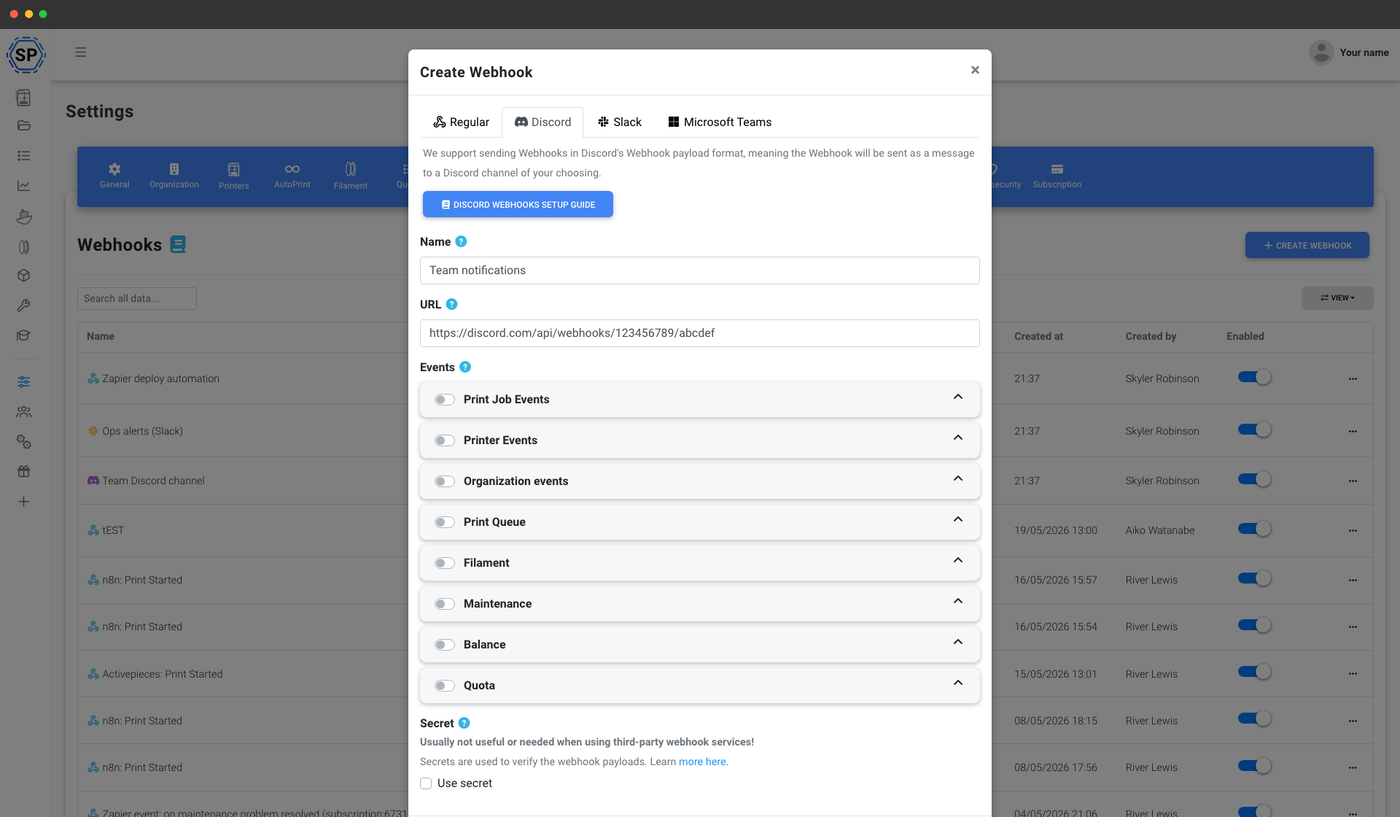
Indsæt URL'en til en kanal-webhook, og få detaljerede embeds uden en bot.
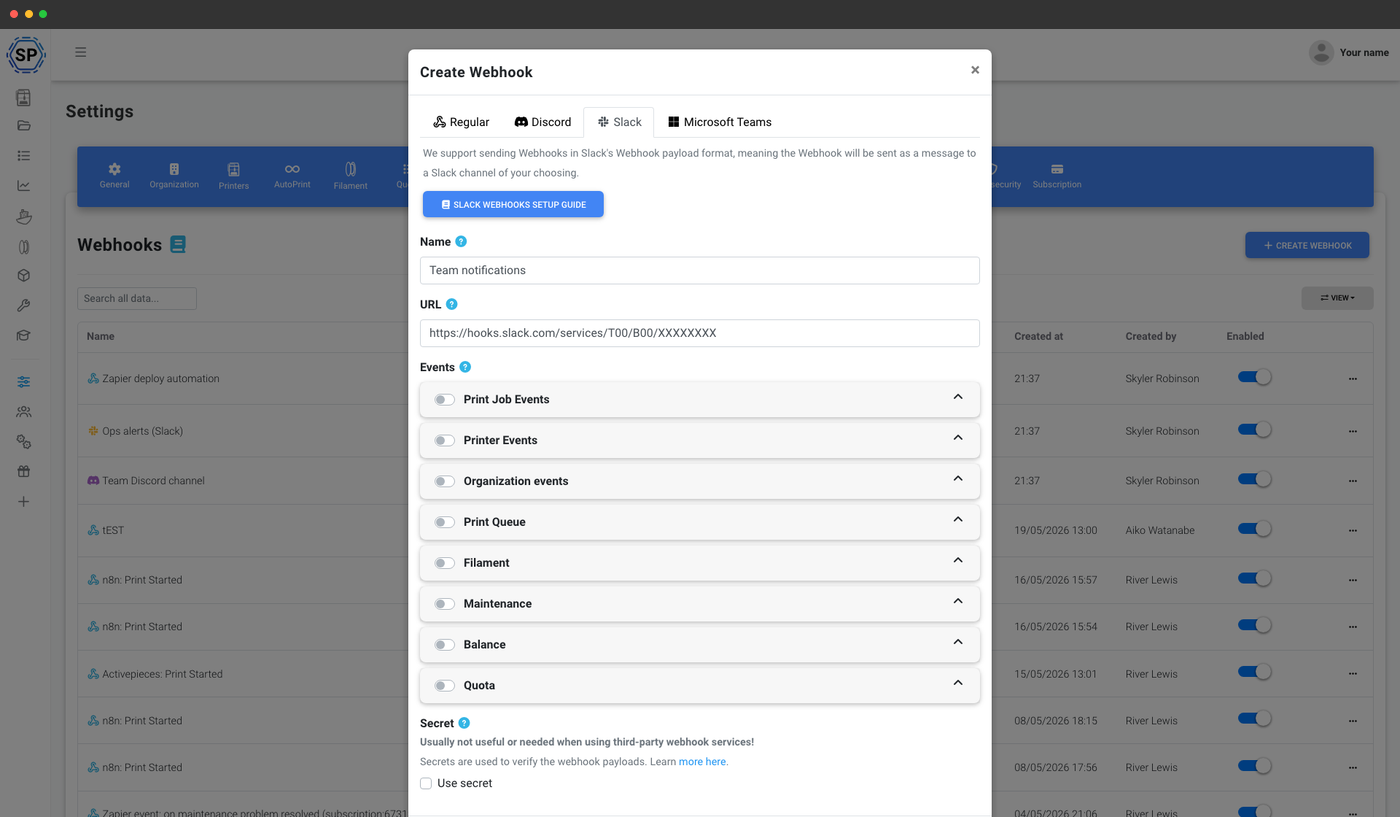
Native Block Kit-beskeder fra ethvert indgående Slack-webhook.
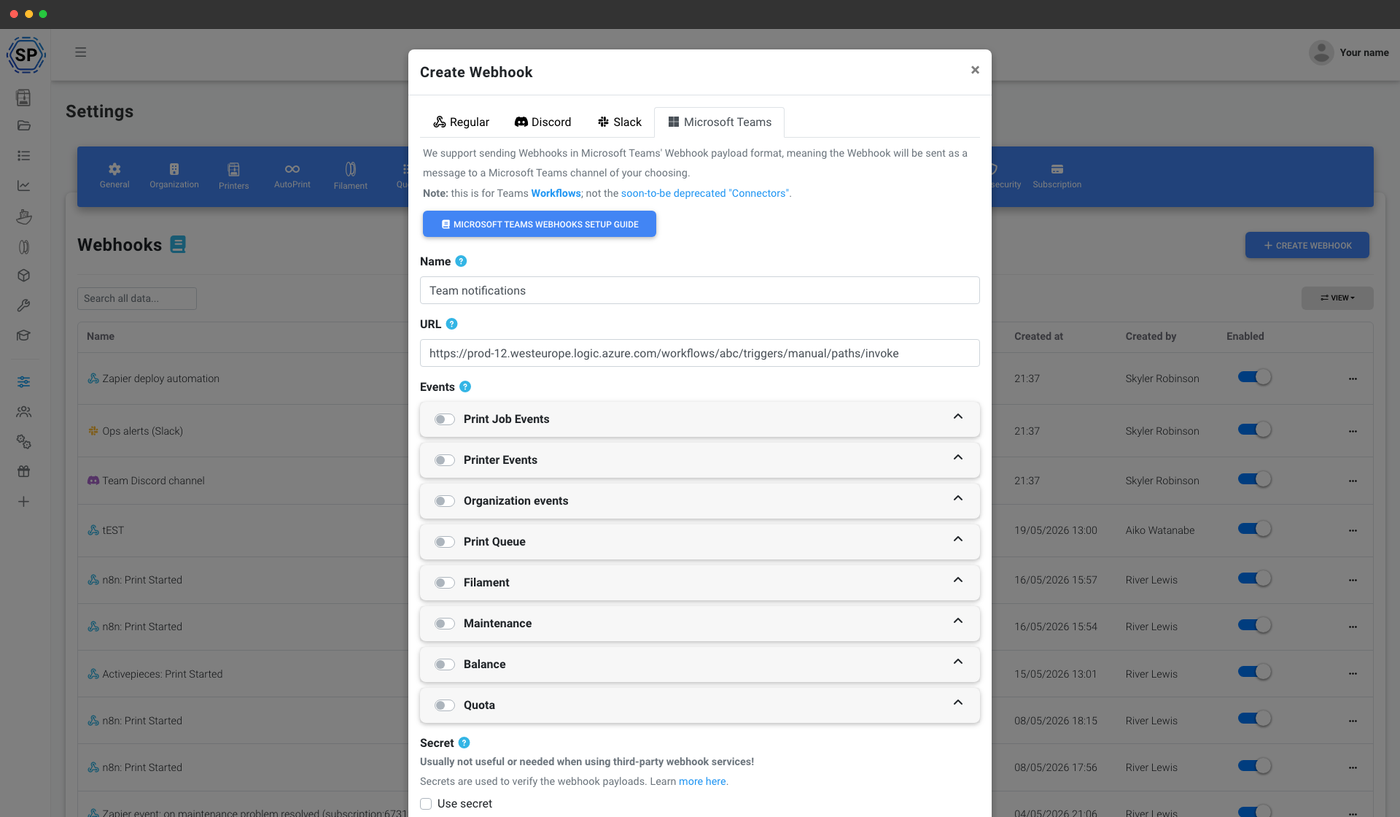
Adaptive kort sendt til en Teams-workflow- eller connector-URL.
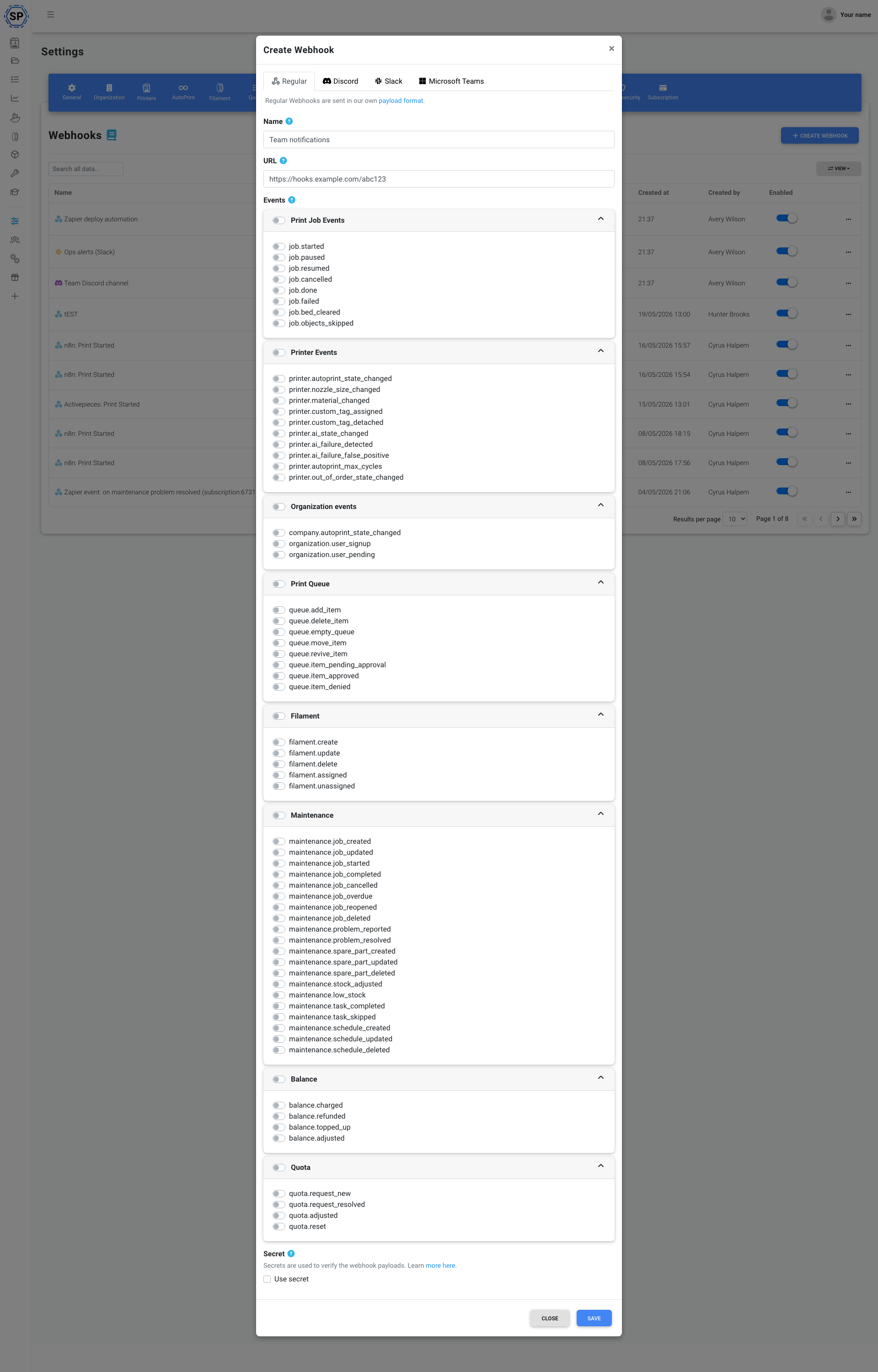
Hver begivenhed din flåde genererer, grupperet i overskuelige kategorier
Tilmeld hver webhook præcis de hændelser, der er relevante for den. En Discord-kanal for hele teamet behøver måske kun print færdigt og print mislykkedes. En Zapier-automatisering kan abonnere på køelement godkendt. Et vedligeholdelsesdashboard vil måske have alle maintenance.*-hændelser. Du bestemmer for hver webhook.
- Printjobhændelser - startet, sat på pause, genoptaget, annulleret, færdig, mislykket, printplade ryddet, objekter sprunget over
- Printerhændelser - AutoPrint-status, dysestørrelse, materiale, brugerdefineret tag tildelt / fjernet, ude af drift-status, AI-status, printfejl registreret af AI, falsk positiv AI-printfejlregistrering, maks. antal AutoPrint-cyklusser
- Organisationshændelser - kontoens AutoPrint-status, ny brugeroprettelse, bruger afventer godkendelse
- Printkø - køelement tilføjet, slettet, flyttet, genoplivet, afventer godkendelse, godkendt, afvist, kø tømt
- Filament: oprettet, opdateret, slettet, tildelt printer, fjernet fra printer
- Vedligeholdelse - job oprettet / startet / fuldført / annulleret / forfaldent / genåbnet / opdateret / slettet, problem rapporteret / løst, reservedel oprettet / opdateret / slettet, lager justeret, lav lagerbeholdning, opgave fuldført / sprunget over, plan oprettet / opdateret / slettet
- Saldo, opkrævet, refunderet, indsat, justeret
- Kvote - ny anmodning, anmodning afsluttet, justeret, nulstillet
En payload-struktur, der er nem at kode mod
Enhver almindelig webhook-levering ser ens ud udefra: en kuvert med navnet event, et ISO-timestamp og det oprindende webhook_id, som omslutter et data-objekt, hvis form er specifik for begivenheden.
Objektet data for en job.done-hændelse omfatter printjobbet, printeren, filen, brugeren og forløbet tid. En filament.assigned-hændelse omfatter filamentet, printeren og hvilket værktøj det blev tildelt. En maintenance.job_overdue-hændelse omfatter jobbet, printeren, den ansvarlige bruger og den oprindelige forfaldsdato. Samme indpakning, hændelsesspecifikke data, så en enkelt switch-sætning i din kode håndterer hele strømmen.
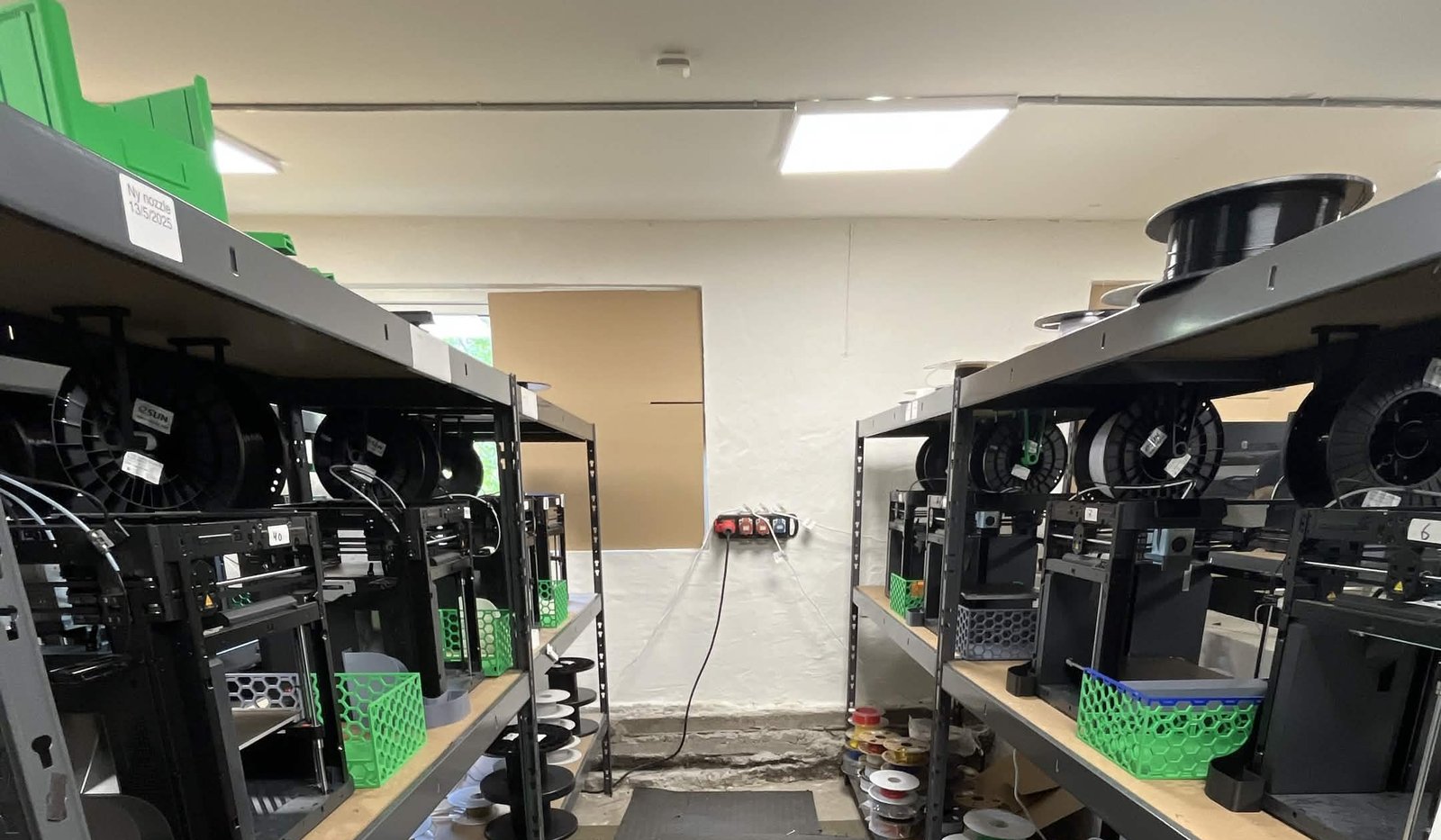
Se, hvordan Weshape bruger Webhooks til at styre ~50 printers
Order queueing is a webhook that feeds into the SimplyPrint API.
Test, afprøv og inspicér, før du sender noget i produktion
Webhooks bør være kedelige. SimplyPrint giver dig tre værktøjer, så de faktisk er det: Se, hvad du modtager, send et testkald, og gennemgå alle tidligere leveringer.
Send en testhændelse
Send efter behov en payload med den faktiske struktur fra ethvert abonnement.
Eksempler på payloads
Gennemse præcise payload-formater, før du skriver en linje kode.
Leveringshistorik
URL, HTTP-status, svarindhold og tidsstempel for hver levering.
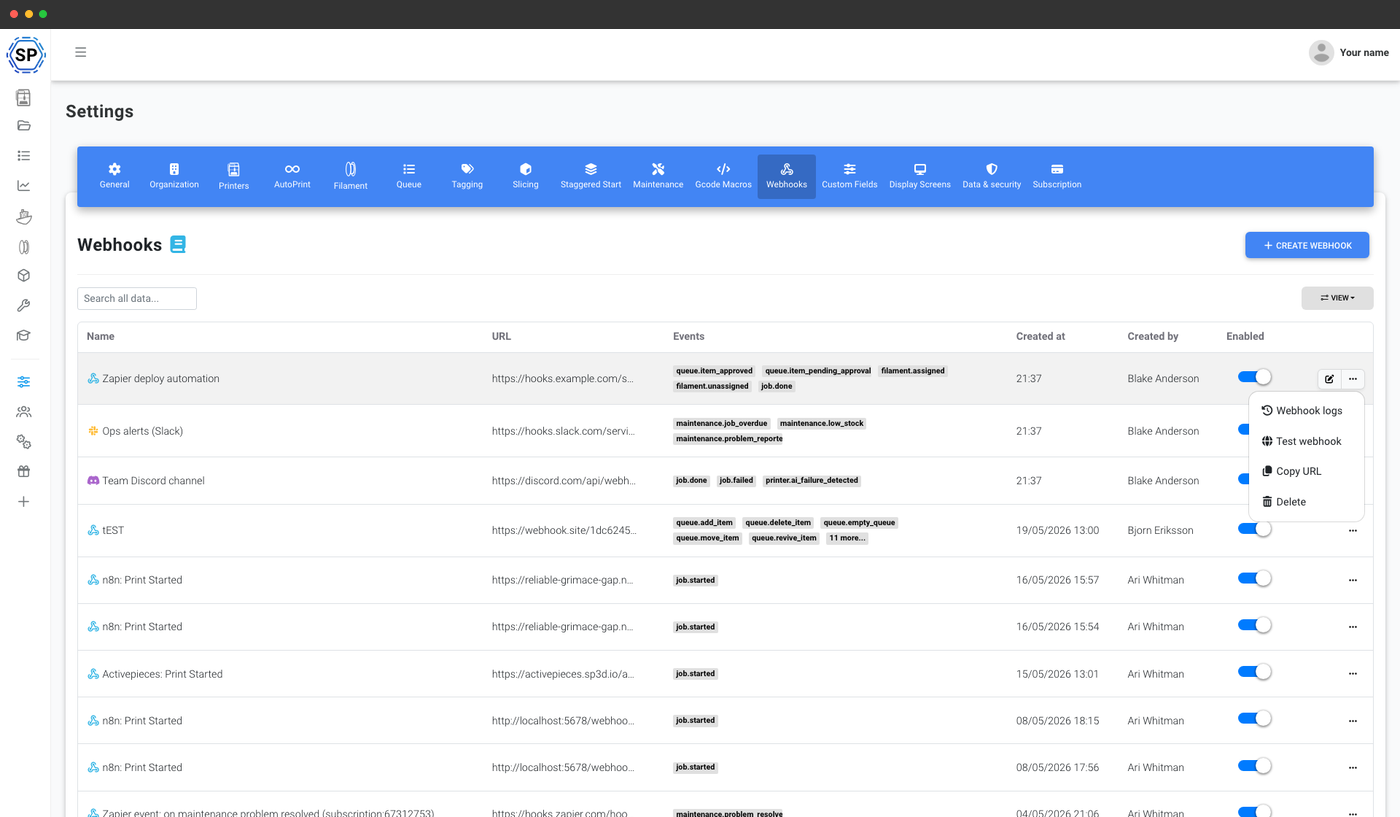
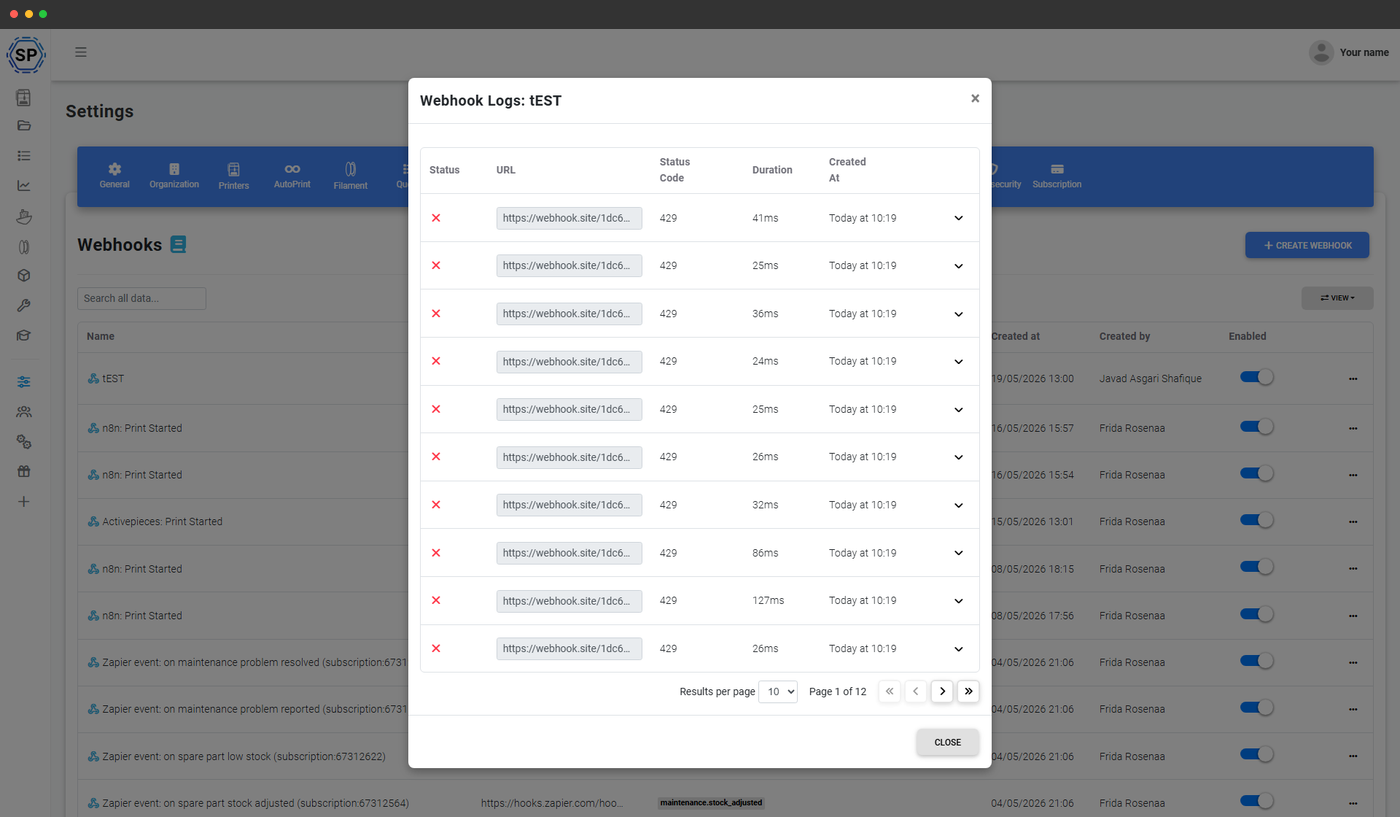
Sådan ser dine webhooks ud, når de er leveret
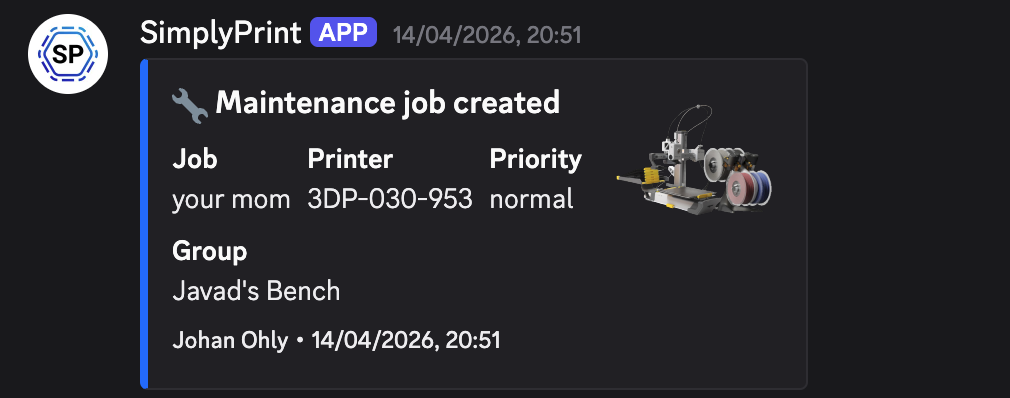
Discord-, Slack- og Teams-formaterne vises som indbyggede embed-kort i de apps, med en fyldig titel, nyttelast med felter og et valgfrit printerminiaturebillede. Her er tre faktiske leveringer fra en printfarm, der bruger SimplyPrint, taget direkte fra en Discord-kanal. Konfigurer formatet én gang, så klarer SimplyPrint embed'et.
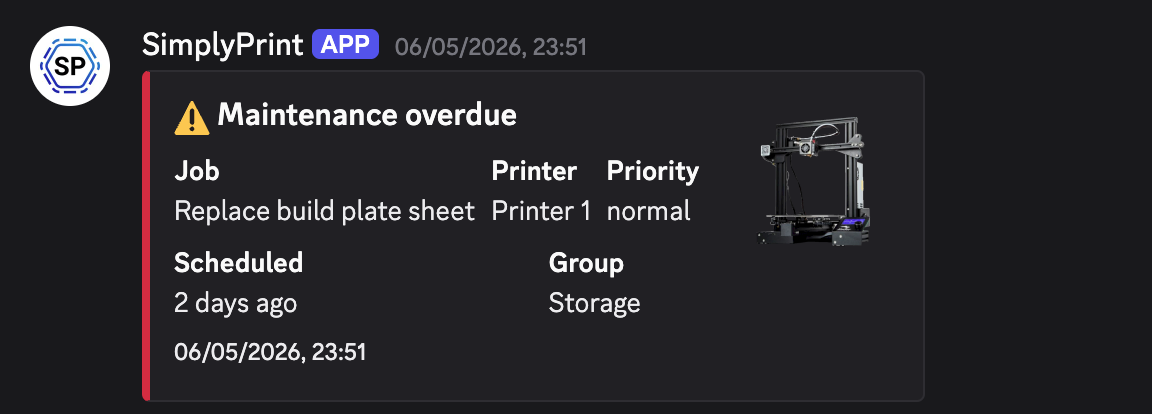
Vedligeholdelsesfrist overskredet
Et planlagt vedligeholdelsesjob overskred sin forfaldsdato: jobnavn, printer, prioritet, tidsplan og gruppe, alt sammen på ét kort.
Vedligeholdelsesjob oprettet
Et nyt vedligeholdelsesjob er planlagt, printer, gruppe og prioritet dukker straks op i dit teams kanal.
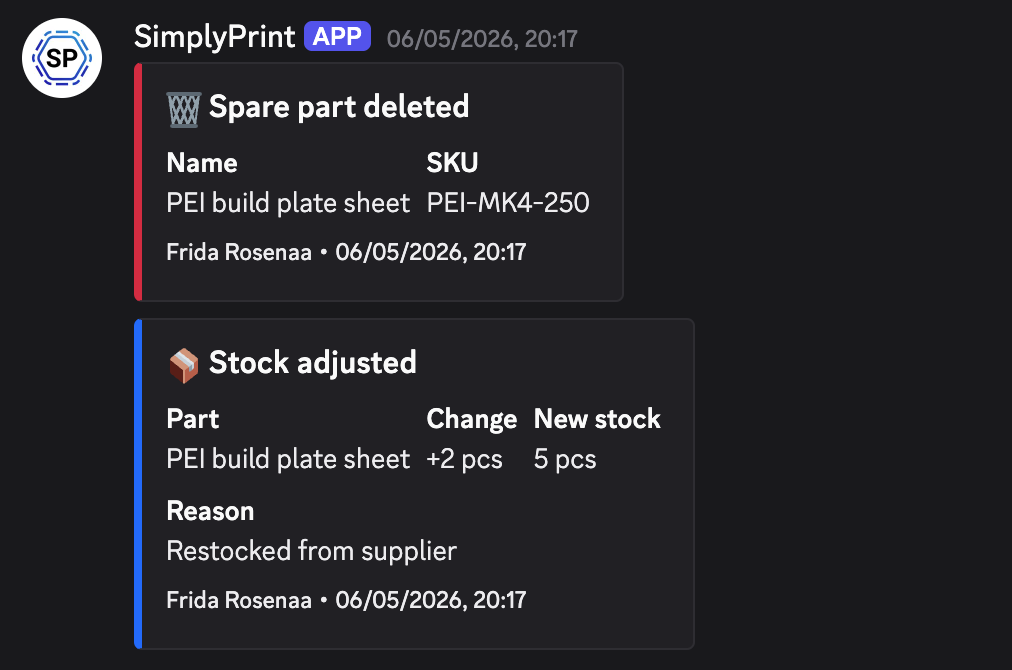
Reservedelslager
Lagerændringer, dele slettet, lager justeret, genopfyldt, leveret som separate hændelser, så et workflow-værktøj kan reagere på hver enkelt.
Valgfri verifikation med en hemmelig nøgle: bekræft, at anmodningen virkelig kom fra SimplyPrint
Angiv en hemmelig nøgle for hver webhook, og SimplyPrint sender den med hver levering i X-SP-Secret-headeren, så din modtager kan kontrollere, at anmodningen virkelig kom fra os og ikke fra en tilfældig IP, der gættede din URL. Udelad nøglen for webhooks på interne netværk, hvor den ikke er nødvendig. Udskift den, hvis en nøgle lækker. Tidligere leveringer forbliver gyldige, og fremtidige bruger den nye nøgle.
Hver webhook kan også aktiveres / deaktiveres uafhængigt. Brug kontakten til at sætte en støjende integration på pause uden at miste dens hændelsesabonnement eller historik.
Hvad folk faktisk forbinder
Det er de mønstre, vi oftest ser på tværs af printfarme, skoler, makerspaces og produktteams, der bruger SimplyPrint.
Send job.done og job.failed til teamets kanal.
Udløs fakturaer eller ordreopfyldelse, når et printkøelement godkendes.
Giv drift besked om forsinket vedligeholdelse eller lav reservedelsbeholdning.
Vis elevernes indsendelser til lærerne i realtid.
Push-delen af en komplet udvikleroplevelse
Webhooks passer naturligt sammen med resten af udviklerfladen i SimplyPrint:
- SimplyPrint API'et lader din kode hente enhver tilstand efter behov: printere, kø, filer, filament og job.
- Webhooks lader SimplyPrint pushe, så snart noget ændres, så du ikke behøver at polle efter det.
- SimplyPrint MCP-serveren lader AI-assistenter som Claude og ChatGPT læse data fra og udføre handlinger på den samme printerflåde via et kvalitetssikret værktøjsregister.
Abonnementsadgang: hvilke abonnementer inkluderer webhooks?
Webhooks er inkluderet i abonnementerne Print Farm og Enterprise uden ekstra omkostninger. Intet gebyr pr. webhook, intet gebyr pr. levering og ingen grænse for events.
| Funktion/grænse | Gratis | Basic | Pro | Printfarm | Enterprise | Skole | Cloud Slicer | Filament Manager |
|---|---|---|---|---|---|---|---|---|
|
Webhooks
Fuldt multikanal webhook-system, almindelig JSON, Discord, Slack og Microsoft Teams, med det komplette hændelseskatalog, valgfri hemmelighedsverificering og historik pr. levering.
|
Vil du vide mere om vores abonnementer?
Se fuld pris- og funktionssammenligningOfte stillede spørgsmål
Hvordan sender jeg hændelser til Discord, Slack eller Microsoft Teams?
discord.com/api/webhooks, hooks.slack.com/services eller er en Teams-workflow-URL, og formaterer payloaden til den pågældende platform. Ingen botinstallation, app eller middleware.Hvilke hændelser kan jeg abonnere på?
Hvordan verificerer jeg, at en forespørgsel rent faktisk kom fra SimplyPrint?
Kan jeg se, hvad der er leveret?
Kan jeg teste en webhook, før den går live?
Hvordan adskiller dette sig fra SimplyPrint API'et?
Hvad med gentagne forsøg, hvis min server er nede?
Forsøger SimplyPrint igen, hvis en levering mislykkes?
Hvor længe gemmes leveringsforsøg?
Hvilke abonnementer omfatter webhooks?
Trinvis opsætningsvejledning
Se den fulde webhook-artikel i hjælpecentret for en gennemgang af, hvordan du opretter dit første webhook, inklusive detaljer om URL'er til Discord, Slack og Microsoft Teams.