

Hey SimplyPrint'ers! 👋
It has been a busy summer for the team!. SimplyPrint now speaks 15 languages, you can schedule a print for later, Enterprise organizations can manage multiple locations from one login, and schools and larger teams have a much more flexible way to organize access with Workgroups.
We have also made it possible to track machines that are not connected to SimplyPrint, log prints by hand with help from AI, slice with Cura and Kiri:Moto, and send models straight from a growing list of CAD and design tools.
There is a lot to cover, so let's get into it.
Quick version
- ✨ SimplyPrint now supports 15 languages, across the panel, website and the print notifications you receive by email, SMS and push.
- ✨ Schedule Print lets you choose when a print should start or when it should finish. The schedule lives on our servers, so you can close the browser.
- ✨ Enterprise Locations keeps each site operationally separate while giving organization administrators one login, shared SSO and a clear overview of billing and capacity.
- ✨ Workgroups add temporary or permanent permissions, printer access and allowances on top of a member's normal role.
- ✨ Virtual Machines and manual print logging let you keep history, materials and costs for machines SimplyPrint does not control, with maintenance tracking on plans that include it.
- ✨ AI print-log extraction can read a slicer summary or screenshot and fill in the print details for you.
- ✨ Cura is live in the cloud slicer, and Kiri:Moto can slice both in the cloud and locally in your browser.
- ✨ New design integrations connect SolidWorks, SketchUp, Blender, Alibre Design, FreeCAD, Printpal.io, Onshape and Fusion 360 directly to SimplyPrint.
SimplyPrint, in your language
This is the biggest update in the batch, and one existing users can start using immediately.
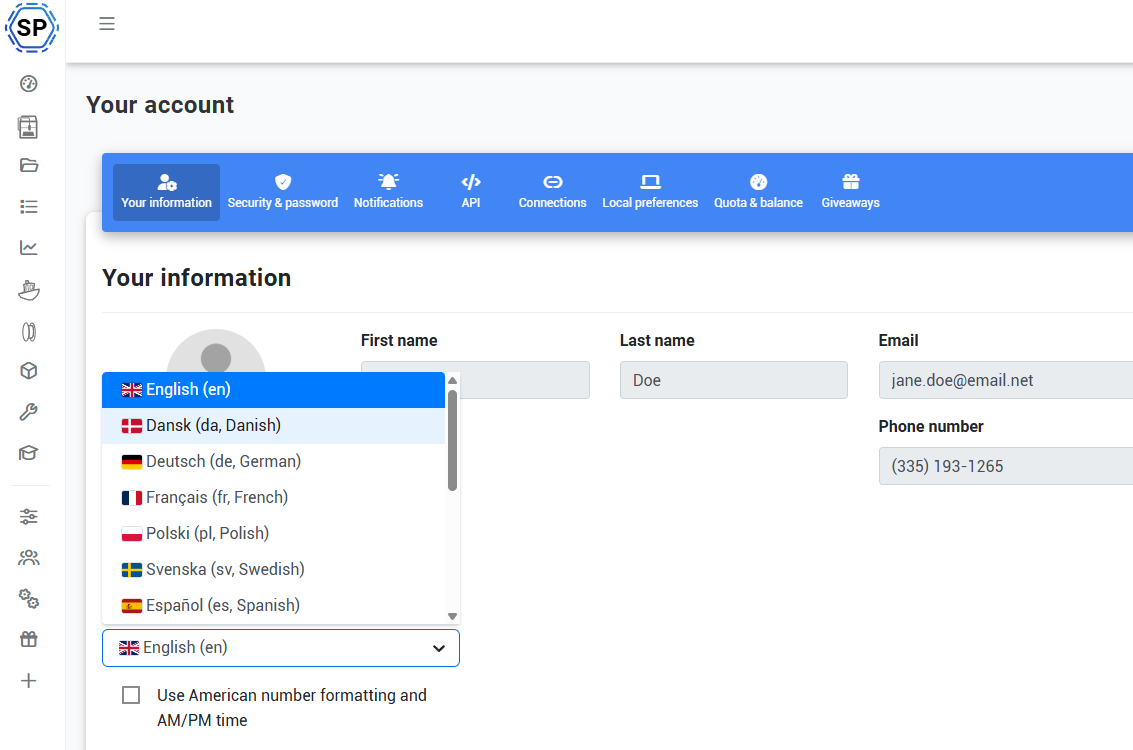
SimplyPrint is now available in English, Danish, German, French, Polish, Swedish, Spanish, Simplified Chinese, Italian, Norwegian, Brazilian Portuguese, Turkish, Russian, Ukrainian and Hindi.
Your language is personal to your user. Open your account settings, choose the language you prefer, and the panel switches with you. Other people in the same organization can keep using their own language, which is especially useful for international companies, schools and teams spread across several locations.
This is more than a translated front page. The panel, public website and print notifications now follow the recipient's language. That includes messages about prints starting, finishing, failing, pausing or being cancelled, along with filament-runout and maintenance notifications.
In other words, you can simply switch language and keep printing. No separate account, no duplicated setup and no organization-wide language that everybody has to share.
We will be adding more languages in the future - do let us know what you think should be the next one!
Schedule a print for exactly when you need it
Schedule Print is now live on the Pro plan and up.
When starting a print, you can choose an exact Start at time or tell SimplyPrint when the job should Finish by. You can schedule from one minute to seven days ahead, or use quick choices such as one hour, four hours or tomorrow.
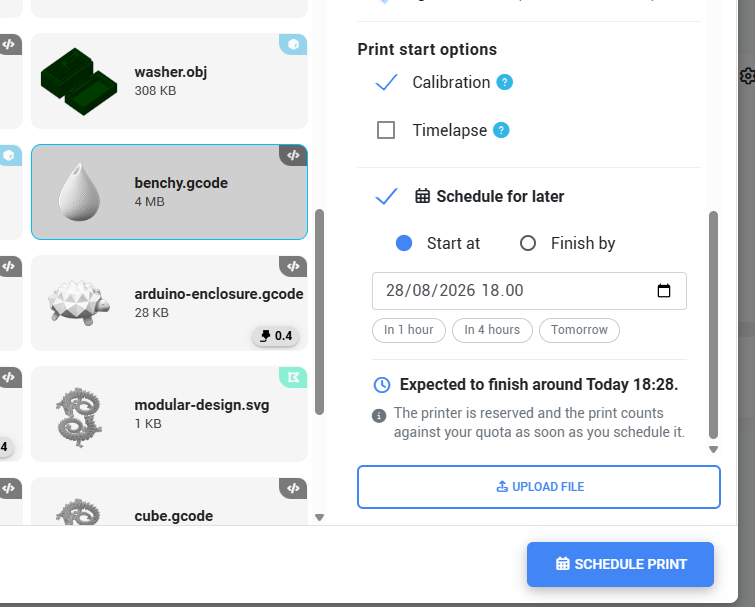
The print job is created immediately and the printer is reserved for it, but SimplyPrint waits until the selected time before releasing it. The schedule runs server-side, so your computer does not need to stay awake and the browser can be closed.
Waiting jobs appear on the printer card, the printer control panel and in a dedicated table above Print History. From there, you can change the time, start now or cancel the scheduled print.
Schedule Print is intentionally a one-time reservation. It does not power on a printer or create a recurring automation, and the printer still needs to be connected and ready when the scheduled release is attempted.
Thanks to everyone behind Schedule Print suggestion #92 for helping us shape it!
One Enterprise organization, many separate locations
For organizations with several sites, labs or departments, Enterprise Locations provides one management layer without mixing everybody's day-to-day work together.
Each location remains its own operational space. Its printers, files, members and local settings stay separate, while organization administrators can move between locations from one login. Ordinary members remain local unless they are explicitly added somewhere else.
Shared SSO can cover the whole organization, and centrally billed locations can share printer and user capacity under one subscription and invoice. If a location needs its own subscription and allowance, it can remain separately billed while still being connected for administration and SSO.
The result is a structure that fits a company with several factories, a university with several labs or a district with several sites: local teams keep a clean workspace, while the organization gets the control and billing overview it needs.
Enterprise organization administrators can create locations themselves, review the projected pricing before confirming, switch between sites and see how shared capacity is being used.
Workgroups add the second layer teams were missing
Most organizations can describe a person's main role easily: administrator, teacher, student, operator or member. The trouble begins when the same person is also part of the robotics club, the design lab and a temporary project team.
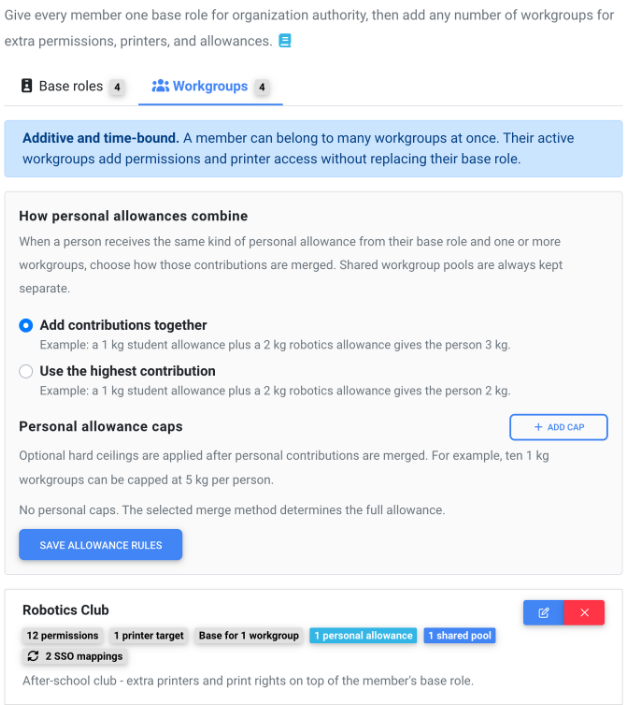
Workgroups solve that without forcing you to create awkward roles such as “Student, robotics, laser trained”. Every member still has one base role, but they can belong to any number of Workgroups at the same time.
Each Workgroup can add:
- Specific workflow permissions
- Access to selected printers, printer groups or printer models
- Personal print allowances or a shared group budget
- An optional start date and expiry date
Workgroups only add access. They cannot quietly remove something the person's base role already grants, and organization-level authority such as billing, user administration and API-key management stays on the base role.
Memberships can be assigned by hand, through an invitation, from a school class or course, or by matching groups from SSO and SCIM. This makes Workgroups useful both for a club that lasts one term and for a permanent department with its own machines and material allowance.
Workgroups are included on the School and Enterprise plans.
Track every machine, even when it is not connected
Not every machine in a workshop has an API, a network connection or a way for SimplyPrint to control it. It may be an older 3D printer that runs from an SD card, or another piece of equipment you still want beside the connected fleet.
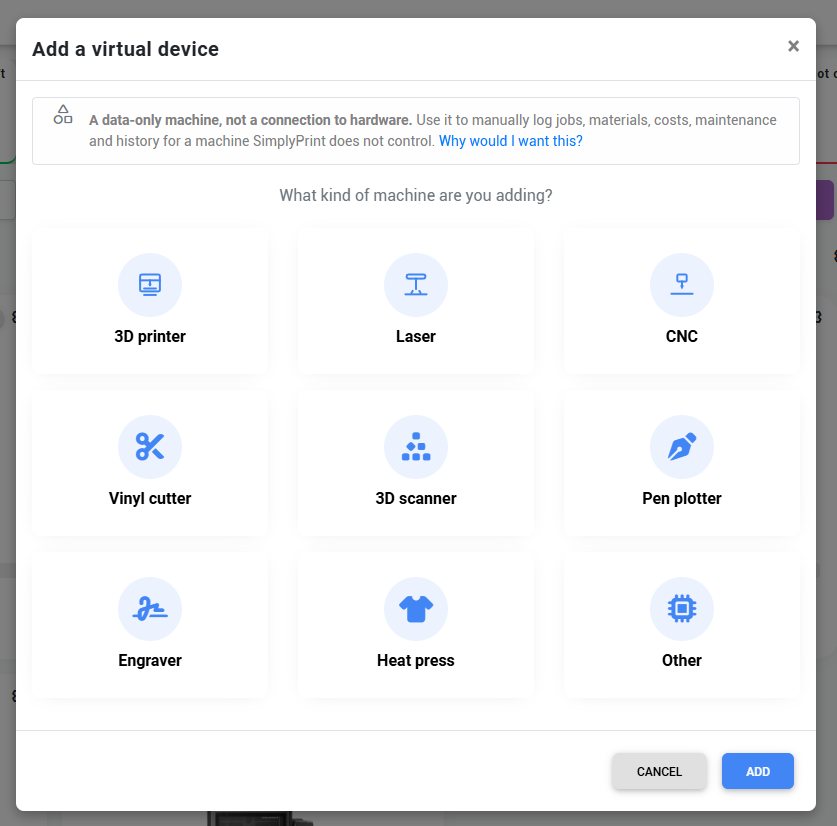
That is what Virtual Machines are for. A Virtual Machine is a data-only record, not a pretend live connection. You can use it to log jobs, materials, costs, notes and history. On plans that include printer maintenance, the machine can be part of those maintenance workflows too. For an FDM printer with a supported profile, you can also slice a file for it and download the result for manual transfer.
You can set its status by hand or through the API, attach instructions or a link to the machine's own web page, and later connect a compatible physical printer without losing the history you already built up.
Virtual Machines are available on every plan, including Free, and they have a separate allowance from connected printer slots.
Log prints by hand, or let AI fill in the form
The new Log a print flow covers work that happened outside SimplyPrint. Pick a connected or virtual machine, enter a free-text machine name, or log the job without a printer at all. You can record the outcome, rating, start and finish time, filament use, cost, custom fields and notes, and optionally subtract the material from your spool inventory.
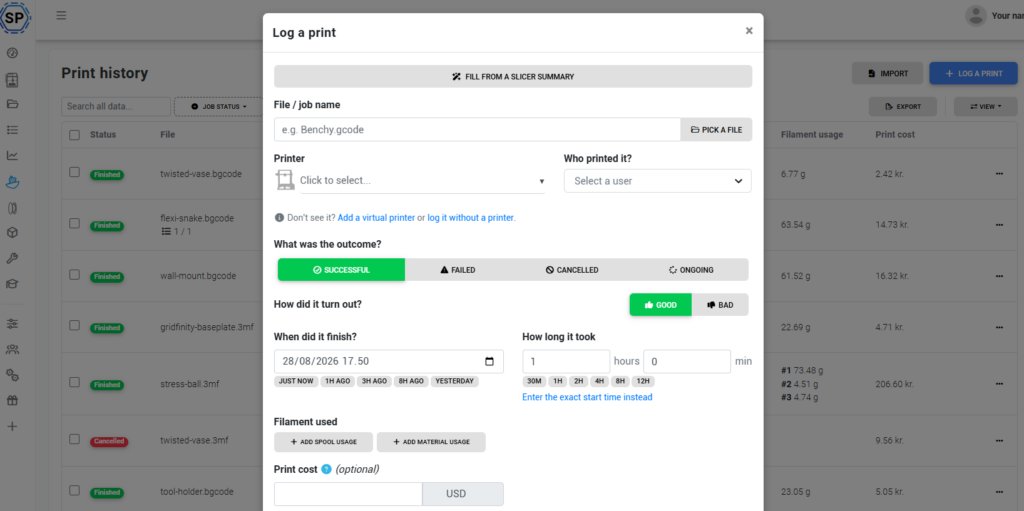
On Pro and up, Fill from a slicer summary makes this much faster. Paste the text from your slicer, paste a screenshot or upload an image, and the AI extracts the job name, duration, machine details and filament usage into the form. You review the result before saving, so it remains a helpful shortcut rather than an invisible import.
For automatically tracked jobs, you can correct the outcome, rating, completion and notes. Manual and imported entries can be edited more fully. This helps when a printer or integration reported an error even though the physical print actually finished successfully.
Cura and Kiri:Moto join the slicer lineup
Our cloud slicer has always been about one familiar browser interface with the real slicing engines underneath it. Two important additions make that lineup much broader.
Cura 5.13.0 is now available as a cloud engine. Cura is the first engine in SimplyPrint outside the PrusaSlicer and Slic3r family, so this was more than adding another logo to the picker. We built a generic engine layer that can represent Cura's own profiles, settings and visibility rules while keeping the same SimplyPrint slicer interface.
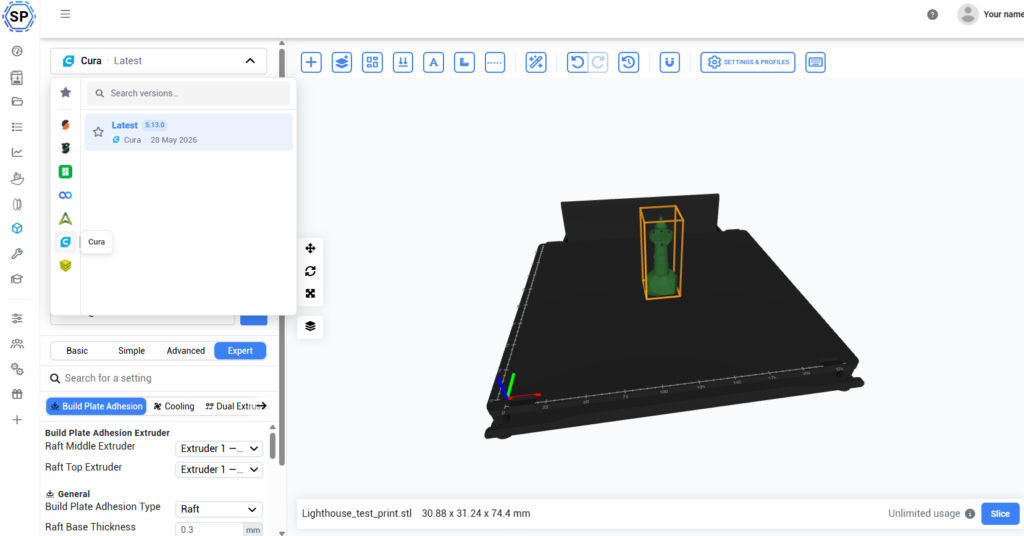
That means Cura users can slice from a Chromebook, tablet, phone or low-powered computer without installing UltiMaker Cura locally. The model is uploaded, the real engine runs on our servers, and the finished G-code comes back ready to download, queue or print.
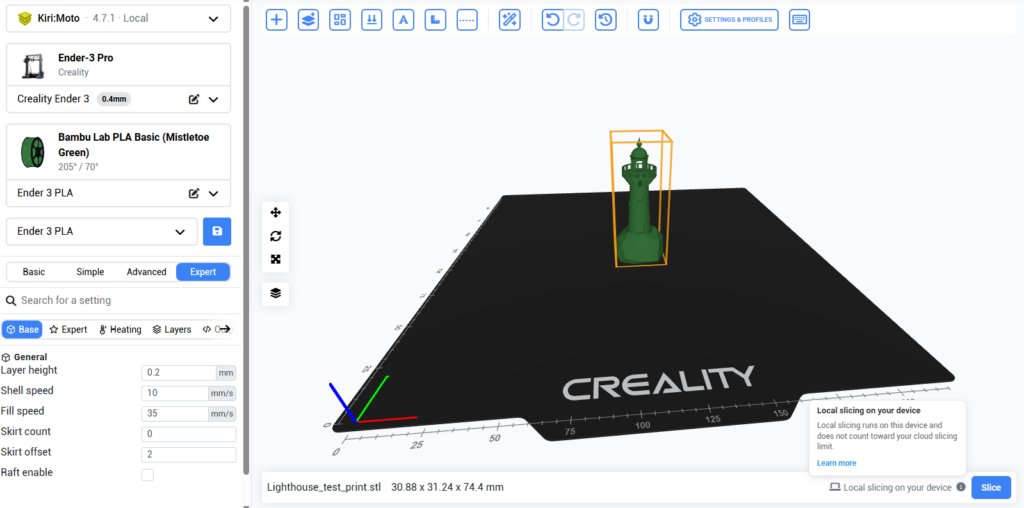
Kiri:Moto 4.7.1 is live too, with a special trick: you can run it through SimplyPrint's cloud or slice locally in the browser. Local mode keeps the processing on the device you are using, while still giving you the SimplyPrint interface and profiles. Kiri:Moto also brings native support for continuous-belt printers.
Kiri:Moto is built by Stewart Allen and the Grid.Space community. We are very grateful for the open-source work that makes the browser-native option possible.
Thanks to everyone who followed and voted on Cura cloud slicing #9 and Cura as a slicer option #678.
From design to SimplyPrint in fewer clicks
We have been building a much better bridge between the tools where models are made and the place where they are sliced, queued and printed.
The growing integration family now includes:
- ✨ SolidWorks: send selected parts, bodies or assemblies as STL or 3MF from the SimplyPrint add-in.
- ✨ SketchUp: send a selection or the whole model from the SimplyPrint extension.
- ✨ Blender: export STL, OBJ or 3MF from Blender's sidebar and send it to your account, queue or printer.
- ✨ Alibre Design: export parts and assemblies as STL or 3MF, with mesh-quality controls and a filament-weight estimate. This came directly from suggestion #799.
- ✨ FreeCAD: send solids, meshes or assemblies from its dock panel and dedicated SimplyPrint workbench.
- ✨ Printpal.io: send a model from Printpal's library directly into your SimplyPrint files with nothing to install.
- ✨ Onshape: export selected parts or a full assembly from the app docked inside Onshape, then open it in SimplyPrint ready to slice, queue or print.
- ✨ Fusion 360: send a design from the official Autodesk App Store add-in on Windows or macOS.
The Onshape integration launched in this release. It works entirely in the browser, supports Part Studios and Assemblies, and exports STL or 3MF with resolution, units and orientation controls. There is no local application to install.
Thanks to everyone behind suggestion #62, and to the people who keep asking us to connect more of the tools they already use.
A few more improvements
Alongside the headliners, we shipped a lot of smaller changes that make the platform clearer and more reliable:
- ✨ Per-group quota exemptions for printers that should not consume a material or cost allowance
- ✨ Configurable SSO session refresh intervals for organizations that want to balance security and sign-in friction
- ✨ Clearer feature locks with explanations and links to the relevant feature or guide
- ✨ Better local-currency pricing across add-ons and feature pages
- ✨ More complete filament usage when importing slicer-summary screenshots into Print History, including multi-material prints
- 🐛 Linked printers no longer fall back into setup after a temporary authentication failure, and duplicate connection attempts are prevented
- 🐛 Cancelled or stale cloud-slicer tasks no longer hold concurrency slots, and imported Bambu Studio and OrcaSlicer preset metadata is normalized
- 🐛 File uploads preserve more metadata, offline warnings wait through brief connection blips, and missing maintenance-notification labels are restored
Changelog
For the full list of changes, check out our public changelog:
This was a big one. Try SimplyPrint in your language, schedule a print for later, add the machines that have never been connected, and have a look through the new slicer and integration options.
As always, thank you for the suggestions, testing and honest feedback. A lot of what you see above started with somebody asking, “Could SimplyPrint do this?”
- Albert @ SimplyPrint