

Hey SimplyPrint'ers! 👋
It has been a busy few weeks. The SimplyPrint Client just got four new printer families, a bunch of smaller features landed across the platform, and two of the biggest things we have ever built are almost ready. Let's go through it.
Quick version
- ✨ Flashforge support for the AD5X, Adventurer 5M, 5M Pro, Creator 5 and Creator 5 Pro, including the IFS multi-material system (beta)
- ✨ Dremel support for the 3D40 and 3D45 (beta)
- ✨ Klipper and Prusa Link through the Client, with nothing to install on the printer (beta)
- ✨ Still on the old SimplyPrint Bambu Lab Client? Please move to the new SimplyPrint Client. The old one no longer gets updates
- ✨ Projects and the Shop are coming very soon. Projects is up first
- ✨ Join our Discord to follow along and shape what we build next
New printers in the SimplyPrint Client
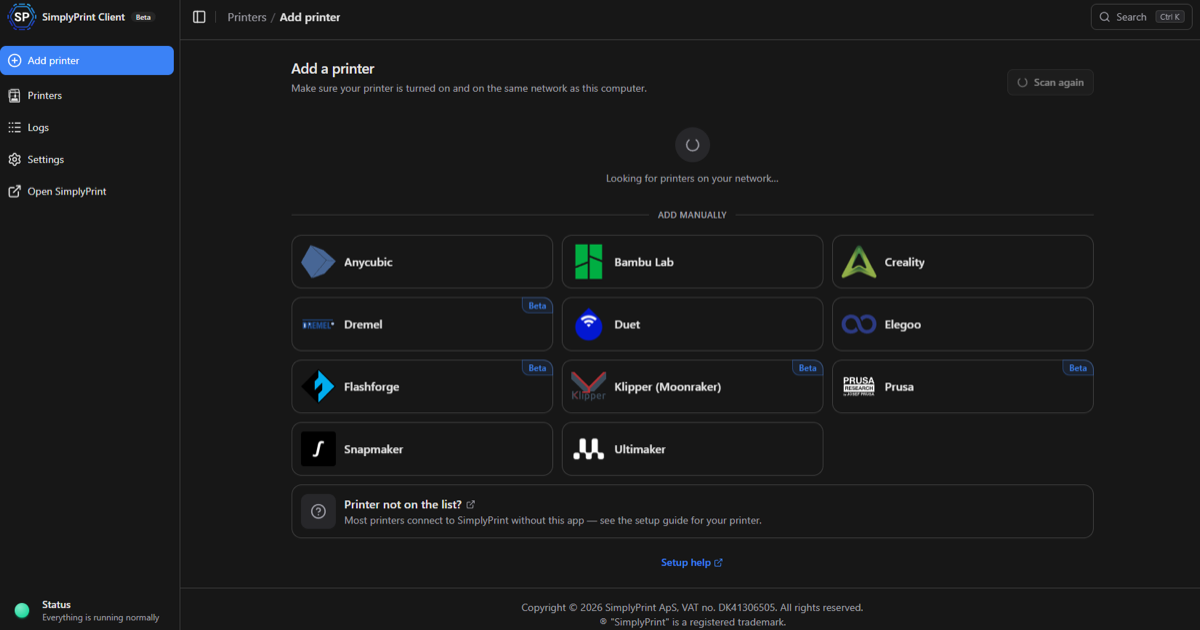
When we launched the new SimplyPrint Client in June, the goal was simple: one small app that connects all your printers to SimplyPrint, whatever brand they are. This release adds four more families to it. All four are in beta, and they are working really well.
Flashforge
This is the big one. The AD5X, Adventurer 5M, Adventurer 5M Pro, Creator 5 and Creator 5 Pro can all connect through the Client, and the AD5X's IFS multi-material system is supported too. You get the SimplyPrint features you would expect: live status, remote control, the print queue, and your filament mapped to the right slots. It is a really nice integration, and we are very happy with how well it works.
Dremel
Dremel is new for us. We mostly did not support Dremel printers before. Some of the older models could run through OctoPrint, but that was about it. Now the 3D40 and 3D45 are supported natively through the Client. Dremel's own .g3drem files work as well: upload them to SimplyPrint like any other G-code, and the Client unpacks them for the printer when you print.
Klipper, without touching the printer
Most Klipper printers already have SimplyPrint built in. The SimplyPrint component comes pre-installed with newer versions of Moonraker, so on most printers you just switch it on in the config file. That is still a great, easy method that needs no extra hardware.
Sometimes it is not that easy, though. Some manufacturers ship their own modified firmware, and some have removed our component entirely, so getting SimplyPrint on the printer can mean rooting it first. Connecting through the Client skips all of that. The Client talks to Moonraker over your network, and nothing needs to be installed on the printer. That means it works with more Klipper printers than the on-printer method can reach.
Prusa Link
Prusa printers can now connect through Prusa Link, Prusa's own local connection. That includes older Prusa printers that have Prusa Link. Our existing Prusa options (OctoPrint, and our own SimplyPrint firmware) are all still here. This is simply one more way in, and a very easy one if you already run the Client.
One Client for your whole fleet
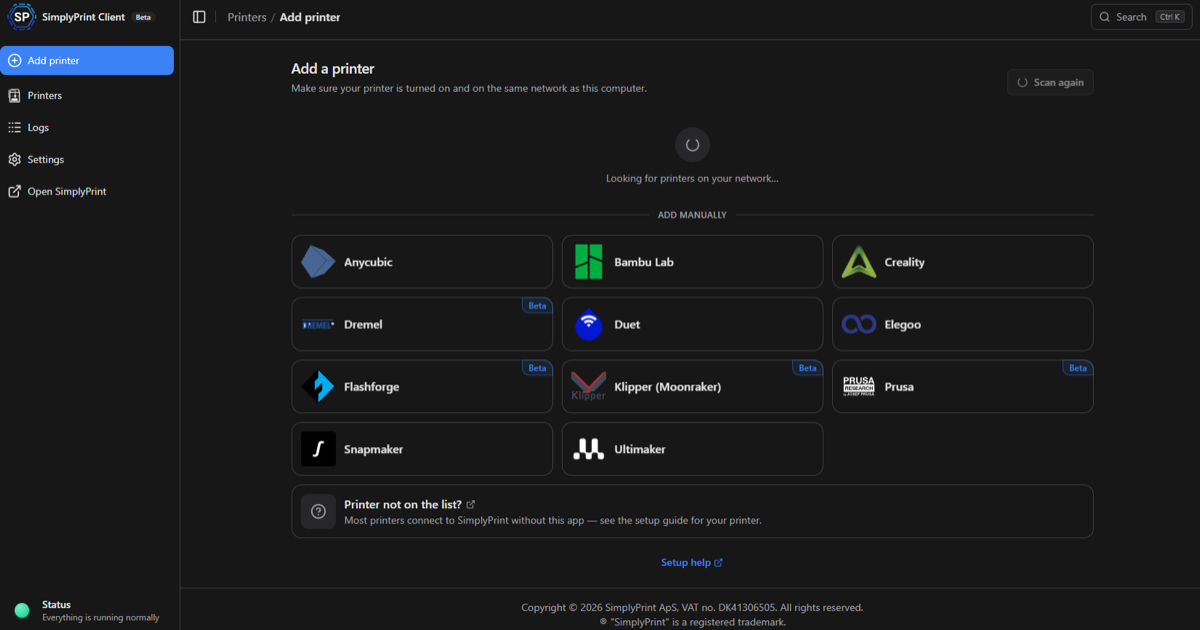
If you are new to it, here is the short version. The SimplyPrint Client is a small app that runs on any always-on computer: Windows, macOS, Linux, Docker, or even your Home Assistant box. It finds printers on your network, connects to them through their own built-in local connection, and links them to your SimplyPrint account. Nothing runs on the printer itself.
With this release, a single Client can run:
- Anycubic
- Bambu Lab
- Creality
- Duet
- Elegoo
- Snapmaker
- Ultimaker
- ✨ Flashforge (new, beta)
- ✨ Dremel (new, beta)
- ✨ Klipper printers via Moonraker (new, beta)
- ✨ Prusa via Prusa Link (new, beta)
Why run a printer through the Client instead of on the printer? A few reasons:
- It is easier on the printer. Some printers, especially older ones, do not have much processing power to spare. Letting a separate computer do the work, and just talking to the printer's existing local connection, is often the better setup.
- One place for everything. If you already have the Client running for your Bambu Labs or Elegoos, adding a Flashforge or a Klipper printer is just a few clicks. Mixed fleets become one fleet.
- Nothing to install or root. No firmware to flash and no component to add.
To be clear, this does not replace the integrations you already use. Every printer that connects directly to SimplyPrint, with no extra device, keeps working exactly as before. The Client is one more option, and a really good one if you already have it.
Speaking of Home Assistant: you can now run the SimplyPrint Client as a Home Assistant app, with a one-click install. Worth saying plainly, since the name can suggest otherwise: this is the SimplyPrint Client running inside Home Assistant. It does not turn your printers into Home Assistant entities. Read more about it here.
The Client has been out since June and is running a lot of printers every day, so it is stable and it is what we recommend. The new printer families are marked beta while we gather feedback, so please tell us how they work for you.
Still on the old Bambu Lab Client? Time to move
If you are running the older SimplyPrint Bambu Lab Client, please switch to the new SimplyPrint Client. The old one has been replaced, and it no longer gets updates or support for new printers. The Bambu Lab A2L, for example, is only supported in the new Client.
The move takes a few minutes, and we have a step-by-step guide for it. A smoother, more one-click upgrade path is coming later, but you do not need to wait for it.
Everything else we shipped since last time
Since our last post, we have posted three changelogs: one for the web platform, one for the mobile app and one for the SimplyPrint Client. Here are the highlights:
- ✨ Hub kiosk log in and log out. A proper Log in button, a log out that reliably ends the session, and an idle logout you can configure (5 minutes by default)
- ✨ Open hours for user groups and workgroups. Choose the hours and days prints may start, and whether to block or just warn outside them
- ✨ Backburner prints after hours. Keep low-priority queue items for outside your working hours (#828)
- ✨ Default queue sorting, including a working-hours optimised order
- ✨ Custom fields for specific file types, such as only printable files or specific extensions (#837)
- ✨ More BIQU CryoGrip plates for Anycubic, Elegoo, Flashforge, Prusa, Qidi, Sovol and Voron printers (#839)
- ✨ G-code preview from print history, in one click with no download
- ✨ Big 3MF files load and slice far better in the cloud slicer
- ✨ SSO logout can now sign you out of your identity provider too
- ✨ Scheduled prints in the mobile app, plus a better Skip objects flow (#92)
- ✨ Anycubic printers found automatically by the Client
- 🐛 Lots of fixes across the queue, AutoPrint, the cloud slicer, NFC tags and multi-nozzle AMS printers
Read everything in the full web, app and Client changelogs, or browse every update on our public changelog.
Thanks to everyone who suggested these!
What's next: Projects and the Shop
This is the part we are most excited about. Two big features are almost ready, and together they will be the biggest update SimplyPrint has seen. The only thing that comes close is the new cloud slicer we released last summer.
Projects
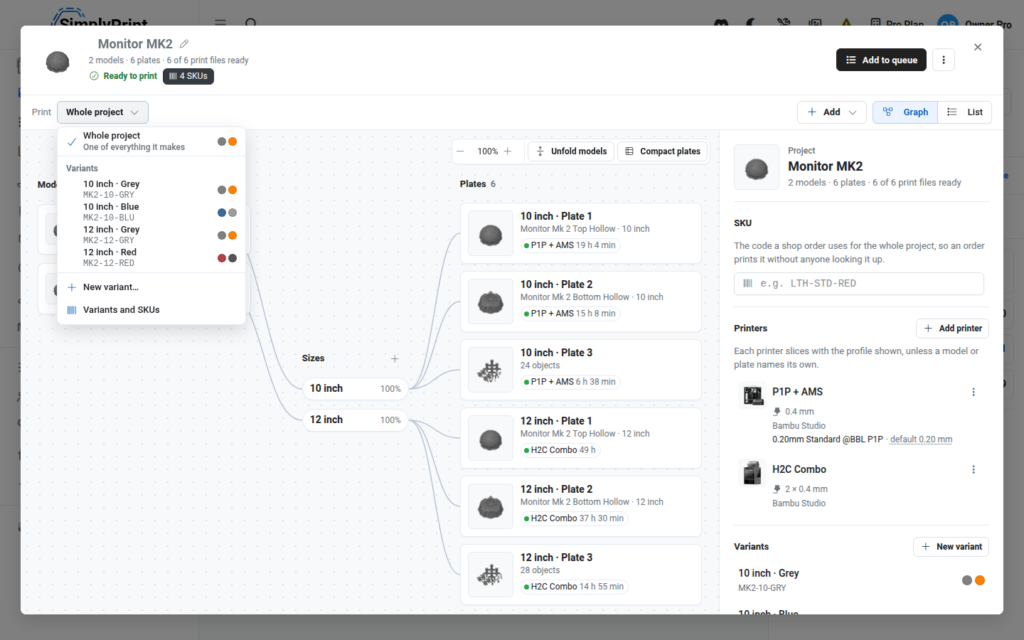
Real prints are rarely a single file. A product is often many parts, in different materials and colors, printed on different printers. Projects lets you set that up once and reuse it.
You group the files that belong together, say which materials and colors each part needs, and choose which printers and setups it can be made on. SimplyPrint then takes care of slicing for each of them. When you need another batch, you send the whole project to the queue in one go, instead of rebuilding it file by file.
We are aiming to open Projects very soon. We will most likely start with Print Farm accounts, in beta, while we make sure it holds up at the more advanced end. After that we will open it to everyone, once we are confident it is just as friendly for hobbyists and schools.
Follow along or add your thoughts on suggestion #780.
The Shop
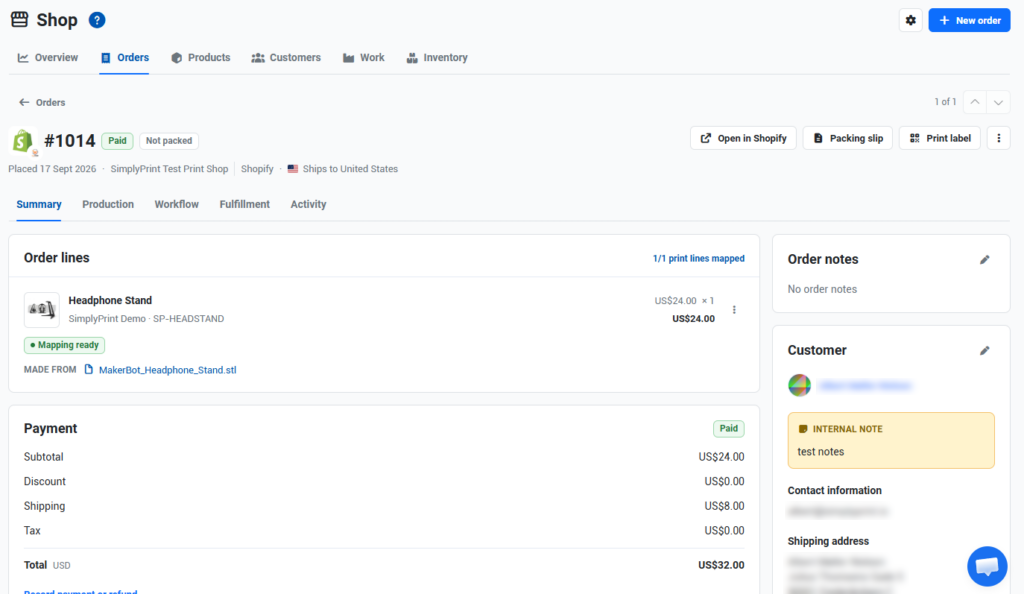
The Shop connects your sales to your printers. An order comes in, SimplyPrint works out what needs printing, it lands in your queue, and you can follow it from the order, to the printer, to packing.
It works with your own manual orders, and it connects to your store. Shopify and WooCommerce are supported from day one, with more integrations to follow. The Shop is not just an idea on a whiteboard. It is running as a proven alpha with print farms right now, and we are targeting the next couple of weeks for the wider release.
Follow along or add your thoughts on suggestion #79.
We have been working closely with a bunch of print farms on both features. It is thanks to them that these are going to be really good, so a big thank you to everyone who has spent time with us on calls, test builds and feedback.
Join us on Discord
We share a lot more, and a lot more often, on our Discord than we do here on the blog. We have been running Print Farm and developer sessions there, where we talk directly with the community about new features while we build them.
If you want to follow the progress on Projects and the Shop, or have a say in how they look at launch and in later releases, Discord is the place. You can also leave feedback on the two suggestions above. Both are still open, and we read everything. These features are built on community feedback.
We will also make some videos about both features, so stay tuned.
Changelog
For the full list of changes, check out our public changelog:
Great things are still to come, and we are building every day. Thanks for being part of it.
- Albert @ SimplyPrint