Bygget til IT, skoler og printfarme med rigtige brugerkataloger
Uanset om du driver et skoledistrikt på Google Workspace, en konto på Microsoft Entra ID eller en printfarm med et blandet team, forbinder SimplyPrint med dit brugerkatalog, så de rette personer får adgang på den rette måde uden delte logins eller manuel håndtering af konti.
Virker med de identitetsudbydere, du allerede bruger
Forbind din udbyder én gang i kontoindstillingerne. OpenID Connect har forudindstillinger med ét klik til de store udbydere, SAML 2.0 dækker alt andet, og en generisk mulighed håndterer enhver standardkompatibel identitetsudbyder.
OpenID Connect (OIDC) med forudindstillinger i ét klik
Vælg din udbyder, indsæt to værdier, og du er færdig
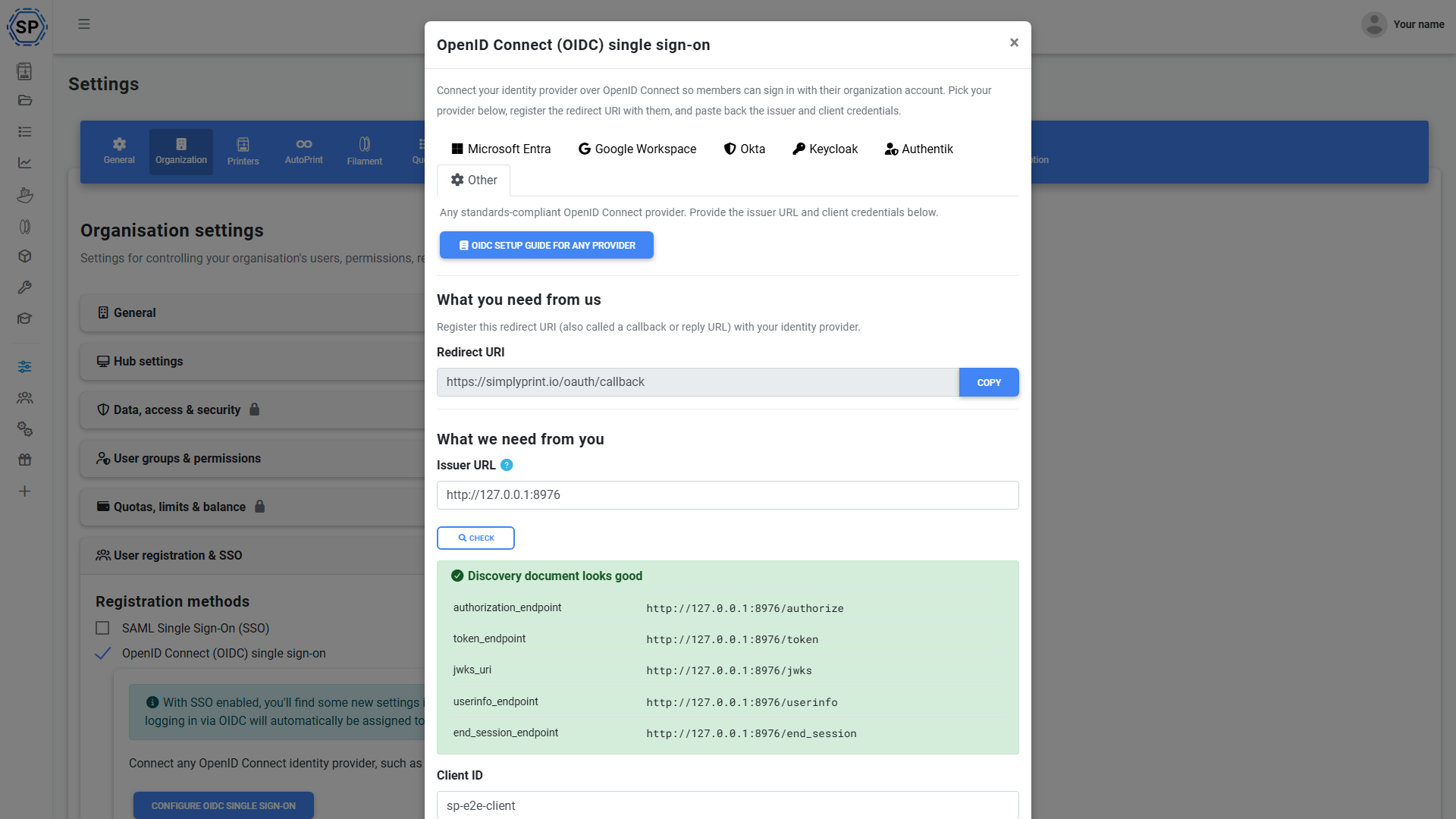
OpenID Connect er den hurtigste måde at oprette forbindelse på. Vælg en forudindstilling til Microsoft Entra ID, Google Workspace, Okta, Keycloak eller Authentik, og SimplyPrint udfylder scopes og claim-mappings for dig. Du kan også vælge den generiske mulighed til enhver standardkompatibel OIDC-udbyder. Kopiér den viste redirect-URI til din udbyder, indsæt derefter dit klient-ID og din klienthemmelighed i SimplyPrint, og opsætningsguiden tjekker dit discovery-dokument live, før du gemmer.
Den bruger OIDC's authorization-code-flow med PKCE, validerer hvert signeret ID-token, RS256 eller stærkere, aldrig et usigneret eller HMAC-token, tjekker nonce og binder udsteder og audience til din udbyder. Når din udbyder understøtter single logout, logger udlogning fra SimplyPrint også brugeren ud hos udbyderen.
SAML 2.0 til enhver virksomhedsidentitetsudbyder
Signerede assertions, forudindstillinger og føderationsunderstøttelse
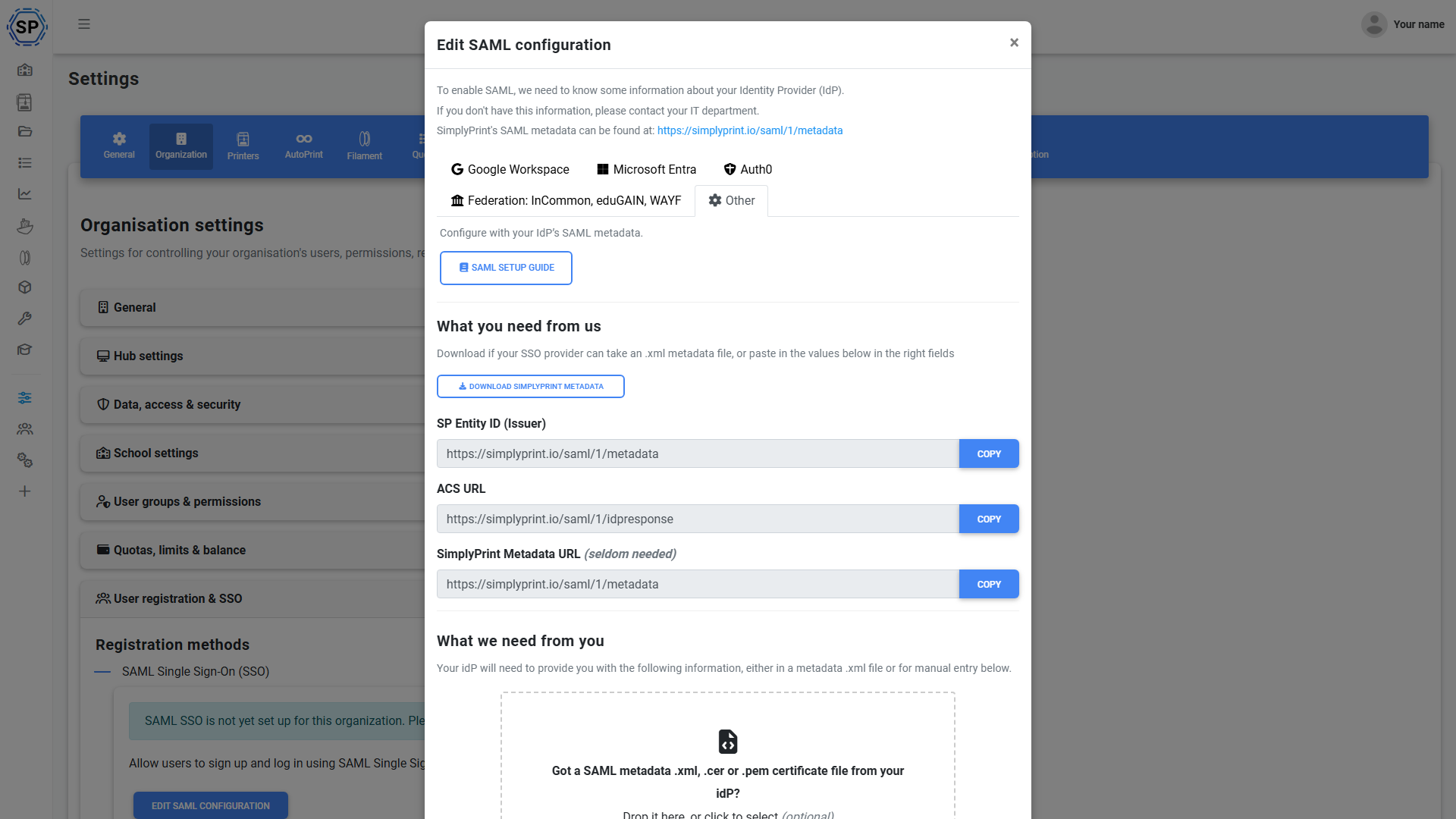
Har du brug for SAML? SimplyPrint er en fuld SAML 2.0-tjenesteudbyder. Forudindstillinger til Google Workspace, Microsoft Entra ID og Auth0 udfylder automatisk endpoints, og en generisk mulighed forbinder enhver SAML 2.0-identitetsudbyder. Signerede assertions er påkrævet som standard, og du får SP-entity-ID'et, ACS-URL'en og metadata-URL'en direkte på opsætningsskærmen til at indsætte i din IdP.
Til forskning og uddannelse understøtter SimplyPrint også SAML-føderation-login, så medlemmer af en føderation kan logge ind via deres eksisterende føderede login.
Verificer dit domæne, og før brugere til det rigtige login
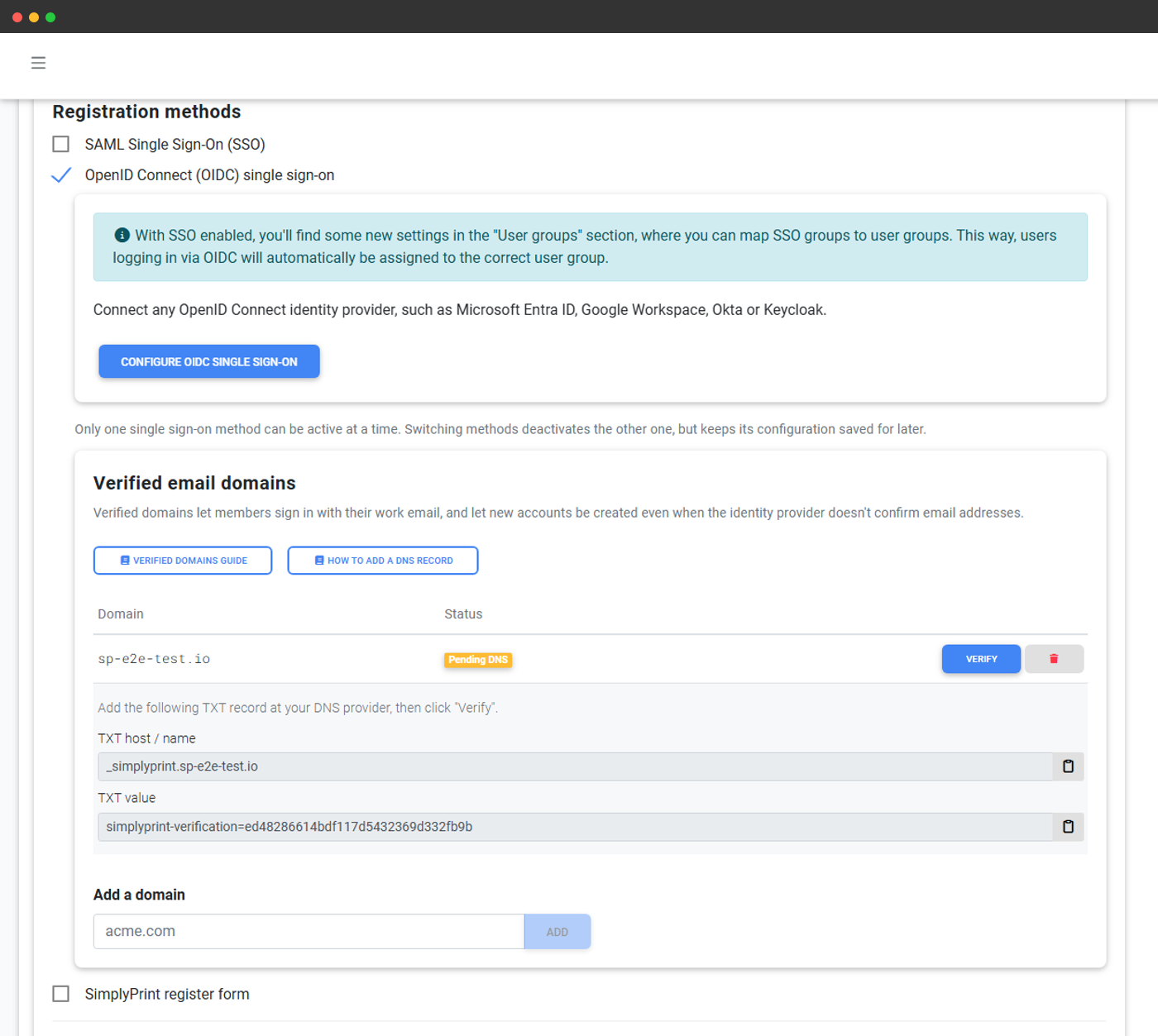
Tilføj en DNS TXT-post for at bevise, at du ejer et domæne som yourschool.edu eller yourcompany.com. Når et domæne er verificeret, bliver alle, der indtaster en arbejds- eller skolemail på det domæne, sendt direkte til din single sign-on uden først at skulle finde den rette knap. Verificerede domæner giver også SimplyPrint mulighed for at stole på nye konti oprettet ved første login, så de rette personer automatisk havner på den rette konto.
Sådan verificerer du dine domæner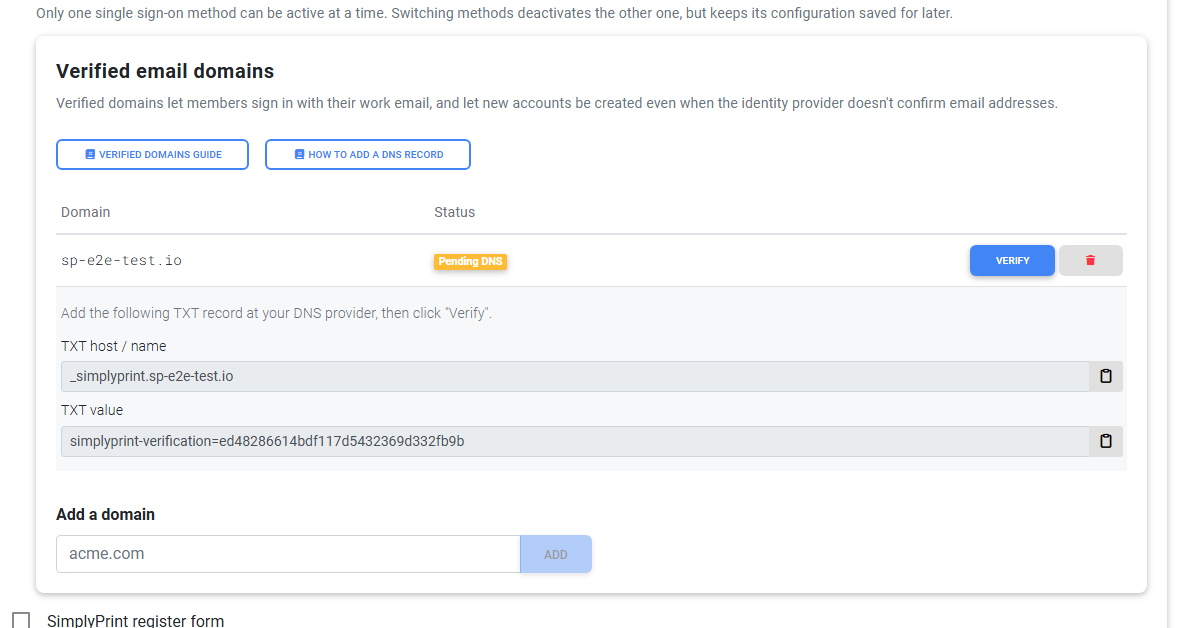
Konti, der oprettes og ryddes op automatisk
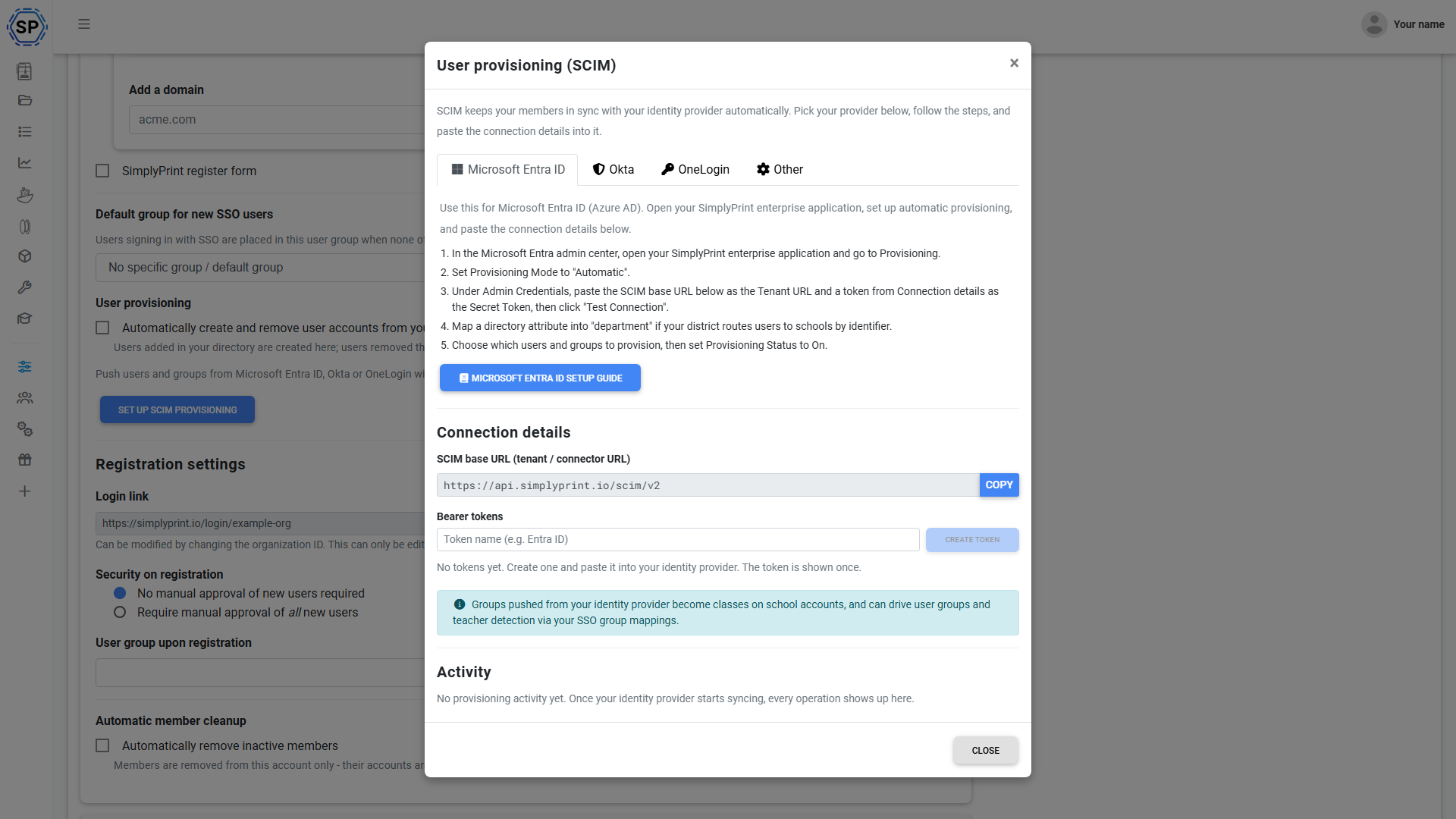
Stop med manuelt at vedligeholde en ekstra kopi af din brugerliste. SimplyPrint kan oprette brugerkonti, første gang nogen logger ind (just-in-time-provisionering), og oprette forbindelse til SCIM 2.0, så din identitetsudbyder sender det fulde billede: nye personer får en konto, og personer, der forlader organisationen, fjernes automatisk. Aktuelle SCIM-vejledninger dækker Okta og Microsoft Entra ID.

Just-in-time-tilmelding
Første login opretter kontoen, hvis e-mailadressen er godkendt.
SCIM-provisionering
Dit katalog tilføjer og fjerner automatisk personer.
Ingen forældreløse logins
Deprovisionering fjerner adgangen, når en person stopper.
Knyt dine grupper til roller, og styr, hvem der får adgang
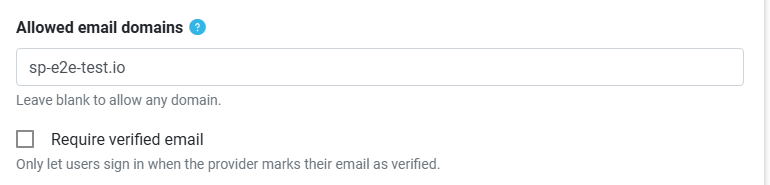
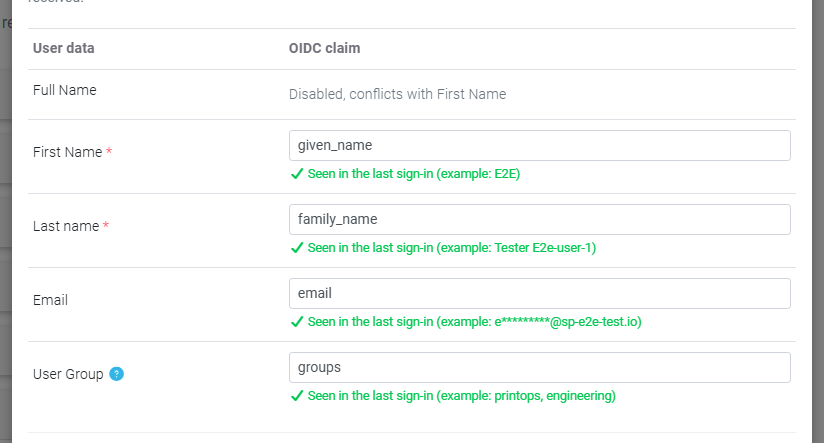
Send en gruppe eller attribut fra din identitetsudbyder, og SimplyPrint mapper den til den rette SimplyPrint-brugergruppe, så folk ankommer med den korrekte rolle og de rette tilladelser i stedet for at blive oprettet én for én. Du kan også tilføje en login-regel, der kun lukker folk ind, når en valgt attribut eller claim matcher en værdi, du angiver, nyttigt til at begrænse adgang til en bestemt afdeling, personalegruppe eller klasse.
Et katalog angiver sjældent, at nogen kun er én ting. Knyt også dine grupper til arbejdsgrupper, så får en bruger tildelt alle matchende arbejdsgrupper, ikke kun den højeste, så "Lærer" og "medlem af robotikgruppen, lasergruppen og afdelingsadministratorerne" endelig kan modelleres ærligt i én påstand. Det afstemmes ved hvert login, både i SAML og SCIM, og ændrer aldrig det, en administrator, en klasse eller et kursus har tildelt samme person.
SSO, tilpasset til den måde du kører dine printere på
Single sign-on betyder noget andet for et skoledistrikt end for en konto. Start med guiden, der er lavet til dig.
Abonnementsadgang: hvilke abonnementer inkluderer single sign-on?
Single sign-on følger med abonnementerne School og Enterprise. Print Farm-abonnenter fra før lanceringen af Enterprise beholder deres adgang. SAML, OIDC, SCIM-klargøring, verificerede domæner og gruppemapping følger alle med, der er ikke et særskilt SSO-tilvalg.
| Funktion/grænse | Gratis | Basic | Pro | Printfarm | Enterprise | Skole | Cloud Slicer | Filament Manager |
|---|---|---|---|---|---|---|---|---|
|
Single sign-on (SSO)
SAML 2.0- og OpenID Connect-login, forudindstillinger for udbydere, SCIM-provisionering, verificerede domæner og gruppemapping.
|
Vil du vide mere om vores abonnementer?
Se fuld pris- og funktionssammenligning