The best 3D printer for beginners in 2026 is the one that works on the first evening and keeps working. Ten years ago a first printer meant a weekend of assembly and tuning; today most printers level their own bed, calibrate themselves and print a first model the evening they arrive. That makes the choice less about specs and more about price, ease, multi-colour and how much freedom you want later. The same picks make the best home 3D printer, whether you are new to it or one of the hobbyists who already own three. Our picks below are ranked when you open the page, from what our printer catalog knows today.
Our picks: the best 3D printer for beginners in 2026
The best first printer overall, then the best for each budget and the best for multi-colour. Every reason under a printer is read from its data and our assessment of it for home use, and the score is out of 100.
Affiliate खुलासा: इस पेज के कुछ link affiliate link हैं। आपके खरीदने पर हमें commission मिल सकता है, इसके लिए आपको कोई अतिरिक्त लागत नहीं देनी होगी। Amazon Associate के रूप में हम योग्य खरीद से कमाते हैं।
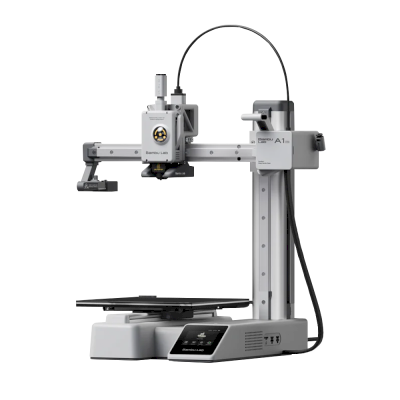
Bambu Lab A1 Mini
 चीन
चीन
- Tom's Hardware, TechRadar, Maker's Muse द्वारा समीक्षा की गई
- Bambu Lab AMS Lite, Bambu Lab AMS, Bambu Lab AMS 2 Pro, Bambu Lab AMS HT के साथ Multi-colour, Bambu Lab A1 Mini Combo के रूप में साथ बेचा जाता है
- कहीं से भी प्रिंट देखने के लिए अंतर्निर्मित कैमरा
- PLA के साथ-साथ PETG, TPU और लचीले filament को भी अच्छी तरह प्रिंट करता है
- AutoPrint किट (Swapmod, 3D Printomat Pro, FarmLoop), जो अगला प्रिंट अपने आप शुरू कर दे
- हमारी खुलेपन की रेटिंग में Bambu Lab "अधिकतर बंद" पर है: नीचे ब्रांड नोट्स देखें
- पिछले तीन वर्षों में Bambu Lab को झटके लगे हैं: नीचे ब्रांड नोट्स देखें
Flashforge Creator 5
चीन
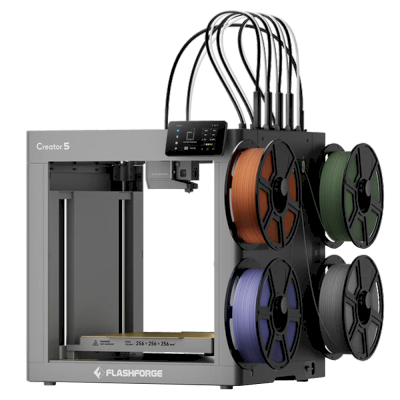
The Creator 5 is Flashforge's open-frame tool changer: four independent toolheads on a CoreXY with a 256 mm build cube and 320 °C hotends, so each colour or material has its own nozzle. It is for hobbyists and makers who print multi-colour PLA, PETG and TPU and want little filament waste for less than other tool changers cost.
- The cheapest way into low-waste four-colour printing, rated 4/5 by Tom's Hardware.
- Tom's Hardware, Aurora Tech, Frankly Built द्वारा समीक्षा की गई
- एक प्रिंट में कई रंगों या सामग्रियों के लिए टूलचेंजर
- मई 2026 को लॉन्च हुआ
- कहीं से भी प्रिंट देखने के लिए अंतर्निर्मित कैमरा
- A large purge when loading, a big prime block and clunky slicer profiles (Tom's Hardware).
- Filament is loaded by hand for each toolhead, which is slow, and the heat soak can't be skipped (ModBot).
Snapmaker U1
चीन
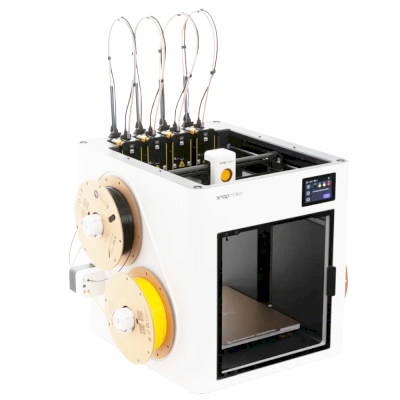
- एक प्रिंट में कई रंगों या सामग्रियों के लिए टूलचेंजर
- Tom's Hardware, TechRadar, Maker's Muse द्वारा समीक्षा की गई
- 2025 को लॉन्च हुआ
- कहीं से भी प्रिंट देखने के लिए अंतर्निर्मित कैमरा
- हमारी खुलेपन की रेटिंग में Snapmaker "अधिकतर खुला" पर है
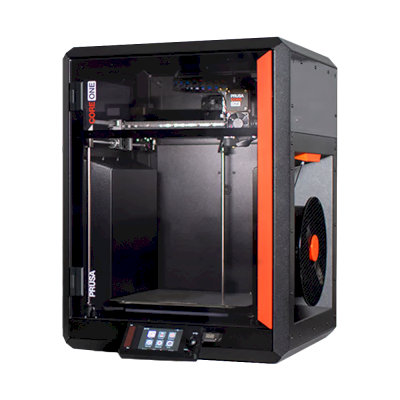
Prusa CORE One
 चेक गणराज्य
 EU
EU
- Tom's Hardware, TechRadar, CNC Kitchen द्वारा समीक्षा की गई
- Prusa MMU 3 के साथ Multi-colour
- जनवरी 2025 को लॉन्च हुआ
- हमारी खुलेपन की रेटिंग में Prusa "खोलें" पर है
- पूरी तरह बंद, इसलिए ABS और ASA अच्छी तरह प्रिंट होते हैं
The best 3D printer for home use, ranked
The top ten for home, and the best 3D printer for hobbyists who want room to grow. Open a printer for its specs, reviews and setup guide, or compare the top four on our printer comparison.
| # | प्रिंटर | स्कोर | से | SimplyPrint के साथ | Enclosure | Multi-colour | ब्रांड की खुली नीति |
|---|---|---|---|---|---|---|---|
| 1 | Bambu Lab P2S 256 x 256 x 256 mm |
79 | - | SimplyPrint द्वारा सत्यापित | पूरी तरह बंद | ऐड-ऑन | अधिकतर बंद |
| 2 | QIDI Q2 270 x 270 x 256 mm |
75 | - | संगत | पूरी तरह बंद | ऐड-ऑन | अधिकतर खुला |
| 3 | Bambu Lab H2C 330 x 320 x 325 mm |
75 | - | SimplyPrint द्वारा सत्यापित | पूरी तरह बंद | ऐड-ऑन | अधिकतर बंद |
| 4 | Flashforge Creator 5 256 x 256 x 256 mm |
74 | $699.00 | संगत | खुला फ्रेम | - | मिश्रित |
| 5 | Snapmaker U1 270 x 270 x 270 mm |
73 | - | संगत | आंशिक रूप से बंद | शामिल | अधिकतर खुला |
| 6 | Bambu Lab X2D 256 x 256 x 260 mm |
73 | - | SimplyPrint द्वारा सत्यापित | पूरी तरह बंद | ऐड-ऑन | अधिकतर बंद |
| 7 | ELEGOO Centauri Carbon 256 x 256 x 256 mm |
72 | - | संगत | पूरी तरह बंद | ऐड-ऑन | अधिकतर खुला |
| 8 | Creality K2 Plus 350 x 350 x 350 mm |
71 | - | संगत | पूरी तरह बंद | ऐड-ऑन | अधिकतर खुला |
| 9 | Creality K2 Pro 300 x 300 x 300 mm |
70 | - | संगत | पूरी तरह बंद | ऐड-ऑन | अधिकतर खुला |
| 10 | Prusa CORE One 250 x 220 x 270 mm |
70 | - | संगत | पूरी तरह बंद | ऐड-ऑन | खोलें |
QIDI अपने कुछ नए प्रिंटर हमें मुफ्त भेजता है।
ये कीमतें पिछले दो हफ्तों में आपके क्षेत्र के स्टोर में मिली सबसे कम कीमतें हैं और अक्सर बदलती रहती हैं। शीर्ष चार की साथ-साथ तुलना करें
What a first 3D printer needs
It sets itself up
Automatic bed levelling and calibration are what make a modern printer easy. Without them, most beginner trouble starts with the first layer. Each printer's page in our compatibility list says whether it levels its own bed.
Enclosed or open: where will it live?
An open-frame printer, where the bed moves back and forth, is cheaper, easier to repair and fine for PLA and PETG. An enclosed printer is quieter, safer around children and pets, and prints ABS and ASA. In a living room, the enclosure is worth paying for. In a garage or workshop it is optional.
Multi-colour: now or later?
A multi-material unit feeds four or more spools into one printer, so a print can change colour by itself. It is the most fun upgrade in home printing, and it costs more and wastes a little filament on every colour change. Many printers can add one later, so you don't have to decide on day one. Our picks list which unit each printer works with.
Software you can grow into
Your slicer turns a model into instructions for the printer. Most makers ship their own, often based on the open-source OrcaSlicer or PrusaSlicer; we compared the two most popular in OrcaSlicer vs Bambu Studio. SimplyPrint adds the rest: slicing in the browser, remote control from your phone, AI failure detection that pauses a print going wrong, and filament tracking so you know what is left on each spool.
What it really costs
The printer is the big cost, then filament. Budget for a few spools of PLA and PETG, a spare nozzle and, later, a second build plate. The best budget 3D printer is often a cheap one with a large community, not a pricier one few people own: every problem you meet has already been solved by someone.
Where to start printing
Your first prints don't need a 3D design program. Model sites such as Printables and MakerWorld have millions of free models, and most open straight in your slicer. When you want to make your own, free tools like Tinkercad run in a browser and are made for beginners: our guide to 3D printing from Tinkercad walks through the first model.
Before you buy: a checklist
- Where will it live? A living room or bedroom: enclosed and quiet. A garage or workshop: either.
- What will you print first? Toys, organisers and gifts in PLA need nothing special; tough outdoor parts want PETG or ASA.
- Colour now or later? If later, check the printer can take a multi-material unit.
- Who will help? A big community and a maker that answers matter more than a spec you won't use.
- Can you get spares? Nozzles and build plates wear out; check they are sold where you live.
Open or walled garden: how free you are later
Some printer makers work like Apple: the printer, slicer, cloud and spare parts come from one company, polished to work together, on its terms. Others work like Android, or a Linux PC: open firmware, any slicer, any filament, parts you can buy or print. Many beginners are happiest in the closed system at first. The question is what happens when you want to tinker, or the maker changes its mind about what your printer may do. We rate each brand in six areas from public sources.
Prusa
खुलापन: खोलें (5 में से 4.9)
खोलें
बंद पारिस्थितिकी तंत्रखोलें
Prusa
खुलापन: खोलें (5 में से 4.9)Prusa Research is a Prague company founded in 2012 by Josef Průša, who came from the open-source RepRap project. It designs and builds the Original Prusa and Prusa CORE printers, makes Prusament filament, develops the PrusaSlicer slicer and runs the Printables model site. Printers are built in Prague and at its US site in Delaware, sold assembled or as kits, and used by hobbyists, schools, businesses and print farms.
स्थापना: 2012 · मुख्यालय: Prague, Czech Republic · स्वामित्व: Prusa Research a.s., founded and led by Josef Průša · लोग: More than 1,200 people (company site, 2026) · वेबसाइट: www.prusa3d.com
Prusa is the most open of the large brands: GPL firmware, an open slicer, full local control without an account and spare parts for everything. Hardware design files now come under Prusa's own Open Community License, which allows personal and in-house business use but not selling machines.
| फर्मवेयर और कस्टम फर्मवेयर ●●●●● |
Firmware for current printers is published on GitHub under GPL-3.0 and updated with every release. Official firmware is signed, but Prusa documents how to flash custom firmware by breaking a seal on the board and says this does not void the warranty. Prusa says firmware and printable parts are shared right away and electronics schematics later. [1][2][3] |
| स्थानीय नियंत्रण और एकीकरण ●●●●● |
PrusaLink, built into the CORE One, MK4S, MK3.9, MK3.5 and XL, handles monitoring, file uploads and print control on the local network without internet or an account, and printing from USB works offline. Prusa publishes PrusaLink's HTTP API as an OpenAPI specification on GitHub, and its help centre covers OctoPrint setup. Prusa Connect is an optional cloud service for remote access. [4][15] |
| तृतीय-पक्ष filament, slicer और पार्ट ●●●●● |
Printers are open to any filament; PrusaSlicer is GPL-licensed and other slicers work. Instead of a locked RFID system, Prusa created OpenPrintTag, an NFC spool-tag standard that is free for any brand to use and works offline. [5][6] |
| मरम्मत और स्पेयर पार्ट्स ●●●●● |
The e-shop sells spare parts for each printer, printable parts are published, and the full CORE One CAD files are released. Prusa's open-source page says its goal is printers that stay moddable and easy to repair for decades, and its licence explicitly allows making spare parts for your own machines. [7][3][5] |
| डेटा और गोपनीयता ●●●●● |
No account is needed for local use through PrusaLink or USB. Prusa Connect needs a Prusa account and stores G-codes and telemetry in the cloud. Prusa Research is an EU company and publishes its privacy policy and a Trust Center. [4][8] |
| समुदाय और दस्तावेज़ ●●●●● |
Large community around Printables and the forum, a detailed knowledge base, and firmware and slicer developed in public on GitHub with open issue trackers. [1][4] |
- GPL firmware with a documented, warranty-safe way to flash custom firmware.
- Full control on the local network through PrusaLink, with no account needed.
- Spare parts for every printer, published printable parts and released CAD files.
- Kits available for people who want to build and understand their printer.
- Made in Prague, with a second factory in Delaware for US buyers.
- OpenPrintTag is an open spool-tag standard any brand can use.
- Hardware files use Prusa's own OCL licence, which bars selling machines built from them; it is not an OSI open-source licence.
- Electronics schematics are published later than firmware and printable parts.
- Remote access and cloud storage need Prusa Connect and an account.
- जुलाई 2026: Printed Solid, the Delaware company Prusa Research bought in 2022, was renamed Prusa USA. Its Wilmington site builds the MK4S and CORE One+, makes filament and is Prusa's US service centre. [9]
- दिसम्बर 2025: Prusa released the full CAD files of the CORE One under its new Open Community License (OCL). OCL allows modifying, sharing mods and in-house commercial use, and grants patent and repair rights, but bars selling machines built from the files without an agreement, so it is not a standard open-source licence. Prusa said it is also filing patents on its designs. [5]
- अक्टूबर 2025: Prusa launched OpenPrintTag, a published NFC standard for smart filament spools that any brand can use without licence fees, starting with redesigned Prusament spools. [6]
- नवम्बर 2024: Prusa announced the CORE One, its first fully enclosed CoreXY printer with active chamber temperature control. [10]
- मार्च 2023: Josef Průša wrote that open source in 3D printing was under strain from cloners and licence violations. With the MK4, Prusa released firmware sources and models of the plastic parts but held back the electronics plans, planning to publish them later under a new licence. [11]
15 स्रोतों से शोधित, अंतिम बार 18 अक्टूबर 2026 को जाँचा गया। स्रोत दिखाएं
- prusa3d/Prusa-Firmware-Buddy on GitHub github.com
- Flashing custom firmware (MINI/MINI+) | Prusa Knowledge Base help.prusa3d.com
- Open-source at Prusa Research prusa3d.com
- Prusa Connect and PrusaLink explained | Prusa Knowledge Base help.prusa3d.com
- Open-sourcing CORE One CAD Files Under the New Open Community License (OCL) blog.prusa3d.com
- The OpenPrintTag Is Here! The Open-Source Smart Spool Standard blog.prusa3d.com
- Spare parts | Original Prusa 3D printers prusa3d.com
- Privacy Policy | Original Prusa 3D printers prusa3d.com
- Delaware's Printed Solid rebrands to Prusa USA | Tom's Hardware tomshardware.com
- Introducing Prusa CORE One: Our new fully-enclosed CoreXY 3D printer blog.prusa3d.com
- The state of open-source in 3D printing in 2023 blog.prusa3d.com
- About us | Original Prusa 3D printers directly from Josef Prusa prusa3d.com
- The Great Recap of 2024 in Prusa Research blog.prusa3d.com
- Introducing the INDX: fast and affordable 8-material printing, exclusively on the CORE One blog.prusa3d.com
- github.com
इस गाइड में: Prusa CORE One
QIDI
खुलापन: अधिकतर खुला (5 में से 4.2)
अधिकतर खुला
बंद पारिस्थितिकी तंत्रखोलें
QIDI
खुलापन: अधिकतर खुला (5 में से 4.2)QIDI Tech is a Chinese 3D printer maker formed in 2014. It sells enclosed, Klipper-based CoreXY printers such as the compact Q2 and the larger Plus4 and Max4, and develops the open-source QIDI Studio slicer and the QIDI Link app.
स्थापना: 2014 · वेबसाइट: qidi3d.com
QIDI is mostly open: its printers are standard Klipper machines you can run fully on the local network, with published source and plenty of spare parts. The phone app and the store-only privacy policy are the weak spots.
| फर्मवेयर और कस्टम फर्मवेयर ●●●●● |
QIDI printers run QIDI's editions of Klipper and Moonraker with Fluidd. QIDI publishes them and per-model firmware packages on GitHub under GPL (for example the Q2 in January 2026 and the Max4 in August 2026) and answers issues there. [1][2][3] |
| स्थानीय नियंत्रण और एकीकरण ●●●●● |
QIDI printers run Klipper and Moonraker with Fluidd on the printer, and QIDI Studio connects to them on the local network by IP without an account. QIDI publishes its Moonraker edition on GitHub, and other software can use Moonraker's documented API. Only the QIDI Link phone app needs an account and QIDI's cloud. [4][5][11][12] |
| तृतीय-पक्ष filament, slicer और पार्ट ●●●●● |
Third-party filament works; QIDI Studio is open source, and as Klipper and Moonraker printers they work with other Moonraker-compatible software. Hotends and nozzles are QIDI parts made per model. [6][1][7] |
| मरम्मत और स्पेयर पार्ट्स ●●●●● |
QIDI's store lists many individual parts, including motherboards, eMMC modules, fans, extruders, hotends and Wi-Fi cards, and its wiki has replacement guides such as the Plus4 hotend. [7][8] |
| डेटा और गोपनीयता ●●●●● |
Local use needs no account. QIDI Link requires one and says which server it uses (Aliyun in China, AWS elsewhere). The published privacy policy covers the online store, not the printers or the app. [5][9] |
| समुदाय और दस्तावेज़ ●●●●● |
Firmware is released and issues are taken on GitHub, and QIDI keeps a wiki per model with manuals, maintenance and troubleshooting guides. [1][4] |
- QIDI is one of the few printer makers we work with directly: they occasionally send us new printers, and put us in touch with their developers when we need them.
- Runs fully on the local network through Fluidd, with no account needed.
- Klipper and Moonraker sources and firmware updates are published on GitHub.
- Many individual spare parts, down to motherboards and eMMC modules.
- Open-source slicer and open filament choice.
- The QIDI Link app needs an account and QIDI's cloud.
- The privacy policy covers only the online store, not the printers or app.
- Hotends and nozzles are QIDI-specific parts.
- अगस्त 2026: QIDI published the firmware repository for the Max4 on GitHub under GPL-3.0. [2]
- जनवरी 2026: QIDI published the Q2's Klipper-based firmware on GitHub under GPL-3.0, with update packages and an issue tracker. [1]
12 स्रोतों से शोधित, अंतिम बार 18 अक्टूबर 2026 को जाँचा गया। स्रोत दिखाएं
- QIDITECH/QIDI_Q2 on GitHub github.com
- QIDITECH/QIDI_MAX4 on GitHub github.com
- QIDITECH/klipper on GitHub github.com
- Connect device and Fluidd | QIDI Wiki wiki.qidi3d.com
- QIDI Link | QIDI Wiki wiki.qidi3d.com
- QIDITECH/QIDIStudio on GitHub github.com
- Accessories | QIDI Online Store qidi3d.com
- PLUS4 Replace Hot End | QIDI Wiki wiki.qidi3d.com
- Privacy policy | QIDI Online Store qidi3d.com
- QIDI | 3D Printer Manufacturer Since 2014 qidi3d.com
- github.com
- moonraker.readthedocs.io
इस गाइड में: QIDI Q2
Snapmaker
खुलापन: अधिकतर खुला (5 में से 4.1)
अधिकतर खुला
बंद पारिस्थितिकी तंत्रखोलें
Snapmaker
खुलापन: अधिकतर खुला (5 में से 4.1)Snapmaker is a Shenzhen company founded in 2016, built around machines that swap tool heads; its Original, 2.0 and U1 machines were launched on Kickstarter. It sells the U1, a CoreXY printer with four tool heads that change in about five seconds for multi-colour printing, and the Artisan, which combines 3D printing, laser engraving and CNC carving. Its buyers are makers, hobbyists and small workshops.
स्थापना: 2016 · मुख्यालय: Shenzhen, China · स्वामित्व: Shenzhen Snapmaker Technologies Co., Ltd.; its main products were crowdfunded on Kickstarter · वेबसाइट: www.snapmaker.com
Snapmaker is mostly open: the U1 runs Klipper with a local Fluidd interface and published source, and nearly every part is sold separately. Its proprietary hotends and RFID system are the closed parts.
| फर्मवेयर और कस्टम फर्मवेयर ●●●●● |
The U1 runs modified Klipper, Moonraker and Fluidd. Snapmaker published its changes on GitHub under GPL-3.0 on 30 March 2026, about three months after Kickstarter deliveries finished. Firmware for the Snapmaker 2.0 and, since August 2026, the Artisan controller is also on GitHub under GPL. [1][2][3][4] |
| स्थानीय नियंत्रण और एकीकरण ●●●●● |
The U1 runs Klipper, Moonraker and Fluidd on the printer and prints from Snapmaker Orca over Wi-Fi or from a USB drive, so other software can use Moonraker's documented API; Snapmaker publishes its Moonraker changes on GitHub. For the Artisan, Snapmaker documents its G-code commands and has Luban pass jobs from OrcaSlicer over the OctoPrint protocol. The Snapmaker app is for remote monitoring. [1][5][13][14][15] |
| तृतीय-पक्ष filament, slicer और पार्ट ●●●●● |
Third-party 1.75 mm filament works and the U1 is supported in OrcaSlicer, but its RFID filament recognition is proprietary and only reads Snapmaker spools, and its hotends are proprietary one-piece units. Snapmaker documents using Cura, OrcaSlicer and PrusaSlicer with its older machines. [1][6][7] |
| मरम्मत और स्पेयर पार्ट्स ●●●●● |
Snapmaker's shop sells most U1 parts on their own, including the main board, heated bed, extruder motor, toolhead board, belts, fans and touchscreen, and its wiki has replacement guides such as the U1 XY motor. Hotends can only be replaced as a whole unit. [8][9][1] |
| डेटा और गोपनीयता ●●●●● |
Cloud features need a Snapmaker account. The privacy policy says personal data is stored on servers in the United States, may be shared with affiliates and third parties in China for some functions, and some data is kept for three years. [10] |
| समुदाय और दस्तावेज़ ●●●●● |
Active forum and a wiki with detailed FAQs and guides, firmware and slicer sources on GitHub, and frequent public updates and livestreams during the U1 campaign. [1][2][11] |
- The U1's four-head tool changer wastes little filament on colour changes.
- Klipper-based U1 with a local Fluidd interface and published firmware source.
- Nearly every U1 part is sold separately, with replacement guides.
- Has delivered all of its Kickstarter campaigns, the U1 ahead of schedule by its own account.
- U1 hotends are proprietary one-piece units.
- RFID filament recognition is proprietary and only works with Snapmaker spools.
- U1 firmware source came after deliveries, at the end of a self-set deadline.
- Personal data is stored in the US and may be shared with affiliates in China.
- The U1 does not work with Luban, so owners of older machines need a different slicer.
- अगस्त 2026: Snapmaker published the Artisan's Marlin-based controller firmware on GitHub under GPL-3.0. [4]
- 30 मार्च 2026: Snapmaker published its modified Klipper, Moonraker and Fluidd for the U1 on GitHub under GPL-3.0, on the last day of the deadline it had set itself. [1][2]
- दिसम्बर 2025: Snapmaker says all U1 Kickstarter orders shipped by 23 December 2025, ahead of its schedule. It says it delivered all three of its Kickstarter campaigns. [12]
- सितम्बर 2025: The U1 Kickstarter raised $20.2 million from more than 20,000 backers by 30 September 2025, the most for any 3D printer on the platform. Snapmaker gives the final total as $20.6 million from 20,680 backers. [11][12]
15 स्रोतों से शोधित, अंतिम बार 18 अक्टूबर 2026 को जाँचा गया। स्रोत दिखाएं
- U1 | Snapmaker Wiki wiki.snapmaker.com
- Snapmaker/u1-klipper on GitHub github.com
- Snapmaker/Snapmaker2-Controller on GitHub github.com
- Snapmaker/Artisan-Controller on GitHub github.com
- Snapmaker Orca Quick Start Guide for U1 | Snapmaker Wiki wiki.snapmaker.com
- Third-party Software | Snapmaker Wiki wiki.snapmaker.com
- Snapmaker/OrcaSlicer (Snapmaker Orca) on GitHub github.com
- 3D Printer Accessories | Snapmaker Shop shop.snapmaker.com
- U1 XY motor replacement guide | Snapmaker Wiki wiki.snapmaker.com
- Privacy Policy | Snapmaker snapmaker.com
- Snapmaker U1 Becomes Most Funded 3D Printer in Kickstarter History - 3D Printing Industry 3dprintingindustry.com
- About Us - Snapmaker snapmaker.com
- wiki.snapmaker.com
- wiki.snapmaker.com
- moonraker.readthedocs.io
इस गाइड में: Snapmaker U1
ELEGOO
खुलापन: अधिकतर खुला (5 में से 3.8)
अधिकतर खुला
बंद पारिस्थितिकी तंत्रखोलें
ELEGOO
खुलापन: अधिकतर खुला (5 में से 3.8)ELEGOO is a Shenzhen company founded in 2015 that makes FDM and resin 3D printers, filament, laser engravers and STEM electronics kits. Its FDM range is the Centauri Carbon, an enclosed CoreXY printer, and the Neptune 4 series of open-frame Klipper printers, sold to hobbyists at budget to mid-range prices. DJI became a shareholder in 2025.
स्थापना: 2015 · मुख्यालय: Shenzhen, China · स्वामित्व: Privately held through its parent, Shenzhen Zhinengpai (SmartPie) Technology; DJI became a shareholder in 2025 · वेबसाइट: www.elegoo.com
ELEGOO is fairly open in daily use: its printers work over the LAN with open slicers and any filament, and it now publishes firmware source. Source releases have followed community pressure rather than launch, and spare parts for the newest printers are thin in its store.
| फर्मवेयर और कस्टम फर्मवेयर ●●●●● |
The Neptune 4 series runs Klipper. For the Centauri Carbon, which went on sale in February 2025, ELEGOO published its modified source on GitHub under GPL-3.0 in September 2025, saying it did so in response to user feedback. [1][2][3][4] |
| स्थानीय नियंत्रण और एकीकरण ●●●●● |
ELEGOO's printers connect to its slicer on the local network by IP without an account. The Neptune 4 series serves Klipper's web interface and Moonraker, which OrcaSlicer reaches as an Octo/Klipper host. For the Centauri Carbon and Centauri Carbon 2, ELEGOO published Elegoo Link on GitHub in January 2026, an Apache-2.0 SDK for local discovery, status, file upload and print control. The Matrix phone app adds remote printing while the printer is online. [5][4][16][6][17] |
| तृतीय-पक्ष filament, slicer और पार्ट ●●●●● |
Third-party filament works; ElegooSlicer is an open-source OrcaSlicer-based slicer, OrcaSlicer works with the Neptune 4, and ELEGOO published the data format of its RFID filament tags so others can use it. [7][8][4] |
| मरम्मत और स्पेयर पार्ट्स ●●●●● |
ELEGOO sells hotend, extruder and nozzle kits and some boards for the Neptune 4, and its wiki has many replacement guides, including the Centauri Carbon motherboard. The store's Centauri Carbon parts list is short (hotend kit, touchscreen, upper shell). [9][10][11] |
| डेटा और गोपनीयता ●●●●● |
LAN printing needs no account; the Matrix app and cloud do. The privacy policy names the companies responsible for personal data in each region (Shenzhen, Hong Kong, United States) but is written mainly for the online store. [12][5] |
| समुदाय और दस्तावेज़ ●●●●● |
Active community and a wiki with guides per model; firmware and slicer sources are on GitHub, although the Centauri Carbon source came after users asked for it. [11][7][1] |
- Works on the local network with ElegooSlicer or OrcaSlicer, with no account needed.
- Open-source slicer and a published RFID tag format for filament.
- Many step-by-step replacement guides in its wiki.
- Offered owners compensation when the Centauri Carbon multi-colour add-on was delayed.
- Centauri Carbon firmware source came about seven months after sales began, after users asked.
- The Centauri Carbon's multi-colour add-on only became available in April 2026, after ELEGOO said in November 2025 it could not give a date.
- Few complete Centauri Carbon parts are listed in its store.
- The privacy policy is written mainly for the online store.
- मई 2026: ELEGOO's parent closed a B+ financing round of over 500 million yuan (about $73 million) from investors including Meituan, Hillhouse Capital and Shenzhen Capital Group. It reported 2025 revenue of 2.3 billion yuan. [13]
- 27 अप्रैल 2026: CANVAS, the multi-colour system for the Centauri Carbon, became available, five months after ELEGOO said it could not give a release date. [14]
- 18 नवम्बर 2025: DJI and Hangzhou Jiangyu Technology became shareholders of ELEGOO's parent company, according to a business registration update reported by TechNode. The size of the stake was not disclosed. [15]
- नवम्बर 2025: ELEGOO said the multi-colour system it was developing for the Centauri Carbon did not yet perform as it wanted and that it could not guarantee a release date. It offered owners a choice of a $50 filament coupon, a 365-day warranty extension or $80 off a Centauri Carbon 2 Combo. [14]
- 26 सितम्बर 2025: In response to user feedback, ELEGOO published the modified source code of the Centauri series firmware on GitHub under GPL-3.0. [1][2]
- फ़रवरी 2025: ELEGOO opened pre-orders for the Centauri Carbon, its first enclosed CoreXY printer, on 17 February 2025. [3]
17 स्रोतों से शोधित, अंतिम बार 18 अक्टूबर 2026 को जाँचा गया। स्रोत दिखाएं
- Update Notice on Centauri Series | ELEGOO elegoo.com
- elegooofficial/CentauriCarbon on GitHub github.com
- Elegoo to Open Pre-Orders for Centauri Carbon on February 17 elegoo.com
- Networked Control with OrcaSlicer | ELEGOO Wiki wiki.elegoo.com
- How to Connect the Printer via LAN | ELEGOO Wiki wiki.elegoo.com
- ELEGOO Matrix App Introduces One-Click Remote Printing elegoo.com
- elegooofficial/ElegooSlicer on GitHub github.com
- elegooofficial/ELEGOO-RFID-Tag-Guide on GitHub github.com
- FDM 3D Printer Accessories | ELEGOO elegoo.com
- Accessories for Centauri Series | ELEGOO elegoo.com
- How to Replace the Motherboard (B0C001) | ELEGOO Wiki wiki.elegoo.com
- Privacy policy | ELEGOO elegoo.com
- Can Elegoo's Latest 500M Yuan Round Counter the "Bambu Effect"? - 3D Printing Industry 3dprintingindustry.com
- Update Notice on Centauri Carbon | ELEGOO elegoo.com
- DJI becomes shareholder in consumer 3D-printer maker ELEGOO | TechNode technode.com
- github.com
- moonraker.readthedocs.io
इस गाइड में: ELEGOO Centauri Carbon
Creality
खुलापन: अधिकतर खुला (5 में से 3.6)
अधिकतर खुला
बंद पारिस्थितिकी तंत्रखोलें
Creality
खुलापन: अधिकतर खुला (5 में से 3.6)Creality is a Shenzhen 3D printer maker founded in 2014. Its low-cost Ender series, launched in 2017, made desktop 3D printing affordable for many hobbyists. It now sells Klipper-based K-series CoreXY printers, Ender and CR open-frame printers, the Hi and SPARKX beginner lines, the CFS multi-material system, 3D scanners and laser engravers, and runs the Creality Cloud model platform. It listed on the Hong Kong Stock Exchange in 2026.
स्थापना: 2014 · मुख्यालय: Shenzhen, China · स्वामित्व: Listed on the Hong Kong Stock Exchange (3388.HK) since 2026; founder Jack Chen is chief executive · वेबसाइट: www.creality.com
Creality sits in the middle: its Klipper-based printers can be run locally with Fluidd and open slicers, and it publishes firmware source, but usually months after launch, and it dropped root access on its 2025 K1 revisions.
| फर्मवेयर और कस्टम फर्मवेयर ●●●●● |
Creality publishes Klipper firmware source for the K1, K2, Hi and Ender-3 V3 KE on GitHub under GPL, but after launch: the K1 source came about three months after the series launched in May 2023, the K2 and Hi sources in September 2025. Earlier K1 printers have an official root option with a published guide, but Creality's wiki says the 2025 K1C and K1 Max do not support root access. [1][2][3][4][5] |
| स्थानीय नियंत्रण और एकीकरण ●●●●● |
Creality Print sends jobs over the local network with no account, and Creality Cloud is optional. The K2 series and Ender-3 V3 serve Fluidd on the printer, so other software can use Klipper's documented Moonraker API. On the K1 series, Creality's firmware notes treat Fluidd and Mainsail as add-ons owners install themselves, and Creality says the 2025 K1C and K1 Max do not support root access. The SPARKX i7 is set up through the Creality Cloud app. [6][20][7][21][4][8][22] |
| तृतीय-पक्ष filament, slicer और पार्ट ●●●●● |
Third-party filament works; Creality Print is an open-source (AGPL-3.0) slicer and OrcaSlicer supports Creality printers. Creality sells nozzle, hotend and extruder kits per model; newer K2 parts such as its nozzle kit are Creality designs. [10][11][12] |
| मरम्मत और स्पेयर पार्ट्स ●●●●● |
Creality's store sells extruder, hotend, heating-block and print-head kits per model, and its wiki has parts lists and replacement guides for current printers (for example the K2 Plus and SPARKX i7 hotends). [12][13][14] |
| डेटा और गोपनीयता ●●●●● |
Local printing needs no account; Creality Cloud and its app need one. Creality's published privacy policy is written for its websites and services, allows use of data for targeted advertising, and says little about printer data or where it is stored. [15][6] |
| समुदाय और दस्तावेज़ ●●●●● |
One of the largest user bases (second in consumer 3D printers by 2025 sales value, per figures in its listing), a public wiki with model-specific guides, firmware and slicer sources on GitHub, and an official forum. [16][10][6] |
- Klipper-based models can be run entirely on the local network through Fluidd, without an account.
- Firmware for most current models and the Creality Print slicer are published as source on GitHub.
- Wide range, from budget Ender printers to multi-colour K2 machines.
- Spare-part kits and model-specific replacement guides are easy to find.
- Very large user base, so community help is easy to find.
- Firmware source has usually appeared months after a model ships.
- Root access, offered on earlier K1 printers, is not supported on the 2025 K1C and K1 Max.
- The privacy policy says little about printer and cloud data.
- The SPARKX line is built around the Creality Cloud app and an account.
- मई 2026: Creality listed on the Main Board of the Hong Kong Stock Exchange (3388.HK), raising about HK$1.27 billion net. Its prospectus showed 2025 revenue of RMB 3.13 billion and a net loss of RMB 182.4 million, after a profit in 2024. [16][5]
- नवम्बर 2025: Creality's wiki states that the 2025 revisions of the K1C and K1 Max do not support root access, which earlier K1 printers offered through an official option and guide. [4][17][3]
- सितम्बर 2025: Creality published the Klipper source for its K2 series and for the Hi on GitHub under GPL-3.0. [2][18]
- अगस्त 2023: About three months after the K1 series launched, Creality published its K1 Klipper source on GitHub, followed by a repository with a root guide and Fluidd and Mainsail install instructions. [1][3][5]
22 स्रोतों से शोधित, अंतिम बार 18 अक्टूबर 2026 को जाँचा गया। स्रोत दिखाएं
- CrealityOfficial/K1_Series_Klipper on GitHub github.com
- CrealityOfficial/K2_Series_Klipper on GitHub github.com
- CrealityOfficial/K1_Series_Annex on GitHub github.com
- Root Disclaimer and Risk Warning | Creality Wiki wiki.creality.com
- New Creality IPO Prospectus Shows Record Revenue Alongside Competitive Pressure - 3D Printing Industry 3dprintingindustry.com
- LAN printing | Creality Wiki wiki.creality.com
- How To Control The Ender-3 V3 Using Fluidd Over A Local Area Network | Creality Wiki wiki.creality.com
- SPARKX i7: One-click printing with the Creality Cloud APP | Creality Wiki wiki.creality.com
- SPARKX i7: How to Print Using a USB Drive | Creality Wiki wiki.creality.com
- CrealityOfficial/CrealityPrint on GitHub github.com
- OrcaSlicer/OrcaSlicer on GitHub github.com
- 3D Printer Accessories | Creality Printer Upgrades & Parts store.creality.com
- Replace K2 Plus Hotend | Creality Wiki wiki.creality.com
- i7 Series Quick-Release Hotend Replacement Guide | Creality Wiki wiki.creality.com
- Privacy Policy | Creality creality.com
- Oversubscribed Creality IPO raises $177M, valuing desktop 3D printing company at $1.12 billion - 3D Printing Industry 3dprintingindustry.com
- Creality Root Disclaimer Explained: Risks, Impact, and 2025 K1 Changes | Makers101 makers101.com
- CrealityOfficial/Hi_Klipper on GitHub github.com
- About Us | Creality Official creality.com
- wiki.creality.com
- wiki.creality.com
- moonraker.readthedocs.io
इस गाइड में: Creality K2 Plus, Creality K2 Pro
Flashforge
खुलापन: मिश्रित (5 में से 3.0)
मिश्रित
बंद पारिस्थितिकी तंत्रखोलें
Flashforge
खुलापन: मिश्रित (5 में से 3.0)Flashforge (Zhejiang Flashforge 3D Technology) is a Chinese 3D printer maker founded in 2011. It sells the Adventurer 5M and 5M Pro CoreXY printers, the AD5X multi-colour printer and the Creator series, plus resin and wax printers, to customers ranging from hobbyists to businesses.
स्थापना: 2011 · मुख्यालय: Zhejiang, China · स्वामित्व: Zhejiang Flashforge 3D Technology Co., Ltd. · वेबसाइट: www.flashforge.com
Flashforge is mixed: the Adventurer 5M runs Klipper with published source and works in a LAN mode with open slicers, but the stock system is closed to modification and its app relies on the cloud.
| फर्मवेयर और कस्टम फर्मवेयर ●●●●● |
The Adventurer 5M series runs Klipper, and Flashforge published its Klipper source on GitHub under GPL-3.0 in January 2024. The stock system is not built to be modified: the community 'Klipper Mod', which adds Moonraker, Mainsail and Fluidd, is unofficial and warns that it may cost the warranty. [1][2] |
| स्थानीय नियंत्रण और एकीकरण ●●●●● |
A LAN mode lets Orca-Flashforge send jobs on the local network, and USB printing works offline. The Flash Maker app needs internet and a Flashforge account and does not connect in LAN mode. Flashforge documents no local API for other software. Moonraker with Mainsail or Fluidd comes only with the community Klipper Mod, which is unofficial and warns that it may cost the warranty. [3][4][2] |
| तृतीय-पक्ष filament, slicer और पार्ट ●●●●● |
Third-party filament works; Orca-Flashforge is an open-source OrcaSlicer fork and OrcaSlicer itself supports Flashforge printers. Nozzles are sold as complete printer-specific assemblies. [5][6][7] |
| मरम्मत और स्पेयर पार्ट्स ●●●●● |
Flashforge sells nozzle, extruder, filament-feeding and touchscreen assemblies for the Adventurer 5M, and its wiki has replacement guides, for example the AD5X extruder board. [7][8] |
| समुदाय और दस्तावेज़ ●●●●● |
A wiki with manuals, FAQs and maintenance guides, and slicer and Klipper sources on GitHub; much of the advanced use comes from the community mod. [3][1][2] |
- Long-established maker, founded in 2011.
- LAN mode and USB printing work without the cloud.
- Klipper source and an open-source slicer are published.
- Common replacement assemblies are sold for the Adventurer 5M.
- Stock firmware is not meant to be modified; deeper control needs an unofficial community mod.
- The Flash Maker app needs internet and an account, and does not work in LAN mode.
- Nozzles are sold as complete printer-specific assemblies.
- जनवरी 2024: Flashforge published the Klipper source for the Adventurer 5M and 5M Pro on GitHub under GPL-3.0. [1]
10 स्रोतों से शोधित, अंतिम बार 18 अक्टूबर 2026 को जाँचा गया। स्रोत दिखाएं
- FlashForge/AD5M_Series_Klipper on GitHub github.com
- xblax/flashforge_ad5m_klipper_mod (unofficial) on GitHub github.com
- FAQ for Flash Maker | Flashforge Wiki wiki.flashforge.com
- Flash Maker Quick Start Guide | Flashforge Wiki wiki.flashforge.com
- FlashForge/Orca-Flashforge on GitHub github.com
- OrcaSlicer/OrcaSlicer on GitHub github.com
- 3D Printing Accessories | Flashforge flashforge.com
- Replacement of extruder board | Flashforge Wiki wiki.flashforge.com
- About Us | Flashforge flashforge.com
- Instructions and Download for Connecting Devices to Flash Maker and Orca-Flashforge | Flashforge Wiki wiki.flashforge.com
इस गाइड में: Flashforge Creator 5
Bambu Lab
खुलापन: अधिकतर बंद (5 में से 2.3)
अधिकतर बंद
बंद पारिस्थितिकी तंत्रखोलें
Bambu Lab
खुलापन: अधिकतर बंद (5 में से 2.3)Bambu Lab is a Shenzhen company founded in 2020 by former DJI engineers. It makes FDM printers in four families (A, P, X and H), the AMS multi-material units, the Bambu Studio slicer, the Bambu Handy app and the MakerWorld model site, and designs them to be used together. Its printers are used by beginners, hobbyists, schools and print farms.
स्थापना: 2020 · मुख्यालय: Shenzhen, China · स्वामित्व: Privately held; founded by CEO Ye Tao and other former DJI staff, with venture investors (BGR, 2026) · वेबसाइट: bambulab.com
Bambu Lab works like Apple: printer, slicer, app, cloud and multi-material system come from one company and are made to work together. Filament and slicer choice stay open, but the firmware is closed and signed, and since 2025 third-party control needs Bambu Connect or the unsupported Developer Mode.
| फर्मवेयर और कस्टम फर्मवेयर ●●●●● |
The printer firmware is Bambu's own and closed; in 2022 Bambu said it would keep it in-house. Its security white paper describes secure boot that only runs verified firmware on X1, H2, P1 and A1 printers. Bambu publishes the GPL parts it uses (Linux kernel, U-Boot, BusyBox) but not the printer software. Rooting the X1 only became possible through a security flaw the X1Plus project used in 2024; Bambu then published a one-off rootable X1 firmware for owners who give up their warranty, and blocks rooting in later firmware. [1][2][3][4][22] |
| स्थानीय नियंत्रण और एकीकरण ●●●●● |
LAN Only mode prints and monitors from Bambu Studio or Bambu Connect without internet or an account; the Handy app, printing from outside the network and print history need Bambu's cloud. Since the 2025 authorization firmware, other software can only read status in normal mode. Full control needs Developer Mode, which cuts the cloud link and which Bambu says it cannot support because the protocols are not official. Bambu documents no local protocol; it offers a file hand-off to Bambu Connect and a Local Server SDK on application. [23][24][6][7][5] |
| तृतीय-पक्ष filament, slicer और पार्ट ●●●●● |
Third-party filament works, and Bambu publicly denied in 2025 that it would restrict it. OrcaSlicer and other slicers can be used, but since the 2025 firmware they send and control prints through Bambu Connect or Developer Mode. Hotends are Bambu's own designs, and Bambu says it cannot promise long-term support for accessories that control the printer unless it approved them first. [7][6][4] |
| मरम्मत और स्पेयर पार्ट्स ●●●●● |
Bambu's store sells individual spare parts down to motors, belts, encoders and boards, and its wiki has step-by-step replacement guides for each model (for example the P2S hotend and the H2D/H2C AP board). Many parts, hotends included, are Bambu-specific, so spares come from Bambu. [8][9][10] |
| डेटा और गोपनीयता ●●●●● |
Cloud features need a Bambu account, while LAN Only mode keeps jobs on the local network. Bambu publishes a Trust Center and a 38-page security white paper, says it holds ISO/IEC 27001, ISO/IEC 27701 and TRUSTe certifications, and runs a paid bug bounty. In August 2023 a cloud outage made some printers start earlier jobs on their own; Bambu apologised. [2][11][5][12] |
| समुदाय और दस्तावेज़ ●●●●● |
Very large user community, the MakerWorld model site, a detailed wiki and a blog where Bambu explains its policy changes. Bambu Studio is developed in public on GitHub with an open issue tracker. The printer protocol is not documented, and Developer Mode is unsupported. [13][5][7] |
- Printer, slicer, app and AMS come from one company and are designed to work together, which makes a first setup simple.
- Step-by-step repair guides for each model and individual spare parts sold in Bambu's store.
- LAN Only mode works without internet or an account.
- Bambu Studio is open source, and third-party filament works.
- Publishes security certifications and runs a public bug bounty.
- Firmware is closed and signed; current models have no supported way to run custom firmware.
- Since the 2025 firmware, third-party software and accessories need Bambu Connect or the unsupported Developer Mode to control the printer.
- Remote printing, the Handy app and print history depend on Bambu's cloud.
- Hotends and many parts are Bambu-specific, so spares come from Bambu.
- In 2026 a US jury found the X1, P1 and A1 infringe Stratasys patents; Bambu is appealing.
- सितम्बर 2026: A US federal jury in Texas found that Bambu Lab's X1, P1 and A1 printers infringe Stratasys patents on prime towers and bed levelling, and awarded Stratasys $27.6 million. No injunction was placed on the printers. Bambu told Tom's Hardware it disagrees with the verdict and intends to seek post-trial review and appeal. Stratasys had filed two suits in 2024; more patents are still to be decided. [14]
- मई 2026: Bambu Lab pressed the developer of 'OrcaSlicer-bambulab', a fork that restored direct cloud printing from OrcaSlicer, to remove it, according to Manufactur3D. On 7 May Bambu said the fork impersonated the official Bambu Studio client to its cloud, which its user agreement does not allow, and that modifying and sharing its AGPL code remains fine. The developer disputed the claims. [15][16][17]
- अक्टूबर 2025: Bambu Lab opened a Trust Center with a security white paper and listed ISO/IEC 27001, ISO/IEC 27701 and TRUSTe privacy certifications. A year later it said its bug bounty had worked with over 100 researchers and that it had added a public security update log. [2][11]
- 20 जनवरी 2025: After criticism from users and print farms, Bambu Lab announced an optional Developer Mode for X1, P1, A1 and A1 mini that leaves MQTT, FTP and the live stream open for third-party software in LAN mode, without official support. It also said LAN mode via Bambu Connect needs neither internet nor an account, and that third-party filament would not be restricted. [7]
- 16 जनवरी 2025: Bambu Lab announced firmware with 'authorization control', first for the X1: starting prints, moving axes, changing temperatures and binding the printer now require Bambu-approved software, also in LAN mode. On updated printers, third-party slicers and accessories such as the Panda Touch could no longer control the printer except through Bambu Connect; reading status still worked. Bambu cited security and up to 30 million unauthorised cloud requests a day; older firmware stayed optional. [6]
- मार्च 2024: After the X1Plus jailbreak, Bambu Lab published a one-off rootable firmware for the X1 series for owners who give up their warranty support. It said it does not support X1Plus, and that firmware after it would block rooting again. [4]
- फ़रवरी 2024: Bambu Lab extended its A1 heatbed-cable callback to a recall of all A1 printers and asked owners to stop using them. It reported electrical faults in under 0.1% of units and offered a full refund plus an $80 voucher, or a redesigned heatbed plus a $120 voucher and six extra months of warranty. The A1 mini was not affected. [18][19]
- जनवरी 2024: Community developers rooted the X1 series through a security flaw in its firmware (up to version 1.07) and released the X1Plus custom firmware. Bambu Lab closed the flaw in later firmware. [22]
- अगस्त 2023: During a Bambu cloud outage on 15 August 2023, some printers started print jobs without user action, because jobs stuck in the cloud were resent when service returned. Bambu apologised, took responsibility and said it would add checks before a print starts. [12]
- मई 2022: Before its first printers shipped, Bambu Lab said its firmware would stay closed and in-house to remain competitive, and promised to open-source everything if the company ever could not survive. [1]
24 स्रोतों से शोधित, अंतिम बार 20 अक्टूबर 2026 को जाँचा गया। स्रोत दिखाएं
- To open, or not to open, that is the question blog.bambulab.com
- The Bambu Lab Trust Center for Complete Security and Privacy Transparency blog.bambulab.com
- Open Source Software | Bambu Lab Wiki wiki.bambulab.com
- Custom Firmware Plan and Our Principles on Ecosystem blog.bambulab.com
- How to enable LAN Mode on Bambu Lab printers | Bambu Lab Wiki wiki.bambulab.com
- Firmware Update Introducing New Authorization Control System blog.bambulab.com
- Updates and Third-Party Integration with Bambu Connect blog.bambulab.com
- 3D Printer Parts | Bambu Lab EU Store eu.store.bambulab.com
- Hotend Replacement Guide for the P2S | Bambu Lab Wiki wiki.bambulab.com
- Replace H2D/H2C AP Board | Bambu Lab Wiki wiki.bambulab.com
- One Year On: strengthening IoT Security through Global Certifications and Community Collaboration blog.bambulab.com
- Initial Investigation in the Bambu Cloud Temporary Outage blog.bambulab.com
- bambulab/BambuStudio on GitHub github.com
- Texas jury hits Bambu Lab with $27.6M verdict in Stratasys patent fight | Tom's Hardware tomshardware.com
- Bambu Lab OrcaSlicer controversy escalates | Manufactur3D manufactur3dmag.com
- Setting the record straight on Cloud Access and Community blog.bambulab.com
- jarczakpawel/OrcaSlicer-bambulab on GitHub github.com
- A1 Recall Update blog.bambulab.com
- A1 Heatbed Cable Callback blog.bambulab.com
- Who Owns Bambu Lab, The 3D Printer Manufacturer? | BGR bgr.com
- Bambu Lab A2L - Creative Playground. Extra Large. blog.bambulab.com
- X1Plus: Open Source Bambu Lab X1 Firmware | Hackaday hackaday.com
- wiki.bambulab.com
- wiki.bambulab.com
इस गाइड में: Bambu Lab A1 Mini, Bambu Lab P2S, Bambu Lab H2C, Bambu Lab X2D
Where they come from, and staying compliant
Most of the best 3D printers today come from Chinese companies, and this ranking reflects that: right now they give you the most printer for the money. That's no judgement of the people who make them. But for some buyers, where a printer comes from matters: some people would simply rather buy from a company closer to home, or keep a printer off its maker's cloud.
इस गाइड के शीर्ष 10 प्रिंटरों में से 9 चीनी कंपनी से आते हैं। EU कंपनियों के सर्वश्रेष्ठ रैंक वाले ये हैं:
अभी तक कोई भी इस गाइड में रैंक नहीं किया गया है।
Any printer, on your terms, with SimplyPrint
Whoever makes your printer, SimplyPrint decides what it talks to:
- Off its maker's cloud. Most printers connect through the SimplyPrint Client on your own network, or in their local-network mode (Bambu Lab's LAN-only mode, with Developer Mode on its newer printers), so they never need their maker's cloud. You can block them from the internet entirely and let only the SimplyPrint Client connect out.
- Your data stored in Europe. SimplyPrint's cloud is hosted in Frankfurt, Germany, under the GDPR. See how we keep it secure and who processes data for us.
- One place for access. Users, permissions, single sign-on and an audit log, for every printer, whatever its brand.
- On your own servers, if you need it. See cloud vs. on-premise.
How we choose
No brand pays for its place in this guide. The ranking is a formula over our catalog, the same for every printer, and it runs again each time the page loads. For beginners and home use it weighs our assessment, price, reviews and multi-colour most:
| हम किन बातों पर विचार करते हैं | अंक | इसे कैसे मापा जाता है |
|---|---|---|
| इस उपयोग के लिए हमारा आकलन | 20 | इस तरह के खरीदार के लिए प्रिंटर का हमारा लिखित आकलन: बेहतरीन, अच्छा, ठीक या खराब। जिस प्रिंटर को हम इसके लिए खराब रेटिंग देते हैं, उसे शामिल नहीं किया जाता। हर प्रिंटर का आकलन अभी नहीं हुआ है; ऐसे प्रिंटरों के लिए यह कारक शामिल नहीं किया जाता और अन्य कारकों का महत्व अधिक होता है। |
| कीमत | 12 | आपके क्षेत्र की सबसे कम वर्तमान कीमत, गाइड के अन्य प्रिंटरों से लॉग स्केल पर तुलना की गई। वर्तमान कीमत न होना कम माना जाता है। |
| कितने उपयोग में हैं | 10 | SimplyPrint पर इस मॉडल के कितने प्रिंटर चलते हैं, लॉग स्केल पर: यह इस पर भरोसा करने वाले लोगों की संख्या का संकेत है। |
| स्वतंत्र समीक्षाएँ | 10 | अधिकतम चार तक, कितने सम्मानित समीक्षकों (प्रेस और YouTube) ने इसकी समीक्षा की है? |
| Multi-colour और Multi-material | 10 | क्या यह multi-material unit, toolchanger या दो extruders के साथ आता है या उनके साथ काम करता है। |
| SimplyPrint के साथ काम करता है | 8 | SimplyPrint द्वारा सत्यापित, संगत या कनेक्शन के आधार पर काम करने की उम्मीद। |
| यह कितना नया है | 8 | इस या पिछले वर्ष लॉन्च होने पर पूरे अंक मिलते हैं, उसके बाद हर वर्ष कम। |
| ब्रांड का खुलापन | 6 | नीचे दी गई हमारी खुले से बंद इकोसिस्टम की स्केल पर ब्रांड का स्थान। अभी रेटिंग न होने को मध्य माना जाता है। |
| बिल्ट-इन कैमरा | 5 | प्रिंट देखने और विफलता पहचान के लिए अंतर्निर्मित कैमरा। |
| Enclosure | 4 | पूरी तरह बंद को सबसे अधिक, आंशिक रूप से बंद को आधे अंक मिलते हैं। |
| SimplyPrint उपयोगकर्ताओं की रेटिंग | 3 | अगर SimplyPrint उपयोगकर्ताओं ने रेटिंग दी है, तो वे इसे क्या रेटिंग देते हैं |
| वे सामग्री जिन्हें यह अच्छी तरह प्रिंट करता है | 3 | यह अपने तापमान, enclosure और निर्माता की सूची के आधार पर कितने प्रकार के filament अच्छी तरह प्रिंट कर सकता है। |
| ब्रांड का प्रदर्शन इतिहास | 1 | ब्रांड के पिछले तीन वर्षों की नकारात्मक घटनाएं (रिकॉल, छंटनी, सुविधाएं हटाने वाले नीति बदलाव), हर एक के स्रोतों सहित। जिस पर अभी शोध नहीं हुआ है, उसे छोटी कटौती माना जाता है। |
किसी प्रिंटर को सूची में शामिल माना जाता है, जब वह SimplyPrint के साथ काम करता हो, सत्यापित, संगत या उसके कनेक्शन के आधार पर अपेक्षित, निर्माता का अपना मॉडल हो और अभी बिक्री में हो: निर्माता उसे अभी बेचता हो, किसी स्टोर पर उसकी मौजूदा कीमत हो या वह पिछले 3 वर्षों में लॉन्च हुआ हो।
स्कोर प्रिंटर चुनता है, एक अपवाद के साथ: जहाँ किसी प्रिंटर के साथ हमारा व्यावहारिक अनुभव उसके स्कोर से अलग होता है, वहाँ हमारा संपादक अलग चयन कर सकता है और उस चयन में यह बताया जाता है। जिस प्रिंटर की जगह हमारे सुझाए नए मॉडल ने ले ली हो, उसे शामिल नहीं किया जाता।
कुछ निर्माता हमें प्रिंटर भेजते हैं या हमारे साथ सीधे काम करते हैं; ऐसा होने पर गाइड उनके प्रिंटरों के पास यह बताती है।
कोई गलती दिखी? हमें बताएँ, हम ठीक कर देंगे। हमसे संपर्क करें
खुलेपन का पैमाना
हर ब्रांड को छह क्षेत्रों में 1 (बंद) से 5 (खुला) तक रेट किया जाता है, उन सार्वजनिक स्रोतों के आधार पर जिन्हें हम हर रेटिंग के साथ सूचीबद्ध करते हैं। कुल रेटिंग भारित औसत है और ब्रांड को बंद इकोसिस्टम से खुलेपन तक के पैमाने पर रखती है:
| क्षेत्र | वज़न |
|---|---|
| फर्मवेयर और कस्टम फर्मवेयर | 30% |
| स्थानीय नियंत्रण और एकीकरण | 30% |
| तृतीय-पक्ष filament, slicer और पार्ट | 15% |
| मरम्मत और स्पेयर पार्ट्स | 10% |
| डेटा और गोपनीयता | 10% |
| समुदाय और दस्तावेज़ | 5% |
खोलें 4.25 से · अधिकतर खुला 3.50 से · मिश्रित 2.75 से · अधिकतर बंद 2.00 से · बंद पारिस्थितिकी तंत्र उससे कम
Some buying links earn us a commission at no cost to you; they never change the ranking. We make SimplyPrint, which runs printers from every brand here, so "works with SimplyPrint" is one factor: it is a fair sign of how many people trust a printer.
आज हमारे कैटलॉग से तैयार: बिक्री पर उपलब्ध और SimplyPrint के साथ काम करने वाले 222 प्रिंटरों में से 213 को रैंक किया गया। इनमें से 48 के लिए हमारे पास इस उपयोग का लिखित मूल्यांकन है। दिखाए गए 7 ब्रांडों में से 7 को खुलेपन के लिए रेट किया गया है।