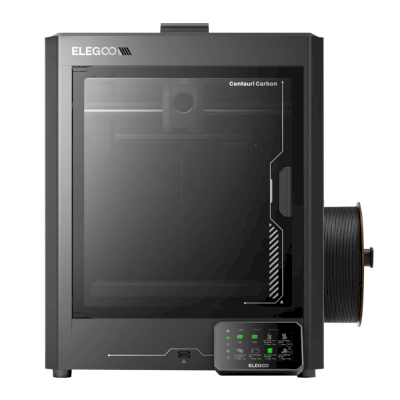
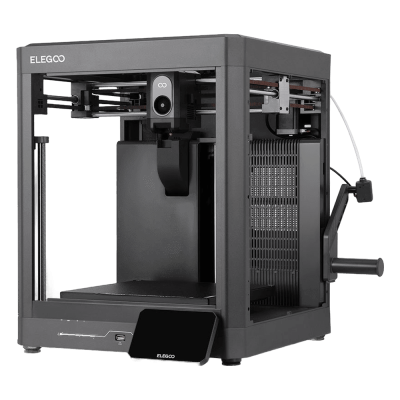
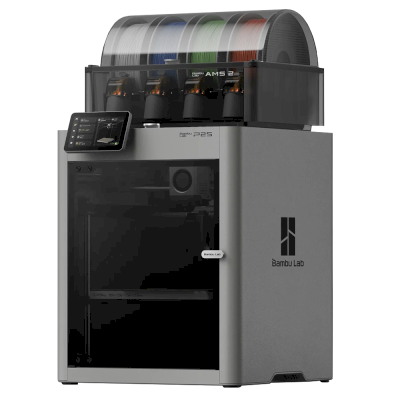
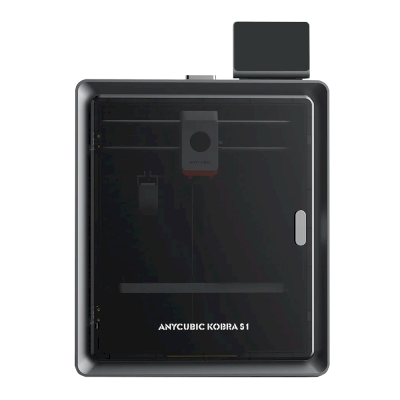
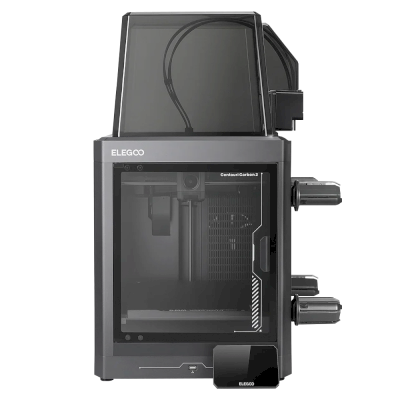
The Centauri Carbon 2 is Elegoo's second fully enclosed CoreXY printer: the original's 256 mm build cube with a 350 degree C hardened-steel nozzle, a 5-inch touchscreen and a better camera and lighting, and the Combo adds Elegoo's Canvas unit for four colours ($449 at launch). It is for hobbyists and small workshops who want an enclosed printer for engineering filaments, and multi-colour, on a budget.
ELEGOO Centauri Carbon 2 को SimplyPrint से कनेक्ट करें
क्या ELEGOO Centauri Carbon 2 3D प्रिंटर SimplyPrint, OctoPrint, Mainsail और Fluidd के साथ काम करता है?
इसे कनेक्ट करने का हर तरीका, उसकी आवश्यकताएँ और उसे सेट अप करने का तरीका।
SimplyPrint क्लाइंट
संगत
The same printer as the Centauri Carbon 2 Combo, which works with the SimplyPrint Client, without the Canvas unit.
आपको क्या चाहिए: उसी नेटवर्क पर हमेशा चालू रहने वाला कंप्यूटर या Raspberry Pi, जो SimplyPrint Client चला रहा हो
ELEGOO's own firmware; no Moonraker to connect to.
OctoPrint
सीधे, USB के जरिए
संगत नहीं
No USB printing from a computer on ELEGOO's own firmware.
SimplyPrint के साथ क्या काम करता है
SimplyPrint क्लाइंट के माध्यम से कनेक्ट होने पर, SimplyPrint उन सभी सुविधाओं को सपोर्ट करता है जो ELEGOO Centauri Carbon 2 अन्य सॉफ़्टवेयर को करने देता है: कैमरा और AI विफलता पहचान, रिमोट प्रिंटिंग, ऑब्जेक्ट छोड़ना, तापमान और गति नियंत्रण, इसकी मल्टी-मटेरियल यूनिट के लिए filament मैपिंग और AutoPrint। एकमात्र अपवाद वे सुविधाएँ हैं जिन्हें ELEGOO Centauri Carbon 2 अन्य सॉफ़्टवेयर को उपयोग नहीं करने देता: बेबी स्टेपिंग, G-code भेजें, filament बदलें, बेड लेवलिंग और Z-ऑफ़सेट कैलिब्रेशन।
हर SimplyPrint सुविधा, इसे SimplyPrint से कनेक्ट करने के हर तरीके के लिए
के माध्यम से SimplyPrint से कनेक्टेड
SimplyPrint सुविधा
SimplyPrint क्लाइंट
संगत
निगरानी
लाइव स्थिति और प्रगति
हां
वेबकैम
हां
AI फेलियर डिटेक्शन
हां
बचा हुआ समय
हां
लेयर प्रगति
हां
तापमान
हां
प्रिंटिंग
प्रिंट शुरू करना
हां
रोकें, फिर शुरू करें और रद्द करें
हां
ऑब्जेक्ट्स छोड़ें
हां
प्रिंट शुरू करने के विकल्प
हां
प्रिंटर कंट्रोल
तापमान बदलें
हां
कंट्रोल से चलाना
हां
होमिंग
हां
Extrude और retract करें
हां
प्रिंट स्पीड बदलें
हां
फैन की गति
हां
बेबी स्टेपिंग
प्रिंटर में उपलब्ध नहीं1
G-code भेजें
प्रिंटर में उपलब्ध नहीं1
कैलिब्रेशन
filament बदलें
प्रिंटर में उपलब्ध नहीं1
बेड लेवलिंग
प्रिंटर में उपलब्ध नहीं1
Z-ऑफ़सेट कैलिब्रेशन
प्रिंटर में उपलब्ध नहीं1
Multi-material
filament को multi-material स्लॉट से मैप करें
हां2
multi-material unit से लोड किया गया filament सिंक करें
हां2
स्वचालन
AutoPrint
प्रो
हां
प्रिंट शुरू होने से पहले file डाउनलोड करें
हां
SimplyPrint क्लाइंट के माध्यम से SimplyPrint से कनेक्टेड
संगत
निगरानी
लाइव स्थिति और प्रगतिहां
वेबकैमहां
AI फेलियर डिटेक्शनहां
बचा हुआ समयहां
लेयर प्रगतिहां
तापमानहां
प्रिंटिंग
प्रिंट शुरू करनाहां
रोकें, फिर शुरू करें और रद्द करेंहां
ऑब्जेक्ट्स छोड़ेंहां
प्रिंट शुरू करने के विकल्पहां
प्रिंटर कंट्रोल
तापमान बदलेंहां
कंट्रोल से चलानाहां
होमिंगहां
Extrude और retract करेंहां
प्रिंट स्पीड बदलेंहां
फैन की गतिहां
बेबी स्टेपिंगप्रिंटर में उपलब्ध नहीं1
G-code भेजेंप्रिंटर में उपलब्ध नहीं1
कैलिब्रेशन
filament बदलेंप्रिंटर में उपलब्ध नहीं1
बेड लेवलिंगप्रिंटर में उपलब्ध नहीं1
Z-ऑफ़सेट कैलिब्रेशनप्रिंटर में उपलब्ध नहीं1
Multi-material
filament को multi-material स्लॉट से मैप करेंहां2
multi-material unit से लोड किया गया filament सिंक करेंहां2
स्वचालन
AutoPrint प्रोहां
प्रिंट शुरू होने से पहले file डाउनलोड करेंहां
काम करता है
निर्भर करता है
समर्थित नहीं
प्रिंटर में उपलब्ध नहीं
प्रिंटर यह सुविधा अन्य सॉफ़्टवेयर को नहीं देता।
multi-material unit चाहिए
ELEGOO Centauri Carbon 2 के लिए कौन सा slicer इस्तेमाल करें
ElegooSlicer, ELEGOO का अपना slicer, इस्तेमाल करें: इसमें ELEGOO Centauri Carbon 2 के लिए तैयार प्रोफ़ाइल है। इसके लिए प्रोफ़ाइल के साथ भी: OrcaSlicer।
हम केवल उन slicer को सूचीबद्ध करते हैं जिन्हें आप SimplyPrint क्लाउड में इस्तेमाल कर सकते हैं, इसलिए ELEGOO Centauri Carbon 2 के लिए अन्य भी हो सकते हैं।
ELEGOO Centauri Carbon 2 के लिए cloud-based slicer: ElegooSlicer online इस्तेमाल करें
ElegooSlicer और अन्य slicers इस्तेमाल करें, सीधे अपने ब्राउज़र में SimplyPrint के ऑनलाइन क्लाउड slicer के साथ। इंस्टॉलेशन की जरूरत नहीं। दुनिया में कहीं से भी, किसी भी डिवाइस पर अपने ELEGOO Centauri Carbon 2 मॉडल slice करें!
स्वचालित profile updates: प्रोफ़ाइलों की हर दिन जाँच होती है और slicer GitHub repositories से, साथ ही हमारे ओपन-सोर्स समुदाय-संचालित slicer प्रोफ़ाइल डेटाबेस से भी अपने-आप ली जाती हैं। इससे आपके पास हमेशा नवीनतम प्रोफ़ाइलों की पहुँच रहती है।
ध्यान दें: अन्य slicer, जैसे Simplify3D, ideaMaker, SuperSlicer और KISSlicer, हमारे cloud में नहीं हैं, इसलिए हम उनकी profiles ट्रैक नहीं करते। वे फिर भी आपके ELEGOO Centauri Carbon 2 के साथ अच्छी तरह काम कर सकते हैं: profile के लिए slicer के दस्तावेज़ या फ़ोरम देखें। आप हमारी GitHub पर ओपन-सोर्स slicer profile डेटाबेस में profiles भी जोड़ सकते हैं।
ELEGOO Centauri Carbon 2 के लिए ऐप
SimplyPrint, ELEGOO Centauri Carbon 2 के ऐप के रूप में काम करता है: आपके फोन और किसी भी ब्राउज़र में, क्लाउड में slicer के साथ।
SimplyPrint के साथ आपको क्या मिलता है
iPhone और Android के लिए एक ऐप, किसी भी ब्राउज़र में वही अनुभव, और क्लाउड में एक slicer।
सिर्फ मॉनिटरिंग से अधिक: प्रिंट कतार, AI विफलता पहचान, AutoPrint और टीम के लिए खाते।
अभी SimplyPrint में ELEGOO Centauri Carbon 2 के लिए कोई plate swapper या auto-ejection kit नहीं है, लेकिन AutoPrint इसे प्रिंट कराता रख सकता है। plate खाली होते ही यह आपकी कतार से अगला job शुरू करता है।
बंद प्रिंटर अपने प्रिंट बाहर निकालते हैं
ELEGOO Centauri Carbon 2 का bed उसके enclosure के अंदर केवल ऊपर-नीचे चलता है, इसलिए plates बदलने के बजाय push-off routine toolhead को ठंडी प्रिंट को plate से धकेलकर उसके सामने के दरवाजे से बाहर निकालने देता है। चलते समय दरवाजा खुला होना चाहिए। कुछ प्रिंटर खुले दरवाजे के साथ प्रिंट नहीं करते, Prusa CORE One में door sensor है, इसलिए पहले अपने प्रिंटर की जांच करें।
इसे स्वचालित करने के तरीके
toolhead से प्रिंट हटाएँCoreXY प्रिंटर पर, अगला काम शुरू होने से पहले G-code रूटीन ठंडे प्रिंट को plate के आगे से धकेल सकता है।
आपका अपना इजेक्शन G-codeप्लेट साफ़ करने वाला रूटीन लिखें, और AutoPrint हर प्रिंट के बाद इसे चलाएगा।
डिस्क्लेमर:
हम इस जानकारी को जितना हो सके उतना नया और सटीक रखने की कोशिश करते हैं, लेकिन इसकी पूर्णता या भरोसेमंदी की गारंटी नहीं दे सकते। हमारा डेटा यूज़र सबमिशन और निर्माता संदर्भों पर आधारित है।
ELEGOO Centauri Carbon 2 कौन सा filament print कर सकता है?
ELEGOO Centauri Carbon 2 के लिए filament संगतता: hotend, bed, chamber और enclosure के आधार पर आंकी गई वे सामग्रियाँ जिन्हें यह संभाल सकता है।
फिलामेंट
उपयुक्तता
नोट्स
PLA
बहुत अच्छा
print करने में सबसे आसान filament। लगभग हर printer पर चलता है; heated bed adhesion में मदद करता है लेकिन जरूरी नहीं।
PETG
बहुत अच्छा
आराम से range में (PETG को ~230-250C hotend और ~70-85C bed पसंद है)।
TPU और लचीले filament
बहुत अच्छा
direct-drive extruder flexible filament अच्छी तरह feed करता है। clean results के लिए slow print करें।
ABS & ASA
बहुत अच्छा
enclosure वाला, पर्याप्त गर्म hotend और bed के साथ: ABS और ASA अच्छी तरह प्रिंट होते हैं।
Nylon (PA)
अच्छा
सावधानी से संभव है। filament को अच्छी तरह सुखाएँ, और enclosure से काफ़ी मदद मिलती है।
Polycarbonate (PC)
अच्छा
PC के लिए उपयुक्त। सर्वोत्तम परिणामों के लिए filament सुखाएँ, धीरे प्रिंट करें और enclosure का उपयोग करें।
Carbon-fiber और glass-filled
सावधानी से
संभव है, यदि आप hardened या wear-resistant nozzle लगाएँ, क्योंकि abrasive fibers मूल brass nozzle को जल्दी घिस देते हैं।
सुझाव: यह प्रिंटर के विनिर्देशों पर आधारित सामान्य मार्गदर्शिका है, हमेशा अपने फिलामेंट की सुझाई गई सेटिंग जांचें। SimplyPrint के साथ आप हर स्पूल के लिए प्रोफाइल सहेज सकते हैं और स्टॉक में मौजूद फिलामेंट को ठीक से ट्रैक कर सकते हैं।
ELEGOO Centauri Carbon 2 के लिए सर्वश्रेष्ठ filament
वे filaments जिन्हें ELEGOO Centauri Carbon 2 अच्छी तरह प्रिंट करता है, पहले ELEGOO के अपने, फिर सबसे प्रसिद्ध।
Tested the Combo (unit supplied by Elegoo). PLA, PLA-CF and PETG print well on stock profiles and Canvas is easy to use; it measured 44-47 dB. Cons: unreliable connections from ElegooSlicer and the Matrix app, false spaghetti alerts, ASA warping until the bed was preheated, lots of purge waste and print-time estimates more than 17% off.
“Overall, the hardware is on point but the software needs more tuning”
Tested the Combo at $449. Prints PAHT-CF and polycarbonate cleanly without a heated chamber, handles 95A TPU through Canvas, needs no cloud, and has an excellent camera. Cons: the loading routine is too cool to clear PC or PA, spool holders that fit other brands poorly, and a cold plate that is not sticky enough. Says the original Centauri Carbon is still its pick for single colour.
“Like the first Centauri Carbon, the CC2 is a delightful Core XY 3D printer that’s easy on the budget.”
Recommended. Scored 29 of 30 in its print tests, with strong dimensional accuracy, very little colour contamination and engineering filaments that fed reliably. Cons: only four filaments, spools stored outside the enclosure with no drying (damp filament caused stringing), purge waste, and a locked-down slicer. For single-colour printing it says the original Centauri is still superb.
“If you are a small business looking to make functional parts on a budget, then the Centauri Carbon 2 really does live up to expectations.”
Aurora Tech · 19 फ़रवरी 2026
Sponsored by Elegoo (disclosed). Over 2,000 colour changes with two false unload errors; faster changes and less purge than first-gen AMS, about half the K2 Pro's waste, but far slower than a Snapmaker U1. Printed PPS-CF and ABS well. Cons: average surface quality, skinned OrcaSlicer with poor estimates. Names it the best-value enclosed multi-colour printer.
ELEGOO Centauri Carbon 2 कब चुनें
Choose the Centauri Carbon 2 for one of the cheapest ways into enclosed four-colour CoreXY printing: Tom's Hardware rated it 4/5, TechRadar recommended it and scored its prints 29 of 30. Every review we found tested the Combo. If you only print one colour, Tom's Hardware and TechRadar both say the original Centauri Carbon is still a superb, cheaper pick. The Bambu Lab P2S Combo costs much more and may be a bit more polished (Tom's Hardware). In Aurora Tech's tests the Creality K2 Pro printed faster with a cleaner surface but purged about twice as much, and a tool changer such as the Snapmaker U1 was far faster at multi-colour with almost no waste.
फायदे
Fully enclosed with a 350 degree C hardened-steel nozzle: Tom's Hardware printed PAHT-CF and polycarbonate without warping, and Aurora Tech printed PPS-CF and ABS.
Four colours for little money with the Combo's Canvas unit, which Aurora Tech ran through over 2,000 colour changes and found faster and less wasteful than first-generation AMS-style systems.
Accurate, clean prints: TechRadar scored it 29 of 30 in its print tests, with very little colour contamination.
Quiet for an enclosed printer (Elegoo says 45 dB; Notebookcheck measured 44-47 dB), with a glass door and an excellent camera with AI detection (Tom's Hardware).
Needs no cloud account (Tom's Hardware), so it can stay on your own network.
Works with SimplyPrint through the SimplyPrint Client, for one queue and remote monitoring across your printers.
कमियां
Elegoo's software lags the hardware: Notebookcheck had unreliable connections from ElegooSlicer and the Matrix app, print-time estimates were off by up to about 20% (Notebookcheck, Aurora Tech), and TechRadar calls the slicer locked down.
Multi-colour prints waste a lot of filament in purge (Notebookcheck, TechRadar), and the spools sit outside the enclosure with no drying, so damp filament shows (TechRadar).
Its monitoring can cry wolf: Notebookcheck saw false spaghetti alerts, and Aurora Tech saw false unload errors that paused prints until someone pressed continue.
No heated chamber, and with high-temperature filaments the loading routine is too cool to clear PC or PA (Tom's Hardware) and the Z offset runs low (Aurora Tech).
The side spool holders suit Elegoo spools but not some other brands, and the cold plate is not sticky enough (Tom's Hardware).
किसके लिए उपयुक्त है
स्कूलअच्छा विकल्प
Enclosed with a glass door, quiet and self-calibrating, with a good camera; Elegoo's software and alerts are still uneven, and SimplyPrint adds queue approval and control over who can start prints.
शौकिया यूज़रबेहतरीन विकल्प
Four colours, engineering filaments and an enclosure for $449 at launch; Tom's Hardware, TechRadar and Aurora Tech all rate it highly for value.
व्यवसायोंअच्छा विकल्प
TechRadar says it lives up to expectations for small businesses making functional parts, and it needs no cloud; the build cube is small and Elegoo's software still needs work.
Print farmsकाम कर सकता है
Cheap per machine and works with SimplyPrint through the Client, but false alerts can pause prints, multi-colour purges a lot, and no AutoPrint plate-swapping kit is listed for it.
ELEGOO Centauri Carbon 2 की समान प्रिंटरों से तुलना करें
उसी निर्माता के, समान आकार के, वही engineering materials या इसी तरह के multi-material प्रिंट करने वाले प्रिंटर, जिन्हें आप आज खरीद सकते हैं। उनके specs और कनेक्शन के साथ अधिकतम चार प्रिंटर की साथ-साथ तुलना करें।
ELEGOO Centauri Carbon 2 कौन बनाता है और ELEGOO आपको कितनी स्वतंत्रता देता है: क्या इसके प्रिंटर इसके cloud के बिना चलते हैं, कोई भी filament और slicer स्वीकार करते हैं और उनकी मरम्मत की जा सकती है। हर क्षेत्र को सार्वजनिक स्रोतों के आधार पर रेट किया गया है।
खुलापन: अधिकतर खुला (5 में से 3.8)
अधिकतर खुला
बंद पारिस्थितिकी तंत्रखोलें
ELEGOO is a Shenzhen company founded in 2015 that makes FDM and resin 3D printers, filament, laser engravers and STEM electronics kits. Its FDM range is the Centauri Carbon, an enclosed CoreXY printer, and the Neptune 4 series of open-frame Klipper printers, sold to hobbyists at budget to mid-range prices. DJI became a shareholder in 2025.
स्थापना:
2015 ·
मुख्यालय:
Shenzhen, China ·
स्वामित्व:
Privately held through its parent, Shenzhen Zhinengpai (SmartPie) Technology; DJI became a shareholder in 2025 ·
वेबसाइट:www.elegoo.com
ELEGOO is fairly open in daily use: its printers work over the LAN with open slicers and any filament, and it now publishes firmware source. Source releases have followed community pressure rather than launch, and spare parts for the newest printers are thin in its store.
फर्मवेयर और कस्टम फर्मवेयर ●●●●●
The Neptune 4 series runs Klipper. For the Centauri Carbon, which went on sale in February 2025, ELEGOO published its modified source on GitHub under GPL-3.0 in September 2025, saying it did so in response to user feedback.
[1][2][3][4]
स्थानीय नियंत्रण और एकीकरण ●●●●●
ELEGOO's printers connect to its slicer on the local network by IP without an account. The Neptune 4 series serves Klipper's web interface and Moonraker, which OrcaSlicer reaches as an Octo/Klipper host. For the Centauri Carbon and Centauri Carbon 2, ELEGOO published Elegoo Link on GitHub in January 2026, an Apache-2.0 SDK for local discovery, status, file upload and print control. The Matrix phone app adds remote printing while the printer is online.
[5][4][16][6][17]
तृतीय-पक्ष filament, slicer और पार्ट ●●●●●
Third-party filament works; ElegooSlicer is an open-source OrcaSlicer-based slicer, OrcaSlicer works with the Neptune 4, and ELEGOO published the data format of its RFID filament tags so others can use it.
[7][8][4]
मरम्मत और स्पेयर पार्ट्स ●●●●●
ELEGOO sells hotend, extruder and nozzle kits and some boards for the Neptune 4, and its wiki has many replacement guides, including the Centauri Carbon motherboard. The store's Centauri Carbon parts list is short (hotend kit, touchscreen, upper shell).
[9][10][11]
डेटा और गोपनीयता ●●●●●
LAN printing needs no account; the Matrix app and cloud do. The privacy policy names the companies responsible for personal data in each region (Shenzhen, Hong Kong, United States) but is written mainly for the online store.
[12][5]
समुदाय और दस्तावेज़ ●●●●●
Active community and a wiki with guides per model; firmware and slicer sources are on GitHub, although the Centauri Carbon source came after users asked for it.
[11][7][1]
फायदे
Works on the local network with ElegooSlicer or OrcaSlicer, with no account needed.
Open-source slicer and a published RFID tag format for filament.
Many step-by-step replacement guides in its wiki.
Offered owners compensation when the Centauri Carbon multi-colour add-on was delayed.
कमियां
Centauri Carbon firmware source came about seven months after sales began, after users asked.
The Centauri Carbon's multi-colour add-on only became available in April 2026, after ELEGOO said in November 2025 it could not give a date.
Few complete Centauri Carbon parts are listed in its store.
The privacy policy is written mainly for the online store.
सिद्ध अनुभव
मई 2026: ELEGOO's parent closed a B+ financing round of over 500 million yuan (about $73 million) from investors including Meituan, Hillhouse Capital and Shenzhen Capital Group. It reported 2025 revenue of 2.3 billion yuan.
[13]
27 अप्रैल 2026: CANVAS, the multi-colour system for the Centauri Carbon, became available, five months after ELEGOO said it could not give a release date.
[14]
18 नवम्बर 2025: DJI and Hangzhou Jiangyu Technology became shareholders of ELEGOO's parent company, according to a business registration update reported by TechNode. The size of the stake was not disclosed.
[15]
नवम्बर 2025: ELEGOO said the multi-colour system it was developing for the Centauri Carbon did not yet perform as it wanted and that it could not guarantee a release date. It offered owners a choice of a $50 filament coupon, a 365-day warranty extension or $80 off a Centauri Carbon 2 Combo.
[14]
26 सितम्बर 2025: In response to user feedback, ELEGOO published the modified source code of the Centauri series firmware on GitHub under GPL-3.0.
[1][2]
फ़रवरी 2025: ELEGOO opened pre-orders for the Centauri Carbon, its first enclosed CoreXY printer, on 17 February 2025.
[3]
17 स्रोतों से शोधित, अंतिम बार 18 अक्टूबर 2026 को जाँचा गया। स्रोत दिखाएं
क्या ELEGOO Centauri Carbon 2, SimplyPrint के साथ संगत है?
हाँ। आप ELEGOO Centauri Carbon 2 को SimplyPrint क्लाइंट के ज़रिए SimplyPrint से कनेक्ट कर सकते हैं, फिर अपने ब्राउज़र या मोबाइल ऐप से प्रिंट स्लाइस कर सकते हैं, उन्हें कतार में डाल सकते हैं, शुरू कर सकते हैं और मॉनिटर कर सकते हैं।
ELEGOO Centauri Carbon 2 को SimplyPrint से कैसे कनेक्ट करें?
ELEGOO Centauri Carbon 2 के लिए हमारी चरण-दर-चरण सेटअप गाइड अपनाएँ। इसमें बताया गया है कि इसे SimplyPrint क्लाइंट के ज़रिए कैसे कनेक्ट करें, हर तरीके के लिए क्या चाहिए और कौन सा चुनें।
ELEGOO Centauri Carbon 2 के लिए कौन-सा slicer उपयोग करना चाहिए?
हम ELEGOO Centauri Carbon 2 के लिए ElegooSlicer की सलाह देते हैं। आप इसे और 6 अन्य slicer, सीधे SimplyPrint के ऑनलाइन slicer में चला सकते हैं, कोई इंस्टॉल नहीं, किसी भी डिवाइस पर, और ELEGOO Centauri Carbon 2 के प्रोफाइल अपने आप अपडेट रहते हैं।
क्या ELEGOO Centauri Carbon 2 के साथ OrcaSlicer उपयोग किया जा सकता है?
हाँ। OrcaSlicer में ELEGOO Centauri Carbon 2 की प्रोफ़ाइल शामिल है, और आप इसे SimplyPrint के ऑनलाइन slicer में चला सकते हैं, इसलिए कुछ इंस्टॉल करने की ज़रूरत नहीं है।
ELEGOO Centauri Carbon 2 कौन सा filament print कर सकता है?
इसके स्पेसिफिकेशन (hotend 350C तक, heated bed 110C तक) के आधार पर ELEGOO Centauri Carbon 2, PLA, PETG, TPU और लचीले filament, या ABS & ASA को अच्छी तरह संभालता है। ABS, nylon, PC और composites के लिए ऊपर पूरी filament गाइड देखें।
क्या ELEGOO Centauri Carbon 2, OctoPrint या Klipper के साथ काम करता है?
हमारी जानकारी में नहीं, लेकिन आपको इनमें से किसी की ज़रूरत नहीं: SimplyPrint SimplyPrint क्लाइंट के जरिए ELEGOO Centauri Carbon 2 से कनेक्ट होता है।
ELEGOO Centauri Carbon 2 के बेड का आकार और बिल्ड वॉल्यूम क्या है?
ELEGOO Centauri Carbon 2 का print bed 256 x 256 mm है और यह 256 mm तक ऊंची प्रिंट कर सकता है, यानी लगभग 256 x 256 x 256 mm का build volume। bed के प्रकार, तापमान और अन्य जानकारी के लिए ऊपर पूरी specifications तालिका देखें।
ELEGOO Centauri Carbon 2 कब जारी हुआ?
ELEGOO ने Centauri Carbon 2 को 26 जनवरी 2026 को लॉन्च किया।
क्या ELEGOO Centauri Carbon 2 प्रिंट अपने आप निकाल सकता है?
अभी इसके लिए कोई समर्थित kit नहीं है, लेकिन SimplyPrint का AutoPrint toolhead से प्रिंट हटा सकता है, या आपका अपना ejection G-code चला सकता है, और फिर आपकी कतार से अगला job शुरू कर सकता है।
Affiliate खुलासा: इस पेज के कुछ link affiliate link हैं। आपके खरीदने पर हमें commission मिल सकता है, इसके लिए आपको कोई अतिरिक्त लागत नहीं देनी होगी। Amazon Associate के रूप में हम योग्य खरीद से कमाते हैं।
 चीन
चीन
 SimplyPrint क्लाइंट




 PrusaSlicer
 BambuStudio
 CrealityPrint
 Cura
Cura Kiri:Moto