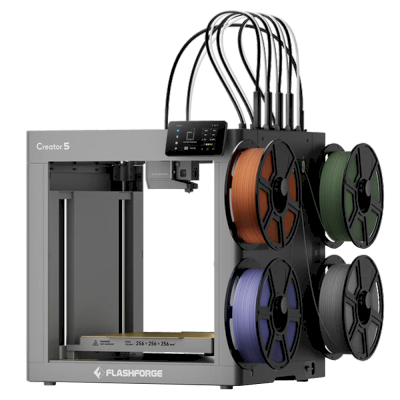
The Creator 5 is Flashforge's open-frame tool changer: four independent toolheads on a CoreXY with a 256 mm build cube and 320 °C hotends, so each colour or material has its own nozzle. It is for hobbyists and makers who print multi-colour PLA, PETG and TPU and want little filament waste for less than other tool changers cost.
Calls it the cheapest tool changer on the market: four fast toolheads on an open-frame CoreXY with little filament waste, and it printed PLA, PETG, TPU and PET-GF well. Downsides are a large purge on loading and a big prime block, clunky slicer profiles, a hard nozzle change and very soft TPU failing.
“If you want to print in four colors, but hate wasting your filament, the Creator 5 is worth a look.”
ModBot · 2026年7月25日
Tests both the open Creator 5 and the enclosed Creator 5 Pro with many materials and grew more impressed over time. Nitpicks: buzzing LEDs, a small screen, a heat soak that cannot be skipped and slow per-tool filament loading. Advises the Pro for ABS and ASA and the cheaper Creator 5 for multicolor PLA-type printing.
Frankly Built · 2026年7月11日
Hands-on review with multicolor and HueForge-style prints. He reports no problems with tool changes, slicer or build quality, finds it more reliable than the Snapmaker U1, and calls it an easy buy for low-waste multicolor printing under $1,000 (affiliate code in the description).
Aurora Tech · 2026年5月14日
In-depth test of a pre-production unit (Flashforge-sponsored, disclosed). The tool changing works exceptionally well, but he hit firmware glitches, a too-high default Z offset, slicer quirks and manual filament loading. Against the Snapmaker U1 it has hotter specs but a smaller volume; he would only recommend it once firmware is fixed and the price gap grows.
Flashforge Creator 5を選択するケース
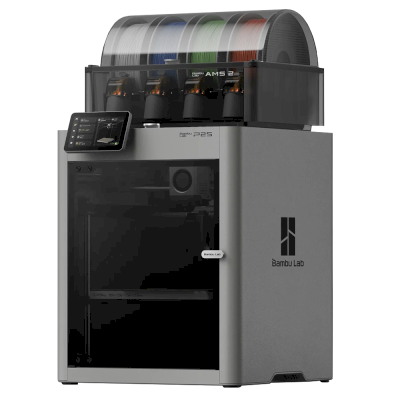
Choose the Creator 5 for low-waste four-colour printing on a budget: Tom's Hardware calls it the cheapest tool changer on the market, and Frankly Built found it more reliable than its closest rival, the Snapmaker U1, which has the larger build volume (Aurora Tech). For ABS and ASA, ModBot and Flashforge point to the enclosed Creator 5 Pro. If you mostly print one material, a single-nozzle printer such as the Bambu Lab P2S is simpler and still does multi-colour with the AMS, at the cost of more purge waste.
メリット
Four independent toolheads, so colour changes waste little filament (Tom's Hardware).
Printed PLA, PETG, TPU and PET-GF well (Tom's Hardware), and tool changes worked very well in Aurora Tech's test.
Built-in camera, a 120 °C bed and up to 320 °C hotends (Flashforge).
Works with SimplyPrint through the SimplyPrint Client.
デメリット
Open frame: Flashforge recommends the enclosed Creator 5 Pro for ABS, ASA and nylon.
A large purge when loading, a big prime block and clunky slicer profiles (Tom's Hardware).
Filament is loaded by hand for each toolhead, which is slow, and the heat soak can't be skipped (ModBot).
Nozzle changes are hard and very soft TPU failed (Tom's Hardware).
Aurora Tech's pre-production unit had firmware glitches and a too-high default Z offset.
おすすめの対象
学校動作する場合あり
Multi-colour prints engage students and SimplyPrint can hold them for approval, but the open frame leaves four hot toolheads in reach and loading each tool by hand takes care.
ホビーユーザー最適
The cheapest way into low-waste four-colour printing, rated 4/5 by Tom's Hardware.
企業動作する場合あり
Efficient multi-material prototypes, but it is open, new and limited to PLA-type materials, PETG and TPU.
プリントファーム動作する場合あり
Little waste per colour print, but slow per-tool loading, a mandatory heat soak and a short track record weigh on unattended fleets.
Flashforge (Zhejiang Flashforge 3D Technology) is a Chinese 3D printer maker founded in 2011. It sells the Adventurer 5M and 5M Pro CoreXY printers, the AD5X multi-colour printer and the Creator series, plus resin and wax printers, to customers ranging from hobbyists to businesses.
設立:
2011 ·
本社:
Zhejiang, China ·
所有関係:
Zhejiang Flashforge 3D Technology Co., Ltd. ·
ウェブサイト:www.flashforge.com
Flashforge is mixed: the Adventurer 5M runs Klipper with published source and works in a LAN mode with open slicers, but the stock system is closed to modification and its app relies on the cloud.
ファームウェアとカスタムファームウェア ●●●●●
The Adventurer 5M series runs Klipper, and Flashforge published its Klipper source on GitHub under GPL-3.0 in January 2024. The stock system is not built to be modified: the community 'Klipper Mod', which adds Moonraker, Mainsail and Fluidd, is unofficial and warns that it may cost the warranty.
[1][2]
ローカル制御と連携 ●●●●●
A LAN mode lets Orca-Flashforge send jobs on the local network, and USB printing works offline. The Flash Maker app needs internet and a Flashforge account and does not connect in LAN mode. Flashforge documents no local API for other software. Moonraker with Mainsail or Fluidd comes only with the community Klipper Mod, which is unofficial and warns that it may cost the warranty.
[3][4][2]
サードパーティー製フィラメント、スライサー、部品 ●●●●●
Third-party filament works; Orca-Flashforge is an open-source OrcaSlicer fork and OrcaSlicer itself supports Flashforge printers. Nozzles are sold as complete printer-specific assemblies.
[5][6][7]
修理と交換部品 ●●●●●
Flashforge sells nozzle, extruder, filament-feeding and touchscreen assemblies for the Adventurer 5M, and its wiki has replacement guides, for example the AD5X extruder board.
[7][8]
コミュニティとドキュメント ●●●●●
A wiki with manuals, FAQs and maintenance guides, and slicer and Klipper sources on GitHub; much of the advanced use comes from the community mod.
[3][1][2]
メリット
Long-established maker, founded in 2011.
LAN mode and USB printing work without the cloud.
Klipper source and an open-source slicer are published.
Common replacement assemblies are sold for the Adventurer 5M.
デメリット
Stock firmware is not meant to be modified; deeper control needs an unofficial community mod.
The Flash Maker app needs internet and an account, and does not work in LAN mode.
Nozzles are sold as complete printer-specific assemblies.
実績
1月 2024: Flashforge published the Klipper source for the Adventurer 5M and 5M Pro on GitHub under GPL-3.0.
[1]
 中国
中国
 SimplyPrintクライアント




 PrusaSlicer
 BambuStudio
 CrealityPrint
 Cura
Cura Kiri:Moto




 オーストラリア向けFlashforge
 カナダ向けFlashforge
 EU向けFlashforge
 英国向けFlashforge