
Om denne integration
SimplyPrint er hverken støttet af eller forbundet med SketchUp. Vi bruger varemærker og billeder udelukkende for at indikere kompatibilitet med vores platform. Brug af SketchUp hardware med SimplyPrint kan være anderledes end hvad SketchUp har tiltænkt. Alle rettigheder tilhører de respektive ejere.
3D-print direkte fra SketchUp, eksporter, slice og print med ét klik
SimplyPrint-udvidelsen til SketchUp forbinder 3D-modellering og 3D-print. Modellér i SketchUp, og send derefter dit arbejde til printeren med ét klik, uden manuelt at eksportere filer, flytte SD-kort eller åbne en slicer i et separat vindue.
Er det nyt for dig? Læs hele vejledningen: Sådan 3D-printer du fra SketchUp.
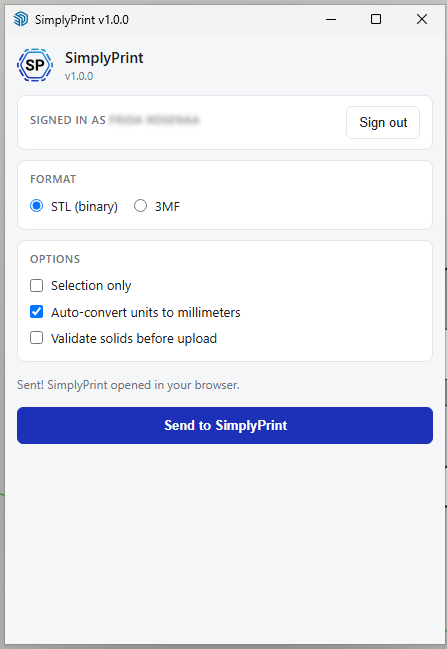
Udvidelsen tilføjer en SimplyPrint-værktøjslinje, en undermenu under Extensions → SimplyPrint, menupunktet File → Send to SimplyPrint… og en mulighed i højrekliksmenuen. Vælg STL eller 3MF, vælg, om hele modellen eller kun din markering skal sendes, klik på Send, og SimplyPrint åbnes i browseren med modellen indlæst, klar til at blive slicet, sat i kø eller printet.
Sådan installerer du
Hent udvidelsen fra SketchUp Extension Warehouse (anbefales) eller fra vores CDN som reserve. Det er den samme .rbz-fil begge steder. Installer den i SketchUp ved at følge trinene nedenfor.
Gå til
Window → Extension Manageri SketchUp.Klik på Install Extension nederst i Extension Manager.
Vælg den downloadede fil
simplyprint.rbz, og godkend eventuelle spørgsmål fra SketchUp.Genstart SketchUp. Værktøjslinjen SimplyPrint vises, og Send to SimplyPrint… føjes til menuen Extensions.
Kom godt i gang
Klik på SimplyPrint-ikonet på værktøjslinjen, eller vælg Extensions → SimplyPrint → Send to SimplyPrint…, for at åbne dialogboksen. Klik på Log ind første gang. En browserfane åbnes, du godkender anmodningen, og så er du klar til fremtidige sessioner. Vælg STL eller 3MF, tilpas eventuelt indstillingerne, og klik derefter på Send til SimplyPrint. Browseren åbner SimplyPrint med modellen indlæst, klar til at blive slicet og printet.
- Eksportér STL eller 3MF direkte fra SketchUp til SimplyPrint
- Upload den aktive model med ét klik, eller begræns det til din aktuelle markering
- Konverter automatisk enheder til millimeter (SketchUp-brugere arbejder ofte i tommer/fod, mens printere forventer mm)
- Valgfri solid-validering, advarer før upload af ikke-manifold geometri, der ikke kan printes
- Log ind én gang, SimplyPrint-sessionen deles med plugins til Blender og Fusion 360
- Virker på Windows, macOS og Linux
Om SimplyPrint-integrationer
Integration med SimplyPrint gør det muligt for applikationer at kommunikere med dine 3D-printere og omvendt. Det giver uendelige muligheder, og vi er overbeviste om, at din 3D-printer bør kunne fungere som en IoT-enhed og arbejde sammen med enhver applikation, du kan forestille dig!
Derfor arbejder teamet bag SimplyPrint på at levere officielle integrationer til de mest populære platforme, slicere og applikationer, samtidig med at vores brugere kan oprette egne integrationer med vores API, eller godkendte tredjepartsleverandører kan oprette integrationer, som alle SimplyPrint-brugere kan anvende, med en "Log ind med SimplyPrint"-metode (med metoden "OAuth2").
Hvis du er udvikler og interesseret i at oprette en integration til SimplyPrint, så læs venligst vores dokumentation om emnet.
Hvis du ikke selv er udvikler, men gerne vil se en integration til en bestemt applikation, så tjek om den allerede er på vores roadmap eller forslagsliste, og hvis ikke, så foreslå den!