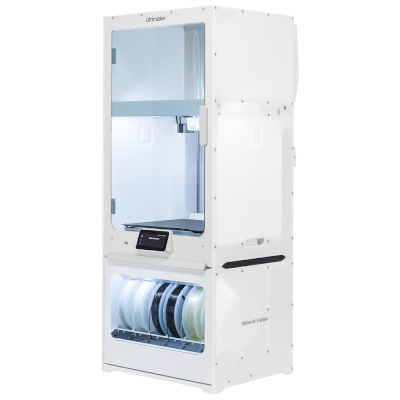
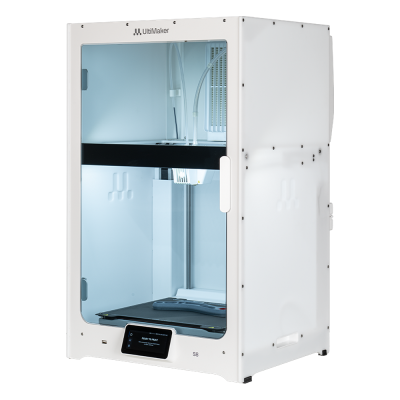
Ultimaker S6 Secure er en variant af Ultimaker S6.
Det betyder, at den deler mange egenskaber med basismodellen, men kan have specifikke ændringer, ekstra funktioner eller medfølgende tilbehør.
Forbind Ultimaker S6 Secure med SimplyPrint
Fungerer Ultimaker S6 Secure-3D-printeren med SimplyPrint, OctoPrint, Mainsail og Fluidd?
Hver forbindelsesmetode, hvad den kræver, og hvordan den sættes op.
SimplyPrint-klient
Ikke bekræftet endnu, hjælp os med at finde ud af det
Vi viser kun slicere, du kan bruge i SimplyPrint-skyen, så der kan være andre til Ultimaker S6 Secure.
Cloud-baseret slicer til Ultimaker S6 Secure: brug Cura online
Brug Cura og andre slicere direkte i din browser med SimplyPrints online-cloud-slicer. Ingen installation nødvendig. Slice dine Ultimaker S6 Secure-modeller fra enhver enhed, hvor som helst i verden!
Automatiske profilopdateringer: Profiler kontrolleres automatisk og hentes dagligt fra slicerens GitHub-repositorier samt fra vores egen open source-database med slicerprofiler, drevet af fællesskabet. Det sikrer, at du altid har adgang til de nyeste profiler.
Bemærk: Andre slicere som Simplify3D, ideaMaker, SuperSlicer og KISSlicer findes ikke i vores cloud, så vi sporer ikke deres profiler. De kan stadig fungere fint med din Ultimaker S6 Secure: Se slicerens egen dokumentation eller fora for en profil. Du kan også bidrage med profiler til vores open source-slicerprofildatabase på GitHub.
Ultimaker S6 Secure-specifikationer: printpladestørrelse, printhøjde og mere
Dens størrelse, temperaturer, multimateriale og forbindelsesmuligheder, baseret på producentens oplysninger og vores egen research.
Læs mere fra producenten
Størrelse
Byggevolumen
330 x 240 x 300 mm
Printpladetype
Rectangle
Printpladestørrelse
330 x 240 mm
Maks. printhøjde
300 mm
Printning
Maks. printhastighed
500 mm/s
Maksimal extrudertemperatur
340 °C
Har opvarmet bed
Ja
Maks. printpladetemperatur
100 °C
Antal dyser
2
Toolheads
2
Direct drive
Nej
Probing tool / Auto Bed Leveling
Ja
Filamentbredde
2.85 mm
Multimateriale
Toolchanger eller hotend-skifter
Nej
IDEX (uafhængige dobbeltekstrudere)
Nej
Opretter forbindelse
Forbindelse
Ethernet, USB
Indbygget kamera
Nej
Understøtter serieprint
Nej
Medfølgende firmware
Producentens egen
Filer og slicing
Understøttede filformater
G-code (.gcode, .gco, .g)
Specialformater: ufp
Printeren
Printerproducent / mærke
Ultimaker
Printermodelnavn
S6 Secure
Fremstillet af en virksomhed fra
Nederlandene
Lanceret
9. september 2025
Produceres stadig
Ja
Ansvarsfraskrivelse:
Vi stræber efter at holde denne information så aktuel og præcis som muligt, men kan ikke garantere dens fuldstændighed eller pålidelighed. Vores data er baseret på brugeres indsendelser og producentreferencer.
Hvilket filament kan Ultimaker S6 Secure printe?
Filamentkompatibilitet for Ultimaker S6 Secure: de materialer, Ultimaker angiver til den.
Filament
Egnethed
Noter
PLA
Fantastisk
På producentens materialeliste til denne printer.
PETG
Fantastisk
På producentens materialeliste til denne printer.
TPU og fleksible materialer
Fantastisk
På producentens materialeliste til denne printer.
ABS & ASA
Fantastisk
På producentens materialeliste til denne printer.
Nylon (PA)
Fantastisk
På producentens materialeliste til denne printer.
Polycarbonate (PC)
Fantastisk
På producentens materialeliste til denne printer.
Kul- og glasfiberforstærket
Fantastisk
På producentens materialeliste til denne printer.
Tip: dette er en generel vejledning ud fra printerens specifikationer - tjek altid filamentets anbefalede indstillinger. Med SimplyPrint kan du gemme en profil for hver spole og holde styr på præcis, hvilket filament du har på lager.
Printere som Ultimaker S6 Secure, der fungerer med SimplyPrint
Printere fra samme producent i lignende størrelse, som printer med de samme tekniske materialer eller multimateriale, og som du kan købe i dag, og som vi ved fungerer med SimplyPrint.
Hvem der laver Ultimaker S6 Secure, og hvor åben Ultimaker er: om printerne kan køre uden deres cloud, bruge alle filamenter og slicere og repareres. Hvert område vurderes ud fra offentlige kilder.
Åbenhed: Blandet (2.9 ud af 5)
Blandet
Lukket økosystemÅbn
UltiMaker is the company formed in 2022 when the Dutch printer maker Ultimaker, founded in 2011, merged with MakerBot. It sells professional desktop and industrial printers (the S series, Factor 4, MakerBot Method and Sketch) to businesses, engineering teams and schools, and develops the open-source Cura slicer and the Digital Factory cloud platform.
Grundlagt:
2011 ·
Hovedkvarter:
Zaltbommel, Netherlands, and New York, USA ·
Ejerskab:
Privately held; at the 2022 merger NPM Capital held the majority and Stratasys a minority stake ·
Hjemmeside:ultimaker.com
UltiMaker is mixed: Cura and material choice are open, and printers can be used on the local network, but the printer firmware is closed and most management features sit in its Digital Factory cloud.
Firmware og brugerdefineret firmware ●●●●●
The printers' own software is not published: UltiMaker's GitHub has its Linux kernel configuration and Cura, but no printer firmware. We found no documented way to run custom firmware on current S-series or Method printers.
[1][2]
Lokal styring og integrationer ●●●●●
Cura can add an S-series printer on the local network, by discovery or IP, without signing in, and start prints. UltiMaker says most features are only available through its Digital Factory cloud, and the API it documents publicly is that cloud API; we found no public documentation for controlling the printers locally.
[3][12]
Tredjepartsfilament, slicere og dele ●●●●●
Cura is open source and widely used with other brands, and UltiMaker lists over 300 materials, including third-party ones, for the S series. Print cores and the Material Station are UltiMaker's own parts.
[2][4]
Reparationer og reservedele ●●●●●
UltiMaker publishes maintenance schedules for the S series and sells part bundles and maintenance kits, and gives an expected printer lifetime of five years at 1,500 printing hours a year.
[5]
Data og privatliv ●●●●●
Local printing needs no account; Digital Factory needs one. UltiMaker's privacy policy says data is stored and processed in the EEA or the United States depending on the user's region.
[6][3]
Fællesskab og dokumentation ●●●●●
Cura is developed in public on GitHub with a large open issue tracker, and UltiMaker runs a community forum and support knowledge base. Printer internals are not documented publicly.
[2][3]
Fordele
Cura is open source and works with printers from many brands.
Wide material choice on the S series, including third-party materials.
Printers can be used on the local network without an account.
Published maintenance schedules and maintenance kits for long service life.
Ulemper
Printer firmware is closed.
Most fleet and management features need the Digital Factory cloud, with paid tiers.
MakerBot CloudPrint was shut down in 2025, forcing users to move platforms.
Print cores and the Material Station are UltiMaker-only parts.
Dokumenteret erfaring
21. maj 2026: UltiMaker launched the Factor 4 Plus, an industrial printer up to twice as fast as the Factor 4, with TRACE print validation for production and defence customers.
[7]
februar 2026: UltiMaker sold the Thingiverse model platform to MyMiniFactory and archived its Thingiverse forum.
[8]
december 2025: UltiMaker shut down MakerBot CloudPrint in early December 2025. Users had to reconnect printers to Digital Factory, with a free year of its premium tier offered to former CloudPrint users; the Replicator+ cannot be networked in Digital Factory.
[9]
maj 2022: Ultimaker and Stratasys' MakerBot announced a merger backed by $62.4 million from NPM Capital and Stratasys, with co-CEOs from both companies and headquarters in the Netherlands and New York. The combined company took the UltiMaker name.
[10][11]
Baseret på 12 kilder, sidst kontrolleret 18. oktober 2026. Vis kilder
Er Ultimaker S6 Secure kompatibel med SimplyPrint?
Det ved vi ikke endnu. SimplyPrint virker med 130+ mærker og 600+ modeller via OctoPrint, Klipper og indbyggede integrationer. Har du en Ultimaker S6 Secure, fortæller vores kompatibilitetstjek dig med få spørgsmål, hvordan den kan tilsluttes.
Hvilken slicer skal jeg bruge til Ultimaker S6 Secure?
Vi anbefaler Cura til Ultimaker S6 Secure. Du kan køre den samt 6 andre slicere direkte i SimplyPrints online slicer, uden installation, på alle enheder, med profiler til Ultimaker S6 Secure, der automatisk holdes opdateret.
Kan jeg bruge OrcaSlicer med Ultimaker S6 Secure?
Ja, men OrcaSlicer har så vidt vi ved ingen indbygget profil til Ultimaker S6 Secure: Start med en lignende printers profil, og indstil printpladens størrelse, højde og dysen, så de passer.
Hvilket filament kan Ultimaker S6 Secure printe?
Ultimaker angiver PLA, PETG, TPU og fleksible materialer, ABS & ASA, Nylon (PA), Polycarbonate (PC) og Kul- og glasfiberforstærket til S6 Secure.
Hvad er Ultimaker S6 Secures printpladestørrelse og byggevolumen?
Ultimaker S6 Secure har en printplade på 330 x 240 mm og kan printe op til 300 mm i højden, med et byggevolumen på cirka 330 x 240 x 300 mm. Se den fulde specifikationstabel ovenfor for printpladetype, temperaturer og mere.
Hvornår udkom Ultimaker S6 Secure?
Ultimaker lancerede S6 Secure den 9. september 2025.
 Nederlandene


 PrusaSlicer
 OrcaSlicer
 BambuStudio
 ElegooSlicer
 CrealityPrint
 Kiri:Moto