 Kina
Kina
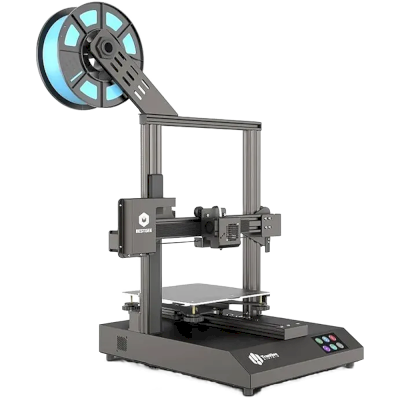
TronHoo BestGee T220S Lite kort fortalt
TronHoo BestGee T220S Lite er en 3D-printer fra TronHoo med et byggevolumen på 220 x 220 x 250 mm.
- Byggevolumen
- 220 x 220 x 250 mm
- Maks. printhastighed
- 150 mm/s
- Printer godt
- PLA, PETG
- Forbindelse
- USB, SD-kort
Forbind TronHoo BestGee T220S Lite med SimplyPrint
Fungerer TronHoo BestGee T220S Lite-3D-printeren med SimplyPrint, OctoPrint, Mainsail og Fluidd? Hver forbindelsesmetode, hvad den kræver, og hvordan den sættes op.
-

OctoPrint
Direkte via USB
Kompatibel
Hvad du har brug for: En Raspberry Pi, der kører OctoPrint, tilsluttet printeren med et USB-kabel
-


Klipper (Moonraker)
Ikke kompatibel
- Leveres ikke med Klipper: Den kører Klipper, efter du har installeret det i stedet for dens egen firmware, en modifikation

Hvad der virker med SimplyPrint
Når den er forbundet via OctoPrint, understøtter SimplyPrint alt, som TronHoo BestGee T220S Lite lader anden software gøre: kameraet og AI-fejldetektering, fjernprint, temperatur- og bevægelseskontrol og AutoPrint. 3 funktioner afhænger af opsætningen: Tabellen angiver, hvad hver kræver.
Alle SimplyPrint-funktioner for hver forbindelsesmetode til SimplyPrint
| Forbundet til SimplyPrint via | |
|---|---|
| SimplyPrint-funktion | OctoPrint Kompatibel |
| Overvågning | |
| Livestatus og fremdrift | Ja |
| Kamera | Ja 1 |
| AI-fejldetektion | Ja 1 |
| Tid tilbage | Ja |
| Lagfremdrift | Ja |
| Temperaturer | Ja |
| Printning | |
| Starter et print | Ja |
| Sæt på pause, genoptag og annuller | Ja |
| Spring objekter over | Afhænger af 2 |
| Filer | |
| Print binær G-code (.bgcode) | Afhænger af 3 |
| Printerstyring | |
| Skift temperaturer | Ja |
| Bevægelse med betjeningen | Ja |
| Hjemkørsel | Ja |
| Ekstrudér og træk tilbage | Ja |
| Ændr printhastighed | Ja |
| Blæserhastighed | Ja |
| Baby stepping | Ja |
| Send G-code | Ja |
| Kalibrering | |
| Udskift filament | Ja |
| Bed leveling | Ja |
| Z-offset-kalibrering | Ja |
| Automatisering | |
| AutoPrint Pro | Ja |
| Download filen, før printet starter | Afhænger af 4 |
Forbundet til SimplyPrint via OctoPrint
Kompatibel
Overvågning
- Livestatus og fremdrift Ja
- Kamera Ja 1
- AI-fejldetektion Ja 1
- Tid tilbage Ja
- Lagfremdrift Ja
- Temperaturer Ja
Printning
- Starter et print Ja
- Sæt på pause, genoptag og annuller Ja
- Spring objekter over Afhænger af 2
Filer
- Print binær G-code (.bgcode) Afhænger af 3
Printerstyring
- Skift temperaturer Ja
- Bevægelse med betjeningen Ja
- Hjemkørsel Ja
- Ekstrudér og træk tilbage Ja
- Ændr printhastighed Ja
- Blæserhastighed Ja
- Baby stepping Ja
- Send G-code Ja
Kalibrering
- Udskift filament Ja
- Bed leveling Ja
- Z-offset-kalibrering Ja
Automatisering
- AutoPrint Pro Ja
- Download filen, før printet starter Afhænger af 4
Virker Afhænger af Ikke understøttet
- Kræver et kamera
- Kræver OctoPrint-pluginnet Cancel Objects
- Kræver OctoPrint-pluginnet BGCode
- Kræver version 4.2.0 eller nyere af SimplyPrint-pluginnet
Hvilken slicer skal du bruge til TronHoo BestGee T220S Lite
Ingen af slicerne i SimplyPrint-clouden har en færdig profil til TronHoo BestGee T220S Lite, men den understøtter standard-G-code: Start med en lignende printers profil, og indstil printpladens størrelse, højde og dyse, så de passer.
Ingen profil til TronHoo BestGee T220S Lite
 PrusaSlicer
 OrcaSlicer
 BambuStudio
 ElegooSlicer
 CrealityPrint
 Cura
Cura Kiri:Moto
Vi viser kun slicere, du kan bruge i SimplyPrint-skyen, så der kan være andre til TronHoo BestGee T220S Lite.
Cloud-baseret slicer til TronHoo BestGee T220S Lite
Alle understøttede slicere - direkte i din browser med SimplyPrints online-cloud-slicer. Ingen installation nødvendig. Slice dine TronHoo BestGee T220S Lite-modeller fra enhver enhed, hvor som helst i verden!
Prøv online-sliceren nuProfiler og andre slicere
Automatiske profilopdateringer: Profiler kontrolleres automatisk og hentes dagligt fra slicerens GitHub-repositorier samt fra vores egen open source-database med slicerprofiler, drevet af fællesskabet. Det sikrer, at du altid har adgang til de nyeste profiler.
Bemærk: Andre slicere som Simplify3D, ideaMaker, SuperSlicer og KISSlicer findes ikke i vores cloud, så vi sporer ikke deres profiler. De kan stadig fungere fint med din TronHoo BestGee T220S Lite: Se slicerens egen dokumentation eller fora for en profil. Du kan også bidrage med profiler til vores open source-slicerprofildatabase på GitHub.
Appen til TronHoo BestGee T220S Lite
SimplyPrint fungerer som app til TronHoo BestGee T220S Lite: på din telefon og i enhver browser, med en slicer i skyen.
Hvad du får med SimplyPrint
- En app til iPhone og Android, den samme i alle browsere og en slicer i skyen.
- Mere end overvågning: en printkø, AI-fejldetektering, AutoPrint og konti til et team.
- Printere fra mange mærker samlet ét sted, side om side.
- En europæisk cloud: hostet i Frankfurt, Tyskland, underlagt GDPR.


Automatisér TronHoo BestGee T220S Lite
Der findes endnu ingen pladeskifter eller automatisk udskubningskit til TronHoo BestGee T220S Lite i SimplyPrint, men AutoPrint kan stadig holde den i gang: Når printpladen er ryddet, starter den næste job i din kø.
Måder at automatisere den på
- Din egen udskubnings-G-code Skriv rutinen, der rydder din printplade, så kører AutoPrint den efter hvert print.
- En robotarm eller noget med en API Fortæl SimplyPrint via API eller webhook, at printpladen er tom, fra en robotarm eller dit eget system.
- Ryd den manuelt, behold køen AutoPrint venter på, at du markerer printpladen som ryddet, og starter derefter næste job.
AutoPrint følger med Pro-abonnementet og derover.
TronHoo BestGee T220S Lite-specifikationer: printpladestørrelse, printhøjde og mere
Dens størrelse, temperaturer, multimateriale og forbindelsesmuligheder, baseret på producentens oplysninger og vores egen research. Læs mere fra producenten
Størrelse
| Byggevolumen | 220 x 220 x 250 mm |
|---|---|
| Printpladetype | Square |
| Printpladestørrelse | 220 x 220 mm |
| Maks. printhøjde | 250 mm |
Printning
| Maks. printhastighed | 150 mm/s |
|---|---|
| Maksimal extrudertemperatur | 260 °C |
| Har opvarmet bed | Ja |
| Maks. printpladetemperatur | 100 °C |
| Antal dyser | 1 |
| Toolheads | 1 |
| Direct drive | Nej |
| Probing tool / Auto Bed Leveling | Nej |
| Filamentbredde | 1.75 mm |
Opretter forbindelse
| Forbindelse | USB, SD-kort |
|---|---|
| Kopier fra | microSD-kort |
| Understøtter serieprint | Ja |
| Medfølgende firmware | Marlin |
Filer og slicing
| Understøttede filformater | G-code (.gcode, .gco, .g) |
|---|
Printeren
| Printerproducent / mærke | TronHoo |
|---|---|
| Printermodelnavn | BestGee T220S Lite |
| Fremstillet af en virksomhed fra | Kina |
Ansvarsfraskrivelse: Vi stræber efter at holde denne information så aktuel og præcis som muligt, men kan ikke garantere dens fuldstændighed eller pålidelighed. Vores data er baseret på brugeres indsendelser og producentreferencer.
Hvilket filament kan TronHoo BestGee T220S Lite printe?
Filamentkompatibilitet for TronHoo BestGee T220S Lite: de materialer, den kan håndtere, vurderet ud fra dens hotend, printplade, kammer og kabinet.
| Filament | Egnethed | Noter |
|---|---|---|
| PLA | Fantastisk | Det nemmeste filament at printe med. Virker på næsten alle printere. En opvarmet printplade forbedrer vedhæftningen, men er ikke nødvendig. |
| PETG | Fantastisk | Komfortabelt inden for området (PETG kan lide en hotend på ~230-250 °C og en printplade på ~70-85 °C). |
| TPU og fleksible materialer | Med omhu | Muligt, men en Bowden-extruder gør fleksible materialer sværere. Print langsomt og foretræk fastere TPU med højere Shore-hårdhed. |
| ABS & ASA | Med omhu | Printpladen er varm nok, men ABS og ASA slår sig uden et kabinet, som stærkt anbefales for rene print. |
| Nylon (PA) | Med omhu | Muligt med forsigtighed. Et kabinet og meget tørt filament er afgørende. |
| Polycarbonate (PC) | Ikke ideelt | Ikke anbefalet: PC kræver meget høje hotend-temperaturer og et lukket kammer. |
| Kul- og glasfiberforstærket | Med omhu | Muligt, hvis du monterer en hærdet eller slidstærk dyse. De slibende fibre slider hurtigt en standardmessingdyse. |
Tip: dette er en generel vejledning ud fra printerens specifikationer - tjek altid filamentets anbefalede indstillinger. Med SimplyPrint kan du gemme en profil for hver spole og holde styr på præcis, hvilket filament du har på lager.
Bedste filament til TronHoo BestGee T220S Lite
Filamenter, som TronHoo BestGee T220S Lite printer godt med, først TronHoos egne, derefter de mest kendte.
Sammenlign TronHoo BestGee T220S Lite med lignende printere
Printere fra samme producent i lignende størrelse, som printer med de samme tekniske materialer eller multimateriale, og som du kan købe i dag. Sammenlign op til fire side om side med deres specifikationer og forbindelsesmetoder.
-
TronHoo BestGee T220 Pro
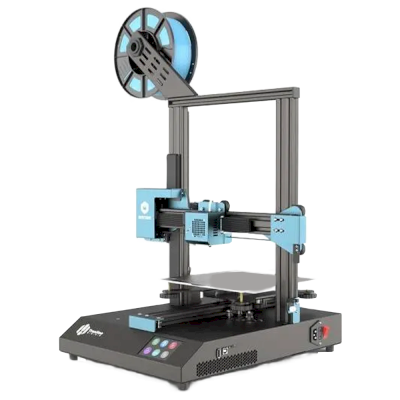 220 x 220 x 250 mmForbinder med: OctoPrintOgså fra TronHoo · Lignende byggevolumen
 -
TronHoo BestGee T220S
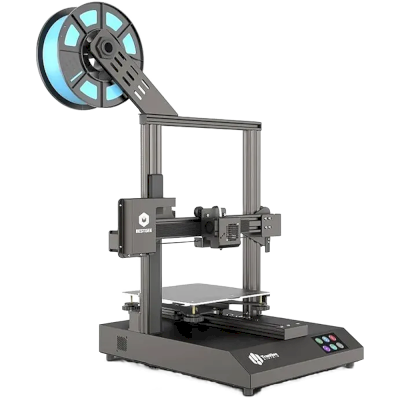 220 x 220 x 250 mmLanceret 2020Forbinder med: OctoPrintOgså fra TronHoo · Lignende byggevolumen
 -
Bambu Lab P1S
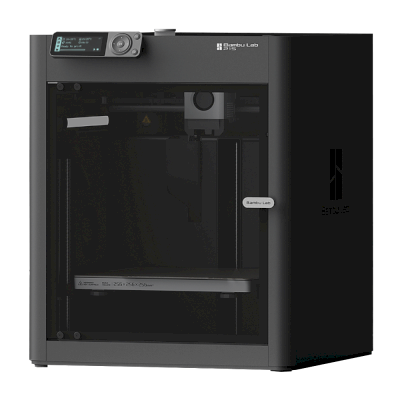 256 x 256 x 256 mmLanceret 13. juli 2023Forbinder med: SimplyPrint-klientLignende byggevolumenBekræftet af SimplyPrint Sammenlign side om side Bambu Lab P1S
 -
Bambu Lab A1
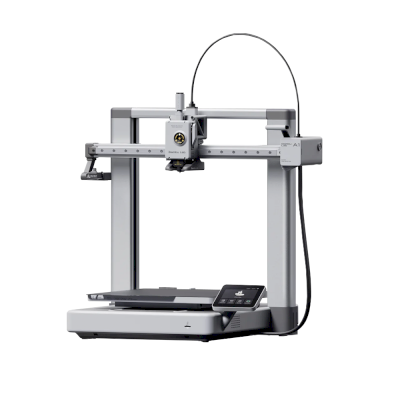 256 x 256 x 256 mmLanceret 14. december 2023Forbinder med: SimplyPrint-klientLignende byggevolumenBekræftet af SimplyPrint Sammenlign side om side Bambu Lab A1
Ofte stillede spørgsmål
Er TronHoo BestGee T220S Lite kompatibel med SimplyPrint?
Ja. Du kan forbinde TronHoo BestGee T220S Lite med SimplyPrint via OctoPrint og derefter slice, sætte i kø, starte og overvåge print fra din browser eller mobilappen.
Hvordan forbinder jeg TronHoo BestGee T220S Lite med SimplyPrint?
Følg vores trin-for-trin-opsætningsguide til TronHoo BestGee T220S Lite. Den viser, hvordan du forbinder den via OctoPrint, hvad du skal bruge til hver mulighed, og hvilken du skal vælge.
Hvilken slicer skal jeg bruge til TronHoo BestGee T220S Lite?
Cura, PrusaSlicer og OrcaSlicer fungerer alle med TronHoo BestGee T220S Lite, og du kan bruge dem i SimplyPrints online-slicer i browseren, uden installation og på enhver enhed.
Kan jeg bruge OrcaSlicer med TronHoo BestGee T220S Lite?
Ja, men OrcaSlicer har så vidt vi ved ingen indbygget profil til TronHoo BestGee T220S Lite: Start med en lignende printers profil, og indstil printpladens størrelse, højde og dysen, så de passer.
Hvilket filament kan TronHoo BestGee T220S Lite printe?
Ud fra specifikationerne (hotend op til 260C, opvarmet printbed op til 100C) håndterer TronHoo BestGee T220S Lite PLA eller PETG godt. Se hele filamentguiden ovenfor for ABS, nylon, PC og kompositmaterialer.
Fungerer TronHoo BestGee T220S Lite med OctoPrint eller Klipper?
TronHoo BestGee T220S Lite virker med OctoPrint, og SimplyPrint forbindes til den via dem, så du får cloudadgang, en kø og kameraovervågning oveni.
Hvad er TronHoo BestGee T220S Lites printpladestørrelse og byggevolumen?
TronHoo BestGee T220S Lite har en printplade på 220 x 220 mm og kan printe op til 250 mm i højden, med et byggevolumen på cirka 220 x 220 x 250 mm. Se den fulde specifikationstabel ovenfor for printpladetype, temperaturer og mere.
Kan TronHoo BestGee T220S Lite automatisk skubbe print af?
Der findes endnu ikke et kit til den, som vi understøtter, men SimplyPrints AutoPrint kan køre din egen udskubnings-G-code, arbejde med en robotarm via API'et eller vente på, at du rydder printpladen, og derefter starte næste job i din kø.
Affiliate-oplysning: Nogle links på denne side er affiliate-links. Vi kan tjene provision, hvis du foretager et køb, uden ekstra omkostning for dig. Som Amazon-associeret tjener vi på kvalificerende køb.
© 2026 SimplyPrint. Alle rettigheder forbeholdes. Denne side samt kompatibilitets-, specifikations- og anmeldelsesdataene på den er udarbejdet af SimplyPrint og må ikke kopieres, datahøstes, reproduceres eller genudgives, helt eller delvist, uden forudgående skriftlig tilladelse. Printerbilleder tilhører deres respektive producenter og vises kun til identifikationsformål. SimplyPrint gør ikke krav på ejerskab af dem. Citerede anmeldelser tilhører deres forfattere.