Forbind Proteor ICARUS-Lite (Rabbit G2) med SimplyPrint
Fungerer Proteor ICARUS-Lite (Rabbit G2)-3D-printeren med SimplyPrint, OctoPrint, Mainsail og Fluidd?
Hver forbindelsesmetode, hvad den kræver, og hvordan den sættes op.
Indbygget af producenten
Kompatibel
Hvad du har brug for: Intet ekstra: det er indbygget i printeren
Hvilken slicer skal du bruge til Proteor ICARUS-Lite (Rabbit G2)
Ingen af slicerne i SimplyPrint-clouden har en færdig profil til Proteor ICARUS-Lite (Rabbit G2), men den understøtter standard-G-code: Start med en lignende printers profil, og indstil printpladens størrelse, højde og dyse, så de passer.
Vi viser kun slicere, du kan bruge i SimplyPrint-skyen, så der kan være andre til Proteor ICARUS-Lite (Rabbit G2).
Cloud-baseret slicer til Proteor ICARUS-Lite (Rabbit G2)
Alle understøttede slicere - direkte i din browser med SimplyPrints online-cloud-slicer. Ingen installation nødvendig. Slice dine Proteor ICARUS-Lite (Rabbit G2)-modeller fra enhver enhed, hvor som helst i verden!
Automatiske profilopdateringer: Profiler kontrolleres automatisk og hentes dagligt fra slicerens GitHub-repositorier samt fra vores egen open source-database med slicerprofiler, drevet af fællesskabet. Det sikrer, at du altid har adgang til de nyeste profiler.
Bemærk: Andre slicere som Simplify3D, ideaMaker, SuperSlicer og KISSlicer findes ikke i vores cloud, så vi sporer ikke deres profiler. De kan stadig fungere fint med din Proteor ICARUS-Lite (Rabbit G2): Se slicerens egen dokumentation eller fora for en profil. Du kan også bidrage med profiler til vores open source-slicerprofildatabase på GitHub.
Appen til Proteor ICARUS-Lite (Rabbit G2)
SimplyPrint fungerer som app til Proteor ICARUS-Lite (Rabbit G2): på din telefon og i enhver browser, med en slicer i skyen.
Hvad du får med SimplyPrint
En app til iPhone og Android, den samme i alle browsere og en slicer i skyen.
Mere end overvågning: en printkø, AI-fejldetektering, AutoPrint og konti til et team.
Printere fra mange mærker samlet ét sted, side om side.
Der findes endnu ingen pladeskifter eller automatisk udskubningskit til Proteor ICARUS-Lite (Rabbit G2) i SimplyPrint, men AutoPrint kan stadig holde den i gang: Når printpladen er ryddet, starter den næste job i din kø.
Måder at automatisere den på
Din egen udskubnings-G-codeSkriv rutinen, der rydder din printplade, så kører AutoPrint den efter hvert print.
En robotarm eller noget med en APIFortæl SimplyPrint via API eller webhook, at printpladen er tom, fra en robotarm eller dit eget system.
Ryd den manuelt, behold køenAutoPrint venter på, at du markerer printpladen som ryddet, og starter derefter næste job.
Proteor ICARUS-Lite (Rabbit G2)-specifikationer: printpladestørrelse, printhøjde og mere
Dens størrelse, temperaturer, multimateriale og forbindelsesmuligheder, baseret på producentens oplysninger og vores egen research.
Læs mere fra producenten
Størrelse
Byggevolumen
305 x 305 x 610 mm
Printpladetype
Square
Printpladestørrelse
305 x 305 mm
Maks. printhøjde
610 mm
Printning
Maksimal extrudertemperatur
450 °C
Har opvarmet bed
Ja
Maks. printpladetemperatur
120 °C
Antal dyser
1
Direct drive
Nej
Probing tool / Auto Bed Leveling
Ja
Filamentbredde
2.85 mm
Opretter forbindelse
Forbindelse
Wi-Fi, Ethernet, USB
Understøtter serieprint
Ja
Medfølgende firmware
RepRapFirmware (Duet)
Filer og slicing
Understøttede filformater
G-code (.gcode, .gco, .g)
Printeren
Printerproducent / mærke
Proteor
Printermodelnavn
ICARUS-Lite (Rabbit G2)
Fremstillet af en virksomhed fra
Frankrig (printere fremstillet i USA)
Ansvarsfraskrivelse:
Vi stræber efter at holde denne information så aktuel og præcis som muligt, men kan ikke garantere dens fuldstændighed eller pålidelighed. Vores data er baseret på brugeres indsendelser og producentreferencer.
Hvilket filament kan Proteor ICARUS-Lite (Rabbit G2) printe?
Filamentkompatibilitet for Proteor ICARUS-Lite (Rabbit G2): de materialer, den kan håndtere, vurderet ud fra dens hotend, printplade, kammer og kabinet.
Filament
Egnethed
Noter
PLA
Fantastisk
Det nemmeste filament at printe med. Virker på næsten alle printere. En opvarmet printplade forbedrer vedhæftningen, men er ikke nødvendig.
PETG
Fantastisk
Komfortabelt inden for området (PETG kan lide en hotend på ~230-250 °C og en printplade på ~70-85 °C).
TPU og fleksible materialer
Med omhu
Muligt, men en Bowden-extruder gør fleksible materialer sværere. Print langsomt og foretræk fastere TPU med højere Shore-hårdhed.
ABS & ASA
Med omhu
Printpladen er varm nok, men ABS og ASA slår sig uden et kabinet, som stærkt anbefales for rene print.
Nylon (PA)
Med omhu
Muligt med forsigtighed. Et kabinet og meget tørt filament er afgørende.
Polycarbonate (PC)
Med omhu
På grænsen: PC kræver helst et lukket, varmt kammer for at undgå deformering.
Kul- og glasfiberforstærket
Med omhu
Muligt, hvis du monterer en hærdet eller slidstærk dyse. De slibende fibre slider hurtigt en standardmessingdyse.
Tip: dette er en generel vejledning ud fra printerens specifikationer - tjek altid filamentets anbefalede indstillinger. Med SimplyPrint kan du gemme en profil for hver spole og holde styr på præcis, hvilket filament du har på lager.
Bedste filament til Proteor ICARUS-Lite (Rabbit G2)
Filamenter, som Proteor ICARUS-Lite (Rabbit G2) printer godt med, først Proteors egne, derefter de mest kendte.
Sammenlign Proteor ICARUS-Lite (Rabbit G2) med lignende printere
Printere fra samme producent i lignende størrelse, som printer med de samme tekniske materialer eller multimateriale, og som du kan købe i dag. Sammenlign op til fire side om side med deres specifikationer og forbindelsesmetoder.
Hvem der laver Proteor ICARUS-Lite (Rabbit G2), og hvor åben Proteor er: om printerne kan køre uden deres cloud, bruge alle filamenter og slicere og repareres. Hvert område vurderes ud fra offentlige kilder.
Åbenhed: Blandet (2.9 ud af 5)
Blandet
Lukket økosystemÅbn
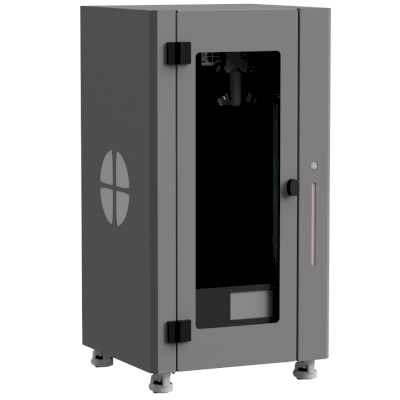
PROTEOR is a French orthotics and prosthetics (O&P) company headquartered in Dijon, founded by the Pierron family and active for more than 110 years. In February 2025 it bought Filament Innovations, maker of the ICARUS printers that O&P clinics use to print prosthetic sockets, braces and orthoses, and it now sells them in the US as part of its PROTEOR Digital Suite with scanning and design software. These are specialist clinic machines, not general-purpose printers.
Hovedkvarter:
Dijon, France ·
Ejerskab:
Pierron family (majority shareholder); ARDIAN Growth and BNP Paribas Développement invested in late 2020 ·
Hjemmeside:www.proteordigital.com
Mixed, judged on four of six areas: open-source-based electronics and PrusaSlicer support, but a cloud-centred workflow, a material marketed as exclusive and little public documentation.
Firmware og brugerdefineret firmware ●●●●●
The ICARUS printers are built on Duet electronics, whose standard RepRapFirmware is open source; we found no published PROTEOR firmware or configuration.
[2][3]
Lokal styring og integrationer ●●●●●
The ICARUS printers run on Duet electronics, connect over Wi-Fi, Ethernet or USB and can be sliced in PrusaSlicer, but remote monitoring and control, shared files and the online slicer run through PROTEOR Print OS, a cloud platform. Duet's HTTP interface is documented, but PROTEOR does not say whether it is open to other software on its printers.
[2][4][11]
Tredjepartsfilament, slicere og dele ●●●●●
PrusaSlicer is supported alongside PROTEOR's online slicer, and PROTEOR sells 1.75 mm filament and pellets; but the printers are marketed around its exclusive CPX-KyronMAX material and its own high-flow extruder.
[2][5][6]
Fællesskab og dokumentation ●●●●●
Little public documentation: we found no public manuals, forum or code. PROTEOR says it added an Academy with installation, maintenance and software videos in early 2026, and support comes from its digital team.
[4][1]
Fordele
Built for O&P: prints definitive sockets and braces in hours with a high-flow extruder.
Part of one clinic workflow: scanning, design and printing from the same company.
PrusaSlicer is supported, not only PROTEOR's own slicer.
Backed by an O&P company with more than 110 years of history.
Ulemper
Remote management and the online slicer depend on PROTEOR's cloud platform.
Little public documentation; spare parts and repair information are not published.
Marketed around an exclusive material (CPX-KyronMAX).
Specialist machines for O&P clinics, not general-purpose printers.
Dokumenteret erfaring
2026: PROTEOR added an Academy to its Print OS platform in the first quarter of 2026, with videos on installation, maintenance and software.
[4]
5. februar 2025: PROTEOR announced it had acquired Filament Innovations, maker of the ICARUS 3D printer and co-developer of the CPX-KyronMAX filament, adding 3D printing to its digital O&P portfolio.
[8][9][10]
2020: In late 2020 the investors ARDIAN Growth and BNP Paribas Développement joined the Pierron family, which remains the majority shareholder, to fund international growth.
[7]
Baseret på 11 kilder, sidst kontrolleret 18. oktober 2026. Vis kilder
Er Proteor ICARUS-Lite (Rabbit G2) kompatibel med SimplyPrint?
Ja. Proteor ICARUS-Lite (Rabbit G2) leveres med SimplyPrint indbygget, så du kan slice, sætte i kø, starte og overvåge print fra din browser eller mobilapp.
Hvordan forbinder jeg Proteor ICARUS-Lite (Rabbit G2) med SimplyPrint?
Følg vores trin-for-trin-opsætningsguide til Proteor ICARUS-Lite (Rabbit G2). Den viser, hvordan du forbinder den via Indbygget af producenten, hvad du skal bruge til hver mulighed, og hvilken du skal vælge.
Hvilken slicer skal jeg bruge til Proteor ICARUS-Lite (Rabbit G2)?
Cura, PrusaSlicer og OrcaSlicer fungerer alle med Proteor ICARUS-Lite (Rabbit G2), og du kan bruge dem i SimplyPrints online-slicer i browseren, uden installation og på enhver enhed.
Kan jeg bruge OrcaSlicer med Proteor ICARUS-Lite (Rabbit G2)?
Ja, men OrcaSlicer har så vidt vi ved ingen indbygget profil til Proteor ICARUS-Lite (Rabbit G2): Start med en lignende printers profil, og indstil printpladens størrelse, højde og dysen, så de passer.
Hvilket filament kan Proteor ICARUS-Lite (Rabbit G2) printe?
Ud fra specifikationerne (hotend op til 450C, opvarmet printbed op til 120C) håndterer Proteor ICARUS-Lite (Rabbit G2) PLA eller PETG godt. Se hele filamentguiden ovenfor for ABS, nylon, PC og kompositmaterialer.
Hvad er Proteor ICARUS-Lite (Rabbit G2)s printpladestørrelse og byggevolumen?
Proteor ICARUS-Lite (Rabbit G2) har en printplade på 305 x 305 mm og kan printe op til 610 mm i højden, med et byggevolumen på cirka 305 x 305 x 610 mm. Se den fulde specifikationstabel ovenfor for printpladetype, temperaturer og mere.
Kan Proteor ICARUS-Lite (Rabbit G2) automatisk skubbe print af?
Der findes endnu ikke et kit til den, som vi understøtter, men SimplyPrints AutoPrint kan køre din egen udskubnings-G-code, arbejde med en robotarm via API'et eller vente på, at du rydder printpladen, og derefter starte næste job i din kø.
Affiliate-oplysning: Nogle links på denne side er affiliate-links. Vi kan tjene provision, hvis du foretager et køb, uden ekstra omkostning for dig. Som Amazon-associeret tjener vi på kvalificerende køb.
 Frankrig
 PrusaSlicer
 OrcaSlicer
 BambuStudio
 ElegooSlicer
 CrealityPrint
 Cura
Cura Kiri:Moto