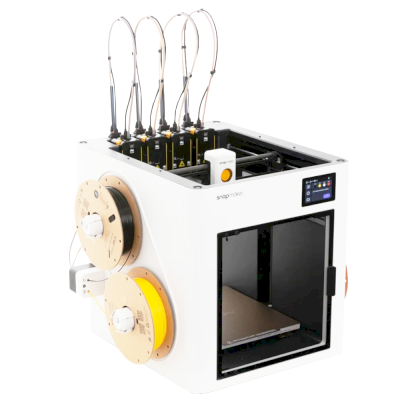
The U1 is Snapmaker's four-toolhead CoreXY printer: each colour or material sits in its own preheated toolhead and swaps in about 5 seconds. It is for people who print a lot of multi-colour or multi-material work and want little purge waste.
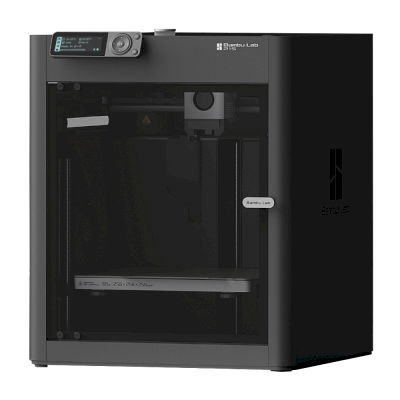
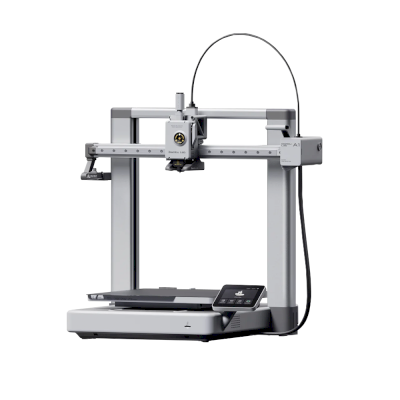
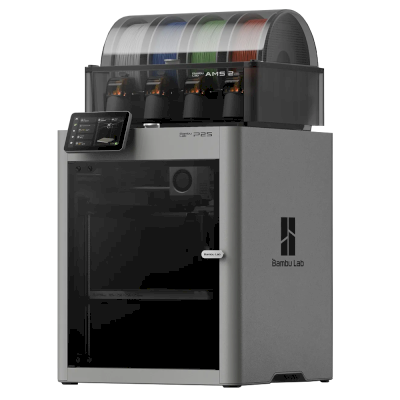
Choose the U1 when multi-colour or multi-material is the point: Tom's Hardware found its colour prints faster than on its Bambu Lab P1P because tool swaps take seconds, and Snapmaker claims up to 85% less filament waste. If you mostly print one material, Maker's Muse says the Bambu A1 or A1 Mini are still the best budget picks. For two materials and engineering filaments, Aurora Tech sees a dual-nozzle Bambu Lab printer as the closer rival. It is an open frame unless you add Snapmaker's Top Cover, so budget for that if you want ABS or ASA.
メリット
Four toolheads swap in about 5 seconds, which cuts purge waste (Snapmaker claims up to 85% less) and keeps multi-colour prints quick.
Tom's Hardware found multi-colour prints fast, precise and clean, and TechRadar rated the print quality highly.
Klipper-based firmware, so it works with SimplyPrint through Klipper or the SimplyPrint Client.
A 270 mm build cube on a CoreXY that moves up to 500 mm/s.
A camera with AI monitoring spots spaghetti, and runout and power-loss checks alert you.
The optional Top Cover encloses it for ABS and ASA.
デメリット
The base printer is an open frame; the enclosure is an extra cost (Tom's Hardware, TechRadar).
Early reviews found rough edges, and Maker's Muse cautions that other reviewers saw less reliable units, so read recent owner reports.
There is no built-in filament drying (TechRadar).
おすすめの対象
学校動作する場合あり
Multi-colour prints are engaging for students, but the open frame leaves hot toolheads in reach unless you add the Top Cover, and early units were uneven.
ホビーユーザー最適
Fast multi-colour with little waste; Aurora Tech ranks it second on his recommendation list after more than 1,000 hours.
企業動作する場合あり
Efficient multi-material on Klipper-based firmware, but it has no enclosure by default and a short track record.
プリントファーム動作する場合あり
Multi-colour output per machine is high, but no AutoPrint kit variant is listed for it and the design is newer and less proven.
Snapmaker is a Shenzhen company founded in 2016, built around machines that swap tool heads; its Original, 2.0 and U1 machines were launched on Kickstarter. It sells the U1, a CoreXY printer with four tool heads that change in about five seconds for multi-colour printing, and the Artisan, which combines 3D printing, laser engraving and CNC carving. Its buyers are makers, hobbyists and small workshops.
設立:
2016 ·
本社:
Shenzhen, China ·
所有関係:
Shenzhen Snapmaker Technologies Co., Ltd.; its main products were crowdfunded on Kickstarter ·
ウェブサイト:www.snapmaker.com
Snapmaker is mostly open: the U1 runs Klipper with a local Fluidd interface and published source, and nearly every part is sold separately. Its proprietary hotends and RFID system are the closed parts.
ファームウェアとカスタムファームウェア ●●●●●
The U1 runs modified Klipper, Moonraker and Fluidd. Snapmaker published its changes on GitHub under GPL-3.0 on 30 March 2026, about three months after Kickstarter deliveries finished. Firmware for the Snapmaker 2.0 and, since August 2026, the Artisan controller is also on GitHub under GPL.
[1][2][3][4]
ローカル制御と連携 ●●●●●
The U1 runs Klipper, Moonraker and Fluidd on the printer and prints from Snapmaker Orca over Wi-Fi or from a USB drive, so other software can use Moonraker's documented API; Snapmaker publishes its Moonraker changes on GitHub. For the Artisan, Snapmaker documents its G-code commands and has Luban pass jobs from OrcaSlicer over the OctoPrint protocol. The Snapmaker app is for remote monitoring.
[1][5][13][14][15]
サードパーティー製フィラメント、スライサー、部品 ●●●●●
Third-party 1.75 mm filament works and the U1 is supported in OrcaSlicer, but its RFID filament recognition is proprietary and only reads Snapmaker spools, and its hotends are proprietary one-piece units. Snapmaker documents using Cura, OrcaSlicer and PrusaSlicer with its older machines.
[1][6][7]
修理と交換部品 ●●●●●
Snapmaker's shop sells most U1 parts on their own, including the main board, heated bed, extruder motor, toolhead board, belts, fans and touchscreen, and its wiki has replacement guides such as the U1 XY motor. Hotends can only be replaced as a whole unit.
[8][9][1]
データとプライバシー ●●●●●
Cloud features need a Snapmaker account. The privacy policy says personal data is stored on servers in the United States, may be shared with affiliates and third parties in China for some functions, and some data is kept for three years.
[10]
コミュニティとドキュメント ●●●●●
Active forum and a wiki with detailed FAQs and guides, firmware and slicer sources on GitHub, and frequent public updates and livestreams during the U1 campaign.
[1][2][11]
メリット
The U1's four-head tool changer wastes little filament on colour changes.
Klipper-based U1 with a local Fluidd interface and published firmware source.
Nearly every U1 part is sold separately, with replacement guides.
Has delivered all of its Kickstarter campaigns, the U1 ahead of schedule by its own account.
デメリット
U1 hotends are proprietary one-piece units.
RFID filament recognition is proprietary and only works with Snapmaker spools.
U1 firmware source came after deliveries, at the end of a self-set deadline.
Personal data is stored in the US and may be shared with affiliates in China.
The U1 does not work with Luban, so owners of older machines need a different slicer.
実績
8月 2026: Snapmaker published the Artisan's Marlin-based controller firmware on GitHub under GPL-3.0.
[4]
2026年3月30日: Snapmaker published its modified Klipper, Moonraker and Fluidd for the U1 on GitHub under GPL-3.0, on the last day of the deadline it had set itself.
[1][2]
12月 2025: Snapmaker says all U1 Kickstarter orders shipped by 23 December 2025, ahead of its schedule. It says it delivered all three of its Kickstarter campaigns.
[12]
9月 2025: The U1 Kickstarter raised $20.2 million from more than 20,000 backers by 30 September 2025, the most for any 3D printer on the platform. Snapmaker gives the final total as $20.6 million from 20,680 backers.
[11][12]
 中国

 SimplyPrintクライアント
 Klipper (Moonraker)


 PrusaSlicer
 OrcaSlicer
 BambuStudio
 ElegooSlicer
 CrealityPrint
 Cura
 Kiri:Moto