Through Klipper directly, SimplyPrint can't map filament to the CFS slots or sync what is loaded in them, and print start options aren't available. Connect it with the SimplyPrint Client for those.
注意:Simplify3D、ideaMaker、SuperSlicer、KISSlicerなどのスライサーはクラウドに含まれていないため、そのプロファイルは管理していません。Creality K2 Pro Comboで正常に動作する場合もあります。プロファイルについては、スライサーのドキュメントやフォーラムを確認してください。GitHubのオープンソースのスライサープロファイルデータベースにプロファイルを提供することもできます。
Creality K2 Pro Combo用アプリ
Creality K2 Pro ComboのアプリとしてSimplyPrintを使用できます。スマートフォンやブラウザーから監視・操作し、クラウドでスライスして、他のプリンターと一緒に管理できます。無料で始められます。 Crealityの純正アプリはCreality Cloudです。
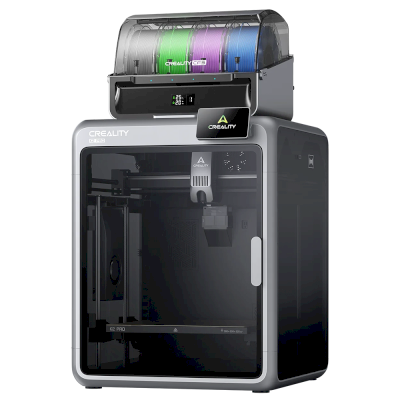
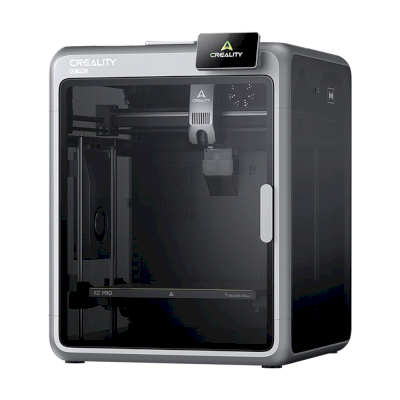
Reviewed the Combo: a mid-sized, four-color, heated-chamber speedster with step-servo X/Y axes and extruder. TPU is hard to print, the long high-flow hotend adds purge waste, the CFS cables are too short to place it anywhere but on top, and it is expensive. Judged slightly behind the K2 Plus.
“Creality’s K2 Pro Combo 3D printer is a mid-sized, four-color speedster with a lot of polish, but not quite as good as the earlier K2 Plus.”
Treats the K2 Pro as the K1C's successor in all but name: excellent speed, high-quality build and easy to use, among the leaders of multifilament printers. Downsides are plenty of purge waste and slow multicolour printing.
“Although not officially the update to the K1C, the K2 Pro matches and surpasses one of my all-time favourite machines.”
Aurora Tech · 2025年9月23日
Creality sent the printer and sponsored the video (disclosed). Tests the mid-size K2 Pro with the CFS: well built, fast and reliable, one of few dependable single-extruder multicolor systems. Calls it a smaller, cheaper K2 Plus with no real innovations, notes the CFS neither stacks nor dries filament, and still prefers the K2 Plus.
Creality K2 Pro Comboのメーカーと、Crealityのプリンターの自由度を紹介します。メーカーのクラウドなしで使えるか、フィラメントやスライサーを自由に選べるか、修理できるかを確認できます。各項目は公開情報に基づいて評価しています。
オープン性:ほぼオープン(5点中3.6点)
ほぼオープン
閉鎖的なエコシステム開く
Creality is a Shenzhen 3D printer maker founded in 2014. Its low-cost Ender series, launched in 2017, made desktop 3D printing affordable for many hobbyists. It now sells Klipper-based K-series CoreXY printers, Ender and CR open-frame printers, the Hi and SPARKX beginner lines, the CFS multi-material system, 3D scanners and laser engravers, and runs the Creality Cloud model platform. It listed on the Hong Kong Stock Exchange in 2026.
設立:
2014 ·
本社:
Shenzhen, China ·
所有関係:
Listed on the Hong Kong Stock Exchange (3388.HK) since 2026; founder Jack Chen is chief executive ·
ウェブサイト:www.creality.com
Creality sits in the middle: its Klipper-based printers can be run locally with Fluidd and open slicers, and it publishes firmware source, but usually months after launch, and it dropped root access on its 2025 K1 revisions.
ファームウェアとカスタムファームウェア ●●●●●
Creality publishes Klipper firmware source for the K1, K2, Hi and Ender-3 V3 KE on GitHub under GPL, but after launch: the K1 source came about three months after the series launched in May 2023, the K2 and Hi sources in September 2025. Earlier K1 printers have an official root option with a published guide, but Creality's wiki says the 2025 K1C and K1 Max do not support root access.
[1][2][3][4][5]
ローカル制御と連携 ●●●●●
Creality Print sends jobs over the local network with no account, and Creality Cloud is optional. The K2 series and Ender-3 V3 serve Fluidd on the printer, so other software can use Klipper's documented Moonraker API. On the K1 series, Creality's firmware notes treat Fluidd and Mainsail as add-ons owners install themselves, and Creality says the 2025 K1C and K1 Max do not support root access. The SPARKX i7 is set up through the Creality Cloud app.
[6][20][7][21][4][8][22]
サードパーティー製フィラメント、スライサー、部品 ●●●●●
Third-party filament works; Creality Print is an open-source (AGPL-3.0) slicer and OrcaSlicer supports Creality printers. Creality sells nozzle, hotend and extruder kits per model; newer K2 parts such as its nozzle kit are Creality designs.
[10][11][12]
修理と交換部品 ●●●●●
Creality's store sells extruder, hotend, heating-block and print-head kits per model, and its wiki has parts lists and replacement guides for current printers (for example the K2 Plus and SPARKX i7 hotends).
[12][13][14]
データとプライバシー ●●●●●
Local printing needs no account; Creality Cloud and its app need one. Creality's published privacy policy is written for its websites and services, allows use of data for targeted advertising, and says little about printer data or where it is stored.
[15][6]
コミュニティとドキュメント ●●●●●
One of the largest user bases (second in consumer 3D printers by 2025 sales value, per figures in its listing), a public wiki with model-specific guides, firmware and slicer sources on GitHub, and an official forum.
[16][10][6]
メリット
Klipper-based models can be run entirely on the local network through Fluidd, without an account.
Firmware for most current models and the Creality Print slicer are published as source on GitHub.
Wide range, from budget Ender printers to multi-colour K2 machines.
Spare-part kits and model-specific replacement guides are easy to find.
Very large user base, so community help is easy to find.
デメリット
Firmware source has usually appeared months after a model ships.
Root access, offered on earlier K1 printers, is not supported on the 2025 K1C and K1 Max.
The privacy policy says little about printer and cloud data.
The SPARKX line is built around the Creality Cloud app and an account.
実績
5月 2026: Creality listed on the Main Board of the Hong Kong Stock Exchange (3388.HK), raising about HK$1.27 billion net. Its prospectus showed 2025 revenue of RMB 3.13 billion and a net loss of RMB 182.4 million, after a profit in 2024.
[16][5]
11月 2025: Creality's wiki states that the 2025 revisions of the K1C and K1 Max do not support root access, which earlier K1 printers offered through an official option and guide.
[4][17][3]
9月 2025: Creality published the Klipper source for its K2 series and for the Hi on GitHub under GPL-3.0.
[2][18]
8月 2023: About three months after the K1 series launched, Creality published its K1 Klipper source on GitHub, followed by a repository with a root guide and Fluidd and Mainsail install instructions.
[1][3][5]
はい。Creality K2 Pro ComboをSimplyPrintクライアントまたはKlipper (Moonraker)経由でSimplyPrintに接続し、ブラウザーやモバイルアプリからスライス、キューへの追加、プリントの開始と監視ができます。
Creality K2 Pro ComboをSimplyPrintに接続するには?
Creality K2 Pro Comboの設定ガイドに沿って手順を進めてください。SimplyPrintクライアントまたはKlipper (Moonraker)での接続方法、それぞれに必要なもの、選び方を説明します。
Creality K2 Pro Comboにはどのスライサーを使用すればよいですか?
Creality K2 Pro ComboにはCrealityPrintをおすすめします。SimplyPrintのオンラインスライサーでは、このスライサーと他の6個のスライサーを、インストール不要でどのデバイスからでも直接利用できます。Creality K2 Pro Comboのプロファイルも自動で最新に保たれます。
OrcaSlicerをCreality K2 Pro Comboで使えますか?
はい。OrcaSlicerにはCreality K2 Pro Combo用のプロファイルが含まれており、SimplyPrintのオンラインスライサーで使用できるため、インストールは不要です。
Creality K2 Pro Comboでプリントできるフィラメントは何ですか?
Creality K2 Pro Comboは、その仕様(ホットエンドは最大300C、ヒートベッドは最大110C)に基づき、PLA, PETG, TPU・柔軟性素材、またはABS & ASAを問題なく扱えます。ABS、ナイロン、PC、複合素材については、上記のフィラメントガイドをご覧ください。
Creality K2 Pro ComboはOctoPrintやKlipperに対応していますか?
Creality K2 Pro ComboはKlipper (Mainsail and Fluidd)に対応しており、SimplyPrintはこれらを通じて接続します。これにより、クラウドアクセス、キュー、カメラ監視も利用できます。
Creality K2 Pro Comboのベッドサイズと造形容量はどれくらいですか?
Creality K2 Pro Comboのプリントベッドは300 x 300 mmで、高さ300 mmまでプリントできます。造形サイズは約300 x 300 x 300 mmです。ベッドの種類や温度などは、上記の仕様一覧を確認してください。
 中国
中国
 SimplyPrintクライアント
  Klipper (Moonraker)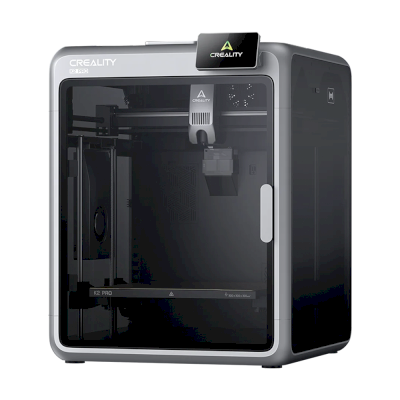





 PrusaSlicer
 BambuStudio
 Cura
Cura Kiri:Moto






 カナダ向けCreality
 EU向けCreality
 英国向けCreality