Picking the best 3D printer in 2026 is harder than it should be. There are dozens of good machines, prices change every week, and most "best 3D printer" lists are written once and left to age. This 3D printer buying guide works differently: the picks below are ranked when you open the page, from what our printer catalog knows today. That means the prices in your region's stores, independent reviews, how many people run each printer with SimplyPrint, and how open each brand leaves you.
Our picks: the best 3D printer 2026
These printers come out on top today, overall and for each budget. Looking for the best budget 3D printer? It is the pick for the lowest price band. Every reason under a printer is read from its data, and the score is out of 100. Prices are the lowest we found in your region, and the buttons take you to the store.
Informativa di affiliazione: alcuni link in questa pagina sono link di affiliazione. Potremmo ricevere una commissione per gli acquisti, senza costi aggiuntivi. In qualità di Associati Amazon, guadagniamo dagli acquisti idonei.
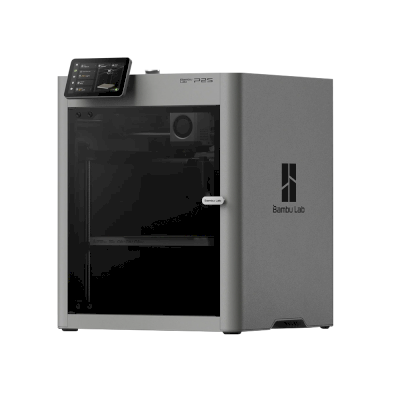
Bambu Lab P2S
 Cina
The P2S is Bambu Lab's enclosed CoreXY printer and the successor to the P1S, with a 5-inch touchscreen, a quick-swap nozzle, AI failure detection and a 256 mm build cube. It is for anyone who wants an easy, fast printer that handles ABS and ASA as well as PLA and PETG.
- 1.000+ stampanti usano SimplyPrint
- Recensito da Tom's Hardware, TechRadar, Wired
- Una delle più economiche, da $449.00
- Completamente chiusa, quindi ABS e ASA si stampano bene
- Lanciato il 14 ottobre 2025
- By default it runs through Bambu Lab's own software and cloud, which some organisations' compliance rules don't allow; with SimplyPrint it can run without them and use SimplyPrint's European cloud, in Bambu Lab's LAN-only mode (with Developer Mode on current firmware, which Bambu Lab doesn't support).
- Multi-colour prints produce a lot of purge waste (TechRadar, Tom's Hardware, Wired).
- Bambu Lab è valutato "Per lo più chiusa" nella nostra scala di apertura: vedere le note sul brand di seguito
- Bambu Lab ha avuto difficoltà negli ultimi tre anni: sotto sono riportate le note sul marchio
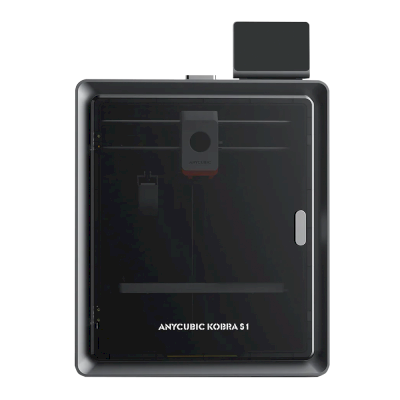
Anycubic Kobra S1
Cina
- Una delle più economiche, da $349.00
- Completamente chiusa, quindi ABS e ASA si stampano bene
- Lanciato il 2 gennaio 2025
- 250+ stampanti usano SimplyPrint
- Multicolore con Anycubic ACE Pro, Anycubic ACE 2 Pro, venduta insieme come Anycubic Kobra S1 Combo
- Anycubic ha avuto difficoltà negli ultimi tre anni: sotto sono riportate le note sul marchio
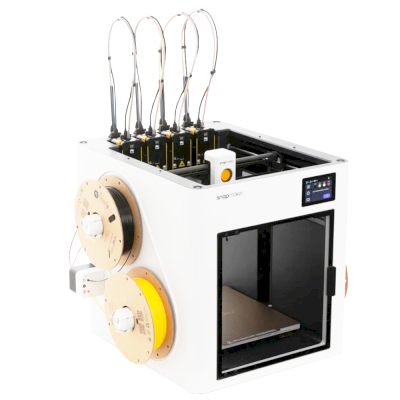
Snapmaker U1
Cina
- Recensito da Tom's Hardware, TechRadar, Maker's Muse
- Un cambio utensile, per più colori o materiali nella stessa stampa
- Lanciato il 2025
- 500+ stampanti usano SimplyPrint
- Una fotocamera integrata, per monitorare le stampe ovunque
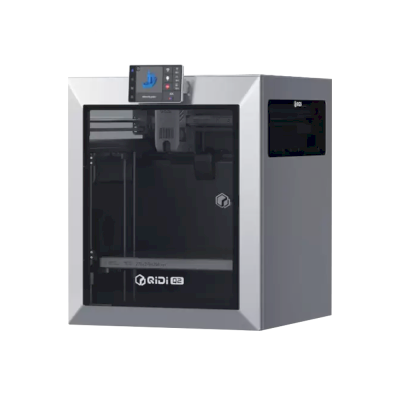
QIDI Q2
Cina
- Recensito da Tom's Hardware, TechRadar, Made with Layers
- Una delle più economiche, da $449.00
- Completamente chiusa, quindi ABS e ASA si stampano bene
- Lanciato il settembre 2025
- 100+ stampanti usano SimplyPrint
The best 3D printer for what you do
If you are asking "what 3D printer should I buy?", start with what you will use it for. The best printer for a classroom is not the best printer for a farm of forty machines. Each of these guides weighs what that buyer cares about most:
- Schools weigh safety and running without fuss: an enclosure, a reliable first print, and a way to let a whole class print without a teacher standing at every machine.
- Beginners and home users weigh price, ease and fun: multi-colour, a printer that levels its own bed, and a big community when something goes wrong.
- Print farms weigh uptime for the money: identical machines that run unattended, plate swapping, remote control and spare parts.
- Businesses weigh materials, reliability and data: engineering filaments, support, and whether the printer has to talk to its maker's cloud.
The ranking
The top ten for most people. Open a printer for its specs, reviews and setup guide, or compare the top four side by side on our printer comparison.
| # | Stampante | Punteggio | Da | Con SimplyPrint | Camera chiusa | Multicolore | Apertura del marchio |
|---|---|---|---|---|---|---|---|
| 1 | Bambu Lab P2S 256 x 256 x 256 mm |
92 | $449.00 | Verificato da SimplyPrint | Completamente chiusa | Componente aggiuntivo | Per lo più chiusa |
| 2 | Bambu Lab X2D 256 x 256 x 260 mm |
88 | $589.00 | Verificato da SimplyPrint | Completamente chiusa | Integrato | Per lo più chiusa |
| 3 | QIDI Q2 270 x 270 x 256 mm |
84 | $449.00 | Compatibile | Completamente chiusa | Componente aggiuntivo | Per lo più aperta |
| 4 | ELEGOO Centauri Carbon 2 256 x 256 x 256 mm |
83 | - | Compatibile | Completamente chiusa | Componente aggiuntivo | Per lo più aperta |
| 5 | Snapmaker U1 270 x 270 x 270 mm |
82 | $699.00 | Compatibile | Con chiusura parziale | Integrato | Per lo più aperta |
| 6 | Creality K2 Pro 300 x 300 x 300 mm |
82 | $599.00 | Compatibile | Completamente chiusa | Componente aggiuntivo | Per lo più aperta |
| 7 | Anycubic Kobra S1 250 x 250 x 250 mm |
81 | $349.00 | Compatibile | Completamente chiusa | Componente aggiuntivo | Misto |
| 8 | Creality K2 260 x 260 x 260 mm |
80 | $399.00 | Compatibile | Completamente chiusa | Componente aggiuntivo | Per lo più aperta |
| 9 | Bambu Lab A1 256 x 256 x 256 mm |
77 | $259.00 | Verificato da SimplyPrint | Telaio aperto | Componente aggiuntivo | Per lo più chiusa |
| 10 | Bambu Lab A2L 330 x 320 x 325 mm |
77 | $439.00 | Verificato da SimplyPrint | Telaio aperto | Componente aggiuntivo | Per lo più chiusa |
QIDI ci invia gratuitamente alcune delle sue nuove stampanti.
I prezzi sono i più bassi trovati nei negozi della regione selezionata nelle ultime due settimane e cambiano spesso. Confrontare le quattro migliori affiancate
What to look for in a 3D printer
Enclosed or open frame
An enclosed printer keeps heat in and hands out. That matters for ABS, ASA and nylon, which warp in a draft, and in any room with children in it. An open-frame printer, where the bed moves back and forth, costs less and is easier to work on. It is fine for PLA and PETG at home.
Multi-colour
Multi-material units feed several spools into one printer, so a print can change colour or material by itself. Bambu Lab's AMS, Creality's CFS, Anycubic's ACE Pro and Prusa's MMU all work this way. They add cost and waste a little filament on every change. Toolchangers and printers with two independent extruders do the same with less waste, for more money.
Size and speed
Most people never fill a 256 mm cube. A bigger bed costs more, takes more room and heats up slower. The top speed on a spec sheet is rarely what you print at, so reliability and quality at sensible speeds matter more than the headline number.
Materials
Almost any printer prints PLA. PETG wants a hotter bed, TPU a direct-drive extruder, ABS and ASA an enclosure, and carbon-fibre filled filaments a hardened nozzle. Every printer in our compatibility list shows what it prints well, and why.
Software, and the printer's future
The printer you buy comes with a slicer, a phone app, a cloud and a firmware update schedule. Check that it works with the slicer you want, that you can print without the maker's cloud if you need to, and that the maker sells spare parts. SimplyPrint runs printers from more than 130 brands in one place, with slicing in the browser, so the brand you buy today doesn't decide the software you use tomorrow.
Open or walled garden: how free does a brand leave you?
Some 3D printer makers work like Apple. One company makes the printer, the slicer, the cloud, the multi-colour system and the spare parts, and it all works together from the first day, on that company's terms. Others work more like Android, or a Linux PC: the firmware is open source, the printer runs without the maker's cloud, any filament and slicer works, and you can buy or print the parts to repair it.
Neither is wrong. A closed system is often the easiest start, and a school or company may like one vendor answering for everything. But the maker decides what the printer can do later. In January 2025, Bambu Lab announced firmware that requires its own authorization for operations such as starting a print, and stops unauthorized third-party software from doing them. It later added an optional Developer Mode that leaves local control open, without support. An open source 3D printer sits at the other end: Prusa publishes its firmware source code, and many printers run Klipper, an open-source firmware anyone can change.
So we rate every brand in this guide in six areas, each from public sources: firmware, local control without the maker's cloud, third-party filament and slicers, repairs and spare parts, data and privacy, and community. We also keep a dated track record of recalls, layoffs, policy changes and closures. Only what happened, with its source, and never a guess about what might.
QIDI
Apertura: Per lo più aperta (4.2 su 5)
Per lo più aperta
Sistema chiusoAperto
QIDI
Apertura: Per lo più aperta (4.2 su 5)QIDI Tech is a Chinese 3D printer maker formed in 2014. It sells enclosed, Klipper-based CoreXY printers such as the compact Q2 and the larger Plus4 and Max4, and develops the open-source QIDI Studio slicer and the QIDI Link app.
Fondata: 2014 · Sito web: qidi3d.com
QIDI is mostly open: its printers are standard Klipper machines you can run fully on the local network, with published source and plenty of spare parts. The phone app and the store-only privacy policy are the weak spots.
| Firmware e firmware personalizzato ●●●●● |
QIDI printers run QIDI's editions of Klipper and Moonraker with Fluidd. QIDI publishes them and per-model firmware packages on GitHub under GPL (for example the Q2 in January 2026 and the Max4 in August 2026) and answers issues there. [1][2][3] |
| Controllo locale e integrazioni ●●●●● |
QIDI printers run Klipper and Moonraker with Fluidd on the printer, and QIDI Studio connects to them on the local network by IP without an account. QIDI publishes its Moonraker edition on GitHub, and other software can use Moonraker's documented API. Only the QIDI Link phone app needs an account and QIDI's cloud. [4][5][11][12] |
| Filamenti, slicer e parti di terze parti ●●●●● |
Third-party filament works; QIDI Studio is open source, and as Klipper and Moonraker printers they work with other Moonraker-compatible software. Hotends and nozzles are QIDI parts made per model. [6][1][7] |
| Riparazioni e ricambi ●●●●● |
QIDI's store lists many individual parts, including motherboards, eMMC modules, fans, extruders, hotends and Wi-Fi cards, and its wiki has replacement guides such as the Plus4 hotend. [7][8] |
| Dati e privacy ●●●●● |
Local use needs no account. QIDI Link requires one and says which server it uses (Aliyun in China, AWS elsewhere). The published privacy policy covers the online store, not the printers or the app. [5][9] |
| Community e documentazione ●●●●● |
Firmware is released and issues are taken on GitHub, and QIDI keeps a wiki per model with manuals, maintenance and troubleshooting guides. [1][4] |
- QIDI is one of the few printer makers we work with directly: they occasionally send us new printers, and put us in touch with their developers when we need them.
- Runs fully on the local network through Fluidd, with no account needed.
- Klipper and Moonraker sources and firmware updates are published on GitHub.
- Many individual spare parts, down to motherboards and eMMC modules.
- Open-source slicer and open filament choice.
- The QIDI Link app needs an account and QIDI's cloud.
- The privacy policy covers only the online store, not the printers or app.
- Hotends and nozzles are QIDI-specific parts.
- agosto 2026: QIDI published the firmware repository for the Max4 on GitHub under GPL-3.0. [2]
- gennaio 2026: QIDI published the Q2's Klipper-based firmware on GitHub under GPL-3.0, with update packages and an issue tracker. [1]
Basato su 12 fonti, ultima verifica 18 ottobre 2026. Mostrare le fonti
- QIDITECH/QIDI_Q2 on GitHub github.com
- QIDITECH/QIDI_MAX4 on GitHub github.com
- QIDITECH/klipper on GitHub github.com
- Connect device and Fluidd | QIDI Wiki wiki.qidi3d.com
- QIDI Link | QIDI Wiki wiki.qidi3d.com
- QIDITECH/QIDIStudio on GitHub github.com
- Accessories | QIDI Online Store qidi3d.com
- PLUS4 Replace Hot End | QIDI Wiki wiki.qidi3d.com
- Privacy policy | QIDI Online Store qidi3d.com
- QIDI | 3D Printer Manufacturer Since 2014 qidi3d.com
- github.com
- moonraker.readthedocs.io
In questa guida: QIDI Q2
Snapmaker
Apertura: Per lo più aperta (4.1 su 5)
Per lo più aperta
Sistema chiusoAperto
Snapmaker
Apertura: Per lo più aperta (4.1 su 5)Snapmaker is a Shenzhen company founded in 2016, built around machines that swap tool heads; its Original, 2.0 and U1 machines were launched on Kickstarter. It sells the U1, a CoreXY printer with four tool heads that change in about five seconds for multi-colour printing, and the Artisan, which combines 3D printing, laser engraving and CNC carving. Its buyers are makers, hobbyists and small workshops.
Fondata: 2016 · Sede centrale: Shenzhen, China · Proprietà: Shenzhen Snapmaker Technologies Co., Ltd.; its main products were crowdfunded on Kickstarter · Sito web: www.snapmaker.com
Snapmaker is mostly open: the U1 runs Klipper with a local Fluidd interface and published source, and nearly every part is sold separately. Its proprietary hotends and RFID system are the closed parts.
| Firmware e firmware personalizzato ●●●●● |
The U1 runs modified Klipper, Moonraker and Fluidd. Snapmaker published its changes on GitHub under GPL-3.0 on 30 March 2026, about three months after Kickstarter deliveries finished. Firmware for the Snapmaker 2.0 and, since August 2026, the Artisan controller is also on GitHub under GPL. [1][2][3][4] |
| Controllo locale e integrazioni ●●●●● |
The U1 runs Klipper, Moonraker and Fluidd on the printer and prints from Snapmaker Orca over Wi-Fi or from a USB drive, so other software can use Moonraker's documented API; Snapmaker publishes its Moonraker changes on GitHub. For the Artisan, Snapmaker documents its G-code commands and has Luban pass jobs from OrcaSlicer over the OctoPrint protocol. The Snapmaker app is for remote monitoring. [1][5][13][14][15] |
| Filamenti, slicer e parti di terze parti ●●●●● |
Third-party 1.75 mm filament works and the U1 is supported in OrcaSlicer, but its RFID filament recognition is proprietary and only reads Snapmaker spools, and its hotends are proprietary one-piece units. Snapmaker documents using Cura, OrcaSlicer and PrusaSlicer with its older machines. [1][6][7] |
| Riparazioni e ricambi ●●●●● |
Snapmaker's shop sells most U1 parts on their own, including the main board, heated bed, extruder motor, toolhead board, belts, fans and touchscreen, and its wiki has replacement guides such as the U1 XY motor. Hotends can only be replaced as a whole unit. [8][9][1] |
| Dati e privacy ●●●●● |
Cloud features need a Snapmaker account. The privacy policy says personal data is stored on servers in the United States, may be shared with affiliates and third parties in China for some functions, and some data is kept for three years. [10] |
| Community e documentazione ●●●●● |
Active forum and a wiki with detailed FAQs and guides, firmware and slicer sources on GitHub, and frequent public updates and livestreams during the U1 campaign. [1][2][11] |
- The U1's four-head tool changer wastes little filament on colour changes.
- Klipper-based U1 with a local Fluidd interface and published firmware source.
- Nearly every U1 part is sold separately, with replacement guides.
- Has delivered all of its Kickstarter campaigns, the U1 ahead of schedule by its own account.
- U1 hotends are proprietary one-piece units.
- RFID filament recognition is proprietary and only works with Snapmaker spools.
- U1 firmware source came after deliveries, at the end of a self-set deadline.
- Personal data is stored in the US and may be shared with affiliates in China.
- The U1 does not work with Luban, so owners of older machines need a different slicer.
- agosto 2026: Snapmaker published the Artisan's Marlin-based controller firmware on GitHub under GPL-3.0. [4]
- 30 marzo 2026: Snapmaker published its modified Klipper, Moonraker and Fluidd for the U1 on GitHub under GPL-3.0, on the last day of the deadline it had set itself. [1][2]
- dicembre 2025: Snapmaker says all U1 Kickstarter orders shipped by 23 December 2025, ahead of its schedule. It says it delivered all three of its Kickstarter campaigns. [12]
- settembre 2025: The U1 Kickstarter raised $20.2 million from more than 20,000 backers by 30 September 2025, the most for any 3D printer on the platform. Snapmaker gives the final total as $20.6 million from 20,680 backers. [11][12]
Basato su 15 fonti, ultima verifica 18 ottobre 2026. Mostrare le fonti
- U1 | Snapmaker Wiki wiki.snapmaker.com
- Snapmaker/u1-klipper on GitHub github.com
- Snapmaker/Snapmaker2-Controller on GitHub github.com
- Snapmaker/Artisan-Controller on GitHub github.com
- Snapmaker Orca Quick Start Guide for U1 | Snapmaker Wiki wiki.snapmaker.com
- Third-party Software | Snapmaker Wiki wiki.snapmaker.com
- Snapmaker/OrcaSlicer (Snapmaker Orca) on GitHub github.com
- 3D Printer Accessories | Snapmaker Shop shop.snapmaker.com
- U1 XY motor replacement guide | Snapmaker Wiki wiki.snapmaker.com
- Privacy Policy | Snapmaker snapmaker.com
- Snapmaker U1 Becomes Most Funded 3D Printer in Kickstarter History - 3D Printing Industry 3dprintingindustry.com
- About Us - Snapmaker snapmaker.com
- wiki.snapmaker.com
- wiki.snapmaker.com
- moonraker.readthedocs.io
In questa guida: Snapmaker U1
ELEGOO
Apertura: Per lo più aperta (3.8 su 5)
Per lo più aperta
Sistema chiusoAperto
ELEGOO
Apertura: Per lo più aperta (3.8 su 5)ELEGOO is a Shenzhen company founded in 2015 that makes FDM and resin 3D printers, filament, laser engravers and STEM electronics kits. Its FDM range is the Centauri Carbon, an enclosed CoreXY printer, and the Neptune 4 series of open-frame Klipper printers, sold to hobbyists at budget to mid-range prices. DJI became a shareholder in 2025.
Fondata: 2015 · Sede centrale: Shenzhen, China · Proprietà: Privately held through its parent, Shenzhen Zhinengpai (SmartPie) Technology; DJI became a shareholder in 2025 · Sito web: www.elegoo.com
ELEGOO is fairly open in daily use: its printers work over the LAN with open slicers and any filament, and it now publishes firmware source. Source releases have followed community pressure rather than launch, and spare parts for the newest printers are thin in its store.
| Firmware e firmware personalizzato ●●●●● |
The Neptune 4 series runs Klipper. For the Centauri Carbon, which went on sale in February 2025, ELEGOO published its modified source on GitHub under GPL-3.0 in September 2025, saying it did so in response to user feedback. [1][2][3][4] |
| Controllo locale e integrazioni ●●●●● |
ELEGOO's printers connect to its slicer on the local network by IP without an account. The Neptune 4 series serves Klipper's web interface and Moonraker, which OrcaSlicer reaches as an Octo/Klipper host. For the Centauri Carbon and Centauri Carbon 2, ELEGOO published Elegoo Link on GitHub in January 2026, an Apache-2.0 SDK for local discovery, status, file upload and print control. The Matrix phone app adds remote printing while the printer is online. [5][4][16][6][17] |
| Filamenti, slicer e parti di terze parti ●●●●● |
Third-party filament works; ElegooSlicer is an open-source OrcaSlicer-based slicer, OrcaSlicer works with the Neptune 4, and ELEGOO published the data format of its RFID filament tags so others can use it. [7][8][4] |
| Riparazioni e ricambi ●●●●● |
ELEGOO sells hotend, extruder and nozzle kits and some boards for the Neptune 4, and its wiki has many replacement guides, including the Centauri Carbon motherboard. The store's Centauri Carbon parts list is short (hotend kit, touchscreen, upper shell). [9][10][11] |
| Dati e privacy ●●●●● |
LAN printing needs no account; the Matrix app and cloud do. The privacy policy names the companies responsible for personal data in each region (Shenzhen, Hong Kong, United States) but is written mainly for the online store. [12][5] |
| Community e documentazione ●●●●● |
Active community and a wiki with guides per model; firmware and slicer sources are on GitHub, although the Centauri Carbon source came after users asked for it. [11][7][1] |
- Works on the local network with ElegooSlicer or OrcaSlicer, with no account needed.
- Open-source slicer and a published RFID tag format for filament.
- Many step-by-step replacement guides in its wiki.
- Offered owners compensation when the Centauri Carbon multi-colour add-on was delayed.
- Centauri Carbon firmware source came about seven months after sales began, after users asked.
- The Centauri Carbon's multi-colour add-on only became available in April 2026, after ELEGOO said in November 2025 it could not give a date.
- Few complete Centauri Carbon parts are listed in its store.
- The privacy policy is written mainly for the online store.
- maggio 2026: ELEGOO's parent closed a B+ financing round of over 500 million yuan (about $73 million) from investors including Meituan, Hillhouse Capital and Shenzhen Capital Group. It reported 2025 revenue of 2.3 billion yuan. [13]
- 27 aprile 2026: CANVAS, the multi-colour system for the Centauri Carbon, became available, five months after ELEGOO said it could not give a release date. [14]
- 18 novembre 2025: DJI and Hangzhou Jiangyu Technology became shareholders of ELEGOO's parent company, according to a business registration update reported by TechNode. The size of the stake was not disclosed. [15]
- novembre 2025: ELEGOO said the multi-colour system it was developing for the Centauri Carbon did not yet perform as it wanted and that it could not guarantee a release date. It offered owners a choice of a $50 filament coupon, a 365-day warranty extension or $80 off a Centauri Carbon 2 Combo. [14]
- 26 settembre 2025: In response to user feedback, ELEGOO published the modified source code of the Centauri series firmware on GitHub under GPL-3.0. [1][2]
- febbraio 2025: ELEGOO opened pre-orders for the Centauri Carbon, its first enclosed CoreXY printer, on 17 February 2025. [3]
Basato su 17 fonti, ultima verifica 18 ottobre 2026. Mostrare le fonti
- Update Notice on Centauri Series | ELEGOO elegoo.com
- elegooofficial/CentauriCarbon on GitHub github.com
- Elegoo to Open Pre-Orders for Centauri Carbon on February 17 elegoo.com
- Networked Control with OrcaSlicer | ELEGOO Wiki wiki.elegoo.com
- How to Connect the Printer via LAN | ELEGOO Wiki wiki.elegoo.com
- ELEGOO Matrix App Introduces One-Click Remote Printing elegoo.com
- elegooofficial/ElegooSlicer on GitHub github.com
- elegooofficial/ELEGOO-RFID-Tag-Guide on GitHub github.com
- FDM 3D Printer Accessories | ELEGOO elegoo.com
- Accessories for Centauri Series | ELEGOO elegoo.com
- How to Replace the Motherboard (B0C001) | ELEGOO Wiki wiki.elegoo.com
- Privacy policy | ELEGOO elegoo.com
- Can Elegoo's Latest 500M Yuan Round Counter the "Bambu Effect"? - 3D Printing Industry 3dprintingindustry.com
- Update Notice on Centauri Carbon | ELEGOO elegoo.com
- DJI becomes shareholder in consumer 3D-printer maker ELEGOO | TechNode technode.com
- github.com
- moonraker.readthedocs.io
In questa guida: ELEGOO Centauri Carbon 2
Creality
Apertura: Per lo più aperta (3.6 su 5)
Per lo più aperta
Sistema chiusoAperto
Creality
Apertura: Per lo più aperta (3.6 su 5)Creality is a Shenzhen 3D printer maker founded in 2014. Its low-cost Ender series, launched in 2017, made desktop 3D printing affordable for many hobbyists. It now sells Klipper-based K-series CoreXY printers, Ender and CR open-frame printers, the Hi and SPARKX beginner lines, the CFS multi-material system, 3D scanners and laser engravers, and runs the Creality Cloud model platform. It listed on the Hong Kong Stock Exchange in 2026.
Fondata: 2014 · Sede centrale: Shenzhen, China · Proprietà: Listed on the Hong Kong Stock Exchange (3388.HK) since 2026; founder Jack Chen is chief executive · Sito web: www.creality.com
Creality sits in the middle: its Klipper-based printers can be run locally with Fluidd and open slicers, and it publishes firmware source, but usually months after launch, and it dropped root access on its 2025 K1 revisions.
| Firmware e firmware personalizzato ●●●●● |
Creality publishes Klipper firmware source for the K1, K2, Hi and Ender-3 V3 KE on GitHub under GPL, but after launch: the K1 source came about three months after the series launched in May 2023, the K2 and Hi sources in September 2025. Earlier K1 printers have an official root option with a published guide, but Creality's wiki says the 2025 K1C and K1 Max do not support root access. [1][2][3][4][5] |
| Controllo locale e integrazioni ●●●●● |
Creality Print sends jobs over the local network with no account, and Creality Cloud is optional. The K2 series and Ender-3 V3 serve Fluidd on the printer, so other software can use Klipper's documented Moonraker API. On the K1 series, Creality's firmware notes treat Fluidd and Mainsail as add-ons owners install themselves, and Creality says the 2025 K1C and K1 Max do not support root access. The SPARKX i7 is set up through the Creality Cloud app. [6][20][7][21][4][8][22] |
| Filamenti, slicer e parti di terze parti ●●●●● |
Third-party filament works; Creality Print is an open-source (AGPL-3.0) slicer and OrcaSlicer supports Creality printers. Creality sells nozzle, hotend and extruder kits per model; newer K2 parts such as its nozzle kit are Creality designs. [10][11][12] |
| Riparazioni e ricambi ●●●●● |
Creality's store sells extruder, hotend, heating-block and print-head kits per model, and its wiki has parts lists and replacement guides for current printers (for example the K2 Plus and SPARKX i7 hotends). [12][13][14] |
| Dati e privacy ●●●●● |
Local printing needs no account; Creality Cloud and its app need one. Creality's published privacy policy is written for its websites and services, allows use of data for targeted advertising, and says little about printer data or where it is stored. [15][6] |
| Community e documentazione ●●●●● |
One of the largest user bases (second in consumer 3D printers by 2025 sales value, per figures in its listing), a public wiki with model-specific guides, firmware and slicer sources on GitHub, and an official forum. [16][10][6] |
- Klipper-based models can be run entirely on the local network through Fluidd, without an account.
- Firmware for most current models and the Creality Print slicer are published as source on GitHub.
- Wide range, from budget Ender printers to multi-colour K2 machines.
- Spare-part kits and model-specific replacement guides are easy to find.
- Very large user base, so community help is easy to find.
- Firmware source has usually appeared months after a model ships.
- Root access, offered on earlier K1 printers, is not supported on the 2025 K1C and K1 Max.
- The privacy policy says little about printer and cloud data.
- The SPARKX line is built around the Creality Cloud app and an account.
- maggio 2026: Creality listed on the Main Board of the Hong Kong Stock Exchange (3388.HK), raising about HK$1.27 billion net. Its prospectus showed 2025 revenue of RMB 3.13 billion and a net loss of RMB 182.4 million, after a profit in 2024. [16][5]
- novembre 2025: Creality's wiki states that the 2025 revisions of the K1C and K1 Max do not support root access, which earlier K1 printers offered through an official option and guide. [4][17][3]
- settembre 2025: Creality published the Klipper source for its K2 series and for the Hi on GitHub under GPL-3.0. [2][18]
- agosto 2023: About three months after the K1 series launched, Creality published its K1 Klipper source on GitHub, followed by a repository with a root guide and Fluidd and Mainsail install instructions. [1][3][5]
Basato su 22 fonti, ultima verifica 18 ottobre 2026. Mostrare le fonti
- CrealityOfficial/K1_Series_Klipper on GitHub github.com
- CrealityOfficial/K2_Series_Klipper on GitHub github.com
- CrealityOfficial/K1_Series_Annex on GitHub github.com
- Root Disclaimer and Risk Warning | Creality Wiki wiki.creality.com
- New Creality IPO Prospectus Shows Record Revenue Alongside Competitive Pressure - 3D Printing Industry 3dprintingindustry.com
- LAN printing | Creality Wiki wiki.creality.com
- How To Control The Ender-3 V3 Using Fluidd Over A Local Area Network | Creality Wiki wiki.creality.com
- SPARKX i7: One-click printing with the Creality Cloud APP | Creality Wiki wiki.creality.com
- SPARKX i7: How to Print Using a USB Drive | Creality Wiki wiki.creality.com
- CrealityOfficial/CrealityPrint on GitHub github.com
- OrcaSlicer/OrcaSlicer on GitHub github.com
- 3D Printer Accessories | Creality Printer Upgrades & Parts store.creality.com
- Replace K2 Plus Hotend | Creality Wiki wiki.creality.com
- i7 Series Quick-Release Hotend Replacement Guide | Creality Wiki wiki.creality.com
- Privacy Policy | Creality creality.com
- Oversubscribed Creality IPO raises $177M, valuing desktop 3D printing company at $1.12 billion - 3D Printing Industry 3dprintingindustry.com
- Creality Root Disclaimer Explained: Risks, Impact, and 2025 K1 Changes | Makers101 makers101.com
- CrealityOfficial/Hi_Klipper on GitHub github.com
- About Us | Creality Official creality.com
- wiki.creality.com
- wiki.creality.com
- moonraker.readthedocs.io
In questa guida: Creality K2 Pro, Creality K2
Anycubic
Apertura: Misto (3.0 su 5)
Misto
Sistema chiusoAperto
Anycubic
Apertura: Misto (3.0 su 5)Anycubic is a Chinese 3D printer maker founded in 2015. It sells the Kobra line of FDM printers, including the enclosed Kobra S1 and S1 Max, the large Kobra 3 Max and the low-cost Kobra X, the ACE Pro multi-material unit and Photon resin printers. Its printers are aimed at hobbyists and home users at budget to mid-range prices.
Fondata: 2015 · Sede centrale: China (its global store is run by Hongkong Anycubic Technology Co., Limited) · Sito web: www.anycubic.com
Anycubic is mixed: its printers work locally in LAN mode, take third-party filament and slicers, and have spare parts and guides, but its published firmware source leaves proprietary parts closed, custom firmware is unsupported, and its cloud had a security incident in 2024.
| Firmware e firmware personalizzato ●●●●● |
The Kobra 3, 3 Max and S1 run Klipper-go, Anycubic's Go port of Klipper. Anycubic published its source with the kernel and U-Boot under GPL, for the Kobra 3 in October 2024 and for the wider family in October 2025, but says some proprietary features are kept closed, and that modifying the firmware voids the warranty. The community project Rinkhals adds Fluidd, Mainsail and SSH, and reports that the newer Kobra X only accepts signed updates. [1][2][3] |
| Controllo locale e integrazioni ●●●●● |
LAN mode lets Anycubic Slicer Next send prints, show progress and stream video on the local network without an account, and the S1's firmware 2.5.9.9 added sending from OrcaSlicer. With LAN mode on, the cloud, the app and AI failure detection are off, and the S1 must leave LAN mode and be bound to an account to update its firmware. Anycubic documents no local API for other software; Moonraker, Fluidd and Mainsail come only with the community firmware Rinkhals. [4][5][3] |
| Filamenti, slicer e parti di terze parti ●●●●● |
Third-party filament works. Anycubic Slicer Next is an open-source OrcaSlicer fork, and recent firmware accepts files sent from OrcaSlicer. Hotends, extruders and many other parts are model-specific Anycubic parts. [6][5][7] |
| Riparazioni e ricambi ●●●●● |
Anycubic's store sells hotends, extruders, motherboards, heated beds, motors and screens, and its wiki has replacement guides for current models, for example the Kobra S1 Max XY motors and the Kobra X Y-axis motor. [7][8][9] |
| Dati e privacy ●●●●● |
LAN mode keeps data on the local network, but the app and cloud need an account. Anycubic's privacy policy allows broad collection, including product usage, device signals and nearby Wi-Fi access points, and storage in the United States. In February 2024 a flaw in its cloud MQTT server let a third party push a file to Kobra 2 printers; Anycubic apologised and patched it. [10][11][4] |
| Community e documentazione ●●●●● |
Active user community and a wiki with guides and error codes for each model. Source releases leave proprietary parts closed, and custom firmware is a community effort. [4][2][3] |
- Budget to mid-range prices, with multi-colour Combo bundles.
- LAN mode works without an account.
- Spare parts and replacement guides for current models.
- Open-source slicer, and third-party filament works.
- Published firmware source leaves some features closed; modifying firmware voids the warranty.
- LAN mode turns off the app, cloud and AI failure detection, and firmware updates need the cloud.
- The privacy policy allows broad data collection.
- Its cloud was used to push files to printers in 2024 (fixed).
- ottobre 2025: Anycubic published Klipper-go, its Go port of Klipper, as a standalone project for the Kobra 3, Kobra 3 V2, Kobra 3 Max and Kobra S1, with the MCU firmware, Linux kernel and U-Boot sources, on GitHub under GPL-3.0. It says some proprietary features remain closed. [2][12]
- ottobre 2024: Anycubic published the Kobra 3 firmware sources (Klipper-go, MCU firmware, Linux kernel and U-Boot) on GitHub under GPL-3.0. [1]
- febbraio 2024: A third party used a vulnerability in Anycubic's cloud MQTT server to make Kobra 2 Pro/Plus/Max printers download a file named 'hacked_machine_readme.gcode'. Anycubic counted 237 affected printers and over 2,000 that received the file, apologised for its late response, tightened cloud authorisation and released a firmware fix. [11]
Basato su 14 fonti, ultima verifica 18 ottobre 2026. Mostrare le fonti
- ANYCUBIC-3D/Kobra3 on GitHub github.com
- ANYCUBIC-3D/Klipper-go on GitHub github.com
- jbatonnet/Rinkhals (community custom firmware) on GitHub github.com
- Kobra S1 Max-LAN Connection Guide | Anycubic Wiki wiki.anycubic.com
- Kobra S1- Firmware update guide | Anycubic Wiki wiki.anycubic.com
- ANYCUBIC-3D/AnycubicSlicerNext on GitHub github.com
- Anycubic 3D Printer Parts & Accessories store.anycubic.com
- Kobra S1 Max - XY Motor Replacement Guide | Anycubic Wiki wiki.anycubic.com
- Kobra X - Y Axis Motor Replacement Guide | Anycubic Wiki wiki.anycubic.com
- Privacy policy | Anycubic Store store.anycubic.com
- Security Issue of Anycubic Cloud store.anycubic.com
- ANYCUBIC-3D/rv1106-kernel-open-source on GitHub github.com
- Anycubic 3D Printer | About anycubic.com
- About Anycubic | Anycubic Global Store store.anycubic.com
In questa guida: Anycubic Kobra S1
Bambu Lab
Apertura: Per lo più chiusa (2.3 su 5)
Per lo più chiusa
Sistema chiusoAperto
Bambu Lab
Apertura: Per lo più chiusa (2.3 su 5)Bambu Lab is a Shenzhen company founded in 2020 by former DJI engineers. It makes FDM printers in four families (A, P, X and H), the AMS multi-material units, the Bambu Studio slicer, the Bambu Handy app and the MakerWorld model site, and designs them to be used together. Its printers are used by beginners, hobbyists, schools and print farms.
Fondata: 2020 · Sede centrale: Shenzhen, China · Proprietà: Privately held; founded by CEO Ye Tao and other former DJI staff, with venture investors (BGR, 2026) · Sito web: bambulab.com
Bambu Lab works like Apple: printer, slicer, app, cloud and multi-material system come from one company and are made to work together. Filament and slicer choice stay open, but the firmware is closed and signed, and since 2025 third-party control needs Bambu Connect or the unsupported Developer Mode.
| Firmware e firmware personalizzato ●●●●● |
The printer firmware is Bambu's own and closed; in 2022 Bambu said it would keep it in-house. Its security white paper describes secure boot that only runs verified firmware on X1, H2, P1 and A1 printers. Bambu publishes the GPL parts it uses (Linux kernel, U-Boot, BusyBox) but not the printer software. Rooting the X1 only became possible through a security flaw the X1Plus project used in 2024; Bambu then published a one-off rootable X1 firmware for owners who give up their warranty, and blocks rooting in later firmware. [1][2][3][4][22] |
| Controllo locale e integrazioni ●●●●● |
LAN Only mode prints and monitors from Bambu Studio or Bambu Connect without internet or an account; the Handy app, printing from outside the network and print history need Bambu's cloud. Since the 2025 authorization firmware, other software can only read status in normal mode. Full control needs Developer Mode, which cuts the cloud link and which Bambu says it cannot support because the protocols are not official. Bambu documents no local protocol; it offers a file hand-off to Bambu Connect and a Local Server SDK on application. [23][24][6][7][5] |
| Filamenti, slicer e parti di terze parti ●●●●● |
Third-party filament works, and Bambu publicly denied in 2025 that it would restrict it. OrcaSlicer and other slicers can be used, but since the 2025 firmware they send and control prints through Bambu Connect or Developer Mode. Hotends are Bambu's own designs, and Bambu says it cannot promise long-term support for accessories that control the printer unless it approved them first. [7][6][4] |
| Riparazioni e ricambi ●●●●● |
Bambu's store sells individual spare parts down to motors, belts, encoders and boards, and its wiki has step-by-step replacement guides for each model (for example the P2S hotend and the H2D/H2C AP board). Many parts, hotends included, are Bambu-specific, so spares come from Bambu. [8][9][10] |
| Dati e privacy ●●●●● |
Cloud features need a Bambu account, while LAN Only mode keeps jobs on the local network. Bambu publishes a Trust Center and a 38-page security white paper, says it holds ISO/IEC 27001, ISO/IEC 27701 and TRUSTe certifications, and runs a paid bug bounty. In August 2023 a cloud outage made some printers start earlier jobs on their own; Bambu apologised. [2][11][5][12] |
| Community e documentazione ●●●●● |
Very large user community, the MakerWorld model site, a detailed wiki and a blog where Bambu explains its policy changes. Bambu Studio is developed in public on GitHub with an open issue tracker. The printer protocol is not documented, and Developer Mode is unsupported. [13][5][7] |
- Printer, slicer, app and AMS come from one company and are designed to work together, which makes a first setup simple.
- Step-by-step repair guides for each model and individual spare parts sold in Bambu's store.
- LAN Only mode works without internet or an account.
- Bambu Studio is open source, and third-party filament works.
- Publishes security certifications and runs a public bug bounty.
- Firmware is closed and signed; current models have no supported way to run custom firmware.
- Since the 2025 firmware, third-party software and accessories need Bambu Connect or the unsupported Developer Mode to control the printer.
- Remote printing, the Handy app and print history depend on Bambu's cloud.
- Hotends and many parts are Bambu-specific, so spares come from Bambu.
- In 2026 a US jury found the X1, P1 and A1 infringe Stratasys patents; Bambu is appealing.
- settembre 2026: A US federal jury in Texas found that Bambu Lab's X1, P1 and A1 printers infringe Stratasys patents on prime towers and bed levelling, and awarded Stratasys $27.6 million. No injunction was placed on the printers. Bambu told Tom's Hardware it disagrees with the verdict and intends to seek post-trial review and appeal. Stratasys had filed two suits in 2024; more patents are still to be decided. [14]
- maggio 2026: Bambu Lab pressed the developer of 'OrcaSlicer-bambulab', a fork that restored direct cloud printing from OrcaSlicer, to remove it, according to Manufactur3D. On 7 May Bambu said the fork impersonated the official Bambu Studio client to its cloud, which its user agreement does not allow, and that modifying and sharing its AGPL code remains fine. The developer disputed the claims. [15][16][17]
- ottobre 2025: Bambu Lab opened a Trust Center with a security white paper and listed ISO/IEC 27001, ISO/IEC 27701 and TRUSTe privacy certifications. A year later it said its bug bounty had worked with over 100 researchers and that it had added a public security update log. [2][11]
- 20 gennaio 2025: After criticism from users and print farms, Bambu Lab announced an optional Developer Mode for X1, P1, A1 and A1 mini that leaves MQTT, FTP and the live stream open for third-party software in LAN mode, without official support. It also said LAN mode via Bambu Connect needs neither internet nor an account, and that third-party filament would not be restricted. [7]
- 16 gennaio 2025: Bambu Lab announced firmware with 'authorization control', first for the X1: starting prints, moving axes, changing temperatures and binding the printer now require Bambu-approved software, also in LAN mode. On updated printers, third-party slicers and accessories such as the Panda Touch could no longer control the printer except through Bambu Connect; reading status still worked. Bambu cited security and up to 30 million unauthorised cloud requests a day; older firmware stayed optional. [6]
- marzo 2024: After the X1Plus jailbreak, Bambu Lab published a one-off rootable firmware for the X1 series for owners who give up their warranty support. It said it does not support X1Plus, and that firmware after it would block rooting again. [4]
- febbraio 2024: Bambu Lab extended its A1 heatbed-cable callback to a recall of all A1 printers and asked owners to stop using them. It reported electrical faults in under 0.1% of units and offered a full refund plus an $80 voucher, or a redesigned heatbed plus a $120 voucher and six extra months of warranty. The A1 mini was not affected. [18][19]
- gennaio 2024: Community developers rooted the X1 series through a security flaw in its firmware (up to version 1.07) and released the X1Plus custom firmware. Bambu Lab closed the flaw in later firmware. [22]
- agosto 2023: During a Bambu cloud outage on 15 August 2023, some printers started print jobs without user action, because jobs stuck in the cloud were resent when service returned. Bambu apologised, took responsibility and said it would add checks before a print starts. [12]
- maggio 2022: Before its first printers shipped, Bambu Lab said its firmware would stay closed and in-house to remain competitive, and promised to open-source everything if the company ever could not survive. [1]
Basato su 24 fonti, ultima verifica 20 ottobre 2026. Mostrare le fonti
- To open, or not to open, that is the question blog.bambulab.com
- The Bambu Lab Trust Center for Complete Security and Privacy Transparency blog.bambulab.com
- Open Source Software | Bambu Lab Wiki wiki.bambulab.com
- Custom Firmware Plan and Our Principles on Ecosystem blog.bambulab.com
- How to enable LAN Mode on Bambu Lab printers | Bambu Lab Wiki wiki.bambulab.com
- Firmware Update Introducing New Authorization Control System blog.bambulab.com
- Updates and Third-Party Integration with Bambu Connect blog.bambulab.com
- 3D Printer Parts | Bambu Lab EU Store eu.store.bambulab.com
- Hotend Replacement Guide for the P2S | Bambu Lab Wiki wiki.bambulab.com
- Replace H2D/H2C AP Board | Bambu Lab Wiki wiki.bambulab.com
- One Year On: strengthening IoT Security through Global Certifications and Community Collaboration blog.bambulab.com
- Initial Investigation in the Bambu Cloud Temporary Outage blog.bambulab.com
- bambulab/BambuStudio on GitHub github.com
- Texas jury hits Bambu Lab with $27.6M verdict in Stratasys patent fight | Tom's Hardware tomshardware.com
- Bambu Lab OrcaSlicer controversy escalates | Manufactur3D manufactur3dmag.com
- Setting the record straight on Cloud Access and Community blog.bambulab.com
- jarczakpawel/OrcaSlicer-bambulab on GitHub github.com
- A1 Recall Update blog.bambulab.com
- A1 Heatbed Cable Callback blog.bambulab.com
- Who Owns Bambu Lab, The 3D Printer Manufacturer? | BGR bgr.com
- Bambu Lab A2L - Creative Playground. Extra Large. blog.bambulab.com
- X1Plus: Open Source Bambu Lab X1 Firmware | Hackaday hackaday.com
- wiki.bambulab.com
- wiki.bambulab.com
In questa guida: Bambu Lab P2S, Bambu Lab X2D, Bambu Lab A1, Bambu Lab A2L
Where they come from, and staying compliant
Most of the best 3D printers today come from Chinese companies, and this ranking reflects that: right now they give you the most printer for the money. That's no judgement of the people who make them. But for some buyers, where a printer comes from matters: schools, public bodies and companies often have rules about where their devices are made and where their data goes.
10 delle migliori 10 stampanti di questa guida provengono da un'azienda cinese. Ecco le aziende UE meglio classificate:
 Repubblica Ceca
 · Punteggio 52 su 100 · $269.99
Repubblica Ceca
· Punteggio 50 su 100 · $549.00
Any printer, on your terms, with SimplyPrint
Whoever makes your printer, SimplyPrint decides what it talks to:
- Off its maker's cloud. Most printers connect through the SimplyPrint Client on your own network, or in their local-network mode (Bambu Lab's LAN-only mode, with Developer Mode on its newer printers), so they never need their maker's cloud. You can block them from the internet entirely and let only the SimplyPrint Client connect out.
- Your data stored in Europe. SimplyPrint's cloud is hosted in Frankfurt, Germany, under the GDPR. See how we keep it secure and who processes data for us.
- One place for access. Users, permissions, single sign-on and an audit log, for every printer, whatever its brand.
- On your own servers, if you need it. See cloud vs. on-premise.
How we choose
No brand pays for its place in this guide. The ranking is a formula over our catalog, the same for every printer, and it runs again each time the page loads. This is what it weighs for this guide, out of 100 points:
| Cosa valutiamo | Punti | Come viene misurato |
|---|---|---|
| La nostra valutazione per questo utilizzo | 16 | La nostra valutazione scritta della stampante per questo tipo di acquirente: ottima, buona, discreta o scarsa. Le stampanti valutate scarse per questo profilo sono escluse. Non tutte le stampanti sono ancora valutate; per queste, il fattore è escluso e gli altri pesano di più. |
| Numero di unità in uso | 12 | Numero di stampanti del modello in uso su SimplyPrint, in scala logaritmica: indica la fiducia degli utenti. Una versione più recente conta come in uso su almeno metà delle stampanti rispetto alla stampante più usata che sostituisce, quindi non è penalizzata perché nuova. |
| Prezzo | 12 | Il prezzo attuale più basso nella regione, confrontato in scala logaritmica con gli altri nella guida. L'assenza di un prezzo attuale è considerata bassa. |
| Funziona con SimplyPrint | 10 | Verificata da SimplyPrint, compatibile o presumibilmente funzionante in base al tipo di connessione. |
| Recensioni indipendenti | 10 | Numero di recensori autorevoli, stampa e YouTube, che l'hanno recensita, fino a quattro. |
| Camera chiusa | 8 | Una struttura completamente chiusa conta di più, una parzialmente chiusa vale la metà. |
| Multicolore e multimateriale | 8 | Se viene fornita o funziona con un'unità multimateriale, un toolchanger o due extruder. |
| Quanto è recente | 8 | Il lancio quest'anno o l'anno scorso vale pienamente, poi diminuisce ogni anno. Una stampante con una versione più recente non riceve nulla qui. |
| Fotocamera integrata | 6 | Una fotocamera integrata, per monitorare le stampe e rilevare gli errori. |
| Materiali stampati bene | 4 | Numero di tipi di filamento stampati bene, in base a temperature, enclosure ed elenco del produttore. |
| Valutazione degli utenti di SimplyPrint | 3 | La valutazione degli utenti di SimplyPrint, quando disponibile |
| Apertura del marchio | 3 | La posizione del marchio nella scala sottostante, da aperto a ecosistema chiuso. Se non ancora valutato, è considerato al centro. |
Una stampante è presa in considerazione se funziona con SimplyPrint (verificata, compatibile o presumibilmente tale in base alla connessione), è un modello del produttore ed è ancora in vendita: il produttore la vende ancora, un negozio ne indica un prezzo attuale o è stata lanciata negli ultimi 3 anni.
Questa guida classifica le stampanti che costano fino a US$800 nel negozio più economico; una più costosa è esclusa salvo selezione del nostro redattore.
Il grado di apertura di un marchio vale pochi punti, mai abbastanza da rendere migliore una stampante più debole. La sua affidabilità è mostrata per ogni scelta, ma non modifica il punteggio: le notizie su un'azienda non dicono nulla sulla sua stampante.
Il punteggio determina le stampanti selezionate, con un'eccezione: quando l'esperienza diretta con una stampante non concorda con il suo punteggio, il redattore può scegliere una selezione diversa, indicata come tale.
Quando una versione più recente di una stampante è nella guida e risulta compatibile con SimplyPrint, quella precedente viene esclusa. Quando non è così, quella precedente resta, non riceve punti per la sua novità e indica che esiste una versione più recente.
Alcuni produttori ci inviano stampanti o collaborano direttamente con noi; in questi casi la guida lo indica accanto alle rispettive stampanti.
C'è qualcosa di errato? Segnalarlo per correggerlo. Contattaci
La scala di apertura
Ogni marchio riceve un punteggio da 1, chiuso, a 5, aperto, in sei aree, basato su fonti pubbliche elencate per ogni valutazione. La valutazione complessiva è la media ponderata e colloca il marchio su una scala da ecosistema chiuso ad aperto:
| Area | Peso |
|---|---|
| Firmware e firmware personalizzato | 30% |
| Controllo locale e integrazioni | 30% |
| Filamenti, slicer e parti di terze parti | 15% |
| Riparazioni e ricambi | 10% |
| Dati e privacy | 10% |
| Community e documentazione | 5% |
Aperto da 4.25 · Per lo più aperta da 3.50 · Misto da 2.75 · Per lo più chiusa da 2.00 · Sistema chiuso al di sotto
Some buying links earn us a commission at no cost to you; they never change the ranking. We make SimplyPrint, which runs printers from every brand here, so "works with SimplyPrint" is one factor. It is a fair sign of how many people trust a printer, and it is the software you would manage the printer with if you chose to.
Creato oggi dal nostro catalogo: 153 stampanti classificate su 230 in vendita compatibili con SimplyPrint. Per 25 è disponibile una nostra valutazione scritta per questo utilizzo. 6 dei 6 marchi mostrati sono valutati per il grado di apertura.