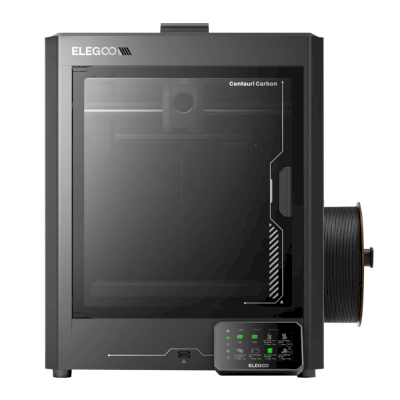
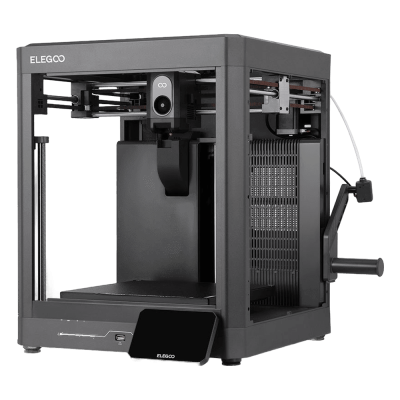
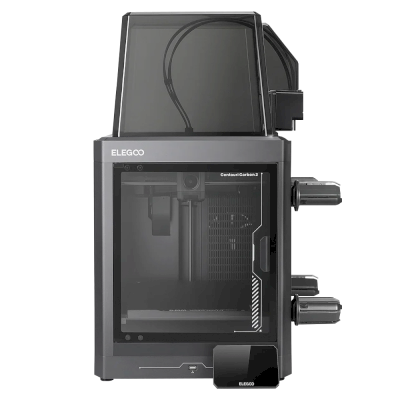
The Centauri Carbon 2 is Elegoo's second fully enclosed CoreXY printer: the original's 256 mm build cube with a 350 degree C hardened-steel nozzle, a 5-inch touchscreen and a better camera and lighting, and the Combo adds Elegoo's Canvas unit for four colours ($449 at launch). It is for hobbyists and small workshops who want an enclosed printer for engineering filaments, and multi-colour, on a budget.
A impressora 3D ELEGOO Centauri Carbon 2 funciona com SimplyPrint, OctoPrint, Mainsail e Fluidd?
Cada forma de conectá-la, o que é necessário e como configurá-la.
Cliente SimplyPrint
Compatível
The same printer as the Centauri Carbon 2 Combo, which works with the SimplyPrint Client, without the Canvas unit.
Do que você precisa: Um computador ou Raspberry Pi na mesma rede, sempre ligado, executando o Cliente SimplyPrint
ELEGOO's own firmware; no Moonraker to connect to.
OctoPrint
Diretamente, via USB
Incompatível
No USB printing from a computer on ELEGOO's own firmware.
O que funciona com SimplyPrint
Conectada via Cliente SimplyPrint, a SimplyPrint suporta tudo o que a ELEGOO Centauri Carbon 2 permite que outros softwares façam: a câmera e a detecção de falhas por IA, impressão remota, pular objetos, controle de temperatura e movimento, mapeamento de filamento para sua unidade multimaterial e AutoPrint. As únicas exceções são o que a ELEGOO Centauri Carbon 2 não permite que outros softwares façam: Ajuste fino, Enviar G-code, Alterar filamento, Nivelamento de mesa e Calibração de Z-offset.
Todos os recursos do SimplyPrint, para cada forma de conectá-la ao SimplyPrint
Conectada ao SimplyPrint via
recurso do SimplyPrint
Cliente SimplyPrint
Compatível
Monitoramento
Status e progresso em tempo real
Sim
Webcam
Sim
Detecção de falhas com IA
Sim
Tempo restante
Sim
Progresso da camada
Sim
Temperaturas
Sim
Imprimindo
Iniciando uma impressão
Sim
Pausar, continuar e cancelar
Sim
Pular objetos
Sim
Opções de início de impressão
Sim
Controle da impressora
Alterar temperaturas
Sim
Movimentação com os controles
Sim
Referenciamento
Sim
Extrudar e retrair
Sim
Alterar velocidade de impressão
Sim
Velocidade do ventilador
Sim
Ajuste fino
Não oferecido pela impressora1
Enviar G-code
Não oferecido pela impressora1
Calibração
Alterar filamento
Não oferecido pela impressora1
Nivelamento de mesa
Não oferecido pela impressora1
Calibração de Z-offset
Não oferecido pela impressora1
Multimaterial
Mapear filamento para compartimentos multimateriais
Sim2
Sincronizar filamento carregado da unidade multimaterial
Sim2
Automação
AutoPrint
Pro
Sim
Baixar o arquivo antes de a impressão começar
Sim
Conectada ao SimplyPrint via Cliente SimplyPrint
Compatível
Monitoramento
Status e progresso em tempo realSim
WebcamSim
Detecção de falhas com IASim
Tempo restanteSim
Progresso da camadaSim
TemperaturasSim
Imprimindo
Iniciando uma impressãoSim
Pausar, continuar e cancelarSim
Pular objetosSim
Opções de início de impressãoSim
Controle da impressora
Alterar temperaturasSim
Movimentação com os controlesSim
ReferenciamentoSim
Extrudar e retrairSim
Alterar velocidade de impressãoSim
Velocidade do ventiladorSim
Ajuste finoNão oferecido pela impressora1
Enviar G-codeNão oferecido pela impressora1
Calibração
Alterar filamentoNão oferecido pela impressora1
Nivelamento de mesaNão oferecido pela impressora1
Calibração de Z-offsetNão oferecido pela impressora1
Multimaterial
Mapear filamento para compartimentos multimateriaisSim2
Sincronizar filamento carregado da unidade multimaterialSim2
Automação
AutoPrint ProSim
Baixar o arquivo antes de a impressão começarSim
Funciona
Depende
Não compatível
Não oferecido pela impressora
A impressora não oferece isso a outros softwares.
Precisa de uma unidade multimaterial
Qual slicer usar com ELEGOO Centauri Carbon 2
Use ElegooSlicer, o slicer da ELEGOO: ele tem um perfil pronto para a ELEGOO Centauri Carbon 2. Também com perfil para ela: OrcaSlicer.
Só listamos slicers que você pode usar na nuvem do SimplyPrint, então pode haver outros para a impressora ELEGOO Centauri Carbon 2.
Slicer na nuvem para ELEGOO Centauri Carbon 2: use ElegooSlicer online
Usar ElegooSlicer e outros slicers diretamente no navegador com o slicer em nuvem online da SimplyPrint. Não é necessária instalação. Fatie seus modelos de ELEGOO Centauri Carbon 2 em qualquer dispositivo, de qualquer lugar do mundo!
Atualizações automáticas de perfis: os perfis são verificados e obtidos automaticamente todos os dias dos repositórios GitHub dos slicers, além do nosso próprio banco de dados de perfis de slicer de código aberto criado pela comunidade. Isso garante que você sempre tenha acesso aos perfis mais recentes.
Observação: Outros slicers, como Simplify3D, ideaMaker, SuperSlicer e KISSlicer, não estão em nossa nuvem, por isso não acompanhamos seus perfis. Eles ainda podem funcionar bem com sua ELEGOO Centauri Carbon 2: consulte a documentação ou os fóruns do slicer para encontrar um perfil. Você também pode contribuir com perfis para nosso banco de dados open source de perfis de slicer no GitHub.
O aplicativo para a ELEGOO Centauri Carbon 2
O SimplyPrint funciona como o app da ELEGOO Centauri Carbon 2: no seu celular e em qualquer navegador, com um slicer na nuvem.
O que você recebe com SimplyPrint
Um app para iPhone e Android, igual em qualquer navegador, e um slicer na nuvem.
Mais que monitoramento: fila de impressão, detecção de falhas por IA, AutoPrint e contas para uma equipe.
Impressoras de várias marcas em um só lugar, lado a lado.
Ainda não há um trocador de placas ou kit de ejeção automática para a ELEGOO Centauri Carbon 2 no SimplyPrint, mas o AutoPrint ainda pode mantê-la imprimindo: assim que a placa estiver livre, ele inicia o próximo trabalho da sua fila.
Impressoras fechadas empurram as impressões para fora
A mesa da ELEGOO Centauri Carbon 2 só se move para cima e para baixo dentro do gabinete, então, em vez de trocar placas, uma rotina de ejeção permite que o cabeçote empurre a impressão resfriada para fora da placa e pela porta frontal, que precisa permanecer aberta durante a operação. Algumas impressoras não imprimem com a porta aberta, como a Prusa CORE One, que tem sensor na porta, então verifique a sua primeiro.
Formas de automatizá-la
Empurrar impressões para fora com o cabeçoteEm uma impressora CoreXY, uma rotina de G-code pode empurrar a peça resfriada para fora da frente da placa antes do próximo trabalho começar.
Seu próprio G-code de ejeçãoEscreva a rotina que limpa sua placa, e o AutoPrint a executará após cada impressão.
Especificações de ELEGOO Centauri Carbon 2: tamanho da mesa, altura de impressão e mais
Suas dimensões, temperaturas, multimaterial e como se conecta, com base no fabricante e em nossa própria pesquisa.
Leia mais do fabricante
Tamanho
Volume de impressão
256 x 256 x 256 mm
Tipo de mesa
Square
Tamanho da mesa
256 x 256 mm
Altura máxima de impressão
256 mm
Imprimindo
Gabinete
Totalmente fechada
Sistema de movimentação
CoreXY
Velocidade máx. de impressão
500 mm/s
Temperatura máxima da extrusora
350 °C
Tem mesa aquecida
Sim
Temperatura máxima da mesa
110 °C
Número de bicos
1
Direct drive
Sim
Ferramenta de sondagem / Nivelamento automático de mesa
Sim
Largura do filamento
1.75 mm
Multimaterial
Unidades multimateriais compatíveis
Elegoo Canvas
Conectando
Conectividade
Wi-Fi, USB
Câmera integrada
Sim
Compatível com impressão via conexão serial
Não
Firmware incluído
Do próprio fabricante
Arquivos e fatiamento
Formatos de arquivo compatíveis
G-code (.gcode, .gco, .g)
Tem opções de inicialização
Sim
Opções disponíveis: Bed Leveling, Timelapse
A impressora
Fabricante / marca da impressora
ELEGOO
Nome do modelo de impressora
Centauri Carbon 2
Fabricada por uma empresa de
China
Lançado
26 de janeiro de 2026
Ainda fabricada
Sim
Aviso legal:
Nos esforçamos para manter esta informação o mais atualizada e precisa possível, mas não podemos garantir sua integridade nem confiabilidade. Nossos dados são baseados em envios de usuários e referências de fabricantes.
Que filamento a ELEGOO Centauri Carbon 2 pode imprimir?
Compatibilidade de filamento da ELEGOO Centauri Carbon 2: os materiais que ela pode usar, com base no hotend, mesa, câmara e gabinete.
Filamento
Adequação
Notas
PLA
Ótimo
O filamento mais fácil de imprimir. Funciona em quase qualquer impressora; uma mesa aquecida ajuda na adesão, mas não é necessária.
PETG
Ótimo
Confortavelmente dentro da faixa (PETG funciona bem com hotend de ~230-250C e mesa de ~70-85C).
TPU e flexíveis
Ótimo
A extrusora direct-drive alimenta bem o filamento flexível. Imprima lentamente para resultados limpos.
ABS & ASA
Ótimo
Fechada, com hotend e mesa suficientemente quentes: ABS e ASA imprimem bem.
Nylon (PA)
Bom
É possível, com cuidado: seque bem o filamento, e uma câmara fechada ajuda muito.
Polycarbonate (PC)
Bom
Dentro da faixa para PC. Seque o filamento, imprima devagar e use uma câmara fechada para obter os melhores resultados.
Reforçado com fibra de carbono e vidro
Com cuidado
Possível se você instalar um bico endurecido ou resistente ao desgaste, as fibras abrasivas desgastam rapidamente um bico de latão padrão.
Dica: este é um guia geral baseado nas especificações da impressora, sempre confira as configurações recomendadas para seu filamento. Com SimplyPrint, você pode salvar um perfil para cada bobina e acompanhar exatamente qual filamento tem em estoque.
Melhor filamento para a ELEGOO Centauri Carbon 2
Filamentos que a ELEGOO Centauri Carbon 2 imprime bem, primeiro os da ELEGOO, depois os mais conhecidos.
Tested the Combo (unit supplied by Elegoo). PLA, PLA-CF and PETG print well on stock profiles and Canvas is easy to use; it measured 44-47 dB. Cons: unreliable connections from ElegooSlicer and the Matrix app, false spaghetti alerts, ASA warping until the bed was preheated, lots of purge waste and print-time estimates more than 17% off.
“Overall, the hardware is on point but the software needs more tuning”
Tested the Combo at $449. Prints PAHT-CF and polycarbonate cleanly without a heated chamber, handles 95A TPU through Canvas, needs no cloud, and has an excellent camera. Cons: the loading routine is too cool to clear PC or PA, spool holders that fit other brands poorly, and a cold plate that is not sticky enough. Says the original Centauri Carbon is still its pick for single colour.
“Like the first Centauri Carbon, the CC2 is a delightful Core XY 3D printer that’s easy on the budget.”
Recommended. Scored 29 of 30 in its print tests, with strong dimensional accuracy, very little colour contamination and engineering filaments that fed reliably. Cons: only four filaments, spools stored outside the enclosure with no drying (damp filament caused stringing), purge waste, and a locked-down slicer. For single-colour printing it says the original Centauri is still superb.
“If you are a small business looking to make functional parts on a budget, then the Centauri Carbon 2 really does live up to expectations.”
Aurora Tech · 19 de fevereiro de 2026
Sponsored by Elegoo (disclosed). Over 2,000 colour changes with two false unload errors; faster changes and less purge than first-gen AMS, about half the K2 Pro's waste, but far slower than a Snapmaker U1. Printed PPS-CF and ABS well. Cons: average surface quality, skinned OrcaSlicer with poor estimates. Names it the best-value enclosed multi-colour printer.
Quando escolher ELEGOO Centauri Carbon 2
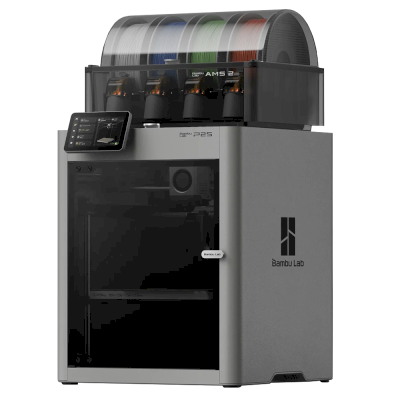
Choose the Centauri Carbon 2 for one of the cheapest ways into enclosed four-colour CoreXY printing: Tom's Hardware rated it 4/5, TechRadar recommended it and scored its prints 29 of 30. Every review we found tested the Combo. If you only print one colour, Tom's Hardware and TechRadar both say the original Centauri Carbon is still a superb, cheaper pick. The Bambu Lab P2S Combo costs much more and may be a bit more polished (Tom's Hardware). In Aurora Tech's tests the Creality K2 Pro printed faster with a cleaner surface but purged about twice as much, and a tool changer such as the Snapmaker U1 was far faster at multi-colour with almost no waste.
Vantagens
Fully enclosed with a 350 degree C hardened-steel nozzle: Tom's Hardware printed PAHT-CF and polycarbonate without warping, and Aurora Tech printed PPS-CF and ABS.
Four colours for little money with the Combo's Canvas unit, which Aurora Tech ran through over 2,000 colour changes and found faster and less wasteful than first-generation AMS-style systems.
Accurate, clean prints: TechRadar scored it 29 of 30 in its print tests, with very little colour contamination.
Quiet for an enclosed printer (Elegoo says 45 dB; Notebookcheck measured 44-47 dB), with a glass door and an excellent camera with AI detection (Tom's Hardware).
Needs no cloud account (Tom's Hardware), so it can stay on your own network.
Works with SimplyPrint through the SimplyPrint Client, for one queue and remote monitoring across your printers.
Contras
Elegoo's software lags the hardware: Notebookcheck had unreliable connections from ElegooSlicer and the Matrix app, print-time estimates were off by up to about 20% (Notebookcheck, Aurora Tech), and TechRadar calls the slicer locked down.
Multi-colour prints waste a lot of filament in purge (Notebookcheck, TechRadar), and the spools sit outside the enclosure with no drying, so damp filament shows (TechRadar).
Its monitoring can cry wolf: Notebookcheck saw false spaghetti alerts, and Aurora Tech saw false unload errors that paused prints until someone pressed continue.
No heated chamber, and with high-temperature filaments the loading routine is too cool to clear PC or PA (Tom's Hardware) and the Z offset runs low (Aurora Tech).
The side spool holders suit Elegoo spools but not some other brands, and the cold plate is not sticky enough (Tom's Hardware).
Para quem é
EscolasBoa compatibilidade
Enclosed with a glass door, quiet and self-calibrating, with a good camera; Elegoo's software and alerts are still uneven, and SimplyPrint adds queue approval and control over who can start prints.
HobbistasÓtima compatibilidade
Four colours, engineering filaments and an enclosure for $449 at launch; Tom's Hardware, TechRadar and Aurora Tech all rate it highly for value.
EmpresasBoa compatibilidade
TechRadar says it lives up to expectations for small businesses making functional parts, and it needs no cloud; the build cube is small and Elegoo's software still needs work.
Print farmsPode funcionar
Cheap per machine and works with SimplyPrint through the Client, but false alerts can pause prints, multi-colour purges a lot, and no AutoPrint plate-swapping kit is listed for it.
Com base nas informações do fabricante e em avaliações independentes.
Leia mais do fabricante
A série ELEGOO Centauri
Todas as impressoras da ELEGOO na série, da mais antiga à mais recente.
Compare a ELEGOO Centauri Carbon 2 com impressoras semelhantes
Impressoras do mesmo fabricante, de tamanho semelhante, que imprimem os mesmos materiais de engenharia ou em vários materiais, que você pode comprar hoje. Compare até quatro lado a lado, com suas especificações e como cada uma se conecta.
Quem fabrica a ELEGOO Centauri Carbon 2 e quão aberta a ELEGOO permite que você seja: se as impressoras dela funcionam sem a nuvem da marca, aceitam qualquer filamento e slicer e podem ser reparadas. Cada área é avaliada com base em fontes públicas.
Abertura: Majoritariamente aberta (3.8 de 5)
Majoritariamente aberta
Ecossistema fechadoAbrir
ELEGOO is a Shenzhen company founded in 2015 that makes FDM and resin 3D printers, filament, laser engravers and STEM electronics kits. Its FDM range is the Centauri Carbon, an enclosed CoreXY printer, and the Neptune 4 series of open-frame Klipper printers, sold to hobbyists at budget to mid-range prices. DJI became a shareholder in 2025.
Fundada:
2015 ·
Sede:
Shenzhen, China ·
Propriedade:
Privately held through its parent, Shenzhen Zhinengpai (SmartPie) Technology; DJI became a shareholder in 2025 ·
Site:www.elegoo.com
ELEGOO is fairly open in daily use: its printers work over the LAN with open slicers and any filament, and it now publishes firmware source. Source releases have followed community pressure rather than launch, and spare parts for the newest printers are thin in its store.
Firmware e firmware personalizado ●●●●●
The Neptune 4 series runs Klipper. For the Centauri Carbon, which went on sale in February 2025, ELEGOO published its modified source on GitHub under GPL-3.0 in September 2025, saying it did so in response to user feedback.
[1][2][3][4]
Controle local e integrações ●●●●●
ELEGOO's printers connect to its slicer on the local network by IP without an account. The Neptune 4 series serves Klipper's web interface and Moonraker, which OrcaSlicer reaches as an Octo/Klipper host. For the Centauri Carbon and Centauri Carbon 2, ELEGOO published Elegoo Link on GitHub in January 2026, an Apache-2.0 SDK for local discovery, status, file upload and print control. The Matrix phone app adds remote printing while the printer is online.
[5][4][16][6][17]
Filamento, slicers e peças de terceiros ●●●●●
Third-party filament works; ElegooSlicer is an open-source OrcaSlicer-based slicer, OrcaSlicer works with the Neptune 4, and ELEGOO published the data format of its RFID filament tags so others can use it.
[7][8][4]
Reparos e peças de reposição ●●●●●
ELEGOO sells hotend, extruder and nozzle kits and some boards for the Neptune 4, and its wiki has many replacement guides, including the Centauri Carbon motherboard. The store's Centauri Carbon parts list is short (hotend kit, touchscreen, upper shell).
[9][10][11]
Dados e privacidade ●●●●●
LAN printing needs no account; the Matrix app and cloud do. The privacy policy names the companies responsible for personal data in each region (Shenzhen, Hong Kong, United States) but is written mainly for the online store.
[12][5]
Comunidade e documentação ●●●●●
Active community and a wiki with guides per model; firmware and slicer sources are on GitHub, although the Centauri Carbon source came after users asked for it.
[11][7][1]
Vantagens
Works on the local network with ElegooSlicer or OrcaSlicer, with no account needed.
Open-source slicer and a published RFID tag format for filament.
Many step-by-step replacement guides in its wiki.
Offered owners compensation when the Centauri Carbon multi-colour add-on was delayed.
Contras
Centauri Carbon firmware source came about seven months after sales began, after users asked.
The Centauri Carbon's multi-colour add-on only became available in April 2026, after ELEGOO said in November 2025 it could not give a date.
Few complete Centauri Carbon parts are listed in its store.
The privacy policy is written mainly for the online store.
Histórico comprovado
maio 2026: ELEGOO's parent closed a B+ financing round of over 500 million yuan (about $73 million) from investors including Meituan, Hillhouse Capital and Shenzhen Capital Group. It reported 2025 revenue of 2.3 billion yuan.
[13]
27 de abril de 2026: CANVAS, the multi-colour system for the Centauri Carbon, became available, five months after ELEGOO said it could not give a release date.
[14]
18 de novembro de 2025: DJI and Hangzhou Jiangyu Technology became shareholders of ELEGOO's parent company, according to a business registration update reported by TechNode. The size of the stake was not disclosed.
[15]
novembro 2025: ELEGOO said the multi-colour system it was developing for the Centauri Carbon did not yet perform as it wanted and that it could not guarantee a release date. It offered owners a choice of a $50 filament coupon, a 365-day warranty extension or $80 off a Centauri Carbon 2 Combo.
[14]
26 de setembro de 2025: In response to user feedback, ELEGOO published the modified source code of the Centauri series firmware on GitHub under GPL-3.0.
[1][2]
fevereiro 2025: ELEGOO opened pre-orders for the Centauri Carbon, its first enclosed CoreXY printer, on 17 February 2025.
[3]
Com base em 17 fontes, verificado pela última vez em 18 de outubro de 2026. Mostrar fontes
A impressora ELEGOO Centauri Carbon 2 é compatível com SimplyPrint?
Sim. Você pode conectar a ELEGOO Centauri Carbon 2 ao SimplyPrint por Cliente SimplyPrint e, em seguida, fatiar, enfileirar, iniciar e monitorar impressões pelo navegador ou aplicativo móvel.
Como conecto a ELEGOO Centauri Carbon 2 ao SimplyPrint?
Siga nosso guia de configuração passo a passo para a ELEGOO Centauri Carbon 2. Ele mostra como conectá-la por Cliente SimplyPrint, o que você precisa para cada opção e qual escolher.
Qual slicer devo usar para a ELEGOO Centauri Carbon 2?
Recomendamos o ElegooSlicer para a impressora ELEGOO Centauri Carbon 2. Você pode usá-lo e 6 outros slicers diretamente no slicer online do SimplyPrint, sem instalação, em qualquer dispositivo, com perfis da impressora ELEGOO Centauri Carbon 2 atualizados automaticamente.
Posso usar o OrcaSlicer com ELEGOO Centauri Carbon 2?
Sim. O OrcaSlicer inclui um perfil para a ELEGOO Centauri Carbon 2, e você pode usá-lo no slicer online do SimplyPrint, então não há nada para instalar.
Que filamento a ELEGOO Centauri Carbon 2 pode imprimir?
Com base nas especificações (hotend de até 350C e mesa aquecida de até 110C), a ELEGOO Centauri Carbon 2 trabalha bem com PLA, PETG, TPU e flexíveis ou ABS & ASA. Consulte acima o guia completo de filamentos para ABS, nylon, PC e compósitos.
A ELEGOO Centauri Carbon 2 funciona com OctoPrint ou Klipper?
Não que saibamos, mas você também não precisa: SimplyPrint se conecta à ELEGOO Centauri Carbon 2 via Cliente SimplyPrint.
Quais são as dimensões da mesa e o volume de impressão da ELEGOO Centauri Carbon 2?
A ELEGOO Centauri Carbon 2 tem uma mesa de impressão de 256 x 256 mm e imprime até 256 mm de altura, com um volume de construção de cerca de 256 x 256 x 256 mm. Consulte a tabela de especificações completa acima para ver o tipo de mesa, temperaturas e mais.
Quando a ELEGOO Centauri Carbon 2 foi lançada?
A ELEGOO lançou a Centauri Carbon 2 em 26 de janeiro de 2026.
A ELEGOO Centauri Carbon 2 pode ejetar impressões automaticamente?
Ainda não há um kit compatível, mas o AutoPrint do SimplyPrint pode empurrar impressões para fora com o cabeçote ou executar seu próprio G-code de ejeção e, em seguida, iniciar o próximo trabalho da sua fila.
Aviso de afiliados: alguns links nesta página são links de afiliados. Podemos receber uma comissão se você fizer uma compra, sem custo adicional para você. Como Associado da Amazon, recebemos por compras qualificadas.
 China
China
 Cliente SimplyPrint




 PrusaSlicer
 BambuStudio
 CrealityPrint
 Cura
Cura Kiri:Moto