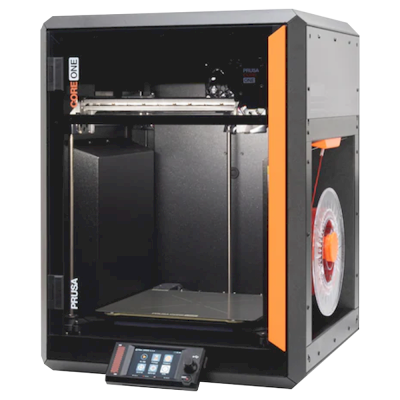
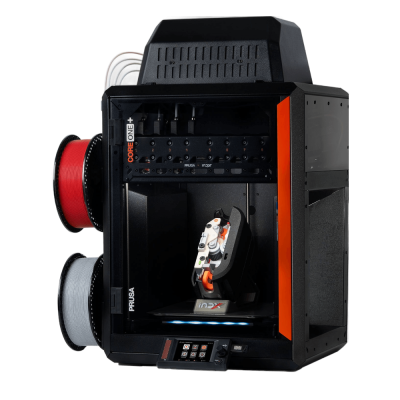
Det finnes en nyere versjon.Prusa CORE One+ etterfølger Prusa CORE One.
Lansert november 2025
Koble Prusa CORE One til SimplyPrint
Fungerer 3D-printeren Prusa CORE One med SimplyPrint, OctoPrint, Mainsail og Fluidd?
Hver tilkoblingsmåte, hva den trenger og hvordan du setter den opp.
SimplyPrint-klienten
Kompatibel
Dette trenger du: En datamaskin eller Raspberry Pi på samme nettverk som alltid er på, og som kjører SimplyPrint-klienten
Leveres ikke med Klipper: Den kjører Klipper etter at du har installert det i stedet for egen fastvare, en modifikasjon
Hva som fungerer med SimplyPrint
Koblet til via OctoPrint, støtter SimplyPrint de fleste funksjonene som tilbys på Prusa CORE One: kameraet og KI-feildeteksjon, fjernutskrift, temperatur- og bevegelseskontroll og AutoPrint. Ikke tilgjengelig via OctoPrint: Synkroniser lastet filament fra multimaterialenheten. 3 funksjoner avhenger av hvordan de er satt opp: Tabellen viser hva hver av dem trenger. Tabellen nedenfor sammenligner alle 3 måtene å koble den til SimplyPrint på.
Alle SimplyPrint-funksjoner for hver måte å koble til SimplyPrint på
Koblet til SimplyPrint via
SimplyPrint-funksjon
SimplyPrint-klienten
Kompatibel
OctoPrint
Kompatibel
Prusa direkte fastvare
Kompatibel
Overvåking
Sanntidsstatus og fremdrift
Ja
Ja
Ja
Webkamera
Ja1
Ja1
Tilbys ikke av printeren2
AI-feildeteksjon
Ja1
Ja1
Tilbys ikke av printeren2
Tid igjen
Ja
Ja
Ja
Lagfremdrift
Tilbys ikke av printeren2
Ja
Ja
Temperaturer
Ja
Ja
Ja
Print
Starte en utskrift
Ja
Ja
Ja
Sett på pause, fortsett og avbryt
Ja
Ja
Ja
Hopp over objekter
Tilbys ikke av printeren2
Avhenger3
Ja
Filer
Skriv ut binær G-code (.bgcode)
Ja
Avhenger4
Avhenger5
Printerstyring
Endre temperaturer
Tilbys ikke av printeren2
Ja
Ja
Bevegelse med kontrollene
Tilbys ikke av printeren2
Ja
Ja
Hjemkjøring
Tilbys ikke av printeren2
Ja
Ja
Ekstrudering og tilbaketrekking
Tilbys ikke av printeren2
Ja
Ja
Endre printhastighet
Tilbys ikke av printeren2
Ja
Ja
Viftehastighet
Tilbys ikke av printeren2
Ja
Ja
Baby stepping
Tilbys ikke av printeren2
Ja
Ja
Send G-code
Tilbys ikke av printeren2
Ja
Ja
Kalibrering
Skift filament
Tilbys ikke av printeren2
Ja
Ja
Nivellering av printplate
Tilbys ikke av printeren2
Ja
Ja
Z-offset-kalibrering
Tilbys ikke av printeren2
Ja
Nei
Multimateriale
Synkroniser lastet filament fra multimaterialenheten
Nei
Nei
Ja6
Automatisering
AutoPrint
Pro
Ja
Ja
Ja
Last ned filen før utskriften starter
Tilbys ikke av printeren2
Avhenger7
Ja
Koblet til SimplyPrint via SimplyPrint-klienten
Kompatibel
Overvåking
Sanntidsstatus og fremdriftJa
WebkameraJa1
AI-feildeteksjonJa1
Tid igjenJa
LagfremdriftTilbys ikke av printeren2
TemperaturerJa
Print
Starte en utskriftJa
Sett på pause, fortsett og avbrytJa
Hopp over objekterTilbys ikke av printeren2
Filer
Skriv ut binær G-code (.bgcode)Ja
Printerstyring
Endre temperaturerTilbys ikke av printeren2
Bevegelse med kontrolleneTilbys ikke av printeren2
HjemkjøringTilbys ikke av printeren2
Ekstrudering og tilbaketrekkingTilbys ikke av printeren2
Endre printhastighetTilbys ikke av printeren2
ViftehastighetTilbys ikke av printeren2
Baby steppingTilbys ikke av printeren2
Send G-codeTilbys ikke av printeren2
Kalibrering
Skift filamentTilbys ikke av printeren2
Nivellering av printplateTilbys ikke av printeren2
Z-offset-kalibreringTilbys ikke av printeren2
Multimateriale
Synkroniser lastet filament fra multimaterialenhetenNei
Automatisering
AutoPrint ProJa
Last ned filen før utskriften starterTilbys ikke av printeren2
Koblet til SimplyPrint via OctoPrint
Kompatibel
Overvåking
Sanntidsstatus og fremdriftJa
WebkameraJa1
AI-feildeteksjonJa1
Tid igjenJa
LagfremdriftJa
TemperaturerJa
Print
Starte en utskriftJa
Sett på pause, fortsett og avbrytJa
Hopp over objekterAvhenger3
Filer
Skriv ut binær G-code (.bgcode)Avhenger4
Printerstyring
Endre temperaturerJa
Bevegelse med kontrolleneJa
HjemkjøringJa
Ekstrudering og tilbaketrekkingJa
Endre printhastighetJa
ViftehastighetJa
Baby steppingJa
Send G-codeJa
Kalibrering
Skift filamentJa
Nivellering av printplateJa
Z-offset-kalibreringJa
Multimateriale
Synkroniser lastet filament fra multimaterialenhetenNei
Automatisering
AutoPrint ProJa
Last ned filen før utskriften starterAvhenger7
Koblet til SimplyPrint via Prusa direkte fastvare
Kompatibel
Overvåking
Sanntidsstatus og fremdriftJa
WebkameraTilbys ikke av printeren2
AI-feildeteksjonTilbys ikke av printeren2
Tid igjenJa
LagfremdriftJa
TemperaturerJa
Print
Starte en utskriftJa
Sett på pause, fortsett og avbrytJa
Hopp over objekterJa
Filer
Skriv ut binær G-code (.bgcode)Avhenger5
Printerstyring
Endre temperaturerJa
Bevegelse med kontrolleneJa
HjemkjøringJa
Ekstrudering og tilbaketrekkingJa
Endre printhastighetJa
ViftehastighetJa
Baby steppingJa
Send G-codeJa
Kalibrering
Skift filamentJa
Nivellering av printplateJa
Z-offset-kalibreringNei
Multimateriale
Synkroniser lastet filament fra multimaterialenhetenJa6
Automatisering
AutoPrint ProJa
Last ned filen før utskriften starterJa
Fungerer
Avhenger
Ikke støttet
Tilbys ikke av printeren
Krever kamera
Printeren tilbyr ikke dette til annen programvare.
Krever OctoPrint-pluginen Cancel Objects
Krever OctoPrint-pluginen BGCode
Krever firmware 5.2.0 eller nyere
Krever en multimaterialenhet
Krever versjon 4.2.0 eller nyere av SimplyPrint-pluginen
Prusa CORE One-eiere på SimplyPrint
50+ printere bruker SimplyPrint
Hvilken slicer du bør bruke til Prusa CORE One
Bruk PrusaSlicer, Prusas egen slicer: Den har en ferdig profil for Prusa CORE One. Også med profil for den: OrcaSlicer, ElegooSlicer.
Vi viser bare slicere du kan bruke i SimplyPrint-skyen, så det kan finnes andre for Prusa CORE One.
Skybasert slicer for Prusa CORE One: bruk PrusaSlicer på nett
Bruk PrusaSlicer og andre slicere direkte i nettleseren med SimplyPrints skybaserte nettslicer. Ingen installasjon kreves. Slice Prusa CORE One-modellene dine fra hvilken som helst enhet, hvor som helst i verden!
Merk: Andre slicere, som Simplify3D, ideaMaker, SuperSlicer og KISSlicer, finnes ikke i skyen vår, så vi sporer ikke profilene deres. De kan fortsatt fungere godt med Prusa CORE One: Se slicerens egen dokumentasjon eller forum etter en profil. Du kan også bidra med profiler til vår åpen kildekode-database for slicerprofiler på GitHub.
Appen for Prusa CORE One
Bruk SimplyPrint som app for Prusa CORE One: følg med på og styr den fra telefonen eller en nettleser, slice i skyen og ha den sammen med de andre printerne dine. Det er gratis å komme i gang. Prusas egne apper er Prusa app og Prusa Connect.
Hva den gjør
SimplyPrint
Prusa app og Prusa Connect
Printere fra andre merker
Ja
Bare Prusa Research-printere
Fungerer uten Prusa Researchs sky
Ja
Bare via Prusa Research-skyen
Også i SimplyPrint
En app for iPhone og Android, det samme i enhver nettleser og en slicer i skyen.
Mer enn overvåking: en skriverkø, AI-basert feildeteksjon, AutoPrint og kontoer for et team.
Det finnes ennå ingen byggeplatebytter eller automatisk utmatingssett for Prusa CORE One i SimplyPrint, men AutoPrint kan fortsatt holde den i gang: Når byggeplaten er ryddet, starter den neste jobb fra køen din.
Lukkede printere skyver ut utskriftene sine
Printplaten til Prusa CORE One beveger seg bare opp og ned inne i kabinettet, så i stedet for å bytte byggeplater lar en avskyvingsrutine verktøyhodet skyve den avkjølte utskriften av byggeplaten og ut gjennom frontdøren, som må være åpen mens den kjører. Noen printere skriver ikke ut med døren åpen, Prusa CORE One har en dørsensor, så sjekk din først.
Måter å automatisere den på
Skyv utskrifter av med verktøyhodetPå en CoreXY-printer kan en G-code-rutine skyve den avkjølte utskriften av fronten av printplaten før neste jobb starter.
Din egen utmatings-G-codeSkriv rutinen som rydder printplaten, så kjører AutoPrint den etter hver utskrift.
En robotarm eller noe med et APIFortell SimplyPrint at printplaten er fri via API eller en webhook, fra en robotarm eller ditt eget system.
Prusa CORE One-spesifikasjoner: printplatestørrelse, utskriftshøyde og mer
Størrelse, temperaturer, multimateriale og tilkobling, basert på produsentens opplysninger og våre egne undersøkelser.
Les mer fra produsenten
Størrelse
Byggevolum
250 x 220 x 270 mm
Printplatetype
Rectangle
Printplatestørrelse
250 x 220 mm
Maks. printhøyde
270 mm
Print
Kabinett
Helt lukket
Bevegelsessystem
CoreXY
Maks. utskriftshastighet
350 mm/s
Maks. ekstrudertemperatur
290 °C
Har oppvarmet printplate
Ja
Maks. printplatetemperatur
120 °C
Oppvarmet kammer
Opptil 55 °C
Antall dyser
1
Verktøyhoder
1
Direct drive
Ja
Probeverktøy / automatisk printplatekalibrering
Ja
Filamentbredde
1.75 mm
Multimateriale
Multimaterialenheter den fungerer med
Prusa MMU 3
Verktøyveksler eller hotend-veksler
Nei
IDEX (uavhengige doble ekstrudere)
Nei
Kobler til
Tilkobling
USB, Ethernet, Wi-Fi
Innebygd kamera
Nei
Støtter seriell utskrift
Ja
Medfølgende firmware
Marlin
Filer og slicing
Støttede filformater
G-code (.gcode, .gco, .g)
Spesialformater: bgcode
Printeren
Printerprodusent / merke
Prusa
Printermodellnavn
CORE One
Laget av et selskap fra
Tsjekkia
Lansert
januar 2025
Ansvarsfraskrivelse:
Vi streber etter å holde denne informasjonen så oppdatert og nøyaktig som mulig, men kan ikke garantere at den er fullstendig eller pålitelig. Dataene våre er basert på brukerinnsendelser og produsentreferanser.
Hvilket filament kan Prusa CORE One skrive ut?
Filamentkompatibilitet for Prusa CORE One: materialene den kan håndtere, vurdert ut fra hotend, printplate, kammer og kapsling.
Filament
Egnethet
Notater
PLA
Flott
Det enkleste filamentet å skrive ut. Fungerer på nesten alle printere. En oppvarmet printplate bidrar til bedre vedheft, men er ikke nødvendig.
PETG
Flott
Godt innenfor området (PETG trives med en hotend på ~230-250C og en printplate på ~70-85C).
TPU og fleksible materialer
Flott
Direct-drive-ekstruderen mater fleksibelt filament godt. Skriv ut sakte for et rent resultat.
ABS & ASA
Flott
Lukket, med varm nok hotend og printplate: ABS og ASA gir gode utskrifter.
Nylon (PA)
Bra
Det går med forsiktighet: Tørk filamentet grundig, og et kabinett hjelper mye.
Polycarbonate (PC)
Bra
Egnet for PC. Tørk filamentet, skriv ut sakte og bruk et kabinett for best resultat.
Karbonfiber- og glassfiberforsterket
Med omtanke
Mulig hvis du monterer en herdet eller slitesterk dyse. De slipende fibrene sliter raskt ut en standard messingsdyse.
Tips: dette er en generell veiledning basert på printerens spesifikasjoner. Sjekk alltid anbefalte innstillinger for filamentet ditt. Med SimplyPrint kan du lagre en profil for hver spole og holde nøyaktig oversikt over filamentet på lager.
Beste filament til Prusa CORE One
Filamenter som Prusa CORE One skriver ut godt, først Prusas egne, deretter de mest kjente.
Prusa quality at CoreXY speed inside an enclosure; the best machine a beginner could start on and a fit for schools and print farms. Not cheap ($1,199 assembled, $949 kit) and lacks a built-in camera; the MMU3 multicolour option was still to come. Editor's Choice.
“The Prusa CORE One is an outstanding machine and just what Prusa Research needs to compete in the modern marketplace.”
Unboxed and printing in under 10 minutes; finish close to resin quality, and the chamber temperature adapts per material so PLA can print with the door shut. Cons: premium price, filament open to the room, and no out-of-the-box multifilament (MMU3 to come). Recommended award.
“this is just about the best 3D printer you can get right now”
Aurora Tech · 23. mars 2025
Used as his main printer for two months (Prusa supplied the unit; VoxelPLA sponsored, both disclosed). Names it his most reliable, future-proof CoreXY. Drawbacks: Marlin-based firmware, a weak camera, a nozzle-cleaning quirk, and the MMU3's large table footprint.
Made with Layers · 9. februar 2025
Compares the CORE One with an X1C. Concludes it does about everything the X1C does and some things better, such as controlling enclosure temperature, so the choice comes down to which strengths matter. Mentions affiliate codes; VoxelPLA sponsored (disclosed).
CNC Kitchen · 31. januar 2025
No sponsor; Prusa supplied the review unit. A good-looking, compact CoreXY that prints technical materials well but has weaker overhangs than the MK4S, a price near the X1C, and a release that feels rushed. Concludes it restores his faith in Prusa.
Printere fra samme produsent, med lignende størrelse, som printer de samme tekniske materialene eller multimateriale som den, og som du kan kjøpe i dag. Sammenlign opptil fire side om side, med spesifikasjoner og hvordan hver kobles til.
Hvem som lager Prusa CORE One, og hvor åpent Prusa lar deg bruke den: om printerne deres fungerer uten skyen deres, godtar hvilket som helst filament og hvilken som helst slicer, og kan repareres. Hvert område er vurdert basert på offentlige kilder.
Åpenhet: Åpne (4.9 av 5)
Åpne
Lukket økosystemÅpne
Prusa Research is a Prague company founded in 2012 by Josef Průša, who came from the open-source RepRap project. It designs and builds the Original Prusa and Prusa CORE printers, makes Prusament filament, develops the PrusaSlicer slicer and runs the Printables model site. Printers are built in Prague and at its US site in Delaware, sold assembled or as kits, and used by hobbyists, schools, businesses and print farms.
Grunnlagt:
2012 ·
Hovedkontor:
Prague, Czech Republic ·
Eierskap:
Prusa Research a.s., founded and led by Josef Průša ·
Personer:
More than 1,200 people (company site, 2026) ·
Nettsted:www.prusa3d.com
Prusa is the most open of the large brands: GPL firmware, an open slicer, full local control without an account and spare parts for everything. Hardware design files now come under Prusa's own Open Community License, which allows personal and in-house business use but not selling machines.
Fastvare og tilpasset fastvare ●●●●●
Firmware for current printers is published on GitHub under GPL-3.0 and updated with every release. Official firmware is signed, but Prusa documents how to flash custom firmware by breaking a seal on the board and says this does not void the warranty. Prusa says firmware and printable parts are shared right away and electronics schematics later.
[1][2][3]
Lokal styring og integrasjoner ●●●●●
PrusaLink, built into the CORE One, MK4S, MK3.9, MK3.5 and XL, handles monitoring, file uploads and print control on the local network without internet or an account, and printing from USB works offline. Prusa publishes PrusaLink's HTTP API as an OpenAPI specification on GitHub, and its help centre covers OctoPrint setup. Prusa Connect is an optional cloud service for remote access.
[4][15]
Filament, slicere og deler fra tredjeparter ●●●●●
Printers are open to any filament; PrusaSlicer is GPL-licensed and other slicers work. Instead of a locked RFID system, Prusa created OpenPrintTag, an NFC spool-tag standard that is free for any brand to use and works offline.
[5][6]
Reparasjoner og reservedeler ●●●●●
The e-shop sells spare parts for each printer, printable parts are published, and the full CORE One CAD files are released. Prusa's open-source page says its goal is printers that stay moddable and easy to repair for decades, and its licence explicitly allows making spare parts for your own machines.
[7][3][5]
Data og personvern ●●●●●
No account is needed for local use through PrusaLink or USB. Prusa Connect needs a Prusa account and stores G-codes and telemetry in the cloud. Prusa Research is an EU company and publishes its privacy policy and a Trust Center.
[4][8]
Fellesskap og dokumentasjon ●●●●●
Large community around Printables and the forum, a detailed knowledge base, and firmware and slicer developed in public on GitHub with open issue trackers.
[1][4]
Fordeler
GPL firmware with a documented, warranty-safe way to flash custom firmware.
Full control on the local network through PrusaLink, with no account needed.
Spare parts for every printer, published printable parts and released CAD files.
Kits available for people who want to build and understand their printer.
Made in Prague, with a second factory in Delaware for US buyers.
OpenPrintTag is an open spool-tag standard any brand can use.
Ulemper
Hardware files use Prusa's own OCL licence, which bars selling machines built from them; it is not an OSI open-source licence.
Electronics schematics are published later than firmware and printable parts.
Remote access and cloud storage need Prusa Connect and an account.
Merittliste
juli 2026: Printed Solid, the Delaware company Prusa Research bought in 2022, was renamed Prusa USA. Its Wilmington site builds the MK4S and CORE One+, makes filament and is Prusa's US service centre.
[9]
desember 2025: Prusa released the full CAD files of the CORE One under its new Open Community License (OCL). OCL allows modifying, sharing mods and in-house commercial use, and grants patent and repair rights, but bars selling machines built from the files without an agreement, so it is not a standard open-source licence. Prusa said it is also filing patents on its designs.
[5]
oktober 2025: Prusa launched OpenPrintTag, a published NFC standard for smart filament spools that any brand can use without licence fees, starting with redesigned Prusament spools.
[6]
november 2024: Prusa announced the CORE One, its first fully enclosed CoreXY printer with active chamber temperature control.
[10]
mars 2023: Josef Průša wrote that open source in 3D printing was under strain from cloners and licence violations. With the MK4, Prusa released firmware sources and models of the plastic parts but held back the electronics plans, planning to publish them later under a new licence.
[11]
Undersøkt fra 15 kilder, sist sjekket 18. oktober 2026. Vis kilder
Ja. Du kan koble Prusa CORE One til SimplyPrint via SimplyPrint-klienten, OctoPrint eller Prusa direkte fastvare, og deretter slice, legge i kø, starte og overvåke utskrifter fra nettleseren eller mobilappen.
Hvordan kobler jeg Prusa CORE One til SimplyPrint?
Følg vår trinnvise oppsettsveiledning for Prusa CORE One. Den viser hvordan du kobler den til via SimplyPrint-klienten, OctoPrint eller Prusa direkte fastvare, hva du trenger for hver metode og hvilken du bør velge.
Hvilken slicer bør jeg bruke for Prusa CORE One?
Vi anbefaler PrusaSlicer for Prusa CORE One. Du kan kjøre den, og 6 andre slicere, direkte i SimplyPrints nettbaserte slicer, uten installasjon, på alle enheter, med profiler for Prusa CORE One som holdes automatisk oppdatert.
Kan jeg bruke OrcaSlicer med Prusa CORE One?
Ja. OrcaSlicer har en profil for Prusa CORE One, og du kan kjøre den i SimplyPrints nettbaserte slicer, så du trenger ikke installere noe.
Hvilket filament kan Prusa CORE One skrive ut?
Ut fra spesifikasjonene (hotend opptil 290C, oppvarmet printplate opptil 120C) håndterer Prusa CORE One PLA, PETG, TPU og fleksible materialer eller ABS & ASA godt. Se hele filamentveiledningen ovenfor for ABS, nylon, PC og kompositter.
Fungerer Prusa CORE One med OctoPrint eller Klipper?
Prusa CORE One fungerer med OctoPrint, og SimplyPrint kobles til via dem, slik at du i tillegg får skytilgang, en printkø og kameraovervåking.
Hva er printplatestørrelsen og byggevolumet til Prusa CORE One?
Prusa CORE One har en printplate på 250 x 220 mm og skriver ut opptil 270 mm høyt, med et byggevolum på omtrent 250 x 220 x 270 mm. Se hele spesifikasjonstabellen over for platetype, temperaturer og mer.
Når kom Prusa CORE One ut?
Prusa lanserte CORE One i januar 2025.
Kan Prusa CORE One løse ut utskrifter automatisk?
Det finnes ennå ikke noe sett for den som vi støtter, men AutoPrint i SimplyPrint kan skyve utskrifter av med verktøyhodet eller kjøre din egen utmatings-G-code, og deretter starte neste jobb fra køen din.
Hvor kan jeg kjøpe Prusa CORE One?
Fra Prusas egen butikk, som har butikker for alle andre steder. Lenkene på denne siden går til disse butikkene. Noen er partnerlenker, så vi kan få provisjon uten ekstra kostnad for deg.
Informasjon om partnerlenker: Enkelte lenker på denne siden er partnerlenker. Vi kan motta provisjon hvis du kjøper noe, uten ekstra kostnad for deg. Som Amazon-partner tjener vi på kvalifiserte kjøp.
 Tsjekkia
 SimplyPrint-klienten
  OctoPrint





 BambuStudio
 CrealityPrint
 Cura
Cura Kiri:Moto