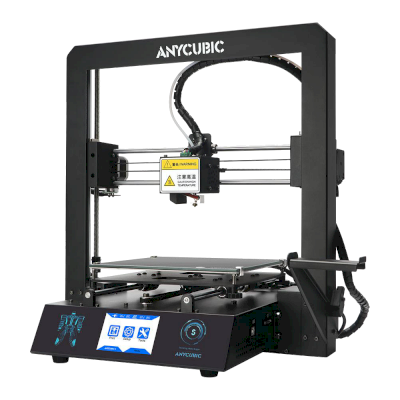
Fungerer 3D-printeren Anycubic i3 Mega med SimplyPrint, OctoPrint, Mainsail og Fluidd?
Hver tilkoblingsmåte, hva den trenger og hvordan du setter den opp.
Leveres ikke med Klipper: Den kjører Klipper etter at du har installert det i stedet for egen fastvare, en modifikasjon
Hva som fungerer med SimplyPrint
Koblet til via OctoPrint, støtter SimplyPrint alt Anycubic i3 Mega lar annen programvare gjøre: kameraet og KI-feildeteksjon, fjernutskrift, temperatur- og bevegelseskontroll og AutoPrint. 3 funksjoner avhenger av hvordan de er satt opp: Tabellen viser hva hver av dem trenger.
Alle SimplyPrint-funksjoner for hver måte å koble til SimplyPrint på
Koblet til SimplyPrint via
SimplyPrint-funksjon
OctoPrint
Kompatibel
Overvåking
Sanntidsstatus og fremdrift
Ja
Webkamera
Ja1
AI-feildeteksjon
Ja1
Tid igjen
Ja
Lagfremdrift
Ja
Temperaturer
Ja
Print
Starte en utskrift
Ja
Sett på pause, fortsett og avbryt
Ja
Hopp over objekter
Avhenger2
Filer
Skriv ut binær G-code (.bgcode)
Avhenger3
Printerstyring
Endre temperaturer
Ja
Bevegelse med kontrollene
Ja
Hjemkjøring
Ja
Ekstrudering og tilbaketrekking
Ja
Endre printhastighet
Ja
Viftehastighet
Ja
Baby stepping
Ja
Send G-code
Ja
Kalibrering
Skift filament
Ja
Nivellering av printplate
Ja
Z-offset-kalibrering
Ja
Automatisering
AutoPrint
Pro
Ja
Last ned filen før utskriften starter
Avhenger4
Koblet til SimplyPrint via OctoPrint
Kompatibel
Overvåking
Sanntidsstatus og fremdriftJa
WebkameraJa1
AI-feildeteksjonJa1
Tid igjenJa
LagfremdriftJa
TemperaturerJa
Print
Starte en utskriftJa
Sett på pause, fortsett og avbrytJa
Hopp over objekterAvhenger2
Filer
Skriv ut binær G-code (.bgcode)Avhenger3
Printerstyring
Endre temperaturerJa
Bevegelse med kontrolleneJa
HjemkjøringJa
Ekstrudering og tilbaketrekkingJa
Endre printhastighetJa
ViftehastighetJa
Baby steppingJa
Send G-codeJa
Kalibrering
Skift filamentJa
Nivellering av printplateJa
Z-offset-kalibreringJa
Automatisering
AutoPrint ProJa
Last ned filen før utskriften starterAvhenger4
Fungerer
Avhenger
Ikke støttet
Krever kamera
Krever OctoPrint-pluginen Cancel Objects
Krever OctoPrint-pluginen BGCode
Krever versjon 4.2.0 eller nyere av SimplyPrint-pluginen
Anycubic i3 Mega-eiere på SimplyPrint
50+ printere bruker SimplyPrint
Hvilken slicer du bør bruke til Anycubic i3 Mega
Bruk PrusaSlicer, Cura eller Kiri:Moto: Hver av dem har en ferdig profil for Anycubic i3 Mega.
Vi viser bare slicere du kan bruke i SimplyPrint-skyen, så det kan finnes andre for Anycubic i3 Mega.
Skybasert slicer for Anycubic i3 Mega: bruk PrusaSlicer på nett
Bruk PrusaSlicer og andre slicere direkte i nettleseren med SimplyPrints skybaserte nettslicer. Ingen installasjon kreves. Slice Anycubic i3 Mega-modellene dine fra hvilken som helst enhet, hvor som helst i verden!
Merk: Andre slicere, som Simplify3D, ideaMaker, SuperSlicer og KISSlicer, finnes ikke i skyen vår, så vi sporer ikke profilene deres. De kan fortsatt fungere godt med Anycubic i3 Mega: Se slicerens egen dokumentasjon eller forum etter en profil. Du kan også bidra med profiler til vår åpen kildekode-database for slicerprofiler på GitHub.
Appen for Anycubic i3 Mega
SimplyPrint fungerer som appen til Anycubic i3 Mega: på telefonen din og i alle nettlesere, med en slicer i skyen.
Hva du får med SimplyPrint
En app for iPhone og Android, det samme i enhver nettleser og en slicer i skyen.
Mer enn overvåking: en skriverkø, AI-basert feildeteksjon, AutoPrint og kontoer for et team.
Printere fra mange merker på ett sted, side om side.
Det finnes ennå ingen byggeplatebytter eller automatisk utmatingssett for Anycubic i3 Mega i SimplyPrint, men AutoPrint kan fortsatt holde den i gang: Når byggeplaten er ryddet, starter den neste jobb fra køen din.
Printere med bevegelig printplate er enklest å automatisere
Anycubic i3 Mega beveger printplaten frem og tilbake, slik at byggeplaten kommer ut foran på printeren. Det er dette byggeplatebyttere som disse bruker: De tar av den ferdige byggeplaten og skyver på en ny. Uten et sett kan en G-code-rutine skyve avkjølte utskrifter av med verktøyhodet.
Anycubic i3 Mega-spesifikasjoner: printplatestørrelse, utskriftshøyde og mer
Størrelse, temperaturer, multimateriale og tilkobling, basert på produsentens opplysninger og våre egne undersøkelser.
Les mer fra produsenten
Størrelse
Byggevolum
210 x 210 x 205 mm
Printplatetype
Square
Printplatestørrelse
210 x 210 mm
Maks. printhøyde
205 mm
Print
Kabinett
Åpen ramme
Bevegelsessystem
Printer med bevegelig printplate
Maks. utskriftshastighet
100 mm/s
Maks. ekstrudertemperatur
260 °C
Har oppvarmet printplate
Ja
Maks. printplatetemperatur
110 °C
Antall dyser
1
Verktøyhoder
1
Direct drive
Nei
Probeverktøy / automatisk printplatekalibrering
Nei
Filamentbredde
1.75 mm
Multimateriale
Verktøyveksler eller hotend-veksler
Nei
IDEX (uavhengige doble ekstrudere)
Nei
Kobler til
Tilkobling
USB, SD-kort
Innebygd kamera
Nei
Støtter seriell utskrift
Ja
Medfølgende firmware
Marlin
Filer og slicing
Støttede filformater
G-code (.gcode, .gco, .g)
Printeren
Printerprodusent / merke
Anycubic
Printermodellnavn
i3 Mega
Laget av et selskap fra
Kina
Lansert
2017
Fortsatt i produksjon
Nei, utgått
Ansvarsfraskrivelse:
Vi streber etter å holde denne informasjonen så oppdatert og nøyaktig som mulig, men kan ikke garantere at den er fullstendig eller pålitelig. Dataene våre er basert på brukerinnsendelser og produsentreferanser.
Hvilket filament kan Anycubic i3 Mega skrive ut?
Filamentkompatibilitet for Anycubic i3 Mega: materialene Anycubic oppgir for den.
Filament
Egnethet
Notater
PLA
Flott
På produsentens liste over materialer for denne printeren.
PETG
Flott
Godt innenfor området (PETG trives med en hotend på ~230-250C og en printplate på ~70-85C).
TPU og fleksible materialer
Med omtanke
Mulig, men en Bowden-ekstruder gjør fleksible materialer vanskeligere å skrive ut. Skriv ut sakte og velg helst fastere TPU med høyere Shore-hardhet.
ABS & ASA
Flott
På produsentens liste over materialer for denne printeren.
Nylon (PA)
Med omtanke
Mulig med forsiktighet, et kabinett og svært tørt filament er avgjørende.
Polycarbonate (PC)
Ikke ideelt
Ikke anbefalt, PC krever svært høye hotend-temperaturer og et lukket kammer.
Karbonfiber- og glassfiberforsterket
Med omtanke
Mulig hvis du monterer en herdet eller slitesterk dyse. De slipende fibrene sliter raskt ut en standard messingsdyse.
Tips: dette er en generell veiledning basert på printerens spesifikasjoner. Sjekk alltid anbefalte innstillinger for filamentet ditt. Med SimplyPrint kan du lagre en profil for hver spole og holde nøyaktig oversikt over filamentet på lager.
Beste filament til Anycubic i3 Mega
Filamenter som Anycubic i3 Mega skriver ut godt, først Anycubics egne, deretter de mest kjente.
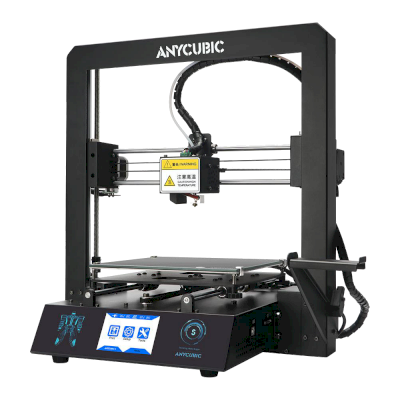
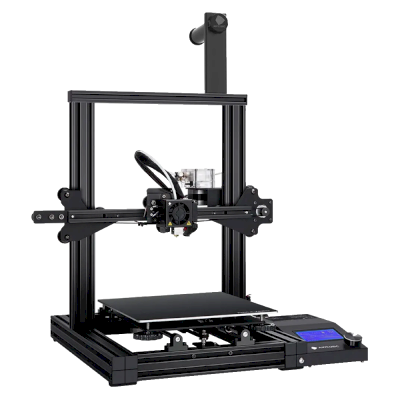
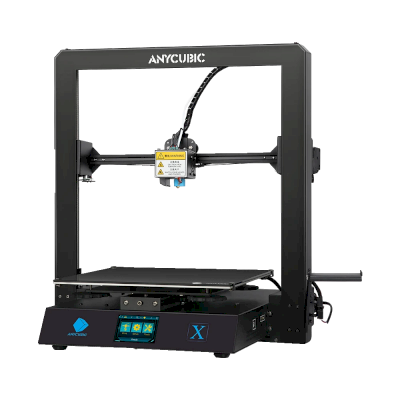
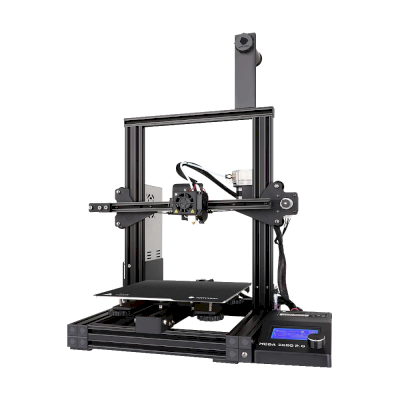
Printere fra samme produsent, med lignende størrelse, som printer de samme tekniske materialene eller multimateriale som den, og som du kan kjøpe i dag. Sammenlign opptil fire side om side, med spesifikasjoner og hvordan hver kobles til.
Hvem som lager Anycubic i3 Mega, og hvor åpent Anycubic lar deg bruke den: om printerne deres fungerer uten skyen deres, godtar hvilket som helst filament og hvilken som helst slicer, og kan repareres. Hvert område er vurdert basert på offentlige kilder.
Åpenhet: Blandet (3.0 av 5)
Blandet
Lukket økosystemÅpne
Anycubic is a Chinese 3D printer maker founded in 2015. It sells the Kobra line of FDM printers, including the enclosed Kobra S1 and S1 Max, the large Kobra 3 Max and the low-cost Kobra X, the ACE Pro multi-material unit and Photon resin printers. Its printers are aimed at hobbyists and home users at budget to mid-range prices.
Grunnlagt:
2015 ·
Hovedkontor:
China (its global store is run by Hongkong Anycubic Technology Co., Limited) ·
Nettsted:www.anycubic.com
Anycubic is mixed: its printers work locally in LAN mode, take third-party filament and slicers, and have spare parts and guides, but its published firmware source leaves proprietary parts closed, custom firmware is unsupported, and its cloud had a security incident in 2024.
Fastvare og tilpasset fastvare ●●●●●
The Kobra 3, 3 Max and S1 run Klipper-go, Anycubic's Go port of Klipper. Anycubic published its source with the kernel and U-Boot under GPL, for the Kobra 3 in October 2024 and for the wider family in October 2025, but says some proprietary features are kept closed, and that modifying the firmware voids the warranty. The community project Rinkhals adds Fluidd, Mainsail and SSH, and reports that the newer Kobra X only accepts signed updates.
[1][2][3]
Lokal styring og integrasjoner ●●●●●
LAN mode lets Anycubic Slicer Next send prints, show progress and stream video on the local network without an account, and the S1's firmware 2.5.9.9 added sending from OrcaSlicer. With LAN mode on, the cloud, the app and AI failure detection are off, and the S1 must leave LAN mode and be bound to an account to update its firmware. Anycubic documents no local API for other software; Moonraker, Fluidd and Mainsail come only with the community firmware Rinkhals.
[4][5][3]
Filament, slicere og deler fra tredjeparter ●●●●●
Third-party filament works. Anycubic Slicer Next is an open-source OrcaSlicer fork, and recent firmware accepts files sent from OrcaSlicer. Hotends, extruders and many other parts are model-specific Anycubic parts.
[6][5][7]
Reparasjoner og reservedeler ●●●●●
Anycubic's store sells hotends, extruders, motherboards, heated beds, motors and screens, and its wiki has replacement guides for current models, for example the Kobra S1 Max XY motors and the Kobra X Y-axis motor.
[7][8][9]
Data og personvern ●●●●●
LAN mode keeps data on the local network, but the app and cloud need an account. Anycubic's privacy policy allows broad collection, including product usage, device signals and nearby Wi-Fi access points, and storage in the United States. In February 2024 a flaw in its cloud MQTT server let a third party push a file to Kobra 2 printers; Anycubic apologised and patched it.
[10][11][4]
Fellesskap og dokumentasjon ●●●●●
Active user community and a wiki with guides and error codes for each model. Source releases leave proprietary parts closed, and custom firmware is a community effort.
[4][2][3]
Fordeler
Budget to mid-range prices, with multi-colour Combo bundles.
LAN mode works without an account.
Spare parts and replacement guides for current models.
Open-source slicer, and third-party filament works.
Ulemper
Published firmware source leaves some features closed; modifying firmware voids the warranty.
LAN mode turns off the app, cloud and AI failure detection, and firmware updates need the cloud.
The privacy policy allows broad data collection.
Its cloud was used to push files to printers in 2024 (fixed).
Merittliste
oktober 2025: Anycubic published Klipper-go, its Go port of Klipper, as a standalone project for the Kobra 3, Kobra 3 V2, Kobra 3 Max and Kobra S1, with the MCU firmware, Linux kernel and U-Boot sources, on GitHub under GPL-3.0. It says some proprietary features remain closed.
[2][12]
oktober 2024: Anycubic published the Kobra 3 firmware sources (Klipper-go, MCU firmware, Linux kernel and U-Boot) on GitHub under GPL-3.0.
[1]
februar 2024: A third party used a vulnerability in Anycubic's cloud MQTT server to make Kobra 2 Pro/Plus/Max printers download a file named 'hacked_machine_readme.gcode'. Anycubic counted 237 affected printers and over 2,000 that received the file, apologised for its late response, tightened cloud authorisation and released a firmware fix.
[11]
Undersøkt fra 14 kilder, sist sjekket 18. oktober 2026. Vis kilder
Ja. Du kan koble Anycubic i3 Mega til SimplyPrint via OctoPrint, og deretter slice, legge i kø, starte og overvåke utskrifter fra nettleseren eller mobilappen.
Hvordan kobler jeg Anycubic i3 Mega til SimplyPrint?
Følg vår trinnvise oppsettsveiledning for Anycubic i3 Mega. Den viser hvordan du kobler den til via OctoPrint, hva du trenger for hver metode og hvilken du bør velge.
Hvilken slicer bør jeg bruke for Anycubic i3 Mega?
Vi anbefaler PrusaSlicer for Anycubic i3 Mega. Du kan kjøre den, og 6 andre slicere, direkte i SimplyPrints nettbaserte slicer, uten installasjon, på alle enheter, med profiler for Anycubic i3 Mega som holdes automatisk oppdatert.
Kan jeg bruke OrcaSlicer med Anycubic i3 Mega?
Ja, men OrcaSlicer har ingen innebygd profil for Anycubic i3 Mega, så vidt vi vet: Start med profilen til en lignende printer og angi printplatens størrelse, høyde og dyse slik at de samsvarer.
Hvilket filament kan Anycubic i3 Mega skrive ut?
Anycubic oppgir PLA og ABS & ASA for i3 Mega.
Fungerer Anycubic i3 Mega med OctoPrint eller Klipper?
Anycubic i3 Mega fungerer med OctoPrint, og SimplyPrint kobles til via dem, slik at du i tillegg får skytilgang, en printkø og kameraovervåking.
Hva er printplatestørrelsen og byggevolumet til Anycubic i3 Mega?
Anycubic i3 Mega har en printplate på 210 x 210 mm og skriver ut opptil 205 mm høyt, med et byggevolum på omtrent 210 x 210 x 205 mm. Se hele spesifikasjonstabellen over for platetype, temperaturer og mer.
Når kom Anycubic i3 Mega ut?
Anycubic lanserte i3 Mega i 2017. Den har siden blitt tatt ut av produksjon, så du kan ikke lenger kjøpe den ny fra Anycubic.
Kan Anycubic i3 Mega løse ut utskrifter automatisk?
Det finnes ennå ikke noe sett for den som vi støtter, men AutoPrint i SimplyPrint kan skyve utskrifter av med verktøyhodet eller kjøre din egen utmatings-G-code, og deretter starte neste jobb fra køen din.
Selges Anycubic i3 Mega fortsatt?
Nei. Anycubic produserer eller selger ikke lenger i3 Mega ny. Lignende printere du kan kjøpe i dag: Anycubic Mega SE, Creality Ender-3 V3 KE og Creality Ender-3 S1 Pro.
Informasjon om partnerlenker: Enkelte lenker på denne siden er partnerlenker. Vi kan motta provisjon hvis du kjøper noe, uten ekstra kostnad for deg. Som Amazon-partner tjener vi på kvalifiserte kjøp.
 Kina
Kina
 OctoPrint





 OrcaSlicer
 BambuStudio
 ElegooSlicer
 CrealityPrint