注意:Simplify3D、ideaMaker、SuperSlicer、KISSlicerなどのスライサーはクラウドに含まれていないため、そのプロファイルは管理していません。Kingroon KP3S Pro S1で正常に動作する場合もあります。プロファイルについては、スライサーのドキュメントやフォーラムを確認してください。GitHubのオープンソースのスライサープロファイルデータベースにプロファイルを提供することもできます。
Kingroon KP3S Pro S1用アプリ
SimplyPrintはKingroon KP3S Pro S1のアプリとして、スマートフォンやあらゆるブラウザーで使えます。クラウドスライサーも利用できます。
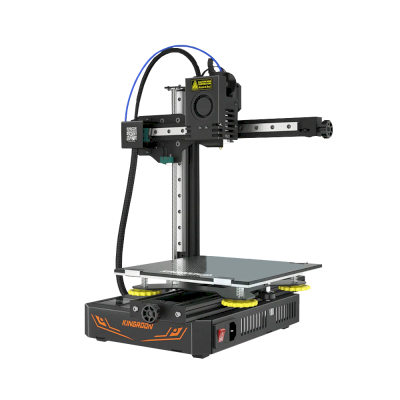
Kingroon KP3S Pro S1のメーカーと、Kingroonのプリンターの自由度を紹介します。メーカーのクラウドなしで使えるか、フィラメントやスライサーを自由に選べるか、修理できるかを確認できます。各項目は公開情報に基づいて評価しています。
オープン性:ほぼオープン(5点中4.1点)
ほぼオープン
閉鎖的なエコシステム開く
Kingroon is a Chinese company founded in 2016, with a Hong Kong address and a factory park in Huizhou, that made small, low-cost printers such as the KP3S bed slingers and the KLP1 CoreXY, the newer ones with Klipper installed. By October 2026 its shop lists its last printers only as sold-out clearance stock, and the company describes itself as a filament and resin maker.
設立:
2016 ·
本社:
Hong Kong (registered address); production in Huizhou, China ·
ウェブサイト:kingroon.com
Klipper and standard parts make the printers easy to work on, but Kingroon now lists them only as sold-out clearance stock and some spare parts are out of stock.
ファームウェアとカスタムファームウェア ●●●●●
The KP3S Pro V2 and KLP1 ship with open-source Klipper on Kingroon's own all-in-one board. We found no Kingroon source repository; upstream Klipper carries a config only for the original KP3S.
[3][8]
ローカル制御と連携 ●●●●●
The KP3S Pro V2 and KLP1 have Klipper on the mainboard with built-in Wi-Fi and print over the web or from a USB drive, with no Raspberry Pi needed. Kingroon's guides use Fluidd or Mainsail in a browser on the local network, so other software can use Moonraker's documented API. We found no Kingroon printer cloud or account; its guide points to the third-party Obico for remote access.
[3][6][10]
サードパーティー製フィラメント、スライサー、部品 ●●●●●
Standard parts throughout: MK8 and E3D V5/V6 nozzles and heater blocks, a Titan-style extruder, GT2 belts and 5015 fans. Any filament works, and OrcaSlicer ships profiles for the KLP1 and the KP3S family.
[5][9]
修理と交換部品 ●●●●●
Kingroon still lists about 20 KP3S-family parts, including the mainboard, extruder and Y-axis rail, but several (the mainboard and rail among them) were out of stock in October 2026, and the printers themselves are discontinued.
[5]
メリット
Klipper on small, cheap printers, controllable from a browser.
Standard, widely available parts (V6-type nozzles, GT2 belts, Titan-style extruder).
OrcaSlicer profiles for the KLP1 and KP3S models.
デメリット
Printers discontinued: Kingroon's shop lists them only as sold-out clearance stock (October 2026).
Some spare parts out of stock, including the KP3S mainboard and Y-axis rail (October 2026).
No published firmware source found for the Klipper models.
実績
10月 2026: In October 2026 Kingroon's shop listed its remaining printers (KLP1, KP3S Pro V2, KP3S 3.0, KP5L) only as clearance items, all sold out, and its About page described the company as a maker of filaments and resins; KP3S spare parts were still listed, some out of stock.
[2][1][5]
2023: Kingroon began selling the KP3S Pro V2 and the KLP1 CoreXY with Klipper installed on an all-in-one board, so no Raspberry Pi was needed.
[3][4]
はい。Kingroon KP3S Pro S1をOctoPrint経由でSimplyPrintに接続し、ブラウザーやモバイルアプリからスライス、キューへの追加、プリントの開始と監視ができます。
Kingroon KP3S Pro S1をSimplyPrintに接続するには?
Kingroon KP3S Pro S1の設定ガイドに沿って手順を進めてください。OctoPrintでの接続方法、それぞれに必要なもの、選び方を説明します。
Kingroon KP3S Pro S1にはどのスライサーを使用すればよいですか?
Kingroon KP3S Pro S1にはOrcaSlicerをおすすめします。SimplyPrintのオンラインスライサーでは、このスライサーと他の6個のスライサーを、インストール不要でどのデバイスからでも直接利用できます。Kingroon KP3S Pro S1のプロファイルも自動で最新に保たれます。
OrcaSlicerをKingroon KP3S Pro S1で使えますか?
はい。OrcaSlicerにはKingroon KP3S Pro S1用のプロファイルが含まれており、SimplyPrintのオンラインスライサーで使用できるため、インストールは不要です。
Kingroon KP3S Pro S1でプリントできるフィラメントは何ですか?
Kingroon KP3S Pro S1は、その仕様(ホットエンドは最大260C、ヒートベッドは最大100C)に基づき、PLA, PETG、またはTPU・柔軟性素材を問題なく扱えます。ABS、ナイロン、PC、複合素材については、上記のフィラメントガイドをご覧ください。
Kingroon KP3S Pro S1はOctoPrintやKlipperに対応していますか?
Kingroon KP3S Pro S1はOctoPrintに対応しており、SimplyPrintはこれらを通じて接続します。これにより、クラウドアクセス、キュー、カメラ監視も利用できます。
Kingroon KP3S Pro S1のベッドサイズと造形容量はどれくらいですか?
Kingroon KP3S Pro S1のプリントベッドは200 x 200 mmで、高さ200 mmまでプリントできます。造形サイズは約200 x 200 x 200 mmです。ベッドの種類や温度などは、上記の仕様一覧を確認してください。
 中国
中国
 OctoPrint





 PrusaSlicer
 BambuStudio
 Cura
Cura Kiri:Moto