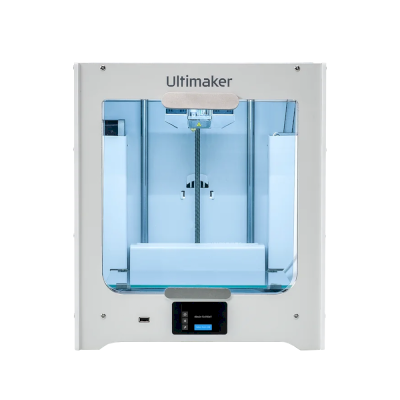
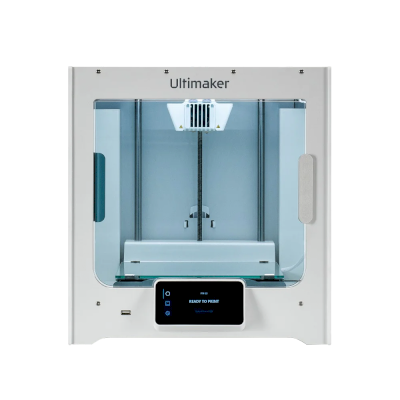
क्या Ultimaker S3 3D प्रिंटर SimplyPrint, OctoPrint, Mainsail और Fluidd के साथ काम करता है?
इसे कनेक्ट करने का हर तरीका, उसकी आवश्यकताएँ और उसे सेट अप करने का तरीका।
SimplyPrint क्लाइंट
संगत
आपको क्या चाहिए: उसी नेटवर्क पर हमेशा चालू रहने वाला कंप्यूटर या Raspberry Pi, जो SimplyPrint Client चला रहा हो
SimplyPrint क्लाइंट के माध्यम से कनेक्ट होने पर, SimplyPrint Ultimaker S3 पर उपलब्ध मुख्य सुविधाओं को कवर करता है: कैमरा और AI विफलता पहचान, रिमोट प्रिंटिंग, ऑब्जेक्ट छोड़ना और AutoPrint। SimplyPrint क्लाइंट के माध्यम से उपलब्ध नहीं: तापमान बदलें, Extrude और retract करें, प्रिंट स्पीड बदलें, फैन की गति, बेबी स्टेपिंग, G-code भेजें, filament बदलें, बेड लेवलिंग और Z-ऑफ़सेट कैलिब्रेशन।
हर SimplyPrint सुविधा, इसे SimplyPrint से कनेक्ट करने के हर तरीके के लिए
के माध्यम से SimplyPrint से कनेक्टेड
SimplyPrint सुविधा
SimplyPrint क्लाइंट
संगत
निगरानी
लाइव स्थिति और प्रगति
हां
वेबकैम
हां1
AI फेलियर डिटेक्शन
हां1
बचा हुआ समय
हां
लेयर प्रगति
हां
तापमान
हां
प्रिंटिंग
प्रिंट शुरू करना
हां
रोकें, फिर शुरू करें और रद्द करें
हां
ऑब्जेक्ट्स छोड़ें
हां
फ़ाइलें
UFP फ़ाइलें प्रिंट करें
हां
प्रिंटर कंट्रोल
तापमान बदलें
नहीं
कंट्रोल से चलाना
हां
होमिंग
हां
Extrude और retract करें
नहीं
प्रिंट स्पीड बदलें
नहीं
फैन की गति
नहीं
बेबी स्टेपिंग
नहीं
G-code भेजें
नहीं
कैलिब्रेशन
filament बदलें
नहीं
बेड लेवलिंग
नहीं
Z-ऑफ़सेट कैलिब्रेशन
नहीं
स्वचालन
AutoPrint
प्रो
हां
प्रिंट शुरू होने से पहले file डाउनलोड करें
हां
SimplyPrint क्लाइंट के माध्यम से SimplyPrint से कनेक्टेड
संगत
निगरानी
लाइव स्थिति और प्रगतिहां
वेबकैमहां1
AI फेलियर डिटेक्शनहां1
बचा हुआ समयहां
लेयर प्रगतिहां
तापमानहां
प्रिंटिंग
प्रिंट शुरू करनाहां
रोकें, फिर शुरू करें और रद्द करेंहां
ऑब्जेक्ट्स छोड़ेंहां
फ़ाइलें
UFP फ़ाइलें प्रिंट करेंहां
प्रिंटर कंट्रोल
तापमान बदलेंनहीं
कंट्रोल से चलानाहां
होमिंगहां
Extrude और retract करेंनहीं
प्रिंट स्पीड बदलेंनहीं
फैन की गतिनहीं
बेबी स्टेपिंगनहीं
G-code भेजेंनहीं
कैलिब्रेशन
filament बदलेंनहीं
बेड लेवलिंगनहीं
Z-ऑफ़सेट कैलिब्रेशननहीं
स्वचालन
AutoPrint प्रोहां
प्रिंट शुरू होने से पहले file डाउनलोड करेंहां
काम करता है
निर्भर करता है
समर्थित नहीं
कैमरा चाहिए
SimplyPrint पर Ultimaker S3 के मालिक
SimplyPrint के साथ उपयोग में
Ultimaker S3 के लिए कौन सा slicer इस्तेमाल करें
Cura, Ultimaker का अपना slicer, इस्तेमाल करें: इसमें Ultimaker S3 के लिए तैयार प्रोफ़ाइल है।
हम केवल उन slicer को सूचीबद्ध करते हैं जिन्हें आप SimplyPrint क्लाउड में इस्तेमाल कर सकते हैं, इसलिए Ultimaker S3 के लिए अन्य भी हो सकते हैं।
Ultimaker S3 के लिए cloud-based slicer: Cura online इस्तेमाल करें
Cura और अन्य slicers इस्तेमाल करें, सीधे अपने ब्राउज़र में SimplyPrint के ऑनलाइन क्लाउड slicer के साथ। इंस्टॉलेशन की जरूरत नहीं। दुनिया में कहीं से भी, किसी भी डिवाइस पर अपने Ultimaker S3 मॉडल slice करें!
स्वचालित profile updates: प्रोफ़ाइलों की हर दिन जाँच होती है और slicer GitHub repositories से, साथ ही हमारे ओपन-सोर्स समुदाय-संचालित slicer प्रोफ़ाइल डेटाबेस से भी अपने-आप ली जाती हैं। इससे आपके पास हमेशा नवीनतम प्रोफ़ाइलों की पहुँच रहती है।
ध्यान दें: अन्य slicer, जैसे Simplify3D, ideaMaker, SuperSlicer और KISSlicer, हमारे cloud में नहीं हैं, इसलिए हम उनकी profiles ट्रैक नहीं करते। वे फिर भी आपके Ultimaker S3 के साथ अच्छी तरह काम कर सकते हैं: profile के लिए slicer के दस्तावेज़ या फ़ोरम देखें। आप हमारी GitHub पर ओपन-सोर्स slicer profile डेटाबेस में profiles भी जोड़ सकते हैं।
Ultimaker S3 के लिए ऐप
SimplyPrint, Ultimaker S3 के ऐप के रूप में काम करता है: आपके फोन और किसी भी ब्राउज़र में, क्लाउड में slicer के साथ।
SimplyPrint के साथ आपको क्या मिलता है
iPhone और Android के लिए एक ऐप, किसी भी ब्राउज़र में वही अनुभव, और क्लाउड में एक slicer।
सिर्फ मॉनिटरिंग से अधिक: प्रिंट कतार, AI विफलता पहचान, AutoPrint और टीम के लिए खाते।
अभी SimplyPrint में Ultimaker S3 के लिए कोई plate swapper या auto-ejection kit नहीं है, लेकिन AutoPrint इसे प्रिंट कराता रख सकता है। plate खाली होते ही यह आपकी कतार से अगला job शुरू करता है।
इसे स्वचालित करने के तरीके
आपका अपना इजेक्शन G-codeप्लेट साफ़ करने वाला रूटीन लिखें, और AutoPrint हर प्रिंट के बाद इसे चलाएगा।
डिस्क्लेमर:
हम इस जानकारी को जितना हो सके उतना नया और सटीक रखने की कोशिश करते हैं, लेकिन इसकी पूर्णता या भरोसेमंदी की गारंटी नहीं दे सकते। हमारा डेटा यूज़र सबमिशन और निर्माता संदर्भों पर आधारित है।
Ultimaker S3 कौन सा filament print कर सकता है?
Ultimaker S3 के लिए filament संगतता: hotend, bed, chamber और enclosure के आधार पर आंकी गई वे सामग्रियाँ जिन्हें यह संभाल सकता है।
फिलामेंट
उपयुक्तता
नोट्स
PLA
बहुत अच्छा
print करने में सबसे आसान filament। लगभग हर printer पर चलता है; heated bed adhesion में मदद करता है लेकिन जरूरी नहीं।
PETG
बहुत अच्छा
आराम से range में (PETG को ~230-250C hotend और ~70-85C bed पसंद है)।
TPU और लचीले filament
सावधानी से
संभव है, लेकिन Bowden extruder flexible filament को कठिन बनाता है; धीरे प्रिंट करें और अधिक कठोर (high-shore) TPU चुनें।
ABS & ASA
सावधानी से
बेड पर्याप्त गर्म है, लेकिन enclosure के बिना ABS और ASA मुड़ जाते हैं। साफ़ प्रिंट के लिए enclosure की दृढ़ अनुशंसा है।
Nylon (PA)
सावधानी से
सावधानी से संभव है, enclosure और बहुत सूखा filament जरूरी हैं।
Polycarbonate (PC)
सावधानी से
सीमांत स्थिति में, वार्पिंग से बचने के लिए PC को बंद, गर्म chamber चाहिए।
Carbon-fiber और glass-filled
सावधानी से
संभव है, यदि आप hardened या wear-resistant nozzle लगाएँ, क्योंकि abrasive fibers मूल brass nozzle को जल्दी घिस देते हैं।
सुझाव: यह प्रिंटर के विनिर्देशों पर आधारित सामान्य मार्गदर्शिका है, हमेशा अपने फिलामेंट की सुझाई गई सेटिंग जांचें। SimplyPrint के साथ आप हर स्पूल के लिए प्रोफाइल सहेज सकते हैं और स्टॉक में मौजूद फिलामेंट को ठीक से ट्रैक कर सकते हैं।
Ultimaker S3 के लिए सर्वश्रेष्ठ filament
वे filaments जिन्हें Ultimaker S3 अच्छी तरह प्रिंट करता है, पहले Ultimaker के अपने, फिर सबसे प्रसिद्ध।
उसी निर्माता के, समान आकार के, वही engineering materials या इसी तरह के multi-material प्रिंट करने वाले प्रिंटर, जिन्हें आप आज खरीद सकते हैं। उनके specs और कनेक्शन के साथ अधिकतम चार प्रिंटर की साथ-साथ तुलना करें।
Ultimaker S3 कौन बनाता है और Ultimaker आपको कितनी स्वतंत्रता देता है: क्या इसके प्रिंटर इसके cloud के बिना चलते हैं, कोई भी filament और slicer स्वीकार करते हैं और उनकी मरम्मत की जा सकती है। हर क्षेत्र को सार्वजनिक स्रोतों के आधार पर रेट किया गया है।
खुलापन: मिश्रित (5 में से 2.9)
मिश्रित
बंद पारिस्थितिकी तंत्रखोलें
UltiMaker is the company formed in 2022 when the Dutch printer maker Ultimaker, founded in 2011, merged with MakerBot. It sells professional desktop and industrial printers (the S series, Factor 4, MakerBot Method and Sketch) to businesses, engineering teams and schools, and develops the open-source Cura slicer and the Digital Factory cloud platform.
स्थापना:
2011 ·
मुख्यालय:
Zaltbommel, Netherlands, and New York, USA ·
स्वामित्व:
Privately held; at the 2022 merger NPM Capital held the majority and Stratasys a minority stake ·
वेबसाइट:ultimaker.com
UltiMaker is mixed: Cura and material choice are open, and printers can be used on the local network, but the printer firmware is closed and most management features sit in its Digital Factory cloud.
फर्मवेयर और कस्टम फर्मवेयर ●●●●●
The printers' own software is not published: UltiMaker's GitHub has its Linux kernel configuration and Cura, but no printer firmware. We found no documented way to run custom firmware on current S-series or Method printers.
[1][2]
स्थानीय नियंत्रण और एकीकरण ●●●●●
Cura can add an S-series printer on the local network, by discovery or IP, without signing in, and start prints. UltiMaker says most features are only available through its Digital Factory cloud, and the API it documents publicly is that cloud API; we found no public documentation for controlling the printers locally.
[3][12]
तृतीय-पक्ष filament, slicer और पार्ट ●●●●●
Cura is open source and widely used with other brands, and UltiMaker lists over 300 materials, including third-party ones, for the S series. Print cores and the Material Station are UltiMaker's own parts.
[2][4]
मरम्मत और स्पेयर पार्ट्स ●●●●●
UltiMaker publishes maintenance schedules for the S series and sells part bundles and maintenance kits, and gives an expected printer lifetime of five years at 1,500 printing hours a year.
[5]
डेटा और गोपनीयता ●●●●●
Local printing needs no account; Digital Factory needs one. UltiMaker's privacy policy says data is stored and processed in the EEA or the United States depending on the user's region.
[6][3]
समुदाय और दस्तावेज़ ●●●●●
Cura is developed in public on GitHub with a large open issue tracker, and UltiMaker runs a community forum and support knowledge base. Printer internals are not documented publicly.
[2][3]
फायदे
Cura is open source and works with printers from many brands.
Wide material choice on the S series, including third-party materials.
Printers can be used on the local network without an account.
Published maintenance schedules and maintenance kits for long service life.
कमियां
Printer firmware is closed.
Most fleet and management features need the Digital Factory cloud, with paid tiers.
MakerBot CloudPrint was shut down in 2025, forcing users to move platforms.
Print cores and the Material Station are UltiMaker-only parts.
सिद्ध अनुभव
21 मई 2026: UltiMaker launched the Factor 4 Plus, an industrial printer up to twice as fast as the Factor 4, with TRACE print validation for production and defence customers.
[7]
फ़रवरी 2026: UltiMaker sold the Thingiverse model platform to MyMiniFactory and archived its Thingiverse forum.
[8]
दिसम्बर 2025: UltiMaker shut down MakerBot CloudPrint in early December 2025. Users had to reconnect printers to Digital Factory, with a free year of its premium tier offered to former CloudPrint users; the Replicator+ cannot be networked in Digital Factory.
[9]
मई 2022: Ultimaker and Stratasys' MakerBot announced a merger backed by $62.4 million from NPM Capital and Stratasys, with co-CEOs from both companies and headquarters in the Netherlands and New York. The combined company took the UltiMaker name.
[10][11]
12 स्रोतों से शोधित, अंतिम बार 18 अक्टूबर 2026 को जाँचा गया। स्रोत दिखाएं
हाँ। आप Ultimaker S3 को SimplyPrint क्लाइंट के ज़रिए SimplyPrint से कनेक्ट कर सकते हैं, फिर अपने ब्राउज़र या मोबाइल ऐप से प्रिंट स्लाइस कर सकते हैं, उन्हें कतार में डाल सकते हैं, शुरू कर सकते हैं और मॉनिटर कर सकते हैं।
Ultimaker S3 को SimplyPrint से कैसे कनेक्ट करें?
Ultimaker S3 के लिए हमारी चरण-दर-चरण सेटअप गाइड अपनाएँ। इसमें बताया गया है कि इसे SimplyPrint क्लाइंट के ज़रिए कैसे कनेक्ट करें, हर तरीके के लिए क्या चाहिए और कौन सा चुनें।
Ultimaker S3 के लिए कौन-सा slicer उपयोग करना चाहिए?
हम Ultimaker S3 के लिए Cura की सलाह देते हैं। आप इसे और 6 अन्य slicer, सीधे SimplyPrint के ऑनलाइन slicer में चला सकते हैं, कोई इंस्टॉल नहीं, किसी भी डिवाइस पर, और Ultimaker S3 के प्रोफाइल अपने आप अपडेट रहते हैं।
क्या Ultimaker S3 के साथ OrcaSlicer उपयोग किया जा सकता है?
हाँ, लेकिन हमारी जानकारी में OrcaSlicer में Ultimaker S3 के लिए अंतर्निहित प्रोफ़ाइल नहीं है: समान प्रिंटर की प्रोफ़ाइल से शुरू करें और bed का आकार, ऊँचाई और nozzle मिलान के अनुसार सेट करें।
Ultimaker S3 कौन सा filament print कर सकता है?
इसके स्पेसिफिकेशन (hotend 280C तक, heated bed 120C तक) के आधार पर Ultimaker S3, PLA या PETG को अच्छी तरह संभालता है। ABS, nylon, PC और composites के लिए ऊपर पूरी filament गाइड देखें।
क्या Ultimaker S3, OctoPrint या Klipper के साथ काम करता है?
हमारी जानकारी में नहीं, लेकिन आपको इनमें से किसी की ज़रूरत नहीं: SimplyPrint SimplyPrint क्लाइंट के जरिए Ultimaker S3 से कनेक्ट होता है।
Ultimaker S3 के बेड का आकार और बिल्ड वॉल्यूम क्या है?
Ultimaker S3 का print bed 230 x 190 mm है और यह 200 mm तक ऊंची प्रिंट कर सकता है, यानी लगभग 230 x 190 x 200 mm का build volume। bed के प्रकार, तापमान और अन्य जानकारी के लिए ऊपर पूरी specifications तालिका देखें।
Ultimaker S3 कब जारी हुआ?
Ultimaker ने S3 को सितम्बर 2019 में लॉन्च किया।
क्या Ultimaker S3 प्रिंट अपने आप निकाल सकता है?
अभी इसके लिए कोई समर्थित kit नहीं है, लेकिन SimplyPrint का AutoPrint आपका अपना ejection G-code चला सकता है, API के माध्यम से रोबोटिक भुजा के साथ काम कर सकता है, या आपके plate साफ करने की प्रतीक्षा कर सकता है, और फिर आपकी कतार से अगला job शुरू कर सकता है।
Affiliate खुलासा: इस पेज के कुछ link affiliate link हैं। आपके खरीदने पर हमें commission मिल सकता है, इसके लिए आपको कोई अतिरिक्त लागत नहीं देनी होगी। Amazon Associate के रूप में हम योग्य खरीद से कमाते हैं।
 नीदरलैंड
 SimplyPrint क्लाइंट


 PrusaSlicer
 OrcaSlicer
 BambuStudio
 ElegooSlicer
 CrealityPrint
 Kiri:Moto

/product_photo_md.png?cacheid=67b61612c5617)