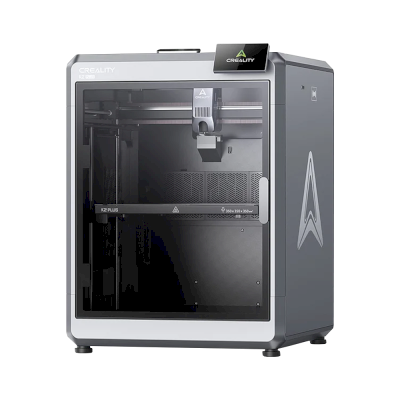
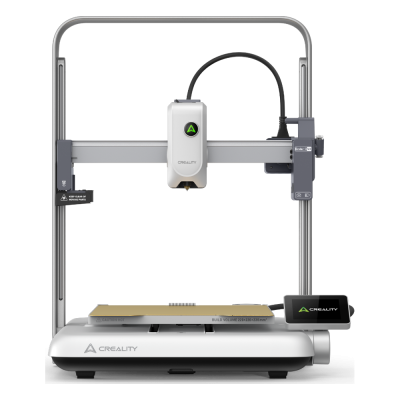
The K2 SE is the entry model of Creality's K2 family: an open-frame CoreXY with a 220 x 215 x 245 mm plate and a 300 °C hotend that takes the CFS multi-colour system, which comes with the Combo. It is for hobbyists who want affordable multi-colour printing in PLA and PETG.
Through Klipper directly, SimplyPrint can't map filament to the CFS slots or sync what is loaded in them, and print start options aren't available. Connect it with the SimplyPrint Client for those.
Choose the K2 SE when you want the cheapest way into Creality's multi-colour CoreXY printers and mostly print PLA, PETG and PLA-CF, the materials Creality lists for it. It is new and less proven than its siblings: Tom's Hardware had not tested it yet, and Makers101 notes it uses plain stepper motors where the rest of the K2 line has step-servos. If you want ABS or ASA, a larger plate or an enclosure for a classroom, the enclosed 260 mm Creality K2 is the step up.
优点
The lowest-priced printer in Creality's K2 family, and it still takes the CFS for multi-colour (Tom's Hardware).
CoreXY up to 500 mm/s, with automatic levelling of the print area, input shaping and power-loss recovery (Creality).
With the CFS, filament auto-relay, run-out and tangle detection come along; the Combo includes one CFS (All3DP).
Works with SimplyPrint through Klipper; Creality OS can be rooted and runs Fluidd (Creality).
缺点
Open frame with no chamber heating: Creality lists PLA, PETG and PLA-CF, and ABS or ASA are not what it is made for.
The smallest build volume in the K2 family, 220 x 215 x 245 mm.
Creality recommends 300 mm/s for good surface quality, well below the 500 mm/s headline.
No built-in camera (an AI camera is an optional extra) and Wi-Fi is 2.4 GHz only (Creality).
No independent hands-on review yet; Tom's Hardware and Makers101 had not tested it.
适合谁
学校可用
Easy PLA printing, and SimplyPrint can queue student prints for approval, but the open frame leaves hot parts in reach; the enclosed Creality K2 suits a classroom better.
业余爱好者适合
Affordable multi-colour PLA and PETG with the CFS, though it is less proven than the rest of the K2 family.
企业可用
Fine for PLA and PETG prototypes, but the small plate, limited materials and missing camera hold it back.
打印农场不太适合
No camera, 2.4 GHz Wi-Fi only and no track record yet make it a weak choice for many machines running unattended.
Creality is a Shenzhen 3D printer maker founded in 2014. Its low-cost Ender series, launched in 2017, made desktop 3D printing affordable for many hobbyists. It now sells Klipper-based K-series CoreXY printers, Ender and CR open-frame printers, the Hi and SPARKX beginner lines, the CFS multi-material system, 3D scanners and laser engravers, and runs the Creality Cloud model platform. It listed on the Hong Kong Stock Exchange in 2026.
成立:
2014 ·
总部:
Shenzhen, China ·
所有权:
Listed on the Hong Kong Stock Exchange (3388.HK) since 2026; founder Jack Chen is chief executive ·
网站:www.creality.com
Creality sits in the middle: its Klipper-based printers can be run locally with Fluidd and open slicers, and it publishes firmware source, but usually months after launch, and it dropped root access on its 2025 K1 revisions.
固件和自定义固件 ●●●●●
Creality publishes Klipper firmware source for the K1, K2, Hi and Ender-3 V3 KE on GitHub under GPL, but after launch: the K1 source came about three months after the series launched in May 2023, the K2 and Hi sources in September 2025. Earlier K1 printers have an official root option with a published guide, but Creality's wiki says the 2025 K1C and K1 Max do not support root access.
[1][2][3][4][5]
本地控制与集成 ●●●●●
Creality Print sends jobs over the local network with no account, and Creality Cloud is optional. The K2 series and Ender-3 V3 serve Fluidd on the printer, so other software can use Klipper's documented Moonraker API. On the K1 series, Creality's firmware notes treat Fluidd and Mainsail as add-ons owners install themselves, and Creality says the 2025 K1C and K1 Max do not support root access. The SPARKX i7 is set up through the Creality Cloud app.
[6][20][7][21][4][8][22]
第三方耗材、切片软件和零件 ●●●●●
Third-party filament works; Creality Print is an open-source (AGPL-3.0) slicer and OrcaSlicer supports Creality printers. Creality sells nozzle, hotend and extruder kits per model; newer K2 parts such as its nozzle kit are Creality designs.
[10][11][12]
维修和备件 ●●●●●
Creality's store sells extruder, hotend, heating-block and print-head kits per model, and its wiki has parts lists and replacement guides for current printers (for example the K2 Plus and SPARKX i7 hotends).
[12][13][14]
数据与隐私 ●●●●●
Local printing needs no account; Creality Cloud and its app need one. Creality's published privacy policy is written for its websites and services, allows use of data for targeted advertising, and says little about printer data or where it is stored.
[15][6]
社区和文档 ●●●●●
One of the largest user bases (second in consumer 3D printers by 2025 sales value, per figures in its listing), a public wiki with model-specific guides, firmware and slicer sources on GitHub, and an official forum.
[16][10][6]
优点
Klipper-based models can be run entirely on the local network through Fluidd, without an account.
Firmware for most current models and the Creality Print slicer are published as source on GitHub.
Wide range, from budget Ender printers to multi-colour K2 machines.
Spare-part kits and model-specific replacement guides are easy to find.
Very large user base, so community help is easy to find.
缺点
Firmware source has usually appeared months after a model ships.
Root access, offered on earlier K1 printers, is not supported on the 2025 K1C and K1 Max.
The privacy policy says little about printer and cloud data.
The SPARKX line is built around the Creality Cloud app and an account.
实绩
五月 2026: Creality listed on the Main Board of the Hong Kong Stock Exchange (3388.HK), raising about HK$1.27 billion net. Its prospectus showed 2025 revenue of RMB 3.13 billion and a net loss of RMB 182.4 million, after a profit in 2024.
[16][5]
十一月 2025: Creality's wiki states that the 2025 revisions of the K1C and K1 Max do not support root access, which earlier K1 printers offered through an official option and guide.
[4][17][3]
九月 2025: Creality published the Klipper source for its K2 series and for the Hi on GitHub under GPL-3.0.
[2][18]
八月 2023: About three months after the K1 series launched, Creality published its K1 Klipper source on GitHub, followed by a repository with a root guide and Fluidd and Mainsail install instructions.
[1][3][5]
 中国
中国

 SimplyPrint客户端
  Klipper(Moonraker)



 PrusaSlicer
 BambuStudio
 ElegooSlicer
 Cura
Cura Kiri:Moto





 面向加拿大的Creality