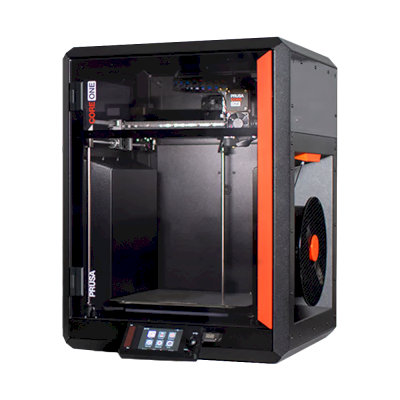
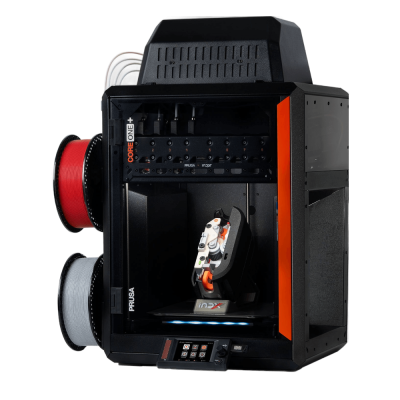
The CORE One+ INDX is Prusa's enclosed CoreXY printer fitted with Bondtech's INDX induction toolchanger: up to eight tools, each with its own nozzle, in a 248 x 205 x 270 mm build volume. It is for makers, workshops and businesses that want fast multi-colour and multi-material printing with almost no purge waste.
La stampante 3D Prusa CORE One+ INDX è compatibile con SimplyPrint, OctoPrint, Mainsail e Fluidd?
Ogni modalità di connessione, requisiti e configurazione.
SimplyPrint Client
Dovrebbe funzionare
Same firmware and electronics as the CORE One, which works with the SimplyPrint Client. How it handles eight tools isn't confirmed yet.
Collegata tramite OctoPrint, SimplyPrint dovrebbe supportare gran parte delle funzioni disponibili su Prusa CORE One+ INDX: la fotocamera e il rilevamento degli errori tramite IA, stampa remota, controllo di temperatura e movimento e AutoPrint. Non disponibile tramite OctoPrint: Sincronizzare il filamento caricato dall'unità multimateriale. 3 funzioni dipendono dalla configurazione: la tabella indica i requisiti di ciascuna. La tabella seguente confronta tutti i 3 modi per collegarla a SimplyPrint.
Ogni funzionalità di SimplyPrint, per ogni modalità di connessione a SimplyPrint
Collegata a SimplyPrint tramite
funzione di SimplyPrint
SimplyPrint Client
Dovrebbe funzionare
OctoPrint
Dovrebbe funzionare
Firmware diretto Prusa
Dovrebbe funzionare
Monitoraggio
Stato e avanzamento in tempo reale
Sì
Sì
Sì
Webcam
Sì1
Sì1
Non offerto dalla stampante2
Rilevamento errori con IA
Sì1
Sì1
Non offerto dalla stampante2
Tempo rimanente
Sì
Sì
Sì
Avanzamento dei layer
Non offerto dalla stampante2
Sì
Sì
Temperature
Sì
Sì
Sì
Stampa
Avvio della stampa
Sì
Sì
Sì
Mettere in pausa, riprendere e annullare
Sì
Sì
Sì
Ignorare oggetti
Non offerto dalla stampante2
Dipende3
Sì
File
Stampare G-code binario (.bgcode)
Sì
Dipende4
Dipende5
Controllo della stampante
Modificare le temperature
Non offerto dalla stampante2
Sì
Sì
Movimento con i comandi
Non offerto dalla stampante2
Sì
Sì
Ritorno all'origine
Non offerto dalla stampante2
Sì
Sì
Estrudere e retrarre
Non offerto dalla stampante2
Sì
Sì
Modificare la velocità di stampa
Non offerto dalla stampante2
Sì
Sì
Velocità ventola
Non offerto dalla stampante2
Sì
Sì
Baby stepping
Non offerto dalla stampante2
Sì
Sì
Inviare G-code
Non offerto dalla stampante2
Sì
Sì
Calibrazione
Cambio filamento
Non offerto dalla stampante2
Sì
Sì
Livellamento del piano
Non offerto dalla stampante2
Sì
Sì
Calibrazione Z-offset
Non offerto dalla stampante2
Sì
No
Multimateriale
Sincronizzare il filamento caricato dall'unità multimateriale
No
No
Sì6
Automazione
AutoPrint
Pro
Sì
Sì
Sì
Scaricare il file prima dell'avvio della stampa
Non offerto dalla stampante2
Dipende7
Sì
Collegata a SimplyPrint tramite SimplyPrint Client
Dovrebbe funzionare
Monitoraggio
Stato e avanzamento in tempo realeSì
WebcamSì1
Rilevamento errori con IASì1
Tempo rimanenteSì
Avanzamento dei layerNon offerto dalla stampante2
TemperatureSì
Stampa
Avvio della stampaSì
Mettere in pausa, riprendere e annullareSì
Ignorare oggettiNon offerto dalla stampante2
File
Stampare G-code binario (.bgcode)Sì
Controllo della stampante
Modificare le temperatureNon offerto dalla stampante2
Movimento con i comandiNon offerto dalla stampante2
Ritorno all'origineNon offerto dalla stampante2
Estrudere e retrarreNon offerto dalla stampante2
Modificare la velocità di stampaNon offerto dalla stampante2
Velocità ventolaNon offerto dalla stampante2
Baby steppingNon offerto dalla stampante2
Inviare G-codeNon offerto dalla stampante2
Calibrazione
Cambio filamentoNon offerto dalla stampante2
Livellamento del pianoNon offerto dalla stampante2
Calibrazione Z-offsetNon offerto dalla stampante2
Multimateriale
Sincronizzare il filamento caricato dall'unità multimaterialeNo
Automazione
AutoPrint ProSì
Scaricare il file prima dell'avvio della stampaNon offerto dalla stampante2
Collegata a SimplyPrint tramite OctoPrint
Dovrebbe funzionare
Monitoraggio
Stato e avanzamento in tempo realeSì
WebcamSì1
Rilevamento errori con IASì1
Tempo rimanenteSì
Avanzamento dei layerSì
TemperatureSì
Stampa
Avvio della stampaSì
Mettere in pausa, riprendere e annullareSì
Ignorare oggettiDipende3
File
Stampare G-code binario (.bgcode)Dipende4
Controllo della stampante
Modificare le temperatureSì
Movimento con i comandiSì
Ritorno all'origineSì
Estrudere e retrarreSì
Modificare la velocità di stampaSì
Velocità ventolaSì
Baby steppingSì
Inviare G-codeSì
Calibrazione
Cambio filamentoSì
Livellamento del pianoSì
Calibrazione Z-offsetSì
Multimateriale
Sincronizzare il filamento caricato dall'unità multimaterialeNo
Automazione
AutoPrint ProSì
Scaricare il file prima dell'avvio della stampaDipende7
Collegata a SimplyPrint tramite Firmware diretto Prusa
Dovrebbe funzionare
Monitoraggio
Stato e avanzamento in tempo realeSì
WebcamNon offerto dalla stampante2
Rilevamento errori con IANon offerto dalla stampante2
Tempo rimanenteSì
Avanzamento dei layerSì
TemperatureSì
Stampa
Avvio della stampaSì
Mettere in pausa, riprendere e annullareSì
Ignorare oggettiSì
File
Stampare G-code binario (.bgcode)Dipende5
Controllo della stampante
Modificare le temperatureSì
Movimento con i comandiSì
Ritorno all'origineSì
Estrudere e retrarreSì
Modificare la velocità di stampaSì
Velocità ventolaSì
Baby steppingSì
Inviare G-codeSì
Calibrazione
Cambio filamentoSì
Livellamento del pianoSì
Calibrazione Z-offsetNo
Multimateriale
Sincronizzare il filamento caricato dall'unità multimaterialeSì6
Automazione
AutoPrint ProSì
Scaricare il file prima dell'avvio della stampaSì
Funziona
Dipende
Non supportato
Non offerto dalla stampante
Richiede una fotocamera
La stampante non offre questa funzione ad altri software.
Richiede il plugin OctoPrint Cancel Objects
Richiede il plugin OctoPrint BGCode
Richiede firmware 5.2.0 o successivo
Richiede un'unità multimateriale
Richiede il plugin SimplyPrint versione 4.2.0 o successiva
Quale slicer usare per la Prusa CORE One+ INDX
Le stampanti Prusa usano PrusaSlicer, lo slicer proprietario di Prusa. Non è ancora disponibile nel cloud un profilo predefinito per Prusa CORE One+ INDX.
Sono elencati solo gli slicer utilizzabili nel cloud di SimplyPrint, potrebbero quindi essercene altri per Prusa CORE One+ INDX.
Slicer cloud per Prusa CORE One+ INDX: usare PrusaSlicer online
Usare PrusaSlicer e altri slicer, direttamente nel browser con lo slicer cloud online di SimplyPrint. Non richiede installazione. Sezionare i modelli Prusa CORE One+ INDX da qualsiasi dispositivo, ovunque nel mondo.
Aggiornamenti automatici dei profili: i profili vengono verificati e recuperati automaticamente ogni giorno dai repository GitHub degli slicer, oltre che dal nostro database open source di profili slicer gestito dalla community. Questo garantisce sempre l'accesso ai profili più recenti.
Nota: Altri slicer, come Simplify3D, ideaMaker, SuperSlicer e KISSlicer, non sono nel nostro cloud, quindi i relativi profili non vengono monitorati. Potrebbero comunque funzionare bene con Prusa CORE One+ INDX: consultare la documentazione o i forum dello slicer per un profilo. È inoltre possibile contribuire con profili al nostro database open source dei profili slicer su GitHub.
L'app per Prusa CORE One+ INDX
Usare SimplyPrint come app per la Prusa CORE One+ INDX: consente di monitorarla e gestirla da telefono o browser, eseguire lo slicing nel cloud e tenerla accanto alle altre stampanti. Si può iniziare gratis. Le app di Prusa sono Prusa app e Prusa Connect.
Cosa fa
SimplyPrint
Prusa app e Prusa Connect
Stampanti di altri marchi
Sì
Solo stampanti Prusa Research
Funziona senza il cloud di Prusa Research
Sì
Solo tramite il cloud di Prusa Research
Anche in SimplyPrint
Un'app per iPhone e Android, accessibile da qualsiasi browser, e uno slicer nel cloud.
Più del monitoraggio: coda di stampa, rilevamento guasti con IA, AutoPrint e account per un team.
Non esiste ancora un dispositivo di sostituzione della piastra o un kit di espulsione automatica per la Prusa CORE One+ INDX in SimplyPrint, ma AutoPrint può comunque mantenerla operativa: quando la piastra è libera, avvia il lavoro successivo dalla coda.
Le stampanti chiuse espellono le stampe
Il piano di stampa della stampante Prusa CORE One+ INDX si muove solo su e giù all'interno della sua camera chiusa, quindi, invece di sostituire le piastre, una routine di espulsione consente alla testa di stampa di spingere la stampa raffreddata fuori dalla piastra e dalla porta frontale, che deve restare aperta durante l'esecuzione. Alcune stampanti non stampano con la porta aperta, la Prusa CORE One ha un sensore della porta, quindi verificare prima.
Modalità di automazione
Spingere via le stampe con la testa di stampaSu una stampante CoreXY, una routine G-code può spingere la stampa raffreddata fuori dal davanti del piano di stampa prima dell'avvio del lavoro successivo.
Avviso legale:
Ci impegniamo a mantenere queste informazioni il più aggiornate e accurate possibile, ma non possiamo garantirne la completezza o l'affidabilità. I dati si basano su segnalazioni degli utenti e riferimenti dei produttori.
Quale filamento può stampare Prusa CORE One+ INDX?
Compatibilità dei filamenti per Prusa CORE One+ INDX: materiali indicati da Prusa.
Filamento
Idoneità
Note
PLA
Ottimo
Nell'elenco dei materiali del produttore per questa stampante.
PETG
Ottimo
Nell'elenco dei materiali del produttore per questa stampante.
TPU e flessibili
Ottimo
Nell'elenco dei materiali del produttore per questa stampante.
ABS & ASA
Ottimo
Nell'elenco dei materiali del produttore per questa stampante.
Nylon (PA)
Ottimo
Nell'elenco dei materiali del produttore per questa stampante.
Polycarbonate (PC)
Ottimo
Nell'elenco dei materiali del produttore per questa stampante.
Con fibra di carbonio e vetro
Con cura
È possibile montando un ugello temprato o resistente all'usura: le fibre abrasive consumano rapidamente un ugello standard in ottone.
Suggerimento: questa è una guida generale basata sulle specifiche della stampante. Controlla sempre le impostazioni consigliate per il filamento. Con SimplyPrint puoi salvare un profilo per ogni bobina e tracciare con precisione il filamento disponibile.
Miglior filamento per Prusa CORE One+ INDX
Filamenti stampati bene da Prusa CORE One+ INDX, prima quelli di Prusa, poi i più noti.
Tested a pre-assembled 8-tool unit. Found multicolour prints nearly waste-free and much faster than the Bambu Lab H2C on the same model, with a quick setup and a fully offline mode. Criticised the high price, the missing flexible-filament profile at launch and that the printer does not know filament colours.
“Prusa’s collaboration with Bondtech to produce the INDX toolchanger has produced a machine other manufacturers can’t wait to copy.”
Ran the assembled 8-tool version for three weeks after a slow first calibration and compared it with the Bambu Lab H2C and Snapmaker U1. Found it clearly faster at multicolour printing than both, with no misprints once settled in. Downsides: recalibration takes time, the workflow is new, and the bed is small.
“The speed is just unmatched by anything a multi-filament printer offers.”
Made with Layers · 11 ottobre 2026
Thomas Sanladerer's video on the INDX toolchanger for the CORE One. Per its description, the INDX does a few things really well and many things not at all.
The Next Layer · 14 luglio 2026
First impressions after over 160 hours and nearly 15,000 tool changes on the Founders Edition: fast, reliable tool changes, automatic nozzle alignment and far less purge waste, with a list of quality-of-life fixes he wants before the production version. Sponsored by Onshape.
Quando scegliere Prusa CORE One+ INDX
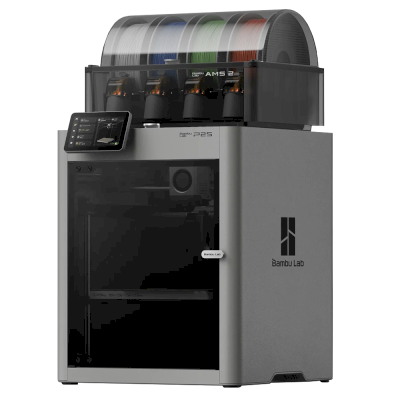
Choose the INDX when multi-colour or multi-material is the point and you want it fast and nearly waste-free: Tom's Hardware ran the same model nearly nine hours faster than the Bambu Lab H2C with 83.58 g less waste, and TechRadar found it clearly faster than the H2C and the Snapmaker U1. The Snapmaker U1 is the cheaper four-colour toolchanger ($849 in Tom's Hardware), and the H2C has a larger 330 x 320 mm bed. If you only print one material, the standard CORE One+ is the same printer without the toolchanger.
Vantaggi
Up to eight tools with a nozzle each: Prusa quotes about 12 seconds and 0.013 g of waste per colour change with no purge tower, and Tom's Hardware measured 18 g of waste over 1,646 tool changes.
Tom's Hardware found it nearly nine hours faster than the Bambu Lab H2C on one model, and TechRadar found it clearly faster than the H2C and Snapmaker U1, with no misprints in three weeks once calibrated.
Fully enclosed with a chamber that reaches 55 °C and smart ventilation, so ASA, PC and nylon print without warping and PLA can print with the door closed.
You can mix nozzle sizes (0.25 to 1.0 mm) and materials in one print, for example soft TPU grips on rigid PETG or PLA parts.
Runs fully offline, with open firmware, an EU build and no subscription; Tom's Hardware names reliability, right to repair and data security as Prusa's strengths.
Expected to work with SimplyPrint through the SimplyPrint Client, OctoPrint or Prusa Direct, but we have not confirmed it yet.
Svantaggi
It is a splurge (Tom's Hardware), and the assembled 8-tool version costs the most; a 4-tool version can be upgraded later.
The bed is smaller than the CORE One+'s because the tool rack takes 15 mm of depth and 2 mm of width, leaving 248 x 205 mm.
The stock nozzles are not designed for long runs of abrasive filament; Prusa rates them for about 10 kg of PETG-CF or 5 kg of PC-CF.
Early-product gaps: no official flexible-filament profile at launch and TPU jammed in Tom's Hardware's test, the printer does not know filament colours, and TechRadar found calibration slow at first.
No camera in the box; a night-vision camera is a separate accessory.
A chi è adatto
ScuoleBuona compatibilità
Enclosed, offline-capable and quick to set up, and Tom's Hardware calls it easy enough for school kids; the price and a newer, more complex toolchanger are the catch.
HobbistiBuona compatibilità
Reviewers rate its multi-colour speed and waste above the H2C and U1, but it costs well above entry-level multi-colour printers.
AziendeOttima compatibilità
Fast, waste-free multi-material in an enclosed, serviceable, offline-capable machine from a maker known for support and repairability.
Farm di stampaBuona compatibilità
Reviewers report reliable running and Prusa builds on its farm-proven CORE One+, but SimplyPrint support is unconfirmed and no bed-clearing kit is listed.
Confrontare Prusa CORE One+ INDX con stampanti simili
Stampanti dello stesso produttore, di dimensioni simili, che stampano gli stessi materiali tecnici o multimateriale, acquistabili oggi. È possibile confrontarne fino a quattro affiancate, con specifiche e modalità di connessione.
Chi produce Prusa CORE One+ INDX e quanto margine di libertà offre Prusa: se le sue stampanti funzionano senza il suo cloud, accettano qualsiasi filamento e slicer e possono essere riparate. Ogni aspetto è valutato su fonti pubbliche.
Apertura: Aperto (4.9 su 5)
Aperto
Sistema chiusoAperto
Prusa Research is a Prague company founded in 2012 by Josef Průša, who came from the open-source RepRap project. It designs and builds the Original Prusa and Prusa CORE printers, makes Prusament filament, develops the PrusaSlicer slicer and runs the Printables model site. Printers are built in Prague and at its US site in Delaware, sold assembled or as kits, and used by hobbyists, schools, businesses and print farms.
Fondata:
2012 ·
Sede centrale:
Prague, Czech Republic ·
Proprietà:
Prusa Research a.s., founded and led by Josef Průša ·
Persone:
More than 1,200 people (company site, 2026) ·
Sito web:www.prusa3d.com
Prusa is the most open of the large brands: GPL firmware, an open slicer, full local control without an account and spare parts for everything. Hardware design files now come under Prusa's own Open Community License, which allows personal and in-house business use but not selling machines.
Firmware e firmware personalizzato ●●●●●
Firmware for current printers is published on GitHub under GPL-3.0 and updated with every release. Official firmware is signed, but Prusa documents how to flash custom firmware by breaking a seal on the board and says this does not void the warranty. Prusa says firmware and printable parts are shared right away and electronics schematics later.
[1][2][3]
Controllo locale e integrazioni ●●●●●
PrusaLink, built into the CORE One, MK4S, MK3.9, MK3.5 and XL, handles monitoring, file uploads and print control on the local network without internet or an account, and printing from USB works offline. Prusa publishes PrusaLink's HTTP API as an OpenAPI specification on GitHub, and its help centre covers OctoPrint setup. Prusa Connect is an optional cloud service for remote access.
[4][15]
Filamenti, slicer e parti di terze parti ●●●●●
Printers are open to any filament; PrusaSlicer is GPL-licensed and other slicers work. Instead of a locked RFID system, Prusa created OpenPrintTag, an NFC spool-tag standard that is free for any brand to use and works offline.
[5][6]
Riparazioni e ricambi ●●●●●
The e-shop sells spare parts for each printer, printable parts are published, and the full CORE One CAD files are released. Prusa's open-source page says its goal is printers that stay moddable and easy to repair for decades, and its licence explicitly allows making spare parts for your own machines.
[7][3][5]
Dati e privacy ●●●●●
No account is needed for local use through PrusaLink or USB. Prusa Connect needs a Prusa account and stores G-codes and telemetry in the cloud. Prusa Research is an EU company and publishes its privacy policy and a Trust Center.
[4][8]
Community e documentazione ●●●●●
Large community around Printables and the forum, a detailed knowledge base, and firmware and slicer developed in public on GitHub with open issue trackers.
[1][4]
Vantaggi
GPL firmware with a documented, warranty-safe way to flash custom firmware.
Full control on the local network through PrusaLink, with no account needed.
Spare parts for every printer, published printable parts and released CAD files.
Kits available for people who want to build and understand their printer.
Made in Prague, with a second factory in Delaware for US buyers.
OpenPrintTag is an open spool-tag standard any brand can use.
Svantaggi
Hardware files use Prusa's own OCL licence, which bars selling machines built from them; it is not an OSI open-source licence.
Electronics schematics are published later than firmware and printable parts.
Remote access and cloud storage need Prusa Connect and an account.
Esperienza comprovata
luglio 2026: Printed Solid, the Delaware company Prusa Research bought in 2022, was renamed Prusa USA. Its Wilmington site builds the MK4S and CORE One+, makes filament and is Prusa's US service centre.
[9]
dicembre 2025: Prusa released the full CAD files of the CORE One under its new Open Community License (OCL). OCL allows modifying, sharing mods and in-house commercial use, and grants patent and repair rights, but bars selling machines built from the files without an agreement, so it is not a standard open-source licence. Prusa said it is also filing patents on its designs.
[5]
ottobre 2025: Prusa launched OpenPrintTag, a published NFC standard for smart filament spools that any brand can use without licence fees, starting with redesigned Prusament spools.
[6]
novembre 2024: Prusa announced the CORE One, its first fully enclosed CoreXY printer with active chamber temperature control.
[10]
marzo 2023: Josef Průša wrote that open source in 3D printing was under strain from cloners and licence violations. With the MK4, Prusa released firmware sources and models of the plastic parts but held back the electronics plans, planning to publish them later under a new licence.
[11]
Basato su 15 fonti, ultima verifica 18 ottobre 2026. Mostrare le fonti
Prusa CORE One+ INDX è compatibile con SimplyPrint?
Molto probabilmente. Si prevede che Prusa CORE One+ INDX si connetta a SimplyPrint tramite SimplyPrint Client, OctoPrint o Firmware diretto Prusa, ma non è ancora stato confermato. Se ne è disponibile una, la guida di configurazione mostra in pochi minuti se funziona, e una risposta lo conferma per tutti.
Come collegare Prusa CORE One+ INDX a SimplyPrint?
Seguire la guida alla configurazione passo passo per Prusa CORE One+ INDX. Mostra come collegare la stampante tramite SimplyPrint Client, OctoPrint o Firmware diretto Prusa, cosa serve per ciascun metodo e quale scegliere.
Quale slicer usare per la stampante Prusa CORE One+ INDX?
Usare PrusaSlicer, lo slicer di Prusa, creato per le sue stampanti. Può essere eseguito nello slicer online di SimplyPrint; non è ancora disponibile un profilo preconfigurato per la Prusa CORE One+ INDX.
È possibile usare OrcaSlicer con Prusa CORE One+ INDX?
Sì, ma per quanto noto OrcaSlicer non dispone di un profilo integrato per Prusa CORE One+ INDX: usare il profilo di una stampante simile e impostare dimensioni del piano di stampa, altezza e ugello corrispondenti.
Quale filamento può stampare Prusa CORE One+ INDX?
Prusa indica PLA, PETG, ABS & ASA, TPU e flessibili, Polycarbonate (PC) e Nylon (PA) per CORE One+ INDX.
Prusa CORE One+ INDX funziona con OctoPrint o Klipper?
La stampante Prusa CORE One+ INDX funziona con OctoPrint e SimplyPrint si collega tramite questi metodi, aggiungendo accesso cloud, coda e monitoraggio con telecamera.
Quali sono le dimensioni del piano di stampa e il volume di stampa della Prusa CORE One+ INDX?
La stampante Prusa CORE One+ INDX ha un piano di stampa di 248 x 205 mm e stampa fino a 270 mm di altezza, con un volume di stampa di circa 248 x 205 x 270 mm. Per il tipo di piano di stampa, le temperature e altro, consultare la tabella delle specifiche completa qui sopra.
Quando è uscita la Prusa CORE One+ INDX?
Prusa ha lanciato CORE One+ INDX il 20 agosto 2026.
La Prusa CORE One+ INDX può espellere automaticamente le stampe?
Non esiste ancora un kit supportato, ma AutoPrint di SimplyPrint può espellere le stampe con la testa di stampa oppure eseguire un G-code di espulsione personalizzato, quindi avviare il lavoro successivo dalla coda.
Dove acquistare Prusa CORE One+ INDX?
Dal negozio di Prusa, con punti vendita in ovunque. I link in questa pagina rimandano a questi negozi. Alcuni sono link affiliati, quindi potremmo ricevere una commissione senza costi aggiuntivi.
Informativa di affiliazione: alcuni link in questa pagina sono link di affiliazione. Potremmo ricevere una commissione per gli acquisti, senza costi aggiuntivi. In qualità di Associati Amazon, guadagniamo dagli acquisti idonei.
 Repubblica Ceca
 SimplyPrint Client
  OctoPrint


 OrcaSlicer
 BambuStudio
 ElegooSlicer
 CrealityPrint
 Cura
Cura Kiri:Moto