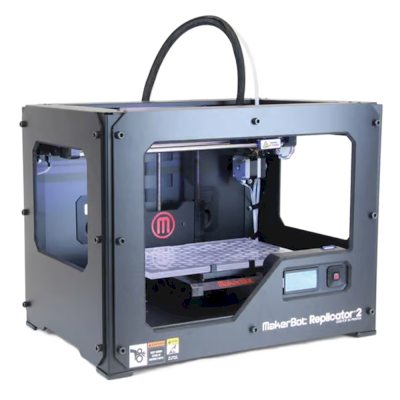
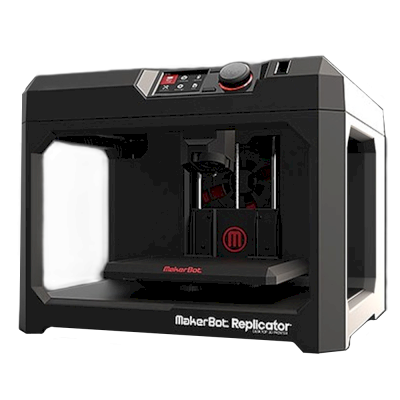
MakerBot 5th Generation को SimplyPrint से कनेक्ट करें
क्या MakerBot 5th Generation 3D प्रिंटर SimplyPrint, OctoPrint, Mainsail और Fluidd के साथ काम करता है?
इसे कनेक्ट करने का हर तरीका, उसकी आवश्यकताएँ और उसे सेट अप करने का तरीका।
SimplyPrint
संगत नहीं
Klipper (Moonraker)
संगत नहीं
OctoPrint
सीधे, USB के जरिए
संगत नहीं
इसे SimplyPrint से कनेक्ट करने का कोई ज्ञात तरीका नहीं
दुर्भाग्य से, हमारी जानकारी के मुताबिक MakerBot 5th Generation फ़िलहाल OctoPrint, Mainsail, Fluidd, या SimplyPrint के साथ संगत नहीं है। सबसे अच्छे 3D प्रिंटिंग अनुभव के लिए, ऐसे अन्य 3D प्रिंटर पर विचार करें जो इन सॉफ़्टवेयर के साथ संगत हों।
हम संगतता कैसे तय करते हैं
यदि प्रिंटर निम्न में से एक या अधिक के साथ काम करता है, तो हम उसे संगत मानते हैं:
इस खास मॉडल के लिए SimplyPrint कस्टम integration
OctoPrint सपोर्ट (प्रिंटर में serial printing का सपोर्ट होना आवश्यक है)
Klipper सपोर्ट, प्रिंटर compatible firmware flash करके या external controller/pad से Klipper चला सकता है
OctoPrint संगतता मुख्यतः इस बात पर आधारित है कि प्रिंटर serial communication को सपोर्ट करता है या नहीं। यदि serial printing समर्थित नहीं है, तो हम OctoPrint को असंगत के रूप में चिह्नित करते हैं।
नोट: कुछ प्रिंटर में third-party OctoPrint plugins होते हैं जो अनौपचारिक या custom connections सक्षम करते हैं। हम इन plugins की सूची नहीं रखते, इसलिए वे हमारे compatibility data में नहीं दिखते।
MakerBot 5th Generation के लिए कौन सा slicer इस्तेमाल करें
MakerBot का अपना slicer, MakerBot Print, इस्तेमाल करें: SimplyPrint के क्लाउड के किसी भी slicer में MakerBot 5th Generation की प्रोफ़ाइल नहीं है, और जहाँ तक हमें पता है, यह मानक G-code स्वीकार नहीं करता।
हम केवल उन slicer को सूचीबद्ध करते हैं जिन्हें आप SimplyPrint क्लाउड में इस्तेमाल कर सकते हैं, इसलिए MakerBot 5th Generation के लिए अन्य भी हो सकते हैं।
MakerBot 5th Generation के लिए ऑनलाइन slicing नहीं
MakerBot 5th Generation के विनिर्देश: bed आकार, प्रिंट ऊंचाई और अधिक
निर्माता और हमारे शोध के अनुसार इसका आकार, तापमान, मल्टी-मटेरियल और कनेक्शन।
साइज़
निर्माण आयतन
252 x 199 x 150 mm
बेड टाइप
Rectangle
बेड साइज़
252 x 199 mm
अधिकतम प्रिंट ऊंचाई
150 mm
प्रिंटिंग
अधिकतम एक्सट्रूडर तापमान
220 °C
हीटेड बेड है
नहीं
नोज़ल की संख्या
1
डायरेक्ट ड्राइव
नहीं
प्रोबिंग टूल / ऑटो बेड लेवलिंग
नहीं
फिलामेंट की चौड़ाई
1.75 mm
कनेक्ट हो रहा है
सीरियल प्रिंटिंग समर्थित है
नहीं
शिप किया गया firmware
निर्माता का अपना
फ़ाइलें और slicing
समर्थित फ़ाइल फ़ॉर्मेट
G-code (.gcode, .gco, .g)
प्रिंटर
प्रिंटर निर्माता / ब्रांड
MakerBot
प्रिंटर मॉडल नाम
5th Generation
निर्माता कंपनी का देश
संयुक्त राज्य अमेरिका
लॉन्च हुआ
2014
अभी भी बनाया जाता है
नहीं, बंद हो चुका है
डिस्क्लेमर:
हम इस जानकारी को जितना हो सके उतना नया और सटीक रखने की कोशिश करते हैं, लेकिन इसकी पूर्णता या भरोसेमंदी की गारंटी नहीं दे सकते। हमारा डेटा यूज़र सबमिशन और निर्माता संदर्भों पर आधारित है।
MakerBot 5th Generation कौन सा filament print कर सकता है?
MakerBot 5th Generation के लिए filament संगतता: hotend, bed, chamber और enclosure के आधार पर आंकी गई वे सामग्रियाँ जिन्हें यह संभाल सकता है।
फिलामेंट
उपयुक्तता
नोट्स
PLA
बहुत अच्छा
print करने में सबसे आसान filament। लगभग हर printer पर चलता है; heated bed adhesion में मदद करता है लेकिन जरूरी नहीं।
PETG
सावधानी से
सीमित, PETG को इस printer से अधिक गर्म bed (~70-80C) चाहिए।
TPU और लचीले filament
सावधानी से
संभव है, लेकिन Bowden extruder flexible filament को कठिन बनाता है; धीरे प्रिंट करें और अधिक कठोर (high-shore) TPU चुनें।
ABS & ASA
आदर्श नहीं
अनुशंसित नहीं है, बेड ABS और ASA के लिए जरूरी ~90-110C तक नहीं पहुँच सकता।
Nylon (PA)
आदर्श नहीं
recommended नहीं, nylon को hotter hotend (~250-270C) और enclosure चाहिए।
Polycarbonate (PC)
आदर्श नहीं
अनुशंसित नहीं - PC के लिए बहुत अधिक हॉटेंड तापमान और बंद चैम्बर चाहिए।
Carbon-fiber और glass-filled
सावधानी से
संभव है, यदि आप hardened या wear-resistant nozzle लगाएँ, क्योंकि abrasive fibers मूल brass nozzle को जल्दी घिस देते हैं।
सुझाव: यह प्रिंटर के विनिर्देशों पर आधारित सामान्य मार्गदर्शिका है, हमेशा अपने फिलामेंट की सुझाई गई सेटिंग जांचें। SimplyPrint के साथ आप हर स्पूल के लिए प्रोफाइल सहेज सकते हैं और स्टॉक में मौजूद फिलामेंट को ठीक से ट्रैक कर सकते हैं।
MakerBot 5th Generation जैसे प्रिंटर जो SimplyPrint के साथ काम करते हैं
उसी निर्माता के, समान आकार के, वही engineering materials या इसी तरह के multi-material प्रिंट करने वाले प्रिंटर, जिन्हें आप आज खरीद सकते हैं और जो SimplyPrint के साथ काम करते हैं।
MakerBot 5th Generation कौन बनाता है और MakerBot आपको कितनी स्वतंत्रता देता है: क्या इसके प्रिंटर इसके cloud के बिना चलते हैं, कोई भी filament और slicer स्वीकार करते हैं और उनकी मरम्मत की जा सकती है। हर क्षेत्र को सार्वजनिक स्रोतों के आधार पर रेट किया गया है।
खुलापन: अधिकतर बंद (5 में से 2.3)
अधिकतर बंद
बंद पारिस्थितिकी तंत्रखोलें
MakerBot is an American 3D printer brand founded in New York in 2009 out of the open-source RepRap scene. Stratasys bought it in 2013 and merged it with Ultimaker in 2022; MakerBot is now UltiMaker's education brand, selling Sketch classroom printers with lesson plans, teacher tools and management in UltiMaker's Digital Factory cloud. The Replicator printers in our catalogue are discontinued.
स्थापना:
2009-01 ·
मुख्यालय:
Brooklyn, New York, US ·
स्वामित्व:
Brand of UltiMaker, formed in August 2022 when Stratasys merged MakerBot with Ultimaker (NPM Capital 53.5%, Stratasys 46.5% at closing) ·
वेबसाइट:www.makerbot.com
Proprietary firmware, MakerBot-only extruders and materials, and classroom management in UltiMaker's cloud. In return schools get one managed system with curriculum and support.
फर्मवेयर और कस्टम फर्मवेयर ●●●●●
MakerBot stopped sharing its hardware designs with the Replicator 2 in 2012, and its fifth-generation printers moved to proprietary controllers, extruders and firmware. We found no firmware source for the current Sketch line.
[15][14]
स्थानीय नियंत्रण और एकीकरण ●●●●●
The Sketch Sprint prints over Wi-Fi or Ethernet from UltiMaker Cura or Digital Factory, or from a USB stick. Classroom management, remote monitoring and browser slicing (Cura Cloud) run in UltiMaker's Digital Factory cloud, which replaced MakerBot CloudPrint in 2025. We found no documented local interface that other software could use.
[16][2][3]
तृतीय-पक्ष filament, slicer और पार्ट ●●●●●
MakerBot lists only its own PLA and Tough PLA, and only its own Sketch extruder, for the Sketch Sprint. Slicing is in UltiMaker Cura (open source) or Cura Cloud.
[2]
मरम्मत और स्पेयर पार्ट्स ●●●●●
UltiMaker's shop sells Sketch extruders, a Sketch Sprint nozzle assembly, build plates and cables, and still sells Smart Extruder+ units for the Replicator+; spare parts are mostly whole assemblies.
[6]
डेटा और गोपनीयता ●●●●●
Some MakerBot services need an account, and MakerBot's privacy policy lists what it collects (including device identifiers such as MAC addresses and usage data) and its use of Google Analytics and retargeting. Students can submit files through Link Share without an account.
[5][2]
समुदाय और दस्तावेज़ ●●●●●
MakerBot offers hundreds of free lesson plans, educator certification, Thingiverse Education and a support site; there is no public source code or bug tracker.
[1]
फायदे
Built for schools: curriculum, lesson plans, teacher tools and certification are part of the package.
Enclosed Sketch printers with HEPA filtration, aimed at classrooms.
Students can submit files without creating accounts (Link Share).
Spare extruders and parts are still sold, even for the Replicator+.
कमियां
Closed firmware and MakerBot-only extruders; only MakerBot PLA and Tough PLA are listed for the Sketch Sprint.
Fleet management depends on UltiMaker's Digital Factory cloud.
CloudPrint's 2025 shutdown left the Replicator 5th Gen, Mini, Mini+ and Z18 without cloud support.
Many ownership changes and layoffs over the years (Stratasys 2013, layoffs 2015 and 2017, Ultimaker merger 2022).
सिद्ध अनुभव
दिसम्बर 2025: UltiMaker shut down MakerBot CloudPrint in early December 2025, after announcing 1 October 2025. Printers had to be reconnected to Digital Factory by hand, and the Replicator Z18, 5th Gen, Mini and Mini+ are not supported there; MakerBot points their owners to MakerBot Print.
[3][4]
31 अगस्त 2022: Stratasys closed the merger of MakerBot with Ultimaker into a company named Ultimaker (now UltiMaker), owned 53.5% by NPM Capital and 46.5% by Stratasys.
[7]
फ़रवरी 2017: MakerBot announced a restructuring with another round of layoffs, Fortune reported.
[9]
जुलाई 2016: A court dismissed the investor class action over the fifth-generation printers and Smart Extruder, finding the statements at issue were not actionable.
[10]
अप्रैल 2016: MakerBot moved printer manufacturing from Brooklyn to the contract manufacturer Jabil and parted ways with an undisclosed number of Brooklyn staff, The Verge reported.
[13]
जुलाई 2015: A class action was filed against MakerBot and Stratasys alleging investors were misled about problems with the fifth-generation printers' Smart Extruder.
[11]
अप्रैल 2015: MakerBot laid off about 20% of its staff, roughly 100 people, under a new CEO, Motherboard reported.
[12]
जून 2013: Stratasys bought MakerBot in a stock deal worth $403 million at the time.
[8]
सितम्बर 2012: With the Replicator 2, MakerBot stopped publishing its machine designs, a break with open-source hardware that co-founder Zach Smith criticised publicly.
[14][15]
16 स्रोतों से शोधित, अंतिम बार 18 अक्टूबर 2026 को जाँचा गया। स्रोत दिखाएं
क्या MakerBot 5th Generation, SimplyPrint के साथ संगत है?
हमारी जानकारी में MakerBot 5th Generation अभी समर्थित नहीं है। SimplyPrint OctoPrint, Klipper और बिल्ट-इन इंटीग्रेशन के ज़रिए 130+ ब्रांड और 600+ मॉडल के साथ काम करता है - समर्थित प्रिंटर के लिए संगतता सूची देखें।
MakerBot 5th Generation के लिए कौन-सा slicer उपयोग करना चाहिए?
MakerBot का अपना slicer, MakerBot Print, इस्तेमाल करें: SimplyPrint के क्लाउड के किसी भी slicer में MakerBot 5th Generation की प्रोफ़ाइल नहीं है, और जहाँ तक हमें पता है, यह मानक G-code स्वीकार नहीं करता।
MakerBot 5th Generation कौन सा filament print कर सकता है?
इसके स्पेसिफिकेशन (hotend 220C तक, heated bed नहीं) के आधार पर MakerBot 5th Generation, PLA को अच्छी तरह संभालता है। ABS, nylon, PC और composites के लिए ऊपर पूरी filament गाइड देखें।
MakerBot 5th Generation के बेड का आकार और बिल्ड वॉल्यूम क्या है?
MakerBot 5th Generation का print bed 252 x 199 mm है और यह 150 mm तक ऊंची प्रिंट कर सकता है, यानी लगभग 252 x 199 x 150 mm का build volume। bed के प्रकार, तापमान और अन्य जानकारी के लिए ऊपर पूरी specifications तालिका देखें।
MakerBot 5th Generation कब जारी हुआ?
MakerBot ने 5th Generation को 2014 में लॉन्च किया। इसे बंद कर दिया गया है, इसलिए आप इसे अब MakerBot से नया नहीं खरीद सकते।
क्या MakerBot 5th Generation अभी भी बिकता है?
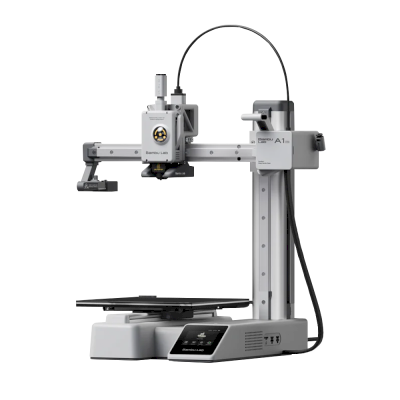
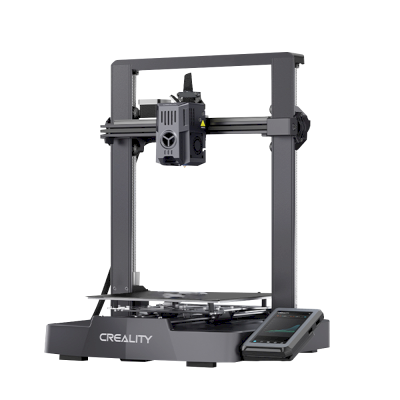
नहीं। MakerBot अब 5th Generation को नया बनाता या बेचता नहीं है। आज खरीदने के लिए ऐसे प्रिंटर: Bambu Lab A1 Mini और Creality Ender-3 V3 KE।
Affiliate खुलासा: इस पेज के कुछ link affiliate link हैं। आपके खरीदने पर हमें commission मिल सकता है, इसके लिए आपको कोई अतिरिक्त लागत नहीं देनी होगी। Amazon Associate के रूप में हम योग्य खरीद से कमाते हैं।
 संयुक्त राज्य अमेरिका


 PrusaSlicer
 OrcaSlicer
 BambuStudio
 ElegooSlicer
 CrealityPrint
 Cura
Cura Kiri:Moto