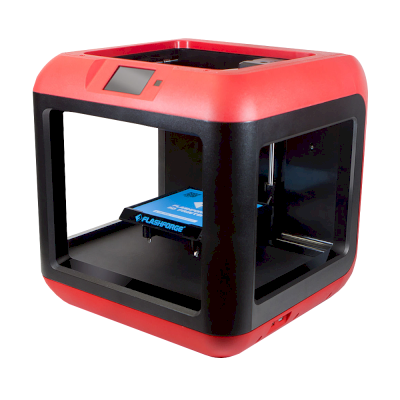
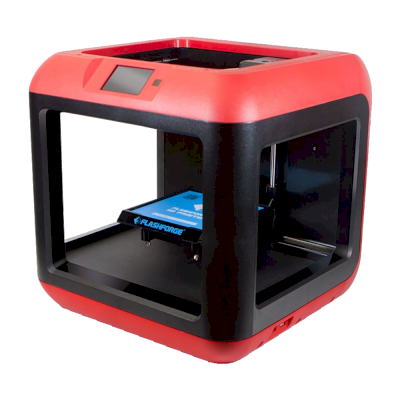
क्या Flashforge Finder 3D प्रिंटर SimplyPrint, OctoPrint, Mainsail और Fluidd के साथ काम करता है?
इसे कनेक्ट करने का हर तरीका, उसकी आवश्यकताएँ और उसे सेट अप करने का तरीका।
इसे SimplyPrint से कनेक्ट करने का कोई ज्ञात तरीका नहीं
दुर्भाग्य से, हमारी जानकारी के मुताबिक Flashforge Finder फ़िलहाल OctoPrint, Mainsail, Fluidd, या SimplyPrint के साथ संगत नहीं है। सबसे अच्छे 3D प्रिंटिंग अनुभव के लिए, ऐसे अन्य 3D प्रिंटर पर विचार करें जो इन सॉफ़्टवेयर के साथ संगत हों।
हम संगतता कैसे तय करते हैं
यदि प्रिंटर निम्न में से एक या अधिक के साथ काम करता है, तो हम उसे संगत मानते हैं:
इस खास मॉडल के लिए SimplyPrint कस्टम integration
OctoPrint सपोर्ट (प्रिंटर में serial printing का सपोर्ट होना आवश्यक है)
Klipper सपोर्ट, प्रिंटर compatible firmware flash करके या external controller/pad से Klipper चला सकता है
OctoPrint संगतता मुख्यतः इस बात पर आधारित है कि प्रिंटर serial communication को सपोर्ट करता है या नहीं। यदि serial printing समर्थित नहीं है, तो हम OctoPrint को असंगत के रूप में चिह्नित करते हैं।
नोट: कुछ प्रिंटर में third-party OctoPrint plugins होते हैं जो अनौपचारिक या custom connections सक्षम करते हैं। हम इन plugins की सूची नहीं रखते, इसलिए वे हमारे compatibility data में नहीं दिखते।
हम केवल उन slicer को सूचीबद्ध करते हैं जिन्हें आप SimplyPrint क्लाउड में इस्तेमाल कर सकते हैं, इसलिए Flashforge Finder के लिए अन्य भी हो सकते हैं।
Flashforge Finder के लिए cloud-based slicer: Kiri:Moto online इस्तेमाल करें
Kiri:Moto और अन्य slicers इस्तेमाल करें, सीधे अपने ब्राउज़र में SimplyPrint के ऑनलाइन क्लाउड slicer के साथ। इंस्टॉलेशन की जरूरत नहीं। दुनिया में कहीं से भी, किसी भी डिवाइस पर अपने Flashforge Finder मॉडल slice करें!
स्वचालित profile updates: प्रोफ़ाइलों की हर दिन जाँच होती है और slicer GitHub repositories से, साथ ही हमारे ओपन-सोर्स समुदाय-संचालित slicer प्रोफ़ाइल डेटाबेस से भी अपने-आप ली जाती हैं। इससे आपके पास हमेशा नवीनतम प्रोफ़ाइलों की पहुँच रहती है।
ध्यान दें: अन्य slicer, जैसे Simplify3D, ideaMaker, SuperSlicer और KISSlicer, हमारे cloud में नहीं हैं, इसलिए हम उनकी profiles ट्रैक नहीं करते। वे फिर भी आपके Flashforge Finder के साथ अच्छी तरह काम कर सकते हैं: profile के लिए slicer के दस्तावेज़ या फ़ोरम देखें। आप हमारी GitHub पर ओपन-सोर्स slicer profile डेटाबेस में profiles भी जोड़ सकते हैं।
Flashforge Finder के विनिर्देश: bed आकार, प्रिंट ऊंचाई और अधिक
डिस्क्लेमर:
हम इस जानकारी को जितना हो सके उतना नया और सटीक रखने की कोशिश करते हैं, लेकिन इसकी पूर्णता या भरोसेमंदी की गारंटी नहीं दे सकते। हमारा डेटा यूज़र सबमिशन और निर्माता संदर्भों पर आधारित है।
Flashforge Finder कौन सा filament print कर सकता है?
Flashforge Finder के लिए filament संगतता: hotend, bed, chamber और enclosure के आधार पर आंकी गई वे सामग्रियाँ जिन्हें यह संभाल सकता है।
फिलामेंट
उपयुक्तता
नोट्स
PLA
बहुत अच्छा
print करने में सबसे आसान filament। लगभग हर printer पर चलता है; heated bed adhesion में मदद करता है लेकिन जरूरी नहीं।
PETG
सावधानी से
सीमित, PETG को इस printer से अधिक गर्म bed (~70-80C) चाहिए।
TPU और लचीले filament
बहुत अच्छा
direct-drive extruder flexible filament अच्छी तरह feed करता है। clean results के लिए slow print करें।
ABS & ASA
आदर्श नहीं
अनुशंसित नहीं है, बेड ABS और ASA के लिए जरूरी ~90-110C तक नहीं पहुँच सकता।
Nylon (PA)
आदर्श नहीं
recommended नहीं, nylon को hotter hotend (~250-270C) और enclosure चाहिए।
Polycarbonate (PC)
आदर्श नहीं
अनुशंसित नहीं - PC के लिए बहुत अधिक हॉटेंड तापमान और बंद चैम्बर चाहिए।
Carbon-fiber और glass-filled
सावधानी से
संभव है, यदि आप hardened या wear-resistant nozzle लगाएँ, क्योंकि abrasive fibers मूल brass nozzle को जल्दी घिस देते हैं।
सुझाव: यह प्रिंटर के विनिर्देशों पर आधारित सामान्य मार्गदर्शिका है, हमेशा अपने फिलामेंट की सुझाई गई सेटिंग जांचें। SimplyPrint के साथ आप हर स्पूल के लिए प्रोफाइल सहेज सकते हैं और स्टॉक में मौजूद फिलामेंट को ठीक से ट्रैक कर सकते हैं।
Flashforge Finder जैसे प्रिंटर जो SimplyPrint के साथ काम करते हैं
उसी निर्माता के, समान आकार के, वही engineering materials या इसी तरह के multi-material प्रिंट करने वाले प्रिंटर, जिन्हें आप आज खरीद सकते हैं और जो SimplyPrint के साथ काम करते हैं।
Flashforge Finder कौन बनाता है और Flashforge आपको कितनी स्वतंत्रता देता है: क्या इसके प्रिंटर इसके cloud के बिना चलते हैं, कोई भी filament और slicer स्वीकार करते हैं और उनकी मरम्मत की जा सकती है। हर क्षेत्र को सार्वजनिक स्रोतों के आधार पर रेट किया गया है।
खुलापन: मिश्रित (5 में से 3.0)
मिश्रित
बंद पारिस्थितिकी तंत्रखोलें
Flashforge (Zhejiang Flashforge 3D Technology) is a Chinese 3D printer maker founded in 2011. It sells the Adventurer 5M and 5M Pro CoreXY printers, the AD5X multi-colour printer and the Creator series, plus resin and wax printers, to customers ranging from hobbyists to businesses.
स्थापना:
2011 ·
मुख्यालय:
Zhejiang, China ·
स्वामित्व:
Zhejiang Flashforge 3D Technology Co., Ltd. ·
वेबसाइट:www.flashforge.com
Flashforge is mixed: the Adventurer 5M runs Klipper with published source and works in a LAN mode with open slicers, but the stock system is closed to modification and its app relies on the cloud.
फर्मवेयर और कस्टम फर्मवेयर ●●●●●
The Adventurer 5M series runs Klipper, and Flashforge published its Klipper source on GitHub under GPL-3.0 in January 2024. The stock system is not built to be modified: the community 'Klipper Mod', which adds Moonraker, Mainsail and Fluidd, is unofficial and warns that it may cost the warranty.
[1][2]
स्थानीय नियंत्रण और एकीकरण ●●●●●
A LAN mode lets Orca-Flashforge send jobs on the local network, and USB printing works offline. The Flash Maker app needs internet and a Flashforge account and does not connect in LAN mode. Flashforge documents no local API for other software. Moonraker with Mainsail or Fluidd comes only with the community Klipper Mod, which is unofficial and warns that it may cost the warranty.
[3][4][2]
तृतीय-पक्ष filament, slicer और पार्ट ●●●●●
Third-party filament works; Orca-Flashforge is an open-source OrcaSlicer fork and OrcaSlicer itself supports Flashforge printers. Nozzles are sold as complete printer-specific assemblies.
[5][6][7]
मरम्मत और स्पेयर पार्ट्स ●●●●●
Flashforge sells nozzle, extruder, filament-feeding and touchscreen assemblies for the Adventurer 5M, and its wiki has replacement guides, for example the AD5X extruder board.
[7][8]
समुदाय और दस्तावेज़ ●●●●●
A wiki with manuals, FAQs and maintenance guides, and slicer and Klipper sources on GitHub; much of the advanced use comes from the community mod.
[3][1][2]
फायदे
Long-established maker, founded in 2011.
LAN mode and USB printing work without the cloud.
Klipper source and an open-source slicer are published.
Common replacement assemblies are sold for the Adventurer 5M.
कमियां
Stock firmware is not meant to be modified; deeper control needs an unofficial community mod.
The Flash Maker app needs internet and an account, and does not work in LAN mode.
Nozzles are sold as complete printer-specific assemblies.
सिद्ध अनुभव
जनवरी 2024: Flashforge published the Klipper source for the Adventurer 5M and 5M Pro on GitHub under GPL-3.0.
[1]
10 स्रोतों से शोधित, अंतिम बार 18 अक्टूबर 2026 को जाँचा गया। स्रोत दिखाएं
क्या Flashforge Finder, SimplyPrint के साथ संगत है?
हमारी जानकारी में Flashforge Finder अभी समर्थित नहीं है। SimplyPrint OctoPrint, Klipper और बिल्ट-इन इंटीग्रेशन के ज़रिए 130+ ब्रांड और 600+ मॉडल के साथ काम करता है - समर्थित प्रिंटर के लिए संगतता सूची देखें।
Flashforge Finder के लिए कौन-सा slicer उपयोग करना चाहिए?
हम Flashforge Finder के लिए Kiri:Moto की सलाह देते हैं। आप इसे और 6 अन्य slicer, सीधे SimplyPrint के ऑनलाइन slicer में चला सकते हैं, कोई इंस्टॉल नहीं, किसी भी डिवाइस पर, और Flashforge Finder के प्रोफाइल अपने आप अपडेट रहते हैं।
क्या Flashforge Finder के साथ OrcaSlicer उपयोग किया जा सकता है?
हाँ, लेकिन हमारी जानकारी में OrcaSlicer में Flashforge Finder के लिए अंतर्निहित प्रोफ़ाइल नहीं है: समान प्रिंटर की प्रोफ़ाइल से शुरू करें और bed का आकार, ऊँचाई और nozzle मिलान के अनुसार सेट करें।
Flashforge Finder कौन सा filament print कर सकता है?
इसके स्पेसिफिकेशन (hotend 240C तक, heated bed नहीं) के आधार पर Flashforge Finder, PLA या TPU और लचीले filament को अच्छी तरह संभालता है। ABS, nylon, PC और composites के लिए ऊपर पूरी filament गाइड देखें।
Flashforge Finder के बेड का आकार और बिल्ड वॉल्यूम क्या है?
Flashforge Finder का print bed 140 x 140 mm है और यह 140 mm तक ऊंची प्रिंट कर सकता है, यानी लगभग 140 x 140 x 140 mm का build volume। bed के प्रकार, तापमान और अन्य जानकारी के लिए ऊपर पूरी specifications तालिका देखें।
 चीन
चीन



 PrusaSlicer
 OrcaSlicer
 BambuStudio
 ElegooSlicer
 CrealityPrint
 Cura
Cura