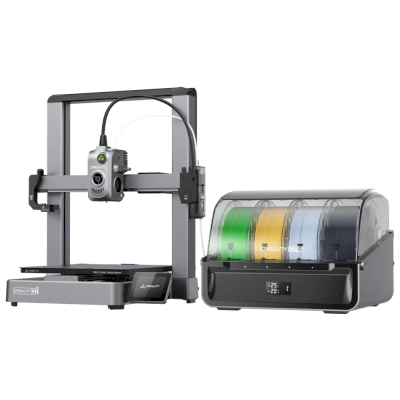
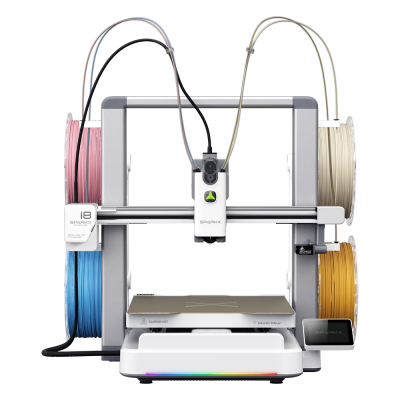
A four-colour bed slinger that feeds four filaments into one nozzle, sold here with Creality's CFS Lite. It suits hobbyists who print a lot of multicolour PLA and want tool-changer speed and low waste at a bed slinger's price.
इसका मतलब है कि इसमें बेस मॉडल की कई विशेषताएँ समान हैं, लेकिन इसमें खास बदलाव, अतिरिक्त सुविधाएँ या साथ मिलने वाली एक्सेसरी हो सकती हैं।
Creality SPARKX i8 Combo को SimplyPrint से कनेक्ट करें
क्या Creality SPARKX i8 Combo 3D प्रिंटर SimplyPrint, OctoPrint, Mainsail और Fluidd के साथ काम करता है?
इसे कनेक्ट करने का हर तरीका, उसकी आवश्यकताएँ और उसे सेट अप करने का तरीका।
SimplyPrint क्लाइंट
काम करने की उम्मीद है
Creality's i8 is the SPARKX i7 with the new QuarTeks printhead, and the i7 works with the SimplyPrint Client. Not confirmed on the i8 yet.
The SPARKX i7 runs Klipper under Creality OS, with Moonraker and Fluidd once rooted. The i8 is built on the same platform, but that isn't confirmed for the i8 yet.
SimplyPrint क्लाइंट के माध्यम से कनेक्ट होने पर, SimplyPrint के Creality SPARKX i8 Combo पर उपलब्ध अधिकांश सुविधाओं को कवर करने की उम्मीद है: कैमरा और AI विफलता पहचान, रिमोट प्रिंटिंग, ऑब्जेक्ट छोड़ना, तापमान और गति नियंत्रण, इसकी मल्टी-मटेरियल यूनिट के लिए filament मैपिंग और AutoPrint। SimplyPrint क्लाइंट के माध्यम से उपलब्ध नहीं: बेबी स्टेपिंग और Z-ऑफ़सेट कैलिब्रेशन। नीचे की तालिका इसे SimplyPrint से जोड़ने के दो तरीकों की तुलना करती है।
हर SimplyPrint सुविधा, इसे SimplyPrint से कनेक्ट करने के हर तरीके के लिए
के माध्यम से SimplyPrint से कनेक्टेड
SimplyPrint सुविधा
SimplyPrint क्लाइंट
काम करने की उम्मीद है
Klipper (Moonraker)
काम करने की उम्मीद है
निगरानी
लाइव स्थिति और प्रगति
हां
हां
वेबकैम
हां
हां
AI फेलियर डिटेक्शन
हां
हां
बचा हुआ समय
हां
हां
लेयर प्रगति
हां
हां
तापमान
हां
हां
प्रिंटिंग
प्रिंट शुरू करना
हां
हां
रोकें, फिर शुरू करें और रद्द करें
हां
हां
ऑब्जेक्ट्स छोड़ें
हां
हां
फ़ाइलें
स्लाइस की गई 3MF फ़ाइलें प्रिंट करें
हां
नहीं
प्रिंटर कंट्रोल
तापमान बदलें
हां
हां
कंट्रोल से चलाना
हां
हां
होमिंग
हां
हां
Extrude और retract करें
हां
हां
प्रिंट स्पीड बदलें
हां
हां
फैन की गति
हां
हां
बेबी स्टेपिंग
नहीं
हां
G-code भेजें
हां
हां
कैलिब्रेशन
filament बदलें
हां
हां
बेड लेवलिंग
हां
हां
Z-ऑफ़सेट कैलिब्रेशन
नहीं
हां
Multi-material
filament को multi-material स्लॉट से मैप करें
हां
नहीं
multi-material unit से लोड किया गया filament सिंक करें
हां
नहीं
स्वचालन
AutoPrint
प्रो
हां
हां
प्रिंट शुरू होने से पहले file डाउनलोड करें
हां
नहीं1
SimplyPrint क्लाइंट के माध्यम से SimplyPrint से कनेक्टेड
काम करने की उम्मीद है
निगरानी
लाइव स्थिति और प्रगतिहां
वेबकैमहां
AI फेलियर डिटेक्शनहां
बचा हुआ समयहां
लेयर प्रगतिहां
तापमानहां
प्रिंटिंग
प्रिंट शुरू करनाहां
रोकें, फिर शुरू करें और रद्द करेंहां
ऑब्जेक्ट्स छोड़ेंहां
फ़ाइलें
स्लाइस की गई 3MF फ़ाइलें प्रिंट करेंहां
प्रिंटर कंट्रोल
तापमान बदलेंहां
कंट्रोल से चलानाहां
होमिंगहां
Extrude और retract करेंहां
प्रिंट स्पीड बदलेंहां
फैन की गतिहां
बेबी स्टेपिंगनहीं
G-code भेजेंहां
कैलिब्रेशन
filament बदलेंहां
बेड लेवलिंगहां
Z-ऑफ़सेट कैलिब्रेशननहीं
Multi-material
filament को multi-material स्लॉट से मैप करेंहां
multi-material unit से लोड किया गया filament सिंक करेंहां
स्वचालन
AutoPrint प्रोहां
प्रिंट शुरू होने से पहले file डाउनलोड करेंहां
Klipper (Moonraker) के माध्यम से SimplyPrint से कनेक्टेड
काम करने की उम्मीद है
निगरानी
लाइव स्थिति और प्रगतिहां
वेबकैमहां
AI फेलियर डिटेक्शनहां
बचा हुआ समयहां
लेयर प्रगतिहां
तापमानहां
प्रिंटिंग
प्रिंट शुरू करनाहां
रोकें, फिर शुरू करें और रद्द करेंहां
ऑब्जेक्ट्स छोड़ेंहां
फ़ाइलें
स्लाइस की गई 3MF फ़ाइलें प्रिंट करेंनहीं
प्रिंटर कंट्रोल
तापमान बदलेंहां
कंट्रोल से चलानाहां
होमिंगहां
Extrude और retract करेंहां
प्रिंट स्पीड बदलेंहां
फैन की गतिहां
बेबी स्टेपिंगहां
G-code भेजेंहां
कैलिब्रेशन
filament बदलेंहां
बेड लेवलिंगहां
Z-ऑफ़सेट कैलिब्रेशनहां
Multi-material
filament को multi-material स्लॉट से मैप करेंनहीं
multi-material unit से लोड किया गया filament सिंक करेंनहीं
स्वचालन
AutoPrint प्रोहां
प्रिंट शुरू होने से पहले file डाउनलोड करेंनहीं1
काम करता है
निर्भर करता है
समर्थित नहीं
SimplyPrint अभी इस कनेक्शन से इसे सपोर्ट नहीं करता।
Creality SPARKX i8 Combo के लिए कौन सा slicer इस्तेमाल करें
Creality प्रिंटर CrealityPrint, Creality के अपने slicer, का उपयोग करते हैं। हमारे cloud में अभी Creality SPARKX i8 Combo के लिए तैयार profile नहीं है।
हम केवल उन slicer को सूचीबद्ध करते हैं जिन्हें आप SimplyPrint क्लाउड में इस्तेमाल कर सकते हैं, इसलिए Creality SPARKX i8 Combo के लिए अन्य भी हो सकते हैं।
Creality SPARKX i8 Combo के लिए cloud-based slicer: CrealityPrint online इस्तेमाल करें
CrealityPrint और अन्य slicers इस्तेमाल करें, सीधे अपने ब्राउज़र में SimplyPrint के ऑनलाइन क्लाउड slicer के साथ। इंस्टॉलेशन की जरूरत नहीं। दुनिया में कहीं से भी, किसी भी डिवाइस पर अपने Creality SPARKX i8 Combo मॉडल slice करें!
स्वचालित profile updates: प्रोफ़ाइलों की हर दिन जाँच होती है और slicer GitHub repositories से, साथ ही हमारे ओपन-सोर्स समुदाय-संचालित slicer प्रोफ़ाइल डेटाबेस से भी अपने-आप ली जाती हैं। इससे आपके पास हमेशा नवीनतम प्रोफ़ाइलों की पहुँच रहती है।
ध्यान दें: अन्य slicer, जैसे Simplify3D, ideaMaker, SuperSlicer और KISSlicer, हमारे cloud में नहीं हैं, इसलिए हम उनकी profiles ट्रैक नहीं करते। वे फिर भी आपके Creality SPARKX i8 Combo के साथ अच्छी तरह काम कर सकते हैं: profile के लिए slicer के दस्तावेज़ या फ़ोरम देखें। आप हमारी GitHub पर ओपन-सोर्स slicer profile डेटाबेस में profiles भी जोड़ सकते हैं।
Creality SPARKX i8 Combo के लिए ऐप
SimplyPrint, Creality SPARKX i8 Combo के ऐप के रूप में काम करता है: आपके फोन और किसी भी ब्राउज़र में, क्लाउड में slicer के साथ।
SimplyPrint के साथ आपको क्या मिलता है
iPhone और Android के लिए एक ऐप, किसी भी ब्राउज़र में वही अनुभव, और क्लाउड में एक slicer।
सिर्फ मॉनिटरिंग से अधिक: प्रिंट कतार, AI विफलता पहचान, AutoPrint और टीम के लिए खाते।
अभी SimplyPrint में Creality SPARKX i8 Combo के लिए कोई plate swapper या auto-ejection kit नहीं है, लेकिन AutoPrint इसे प्रिंट कराता रख सकता है। plate खाली होते ही यह आपकी कतार से अगला job शुरू करता है।
Bed slinger को ऑटोमेट करना सबसे आसान है
Creality SPARKX i8 Combo का bed आगे-पीछे चलता है, इसलिए इसकी plate प्रिंटर के सामने निकलती है। ऐसे plate swapper तैयार plate हटाकर नई plate लगाते हैं। kit के बिना, G-code routine toolhead से ठंडी प्रिंट को धकेलकर हटा सकता है।
डिस्क्लेमर:
हम इस जानकारी को जितना हो सके उतना नया और सटीक रखने की कोशिश करते हैं, लेकिन इसकी पूर्णता या भरोसेमंदी की गारंटी नहीं दे सकते। हमारा डेटा यूज़र सबमिशन और निर्माता संदर्भों पर आधारित है।
Creality SPARKX i8 Combo कौन सा filament print कर सकता है?
Creality SPARKX i8 Combo के लिए filament संगतता: hotend, bed, chamber और enclosure के आधार पर आंकी गई वे सामग्रियाँ जिन्हें यह संभाल सकता है।
फिलामेंट
उपयुक्तता
नोट्स
PLA
बहुत अच्छा
print करने में सबसे आसान filament। लगभग हर printer पर चलता है; heated bed adhesion में मदद करता है लेकिन जरूरी नहीं।
PETG
बहुत अच्छा
आराम से range में (PETG को ~230-250C hotend और ~70-85C bed पसंद है)।
TPU और लचीले filament
बहुत अच्छा
direct-drive extruder flexible filament अच्छी तरह feed करता है। clean results के लिए slow print करें।
ABS & ASA
सावधानी से
बेड पर्याप्त गर्म है, लेकिन enclosure के बिना ABS और ASA मुड़ जाते हैं। साफ़ प्रिंट के लिए enclosure की दृढ़ अनुशंसा है।
Nylon (PA)
सावधानी से
सावधानी से संभव है, enclosure और बहुत सूखा filament जरूरी हैं।
Polycarbonate (PC)
सावधानी से
सीमांत स्थिति में, वार्पिंग से बचने के लिए PC को बंद, गर्म chamber चाहिए।
Carbon-fiber और glass-filled
सावधानी से
संभव है, यदि आप hardened या wear-resistant nozzle लगाएँ, क्योंकि abrasive fibers मूल brass nozzle को जल्दी घिस देते हैं।
सुझाव: यह प्रिंटर के विनिर्देशों पर आधारित सामान्य मार्गदर्शिका है, हमेशा अपने फिलामेंट की सुझाई गई सेटिंग जांचें। SimplyPrint के साथ आप हर स्पूल के लिए प्रोफाइल सहेज सकते हैं और स्टॉक में मौजूद फिलामेंट को ठीक से ट्रैक कर सकते हैं।
Creality SPARKX i8 Combo के लिए सर्वश्रेष्ठ filament
वे filaments जिन्हें Creality SPARKX i8 Combo अच्छी तरह प्रिंट करता है, पहले Creality के अपने, फिर सबसे प्रसिद्ध।
समीक्षक Creality SPARKX i8 Combo के बारे में क्या कहते हैं
ऐसे लोगों की समीक्षाएं जो पेशेवर रूप से प्रिंटर टेस्ट करते हैं। हम उनके लिंक देते हैं, राय उनकी अपनी हैं।
Aurora Tech · 18 सितम्बर 2026
Hands-on test of a beta unit Creality supplied and sponsored. Colour changes took 1-2 seconds with only the prime tower as waste, and multicolour prints ran 2.5 to 4 times faster than on other multicolour bed slingers. Single-colour quality was only decent, it prints PLA and PETG only, and the beta firmware had bugs (nozzle reading about 10 C high, dropped connections).
Creality SPARKX i8 Combo कब चुनें
Choose it when most of your prints are multicolour PLA or PETG and you want the CFS Lite's filament recognition and sealed storage from day one. The plain SPARKX i8 costs less if you are happy with the four spool holders. Pick the SPARKX i7 if you also print TPU or mostly one colour, or a tool changer such as the Snapmaker U1 if you need materials with different temperatures in one print.
फायदे
Four colours through one nozzle, with colour changes in 1-2 seconds and almost no purge waste.
Aurora Tech measured multicolour prints 2.5 to 4 times faster than on other multicolour bed slingers, close to tool changers.
Costs far less than a tool changer, and has a 260 x 260 x 255 mm bed and a 500 mm/s top speed.
Arrives 90% pre-assembled. The CFS Lite in the Combo adds RFID filament recognition, automatic loading and unloading, and sealed filament storage.
Expected to work with SimplyPrint like the SPARKX i7, through the SimplyPrint Client or Klipper (not yet tested by us).
Four spool holders on the frame still work if you skip the CFS Lite.
कमियां
PLA and PETG only: no TPU, and no mixing filaments that print at very different temperatures, because they share one heat break.
Early units had rough firmware and slicer profiles (false alarms, dropped connections, a PETG profile that needed tuning), so expect updates after launch.
Not shipping yet: it is sold through a crowdfunding campaign, with Creality aiming for deliveries from October and mostly November 2026.
Open frame with a moving bed and no enclosure, and four colours is the maximum.
Single-colour prints were only decent in Aurora Tech's test, with some stringing.
किसके लिए उपयुक्त है
स्कूलकाम कर सकता है
Multicolour prints are a good hook for students, but the open frame and moving bed offer no enclosure and the firmware is still young.
शौकिया यूज़रबेहतरीन विकल्प
Fast, low-waste multicolour printing is what this printer is built for, as long as you stay with PLA and PETG.
व्यवसायोंकाम कर सकता है
Useful for multicolour PLA products, but it is a new design on early firmware, limited to PLA and PETG, and not shipping yet.
Print farmsउपयुक्त नहीं
One nozzle, an open frame, no plate swapping and early firmware make it a weak fit for unattended batches.
Creality SPARKX i8 Combo की समान प्रिंटरों से तुलना करें
उसी निर्माता के, समान आकार के, वही engineering materials या इसी तरह के multi-material प्रिंट करने वाले प्रिंटर, जिन्हें आप आज खरीद सकते हैं। उनके specs और कनेक्शन के साथ अधिकतम चार प्रिंटर की साथ-साथ तुलना करें।
Creality SPARKX i8 Combo कौन बनाता है और Creality आपको कितनी स्वतंत्रता देता है: क्या इसके प्रिंटर इसके cloud के बिना चलते हैं, कोई भी filament और slicer स्वीकार करते हैं और उनकी मरम्मत की जा सकती है। हर क्षेत्र को सार्वजनिक स्रोतों के आधार पर रेट किया गया है।
खुलापन: अधिकतर खुला (5 में से 3.6)
अधिकतर खुला
बंद पारिस्थितिकी तंत्रखोलें
Creality is a Shenzhen 3D printer maker founded in 2014. Its low-cost Ender series, launched in 2017, made desktop 3D printing affordable for many hobbyists. It now sells Klipper-based K-series CoreXY printers, Ender and CR open-frame printers, the Hi and SPARKX beginner lines, the CFS multi-material system, 3D scanners and laser engravers, and runs the Creality Cloud model platform. It listed on the Hong Kong Stock Exchange in 2026.
स्थापना:
2014 ·
मुख्यालय:
Shenzhen, China ·
स्वामित्व:
Listed on the Hong Kong Stock Exchange (3388.HK) since 2026; founder Jack Chen is chief executive ·
वेबसाइट:www.creality.com
Creality sits in the middle: its Klipper-based printers can be run locally with Fluidd and open slicers, and it publishes firmware source, but usually months after launch, and it dropped root access on its 2025 K1 revisions.
फर्मवेयर और कस्टम फर्मवेयर ●●●●●
Creality publishes Klipper firmware source for the K1, K2, Hi and Ender-3 V3 KE on GitHub under GPL, but after launch: the K1 source came about three months after the series launched in May 2023, the K2 and Hi sources in September 2025. Earlier K1 printers have an official root option with a published guide, but Creality's wiki says the 2025 K1C and K1 Max do not support root access.
[1][2][3][4][5]
स्थानीय नियंत्रण और एकीकरण ●●●●●
Creality Print sends jobs over the local network with no account, and Creality Cloud is optional. The K2 series and Ender-3 V3 serve Fluidd on the printer, so other software can use Klipper's documented Moonraker API. On the K1 series, Creality's firmware notes treat Fluidd and Mainsail as add-ons owners install themselves, and Creality says the 2025 K1C and K1 Max do not support root access. The SPARKX i7 is set up through the Creality Cloud app.
[6][20][7][21][4][8][22]
तृतीय-पक्ष filament, slicer और पार्ट ●●●●●
Third-party filament works; Creality Print is an open-source (AGPL-3.0) slicer and OrcaSlicer supports Creality printers. Creality sells nozzle, hotend and extruder kits per model; newer K2 parts such as its nozzle kit are Creality designs.
[10][11][12]
मरम्मत और स्पेयर पार्ट्स ●●●●●
Creality's store sells extruder, hotend, heating-block and print-head kits per model, and its wiki has parts lists and replacement guides for current printers (for example the K2 Plus and SPARKX i7 hotends).
[12][13][14]
डेटा और गोपनीयता ●●●●●
Local printing needs no account; Creality Cloud and its app need one. Creality's published privacy policy is written for its websites and services, allows use of data for targeted advertising, and says little about printer data or where it is stored.
[15][6]
समुदाय और दस्तावेज़ ●●●●●
One of the largest user bases (second in consumer 3D printers by 2025 sales value, per figures in its listing), a public wiki with model-specific guides, firmware and slicer sources on GitHub, and an official forum.
[16][10][6]
फायदे
Klipper-based models can be run entirely on the local network through Fluidd, without an account.
Firmware for most current models and the Creality Print slicer are published as source on GitHub.
Wide range, from budget Ender printers to multi-colour K2 machines.
Spare-part kits and model-specific replacement guides are easy to find.
Very large user base, so community help is easy to find.
कमियां
Firmware source has usually appeared months after a model ships.
Root access, offered on earlier K1 printers, is not supported on the 2025 K1C and K1 Max.
The privacy policy says little about printer and cloud data.
The SPARKX line is built around the Creality Cloud app and an account.
सिद्ध अनुभव
मई 2026: Creality listed on the Main Board of the Hong Kong Stock Exchange (3388.HK), raising about HK$1.27 billion net. Its prospectus showed 2025 revenue of RMB 3.13 billion and a net loss of RMB 182.4 million, after a profit in 2024.
[16][5]
नवम्बर 2025: Creality's wiki states that the 2025 revisions of the K1C and K1 Max do not support root access, which earlier K1 printers offered through an official option and guide.
[4][17][3]
सितम्बर 2025: Creality published the Klipper source for its K2 series and for the Hi on GitHub under GPL-3.0.
[2][18]
अगस्त 2023: About three months after the K1 series launched, Creality published its K1 Klipper source on GitHub, followed by a repository with a root guide and Fluidd and Mainsail install instructions.
[1][3][5]
22 स्रोतों से शोधित, अंतिम बार 18 अक्टूबर 2026 को जाँचा गया। स्रोत दिखाएं
क्या Creality SPARKX i8 Combo, SimplyPrint के साथ संगत है?
बहुत संभव है। हमें उम्मीद है कि Creality SPARKX i8 Combo, SimplyPrint क्लाइंट या Klipper (Moonraker) के जरिए SimplyPrint से जुड़ेगा, लेकिन अभी तक किसी ने इसकी पुष्टि नहीं की है। अगर आपके पास एक है, तो सेटअप गाइड कुछ ही मिनटों में दिखा देगी कि यह काम करता है या नहीं, और आपका जवाब सभी के लिए इसकी पुष्टि करेगा।
Creality SPARKX i8 Combo को SimplyPrint से कैसे कनेक्ट करें?
Creality SPARKX i8 Combo के लिए हमारी चरण-दर-चरण सेटअप गाइड अपनाएँ। इसमें बताया गया है कि इसे SimplyPrint क्लाइंट या Klipper (Moonraker) के ज़रिए कैसे कनेक्ट करें, हर तरीके के लिए क्या चाहिए और कौन सा चुनें।
Creality SPARKX i8 Combo के लिए कौन-सा slicer उपयोग करना चाहिए?
CrealityPrint, Creality का अपने प्रिंटरों के लिए बनाया गया slicer, इस्तेमाल करें। इसे आप SimplyPrint के ऑनलाइन slicer में चला सकते हैं, इसमें अभी Creality SPARKX i8 Combo के लिए तैयार प्रोफ़ाइल नहीं है।
क्या Creality SPARKX i8 Combo के साथ OrcaSlicer उपयोग किया जा सकता है?
हाँ, लेकिन हमारी जानकारी में OrcaSlicer में Creality SPARKX i8 Combo के लिए अंतर्निहित प्रोफ़ाइल नहीं है: समान प्रिंटर की प्रोफ़ाइल से शुरू करें और bed का आकार, ऊँचाई और nozzle मिलान के अनुसार सेट करें।
Creality SPARKX i8 Combo कौन सा filament print कर सकता है?
इसके स्पेसिफिकेशन (hotend 300C तक, heated bed 100C तक) के आधार पर Creality SPARKX i8 Combo, PLA, PETG, या TPU और लचीले filament को अच्छी तरह संभालता है। ABS, nylon, PC और composites के लिए ऊपर पूरी filament गाइड देखें।
क्या Creality SPARKX i8 Combo, OctoPrint या Klipper के साथ काम करता है?
Creality SPARKX i8 Combo, Klipper (Mainsail and Fluidd) के साथ काम करता है और SimplyPrint इन्हीं से कनेक्ट होता है। इसके साथ आपको cloud access, कतार और camera monitoring मिलती है।
Creality SPARKX i8 Combo के बेड का आकार और बिल्ड वॉल्यूम क्या है?
Creality SPARKX i8 Combo का print bed 260 x 260 mm है और यह 255 mm तक ऊंची प्रिंट कर सकता है, यानी लगभग 260 x 260 x 255 mm का build volume। bed के प्रकार, तापमान और अन्य जानकारी के लिए ऊपर पूरी specifications तालिका देखें।
Creality SPARKX i8 Combo कब जारी हुआ?
Creality ने SPARKX i8 Combo को 21 सितम्बर 2026 को लॉन्च किया।
क्या Creality SPARKX i8 Combo प्रिंट अपने आप निकाल सकता है?
अभी इसके लिए कोई समर्थित kit नहीं है, लेकिन SimplyPrint का AutoPrint toolhead से प्रिंट हटा सकता है, या आपका अपना ejection G-code चला सकता है, और फिर आपकी कतार से अगला job शुरू कर सकता है।
Affiliate खुलासा: इस पेज के कुछ link affiliate link हैं। आपके खरीदने पर हमें commission मिल सकता है, इसके लिए आपको कोई अतिरिक्त लागत नहीं देनी होगी। Amazon Associate के रूप में हम योग्य खरीद से कमाते हैं।
 चीन
चीन
 SimplyPrint क्लाइंट
  Klipper (Moonraker)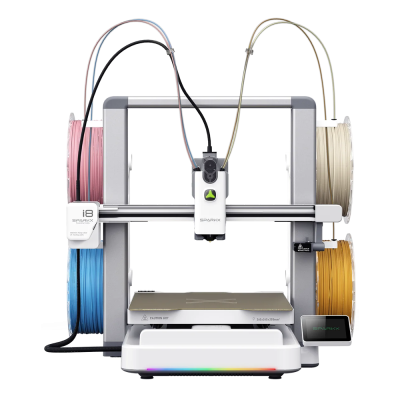



 PrusaSlicer
 OrcaSlicer
 BambuStudio
 ElegooSlicer
 Cura
Cura Kiri:Moto