 美国
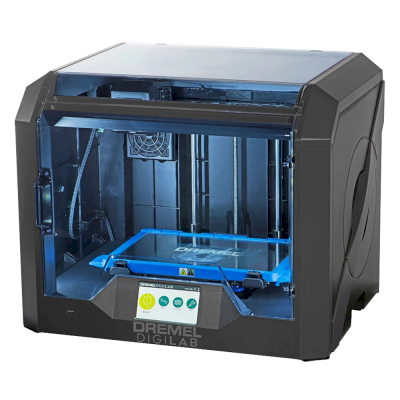
Dremel 3D45概览
The 3D45 is Dremel's enclosed classroom printer from 2017, with a 255 x 155 x 170 mm heated glass bed, a 280 °C all-metal hotend and a built-in camera, for PLA through nylon and TPU. It is now sold by 3PI Tech under licence and suits schools and labs that want a proven, safe machine more than speed or size.
- 成型尺寸
- 255 × 155 × 170 mm
- 封闭式机箱
- 全封闭
- 打印效果好
- PLA, PETG, TPU和柔性材料, ABS & ASA, Nylon(PA), Polycarbonate(PC)
- 内置摄像头
- 是
- 连接性
- Wi-Fi, 以太网, USB
将Dremel 3D45连接至SimplyPrint
这台Dremel 3D45 3D打印机是否兼容SimplyPrint、OctoPrint、Mainsail和Fluidd? 每种连接方式、所需条件及设置方法。
-

SimplyPrint客户端
兼容
您需要: 与打印机在同一网络且保持开机的计算机或Raspberry Pi,运行SimplyPrint客户端
10+台打印机使用SimplyPrint
-


Klipper(Moonraker)
不兼容
-

OctoPrint
通过USB直接连接
不兼容
与SimplyPrint兼容的功能
通过SimplyPrint客户端连接后,SimplyPrint支持Dremel 3D45提供的大部分功能:摄像头和AI故障检测, 远程打印和AutoPrint。 Dremel 3D45不允许其他软件执行以下功能:跳过对象, 更改温度, 使用控制器移动, 回零, 挤出和回抽, 更改打印速度, 风扇速度, 步进微调, 发送 G-code, 更换耗材, 打印床调平和Z轴偏移校准。 尚无法通过SimplyPrint客户端在SimplyPrint中使用:层进度。 无法通过SimplyPrint客户端使用:打印开始前下载文件。
每种连接至SimplyPrint的方式所支持的全部SimplyPrint功能
| 已通过以下方式连接至SimplyPrint | |
|---|---|
| SimplyPrint功能 | SimplyPrint客户端 兼容 |
| 监控 | |
| 实时状态和进度 | 是 |
| 摄像头 | 是 |
| AI打印失败检测 | 是 |
| 剩余时间 | 是 |
| 层进度 | 否 1 |
| 温度 | 是 |
| 打印 | |
| 开始打印 | 是 |
| 暂停、继续和取消 | 是 |
| 跳过对象 | 打印机不提供此功能 2 |
| 打印机控制 | |
| 更改温度 | 打印机不提供此功能 2 |
| 使用控制器移动 | 打印机不提供此功能 2 |
| 回零 | 打印机不提供此功能 2 |
| 挤出和回抽 | 打印机不提供此功能 2 |
| 更改打印速度 | 打印机不提供此功能 2 |
| 风扇速度 | 打印机不提供此功能 2 |
| 步进微调 | 打印机不提供此功能 2 |
| 发送 G-code | 打印机不提供此功能 2 |
| 校准 | |
| 更换耗材 | 打印机不提供此功能 2 |
| 打印床调平 | 打印机不提供此功能 2 |
| Z轴偏移校准 | 打印机不提供此功能 2 |
| 自动化 | |
| AutoPrint 专业版 | 是 |
| 打印开始前下载文件 | 否 |
已通过SimplyPrint客户端连接至SimplyPrint
兼容
监控
- 实时状态和进度 是
- 摄像头 是
- AI打印失败检测 是
- 剩余时间 是
- 层进度 否 1
- 温度 是
打印
- 开始打印 是
- 暂停、继续和取消 是
- 跳过对象 打印机不提供此功能 2
打印机控制
- 更改温度 打印机不提供此功能 2
- 使用控制器移动 打印机不提供此功能 2
- 回零 打印机不提供此功能 2
- 挤出和回抽 打印机不提供此功能 2
- 更改打印速度 打印机不提供此功能 2
- 风扇速度 打印机不提供此功能 2
- 步进微调 打印机不提供此功能 2
- 发送 G-code 打印机不提供此功能 2
校准
- 更换耗材 打印机不提供此功能 2
- 打印床调平 打印机不提供此功能 2
- Z轴偏移校准 打印机不提供此功能 2
自动化
- AutoPrint 专业版 是
- 打印开始前下载文件 否
可用 视情况而定 不支持 打印机不提供此功能
- SimplyPrint暂不支持通过此连接实现此功能。
- 打印机未向其他软件提供此功能。
SimplyPrint上的Dremel 3D45用户
10+台打印机使用SimplyPrint
Dremel 3D45应使用什么切片软件
请使用OrcaSlicer, ElegooSlicer, CrealityPrint或Cura:每个都有适用于Dremel 3D45的现成配置文件。
适用于Dremel 3D45的预设配置文件
-
 OrcaSlicer在SimplyPrint云端运行
-
 ElegooSlicer在SimplyPrint云端运行
-
 CrealityPrint在SimplyPrint云端运行
-
 Cura在SimplyPrint云端运行
没有适用于Dremel 3D45的配置文件
 PrusaSlicer
 BambuStudio
 Kiri:Moto
我们只列出可在SimplyPrint云端使用的切片软件,因此Dremel 3D45可能还有其他可用的切片软件。
适用于Dremel 3D45的云端切片软件:在线使用OrcaSlicer
使用OrcaSlicer及其他切片软件,直接在浏览器中使用SimplyPrint的在线云端切片软件。无需安装。无论您身在何处,使用任何设备都可切片您的Dremel 3D45模型!
立即试用在线切片软件配置文件和其他切片软件
自动更新配置文件:系统每天都会检查并从切片软件GitHub仓库以及我们自己的开源、社区驱动的切片软件配置文件数据库获取配置文件,确保您始终能使用最新配置文件。
注意:其他切片软件,例如Simplify3D、ideaMaker、SuperSlicer和KISSlicer,不在我们的云端,因此我们不会跟踪其配置文件。它们仍可能与您的Dremel 3D45良好配合:请查看切片软件自身的文档或论坛以获取配置文件。您也可以向我们的GitHub开源切片软件配置文件数据库贡献配置文件。
适用于Dremel 3D45的应用
将SimplyPrint作为您Dremel 3D45的应用:您可通过手机或任意浏览器监控和操作它,在云端切片,并将其与其他打印机一起管理。免费即可开始使用。 Dremel自家的应用是Dremel Print Cloud。
| 功能说明 | SimplyPrint | Dremel Print Cloud |
|---|---|---|
| 其他品牌的打印机 | 是 | 仅限Dremel打印机 |
| 无需使用Dremel的云端服务 | 是 | 仅通过Dremel的云端 |


让Dremel 3D45自动化
SimplyPrint暂未提供适用于Dremel 3D45的自动换板装置或自动退件套件,但AutoPrint仍可让它持续打印:打印平台清空后,会从您的队列启动下一个任务。
自动化方式
- 您自己的弹出G-code 编写清理打印平台的流程,AutoPrint会在每次打印后运行它。
- 机械臂或任何带有API的设备 通过API或webhook,将打印板已清空的信息告知SimplyPrint,信息可来自机械臂或您自己的系统。
- 手动清除,保留队列 AutoPrint会等待您将打印板标记为已清空,然后开始下一个任务。
AutoPrint随Pro及更高套餐提供。
Dremel 3D45规格:打印床尺寸、打印高度等
其尺寸、温度、多材料支持和连接方式,来自制造商资料及我们的研究。 阅读制造商提供的更多信息
大小
| 成型尺寸 | 255 × 155 × 170 mm |
|---|---|
| 打印床类型 | Rectangle |
| 打印床尺寸 | 255 × 155 mm |
| 最大打印高度 | 170 mm |
打印
| 封闭式机箱 | 全封闭 |
|---|---|
| 最高挤出机温度 | 280 °C |
| 配备热床 | 是 |
| 最高热床温度 | 100 °C |
| 喷嘴数量 | 1 |
| 工具头 | 1 |
| 直驱 | 是 |
| 探针工具/自动调平 | 否 |
| 耗材宽度 | 1.75 mm |
多材料
| 换刀器或热端更换器 | 否 |
|---|---|
| IDEX(独立双挤出机) | 否 |
正在连接
| 连接性 | Wi-Fi, 以太网, USB |
|---|---|
| 内置摄像头 | 是 |
| 从以下位置打印 | USB闪存盘 |
| 支持串口打印 | 否 |
| 随设备提供的固件 | 制造商自有 |
| 随设备提供的本地UI | Custom |
文件和切片
| 支持的文件格式 | G-code(.gcode、.gco、.g) 特殊格式:g3drem |
|---|
打印机
| 打印机制造商/品牌 | Dremel |
|---|---|
| 打印机型号名称 | 3D45 |
| 由来自以下国家的公司制造 | 美国 |
| 上线日期 | 2017 |
| 仍在生产 | 是 |
免责声明: 我们致力于让这些信息尽可能保持最新和准确,但无法保证其完整性或可靠性。我们的数据来源于用户提交内容和制造商参考资料。
Dremel 3D45可以打印哪些耗材?
Dremel 3D45的耗材兼容性:Dremel列出的可用材料。
| 耗材 | 适用性 | 备注 |
|---|---|---|
| PLA | 太好了 | 在制造商列出的该打印机材料清单中。 |
| PETG | 太好了 | 在制造商列出的该打印机材料清单中。 |
| TPU和柔性材料 | 太好了 | 在制造商列出的该打印机材料清单中。 |
| ABS & ASA | 太好了 | 在制造商列出的该打印机材料清单中。 |
| Nylon(PA) | 太好了 | 在制造商列出的该打印机材料清单中。 |
| Polycarbonate(PC) | 良好 | 适用于PC。干燥耗材,慢速打印,并使用封闭腔体以获得最佳效果。 |
| 碳纤维和玻璃纤维填充 | 精心打造 | 只要安装硬化或耐磨喷嘴即可,但磨蚀性纤维会很快磨损原装黄铜喷嘴。 |
提示:这是基于打印机规格的一般指南,请始终查看耗材的推荐设置。使用SimplyPrint,您可以为每个料盘保存配置,并准确追踪库存中的耗材。
最适合Dremel 3D45的耗材
Dremel 3D45适合打印的耗材,优先显示Dremel自有品牌,其次是最知名的品牌。
评测者如何评价Dremel 3D45
来自专业打印机测试人员的评测。我们提供链接,观点归其本人所有。
REVIEW: The Dremel 3D45 a professional, versatile and reliable open material 3D printer
A month of engineering-team testing without a single failed print; nylon, TPU and PC printed well and parts were dimensionally consistent. Third-party spools are inconvenient to load, the slicer lacks Cura plugins and the casing looks cheap for the price; rated well suited to schools.
“Living up to the Dremel legacy, the 3D45 is a reliable 3D printer.”
Reviewed: Dremel 3D45
Short guide review: the 3D45 keeps the 3D40's size and adds a heated removable glass bed and better nozzle for ABS and nylon, plus a cloud slicer that works but needs tweaks. Praises the door, filament and climate sensors and sees it as a safe classroom machine.
“It produces quality, repeatable results in a compact, fully enclosed, quiet package.”
Tests the 3D45 with Dremel's materials (loan unit from Dremel). Well built, easy to use, cloud printing flawless and print quality great, including ABS, nylon and PC. But the simplified software, chamber heat-creep and lack of filtering limit it, so he sees it as good for education and less so for advanced makers or PLA-only users given the price.
何时选择Dremel 3D45
Choose the 3D45 for a classroom or lab that wants an enclosed printer reviewers found dependable: 3D Printing Industry's engineering team ran it for a month without a failed print, and Make: calls it quiet with repeatable results. It is an old design and 3PI Tech lists it from $1,999, so if you want a bigger plate, faster printing or multi-colour, a modern enclosed printer such as the Bambu Lab P2S or Creality K2 gives more. CNC Kitchen found its simplified software and chamber heat creep limit it for advanced makers.
优点
- Enclosed with door, filament and climate sensors (Make:), which reviewers see as a safe classroom machine.
- Prints PLA, PETG, nylon, Eco-ABS and TPU on a 100 °C heated glass bed (3PI Tech); CNC Kitchen found ABS, nylon and PC printed well.
- No failed prints in a month of engineering-team testing, with dimensionally consistent parts (3D Printing Industry).
- RFID-tagged filament sets the temperatures automatically (3PI Tech).
- Built-in camera, Wi-Fi and Ethernet, and it works with SimplyPrint through the SimplyPrint Client, where a teacher can approve student prints.
缺点
- Expensive for a 2017 design: 3PI Tech lists it from $1,999.
- A small 255 x 155 x 170 mm build volume.
- Simplified slicer, heat creep in the chamber and no air filtering (CNC Kitchen).
- Third-party spools are awkward to load (3D Printing Industry).
适合谁
-
学校 适合
Enclosed, quiet, sensor-equipped and reliable, which reviewers rate well suited to schools; it costs a lot for an old, small machine.
-
业余爱好者 不太适合
CNC Kitchen sees it as less suited to advanced makers, and the price buys far more in a modern printer.
-
企业 可用
Reliable and handles nylon and PC, but the plate is small and the software basic.
-
打印农场 不太适合
Small, slow by today's standards and expensive per unit for a fleet.
根据制造商信息和独立评测编写。 阅读制造商提供的更多信息
将Dremel 3D45与类似打印机比较
与它同一制造商、尺寸相近、可打印相同工程材料或同样支持多材料打印,且目前可购买的打印机。最多可并排比较四台,包括其规格和连接方式。
-
Wanhao D6 Plus
 200 × 200 × 175 mm连接方式: OctoPrint相近的打印体积 · 也可打印ABS & ASA, Nylon(PA), Polycarbonate(PC)
-
QIDI X-Smart 3
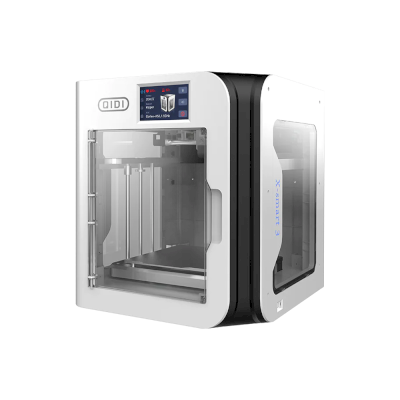 175 × 180 × 170 mm发布于四月 2023连接方式: Klipper(Moonraker)相近的打印体积 · 也可打印ABS & ASA, Nylon(PA), Polycarbonate(PC)
-
PrintersForAnts Micron
 180 × 180 × 165 mm发布于五月 2021连接方式: Klipper(Moonraker)相近的打印体积 · 也可打印ABS & ASA, Nylon(PA), Polycarbonate(PC)
-
PrintersForAnts Salad Fork
 180 × 180 × 150 mm发布于九月 2021连接方式: Klipper(Moonraker)相近的打印体积 · 也可打印ABS & ASA, Nylon(PA), Polycarbonate(PC)
在哪里购买Dremel 3D45

常见问题
Dremel 3D45与SimplyPrint兼容吗?
是的。您可通过SimplyPrint客户端将Dremel 3D45连接至SimplyPrint,然后通过浏览器或移动应用进行切片、加入打印队列、开始打印并监控进度。
如何将Dremel 3D45连接到SimplyPrint?
请按照Dremel 3D45的分步设置指南操作。指南会说明如何通过SimplyPrint客户端连接、每种方式需要什么以及该选哪种。
Dremel 3D45 应使用哪款切片软件?
我们推荐将OrcaSlicer用于Dremel 3D45。您可以直接在SimplyPrint的在线切片软件中运行它以及其他6款切片软件,无需安装,任何设备均可使用,且会自动更新Dremel 3D45的配置文件。
我可以将OrcaSlicer与Dremel 3D45一起使用吗?
是。OrcaSlicer附带适用于Dremel 3D45的配置文件,您可以在SimplyPrint的在线切片软件中运行它,无需安装任何内容。
Dremel 3D45可以打印哪些耗材?
Dremel列出3D45适用的PLA, PETG, Nylon(PA), ABS & ASA和TPU和柔性材料。
Dremel 3D45支持OctoPrint或Klipper吗?
据我们所知不能,但您不需要这两者:SimplyPrint可通过SimplyPrint客户端连接到Dremel 3D45。
Dremel 3D45的打印床尺寸和构建体积是多少?
Dremel 3D45的打印床尺寸为255 x 155 mm,最大打印高度为170 mm,构建体积约为255 x 155 x 170 mm。请查看上方完整规格表,了解打印床类型、温度等信息。
Dremel 3D45何时发布?
Dremel于2017推出3D45。
Dremel 3D45可以自动推出打印件吗?
我们暂未支持适用于它的套件,但SimplyPrint的AutoPrint可以运行您自己的退件G-code,通过API与机械臂配合,或等待您清空打印平台,然后从您的队列启动下一个任务。
在哪里购买Dremel 3D45?
从Dremel自己的商店购买,该商店在美国设有门店。 本页链接通向这些商店,部分为联盟链接,因此我们可能获得佣金,且不会增加您的费用。
联盟披露:本页面的部分链接为联盟链接。如果您购买,我们可能会获得佣金,您无需支付额外费用。作为 Amazon 联盟会员,我们从符合条件的购买中获得收入。
© 2026 SimplyPrint。保留所有权利。本页面及其兼容性、规格和评价数据由SimplyPrint编制,未经事先书面许可,不得全部或部分复制、抓取、转载或再发布。打印机图片归各自制造商所有,仅用于识别用途;SimplyPrint不主张对其拥有所有权。引用的评价归其作者所有。