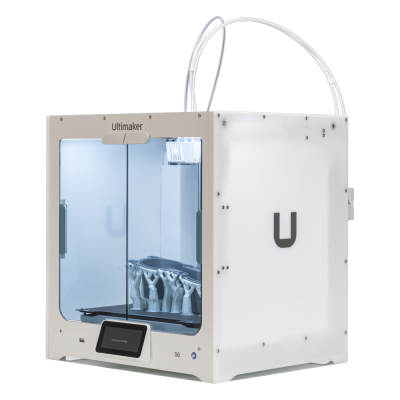
The S6 is UltiMaker's professional dual-extrusion desktop printer with swappable print cores, a flexible PEI plate and a partly enclosed chamber. It is for engineering teams, studios and schools that want a dependable, easy-to-run printer with a wide material range.
A impressora 3D Ultimaker S6 funciona com SimplyPrint, OctoPrint, Mainsail e Fluidd?
Cada forma de conectá-la, o que é necessário e como configurá-la.
Cliente SimplyPrint
Ainda sem confirmação, ajude-nos a descobrir
The SimplyPrint Client's UltiMaker integration covers the S3, S5 and S7 (local HTTP API). The S6 and S8 run a different firmware that UltiMaker says is not compatible with the S3/S5/S7's; whether its local API is the same is unconfirmed.
Origem
UltiMaker S-line printers take jobs over the network or from a USB drive; no USB serial printing is documented (the S7's manual shows a host port only).
Origem
Especificações de Ultimaker S6: tamanho da mesa, altura de impressão e mais
Suas dimensões, temperaturas, multimaterial e como se conecta, com base no fabricante e em nossa própria pesquisa.
Leia mais do fabricante
Tamanho
Volume de impressão
330 x 240 x 300 mm
Tipo de mesa
Rectangle
Tamanho da mesa
330 x 240 mm
Altura máxima de impressão
300 mm
Imprimindo
Gabinete
Parcialmente fechada
Velocidade máx. de impressão
500 mm/s
Temperatura máxima da extrusora
340 °C
Tem mesa aquecida
Sim
Temperatura máxima da mesa
100 °C
Número de bicos
2
Cabeçotes de ferramenta
2
Direct drive
Não
Ferramenta de sondagem / Nivelamento automático de mesa
Sim
Largura do filamento
2.85 mm
Multimaterial
Trocador de ferramentas ou de hotend
Não
IDEX (extrusoras duplas independentes)
Não
Conectando
Conectividade
Wi-Fi, Ethernet, USB
Compatível com impressão via conexão serial
Não
Firmware incluído
Do próprio fabricante
Arquivos e fatiamento
Formatos de arquivo compatíveis
G-code (.gcode, .gco, .g)
A impressora
Fabricante / marca da impressora
Ultimaker
Nome do modelo de impressora
S6
Fabricada por uma empresa de
Países Baixos
Lançado
junho 2025
Ainda fabricada
Sim
Aviso legal:
Nos esforçamos para manter esta informação o mais atualizada e precisa possível, mas não podemos garantir sua integridade nem confiabilidade. Nossos dados são baseados em envios de usuários e referências de fabricantes.
Que filamento a Ultimaker S6 pode imprimir?
Compatibilidade de filamento da Ultimaker S6: os materiais listados pela Ultimaker.
Filamento
Adequação
Notas
PLA
Ótimo
Na lista de materiais do fabricante para esta impressora.
PETG
Ótimo
Na lista de materiais do fabricante para esta impressora.
TPU e flexíveis
Ótimo
Na lista de materiais do fabricante para esta impressora.
ABS & ASA
Ótimo
Na lista de materiais do fabricante para esta impressora.
Nylon (PA)
Ótimo
Na lista de materiais do fabricante para esta impressora.
Polycarbonate (PC)
Ótimo
Na lista de materiais do fabricante para esta impressora.
Reforçado com fibra de carbono e vidro
Com cuidado
Possível se você instalar um bico endurecido ou resistente ao desgaste, as fibras abrasivas desgastam rapidamente um bico de latão padrão.
Dica: este é um guia geral baseado nas especificações da impressora, sempre confira as configurações recomendadas para seu filamento. Com SimplyPrint, você pode salvar um perfil para cada bobina e acompanhar exatamente qual filamento tem em estoque.
Quando escolher Ultimaker S6
Choose the S6 when you want UltiMaker's ecosystem (Cura, Digital Factory, 301+ materials) at the lower end of the S series and can live with a partly enclosed chamber. The UltiMaker S8 is the step up if you want the fully enclosed build chamber and an integrated EPA filter; the S6 only has an optional Air Manager. We cannot yet connect it to SimplyPrint, so check that matters to you first.
Vantagens
Dual extrusion with swappable print cores, and 301+ compatible materials including optional composite and metal cores (UltiMaker).
Up to 500 mm/s travel speed and 50,000 mm/s2 acceleration from the Cheetah motion planner (UltiMaker).
Flexible PEI-coated steel plate that releases parts easily, with an optional glass plate (UltiMaker).
Works with the Material Station for longer unattended runs and the optional Air Manager with an EPA filter (UltiMaker).
12-month warranty and Wi-Fi, Ethernet and USB connections (UltiMaker).
Contras
No confirmed way to connect it to SimplyPrint: Klipper is not possible and OctoPrint is unlikely, and our SimplyPrint Client status is unknown.
Only partly enclosed and passively heated, so ABS and nylon are not as well served as on a fully enclosed printer; the filter is an optional extra.
Wi-Fi is 2.4 GHz only (UltiMaker).
No independent hands-on review found for the S6 itself; claims are UltiMaker's own.
Para quem é
EscolasBoa compatibilidade
Easy to run and well supported with a warranty; the partly open chamber and the lack of a confirmed SimplyPrint connection are the drawbacks.
HobbistasPode funcionar
Capable, but priced for professionals and tied to UltiMaker's ecosystem.
EmpresasBoa compatibilidade
Dual extrusion, many materials and a warranty suit prototyping and tooling work.
Print farmsPode funcionar
The Material Station allows longer unattended runs, but we cannot yet connect it to SimplyPrint.
Com base nas informações do fabricante e em avaliações independentes.
Leia mais do fabricante
Impressoras semelhantes à Ultimaker S6 que funcionam com SimplyPrint
Impressoras do mesmo fabricante, de tamanho semelhante, que imprimem os mesmos materiais de engenharia ou em vários materiais, que você pode comprar hoje e que sabemos funcionar com SimplyPrint.
Quem fabrica a Ultimaker S6 e quão aberta a Ultimaker permite que você seja: se as impressoras dela funcionam sem a nuvem da marca, aceitam qualquer filamento e slicer e podem ser reparadas. Cada área é avaliada com base em fontes públicas.
Abertura: Misto (2.9 de 5)
Misto
Ecossistema fechadoAbrir
UltiMaker is the company formed in 2022 when the Dutch printer maker Ultimaker, founded in 2011, merged with MakerBot. It sells professional desktop and industrial printers (the S series, Factor 4, MakerBot Method and Sketch) to businesses, engineering teams and schools, and develops the open-source Cura slicer and the Digital Factory cloud platform.
Fundada:
2011 ·
Sede:
Zaltbommel, Netherlands, and New York, USA ·
Propriedade:
Privately held; at the 2022 merger NPM Capital held the majority and Stratasys a minority stake ·
Site:ultimaker.com
UltiMaker is mixed: Cura and material choice are open, and printers can be used on the local network, but the printer firmware is closed and most management features sit in its Digital Factory cloud.
Firmware e firmware personalizado ●●●●●
The printers' own software is not published: UltiMaker's GitHub has its Linux kernel configuration and Cura, but no printer firmware. We found no documented way to run custom firmware on current S-series or Method printers.
[1][2]
Controle local e integrações ●●●●●
Cura can add an S-series printer on the local network, by discovery or IP, without signing in, and start prints. UltiMaker says most features are only available through its Digital Factory cloud, and the API it documents publicly is that cloud API; we found no public documentation for controlling the printers locally.
[3][12]
Filamento, slicers e peças de terceiros ●●●●●
Cura is open source and widely used with other brands, and UltiMaker lists over 300 materials, including third-party ones, for the S series. Print cores and the Material Station are UltiMaker's own parts.
[2][4]
Reparos e peças de reposição ●●●●●
UltiMaker publishes maintenance schedules for the S series and sells part bundles and maintenance kits, and gives an expected printer lifetime of five years at 1,500 printing hours a year.
[5]
Dados e privacidade ●●●●●
Local printing needs no account; Digital Factory needs one. UltiMaker's privacy policy says data is stored and processed in the EEA or the United States depending on the user's region.
[6][3]
Comunidade e documentação ●●●●●
Cura is developed in public on GitHub with a large open issue tracker, and UltiMaker runs a community forum and support knowledge base. Printer internals are not documented publicly.
[2][3]
Vantagens
Cura is open source and works with printers from many brands.
Wide material choice on the S series, including third-party materials.
Printers can be used on the local network without an account.
Published maintenance schedules and maintenance kits for long service life.
Contras
Printer firmware is closed.
Most fleet and management features need the Digital Factory cloud, with paid tiers.
MakerBot CloudPrint was shut down in 2025, forcing users to move platforms.
Print cores and the Material Station are UltiMaker-only parts.
Histórico comprovado
21 de maio de 2026: UltiMaker launched the Factor 4 Plus, an industrial printer up to twice as fast as the Factor 4, with TRACE print validation for production and defence customers.
[7]
fevereiro 2026: UltiMaker sold the Thingiverse model platform to MyMiniFactory and archived its Thingiverse forum.
[8]
dezembro 2025: UltiMaker shut down MakerBot CloudPrint in early December 2025. Users had to reconnect printers to Digital Factory, with a free year of its premium tier offered to former CloudPrint users; the Replicator+ cannot be networked in Digital Factory.
[9]
maio 2022: Ultimaker and Stratasys' MakerBot announced a merger backed by $62.4 million from NPM Capital and Stratasys, with co-CEOs from both companies and headquarters in the Netherlands and New York. The combined company took the UltiMaker name.
[10][11]
Com base em 12 fontes, verificado pela última vez em 18 de outubro de 2026. Mostrar fontes
A impressora Ultimaker S6 é compatível com SimplyPrint?
Ainda não sabemos. A SimplyPrint funciona com mais de 130 marcas e mais de 600 modelos via OctoPrint, Klipper e integrações integradas. Se você tiver uma Ultimaker S6, nossa verificação de compatibilidade informa, com algumas perguntas, como ela pode se conectar.
Qual slicer devo usar para a Ultimaker S6?
Use Cura, o slicer da Ultimaker, feito para suas impressoras. Você pode usá-lo no slicer online do SimplyPrint; ele ainda não tem um perfil pronto para a Ultimaker S6.
Que filamento a Ultimaker S6 pode imprimir?
A Ultimaker lista PLA, PETG, ABS & ASA, Nylon (PA), Polycarbonate (PC) e TPU e flexíveis para a S6.
Quais são as dimensões da mesa e o volume de impressão da Ultimaker S6?
A Ultimaker S6 tem uma mesa de impressão de 330 x 240 mm e imprime até 300 mm de altura, com um volume de construção de cerca de 330 x 240 x 300 mm. Consulte a tabela de especificações completa acima para ver o tipo de mesa, temperaturas e mais.
Quando a Ultimaker S6 foi lançada?
A Ultimaker lançou a S6 em junho 2025.
Onde comprar Ultimaker S6?
Na loja da Ultimaker, que atende os EUA. Os links desta página levam a essas lojas. Alguns são links de afiliados, então podemos receber uma comissão sem custo extra para você.
 Países Baixos


 PrusaSlicer
 OrcaSlicer
 BambuStudio
 ElegooSlicer
 CrealityPrint
 Kiri:Moto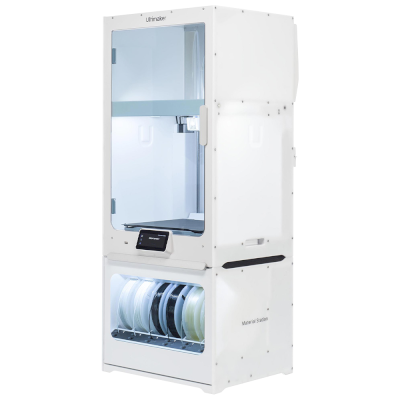


 Ideal para EUA: loja da Ultimaker para os EUA