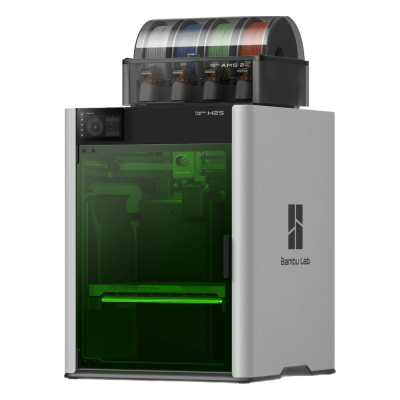
The H2S Laser Full Combo is the Bambu Lab H2S with the optional 10 W laser and cutting module added: a 340 x 320 x 340 mm enclosed printer with a 350 degrees C hotend, a 65 degrees C heated chamber and the AMS 2 Pro. It is for makers and small businesses that want big, fast prints plus laser cutting and engraving in one machine.
Bambu Lab H2S Laser Full Combo é uma variante de Bambu Lab H2S.
Isso significa que ele compartilha muitas características com o modelo base, mas pode ter modificações específicas, recursos adicionais ou acessórios incluídos.
Conecte a Bambu Lab H2S Laser Full Combo ao SimplyPrint
A impressora 3D Bambu Lab H2S Laser Full Combo funciona com SimplyPrint, OctoPrint, Mainsail e Fluidd?
Cada forma de conectá-la, o que é necessário e como configurá-la.
Cliente SimplyPrint
Verificado pelo SimplyPrint
Do que você precisa: Um computador ou Raspberry Pi na mesma rede, sempre ligado, executando o Cliente SimplyPrint
Conectada via Cliente SimplyPrint no modo somente LAN, a SimplyPrint suporta tudo o que a Bambu Lab H2S Laser Full Combo permite que outros softwares façam: a câmera e a detecção de falhas por IA, impressão remota, pular objetos, controle de temperatura e movimento, mapeamento de filamento para sua unidade multimaterial e AutoPrint. As únicas exceções são o que a Bambu Lab H2S Laser Full Combo não permite que outros softwares façam: Ajuste fino, Nivelamento de mesa e Calibração de Z-offset. A tabela abaixo compara as duas formas de conectá-la ao SimplyPrint.
Todos os recursos do SimplyPrint, para cada forma de conectá-la ao SimplyPrint
Conectada ao SimplyPrint via
recurso do SimplyPrint
Cliente SimplyPrint (Modo somente LAN, recomendado)
Verificado pelo SimplyPrint
Cliente SimplyPrint (Modo nuvem)
Verificado pelo SimplyPrint
Monitoramento
Status e progresso em tempo real
Sim
Sim
Webcam
Sim
Sim
Detecção de falhas com IA
Sim
Sim
Tempo restante
Sim
Sim
Progresso da camada
Sim
Sim
Temperaturas
Sim
Sim
Imprimindo
Iniciando uma impressão
Sim
Depende1
Pausar, continuar e cancelar
Sim
Depende1
Pular objetos
Sim
Depende1
Arquivos
Imprimir arquivos 3MF fatiados
Sim
Sim
Controle da impressora
Alterar temperaturas
Sim
Sim
Movimentação com os controles
Sim
Depende1
Referenciamento
Sim
Depende1
Extrudar e retrair
Sim
Depende1
Alterar velocidade de impressão
Sim
Depende1
Velocidade do ventilador
Sim
Depende1
Ajuste fino
Não oferecido pela impressora2
Não oferecido pela impressora2
Enviar G-code
Sim
Depende1
Calibração
Alterar filamento
Sim
Depende1
Nivelamento de mesa
Não oferecido pela impressora2
Não oferecido pela impressora2
Calibração de Z-offset
Não oferecido pela impressora2
Não oferecido pela impressora2
Multimaterial
Mapear filamento para compartimentos multimateriais
Sim
Sim
Sincronizar filamento carregado da unidade multimaterial
Sim
Sim
Automação
AutoPrint
Pro
Sim
Depende1
Baixar o arquivo antes de a impressão começar
Sim
Não oferecido pela impressora2
Conectada ao SimplyPrint via Cliente SimplyPrint (Modo somente LAN, recomendado)
Verificado pelo SimplyPrint
Monitoramento
Status e progresso em tempo realSim
WebcamSim
Detecção de falhas com IASim
Tempo restanteSim
Progresso da camadaSim
TemperaturasSim
Imprimindo
Iniciando uma impressãoSim
Pausar, continuar e cancelarSim
Pular objetosSim
Arquivos
Imprimir arquivos 3MF fatiadosSim
Controle da impressora
Alterar temperaturasSim
Movimentação com os controlesSim
ReferenciamentoSim
Extrudar e retrairSim
Alterar velocidade de impressãoSim
Velocidade do ventiladorSim
Ajuste finoNão oferecido pela impressora2
Enviar G-codeSim
Calibração
Alterar filamentoSim
Nivelamento de mesaNão oferecido pela impressora2
Calibração de Z-offsetNão oferecido pela impressora2
Multimaterial
Mapear filamento para compartimentos multimateriaisSim
Sincronizar filamento carregado da unidade multimaterialSim
Automação
AutoPrint ProSim
Baixar o arquivo antes de a impressão começarSim
Conectada ao SimplyPrint via Cliente SimplyPrint (Modo nuvem)
Verificado pelo SimplyPrint
Monitoramento
Status e progresso em tempo realSim
WebcamSim
Detecção de falhas com IASim
Tempo restanteSim
Progresso da camadaSim
TemperaturasSim
Imprimindo
Iniciando uma impressãoDepende1
Pausar, continuar e cancelarDepende1
Pular objetosDepende1
Arquivos
Imprimir arquivos 3MF fatiadosSim
Controle da impressora
Alterar temperaturasSim
Movimentação com os controlesDepende1
ReferenciamentoDepende1
Extrudar e retrairDepende1
Alterar velocidade de impressãoDepende1
Velocidade do ventiladorDepende1
Ajuste finoNão oferecido pela impressora2
Enviar G-codeDepende1
Calibração
Alterar filamentoDepende1
Nivelamento de mesaNão oferecido pela impressora2
Calibração de Z-offsetNão oferecido pela impressora2
Multimaterial
Mapear filamento para compartimentos multimateriaisSim
Sincronizar filamento carregado da unidade multimaterialSim
Automação
AutoPrint ProDepende1
Baixar o arquivo antes de a impressão começarNão oferecido pela impressora2
Funciona
Depende
Não compatível
Não oferecido pela impressora
O firmware Bambu Lab de 2025 em diante permite apenas monitoramento no modo de nuvem: use o modo somente LAN para iniciar impressões e controlar a impressora. Firmwares mais antigos ainda permitem ambos.
A impressora não oferece isso a outros softwares.
Qual slicer usar com Bambu Lab H2S Laser Full Combo
A Bambu Lab usa o BambuStudio, o slicer da própria Bambu Lab. Ainda não há um perfil pronto para a Bambu Lab H2S Laser Full Combo em nossa nuvem.
Só listamos slicers que você pode usar na nuvem do SimplyPrint, então pode haver outros para a impressora Bambu Lab H2S Laser Full Combo.
Slicer na nuvem para Bambu Lab H2S Laser Full Combo: use BambuStudio online
Usar BambuStudio e outros slicers diretamente no navegador com o slicer em nuvem online da SimplyPrint. Não é necessária instalação. Fatie seus modelos de Bambu Lab H2S Laser Full Combo em qualquer dispositivo, de qualquer lugar do mundo!
Atualizações automáticas de perfis: os perfis são verificados e obtidos automaticamente todos os dias dos repositórios GitHub dos slicers, além do nosso próprio banco de dados de perfis de slicer de código aberto criado pela comunidade. Isso garante que você sempre tenha acesso aos perfis mais recentes.
Observação: Outros slicers, como Simplify3D, ideaMaker, SuperSlicer e KISSlicer, não estão em nossa nuvem, por isso não acompanhamos seus perfis. Eles ainda podem funcionar bem com sua Bambu Lab H2S Laser Full Combo: consulte a documentação ou os fóruns do slicer para encontrar um perfil. Você também pode contribuir com perfis para nosso banco de dados open source de perfis de slicer no GitHub.
O aplicativo para a Bambu Lab H2S Laser Full Combo
O SimplyPrint funciona como o app da Bambu Lab H2S Laser Full Combo: no seu celular e em qualquer navegador, com um slicer na nuvem.
O que você recebe com SimplyPrint
Um app para iPhone e Android, igual em qualquer navegador, e um slicer na nuvem.
Mais que monitoramento: fila de impressão, detecção de falhas por IA, AutoPrint e contas para uma equipe.
Impressoras de várias marcas em um só lugar, lado a lado.
Ainda não há um trocador de placas ou kit de ejeção automática para a Bambu Lab H2S Laser Full Combo no SimplyPrint, mas o AutoPrint ainda pode mantê-la imprimindo: assim que a placa estiver livre, ele inicia o próximo trabalho da sua fila.
Impressoras fechadas empurram as impressões para fora
A mesa da Bambu Lab H2S Laser Full Combo só se move para cima e para baixo dentro do gabinete, então, em vez de trocar placas, kits como estes permitem que o cabeçote empurre a impressão resfriada para fora da placa e pela porta frontal, que eles abrem para você quando uma impressão termina.
Empurrar impressões para fora com o cabeçoteEm uma impressora CoreXY, uma rotina de G-code pode empurrar a peça resfriada para fora da frente da placa antes do próximo trabalho começar.
Seu próprio G-code de ejeçãoEscreva a rotina que limpa sua placa, e o AutoPrint a executará após cada impressão.
G-code (.gcode, .gco, .g), Arquivos no formato Zip (por exemplo, 3MF)
A impressora
Fabricante / marca da impressora
Bambu Lab
Nome do modelo de impressora
H2S Laser Full Combo
Fabricada por uma empresa de
China
Lançado
26 de agosto de 2025
Aviso legal:
Nos esforçamos para manter esta informação o mais atualizada e precisa possível, mas não podemos garantir sua integridade nem confiabilidade. Nossos dados são baseados em envios de usuários e referências de fabricantes.
Que filamento a Bambu Lab H2S Laser Full Combo pode imprimir?
Compatibilidade de filamento da Bambu Lab H2S Laser Full Combo: os materiais que ela pode usar, com base no hotend, mesa, câmara e gabinete.
Filamento
Adequação
Notas
PLA
Ótimo
O filamento mais fácil de imprimir. Funciona em quase qualquer impressora; uma mesa aquecida ajuda na adesão, mas não é necessária.
PETG
Ótimo
Confortavelmente dentro da faixa (PETG funciona bem com hotend de ~230-250C e mesa de ~70-85C).
TPU e flexíveis
Ótimo
A extrusora direct-drive alimenta bem o filamento flexível. Imprima lentamente para resultados limpos.
ABS & ASA
Ótimo
Fechada, com hotend e mesa suficientemente quentes: ABS e ASA imprimem bem.
Nylon (PA)
Bom
É possível, com cuidado: seque bem o filamento, e uma câmara fechada ajuda muito.
Polycarbonate (PC)
Bom
Dentro da faixa para PC. Seque o filamento, imprima devagar e use uma câmara fechada para obter os melhores resultados.
Reforçado com fibra de carbono e vidro
Com cuidado
Possível se você instalar um bico endurecido ou resistente ao desgaste, as fibras abrasivas desgastam rapidamente um bico de latão padrão.
Dica: este é um guia geral baseado nas especificações da impressora, sempre confira as configurações recomendadas para seu filamento. Com SimplyPrint, você pode salvar um perfil para cada bobina e acompanhar exatamente qual filamento tem em estoque.
Melhor filamento para a Bambu Lab H2S Laser Full Combo
Filamentos que a Bambu Lab H2S Laser Full Combo imprime bem, primeiro os da Bambu Lab, depois os mais conhecidos.
Editor's Choice. Praises the large 340 x 340 mm bed, enclosure, perfect auto bed levelling and the faster, easier-to-maintain AMS 2 Pro, with clean results in PLA, PETG, nylon-CF and TPU. Downsides: the price and proprietary replacement parts. Tested the AMS Combo without the laser.
“The H2S has excellent quality and print speed, making it the perfect successor to the X1C.”
Rates the single-nozzle H2S for its huge 340 x 320 x 340 mm volume, speed and enclosed heated chamber, scoring 29/30 on his print-quality test. Cons: no dual nozzle, higher running cost from the heated chamber and an optional Vision Encoder.
“A single nozzle might seem like a step back for industrial and business users, but this machine offers enterprise-level print features and volume at an extremely affordable price.”
Frankly Built · 13 de outubro de 2025
Uses two H2S units (supplied by Bambu Lab) across a variety of materials for weeks and reports no bugs, errors or clogs, with good prints out of the box. Calls it the bigger Bambu he wanted. Filament sponsor: Polymaker.
CNC Kitchen · 26 de agosto de 2025
Compares the H2S with the H2D: same look and a little more volume, $800 cheaper, but single-nozzle purge waste and no real multi-material. Still a hybrid with the 10 W laser and drag knife only. Calls it a fantastic choice for single-material parts that need the volume.
Made with Layers · 26 de agosto de 2025
Thomas Sanladerer sees the H2S as more of a bigger X1C than a baby H2D. He misses the second hotend for multi-material work, but finds little to complain about, with very well-designed hardware and near-flawless prints at a fair price. Sponsor: VoxelPLA.
Quando escolher Bambu Lab H2S Laser Full Combo
Choose the Laser Full Combo if you want the H2S's large, enclosed single-nozzle printing and also plan to cut or engrave: Bambu lists the laser module as optional and self-installed, so the base H2S is cheaper if you will not use it. Reviewers agree on the printing: Tom's Hardware gave it 4.5/5 and called it the successor to the X1C, and TechRadar also gave 4.5/5. If you want real multi-material with soluble supports, the dual-nozzle H2D suits better, as CNC Kitchen and Made with Layers note the single nozzle wastes filament on colour changes.
Vantagens
A 340 x 320 x 340 mm enclosed volume with a 350 degrees C hotend and a 65 degrees C heated chamber (Bambu Lab).
Excellent print quality and speed with perfect auto bed levelling (Tom's Hardware); Frankly Built ran two units for weeks with no clogs or errors.
The 10 W 455 nm laser cuts up to 5 mm plywood, acrylic or PU, and the module adds air assist and digital cutting (Bambu Lab).
The AMS 2 Pro is faster and easier to maintain (Tom's Hardware), with clean results in PLA, PETG, nylon-CF and TPU.
Five flame sensors, a laser safety window and an emergency stop (Bambu Lab).
Works with SimplyPrint through the SimplyPrint Client, verified.
Contras
Single nozzle, so colour changes purge filament and there is no real multi-material; a second hotend is the H2D (CNC Kitchen, Made with Layers).
Expensive, with proprietary replacement parts (Tom's Hardware), and a higher running cost from the heated chamber (TechRadar).
The laser module needs self-installation, and a laser in a shared room needs supervision and safety rules (Bambu Lab).
It runs through Bambu Lab's own software and cloud, which some organisations' compliance rules don't allow; connected through SimplyPrint it can be cut off from that and use SimplyPrint's European cloud.
Para quem é
EscolasPode funcionar
Enclosed, filtered and well protected, and SimplyPrint can queue student prints for approval, but the price and the laser module need supervision.
HobbistasÓtima compatibilidade
Large, fast, reliable prints plus laser cutting and engraving, at a price that is high but fair for what it does.
EmpresasÓtima compatibilidade
A large heated chamber for engineering filaments, verified SimplyPrint support, and laser cutting for enclosures and jigs.
Print farmsPode funcionar
Reliable per Frankly Built's two-unit test, but a large, costly single-nozzle machine with no plate-clearing kit in our sources.
Com base nas informações do fabricante e em avaliações independentes.
Leia mais do fabricante
Compare a Bambu Lab H2S Laser Full Combo com impressoras semelhantes
Impressoras do mesmo fabricante, de tamanho semelhante, que imprimem os mesmos materiais de engenharia ou em vários materiais, que você pode comprar hoje. Compare até quatro lado a lado, com suas especificações e como cada uma se conecta.
Também vendida sem a unidade multimaterial, como a Bambu Lab H2S.
Sobre Bambu Lab
Quem fabrica a Bambu Lab H2S Laser Full Combo e quão aberta a Bambu Lab permite que você seja: se as impressoras dela funcionam sem a nuvem da marca, aceitam qualquer filamento e slicer e podem ser reparadas. Cada área é avaliada com base em fontes públicas.
Abertura: Majoritariamente fechada (2.3 de 5)
Majoritariamente fechada
Ecossistema fechadoAbrir
Bambu Lab is a Shenzhen company founded in 2020 by former DJI engineers. It makes FDM printers in four families (A, P, X and H), the AMS multi-material units, the Bambu Studio slicer, the Bambu Handy app and the MakerWorld model site, and designs them to be used together. Its printers are used by beginners, hobbyists, schools and print farms.
Fundada:
2020 ·
Sede:
Shenzhen, China ·
Propriedade:
Privately held; founded by CEO Ye Tao and other former DJI staff, with venture investors (BGR, 2026) ·
Site:bambulab.com
Bambu Lab works like Apple: printer, slicer, app, cloud and multi-material system come from one company and are made to work together. Filament and slicer choice stay open, but the firmware is closed and signed, and since 2025 third-party control needs Bambu Connect or the unsupported Developer Mode.
Firmware e firmware personalizado ●●●●●
The printer firmware is Bambu's own and closed; in 2022 Bambu said it would keep it in-house. Its security white paper describes secure boot that only runs verified firmware on X1, H2, P1 and A1 printers. Bambu publishes the GPL parts it uses (Linux kernel, U-Boot, BusyBox) but not the printer software. Rooting the X1 only became possible through a security flaw the X1Plus project used in 2024; Bambu then published a one-off rootable X1 firmware for owners who give up their warranty, and blocks rooting in later firmware.
[1][2][3][4][22]
Controle local e integrações ●●●●●
LAN Only mode prints and monitors from Bambu Studio or Bambu Connect without internet or an account; the Handy app, printing from outside the network and print history need Bambu's cloud. Since the 2025 authorization firmware, other software can only read status in normal mode. Full control needs Developer Mode, which cuts the cloud link and which Bambu says it cannot support because the protocols are not official. Bambu documents no local protocol; it offers a file hand-off to Bambu Connect and a Local Server SDK on application.
[23][24][6][7][5]
Filamento, slicers e peças de terceiros ●●●●●
Third-party filament works, and Bambu publicly denied in 2025 that it would restrict it. OrcaSlicer and other slicers can be used, but since the 2025 firmware they send and control prints through Bambu Connect or Developer Mode. Hotends are Bambu's own designs, and Bambu says it cannot promise long-term support for accessories that control the printer unless it approved them first.
[7][6][4]
Reparos e peças de reposição ●●●●●
Bambu's store sells individual spare parts down to motors, belts, encoders and boards, and its wiki has step-by-step replacement guides for each model (for example the P2S hotend and the H2D/H2C AP board). Many parts, hotends included, are Bambu-specific, so spares come from Bambu.
[8][9][10]
Dados e privacidade ●●●●●
Cloud features need a Bambu account, while LAN Only mode keeps jobs on the local network. Bambu publishes a Trust Center and a 38-page security white paper, says it holds ISO/IEC 27001, ISO/IEC 27701 and TRUSTe certifications, and runs a paid bug bounty. In August 2023 a cloud outage made some printers start earlier jobs on their own; Bambu apologised.
[2][11][5][12]
Comunidade e documentação ●●●●●
Very large user community, the MakerWorld model site, a detailed wiki and a blog where Bambu explains its policy changes. Bambu Studio is developed in public on GitHub with an open issue tracker. The printer protocol is not documented, and Developer Mode is unsupported.
[13][5][7]
Vantagens
Printer, slicer, app and AMS come from one company and are designed to work together, which makes a first setup simple.
Step-by-step repair guides for each model and individual spare parts sold in Bambu's store.
LAN Only mode works without internet or an account.
Bambu Studio is open source, and third-party filament works.
Publishes security certifications and runs a public bug bounty.
Contras
Firmware is closed and signed; current models have no supported way to run custom firmware.
Since the 2025 firmware, third-party software and accessories need Bambu Connect or the unsupported Developer Mode to control the printer.
Remote printing, the Handy app and print history depend on Bambu's cloud.
Hotends and many parts are Bambu-specific, so spares come from Bambu.
In 2026 a US jury found the X1, P1 and A1 infringe Stratasys patents; Bambu is appealing.
Histórico comprovado
setembro 2026: A US federal jury in Texas found that Bambu Lab's X1, P1 and A1 printers infringe Stratasys patents on prime towers and bed levelling, and awarded Stratasys $27.6 million. No injunction was placed on the printers. Bambu told Tom's Hardware it disagrees with the verdict and intends to seek post-trial review and appeal. Stratasys had filed two suits in 2024; more patents are still to be decided.
[14]
maio 2026: Bambu Lab pressed the developer of 'OrcaSlicer-bambulab', a fork that restored direct cloud printing from OrcaSlicer, to remove it, according to Manufactur3D. On 7 May Bambu said the fork impersonated the official Bambu Studio client to its cloud, which its user agreement does not allow, and that modifying and sharing its AGPL code remains fine. The developer disputed the claims.
[15][16][17]
outubro 2025: Bambu Lab opened a Trust Center with a security white paper and listed ISO/IEC 27001, ISO/IEC 27701 and TRUSTe privacy certifications. A year later it said its bug bounty had worked with over 100 researchers and that it had added a public security update log.
[2][11]
20 de janeiro de 2025: After criticism from users and print farms, Bambu Lab announced an optional Developer Mode for X1, P1, A1 and A1 mini that leaves MQTT, FTP and the live stream open for third-party software in LAN mode, without official support. It also said LAN mode via Bambu Connect needs neither internet nor an account, and that third-party filament would not be restricted.
[7]
16 de janeiro de 2025: Bambu Lab announced firmware with 'authorization control', first for the X1: starting prints, moving axes, changing temperatures and binding the printer now require Bambu-approved software, also in LAN mode. On updated printers, third-party slicers and accessories such as the Panda Touch could no longer control the printer except through Bambu Connect; reading status still worked. Bambu cited security and up to 30 million unauthorised cloud requests a day; older firmware stayed optional.
[6]
março 2024: After the X1Plus jailbreak, Bambu Lab published a one-off rootable firmware for the X1 series for owners who give up their warranty support. It said it does not support X1Plus, and that firmware after it would block rooting again.
[4]
fevereiro 2024: Bambu Lab extended its A1 heatbed-cable callback to a recall of all A1 printers and asked owners to stop using them. It reported electrical faults in under 0.1% of units and offered a full refund plus an $80 voucher, or a redesigned heatbed plus a $120 voucher and six extra months of warranty. The A1 mini was not affected.
[18][19]
janeiro 2024: Community developers rooted the X1 series through a security flaw in its firmware (up to version 1.07) and released the X1Plus custom firmware. Bambu Lab closed the flaw in later firmware.
[22]
agosto 2023: During a Bambu cloud outage on 15 August 2023, some printers started print jobs without user action, because jobs stuck in the cloud were resent when service returned. Bambu apologised, took responsibility and said it would add checks before a print starts.
[12]
maio 2022: Before its first printers shipped, Bambu Lab said its firmware would stay closed and in-house to remain competitive, and promised to open-source everything if the company ever could not survive.
[1]
Com base em 24 fontes, verificado pela última vez em 20 de outubro de 2026. Mostrar fontes
A impressora Bambu Lab H2S Laser Full Combo é compatível com SimplyPrint?
Sim. Você pode conectar a Bambu Lab H2S Laser Full Combo ao SimplyPrint por Cliente SimplyPrint e, em seguida, fatiar, enfileirar, iniciar e monitorar impressões pelo navegador ou aplicativo móvel.
Como conecto a Bambu Lab H2S Laser Full Combo ao SimplyPrint?
Siga nosso guia de configuração passo a passo para a Bambu Lab H2S Laser Full Combo. Ele mostra como conectá-la por Cliente SimplyPrint, o que você precisa para cada opção e qual escolher.
Qual slicer devo usar para a Bambu Lab H2S Laser Full Combo?
Use BambuStudio, o slicer da Bambu Lab, feito para suas impressoras. Você pode usá-lo no slicer online do SimplyPrint; ele ainda não tem um perfil pronto para a Bambu Lab H2S Laser Full Combo.
Posso usar o OrcaSlicer com Bambu Lab H2S Laser Full Combo?
Sim, mas, pelo que sabemos, o OrcaSlicer não tem um perfil integrado para a Bambu Lab H2S Laser Full Combo: comece com o perfil de uma impressora semelhante e ajuste o tamanho e a altura da mesa e o bico conforme necessário.
Que filamento a Bambu Lab H2S Laser Full Combo pode imprimir?
Com base nas especificações (hotend de até 350C e mesa aquecida de até 120C), a Bambu Lab H2S Laser Full Combo trabalha bem com PLA, PETG, TPU e flexíveis ou ABS & ASA. Consulte acima o guia completo de filamentos para ABS, nylon, PC e compósitos.
A Bambu Lab H2S Laser Full Combo funciona com OctoPrint ou Klipper?
Não diretamente: um plugin comunitário do OctoPrint pode conectá-la pela rede. Mas você não precisa de nenhum dos dois: SimplyPrint se conecta à Bambu Lab H2S Laser Full Combo via Cliente SimplyPrint.
Quais são as dimensões da mesa e o volume de impressão da Bambu Lab H2S Laser Full Combo?
A Bambu Lab H2S Laser Full Combo tem uma mesa de impressão de 340 x 320 mm e imprime até 340 mm de altura, com um volume de construção de cerca de 340 x 320 x 340 mm. Consulte a tabela de especificações completa acima para ver o tipo de mesa, temperaturas e mais.
Quando a Bambu Lab H2S Laser Full Combo foi lançada?
A Bambu Lab lançou a H2S Laser Full Combo em 26 de agosto de 2025.
A Bambu Lab H2S Laser Full Combo pode ejetar impressões automaticamente?
Ainda não há um kit compatível, mas o AutoPrint do SimplyPrint pode empurrar impressões para fora com o cabeçote ou executar seu próprio G-code de ejeção e, em seguida, iniciar o próximo trabalho da sua fila.
Onde comprar Bambu Lab H2S Laser Full Combo?
Na loja da Bambu Lab, que atende a UE. Os links desta página levam a essas lojas. Alguns são links de afiliados, então podemos receber uma comissão sem custo extra para você.
Aviso de afiliados: alguns links nesta página são links de afiliados. Podemos receber uma comissão se você fizer uma compra, sem custo adicional para você. Como Associado da Amazon, recebemos por compras qualificadas.
 China
China
 Cliente SimplyPrint



 PrusaSlicer
 OrcaSlicer
 ElegooSlicer
 CrealityPrint
 Cura
Cura Kiri:Moto



 A Bambu Lab não tem loja para EUA: tente a loja dela para a UE