
SketchUp
Send 3D-modellene dine direkte fra SketchUp til SimplyPrint for slicing og utskrift
Installer fra Extension Warehouse Les hele veiledningen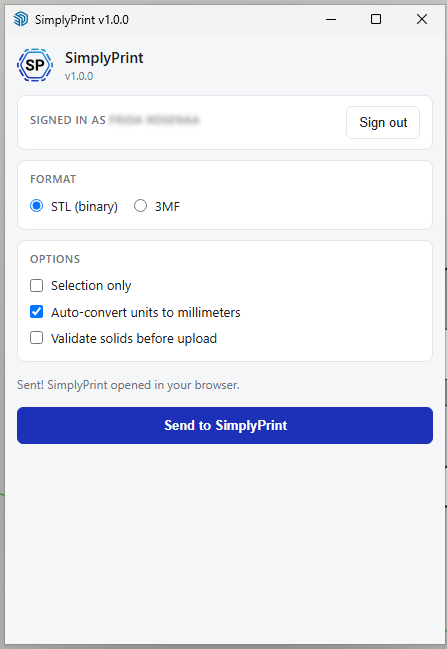
Send 3D-modellene dine direkte fra SketchUp til SimplyPrint for slicing og utskrift
Installer fra Extension Warehouse Les hele veiledningen
SimplyPrint er verken godkjent av eller tilknyttet SketchUp. Vi bruker varemerker og bilder utelukkende for å indikere kompatibilitet med plattformen vår. Bruk av SketchUp-maskinvare med SimplyPrint er kanskje ikke i tråd med det SketchUp har tiltenkt. Alle rettigheter tilhører de respektive eierne.
SimplyPrint-utvidelsen for SketchUp knytter sammen 3D-modellering og 3D-printing. Modeller i SketchUp, og send deretter arbeidet til printeren med ett klikk, uten å eksportere filer manuelt, flytte SD-kort eller åpne en slicer i et eget vindu.
Er dette nytt for deg? Les hele veiledningen: Slik 3D-printer du fra SketchUp.
Utvidelsen legger til en SimplyPrint-verktøylinje, en undermeny under Extensions → SimplyPrint, menypunktet File → Send to SimplyPrint… og et alternativ i høyreklikkmenyen. Velg STL eller 3MF, velg om hele modellen eller bare markeringen skal sendes, klikk på Send, og SimplyPrint åpnes i nettleseren med modellen lastet inn, klar til å slices, settes i kø eller printes.
Hent utvidelsen fra SketchUp Extension Warehouse (anbefalt) eller fra CDN-et vårt som reserve. Det er den samme .rbz-filen begge steder. Installer den i SketchUp ved å følge trinnene nedenfor.
Gå til Window → Extension Manager i SketchUp.
Klikk på Install Extension nederst i Extension Manager.
Velg den nedlastede filen simplyprint.rbz, og godkjenn eventuelle forespørsler fra SketchUp.
Start SketchUp på nytt. Verktøylinjen SimplyPrint vises, og Send to SimplyPrint… legges til under menyen Extensions.
Klikk på SimplyPrint-ikonet på verktøylinjen, eller velg Extensions → SimplyPrint → Send to SimplyPrint…, for å åpne dialogboksen. Klikk på Logg inn første gang. En nettleserfane åpnes, du godkjenner forespørselen, og du er klar for fremtidige økter. Velg STL eller 3MF, tilpass eventuelt innstillingene, og klikk deretter på Send til SimplyPrint. Nettleseren åpner SimplyPrint med modellen lastet inn, klar til å slices og printes.
Integrasjon med SimplyPrint lar applikasjoner samhandle med 3D-printerne dine og 3D-printerne samhandle med andre applikasjoner. Det gir uendelige muligheter, og vi mener bestemt at 3D-printeren din bør kunne fungere som en IOT-enhet sammen med alle applikasjoner du kan tenke deg!
Derfor arbeider teamet bak SimplyPrint med å tilby offisielle integrasjoner for de mest populære plattformene, slicerne og applikasjonene, samtidig som brukerne våre kan lage egne integrasjoner med vårt API, eller godkjente tredjepartsleverandører kan lage integrasjoner som brukes av alle SimplyPrint-brukere, med "Logg inn med SimplyPrint"-metoden (med "OAuth2"-metoden).
Hvis du er utvikler og vil lage en integrasjon for SimplyPrint, kan du lese dokumentasjonen vår om dette.
Hvis du ikke er utvikler selv, men gjerne vil se en integrasjon for en bestemt applikasjon, kan du sjekke om den allerede finnes på vår veikart- eller forslagsliste, og hvis ikke, kan du gjerne foreslå den!