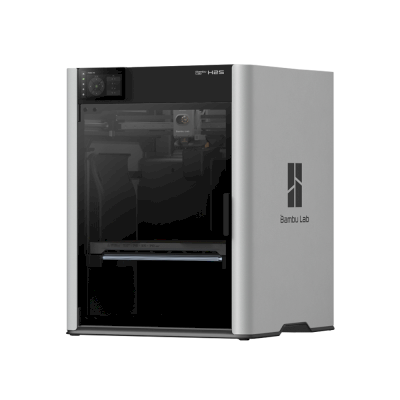
The H2S is Bambu Lab's large, fully enclosed single-nozzle printer: 340 x 320 x 340 mm, a 350 °C hotend and a 65 °C actively heated chamber. It is for makers and small businesses that want big, clean prints in everything from PLA to nylon and PC without paying for the H2D's second nozzle.
L’imprimante 3D Bambu Lab H2S est-elle compatible avec SimplyPrint, OctoPrint, Mainsail et Fluidd ?
Chaque méthode de connexion, ses prérequis et sa configuration.
Client SimplyPrint
Vérifié par SimplyPrint
Ce dont vous avez besoin : Un ordinateur ou Raspberry Pi sur le même réseau, qui reste allumé et exécute le client SimplyPrint
Connectée via Client SimplyPrint en mode LAN uniquement, SimplyPrint prend en charge tout ce que Bambu Lab H2S permet de faire avec d’autres logiciels : la caméra et la détection des échecs par IA, impression à distance, ignorer des objets, contrôle de la température et des mouvements, attribution des filaments pour son unité multi-matériaux et AutoPrint. Les seules exceptions concernent ce que Bambu Lab H2S ne permet pas aux autres logiciels de faire : Micro-ajustement, Mise à niveau du plateau et Calibration du décalage Z. Le tableau ci-dessous compare les deux méthodes de connexion à SimplyPrint.
Toutes les fonctionnalités SimplyPrint, pour chaque méthode de connexion à SimplyPrint
Connectée à SimplyPrint via
fonctionnalité SimplyPrint
Client SimplyPrint (Mode réseau local uniquement, recommandé)
Vérifié par SimplyPrint
Client SimplyPrint (Mode cloud)
Vérifié par SimplyPrint
Surveillance
État et progression en direct
Oui
Oui
Webcam
Oui
Oui
Détection des échecs par IA
Oui
Oui
Temps restant
Oui
Oui
Progression des couches
Oui
Oui
Températures
Oui
Oui
Impression
Démarrage d’une impression
Oui
Cela dépend1
Mettre en pause, reprendre et annuler
Oui
Cela dépend1
Ignorer des objets
Oui
Cela dépend1
Options de démarrage d’impression
Oui
Cela dépend1
Fichiers
Imprimer des fichiers 3MF slicés
Oui
Oui
Contrôle de l’imprimante
Modifier les températures
Oui
Oui
Déplacement avec les commandes
Oui
Cela dépend1
Retour à l’origine
Oui
Cela dépend1
Extruder et rétracter
Oui
Cela dépend1
Modifier la vitesse d’impression
Oui
Cela dépend1
Vitesse du ventilateur
Oui
Cela dépend1
Micro-ajustement
Non proposé par l’imprimante2
Non proposé par l’imprimante2
Envoyer du G-code
Oui
Cela dépend1
Calibration
Changer le filament
Oui
Cela dépend1
Mise à niveau du plateau
Non proposé par l’imprimante2
Non proposé par l’imprimante2
Calibration du décalage Z
Non proposé par l’imprimante2
Non proposé par l’imprimante2
Multi-matériaux
Associer le filament aux emplacements multi-matériaux
Oui3
Oui3
Synchroniser le filament chargé depuis l’unité multimatériau
Oui3
Oui3
Automatisation
AutoPrint
Pro
Oui
Cela dépend1
Télécharger le fichier avant le début de l’impression
Oui
Non proposé par l’imprimante2
Connectée à SimplyPrint via Client SimplyPrint (Mode réseau local uniquement, recommandé)
Vérifié par SimplyPrint
Surveillance
État et progression en directOui
WebcamOui
Détection des échecs par IAOui
Temps restantOui
Progression des couchesOui
TempératuresOui
Impression
Démarrage d’une impressionOui
Mettre en pause, reprendre et annulerOui
Ignorer des objetsOui
Options de démarrage d’impressionOui
Fichiers
Imprimer des fichiers 3MF slicésOui
Contrôle de l’imprimante
Modifier les températuresOui
Déplacement avec les commandesOui
Retour à l’origineOui
Extruder et rétracterOui
Modifier la vitesse d’impressionOui
Vitesse du ventilateurOui
Micro-ajustementNon proposé par l’imprimante2
Envoyer du G-codeOui
Calibration
Changer le filamentOui
Mise à niveau du plateauNon proposé par l’imprimante2
Calibration du décalage ZNon proposé par l’imprimante2
Multi-matériaux
Associer le filament aux emplacements multi-matériauxOui3
Synchroniser le filament chargé depuis l’unité multimatériauOui3
Automatisation
AutoPrint ProOui
Télécharger le fichier avant le début de l’impressionOui
Connectée à SimplyPrint via Client SimplyPrint (Mode cloud)
Vérifié par SimplyPrint
Surveillance
État et progression en directOui
WebcamOui
Détection des échecs par IAOui
Temps restantOui
Progression des couchesOui
TempératuresOui
Impression
Démarrage d’une impressionCela dépend1
Mettre en pause, reprendre et annulerCela dépend1
Ignorer des objetsCela dépend1
Options de démarrage d’impressionCela dépend1
Fichiers
Imprimer des fichiers 3MF slicésOui
Contrôle de l’imprimante
Modifier les températuresOui
Déplacement avec les commandesCela dépend1
Retour à l’origineCela dépend1
Extruder et rétracterCela dépend1
Modifier la vitesse d’impressionCela dépend1
Vitesse du ventilateurCela dépend1
Micro-ajustementNon proposé par l’imprimante2
Envoyer du G-codeCela dépend1
Calibration
Changer le filamentCela dépend1
Mise à niveau du plateauNon proposé par l’imprimante2
Calibration du décalage ZNon proposé par l’imprimante2
Multi-matériaux
Associer le filament aux emplacements multi-matériauxOui3
Synchroniser le filament chargé depuis l’unité multimatériauOui3
Automatisation
AutoPrint ProCela dépend1
Télécharger le fichier avant le début de l’impressionNon proposé par l’imprimante2
Fonctionne
Cela dépend
Non pris en charge
Non proposé par l’imprimante
Le firmware Bambu Lab à partir de 2025 n’autorise la surveillance qu’en mode cloud : utilisez le mode LAN uniquement pour lancer des impressions et contrôler l’imprimante. Les anciens firmwares autorisent toujours les deux.
L’imprimante ne propose pas cette fonction aux autres logiciels.
Nécessite une unité multi-matériaux
Propriétaires de Bambu Lab H2S sur SimplyPrint
100 imprimantes ou plus utilisent SimplyPrint
Quel slicer utiliser avec Bambu Lab H2S
Utilisez BambuStudio, le slicer de Bambu Lab : il propose un profil prêt à l’emploi pour la Bambu Lab H2S. Profil également disponible dans : OrcaSlicer, ElegooSlicer.
Nous répertorions uniquement les slicers utilisables dans le cloud de SimplyPrint, il peut donc en exister d’autres pour l’imprimante Bambu Lab H2S.
Slicer cloud pour Bambu Lab H2S : utiliser BambuStudio en ligne
Utilisez BambuStudio et d’autres slicers, directement dans votre navigateur grâce au slicer cloud en ligne de SimplyPrint. Aucune installation requise. Slicez vos modèles pour Bambu Lab H2S depuis n’importe quel appareil, partout dans le monde !
Mises à jour automatiques des profils : les profils sont vérifiés et récupérés automatiquement chaque jour depuis les dépôts GitHub des slicers, ainsi que depuis notre propre base de données open source de profils de slicer gérée par la communauté. Vous avez ainsi toujours accès aux derniers profils.
Remarque : Les autres slicers, tels que Simplify3D, ideaMaker, SuperSlicer et KISSlicer, ne sont pas dans notre cloud, nous ne suivons donc pas leurs profils. Ils peuvent néanmoins fonctionner avec votre Bambu Lab H2S : consultez la documentation ou les forums du slicer pour trouver un profil. Vous pouvez aussi ajouter des profils à notre base open source de profils de slicer sur GitHub.
L’application pour Bambu Lab H2S
SimplyPrint est l’application de Bambu Lab H2S : sur votre téléphone et dans n’importe quel navigateur, avec un slicer dans le cloud.
Ce que vous obtenez avec SimplyPrint
Une appli pour iPhone et Android, identique dans tous les navigateurs, et un slicer dans le cloud.
Plus que de la surveillance : une file d’impression, la détection des échecs par IA, AutoPrint et des comptes pour une équipe.
Des imprimantes de nombreuses marques au même endroit, côte à côte.
Il n’existe pas encore d’échangeur de plateaux ni de kit d’éjection automatique pour l’imprimante Bambu Lab H2S dans SimplyPrint, mais AutoPrint peut néanmoins la maintenir en impression : une fois le plateau libéré, il démarre la tâche suivante de votre file d’attente.
Les imprimantes avec enceinte expulsent leurs impressions
Le plateau de l’imprimante Bambu Lab H2S se déplace uniquement de haut en bas dans son caisson. Au lieu d’échanger les plateaux, des kits comme ceux-ci permettent à la tête d’impression de pousser l’impression refroidie hors du plateau et par sa porte avant, qu’ils ouvrent automatiquement lorsqu’une impression est terminée.
Oui
Options disponibles : Use AMS, Bed Leveling, Flow Calibration, Timelapse
L’imprimante
Fabricant / marque de l’imprimante
Bambu Lab
Nom du modèle d’imprimante
H2S
Entreprise fabricante originaire de
Chine
Lancement
26 août 2025
Toujours fabriquée
Oui
Avertissement:
Nous nous efforçons de maintenir ces informations aussi à jour et exactes que possible, mais nous ne pouvons pas garantir leur exhaustivité ni leur fiabilité. Nos données reposent sur les contributions des utilisateurs et les références des fabricants.
Quel filament peut imprimer l’imprimante Bambu Lab H2S ?
Compatibilité des filaments avec Bambu Lab H2S : les matériaux indiqués par Bambu Lab.
Filament
Adéquation
Notes
PLA
Très bien
Dans la liste des matériaux du fabricant pour cette imprimante.
PETG
Très bien
Dans la liste des matériaux du fabricant pour cette imprimante.
TPU et flexibles
Très bien
Dans la liste des matériaux du fabricant pour cette imprimante.
ABS & ASA
Très bien
Dans la liste des matériaux du fabricant pour cette imprimante.
Nylon (PA)
Très bien
Dans la liste des matériaux du fabricant pour cette imprimante.
Polycarbonate (PC)
Très bien
Dans la liste des matériaux du fabricant pour cette imprimante.
Chargé en fibres de carbone et de verre
Très bien
Dans la liste des matériaux du fabricant pour cette imprimante.
Haute température (PEI, PEEK, PEKK)
Très bien
Dans la liste des matériaux du fabricant pour cette imprimante.
Conseil : ce guide général repose sur les spécifications de l’imprimante, vérifiez toujours les paramètres recommandés pour votre filament. Avec SimplyPrint, vous pouvez enregistrer un profil pour chaque bobine et suivre précisément votre stock de filament.
Meilleur filament pour la Bambu Lab H2S
Les filaments que Bambu Lab H2S imprime bien, d’abord ceux de Bambu Lab, puis les plus connus.
The 340 mm single-nozzle H2 machine with servo extruder, strong airflow and the AMS 2 Pro ($1,499 Combo). Sees skipping the second nozzle as a waste and says it will not dethrone the H2D, but it is a smart choice for a full-featured Bambu with a big plate. Editor's Choice.
“The H2S has a generous build volume that makers have been craving, but skipping the dual nozzle of the H2D seems like a waste.”
Reviewed the Combo. Exceptionally clean large prints in an enclosed chamber; about on par with the X1C at default speed, with a 20-30% cut in print times after tuning. Downsides: purge waste from the AMS, no dual nozzle, and not for first-time hobbyists. Recommended award.
“The test prints that came out of this machine were some of the cleanest I've seen”
Frankly Built · 13 octobre 2025
Bambu sent the units and Polymaker sponsors the channel (disclosed). Calls the H2S his new favourite printer: big build volume, great results out of the box. Buy a separate laser if you want one, or look at the H2D.
CNC Kitchen · 26 août 2025
Tested months early under embargo. Great for large single-material work: feeds soft TPU well and finished a six-day print with about 3,000 material changes without a failure. Gripes: heavy, a roughly 10 C bed temperature spread, closed ecosystem. Pick the H2D for real multi-material. VoxelPLA sponsored.
Made with Layers · 26 août 2025
His take: more a bigger X1C than a baby H2D. Praises the design and near-flawless prints at a reasonable price, but finds it a poor fit for engineering filaments like PPS-CF, where the H2D is better. Suits single-material, PLA and PETG multicolour, or batch production. VoxelPLA sponsored part.
Quand choisir l’imprimante Bambu Lab H2S
Choose the H2S when most of your work is single-material or simple multi-colour on a large plate, and you want an enclosed machine that handles ABS, ASA, nylon and PC. Multi-colour works with the AMS 2 Pro, AMS HT or first-generation AMS, but with one nozzle it purges more than the H2D, so if you print in several materials or want dedicated support material, the H2D is the better pick (Tom's Hardware, CNC Kitchen). If you want a lower price and can live with an open frame and basic filaments, the A2L is the cheaper large Bambu.
Avantages
Fully enclosed with an actively heated chamber (up to 65 °C) and a 350 °C hotend, so ABS, ASA, nylon and PC print well.
A 340 x 320 x 340 mm plate, and the servo extruder feeds soft TPU well (CNC Kitchen).
TechRadar called its test prints some of the cleanest it had seen, with print times cut 20-30% after tuning.
Reliable on very long jobs: CNC Kitchen finished a six-day print with about 3,000 material changes without a failure.
Great for multi-material with the AMS 2 Pro or AMS HT, up to 24 slots in total; the first-generation AMS also works, without drying (Bambu).
Works with SimplyPrint through the SimplyPrint Client, a verified connection.
Inconvénients
One nozzle means more purge waste on multi-colour prints than the dual-nozzle H2D, and Tom's Hardware sees skipping the second nozzle as a waste.
Heavy, and CNC Kitchen measured a bed temperature spread of roughly 10 °C.
A poor fit for the hardest engineering filaments such as PPS-CF, where the H2D is better (Made with Layers).
Not aimed at first-time hobbyists (TechRadar), and the Combo launched at $1,499 (Tom's Hardware).
By default it runs through Bambu Lab's own software and cloud, which some organisations' compliance rules don't allow; with SimplyPrint it can run without them and use SimplyPrint's European cloud, in Bambu Lab's LAN-only mode (with Developer Mode on current firmware, which Bambu Lab doesn't support).
Pour qui
ÉcolesBon choix
Enclosed, rated below 50 dB by Bambu, with flame sensors and an emergency stop, and SimplyPrint can hold student prints for approval; it is expensive for a classroom and not aimed at first-time users.
ParticuliersPeut fonctionner
Very capable, but more printer and more money than a first printer needs: start with an A1 Mini, or a P2S for multi-colour, and move up when you outgrow it.
EntreprisesExcellent choix
An enclosed, heated-chamber machine for engineering materials with strong reliability reports; the closed Bambu ecosystem is the one compliance question.
Fermes d’impressionBon choix
Dependable on long jobs and the big plate suits batches, but the unit price is high and a single nozzle purges more than the H2D on colour work.
Comparer Bambu Lab H2S avec des imprimantes similaires
Des imprimantes du même fabricant, de taille similaire, imprimant les mêmes matériaux techniques ou en multi-matériaux, disponibles aujourd’hui. Comparez jusqu’à quatre modèles côte à côte, avec leurs caractéristiques et leur mode de connexion.
Également de Bambu Lab · Volume d’impression similaire · Imprime également ABS & ASA, Nylon (PA), Polycarbonate (PC), Chargé en fibres de carbone et de verre, Haute température (PEI, PEEK, PEKK) · Également multi-matériaux
Également de Bambu Lab · Volume d’impression similaire · Imprime également ABS & ASA, Nylon (PA), Polycarbonate (PC), Chargé en fibres de carbone et de verre, Haute température (PEI, PEEK, PEKK) · Également multi-matériaux
Également vendue sous le nom de Bambu Lab H2S Combo, avec son unité multi-matériaux.
À propos de Bambu Lab
Qui fabrique Bambu Lab H2S, et quelle liberté vous laisse Bambu Lab : ses imprimantes peuvent-elles fonctionner sans son cloud, accepter tous les filaments et slicers, et être réparées ? Chaque critère est évalué à partir de sources publiques.
Ouverture : Plutôt fermée (2.3 sur 5)
Plutôt fermée
Jardin closOuvert
Bambu Lab is a Shenzhen company founded in 2020 by former DJI engineers. It makes FDM printers in four families (A, P, X and H), the AMS multi-material units, the Bambu Studio slicer, the Bambu Handy app and the MakerWorld model site, and designs them to be used together. Its printers are used by beginners, hobbyists, schools and print farms.
Fondée:
2020 ·
Siège social:
Shenzhen, China ·
Propriété:
Privately held; founded by CEO Ye Tao and other former DJI staff, with venture investors (BGR, 2026) ·
Site web:bambulab.com
Bambu Lab works like Apple: printer, slicer, app, cloud and multi-material system come from one company and are made to work together. Filament and slicer choice stay open, but the firmware is closed and signed, and since 2025 third-party control needs Bambu Connect or the unsupported Developer Mode.
Micrologiciel et micrologiciel personnalisé ●●●●●
The printer firmware is Bambu's own and closed; in 2022 Bambu said it would keep it in-house. Its security white paper describes secure boot that only runs verified firmware on X1, H2, P1 and A1 printers. Bambu publishes the GPL parts it uses (Linux kernel, U-Boot, BusyBox) but not the printer software. Rooting the X1 only became possible through a security flaw the X1Plus project used in 2024; Bambu then published a one-off rootable X1 firmware for owners who give up their warranty, and blocks rooting in later firmware.
[1][2][3][4][22]
Contrôle local et intégrations ●●●●●
LAN Only mode prints and monitors from Bambu Studio or Bambu Connect without internet or an account; the Handy app, printing from outside the network and print history need Bambu's cloud. Since the 2025 authorization firmware, other software can only read status in normal mode. Full control needs Developer Mode, which cuts the cloud link and which Bambu says it cannot support because the protocols are not official. Bambu documents no local protocol; it offers a file hand-off to Bambu Connect and a Local Server SDK on application.
[23][24][6][7][5]
Filaments, slicers et pièces tiers ●●●●●
Third-party filament works, and Bambu publicly denied in 2025 that it would restrict it. OrcaSlicer and other slicers can be used, but since the 2025 firmware they send and control prints through Bambu Connect or Developer Mode. Hotends are Bambu's own designs, and Bambu says it cannot promise long-term support for accessories that control the printer unless it approved them first.
[7][6][4]
Réparations et pièces détachées ●●●●●
Bambu's store sells individual spare parts down to motors, belts, encoders and boards, and its wiki has step-by-step replacement guides for each model (for example the P2S hotend and the H2D/H2C AP board). Many parts, hotends included, are Bambu-specific, so spares come from Bambu.
[8][9][10]
Données et confidentialité ●●●●●
Cloud features need a Bambu account, while LAN Only mode keeps jobs on the local network. Bambu publishes a Trust Center and a 38-page security white paper, says it holds ISO/IEC 27001, ISO/IEC 27701 and TRUSTe certifications, and runs a paid bug bounty. In August 2023 a cloud outage made some printers start earlier jobs on their own; Bambu apologised.
[2][11][5][12]
Communauté et documentation ●●●●●
Very large user community, the MakerWorld model site, a detailed wiki and a blog where Bambu explains its policy changes. Bambu Studio is developed in public on GitHub with an open issue tracker. The printer protocol is not documented, and Developer Mode is unsupported.
[13][5][7]
Avantages
Printer, slicer, app and AMS come from one company and are designed to work together, which makes a first setup simple.
Step-by-step repair guides for each model and individual spare parts sold in Bambu's store.
LAN Only mode works without internet or an account.
Bambu Studio is open source, and third-party filament works.
Publishes security certifications and runs a public bug bounty.
Inconvénients
Firmware is closed and signed; current models have no supported way to run custom firmware.
Since the 2025 firmware, third-party software and accessories need Bambu Connect or the unsupported Developer Mode to control the printer.
Remote printing, the Handy app and print history depend on Bambu's cloud.
Hotends and many parts are Bambu-specific, so spares come from Bambu.
In 2026 a US jury found the X1, P1 and A1 infringe Stratasys patents; Bambu is appealing.
Expérience
septembre 2026: A US federal jury in Texas found that Bambu Lab's X1, P1 and A1 printers infringe Stratasys patents on prime towers and bed levelling, and awarded Stratasys $27.6 million. No injunction was placed on the printers. Bambu told Tom's Hardware it disagrees with the verdict and intends to seek post-trial review and appeal. Stratasys had filed two suits in 2024; more patents are still to be decided.
[14]
mai 2026: Bambu Lab pressed the developer of 'OrcaSlicer-bambulab', a fork that restored direct cloud printing from OrcaSlicer, to remove it, according to Manufactur3D. On 7 May Bambu said the fork impersonated the official Bambu Studio client to its cloud, which its user agreement does not allow, and that modifying and sharing its AGPL code remains fine. The developer disputed the claims.
[15][16][17]
octobre 2025: Bambu Lab opened a Trust Center with a security white paper and listed ISO/IEC 27001, ISO/IEC 27701 and TRUSTe privacy certifications. A year later it said its bug bounty had worked with over 100 researchers and that it had added a public security update log.
[2][11]
20 janvier 2025: After criticism from users and print farms, Bambu Lab announced an optional Developer Mode for X1, P1, A1 and A1 mini that leaves MQTT, FTP and the live stream open for third-party software in LAN mode, without official support. It also said LAN mode via Bambu Connect needs neither internet nor an account, and that third-party filament would not be restricted.
[7]
16 janvier 2025: Bambu Lab announced firmware with 'authorization control', first for the X1: starting prints, moving axes, changing temperatures and binding the printer now require Bambu-approved software, also in LAN mode. On updated printers, third-party slicers and accessories such as the Panda Touch could no longer control the printer except through Bambu Connect; reading status still worked. Bambu cited security and up to 30 million unauthorised cloud requests a day; older firmware stayed optional.
[6]
mars 2024: After the X1Plus jailbreak, Bambu Lab published a one-off rootable firmware for the X1 series for owners who give up their warranty support. It said it does not support X1Plus, and that firmware after it would block rooting again.
[4]
février 2024: Bambu Lab extended its A1 heatbed-cable callback to a recall of all A1 printers and asked owners to stop using them. It reported electrical faults in under 0.1% of units and offered a full refund plus an $80 voucher, or a redesigned heatbed plus a $120 voucher and six extra months of warranty. The A1 mini was not affected.
[18][19]
janvier 2024: Community developers rooted the X1 series through a security flaw in its firmware (up to version 1.07) and released the X1Plus custom firmware. Bambu Lab closed the flaw in later firmware.
[22]
août 2023: During a Bambu cloud outage on 15 August 2023, some printers started print jobs without user action, because jobs stuck in the cloud were resent when service returned. Bambu apologised, took responsibility and said it would add checks before a print starts.
[12]
mai 2022: Before its first printers shipped, Bambu Lab said its firmware would stay closed and in-house to remain competitive, and promised to open-source everything if the company ever could not survive.
[1]
D’après 24 sources, dernière vérification le 20 octobre 2026. Afficher les sources
L’imprimante Bambu Lab H2S est-elle compatible avec SimplyPrint ?
Oui. Vous pouvez connecter Bambu Lab H2S à SimplyPrint via Client SimplyPrint, puis slicer, mettre en file d’impression, lancer et surveiller vos impressions depuis votre navigateur ou l’application mobile.
Comment connecter Bambu Lab H2S à SimplyPrint ?
Suivez notre guide de configuration pas à pas pour Bambu Lab H2S. Il indique comment la connecter via Client SimplyPrint, ce dont vous avez besoin pour chaque méthode et laquelle choisir.
Quel slicer utiliser pour la Bambu Lab H2S ?
Nous recommandons BambuStudio pour l’imprimante Bambu Lab H2S. Vous pouvez l’utiliser, ainsi que 6 autres slicers, directement dans le slicer en ligne de SimplyPrint, sans installation, sur tout appareil, avec des profils pour l’imprimante Bambu Lab H2S mis à jour automatiquement.
Puis-je utiliser OrcaSlicer avec la Bambu Lab H2S ?
Oui. OrcaSlicer inclut un profil pour la Bambu Lab H2S, que vous pouvez utiliser dans le slicer en ligne de SimplyPrint, sans rien installer.
Quel filament peut imprimer l’imprimante Bambu Lab H2S ?
Bambu Lab indique PLA, PETG, TPU et flexibles, ABS & ASA, Nylon (PA), Polycarbonate (PC), Chargé en fibres de carbone et de verre et Haute température (PEI, PEEK, PEKK) pour H2S.
La Bambu Lab H2S fonctionne-t-elle avec OctoPrint ou Klipper ?
Pas directement : un plugin communautaire OctoPrint permet plutôt une connexion réseau. Mais aucun n’est nécessaire : SimplyPrint se connecte à Bambu Lab H2S via Client SimplyPrint.
Quelle est la taille du plateau et le volume d’impression de Bambu Lab H2S ?
L’imprimante Bambu Lab H2S possède un plateau d’impression de 340 x 320 mm et imprime jusqu’à 340 mm de haut, soit un volume d’impression d’environ 340 x 320 x 340 mm. Consultez le tableau complet des caractéristiques ci-dessus pour le type de plateau, les températures et plus encore.
Quand Bambu Lab H2S est-elle sortie ?
Bambu Lab a lancé H2S le 26 août 2025.
L’imprimante Bambu Lab H2S peut-elle éjecter automatiquement les impressions ?
Il n’existe encore aucun kit pris en charge pour elle, mais AutoPrint de SimplyPrint peut pousser les impressions avec la tête d’impression, ou exécuter votre propre G-code d’éjection, puis démarrer la tâche suivante de votre file d’attente.
Où acheter Bambu Lab H2S ?
Depuis la boutique de Bambu Lab, qui possède des boutiques pour Australie, Canada, l’UE, le Royaume-Uni et les États-Unis. Les liens de cette page mènent vers ces boutiques. Certains sont des liens affiliés, nous pouvons donc toucher une commission sans coût supplémentaire pour vous.
Divulgation d’affiliation : certains liens de cette page sont des liens affiliés. Nous pouvons percevoir une commission si vous effectuez un achat, sans coût supplémentaire pour vous. En tant que partenaire Amazon, nous percevons une rémunération sur les achats remplissant les conditions requises.
 Chine
Chine
 Client SimplyPrint





 PrusaSlicer
 CrealityPrint
 Cura
Cura Kiri:Moto

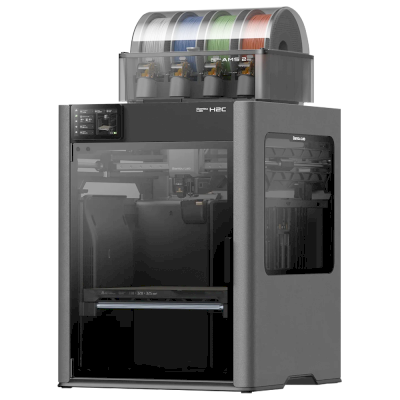

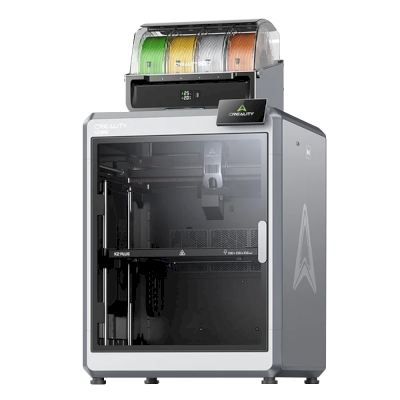

 Les meilleures pour États-Unis : boutique de Bambu Lab pour les États-Unis
 Bambu Lab pour Australie
 Bambu Lab pour Canada
 Bambu Lab pour l’UE
 Bambu Lab pour le Royaume-Uni