The S8 is UltiMaker's fastest dual-material desktop printer, built in Europe with a fully enclosed chamber, an integrated EPA filter and a camera. It is for engineering teams, product developers and schools that want a reliable, easy printer and use UltiMaker's software.
Volumen de impresión
330 x 240 x 300 mm
Cerramiento
Totalmente cerrada
Velocidad máxima de impresión
500 mm/s
Imprime bien
PLA, PETG, TPU y flexibles, ABS & ASA, Nylon (PA), Polycarbonate (PC), Con fibra de carbono y relleno de vidrio
Ultimaker S8 Pro Bundle es una variante de Ultimaker S8.
Esto significa que comparte muchas características con el modelo base, pero puede tener modificaciones específicas, funciones adicionales o accesorios incluidos.
Conecta Ultimaker S8 Pro Bundle a SimplyPrint
¿Funciona la impresora 3D Ultimaker S8 Pro Bundle con SimplyPrint, OctoPrint, Mainsail y Fluidd?
Cada forma de conectarla, lo que necesita y cómo configurarla.
Cliente de SimplyPrint
Aún no confirmado, ayúdanos a averiguarlo
The SimplyPrint Client's UltiMaker integration covers the S3, S5 and S7 (local HTTP API). The S6 and S8 run a different firmware that UltiMaker says is not compatible with the S3/S5/S7's; whether its local API is the same is unconfirmed.
Origen
UltiMaker S-line printers take jobs over the network or from a USB drive; no USB serial printing is documented (the S7's manual shows a host port only).
Origen
Especificaciones de Ultimaker S8 Pro Bundle: tamaño de cama, altura de impresión y más
Su tamaño, temperaturas, multimaterial y cómo se conecta, según el fabricante y nuestra propia investigación.
Más información del fabricante
Tamaño
Volumen de impresión
330 x 240 x 300 mm
Tipo de cama
Rectangle
Tamaño de cama
330 x 240 mm
Altura máxima de impresión
300 mm
Impresión
Cerramiento
Totalmente cerrada
Velocidad máxima de impresión
500 mm/s
Temperatura máxima del extrusor
340 °C
Tiene cama caliente
Sí
Temperatura máxima de la cama
120 °C
Número de boquillas
2
Cabezales de impresión
2
Direct drive
No
Herramienta de sondeo / Nivelación automática de la cama
Sí
Ancho del filamento
2.85 mm
Multimaterial
Cambiador de herramientas o de hotends
No
IDEX (extrusores dobles independientes)
No
Conectando
Conectividad
Wi-Fi, Ethernet, USB
Admite impresión por puerto serie
No
Firmware incluido
El propio del fabricante
Archivos y laminado
Formatos de archivo compatibles
G-code (.gcode, .gco, .g)
La impresora
Fabricante / marca de la impresora
Ultimaker
Nombre del modelo de impresora
S8 Pro Bundle
Fabricada por una empresa de
Países Bajos
Lanzado
marzo 2025
Se sigue fabricando
Sí
Aviso legal:
Nos esforzamos por mantener esta información lo más actualizada y precisa posible, pero no podemos garantizar su integridad ni su fiabilidad. Nuestros datos se basan en aportaciones de usuarios y referencias de fabricantes.
¿Qué filamento admite Ultimaker S8 Pro Bundle?
Compatibilidad de filamento de la Ultimaker S8 Pro Bundle: los materiales que Ultimaker indica para ella.
Filamento
Idoneidad
Notas
PLA
Genial
En la lista de materiales del fabricante para esta impresora.
PETG
Genial
En la lista de materiales del fabricante para esta impresora.
TPU y flexibles
Genial
En la lista de materiales del fabricante para esta impresora.
ABS & ASA
Genial
En la lista de materiales del fabricante para esta impresora.
Nylon (PA)
Genial
En la lista de materiales del fabricante para esta impresora.
Polycarbonate (PC)
Genial
En la lista de materiales del fabricante para esta impresora.
Con fibra de carbono y relleno de vidrio
Genial
En la lista de materiales del fabricante para esta impresora.
Consejo: esta es una guía general basada en las especificaciones de la impresora. Comprueba siempre los ajustes recomendados para tu filamento. Con SimplyPrint puedes guardar un perfil para cada bobina y saber exactamente qué filamento tienes en inventario.
Cuándo elegir la Ultimaker S8 Pro Bundle
Choose the S8 when you want a fully enclosed professional dual-extrusion printer and value speed and ease of use over price. The UltiMaker S6 costs less but has only a partly enclosed chamber; the Factor 4 Plus is for heated-chamber production work. The S8 Pro Bundle, which UltiMaker pitches for 24/7 printing, shares this guidance. A confirmed SimplyPrint connection is still missing.
Ventajas
Up to 4x the productivity of its predecessor and 500 mm/s travel speed, with print accuracy of 0.15 mm ± 0.15% (UltiMaker); 3Dnatives measured a part in 34 minutes that took just over 2 hours on the S7.
Fully enclosed build chamber with an integrated EPA filter (UltiMaker).
Dual extrusion with high-flow print cores lets you combine two very different materials (UltiMaker).
3Dnatives scored it 9.4/10 and rated ease of use 10/10 (3Dnatives).
Wi-Fi on 2.4 and 5 GHz and Gigabit Ethernet (UltiMaker), and our facts list a built-in camera.
Desventajas
No confirmed way to connect it to SimplyPrint: Klipper is not possible and OctoPrint is unlikely, and our SimplyPrint Client status is unknown.
3Dnatives lists the price (about EUR 8,000) and a slow start to printing as drawbacks; small parts gain least from the speed boost (3Dnatives).
3Dnatives calls it an evolution of the S7: the hardware is nearly unchanged and it ships with two print cores instead of three.
3Dnatives hit a bug that blocked printing with generic-colour filament; UltiMaker fixed it within a few weeks (3Dnatives).
A quién va dirigido
Centros educativosBuena opción
Enclosed with an air filter and very easy to use, but the price is high and no SimplyPrint connection is confirmed.
AficionadosNo encaja bien
A professional machine priced well above hobby range.
EmpresasExcelente opción
A fast, enclosed, easy dual-material printer with a European build and a good independent score.
Granjas de impresiónPuede funcionar
Good for steady production, but we cannot yet connect it to SimplyPrint, so you would run it through UltiMaker's software.
Impresoras como la Ultimaker S8 Pro Bundle que funcionan con SimplyPrint
Impresoras del mismo fabricante, de tamaño similar, que imprimen los mismos materiales técnicos o en multimaterial, que puedes comprar hoy y que sabemos que funcionan con SimplyPrint.
Quién fabrica Ultimaker S8 Pro Bundle y cuánta libertad te da Ultimaker: si sus impresoras funcionan sin su nube, aceptan cualquier filamento y slicer, y se pueden reparar. Cada área se valora con fuentes públicas.
Apertura: Mixto (2.9 de 5)
Mixto
Ecosistema cerradoAbrir
UltiMaker is the company formed in 2022 when the Dutch printer maker Ultimaker, founded in 2011, merged with MakerBot. It sells professional desktop and industrial printers (the S series, Factor 4, MakerBot Method and Sketch) to businesses, engineering teams and schools, and develops the open-source Cura slicer and the Digital Factory cloud platform.
Fundada:
2011 ·
Sede central:
Zaltbommel, Netherlands, and New York, USA ·
Propiedad:
Privately held; at the 2022 merger NPM Capital held the majority and Stratasys a minority stake ·
Sitio web:ultimaker.com
UltiMaker is mixed: Cura and material choice are open, and printers can be used on the local network, but the printer firmware is closed and most management features sit in its Digital Factory cloud.
Firmware y firmware personalizado ●●●●●
The printers' own software is not published: UltiMaker's GitHub has its Linux kernel configuration and Cura, but no printer firmware. We found no documented way to run custom firmware on current S-series or Method printers.
[1][2]
Control local e integraciones ●●●●●
Cura can add an S-series printer on the local network, by discovery or IP, without signing in, and start prints. UltiMaker says most features are only available through its Digital Factory cloud, and the API it documents publicly is that cloud API; we found no public documentation for controlling the printers locally.
[3][12]
Filamento, slicers y piezas de terceros ●●●●●
Cura is open source and widely used with other brands, and UltiMaker lists over 300 materials, including third-party ones, for the S series. Print cores and the Material Station are UltiMaker's own parts.
[2][4]
Reparaciones y repuestos ●●●●●
UltiMaker publishes maintenance schedules for the S series and sells part bundles and maintenance kits, and gives an expected printer lifetime of five years at 1,500 printing hours a year.
[5]
Datos y privacidad ●●●●●
Local printing needs no account; Digital Factory needs one. UltiMaker's privacy policy says data is stored and processed in the EEA or the United States depending on the user's region.
[6][3]
Comunidad y documentación ●●●●●
Cura is developed in public on GitHub with a large open issue tracker, and UltiMaker runs a community forum and support knowledge base. Printer internals are not documented publicly.
[2][3]
Ventajas
Cura is open source and works with printers from many brands.
Wide material choice on the S series, including third-party materials.
Printers can be used on the local network without an account.
Published maintenance schedules and maintenance kits for long service life.
Desventajas
Printer firmware is closed.
Most fleet and management features need the Digital Factory cloud, with paid tiers.
MakerBot CloudPrint was shut down in 2025, forcing users to move platforms.
Print cores and the Material Station are UltiMaker-only parts.
Trayectoria
21 de mayo de 2026: UltiMaker launched the Factor 4 Plus, an industrial printer up to twice as fast as the Factor 4, with TRACE print validation for production and defence customers.
[7]
febrero 2026: UltiMaker sold the Thingiverse model platform to MyMiniFactory and archived its Thingiverse forum.
[8]
diciembre 2025: UltiMaker shut down MakerBot CloudPrint in early December 2025. Users had to reconnect printers to Digital Factory, with a free year of its premium tier offered to former CloudPrint users; the Replicator+ cannot be networked in Digital Factory.
[9]
mayo 2022: Ultimaker and Stratasys' MakerBot announced a merger backed by $62.4 million from NPM Capital and Stratasys, with co-CEOs from both companies and headquarters in the Netherlands and New York. The combined company took the UltiMaker name.
[10][11]
Investigado a partir de 12 fuentes, última comprobación: 18 de octubre de 2026. Mostrar fuentes
¿La Ultimaker S8 Pro Bundle es compatible con SimplyPrint?
Aún no lo sabemos. SimplyPrint funciona con más de 130 marcas y más de 600 modelos mediante OctoPrint, Klipper e integraciones integradas. Si tienes una Ultimaker S8 Pro Bundle, nuestra comprobación de compatibilidad te indica en unas pocas preguntas cómo podría conectarse.
¿Qué slicer debo usar para la Ultimaker S8 Pro Bundle?
Usa Cura, el slicer propio de Ultimaker, creado para sus impresoras. Puedes usarlo en el slicer online de SimplyPrint; aún no tiene un perfil listo para la Ultimaker S8 Pro Bundle.
¿Qué filamento admite Ultimaker S8 Pro Bundle?
Ultimaker indica PLA, PETG, TPU y flexibles, ABS & ASA, Nylon (PA), Polycarbonate (PC) y Con fibra de carbono y relleno de vidrio para el modelo S8 Pro Bundle.
¿Cuál es el tamaño de la cama y el volumen de impresión de Ultimaker S8 Pro Bundle?
La Ultimaker S8 Pro Bundle tiene una cama de impresión de 330 x 240 mm e imprime piezas de hasta 300 mm de alto, con un volumen de impresión de unos 330 x 240 x 300 mm. Consulta la tabla de especificaciones completa de arriba para ver el tipo de cama, temperaturas y más.
¿Cuándo salió Ultimaker S8 Pro Bundle?
Ultimaker lanzó el modelo S8 Pro Bundle en marzo 2025.
¿Dónde puedo comprar la Ultimaker S8 Pro Bundle?
Desde la tienda de Ultimaker, que tiene tiendas para EE. UU.. Los enlaces de esta página llevan a esas tiendas; algunos son enlaces de afiliados, por lo que podemos recibir una comisión sin coste adicional para ti.
 Países Bajos


 PrusaSlicer
 OrcaSlicer
 BambuStudio
 ElegooSlicer
 CrealityPrint
 Kiri:Moto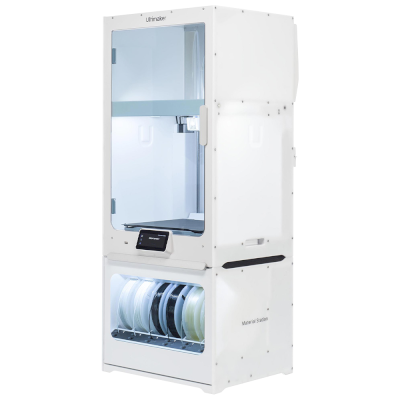


 Mejor opción para EE. UU.: tienda de Ultimaker para EE. UU.