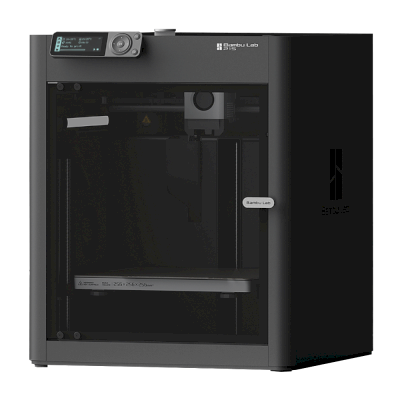
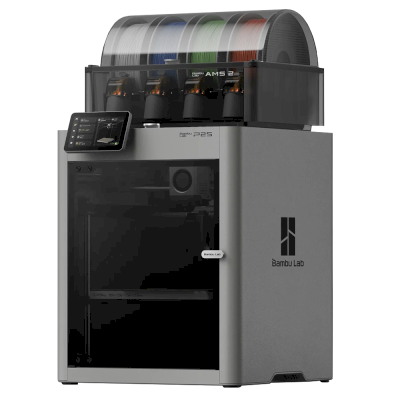
The P1S is Bambu Lab's enclosed CoreXY printer with a 256 mm build cube, automatic calibration and optional four-colour printing through the AMS. It is for anyone who wants fast, low-fuss printing that includes ABS, ASA, nylon and PC.
Es gibt eine neuere Version. Die Bambu Lab P2S folgt auf den Bambu Lab P1S.
Gestartet am 14. Oktober 2025
Den Bambu Lab P1S mit SimplyPrint verbinden
Funktioniert der 3D-Drucker Bambu Lab P1S mit SimplyPrint, OctoPrint, Mainsail und Fluidd?
Jede Verbindungsmöglichkeit, Voraussetzungen und Einrichtung.
SimplyPrint Client
Von SimplyPrint bestätigt
Das brauchst du: Ein dauerhaft eingeschalteter Computer oder Raspberry Pi im selben Netzwerk mit dem SimplyPrint Client
Über SimplyPrint Client im reinen LAN-Modus verbunden, unterstützt SimplyPrint alles, was der Bambu Lab P1S anderer Software ermöglicht: die Kamera und KI-Fehlererkennung, Drucken per Fernzugriff, Objekte überspringen, Temperatur- und Bewegungssteuerung, Filamentzuordnung für die Mehrmaterialeinheit und AutoPrint. Die einzigen Ausnahmen sind Funktionen, die Bambu Lab P1S anderer Software nicht erlaubt: Baby Stepping, Bettnivellierung und Z-Offset-Kalibrierung. Die folgende Tabelle vergleicht die beiden Verbindungsmöglichkeiten mit SimplyPrint.
Alle SimplyPrint-Funktionen für jede Verbindungsart mit SimplyPrint
Mit SimplyPrint verbunden über
SimplyPrint-Funktion
SimplyPrint Client (Nur-LAN-Modus, empfohlen)
Von SimplyPrint bestätigt
SimplyPrint Client (Cloud-Modus)
Von SimplyPrint bestätigt
Überwachung
Live-Status und Fortschritt
Ja
Ja
Webcam
Ja
Ja
KI-Fehlererkennung
Ja
Ja
Verbleibende Zeit
Ja
Ja
Schichtfortschritt
Ja
Ja
Temperaturen
Ja
Ja
Drucken
Druck starten
Ja
Kommt darauf an1
Pausieren, fortsetzen und abbrechen
Ja
Kommt darauf an1
Objekte überspringen
Ja
Kommt darauf an1
Druckstart-Optionen
Ja
Kommt darauf an1
Dateien
Geslicte 3MF-Dateien drucken
Ja
Ja
Druckersteuerung
Temperaturen ändern
Ja
Kommt darauf an1
Bewegen über die Steuerung
Ja
Kommt darauf an1
Referenzfahrt
Ja
Kommt darauf an1
Extrudieren und zurückziehen
Ja
Kommt darauf an1
Druckgeschwindigkeit ändern
Ja
Kommt darauf an1
Lüftergeschwindigkeit
Ja
Kommt darauf an1
Baby Stepping
Vom Drucker nicht unterstützt2
Vom Drucker nicht unterstützt2
G-code senden
Ja
Kommt darauf an1
Kalibrierung
Filament wechseln
Ja
Kommt darauf an1
Bettnivellierung
Vom Drucker nicht unterstützt2
Vom Drucker nicht unterstützt2
Z-Offset-Kalibrierung
Vom Drucker nicht unterstützt2
Vom Drucker nicht unterstützt2
Multimaterial
Filament Multi-Material-Slots zuordnen
Ja3
Ja3
Eingelegtes Filament aus der Multi-Material-Einheit synchronisieren
Ja3
Ja3
Automatisierung
AutoPrint
Pro
Ja
Kommt darauf an1
Datei vor Druckbeginn herunterladen
Ja
Vom Drucker nicht unterstützt2
Mit SimplyPrint über SimplyPrint Client (Nur-LAN-Modus, empfohlen) verbunden
Von SimplyPrint bestätigt
Überwachung
Live-Status und FortschrittJa
WebcamJa
KI-FehlererkennungJa
Verbleibende ZeitJa
SchichtfortschrittJa
TemperaturenJa
Drucken
Druck startenJa
Pausieren, fortsetzen und abbrechenJa
Objekte überspringenJa
Druckstart-OptionenJa
Dateien
Geslicte 3MF-Dateien druckenJa
Druckersteuerung
Temperaturen ändernJa
Bewegen über die SteuerungJa
ReferenzfahrtJa
Extrudieren und zurückziehenJa
Druckgeschwindigkeit ändernJa
LüftergeschwindigkeitJa
Baby SteppingVom Drucker nicht unterstützt2
G-code sendenJa
Kalibrierung
Filament wechselnJa
BettnivellierungVom Drucker nicht unterstützt2
Z-Offset-KalibrierungVom Drucker nicht unterstützt2
Multimaterial
Filament Multi-Material-Slots zuordnenJa3
Eingelegtes Filament aus der Multi-Material-Einheit synchronisierenJa3
Automatisierung
AutoPrint ProJa
Datei vor Druckbeginn herunterladenJa
Mit SimplyPrint über SimplyPrint Client (Cloud-Modus) verbunden
Von SimplyPrint bestätigt
Überwachung
Live-Status und FortschrittJa
WebcamJa
KI-FehlererkennungJa
Verbleibende ZeitJa
SchichtfortschrittJa
TemperaturenJa
Drucken
Druck startenKommt darauf an1
Pausieren, fortsetzen und abbrechenKommt darauf an1
Objekte überspringenKommt darauf an1
Druckstart-OptionenKommt darauf an1
Dateien
Geslicte 3MF-Dateien druckenJa
Druckersteuerung
Temperaturen ändernKommt darauf an1
Bewegen über die SteuerungKommt darauf an1
ReferenzfahrtKommt darauf an1
Extrudieren und zurückziehenKommt darauf an1
Druckgeschwindigkeit ändernKommt darauf an1
LüftergeschwindigkeitKommt darauf an1
Baby SteppingVom Drucker nicht unterstützt2
G-code sendenKommt darauf an1
Kalibrierung
Filament wechselnKommt darauf an1
BettnivellierungVom Drucker nicht unterstützt2
Z-Offset-KalibrierungVom Drucker nicht unterstützt2
Multimaterial
Filament Multi-Material-Slots zuordnenJa3
Eingelegtes Filament aus der Multi-Material-Einheit synchronisierenJa3
Automatisierung
AutoPrint ProKommt darauf an1
Datei vor Druckbeginn herunterladenVom Drucker nicht unterstützt2
Funktioniert
Kommt darauf an
Nicht unterstützt
Vom Drucker nicht unterstützt
Bambu-Lab-Firmware ab 2025 erlaubt im Cloud-Modus nur die Überwachung: Nutze den Nur-LAN-Modus, um Drucke zu starten und den Drucker zu steuern. Ältere Firmware erlaubt weiterhin beides.
Der Drucker bietet dies anderer Software nicht an.
Benötigt eine Mehrmaterialeinheit
Bambu Lab P1S-Besitzer bei SimplyPrint
1.500+ Drucker nutzen SimplyPrint
SimplyPrint Client
4,2 von 5
32 verifizierte Besitzer
Bewertungen stammen von Besitzern, deren Drucker mit SimplyPrint mindestens 10 Drucke abgeschlossen hat.
Welchen Slicer für Bambu Lab P1S nutzen
Nutze BambuStudio, den eigenen Slicer von Bambu Lab: Er hat ein fertiges Profil für den Bambu Lab P1S. Auch mit Profil dafür: OrcaSlicer, ElegooSlicer, CrealityPrint, Kiri:Moto.
Wir führen nur Slicer auf, die du in der SimplyPrint-Cloud nutzen kannst. Daher kann es weitere für den Bambu Lab P1S geben.
Cloud-basierter Slicer für Bambu Lab P1S: BambuStudio online nutzen
Nutze BambuStudio und andere Slicer direkt in deinem Browser mit dem Online-Cloud-Slicer von SimplyPrint. Keine Installation nötig. Slice deine Bambu Lab P1S-Modelle von jedem Gerät überall auf der Welt!
Automatische Profilupdates: Profile werden täglich in den GitHub-Repositories der Slicer sowie in unserer eigenen Open-Source-Community-Datenbank für Slicer-Profile geprüft und abgerufen. So hast du immer Zugriff auf die neuesten Profile.
Hinweis: Andere Slicer wie Simplify3D, ideaMaker, SuperSlicer und KISSlicer sind nicht in unserer Cloud verfügbar, daher verfolgen wir ihre Profile nicht. Sie funktionieren möglicherweise dennoch gut mit deinem Bambu Lab P1S: Suche in der Dokumentation oder in Foren des Slicers nach einem Profil. Du kannst auch Profile zu unserer Open-Source-Datenbank für Slicer-Profile auf GitHub beitragen.
Die App für Bambu Lab P1S
SimplyPrint dient als App für Bambu Lab P1S: auf deinem Smartphone und in jedem Browser, mit einem Slicer in der Cloud.
Druckplattenwechsler und Auswurf-Kits für den Bambu Lab P1S funktionieren mit SimplyPrints AutoPrint: Nach jedem Druck wird die Druckplatte geräumt und der nächste Auftrag aus deiner Warteschlange gestartet, sodass der Drucker selbstständig weiterdruckt.
Geschlossene Drucker schieben ihre Drucke heraus
Das Druckbett des Bambu Lab P1S bewegt sich in seinem Gehäuse nur auf und ab. Statt Druckplatten zu wechseln, ermöglichen Kits wie diese dem Druckkopf, den abgekühlten Druck von der Platte und durch die Vordertür herauszuschieben, die sie nach Druckende für dich öffnen.
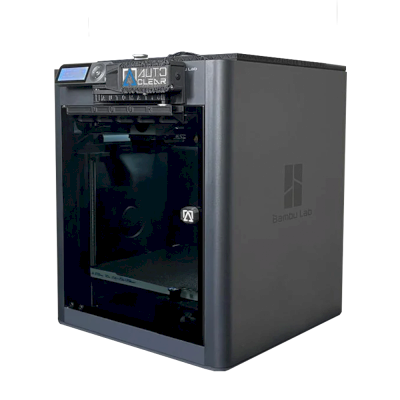
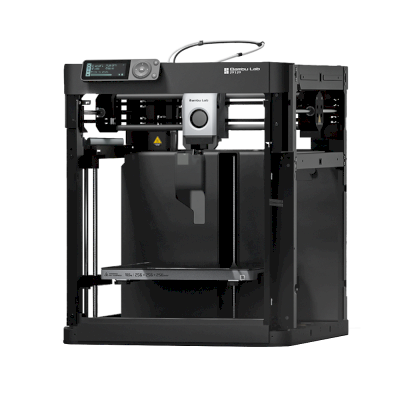
Drucke mit dem Druckkopf herunterstoßenBei einem CoreXY-Drucker kann eine G-code-Routine den abgekühlten Druck vor dem nächsten Auftrag vorne von der Druckplatte schieben.
Ein Roboterarm oder etwas mit einer APIMelde SimplyPrint per API oder Webhook, dass die Druckplatte frei ist, über einen Roboterarm oder dein eigenes System.
Ja
Verfügbare Optionen: Use AMS, Bed Leveling, Timelapse
Der Drucker
Druckerhersteller / -marke
Bambu Lab
Name des Druckermodells
P1S
Hergestellt von einem Unternehmen aus
China
Veröffentlichung
13. Juli 2023
Wird noch hergestellt
Ja
Haftungsausschluss:
Wir bemühen uns, diese Informationen so aktuell und genau wie möglich zu halten, können aber keine Vollständigkeit oder Zuverlässigkeit garantieren. Unsere Daten basieren auf Nutzereinreichungen und Herstellerangaben.
Welches Filament kann Bambu Lab P1S drucken?
Filamentkompatibilität für den Bambu Lab P1S: die von Bambu Lab dafür angegebenen Materialien.
Filament
Eignung
Notizen
PLA
Großartig
Auf der Materialliste des Herstellers für diesen Drucker.
PETG
Großartig
Auf der Materialliste des Herstellers für diesen Drucker.
TPU und flexible Materialien
Großartig
Auf der Materialliste des Herstellers für diesen Drucker.
ABS & ASA
Großartig
Auf der Materialliste des Herstellers für diesen Drucker.
Nylon (PA)
Großartig
Auf der Materialliste des Herstellers für diesen Drucker.
Polycarbonate (PC)
Großartig
Auf der Materialliste des Herstellers für diesen Drucker.
Kohlefaser- und glasfasergefüllt
Mit Sorgfalt
Möglich mit einer gehärteten oder verschleißfesten Düse. Die abrasiven Fasern verschleißen eine Standard-Messingdüse schnell.
Tipp: Dies ist eine allgemeine Anleitung anhand der Druckerspezifikationen. Prüfe immer die empfohlenen Einstellungen deines Filaments. Mit SimplyPrint kannst du für jede Spule ein Profil speichern und genau verfolgen, welches Filament du auf Lager hast.
Bestes Filament für den Bambu Lab P1S
Filamente, die Bambu Lab P1S gut druckt, zuerst von Bambu Lab, dann die bekanntesten.
Hands-on review of the enclosed P1S. Praises the speed, the enclosure for higher-temperature materials, simple automatic bed leveling and the optional four-color AMS, and treats it as a clear step up from the P1P and a cheaper alternative to the X1 Carbon, though it adds no new technology. Points to the open-frame P1P and the Creality K1 as alternatives.
“Its simple set up and ease of use makes it an excellent first printer for people with a bigger than Ender sized budget.”
Wann du dich für den Bambu Lab P1S entscheiden solltest
Choose the P1S when you want an enclosed printer that handles ABS and ASA as well as PLA and PETG, and you may add multi-colour later with the AMS (if you don't need colour, the standalone P1S costs less than the Combo). Tom's Hardware calls it a clear step up from the open-frame P1P and a cheaper alternative to the X1 Carbon. If you want a touchscreen, a quick-swap nozzle and AI failure detection, the P2S is the newer version, though Frankly Built says to buy a discounted P1S if you don't need those. If you only print PLA and PETG, the open-frame A1 is the alternative, and if you want an EU-built printer that runs without a cloud, look at the Prusa CORE One.
Vorteile
Fully enclosed with plastic and glass panels, so ABS, ASA, nylon and PC print well.
Calibrates itself (bed levelling, vibration compensation), and Bambu says you can print within about 15 minutes of unboxing.
Fast, and Tom's Hardware calls it an excellent first printer for anyone with a bigger-than-Ender budget.
Great for multi-colour with the AMS: four colours per unit and up to 16 with four units.
Works with SimplyPrint through the SimplyPrint Client and is marked Verified by SimplyPrint.
Built for print farms: Bambu describes the P series as the backbone of print farms, and AutoPrint kits such as FarmLoop and AutoClear One clear the bed so it keeps printing.
Nachteile
By default it runs through Bambu Lab's own software and cloud, which some organisations' compliance rules don't allow; with SimplyPrint it can run without them and use SimplyPrint's European cloud, in Bambu Lab's LAN-only mode (with Developer Mode on current firmware, which Bambu Lab doesn't support).
Carbon and glass fibre filaments need a hotend upgrade first, according to Bambu's own FAQ.
The camera is low frame rate (720p at 0.5 fps in the spec table), so live watching is choppy.
Connects over Wi-Fi or prints from an SD card; there is no Ethernet port.
The P2S is the newer design, and Tom's Hardware notes the P1S adds no new technology.
Für wen geeignet
SchulenPasst gut
Enclosed and self-calibrating, so students can run it without tuning; SimplyPrint adds a queue where a teacher approves prints and controls who can start what.
HobbyanwenderPasst sehr gut
Fast, forgiving and ready for multi-colour with the AMS; Tom's Hardware calls it an excellent first printer.
UnternehmenPasst gut
Enclosed with a wide material range, but it uses Bambu's cloud by default and can't print fibre-filled filaments without a hotend upgrade.
DruckfarmenPasst sehr gut
Bambu points to print farms as the P series' home, it is verified with SimplyPrint, and kits like FarmLoop let it run unattended.
Basierend auf Herstellerangaben und unabhängigen Bewertungen.
Mehr vom Hersteller
Den Bambu Lab P1S mit ähnlichen Druckern vergleichen
Drucker desselben Herstellers in ähnlicher Größe, die dieselben technischen Materialien drucken oder wie dieser Drucker mehrere Materialien verarbeiten und heute erhältlich sind. Vergleiche bis zu vier direkt anhand ihrer Daten und Verbindungsarten.
Wer den Bambu Lab P1S herstellt und wie offen Bambu Lab ist: ob die Drucker ohne eigene Cloud funktionieren, beliebiges Filament und jeden Slicer akzeptieren und repariert werden können. Jeder Bereich wird anhand öffentlicher Quellen bewertet.
Offenheit: Weitgehend geschlossen (2.3 von 5)
Weitgehend geschlossen
Abgeschlossenes ÖkosystemÖffnen
Bambu Lab is a Shenzhen company founded in 2020 by former DJI engineers. It makes FDM printers in four families (A, P, X and H), the AMS multi-material units, the Bambu Studio slicer, the Bambu Handy app and the MakerWorld model site, and designs them to be used together. Its printers are used by beginners, hobbyists, schools and print farms.
Gegründet:
2020 ·
Hauptsitz:
Shenzhen, China ·
Eigentümerschaft:
Privately held; founded by CEO Ye Tao and other former DJI staff, with venture investors (BGR, 2026) ·
Website:bambulab.com
Bambu Lab works like Apple: printer, slicer, app, cloud and multi-material system come from one company and are made to work together. Filament and slicer choice stay open, but the firmware is closed and signed, and since 2025 third-party control needs Bambu Connect or the unsupported Developer Mode.
Firmware und angepasste Firmware ●●●●●
The printer firmware is Bambu's own and closed; in 2022 Bambu said it would keep it in-house. Its security white paper describes secure boot that only runs verified firmware on X1, H2, P1 and A1 printers. Bambu publishes the GPL parts it uses (Linux kernel, U-Boot, BusyBox) but not the printer software. Rooting the X1 only became possible through a security flaw the X1Plus project used in 2024; Bambu then published a one-off rootable X1 firmware for owners who give up their warranty, and blocks rooting in later firmware.
[1][2][3][4][22]
Lokale Steuerung und Integrationen ●●●●●
LAN Only mode prints and monitors from Bambu Studio or Bambu Connect without internet or an account; the Handy app, printing from outside the network and print history need Bambu's cloud. Since the 2025 authorization firmware, other software can only read status in normal mode. Full control needs Developer Mode, which cuts the cloud link and which Bambu says it cannot support because the protocols are not official. Bambu documents no local protocol; it offers a file hand-off to Bambu Connect and a Local Server SDK on application.
[23][24][6][7][5]
Filament, Slicer und Teile von Drittanbietern ●●●●●
Third-party filament works, and Bambu publicly denied in 2025 that it would restrict it. OrcaSlicer and other slicers can be used, but since the 2025 firmware they send and control prints through Bambu Connect or Developer Mode. Hotends are Bambu's own designs, and Bambu says it cannot promise long-term support for accessories that control the printer unless it approved them first.
[7][6][4]
Reparaturen und Ersatzteile ●●●●●
Bambu's store sells individual spare parts down to motors, belts, encoders and boards, and its wiki has step-by-step replacement guides for each model (for example the P2S hotend and the H2D/H2C AP board). Many parts, hotends included, are Bambu-specific, so spares come from Bambu.
[8][9][10]
Daten und Datenschutz ●●●●●
Cloud features need a Bambu account, while LAN Only mode keeps jobs on the local network. Bambu publishes a Trust Center and a 38-page security white paper, says it holds ISO/IEC 27001, ISO/IEC 27701 and TRUSTe certifications, and runs a paid bug bounty. In August 2023 a cloud outage made some printers start earlier jobs on their own; Bambu apologised.
[2][11][5][12]
Community und Dokumentation ●●●●●
Very large user community, the MakerWorld model site, a detailed wiki and a blog where Bambu explains its policy changes. Bambu Studio is developed in public on GitHub with an open issue tracker. The printer protocol is not documented, and Developer Mode is unsupported.
[13][5][7]
Vorteile
Printer, slicer, app and AMS come from one company and are designed to work together, which makes a first setup simple.
Step-by-step repair guides for each model and individual spare parts sold in Bambu's store.
LAN Only mode works without internet or an account.
Bambu Studio is open source, and third-party filament works.
Publishes security certifications and runs a public bug bounty.
Nachteile
Firmware is closed and signed; current models have no supported way to run custom firmware.
Since the 2025 firmware, third-party software and accessories need Bambu Connect or the unsupported Developer Mode to control the printer.
Remote printing, the Handy app and print history depend on Bambu's cloud.
Hotends and many parts are Bambu-specific, so spares come from Bambu.
In 2026 a US jury found the X1, P1 and A1 infringe Stratasys patents; Bambu is appealing.
Erfolgsbilanz
September 2026: A US federal jury in Texas found that Bambu Lab's X1, P1 and A1 printers infringe Stratasys patents on prime towers and bed levelling, and awarded Stratasys $27.6 million. No injunction was placed on the printers. Bambu told Tom's Hardware it disagrees with the verdict and intends to seek post-trial review and appeal. Stratasys had filed two suits in 2024; more patents are still to be decided.
[14]
Mai 2026: Bambu Lab pressed the developer of 'OrcaSlicer-bambulab', a fork that restored direct cloud printing from OrcaSlicer, to remove it, according to Manufactur3D. On 7 May Bambu said the fork impersonated the official Bambu Studio client to its cloud, which its user agreement does not allow, and that modifying and sharing its AGPL code remains fine. The developer disputed the claims.
[15][16][17]
Oktober 2025: Bambu Lab opened a Trust Center with a security white paper and listed ISO/IEC 27001, ISO/IEC 27701 and TRUSTe privacy certifications. A year later it said its bug bounty had worked with over 100 researchers and that it had added a public security update log.
[2][11]
20. Januar 2025: After criticism from users and print farms, Bambu Lab announced an optional Developer Mode for X1, P1, A1 and A1 mini that leaves MQTT, FTP and the live stream open for third-party software in LAN mode, without official support. It also said LAN mode via Bambu Connect needs neither internet nor an account, and that third-party filament would not be restricted.
[7]
16. Januar 2025: Bambu Lab announced firmware with 'authorization control', first for the X1: starting prints, moving axes, changing temperatures and binding the printer now require Bambu-approved software, also in LAN mode. On updated printers, third-party slicers and accessories such as the Panda Touch could no longer control the printer except through Bambu Connect; reading status still worked. Bambu cited security and up to 30 million unauthorised cloud requests a day; older firmware stayed optional.
[6]
März 2024: After the X1Plus jailbreak, Bambu Lab published a one-off rootable firmware for the X1 series for owners who give up their warranty support. It said it does not support X1Plus, and that firmware after it would block rooting again.
[4]
Februar 2024: Bambu Lab extended its A1 heatbed-cable callback to a recall of all A1 printers and asked owners to stop using them. It reported electrical faults in under 0.1% of units and offered a full refund plus an $80 voucher, or a redesigned heatbed plus a $120 voucher and six extra months of warranty. The A1 mini was not affected.
[18][19]
Januar 2024: Community developers rooted the X1 series through a security flaw in its firmware (up to version 1.07) and released the X1Plus custom firmware. Bambu Lab closed the flaw in later firmware.
[22]
August 2023: During a Bambu cloud outage on 15 August 2023, some printers started print jobs without user action, because jobs stuck in the cloud were resent when service returned. Bambu apologised, took responsibility and said it would add checks before a print starts.
[12]
Mai 2022: Before its first printers shipped, Bambu Lab said its firmware would stay closed and in-house to remain competitive, and promised to open-source everything if the company ever could not survive.
[1]
Recherchiert anhand von 24 Quellen, zuletzt geprüft am 20. Oktober 2026. Quellen anzeigen
Wie Bambu Lab im Vergleich zu allen anderen Marken abschneidet und welche Drucker wir kaufen würden: die besten 3D-Drucker 2026.
Häufig gestellte Fragen
Ist Bambu Lab P1S mit SimplyPrint kompatibel?
Ja. Du kannst Bambu Lab P1S über SimplyPrint Client mit SimplyPrint verbinden und dann Drucke über deinen Browser oder die mobile App slicen, in die Warteschlange einreihen, starten und überwachen.
Wie verbinde ich den Bambu Lab P1S mit SimplyPrint?
Folge unserer Schritt-für-Schritt-Anleitung für den Bambu Lab P1S. Sie zeigt dir, wie du ihn über SimplyPrint Client verbindest, was du jeweils brauchst und welche Methode du wählen solltest.
Welchen Slicer sollte ich für den Bambu Lab P1S verwenden?
Wir empfehlen BambuStudio für den Bambu Lab P1S. Du kannst ihn und 6 weitere Slicer direkt im SimplyPrint-Online-Slicer nutzen, ohne Installation, auf jedem Gerät und mit automatisch aktuellen Profilen für den Bambu Lab P1S.
Kann ich OrcaSlicer mit dem Bambu Lab P1S nutzen?
Ja. OrcaSlicer enthält ein Profil für den Bambu Lab P1S, das du im SimplyPrint-Online-Slicer nutzen kannst. Du musst also nichts installieren.
Welches Filament kann Bambu Lab P1S drucken?
Bambu Lab führt PLA, PETG, TPU und flexible Materialien, ABS & ASA, Nylon (PA) und Polycarbonate (PC) für P1S auf.
Funktioniert der Bambu Lab P1S mit OctoPrint oder Klipper?
Nicht direkt: Ein Community-OctoPrint-Plugin kann ihn stattdessen über das Netzwerk verbinden. Aber du brauchst beides nicht: SimplyPrint verbindet sich über SimplyPrint Client mit dem Bambu Lab P1S.
Wie groß sind Druckbett und Bauraum von Bambu Lab P1S?
Der Bambu Lab P1S hat ein Druckbett von 256 x 256 mm und druckt bis zu 256 mm hoch, mit einem Bauvolumen von etwa 256 x 256 x 256 mm. Die vollständige Tabelle oben enthält Bettart, Temperaturen und mehr.
Wann erschien Bambu Lab P1S?
Bambu Lab brachte P1S am 13. Juli 2023 auf den Markt.
Kann der Bambu Lab P1S Drucke automatisch auswerfen?
Ja, mit einem passenden AutoPrint-Kit: Bambu Lab P1S AutoClear One oder Bambu Lab P1S FarmLoop. AutoPrint von SimplyPrint startet dann jedes Mal den nächsten Auftrag aus deiner Warteschlange, sobald die Druckplatte frei ist, und druckt selbstständig weiter.
Wo kann ich den Bambu Lab P1S kaufen?
Über den eigenen Shop von Bambu Lab, der Shops für Australien, Kanada, die EU, das Vereinigte Königreich und die USA hat. Die Links auf dieser Seite führen zu diesen Shops. Einige sind Affiliate-Links, daher erhalten wir möglicherweise eine Provision, ohne Mehrkosten für dich.
Affiliate-Hinweis: Einige Links auf dieser Seite sind Affiliate-Links. Bei einem Kauf erhalten wir möglicherweise eine Provision, ohne Mehrkosten für dich. Als Amazon-Partner verdienen wir an qualifizierten Käufen.
 China
China
 SimplyPrint Client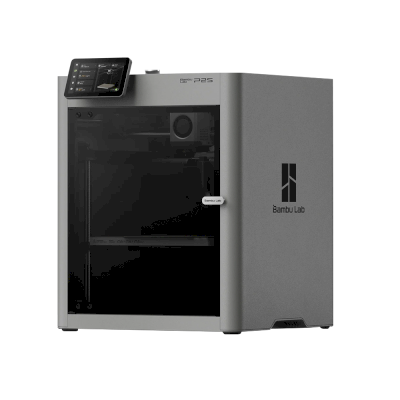







 PrusaSlicer
 Cura
Cura




 Am besten für USA: Shop von Bambu Lab für die USA
 Bambu Lab für Australien
 Bambu Lab für Kanada
 Bambu Lab für die EU
 Bambu Lab für das Vereinigte Königreich