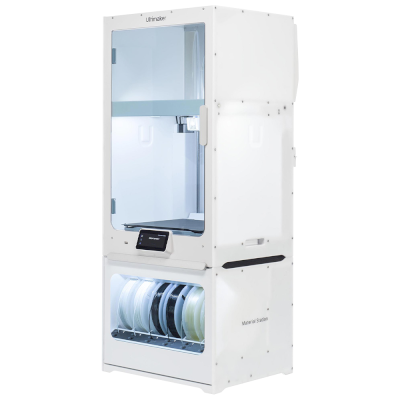
Ultimaker S8 Secure es una variante de Ultimaker S8.
Esto significa que comparte muchas características con el modelo base, pero puede tener modificaciones específicas, funciones adicionales o accesorios incluidos.
Conecta Ultimaker S8 Secure a SimplyPrint
¿Funciona la impresora 3D Ultimaker S8 Secure con SimplyPrint, OctoPrint, Mainsail y Fluidd?
Cada forma de conectarla, lo que necesita y cómo configurarla.
Cliente de SimplyPrint
No se espera que funcione
Built to run air-gapped: no Wi-Fi, no cameras, USB-only workflows, tamper-resistant firmware, encrypted file handling.
Origen
Ships UltiMaker's own closed firmware; no Klipper, and no known route to install it.
Origen
No se conoce ninguna forma de conectarla a SimplyPrint
Lamentablemente, la Ultimaker S8 Secure no es compatible actualmente, hasta donde sabemos, con OctoPrint, Mainsail, Fluidd o SimplyPrint. Para la mejor experiencia de impresión 3D, considera otras impresoras 3D compatibles con estos programas.
Cómo determinamos la compatibilidad
Consideramos una impresora compatible si funciona con uno o varios de los siguientes:
Integración personalizada de SimplyPrint para este modelo específico
Compatibilidad con OctoPrint (requiere que la impresora admita la impresión a través del puerto serie)
Compatibilidad con Klipper (la impresora puede ejecutar Klipper, ya sea instalando firmware compatible o usando un controlador/pantalla externo)
La compatibilidad con OctoPrint se basa principalmente en si la impresora admite comunicación serie. Si no admite la impresión mediante comunicación serie, marcamos OctoPrint como no compatible.
Nota: Algunas impresoras tienen plugins de terceros para OctoPrint que habilitan conexiones no oficiales o personalizadas. No mantenemos una lista de estos plugins, así que no aparecen en nuestros datos de compatibilidad.
Solo incluimos slicers que puedes usar en la nube de SimplyPrint, por lo que puede haber otros para la Ultimaker S8 Secure.
No hay slicing en línea para Ultimaker S8 Secure
Especificaciones de Ultimaker S8 Secure: tamaño de cama, altura de impresión y más
Su tamaño, temperaturas, multimaterial y cómo se conecta, según el fabricante y nuestra propia investigación.
Más información del fabricante
Tamaño
Volumen de impresión
330 x 240 x 300 mm
Tipo de cama
Rectangle
Tamaño de cama
330 x 240 mm
Altura máxima de impresión
300 mm
Impresión
Cerramiento
Totalmente cerrada
Velocidad máxima de impresión
500 mm/s
Temperatura máxima del extrusor
340 °C
Tiene cama caliente
Sí
Temperatura máxima de la cama
120 °C
Número de boquillas
2
Cabezales de impresión
2
Direct drive
No
Herramienta de sondeo / Nivelación automática de la cama
Sí
Ancho del filamento
2.85 mm
Multimaterial
Cambiador de herramientas o de hotends
No
IDEX (extrusores dobles independientes)
No
Conectando
Conectividad
USB
Cámara integrada
No
Admite impresión por puerto serie
No
Firmware incluido
El propio del fabricante
Archivos y laminado
Formatos de archivo compatibles
G-code (.gcode, .gco, .g)
La impresora
Fabricante / marca de la impresora
Ultimaker
Nombre del modelo de impresora
S8 Secure
Fabricada por una empresa de
Países Bajos
Lanzado
9 de septiembre de 2025
Se sigue fabricando
Sí
Aviso legal:
Nos esforzamos por mantener esta información lo más actualizada y precisa posible, pero no podemos garantizar su integridad ni su fiabilidad. Nuestros datos se basan en aportaciones de usuarios y referencias de fabricantes.
¿Qué filamento admite Ultimaker S8 Secure?
Compatibilidad de filamento de la Ultimaker S8 Secure: los materiales que Ultimaker indica para ella.
Filamento
Idoneidad
Notas
PLA
Genial
En la lista de materiales del fabricante para esta impresora.
PETG
Genial
En la lista de materiales del fabricante para esta impresora.
TPU y flexibles
Genial
En la lista de materiales del fabricante para esta impresora.
ABS & ASA
Genial
En la lista de materiales del fabricante para esta impresora.
Nylon (PA)
Genial
En la lista de materiales del fabricante para esta impresora.
Polycarbonate (PC)
Genial
En la lista de materiales del fabricante para esta impresora.
Con fibra de carbono y relleno de vidrio
Genial
En la lista de materiales del fabricante para esta impresora.
Consejo: esta es una guía general basada en las especificaciones de la impresora. Comprueba siempre los ajustes recomendados para tu filamento. Con SimplyPrint puedes guardar un perfil para cada bobina y saber exactamente qué filamento tienes en inventario.
Impresoras como la Ultimaker S8 Secure que funcionan con SimplyPrint
Impresoras del mismo fabricante, de tamaño similar, que imprimen los mismos materiales técnicos o en multimaterial, que puedes comprar hoy y que sabemos que funcionan con SimplyPrint.
Quién fabrica Ultimaker S8 Secure y cuánta libertad te da Ultimaker: si sus impresoras funcionan sin su nube, aceptan cualquier filamento y slicer, y se pueden reparar. Cada área se valora con fuentes públicas.
Apertura: Mixto (2.9 de 5)
Mixto
Ecosistema cerradoAbrir
UltiMaker is the company formed in 2022 when the Dutch printer maker Ultimaker, founded in 2011, merged with MakerBot. It sells professional desktop and industrial printers (the S series, Factor 4, MakerBot Method and Sketch) to businesses, engineering teams and schools, and develops the open-source Cura slicer and the Digital Factory cloud platform.
Fundada:
2011 ·
Sede central:
Zaltbommel, Netherlands, and New York, USA ·
Propiedad:
Privately held; at the 2022 merger NPM Capital held the majority and Stratasys a minority stake ·
Sitio web:ultimaker.com
UltiMaker is mixed: Cura and material choice are open, and printers can be used on the local network, but the printer firmware is closed and most management features sit in its Digital Factory cloud.
Firmware y firmware personalizado ●●●●●
The printers' own software is not published: UltiMaker's GitHub has its Linux kernel configuration and Cura, but no printer firmware. We found no documented way to run custom firmware on current S-series or Method printers.
[1][2]
Control local e integraciones ●●●●●
Cura can add an S-series printer on the local network, by discovery or IP, without signing in, and start prints. UltiMaker says most features are only available through its Digital Factory cloud, and the API it documents publicly is that cloud API; we found no public documentation for controlling the printers locally.
[3][12]
Filamento, slicers y piezas de terceros ●●●●●
Cura is open source and widely used with other brands, and UltiMaker lists over 300 materials, including third-party ones, for the S series. Print cores and the Material Station are UltiMaker's own parts.
[2][4]
Reparaciones y repuestos ●●●●●
UltiMaker publishes maintenance schedules for the S series and sells part bundles and maintenance kits, and gives an expected printer lifetime of five years at 1,500 printing hours a year.
[5]
Datos y privacidad ●●●●●
Local printing needs no account; Digital Factory needs one. UltiMaker's privacy policy says data is stored and processed in the EEA or the United States depending on the user's region.
[6][3]
Comunidad y documentación ●●●●●
Cura is developed in public on GitHub with a large open issue tracker, and UltiMaker runs a community forum and support knowledge base. Printer internals are not documented publicly.
[2][3]
Ventajas
Cura is open source and works with printers from many brands.
Wide material choice on the S series, including third-party materials.
Printers can be used on the local network without an account.
Published maintenance schedules and maintenance kits for long service life.
Desventajas
Printer firmware is closed.
Most fleet and management features need the Digital Factory cloud, with paid tiers.
MakerBot CloudPrint was shut down in 2025, forcing users to move platforms.
Print cores and the Material Station are UltiMaker-only parts.
Trayectoria
21 de mayo de 2026: UltiMaker launched the Factor 4 Plus, an industrial printer up to twice as fast as the Factor 4, with TRACE print validation for production and defence customers.
[7]
febrero 2026: UltiMaker sold the Thingiverse model platform to MyMiniFactory and archived its Thingiverse forum.
[8]
diciembre 2025: UltiMaker shut down MakerBot CloudPrint in early December 2025. Users had to reconnect printers to Digital Factory, with a free year of its premium tier offered to former CloudPrint users; the Replicator+ cannot be networked in Digital Factory.
[9]
mayo 2022: Ultimaker and Stratasys' MakerBot announced a merger backed by $62.4 million from NPM Capital and Stratasys, with co-CEOs from both companies and headquarters in the Netherlands and New York. The combined company took the UltiMaker name.
[10][11]
Investigado a partir de 12 fuentes, última comprobación: 18 de octubre de 2026. Mostrar fuentes
¿La Ultimaker S8 Secure es compatible con SimplyPrint?
Que sepamos, Ultimaker S8 Secure aún no es compatible. SimplyPrint funciona con más de 130 marcas y más de 600 modelos mediante OctoPrint, Klipper e integraciones nativas. Consulta la lista de compatibilidad para ver impresoras compatibles.
¿Qué slicer debo usar para la Ultimaker S8 Secure?
Usa Cura, el slicer propio de Ultimaker, creado para sus impresoras. Puedes usarlo en el slicer online de SimplyPrint; aún no tiene un perfil listo para la Ultimaker S8 Secure.
¿Qué filamento admite Ultimaker S8 Secure?
Ultimaker indica PLA, PETG, TPU y flexibles, ABS & ASA, Nylon (PA), Polycarbonate (PC) y Con fibra de carbono y relleno de vidrio para el modelo S8 Secure.
¿Cuál es el tamaño de la cama y el volumen de impresión de Ultimaker S8 Secure?
La Ultimaker S8 Secure tiene una cama de impresión de 330 x 240 mm e imprime piezas de hasta 300 mm de alto, con un volumen de impresión de unos 330 x 240 x 300 mm. Consulta la tabla de especificaciones completa de arriba para ver el tipo de cama, temperaturas y más.
¿Cuándo salió Ultimaker S8 Secure?
Ultimaker lanzó el modelo S8 Secure el 9 de septiembre de 2025.
 Países Bajos


 PrusaSlicer
 OrcaSlicer
 BambuStudio
 ElegooSlicer
 CrealityPrint
 Kiri:Moto