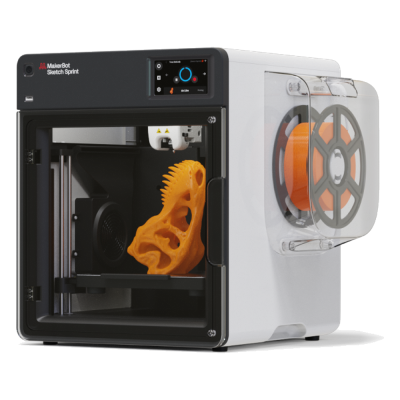
The Sketch Sprint is MakerBot's fully enclosed classroom printer, with a 220 x 220 x 220 mm plate, a camera and a PIN lock, printing MakerBot PLA and Tough PLA. It is for schools and educators who want a simple, safe, supported package.
Немає відомого способу підключити його до SimplyPrint
На жаль, наскільки нам відомо, MakerBot Sketch Sprint наразі несумісний з OctoPrint, Mainsail, Fluidd або SimplyPrint. Для найкращого досвіду 3D-друку розгляньте інші 3D-принтери, сумісні з цим програмним забезпеченням.
Як ми визначаємо сумісність
Ми вважаємо принтер сумісним, якщо він працює з одним або кількома з наведених:
Спеціальна інтеграція SimplyPrint для цієї моделі
Підтримка OctoPrint (принтер має підтримувати послідовний друк)
Підтримка Klipper (принтер може працювати з Klipper після встановлення сумісної прошивки або з використанням зовнішнього контролера чи панелі)
Сумісність з OctoPrint насамперед залежить від підтримки принтером послідовного зв'язку. Якщо послідовний друк не підтримується, ми позначаємо OctoPrint як несумісний.
Примітка: Деякі принтери мають сторонні плагіни OctoPrint, що уможливлюють неофіційні або нестандартні підключення. Ми не ведемо список таких плагінів, тож їх не враховано в наших даних про сумісність.
Який слайсер використовувати для MakerBot Sketch Sprint
Використовуйте власний слайсер MakerBot, MakerBot Print: жоден зі слайсерів у хмарі SimplyPrint не має профілю для MakerBot Sketch Sprint, і він не приймає стандартний G-code, наскільки нам відомо.
Відмова від відповідальності:
Ми прагнемо підтримувати цю інформацію максимально актуальною і точною, але не можемо гарантувати її повноту чи надійність. Наші дані базуються на матеріалах, наданих користувачами, і відомостях виробників.
Який філамент може друкувати MakerBot Sketch Sprint?
Сумісність із філаментом для MakerBot Sketch Sprint: матеріали, які MakerBot зазначає для нього.
Філамент
Придатність
Примітки
PLA
Чудово
У списку матеріалів виробника для цього принтера.
PETG
Чудово
У комфортному діапазоні (для PETG потрібні hotend ~230-250C і стіл ~70-85C).
TPU і гнучкі матеріали
Чудово
Екструдер із прямим приводом добре подає гнучкий філамент. Друкуйте повільно для чистого результату.
ABS & ASA
Чудово
У закритому корпусі з достатньо гарячими хотендом і столом ABS та ASA друкуються добре.
Nylon (PA)
Добре
Можливо, але обережно: ретельно висушіть філамент, а закритий корпус дуже допоможе.
Polycarbonate (PC)
Не найкращий варіант
Не рекомендовано, PC потребує дуже високої температури hotend і закритої камери.
Вугленаповнені та склонаповнені
З турботою
Можливо, якщо встановити загартоване або зносостійке сопло: абразивні волокна швидко зношують стандартне латунне сопло.
Порада: це загальна рекомендація зі специфікацій принтера, завжди перевіряйте рекомендовані параметри філаменту. У SimplyPrint можна зберегти профіль для кожної котушки й точно відстежувати філамент у запасі.
Коли обрати MakerBot Sketch Sprint
Choose the Sketch Sprint when you run a classroom and want a closed, supported printer with lesson plans, teacher training and a way for students to submit prints without installing software. It is limited to MakerBot PLA and Tough PLA and costs 2,399 USD with five student seats, so it is poor value for anyone who wants material freedom. We found no independent review, and sources differ on its speed. For classroom use alongside SimplyPrint's print approval, an enclosed Bambu Lab P1S is cheaper and prints more materials, but note its own cloud trade-offs.
Переваги
Fully enclosed with HEPA and carbon filters, and UL, CE and FCC certified (MakerBot).
Education package: PIN-code lock, 600+ lesson plans, ISTE-certified training and student print submission without software installs (MakerBot).
Built-in 2 MP camera for remote monitoring and automatic timelapses (MakerBot).
Heated plate to 110 °C with a removable flexible surface and mesh levelling (MakerBot).
Works with Digital Factory in the browser and Cura 5.9, and runs on Chromebooks (MakerBot).
Недоліки
Limited to MakerBot PLA and Tough PLA on a 0.4 mm nozzle (MakerBot), so no PETG, ABS or flexible filaments.
High price: 2,399 USD for the single-printer education bundle (MakerBot).
Not expected to connect to SimplyPrint: our catalog rates both Klipper and OctoPrint as unlikely, and it runs on MakerBot's own firmware and Digital Factory.
Small 220 x 220 x 220 mm plate.
No independent hands-on review found, and the print speed is quoted as either 250 or 300 mm/s depending on the listing.
Кому підійде
ШколиДобре підходить
Enclosed, filtered, PIN-locked and sold with lesson plans, though it uses MakerBot's own tools instead of SimplyPrint's approval queue and costs more than comparable printers.
АматориНе підходить
Locked to MakerBot's PLA range and priced for institutions, so a hobby printer gives you much more for the money.
ПідприємстваНе підходить
Only PLA and Tough PLA on a small plate, so it is not suited to functional parts.
Ферми друкуНе підходить
Not expected to connect to SimplyPrint and limited to a few materials, so it does not fit a fleet.
Схожі на MakerBot Sketch Sprint принтери, сумісні з SimplyPrint
Принтери того самого виробника, схожого розміру, що друкують тими самими інженерними або кількома матеріалами, як цей, доступні для придбання сьогодні та сумісні з SimplyPrint.
Хто виробляє MakerBot Sketch Sprint і яку свободу залишає вам MakerBot: чи принтери працюють без хмари виробника, підтримують будь-який філамент і слайсер та чи їх можна ремонтувати. Кожен аспект оцінено за відкритими джерелами.
Відкритість: Переважно закритий (2.3 з 5)
Переважно закритий
Закрита екосистемаВідкрити
MakerBot is an American 3D printer brand founded in New York in 2009 out of the open-source RepRap scene. Stratasys bought it in 2013 and merged it with Ultimaker in 2022; MakerBot is now UltiMaker's education brand, selling Sketch classroom printers with lesson plans, teacher tools and management in UltiMaker's Digital Factory cloud. The Replicator printers in our catalogue are discontinued.
Засновано:
2009-01 ·
Штаб-квартира:
Brooklyn, New York, US ·
Власність:
Brand of UltiMaker, formed in August 2022 when Stratasys merged MakerBot with Ultimaker (NPM Capital 53.5%, Stratasys 46.5% at closing) ·
Вебсайт:www.makerbot.com
Proprietary firmware, MakerBot-only extruders and materials, and classroom management in UltiMaker's cloud. In return schools get one managed system with curriculum and support.
Прошивка й користувацька прошивка ●●●●●
MakerBot stopped sharing its hardware designs with the Replicator 2 in 2012, and its fifth-generation printers moved to proprietary controllers, extruders and firmware. We found no firmware source for the current Sketch line.
[15][14]
Локальне керування та інтеграції ●●●●●
The Sketch Sprint prints over Wi-Fi or Ethernet from UltiMaker Cura or Digital Factory, or from a USB stick. Classroom management, remote monitoring and browser slicing (Cura Cloud) run in UltiMaker's Digital Factory cloud, which replaced MakerBot CloudPrint in 2025. We found no documented local interface that other software could use.
[16][2][3]
Сторонні філаменти, слайсери та компоненти ●●●●●
MakerBot lists only its own PLA and Tough PLA, and only its own Sketch extruder, for the Sketch Sprint. Slicing is in UltiMaker Cura (open source) or Cura Cloud.
[2]
Ремонт і запчастини ●●●●●
UltiMaker's shop sells Sketch extruders, a Sketch Sprint nozzle assembly, build plates and cables, and still sells Smart Extruder+ units for the Replicator+; spare parts are mostly whole assemblies.
[6]
Дані й конфіденційність ●●●●●
Some MakerBot services need an account, and MakerBot's privacy policy lists what it collects (including device identifiers such as MAC addresses and usage data) and its use of Google Analytics and retargeting. Students can submit files through Link Share without an account.
[5][2]
Спільнота та документація ●●●●●
MakerBot offers hundreds of free lesson plans, educator certification, Thingiverse Education and a support site; there is no public source code or bug tracker.
[1]
Переваги
Built for schools: curriculum, lesson plans, teacher tools and certification are part of the package.
Enclosed Sketch printers with HEPA filtration, aimed at classrooms.
Students can submit files without creating accounts (Link Share).
Spare extruders and parts are still sold, even for the Replicator+.
Недоліки
Closed firmware and MakerBot-only extruders; only MakerBot PLA and Tough PLA are listed for the Sketch Sprint.
Fleet management depends on UltiMaker's Digital Factory cloud.
CloudPrint's 2025 shutdown left the Replicator 5th Gen, Mini, Mini+ and Z18 without cloud support.
Many ownership changes and layoffs over the years (Stratasys 2013, layoffs 2015 and 2017, Ultimaker merger 2022).
Перевірений досвід
грудень 2025: UltiMaker shut down MakerBot CloudPrint in early December 2025, after announcing 1 October 2025. Printers had to be reconnected to Digital Factory by hand, and the Replicator Z18, 5th Gen, Mini and Mini+ are not supported there; MakerBot points their owners to MakerBot Print.
[3][4]
31 серпня 2022: Stratasys closed the merger of MakerBot with Ultimaker into a company named Ultimaker (now UltiMaker), owned 53.5% by NPM Capital and 46.5% by Stratasys.
[7]
лютий 2017: MakerBot announced a restructuring with another round of layoffs, Fortune reported.
[9]
липень 2016: A court dismissed the investor class action over the fifth-generation printers and Smart Extruder, finding the statements at issue were not actionable.
[10]
квітень 2016: MakerBot moved printer manufacturing from Brooklyn to the contract manufacturer Jabil and parted ways with an undisclosed number of Brooklyn staff, The Verge reported.
[13]
липень 2015: A class action was filed against MakerBot and Stratasys alleging investors were misled about problems with the fifth-generation printers' Smart Extruder.
[11]
квітень 2015: MakerBot laid off about 20% of its staff, roughly 100 people, under a new CEO, Motherboard reported.
[12]
червень 2013: Stratasys bought MakerBot in a stock deal worth $403 million at the time.
[8]
вересень 2012: With the Replicator 2, MakerBot stopped publishing its machine designs, a break with open-source hardware that co-founder Zach Smith criticised publicly.
[14][15]
На основі 16 джерел, остання перевірка 18 жовтня 2026. Показати джерела
Чи сумісний MakerBot Sketch Sprint із SimplyPrint?
Наскільки нам відомо, MakerBot Sketch Sprint ще не підтримується. SimplyPrint працює з понад 130 брендами та понад 600 моделями через OctoPrint, Klipper і вбудовані інтеграції, перевірте список сумісності, щоб знайти підтримуваний принтер.
Який слайсер використовувати для MakerBot Sketch Sprint?
Використовуйте власний слайсер MakerBot, MakerBot Print: жоден зі слайсерів у хмарі SimplyPrint не має профілю для MakerBot Sketch Sprint, і він не приймає стандартний G-code, наскільки нам відомо.
Який філамент може друкувати MakerBot Sketch Sprint?
MakerBot вказує PLA для Sketch Sprint.
Який розмір столу та робочий об'єм у MakerBot Sketch Sprint?
Принтер MakerBot Sketch Sprint має друкарський стіл розміром 220 x 220 mm і друкує моделі заввишки до 220 mm, з об'ємом друку приблизно 220 x 220 x 220 mm. Повну таблицю характеристик, зокрема тип столу й температури, дивіться вище.
Коли вийшов MakerBot Sketch Sprint?
Sketch Sprint від MakerBot випущено у листопад 2024.
Де можна придбати MakerBot Sketch Sprint?
Із власного магазину MakerBot, який має магазини для в інших місцях. Посилання на цій сторінці ведуть до цих магазинів, деякі з них партнерські, тож ми можемо отримати комісію без додаткових витрат для вас.
 США
США


 PrusaSlicer
 OrcaSlicer
 BambuStudio
 ElegooSlicer
 CrealityPrint
 Cura
Cura Kiri:Moto